turn signal MINI COOPER 2011 Owners Manual
[x] Cancel search | Manufacturer: MINI, Model Year: 2011, Model line: COOPER, Model: MINI COOPER 2011Pages: 210, PDF Size: 3.19 MB
Page 12 of 210
AT A GLANCECockpit
10
Cockpit
Around the steering wheel: controls and displays
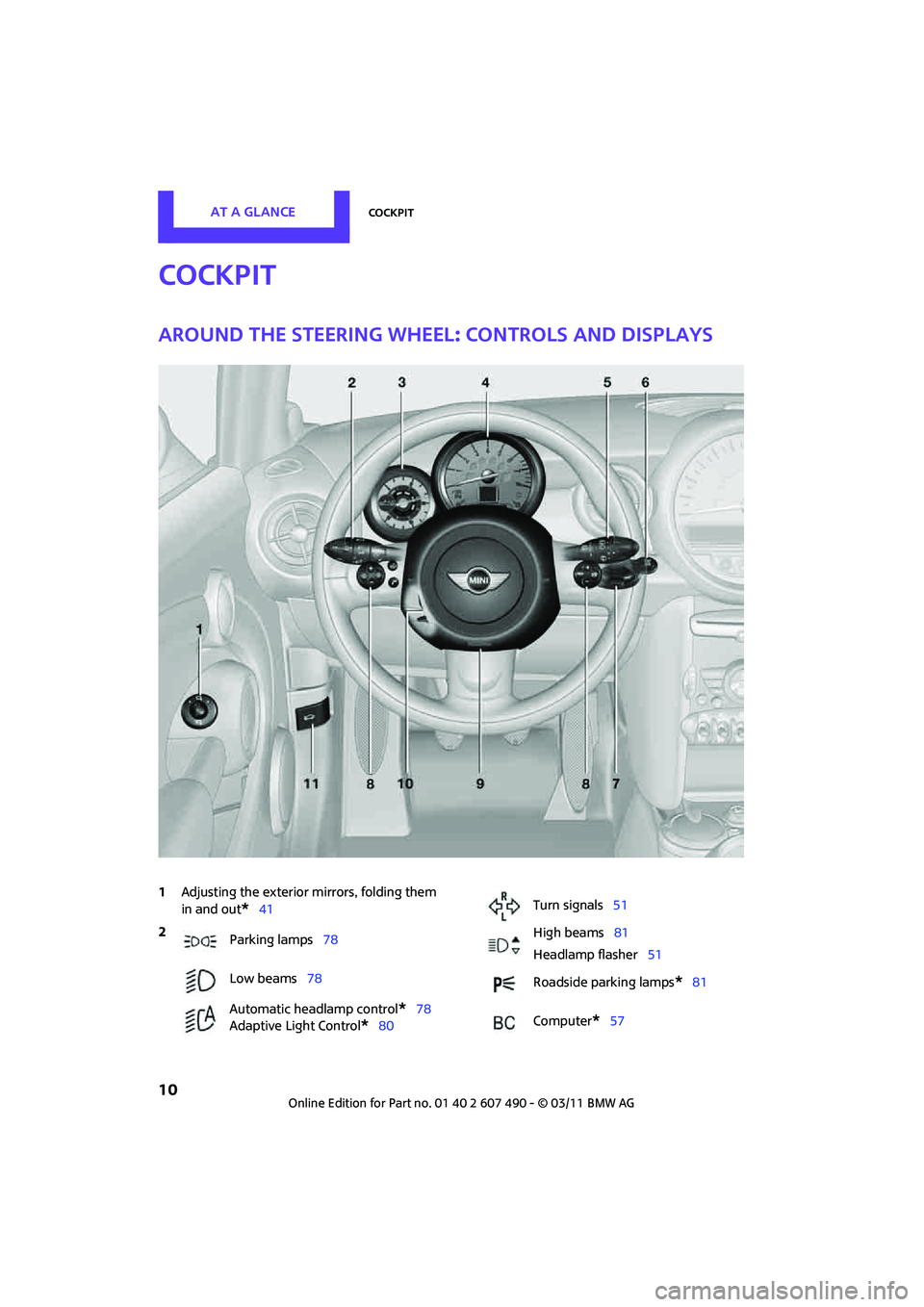
1Adjusting the exterior mirrors, folding them
in and out
*41
2
Parking lamps 78
Low beams 78
Automatic headlamp control
*78
Adaptive Light Control
*80
Turn signals 51
High beams 81
Headlamp flasher 51
Roadside parking lamps
*81
Computer
*57
Page 23 of 210
Opening and closingCONTROLS
21
Personal Profile settings
For more information on specific settings, refer
to the specified pages.
> Response of the central locking system
when the car is being unlocked 21
> Automatic locking of the vehicle 25
> Triple turn signal activation 51
> Settings for the displays in the speedometer
and tachometer:
>12 h/24 h mode of the clock, refer to
Formats and units of measure 61
> Date format, refer to Formats and units
of measure 61
> Units of measure for fuel consumption,
distance covered/re maining distances
and temperature, refer to Formats and
units of measure 61
> Light settings:
>Pathway lighting 79
> Daytime running lights 79
> Automatic climate control
*: activating/
deactivating the AUTO program, setting the
temperature, air volume and air
distribution 86
> Entertainment:
>Adjusting vo lume levels 106
> Tone control 107
Central lock ing system
The concept
The central locking system is ready for operation
whenever the driver's door is closed.
The system simultaneously engages and
releases the locks on the following:
>Doors
> Liftgate
> Fuel filler flap
Operating from outside
>Via the remote control
> Via the door lock
*
>In cars with Comfort Access*, via the door
handles on the driver's and passenger's
sides
The anti-theft system is also operated at the
same time. It prevents the doors from being
unlocked using the lock buttons or door han-
dles. The remote control can also be used to
switch on/off the welcome lamps and interior
lamps. The alarm system
* is also activated or
deactivated, page 27.
Operating from inside
Button for central locking system, page 25.
In the event of a sufficiently severe accident, the
central locking system unlocks automatically. In
addition, the hazard warning flashers and inte-
rior lamps come on.
Opening and closing:
from outside
Persons or animals in a parked vehicle
could lock the doors from the inside. Take
the key with you when you leave the vehicle
so that the vehicle can be opened from the
outside. <
Using the remote control
Unlocking
Press the button.
The welcome lamps and interior lamps come on.
Page 24 of 210
CONTROLSOpening and closing
22
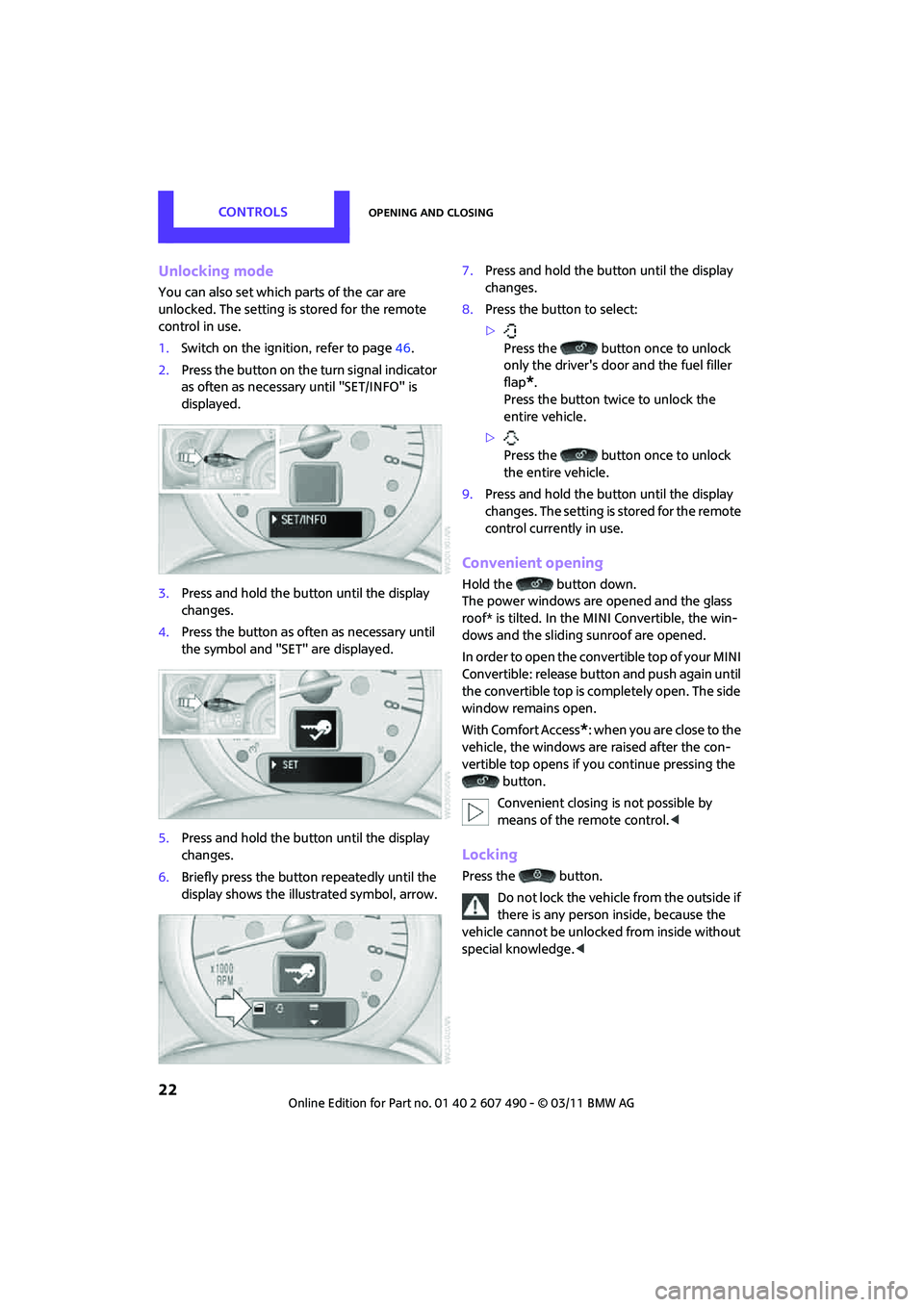
Unlocking mode
You can also set which parts of the car are
unlocked. The setting is stored for the remote
control in use.
1.Switch on the ignition, refer to page 46.
2. Press the button on the turn signal indicator
as often as necessary until "SET/INFO" is
displayed.
3. Press and hold the button until the display
changes.
4. Press the button as often as necessary until
the symbol and "SET" are displayed.
5. Press and hold the button until the display
changes.
6. Briefly press the button repeatedly until the
display shows the illu strated symbol, arrow. 7.
Press and hold the button until the display
changes.
8. Press the button to select:
>
Press the button once to unlock
only the driver's door and the fuel filler
flap
*.
Press the button twice to unlock the
entire vehicle.
> Press the button once to unlock
the entire vehicle.
9. Press and hold the button until the display
changes. The setting is stored for the remote
control currently in use.
Convenient opening
Hold the button down.
The power windows are opened and the glass
roof* is tilted. In the MINI Convertible, the win-
dows and the sliding sunroof are opened.
In order to open the convertible top of your MINI
Convertible: release butt on and push again until
the convertible top is completely open. The side
window remains open.
With Comfort Access
*: when you are close to the
vehicle, the windows are raised after the con-
vertible top opens if yo u continue pressing the
button.
Convenient closing is not possible by
means of the remote control. <
Locking
Press the button.
Do not lock the vehicle from the outside if
there is any person inside, because the
vehicle cannot be unlocked from inside without
special knowledge. <
Page 25 of 210
Opening and closingCONTROLS
23
MINI Convertible: convenient closing*
When you are close to the vehicle, the remote
control for Comfort Access can be used to close
the convertible top and the windows.
Press and hold the button.
The convertible top and the windows are closed.Watch during the closing process to be
sure that no one is injured. Releasing the
button interrupts the closing process. <
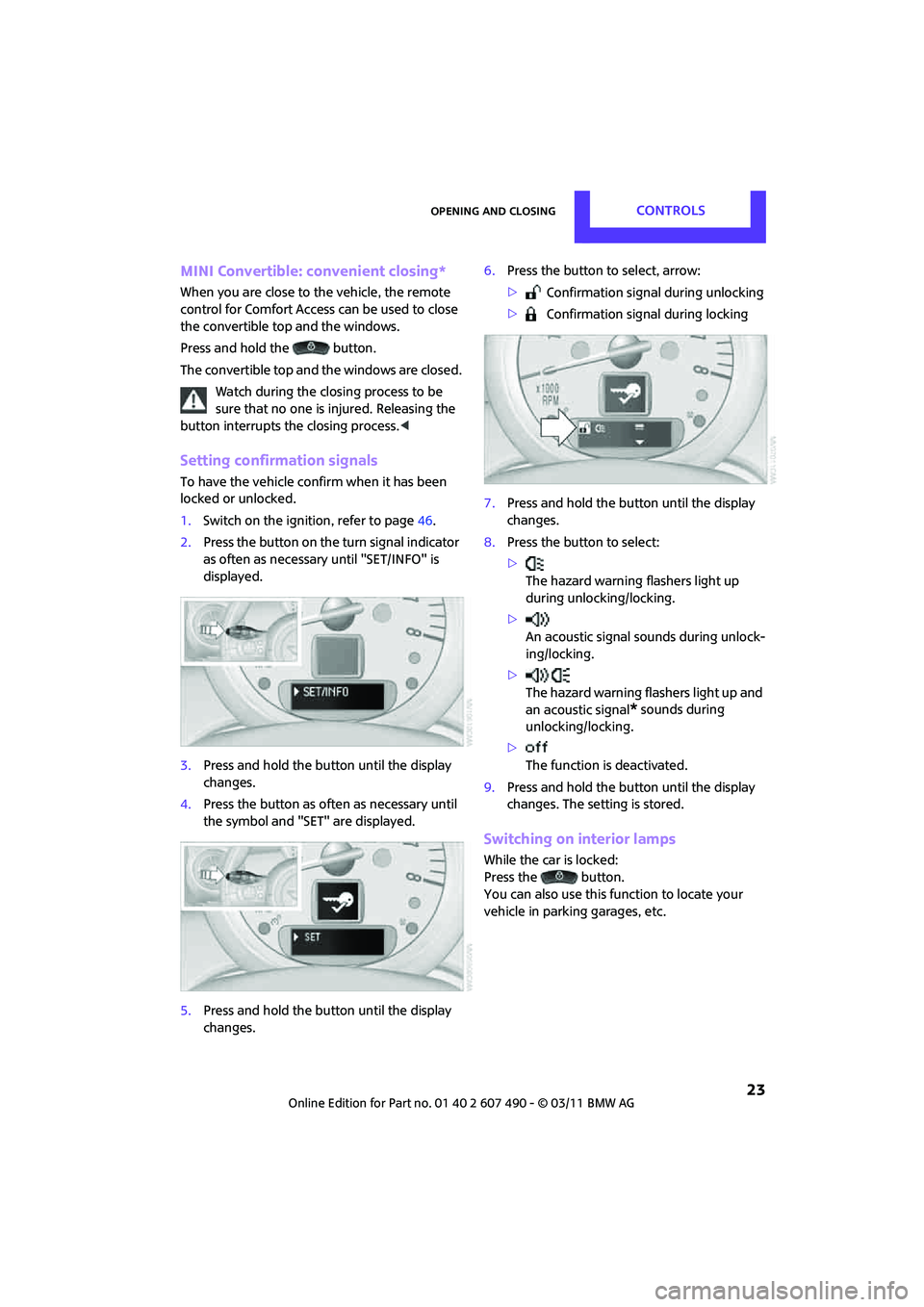
Setting confirmation signals
To have the vehicle confirm when it has been
locked or unlocked.
1.Switch on the ignition, refer to page 46.
2. Press the button on the turn signal indicator
as often as necessary until "SET/INFO" is
displayed.
3. Press and hold the butt on until the display
changes.
4. Press the button as of ten as necessary until
the symbol and "SET" are displayed.
5. Press and hold the butt on until the display
changes. 6.
Press the button to select, arrow:
> Confirmation signal during unlocking
> Confirmation signal during locking
7. Press and hold the butt on until the display
changes.
8. Press the button to select:
>
The hazard warning flashers light up
during unlocking/locking.
> An acoustic signal sounds during unlock-
ing/locking.
> The hazard warning flashers light up and
an acoustic signal
* sounds during
unlocking/locking.
> The function is deactivated.
9. Press and hold the butt on until the display
changes. The setting is stored.
Switching on interior lamps
While the car is locked:
Press the button.
You can also use this function to locate your
vehicle in parking garages, etc.
Page 27 of 210
Opening and closingCONTROLS
25
Manual operation
In the event of an electrical malfunction, the
driver's door can be unlocked or locked by
turning the integrated key in the door lock to
the end positions.
Opening and closing:
from inside
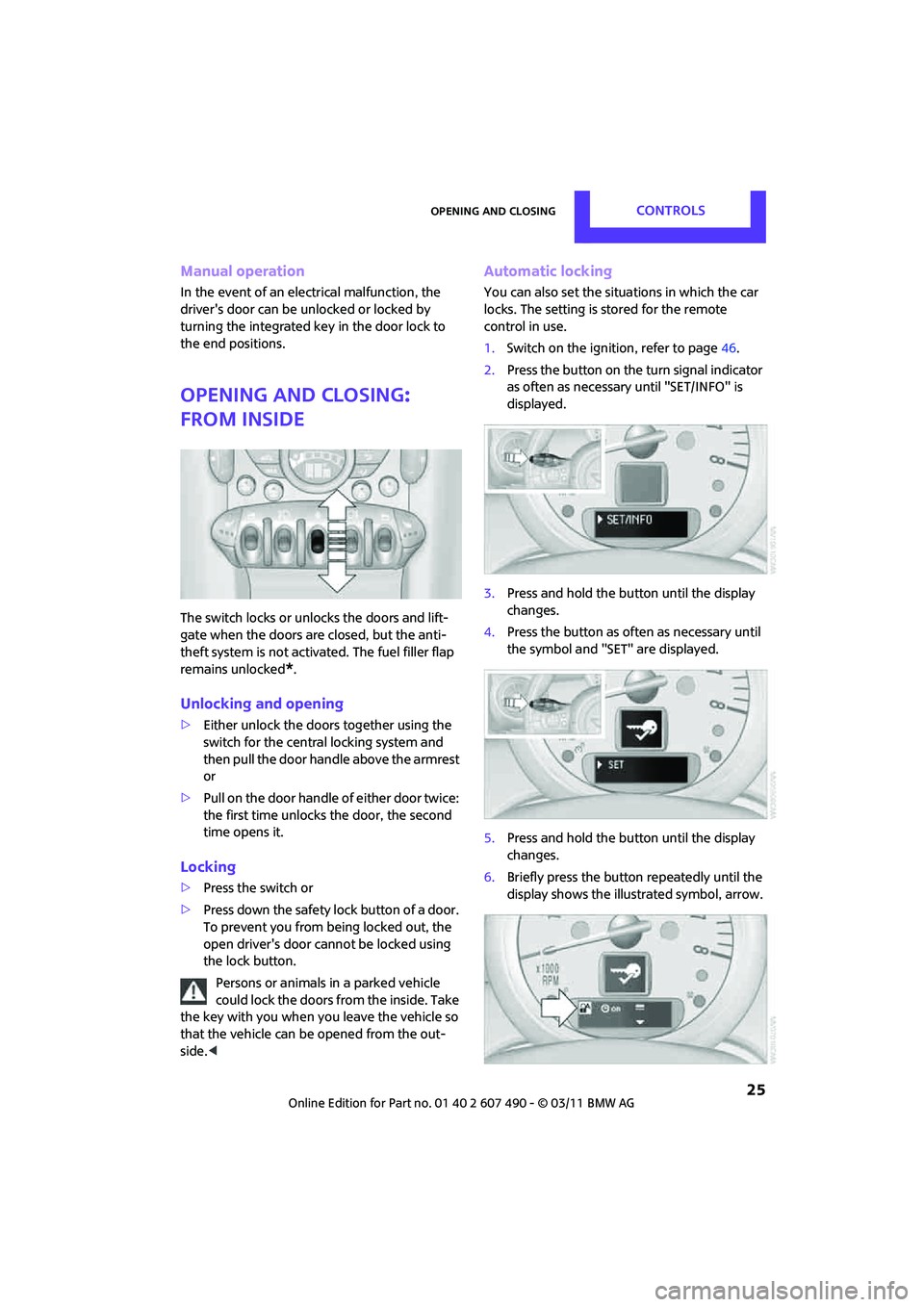
The switch locks or unloc ks the doors and lift-
gate when the doors are closed, but the anti-
theft system is not activated. The fuel filler flap
remains unlocked
*.
Unlocking and opening
> Either unlock the doors together using the
switch for the central locking system and
then pull the door handle above the armrest
or
> Pull on the door handle of either door twice:
the first time unlocks the door, the second
time opens it.
Locking
>Press the switch or
> Press down the safety lo ck button of a door.
To prevent you from being locked out, the
open driver's door cannot be locked using
the lock button.
Persons or animals in a parked vehicle
could lock the doors from the inside. Take
the key with you when you leave the vehicle so
that the vehicle can be opened from the out-
side. <
Automatic locking
You can also set the situ ations in which the car
locks. The setting is stored for the remote
control in use.
1. Switch on the ignition, refer to page 46.
2. Press the button on the turn signal indicator
as often as necessary until "SET/INFO" is
displayed.
3. Press and hold the butt on until the display
changes.
4. Press the button as of ten as necessary until
the symbol and "SET" are displayed.
5. Press and hold the butt on until the display
changes.
6. Briefly press the button repeatedly until the
display shows the illu strated symbol, arrow.
Page 43 of 210
AdjustmentsCONTROLS
41
MINI Convertible: rear belt guide
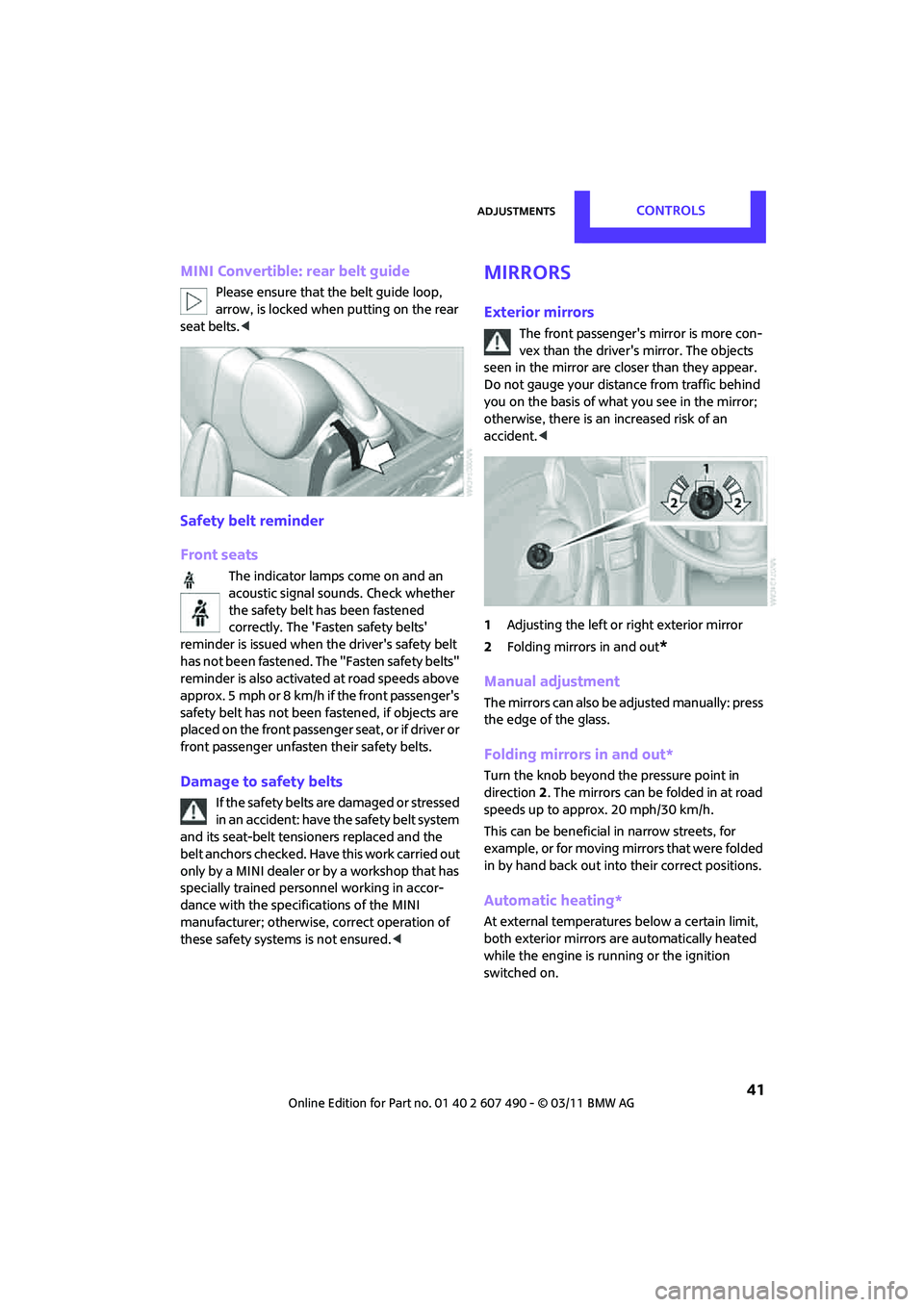
Please ensure that the belt guide loop,
arrow, is locked when putting on the rear
seat belts.<
Safety belt reminder
Front seats
The indicator lamps come on and an
acoustic signal so unds. Check whether
the safety belt has been fastened
correctly. The 'Fasten safety belts'
reminder is issued when the driver's safety belt
has not been fastened. Th e "Fasten safety belts"
reminder is also activate d at road speeds above
approx. 5 mph or 8 km/h if the front passenger's
safety belt has not been fastened, if objects are
placed on the front passenger seat, or if driver or
front passenger unfasten their safety belts.
Damage to safety belts
If the safety belts are damaged or stressed
in an accident: have the safety belt system
and its seat-belt tensio ners replaced and the
belt anchors checked. Have this work carried out
only by a MINI dealer or by a workshop that has
specially trained personnel working in accor-
dance with the specifications of the MINI
manufacturer; otherwise, correct operation of
these safety systems is not ensured. <
Mirrors
Exterior mirrors
The front passenger's mirror is more con-
vex than the driver's mirror. The objects
seen in the mirror are closer than they appear.
Do not gauge your distance from traffic behind
you on the basis of what you see in the mirror;
otherwise, there is an increased risk of an
accident. <
1 Adjusting the left or right exterior mirror
2 Folding mirrors in and out
*
Manual adjustment
The mirrors can also be adjusted manually: press
the edge of the glass.
Folding mirrors in and out*
Turn the knob beyond the pressure point in
direction 2. The mirrors can be folded in at road
speeds up to approx. 20 mph/30 km/h.
This can be beneficial in narrow streets, for
example, or for moving mirrors that were folded
in by hand back out into their correct positions.
Automatic heating*
At external temperatures below a certain limit,
both exterior mirrors are automatically heated
while the engine is running or the ignition
switched on.
Page 53 of 210
DrivingCONTROLS
51
Turn signals/
headlamp flasher
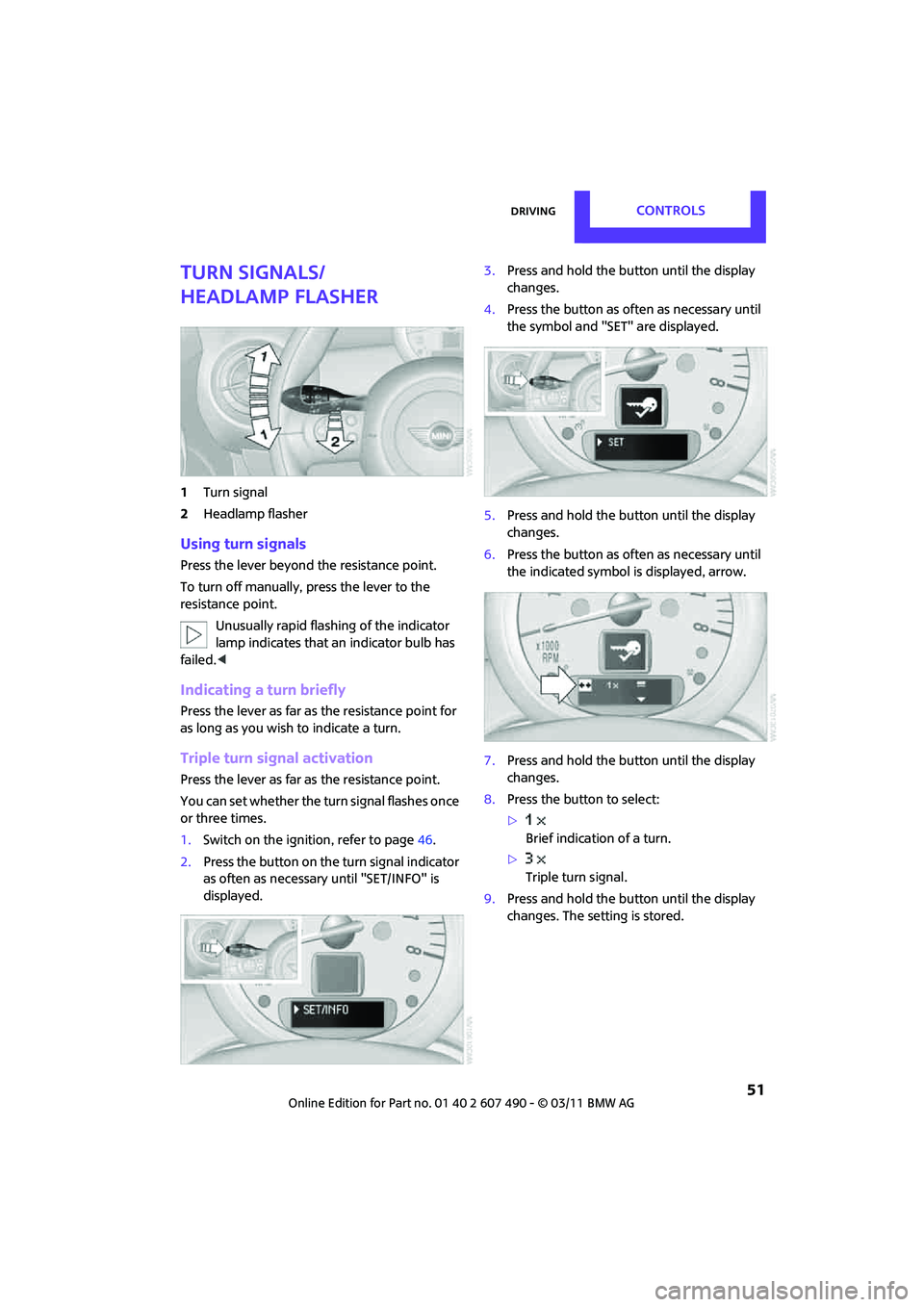
1Turn signal
2 Headlamp flasher
Using turn signals
Press the lever beyond the resistance point.
To turn off manually, press the lever to the
resistance point.
Unusually rapid flashi ng of the indicator
lamp indicates that an indicator bulb has
failed. <
Indicating a turn briefly
Press the lever as far as the resistance point for
as long as you wish to indicate a turn.
Triple turn signal activation
Press the lever as far as the resistance point.
You can set whether the turn signal flashes once
or three times.
1. Switch on the ignition, refer to page 46.
2. Press the button on the turn signal indicator
as often as necessary until "SET/INFO" is
displayed. 3.
Press and hold the butt on until the display
changes.
4. Press the button as of ten as necessary until
the symbol and "SET" are displayed.
5. Press and hold the butt on until the display
changes.
6. Press the button as of ten as necessary until
the indicated symbol is displayed, arrow.
7. Press and hold the butt on until the display
changes.
8. Press the button to select:
>
Brief indication of a turn.
> Triple turn signal.
9. Press and hold the butt on until the display
changes. The setting is stored.
Page 54 of 210
CONTROLSDriving
52
Wiper system
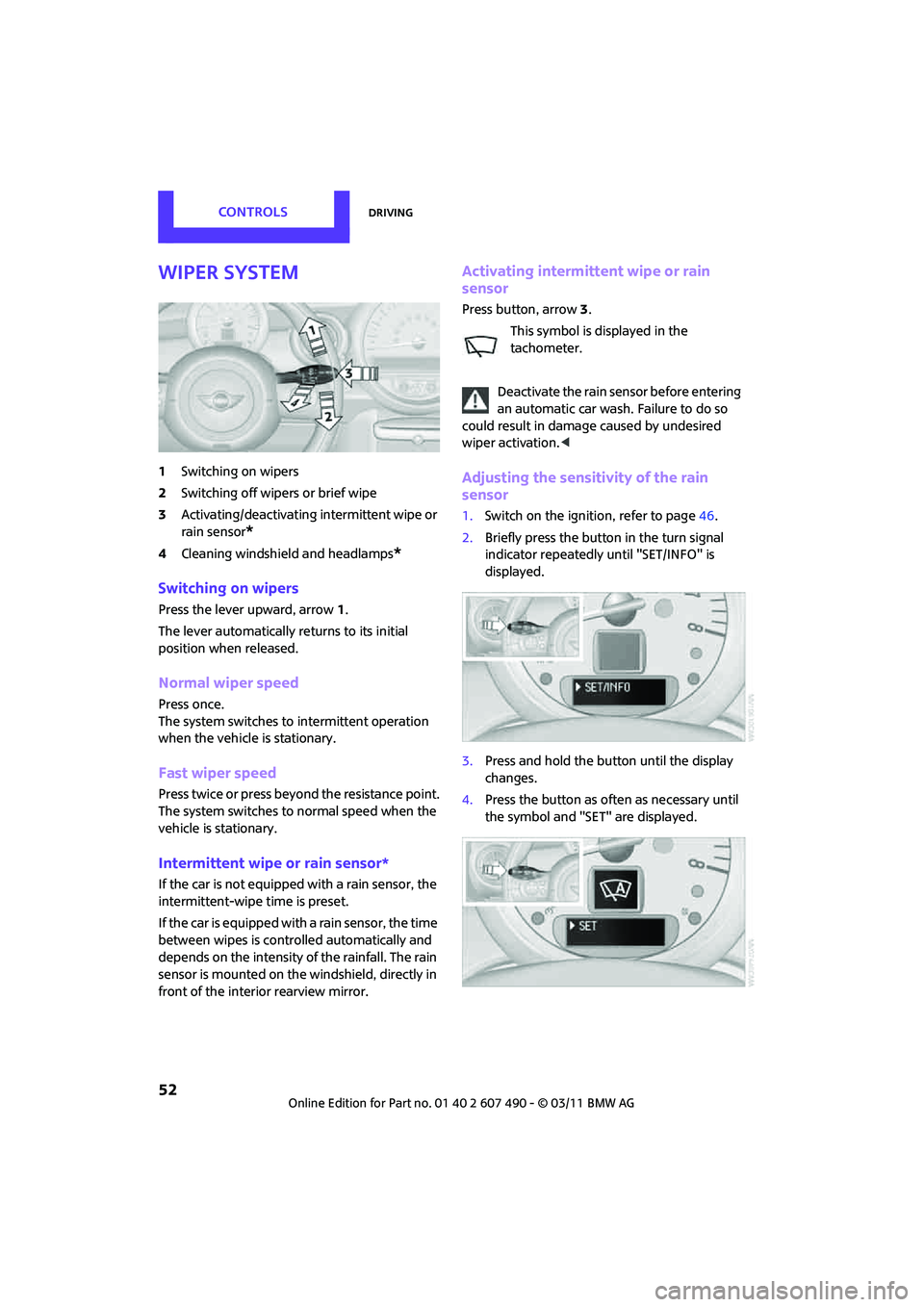
1Switching on wipers
2 Switching off wipe rs or brief wipe
3 Activating/deactivating intermittent wipe or
rain sensor
*
4 Cleaning windshield and headlamps*
Switching on wipers
Press the lever upward, arrow 1.
The lever automatically returns to its initial
position when released.
Normal wiper speed
Press once.
The system switches to intermittent operation
when the vehicle is stationary.
Fast wiper speed
Press twice or press beyond the resistance point.
The system switches to normal speed when the
vehicle is stationary.
Intermittent wipe or rain sensor*
If the car is not equipped with a rain sensor, the
intermittent-wipe time is preset.
If the car is equipped with a rain sensor, the time
between wipes is contro lled automatically and
depends on the intensity of the rainfall. The rain
sensor is mounted on the windshield, directly in
front of the interior rearview mirror.
Activating intermittent wipe or rain
sensor
Press button, arrow 3.
This symbol is displayed in the
tachometer.
Deactivate the rain se nsor before entering
an automatic car wash. Failure to do so
could result in damage caused by undesired
wiper activation. <
Adjusting the sensitivity of the rain
sensor
1.Switch on the ignition, refer to page 46.
2. Briefly press the button in the turn signal
indicator repeatedly until "SET/INFO" is
displayed.
3. Press and hold the button until the display
changes.
4. Press the button as often as necessary until
the symbol and "SET" are displayed.
Page 59 of 210
Controls overviewCONTROLS
57
If the range displayed is less than
30 miles/50 km, be sure to refuel; other-
wise, engine functions are not guaranteed and
damage could occur. <
With a dynamic driving st yle, e.g. rapid corner-
ing, engine functions are not always assured.
Computer*
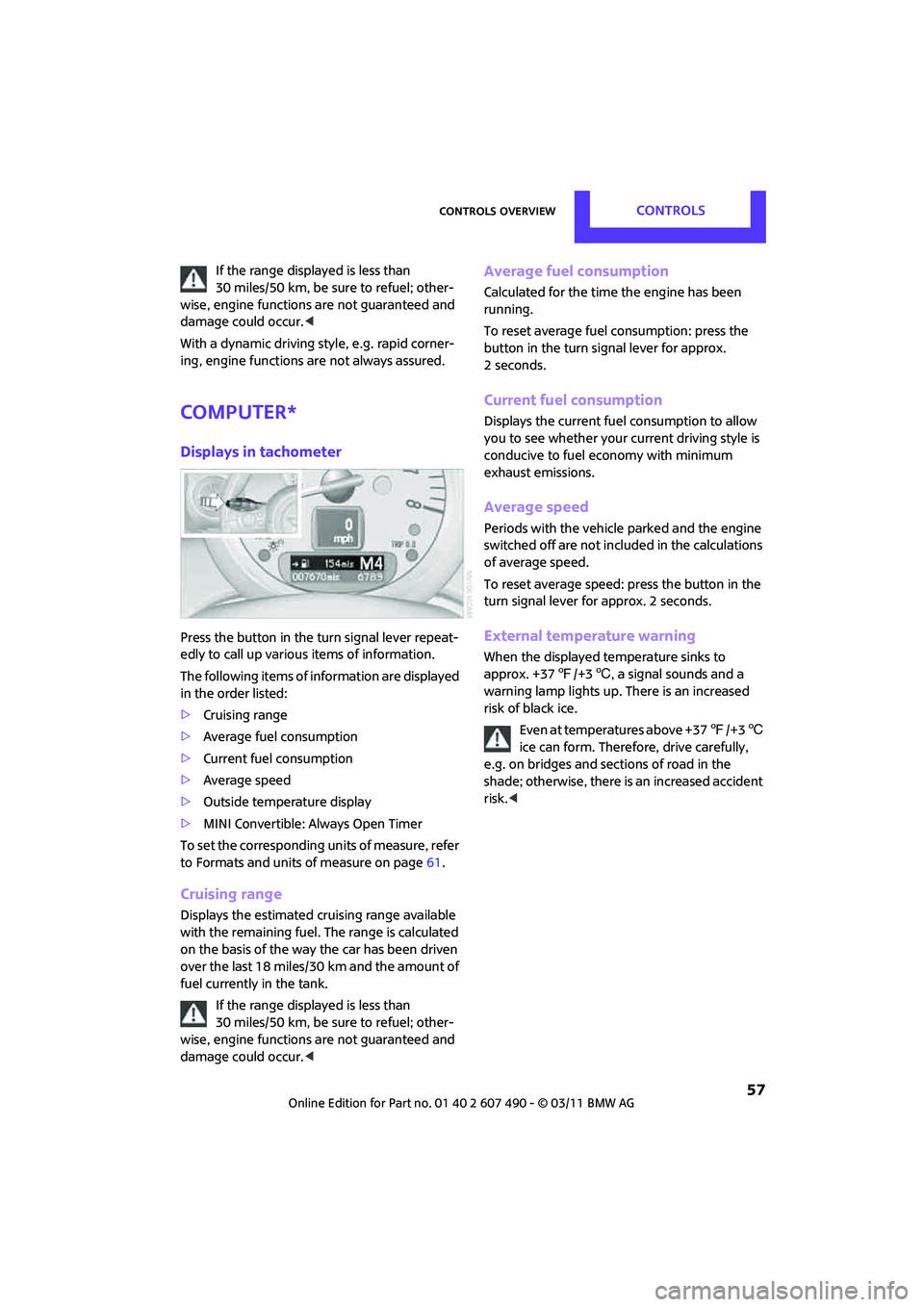
Displays in tachometer
Press the button in the turn signal lever repeat-
edly to call up various items of information.
The following items of information are displayed
in the order listed:
> Cruising range
> Average fuel consumption
> Current fuel consumption
> Average speed
> Outside temperature display
> MINI Convertible: Always Open Timer
To set the corresponding units of measure, refer
to Formats and units of measure on page 61.
Cruising range
Displays the estimated cruising range available
with the remaining fuel. The range is calculated
on the basis of the way the car has been driven
over the last 18 miles/30 km and the amount of
fuel currently in the tank.
If the range displayed is less than
30 miles/50 km, be sure to refuel; other-
wise, engine functions are not guaranteed and
damage could occur. <
Average fuel consumption
Calculated for the time the engine has been
running.
To reset average fuel consumption: press the
button in the turn signal lever for approx.
2 seconds.
Current fuel consumption
Displays the current fuel consumption to allow
you to see whether your current driving style is
conducive to fuel economy with minimum
exhaust emissions.
Average speed
Periods with the vehicle parked and the engine
switched off are not includ ed in the calculations
of average speed.
To reset average speed: press the button in the
turn signal lever for approx. 2 seconds.
External temperature warning
When the displayed temperature sinks to
approx. +37 7/+3 6, a signal sounds and a
warning lamp lights up. There is an increased
risk of black ice.
Even at temperatures above +37 7/+3 6
ice can form. Therefore, drive carefully,
e.g. on bridges and sections of road in the
shade; otherwise, there is an increased accident
risk. <
Page 60 of 210

CONTROLSControls overview
58
Always Open Timer
If driving the MINI Convertible with its soft top
down, the driving times are displayed digitally
on the tachometer.
The following driving times are displayed:
1 Total driving time
2 Current driving time
To reset the display 2:
Press and hold the button in the turn signal lever
or the "Reset trip odometer" button, page 12,
for approx. 2 seconds.
To reset the total driving time, contact your MINI
dealer.
Analog to Always Open Timer
The analog Always Open Timer indicates the
number of hours and minutes that you drove
with the convertible top down. A maximum of
6 hours and 59 minutes can be displayed.
The total driving time is displayed digitally in the
tachometer.
1 LED hour display
2 Minute display