turn signal MINI COOPER 2011 Owner's Manual
[x] Cancel search | Manufacturer: MINI, Model Year: 2011, Model line: COOPER, Model: MINI COOPER 2011Pages: 210, PDF Size: 3.19 MB
Page 82 of 210
CONTROLSLamps
80
Activating/deactivating daytime
running lights
The setting is stored for the remote control in
use, refer to Personal Profile, page 20.
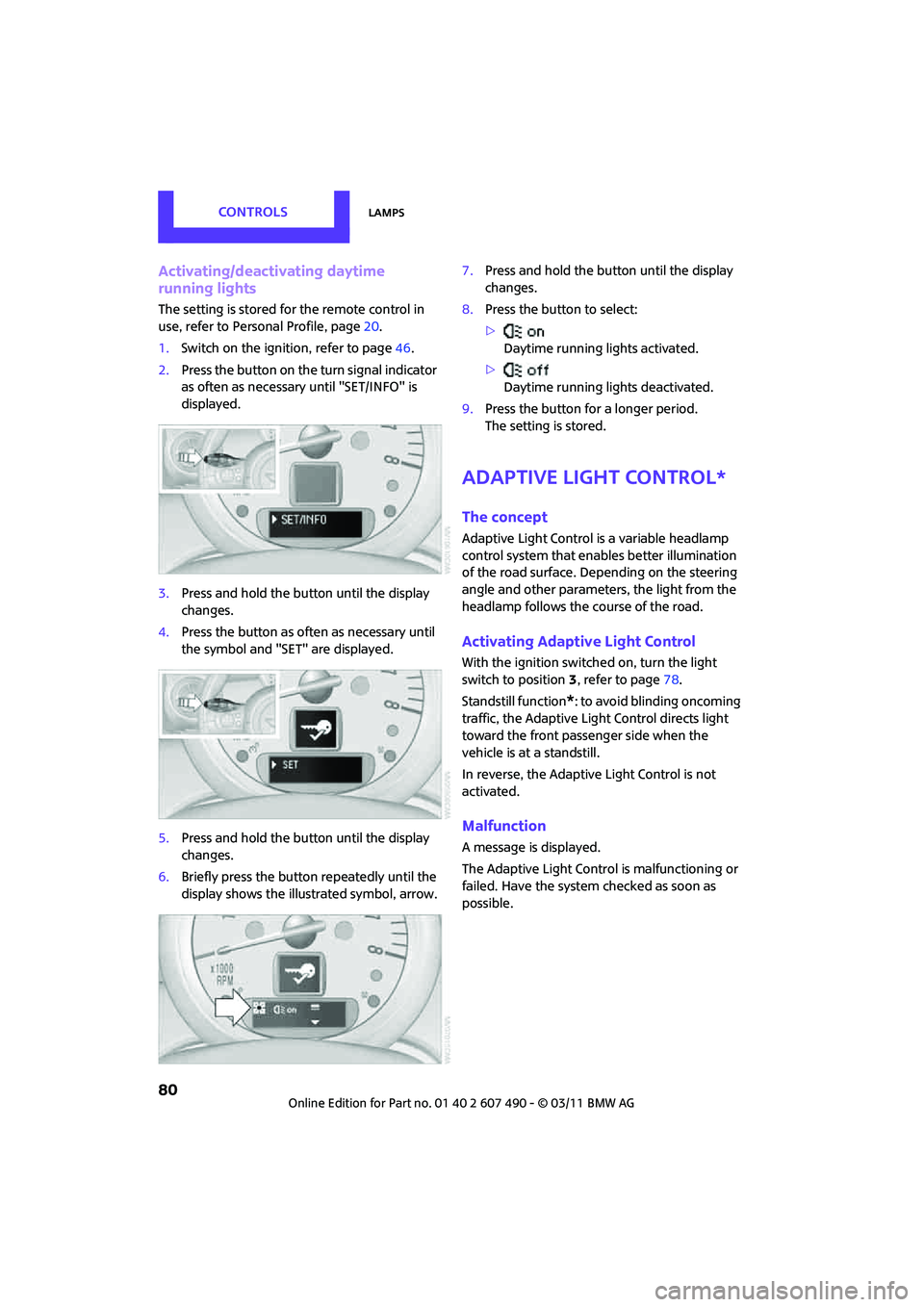
1. Switch on the ignition, refer to page 46.
2. Press the button on the turn signal indicator
as often as necessary until "SET/INFO" is
displayed.
3. Press and hold the button until the display
changes.
4. Press the button as often as necessary until
the symbol and "SET" are displayed.
5. Press and hold the button until the display
changes.
6. Briefly press the button repeatedly until the
display shows the illu strated symbol, arrow. 7.
Press and hold the button until the display
changes.
8. Press the button to select:
>
Daytime running lights activated.
> Daytime running lights deactivated.
9. Press the button for a longer period.
The setting is stored.
Adaptive Light Control*
The concept
Adaptive Light Control is a variable headlamp
control system that enables better illumination
of the road surface. Depending on the steering
angle and other parameters, the light from the
headlamp follows the course of the road.
Activating Adaptive Light Control
With the ignition switched on, turn the light
switch to position 3, refer to page 78.
Standstill function
*: to avoid blinding oncoming
traffic, the Adaptive Light Control directs light
toward the front passenger side when the
vehicle is at a standstill.
In reverse, the Adaptive Light Control is not
activated.
Malfunction
A message is displayed.
The Adaptive Light Control is malfunctioning or
failed. Have the system checked as soon as
possible.
Page 83 of 210
LampsCONTROLS
81
High beams/
roadside parking lamps
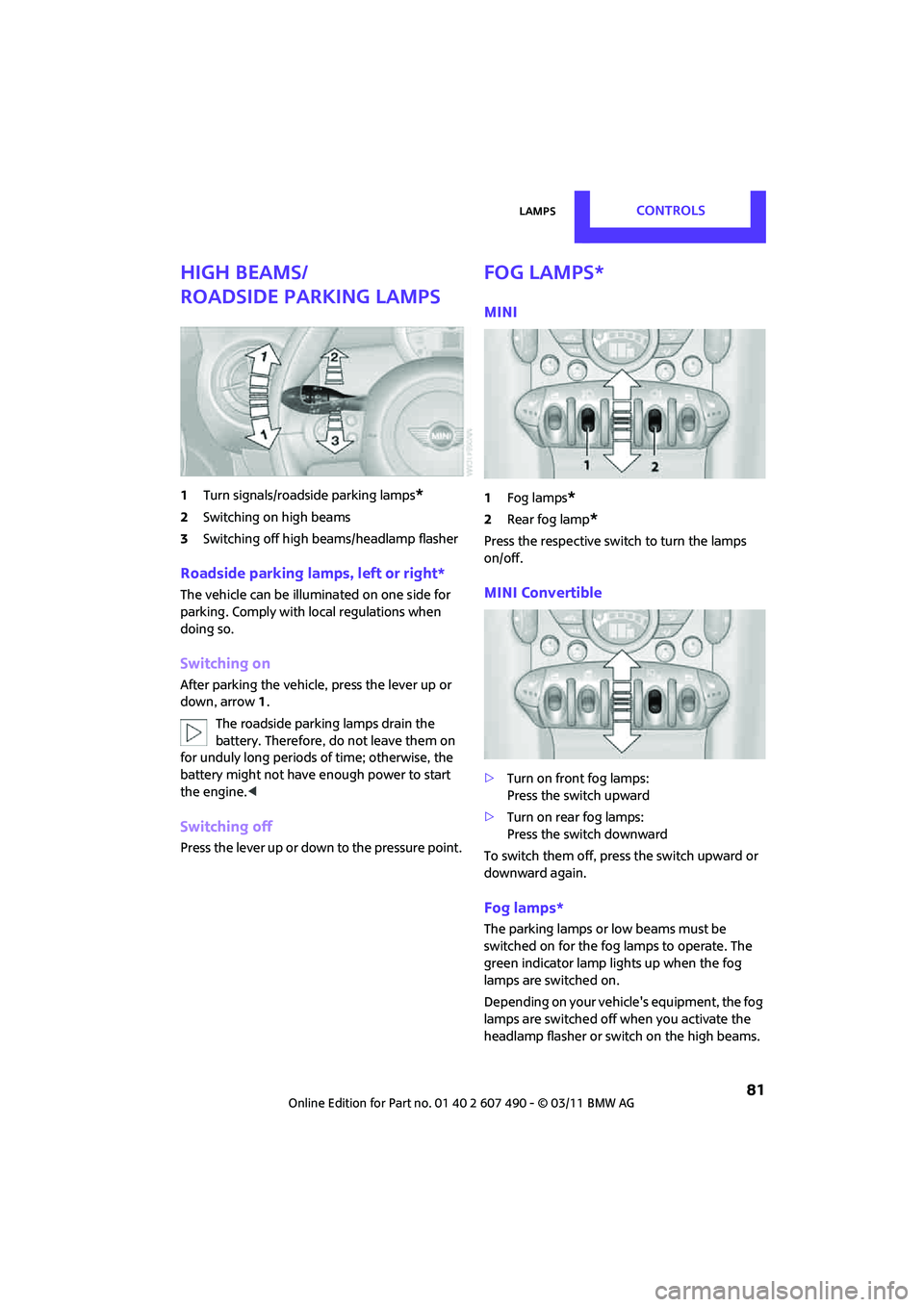
1Turn signals/roadside parking lamps*
2Switching on high beams
3 Switching off high be ams/headlamp flasher
Roadside parking lamps, left or right*
The vehicle can be illumi nated on one side for
parking. Comply with local regulations when
doing so.
Switching on
After parking the vehicle, press the lever up or
down, arrow 1.
The roadside parking lamps drain the
battery. Therefore, do not leave them on
for unduly long periods of time; otherwise, the
battery might not have enough power to start
the engine. <
Switching off
Press the lever up or down to the pressure point.
Fog lamps*
MINI
1Fog lamps*
2Rear fog lamp*
Press the respective swit ch to turn the lamps
on/off.
MINI Convertible
> Turn on front fog lamps:
Press the switch upward
> Turn on rear fog lamps:
Press the switch downward
To switch them off, pre ss the switch upward or
downward again.
Fog lamps*
The parking lamps or low beams must be
switched on for the fog lamps to operate. The
green indicator lamp lights up when the fog
lamps are switched on.
Depending on your vehicle's equipment, the fog
lamps are switched off when you activate the
headlamp flasher or switch on the high beams.
Page 108 of 210
ENTERTAINMENTRadio MINI Boost CD
106
Radio MINI Boost CD
Radio switching on/off
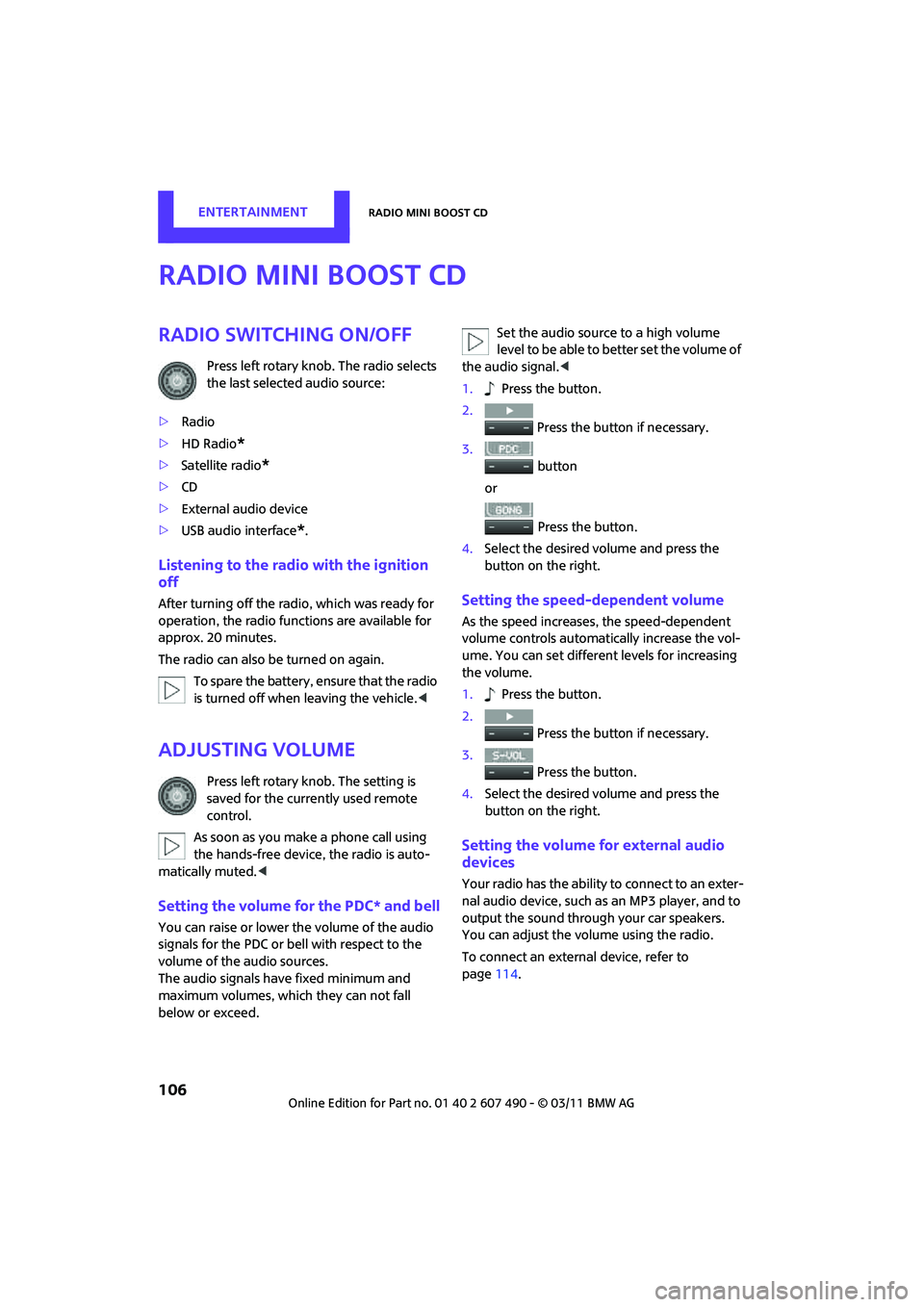
Press left rotary knob. The radio selects
the last selected audio source:
> Radio
> HD Radio
*
>Satellite radio*
>CD
> External audio device
> USB audio interface
*.
Listening to the radi o with the ignition
off
After turning off the radi o, which was ready for
operation, the radio functions are available for
approx. 20 minutes.
The radio can also be turned on again.
To spare the battery, ensure that the radio
is turned off when leaving the vehicle. <
Adjusting volume
Press left rotary knob. The setting is
saved for the currently used remote
control.
As soon as you make a phone call using
the hands-free device, the radio is auto-
matically muted. <
Setting the volume for the PDC* and bell
You can raise or lower the volume of the audio
signals for the PDC or bell with respect to the
volume of the audio sources.
The audio signals have fixed minimum and
maximum volumes, which they can not fall
below or exceed. Set the audio source to a high volume
level to be able to better set the volume of
the audio signal. <
1. Press the button.
2. Press the button if necessary.
3. button
or
Press the button.
4. Select the desired vo lume and press the
button on the right.
Setting the speed-dependent volume
As the speed increases, the speed-dependent
volume controls automatically increase the vol-
ume. You can set different levels for increasing
the volume.
1. Press the button.
2. Press the button if necessary.
3. Press the button.
4. Select the desired vo lume and press the
button on the right.
Setting the volume for external audio
devices
Your radio has the ability to connect to an exter-
nal audio device, such as an MP3 player, and to
output the sound through your car speakers.
You can adjust the volume using the radio.
To connect an extern al device, refer to
page 114.
Page 109 of 210

Radio MINI Boost CDENTERTAINMENT
107
To adjust the volume of an external audio device
to the radio:
1. MODE Press button.
2. Press the button.
3. Press the button.
4. Select the desired volume and press the
button on the right.
Tone control
You can select between the following settings:
>Bass: bass adjustment.
> Treble: treble adjustment.
> Balance: volume distribution left/right.
> Fader: volume distri bution front/back.
The tone settings are set for all audio sources at
once.
Setting the bass, treble and balance
1. Press the button.
2. Select the desired volume and press the
button on the right.
3. Carry out the desired se ttings and press the
button on the right.
Resetting tone settings
The tone settings are reset to the middle value.
1. Press the button.
2. Press the button.
Time
Setting the time, date and time format
You may set the time, date and the time format,
refer to page 63.
Radio
You radio is designed for the reception of FM
and AM signals.
To listen to the radio
1.Turn on the radio, refer to page 106.
2. MODE If necessary, press the button.
3. Press the button.
4. Press the corresponding button as
often as necessary until the desired wave-
length band is selected.
> AM: AM and AMA
> FM: FM1/FM2 and FMA
Selecting a station
The setting is stored for the remote control in
use.
Next station
… Press the button.
The next available st ation is selected.
Selecting stations by changing the
frequency
1. Press the button.
2. Press the button each time to enter a
desired frequency.
Page 111 of 210
Radio MINI Boost CDENTERTAINMENT
109
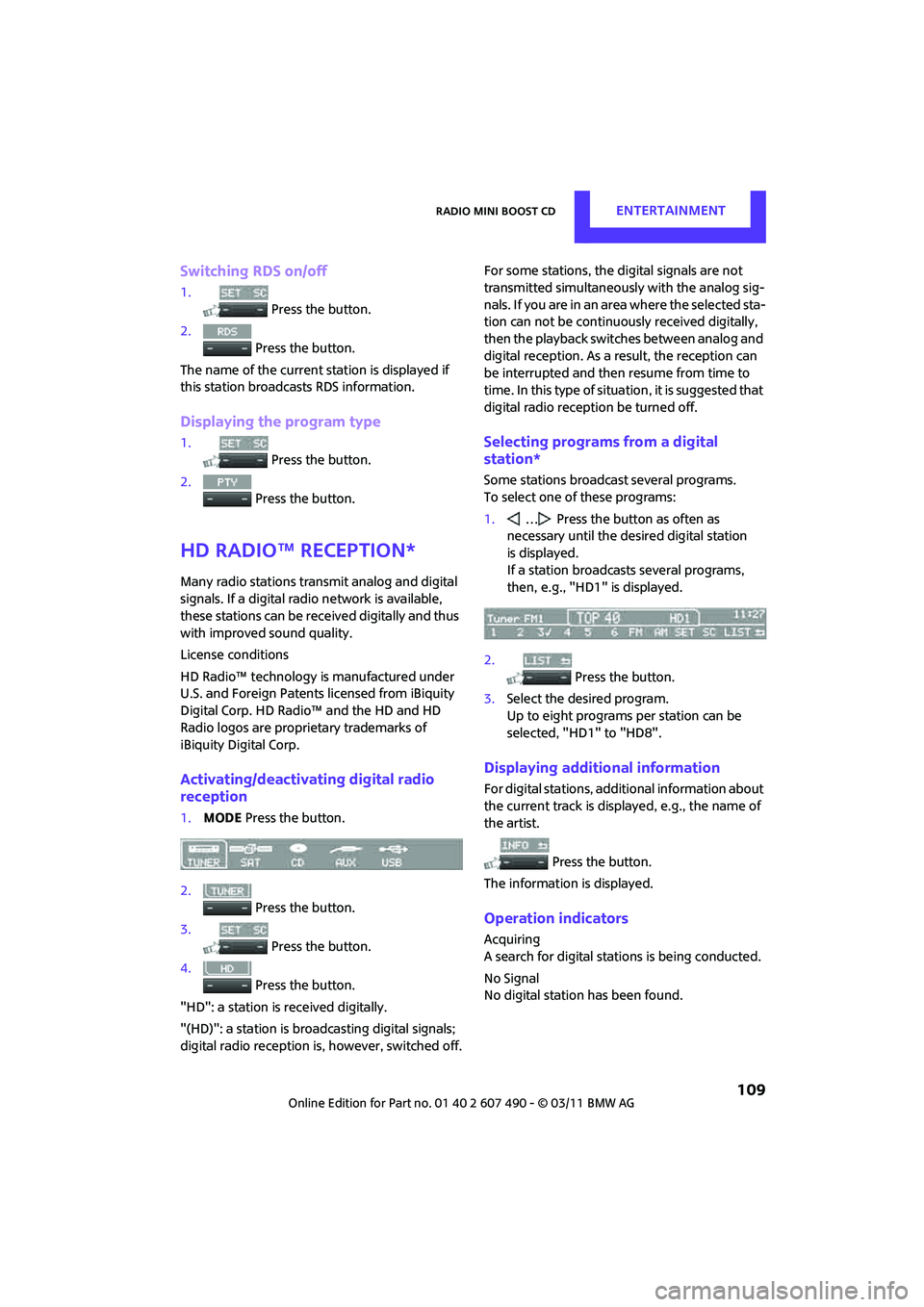
Switching RDS on/off
1. Press the button.
2. Press the button.
The name of the current station is displayed if
this station broadcasts RDS information.
Displaying the program type
1.
Press the button.
2. Press the button.
HD Radio™ reception*
Many radio stations transmit analog and digital
signals. If a digital radio network is available,
these stations can be received digitally and thus
with improved sound quality.
License conditions
HD Radio™ technology is manufactured under
U.S. and Foreign Patents licensed from iBiquity
Digital Corp. HD Radio™ and the HD and HD
Radio logos are proprietary trademarks of
iBiquity Digital Corp.
Activating/deactivating digital radio
reception
1.MODE Press the button.
2. Press the button.
3. Press the button.
4. Press the button.
"HD": a station is received digitally.
"(HD)": a station is broadcasting digital signals;
digital radio reception is , however, switched off. For some stations, the digital signals are not
transmitted simultaneously with the analog sig-
nals. If you are in an area where the selected sta-
tion can not be continuously received digitally,
then the playback switches between analog and
digital reception. As a
result, the reception can
be interrupted and then resume from time to
time. In this type of situat ion, it is suggested that
digital radio recept ion be turned off.
Selecting programs from a digital
station*
Some stations broadcast several programs.
To select one of these programs:
1.… Press the button as often as
necessary until the de sired digital station
is displayed.
If a station broadcasts several programs,
then, e.g., "HD1" is displayed.
2. Press the button.
3. Select the desired program.
Up to eight programs per station can be
selected, "HD1" to "HD8".
Displaying additional information
For digital stations, addi tional information about
the current track is displayed, e.g., the name of
the artist.
Press the button.
The information is displayed.
Operation indicators
Acquiring
A search for digital stat ions is being conducted.
No Signal
No digital station has been found.
Page 112 of 210
ENTERTAINMENTRadio MINI Boost CD
110
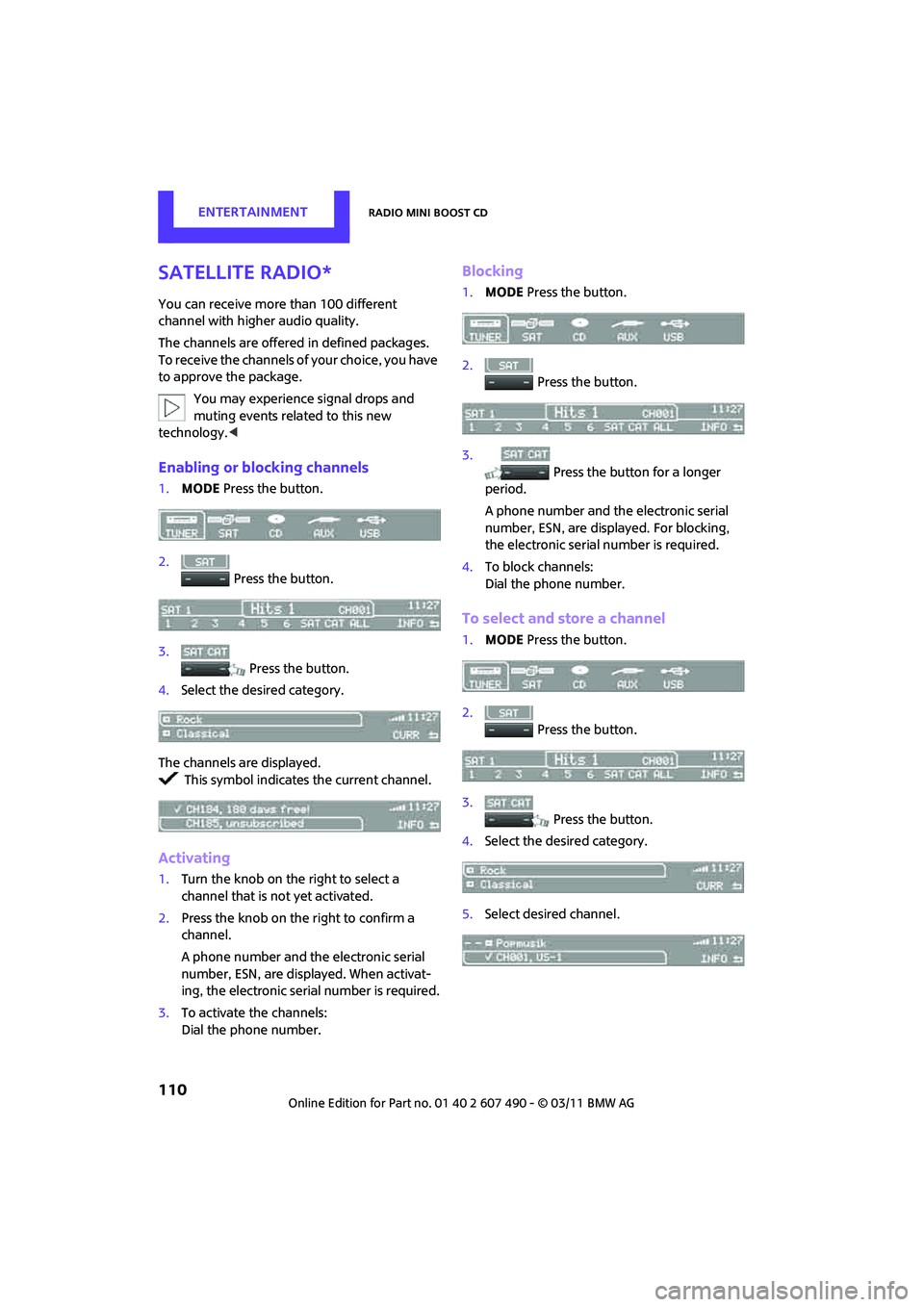
Satellite radio*
You can receive more than 100 different
channel with higher audio quality.
The channels are offered in defined packages.
To receive the channels of your choice, you have
to approve the package.You may experience signal drops and
muting events related to this new
technology. <
Enabling or blocking channels
1.MODE Press the button.
2. Press the button.
3. Press the button.
4. Select the desired category.
The channels are displayed. This symbol indicates the current channel.
Activating
1. Turn the knob on the right to select a
channel that is not yet activated.
2. Press the knob on the right to confirm a
channel.
A phone number and th e electronic serial
number, ESN, are displayed. When activat-
ing, the electronic serial number is required.
3. To activate the channels:
Dial the phone number.
Blocking
1.MODE Press the button.
2. Press the button.
3. Press the button for a longer
period.
A phone number and the electronic serial
number, ESN, are displayed. For blocking,
the electronic serial number is required.
4. To block channels:
Dial the phone number.
To select and store a channel
1.MODE Press the button.
2. Press the button.
3. Press the button.
4. Select the desired category.
5. Select desired channel.
Page 162 of 210

MOBILITYReplacing components
160
Replacing the bulb
1.Turn the lamp counterclockwise, arrow 1,
and remove it, arrow 2.
2. Push on the catch, arrow 1, and disconnect
the connector, arrow 2.
3. To insert the new bulb and replace the
cover, proceed in reverse order.
Turn signals, parking lamps, roadside
parking lamps, and fog lamps
Accessing the lamps via the wheel well
1Turn signal
2 Parking/roadside parking/fog lamps
Replacing a turn signal bulb
21 watt bulb, PY 21 W
1.Turn in the wheel.
2. Remove cover 1.
To do so, turn the cover counterclockwise.
3. Remove the inside cover.
To do so, turn the cover counterclockwise.
4. Unscrew the bulb counterclockwise.
5. To insert the new bulb and replace the
covers, proceed in reverse order.
Page 163 of 210

Replacing componentsMOBILITY
161
Replacing a parking/roadside parking
lamp bulb
5watt bulb, W5W
1.Turn in the wheel.
2. Remove cover 2.
To do so, turn the cover counterclockwise.
3. Unscrew the upper bulb counterclockwise.
4. To insert the new bulb and replace the
cover, proceed in reverse order.
Replacing a fog lamp bulb
H8 bulb, 35 watts
1.Turn in the wheel.
2. Remove cover 2.
To do so, turn the cover counterclockwise.
3. Pull the cable connector.
4. Unscrew the lower bulb counterclockwise.
5. To insert the new bulb and replace the
cover, proceed in reverse order.
Side turn signals
5watt bulb, W5W
1.Push the lamp with the ventilation grate
forward and remove.
2. Unscrew the bulb holder counterclockwise.
3. Pull out and replace the bulb.
4. To insert the new bulb and replace the
cover, proceed in reverse order.
Tail lamps
Bulbs 21 Watt/5 Watt, W 5 W
1Turn signal
2 Tail lamp LED
3 Brake light
Page 173 of 210
Giving and receiving assistanceMOBILITY
171
Tow-starting, towing
away
Observe the applicable laws and regula-
tions for tow-starting and towing
vehicles. <
Do not transport an y passengers other
than the driver in a vehicle that is being
towed. <
Using a tow fitting
The screw-in tow fitting must always be carried
in the car. It can be screwed in at the front or
rear of the MINI.
It is stored in the onbo ard vehicle toolkit in the
cargo area underneath the cover on the right-
hand side, page 157.
Use only the tow fitting provided with the
vehicle and screw it all the way in. Use the
tow fitting for towing on paved roads only. Avoid
lateral loading of the tow fitting, e.g. do not lift
the vehicle by the tow fitting. Otherwise, the tow
fitting and the vehicle could be damaged. <
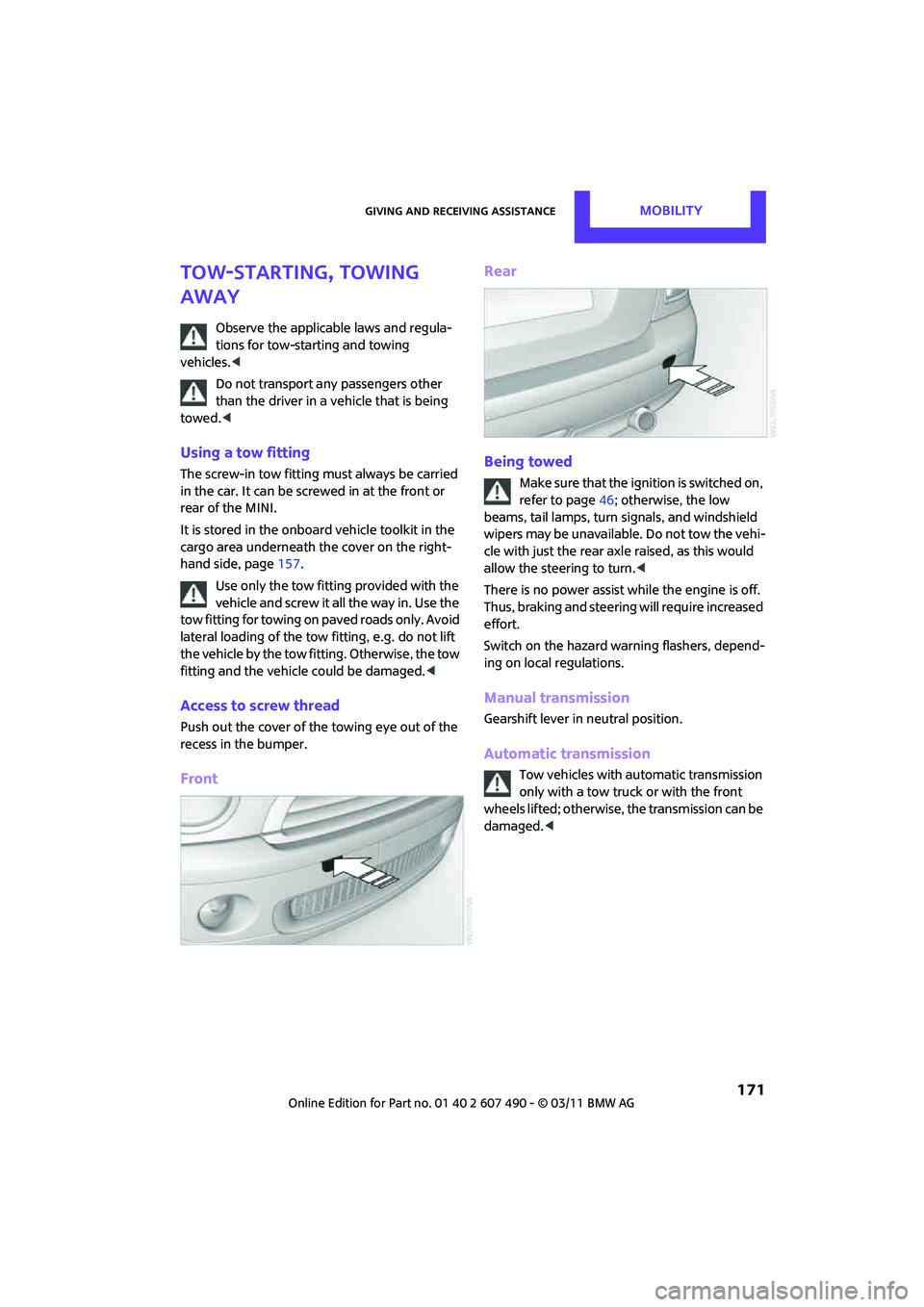
Access to screw thread
Push out the cover of the towing eye out of the
recess in the bumper.
Front Rear
Being towed
Make sure that the ignition is switched on,
refer to page
46; otherwise, the low
beams, tail lamps, turn signals, and windshield
wipers may be unavailable. Do not tow the vehi-
cle with just the rear ax le raised, as this would
allow the steering to turn. <
There is no power assist while the engine is off.
Thus, braking and steering will require increased
effort.
Switch on the hazard warning flashers, depend-
ing on local regulations.
Manual transmission
Gearshift lever in neutral position.
Automatic transmission
Tow vehicles with automatic transmission
only with a tow truck or with the front
wheels lifted; otherwise, the transmission can be
damaged. <
Page 175 of 210
Indicator and warning lampsMOBILITY
173
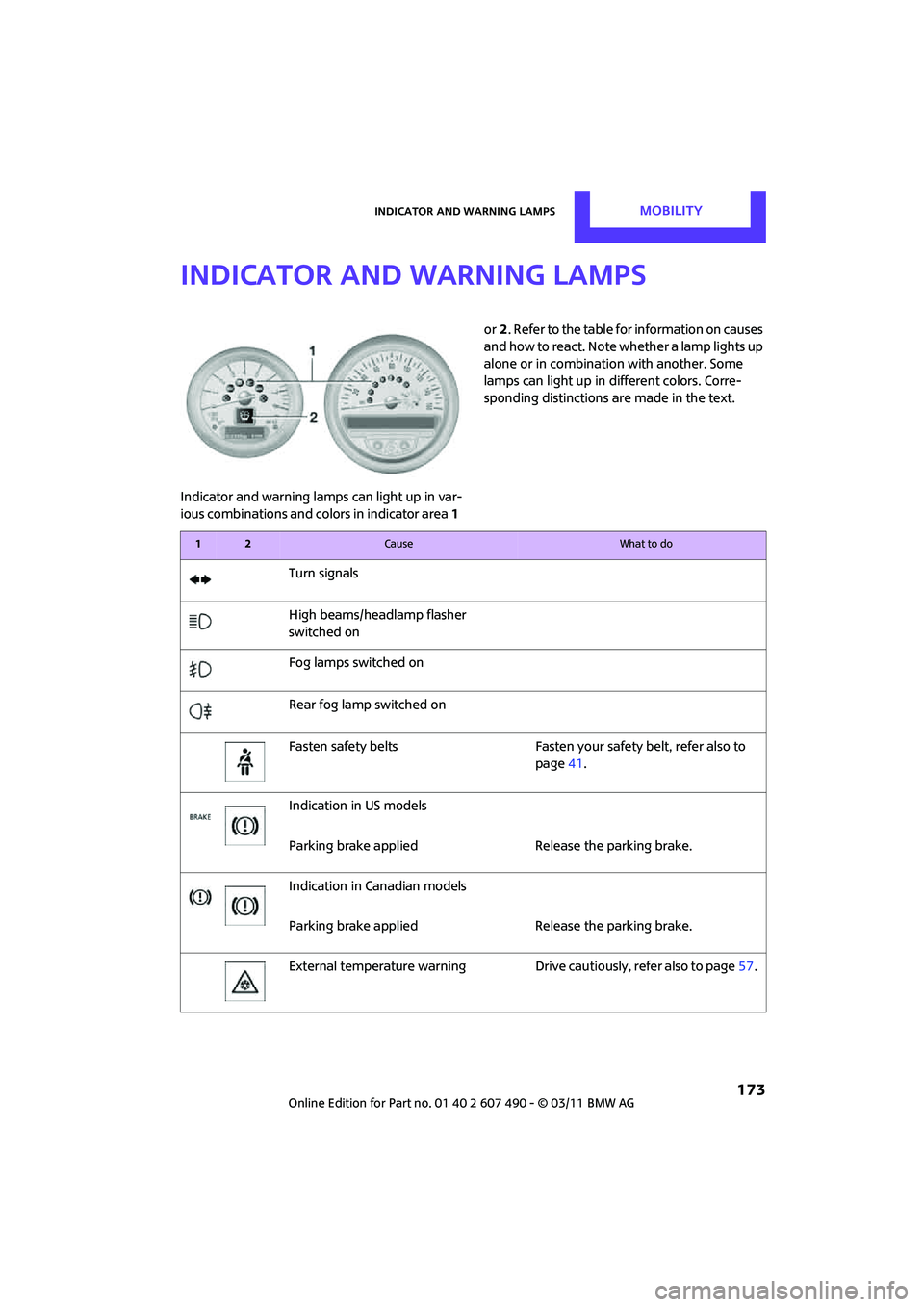
Indicator and warning lamps
Indicator and warning lamps can light up in var-
ious combinations and colors in indicator area 1 or
2. Refer to the table for information on causes
and how to react. Note wh ether a lamp lights up
alone or in combinatio n with another. Some
lamps can light up in different colors. Corre-
sponding distinctions are made in the text.
12Cause What to do
Turn signals
High beams/head lamp flasher
switched on
Fog lamps switched on
Rear fog lamp switched on
Fasten safety belts Fasten your safety belt, refer also to page41.
Indication in US models
Parking brake applied Release the parking brake.
Indication in Canadian models
Parking brake applied Release the parking brake.
External temperature wa rningDrive cautiously, refer also to page 57.