tow MINI COOPER 2013 Owner's Manual
[x] Cancel search | Manufacturer: MINI, Model Year: 2013, Model line: COOPER, Model: MINI COOPER 2013Pages: 267, PDF Size: 3.53 MB
Page 123 of 267
NAVIGATIONRoute guidance
122
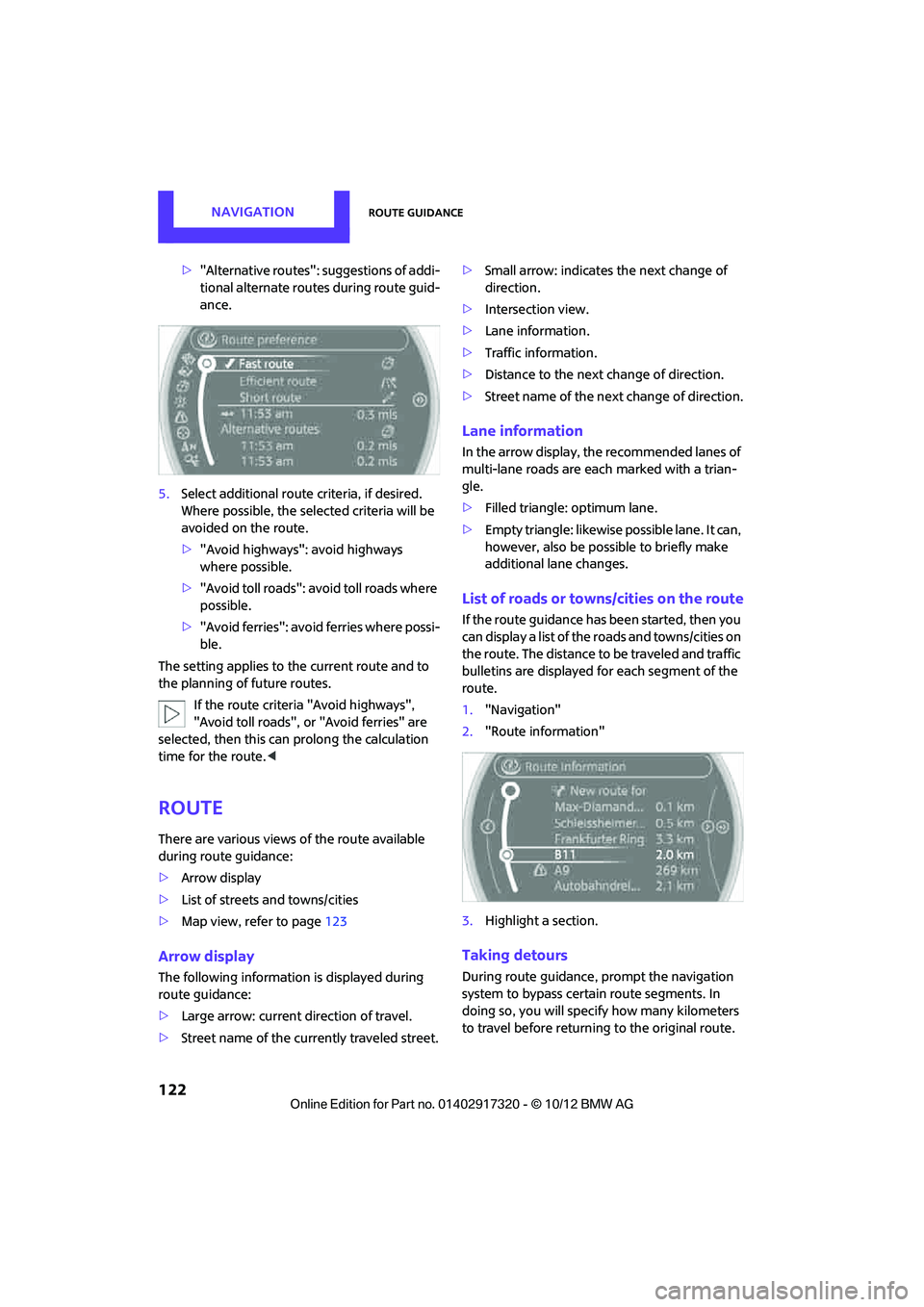
>"Alternative routes": suggestions of addi-
tional alternate routes during route guid-
ance.
5. Select additional route criteria, if desired.
Where possible, the selected criteria will be
avoided on the route.
>"Avoid highways": avoid highways
where possible.
> "Avoid toll roads": avoid toll roads where
possible.
> "Avoid ferries": avoid ferries where possi-
ble.
The setting applies to the current route and to
the planning of future routes.
If the route criteria "Avoid highways",
"Avoid toll roads", or "Avoid ferries" are
selected, then this can prolong the calculation
time for the route. <
Route
There are various views of the route available
during route guidance:
>Arrow display
> List of streets and towns/cities
> Map view, refer to page 123
Arrow display
The following information is displayed during
route guidance:
>Large arrow: current direction of travel.
> Street name of the currently traveled street. >
Small arrow: indicates the next change of
direction.
> Intersection view.
> Lane information.
> Traffic information.
> Distance to the next change of direction.
> Street name of the next change of direction.
Lane information
In the arrow display, the recommended lanes of
multi-lane roads are each marked with a trian-
gle.
>Filled triangle: optimum lane.
> Empty triangle: likewise possible lane. It can,
however, also be possi ble to briefly make
additional lane changes.
List of roads or towns/cities on the route
If the route guidance has been started, then you
can display a list of the roads and towns/cities on
the route. The distance to be traveled and traffic
bulletins are displayed fo r each segment of the
route.
1. "Navigation"
2. "Route information"
3. Highlight a section.
Taking detours
During route guidance, prompt the navigation
system to bypass certai n route segments. In
doing so, you will specif y how many kilometers
to travel before returning to the original route.
00320051004F004C00510048000300280047004C0057004C005200510003
Page 130 of 267
What to do if…NAVIGATION
129
What to do if…
What to do if…
>The current position cannot be displayed?
The position is in an unrecognized region, in
a poor reception area, or the system is in the
process of determining the position. Recep-
tion is best when you have an unobstructed
view to the sky.
> The route guidance does not accept an
address without the street name?
A downtown area cannot be determined for
the town or city that has been entered. Input
any street in the select ed town/city and start
route guidance.
> The route guidance does not accept a desti-
nation?
The destination data is not contained in the
navigation data. Select a destination that is
as close as possible to the original.
> The letters for a de stination cannot be
selected during destination entry?
Stored data do not contain the data of the
destination. Select a de stination that is as
close as possible to the original.
> The map view is displayed in grayscale?
When the traffic info map is activated, the
picture on the Control Display is switched to
a grayscale. This permits an optimized
depiction of traf fic information.
> Voice instructions ar e no longer issued
before intersections du ring route guidance?
The area has not been fully recorded yet, or
you have left the recommended route and
the system requires a few seconds to calcu-
late a new route suggestion.
> The navigation system does not react to
entries?
If the battery was disconnected, it takes
about 10 minutes before the system is once
again operational.
00320051004F004C00510048000300280047004C0057004C005200510003
Page 179 of 267
COMMUNICATIONSMobile phone preparation Bluetooth
178
Installation location
In the center armrest.
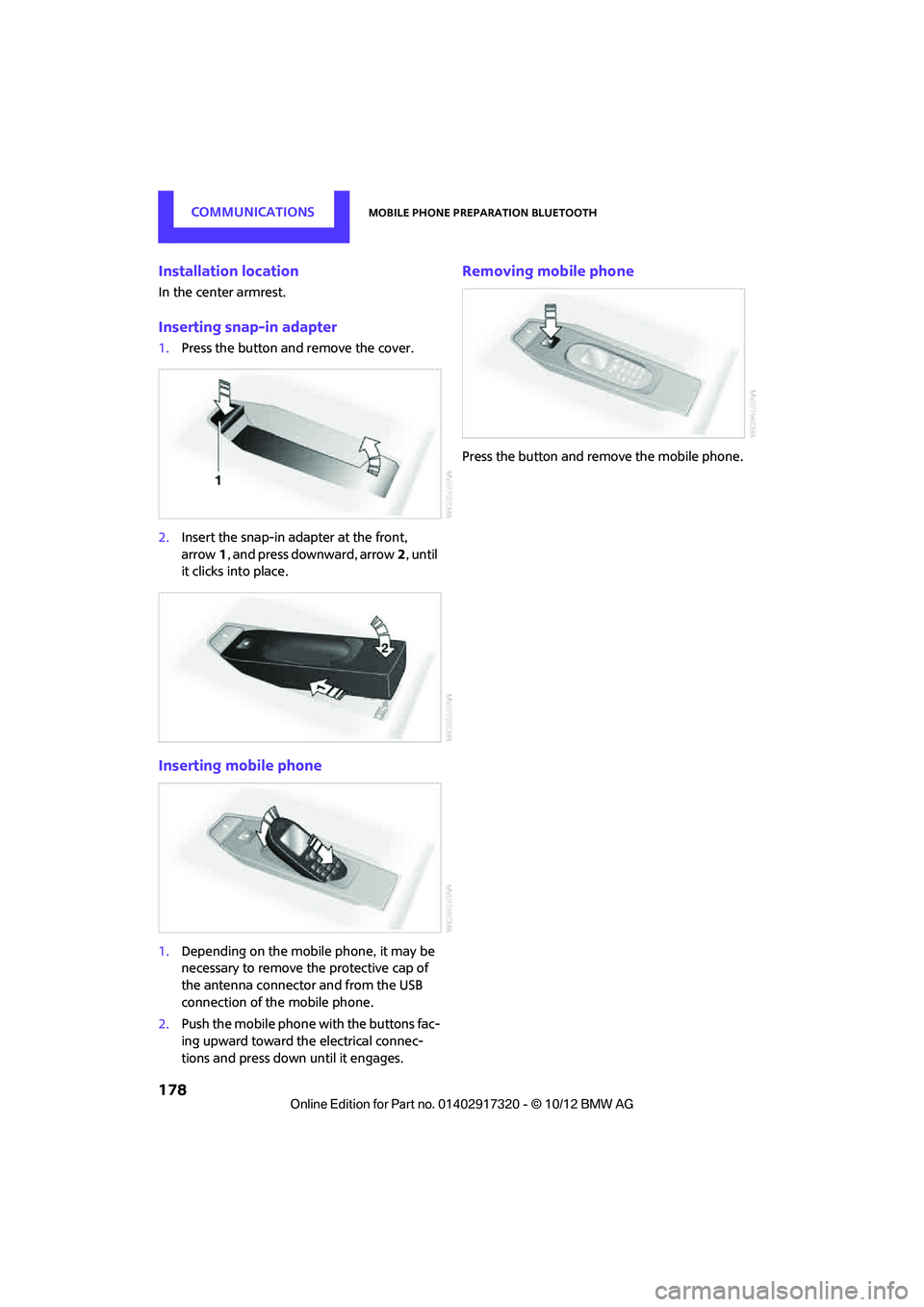
Inserting snap-in adapter
1.Press the button and remove the cover.
2. Insert the snap-in ad apter at the front,
arrow 1, and press downward, arrow 2, until
it clicks into place.
Inserting mobile phone
1. Depending on the mobile phone, it may be
necessary to remove the protective cap of
the antenna connector and from the USB
connection of the mobile phone.
2. Push the mobile phone with the buttons fac-
ing upward toward the electrical connec-
tions and press down until it engages.
Removing mobile phone
Press the button and remove the mobile phone.
00320051004F004C00510048000300280047004C0057004C005200510003
Page 205 of 267
MOBILITYWheels and tires
204
Tire condition
Inspect your tires regularly for tread wear, signs
of damage and for foreign objects lodged in the
tread. Check the tread depth.
Tread depth
The tread depth should not drop below 0.12 in/
3 mm, although, for exam ple, European legisla-
tion only specifies a minimum tread depth of
0.063 in/1.6 mm. At tread depths below 0.12 in/
3 mm there is an increased risk of high-speed
hydroplaning, even when only small amounts of
water are present on the road surface.
Winter tires
When winter tires wear down past a tread depth
of 0.16 in/4 mm, they become perceptibly less
suitable for winter condit ions. In the interest of
safety, new tires should be installed.
Minimum tread depth
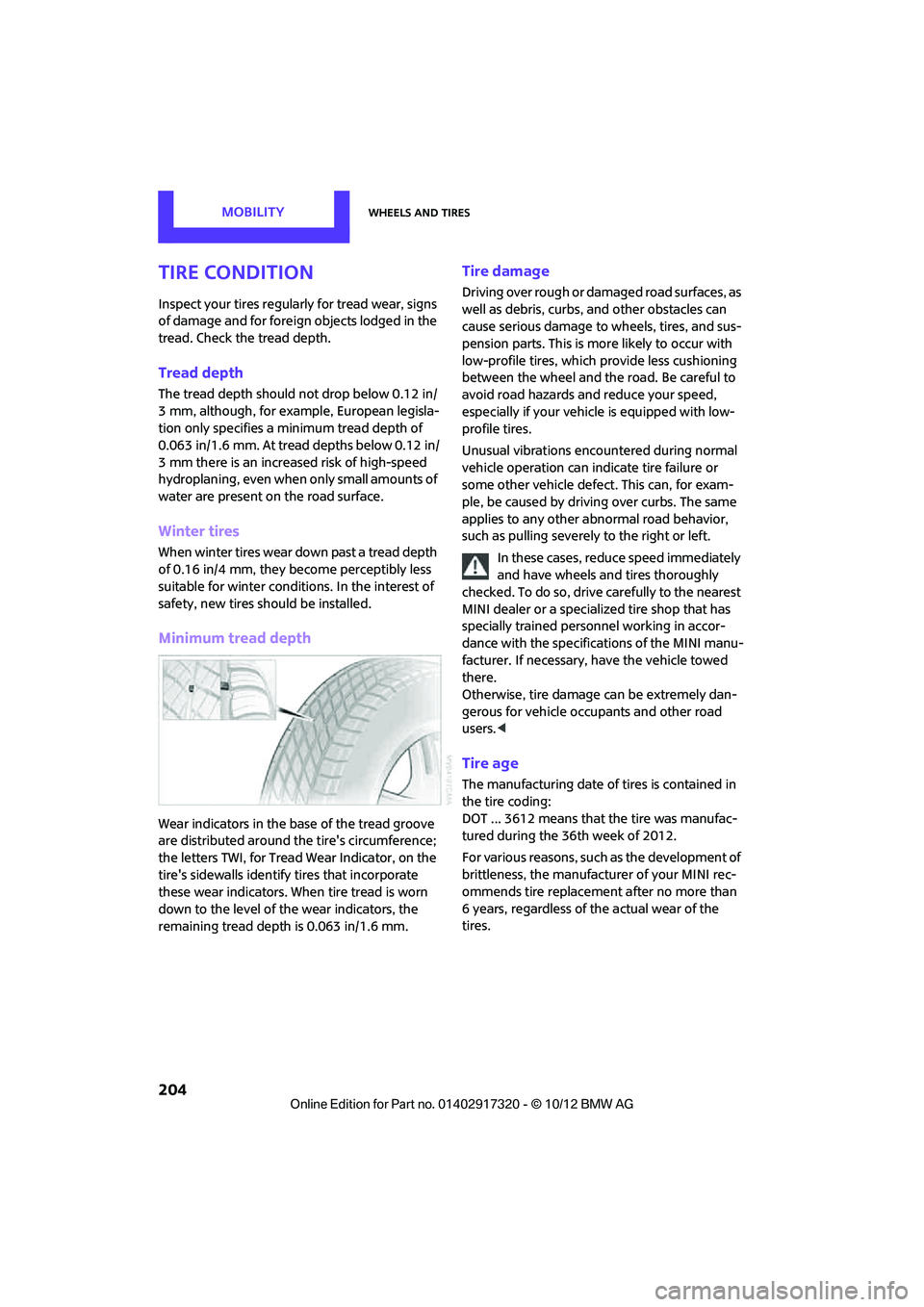
Wear indicators in the base of the tread groove
are distributed around the tire's circumference;
the letters TWI, for Tread Wear Indicator, on the
tire's sidewalls identify tires that incorporate
these wear indicators. When tire tread is worn
down to the level of the wear indicators, the
remaining tread dept h is 0.063 in/1.6 mm.
Tire damage
Driving over rough or damaged road surfaces, as
well as debris, curbs, and other obstacles can
cause serious damage to wheels, tires, and sus-
pension parts. This is more likely to occur with
low-profile tires, which provide less cushioning
between the wheel and the road. Be careful to
avoid road hazards and reduce your speed,
especially if your vehi cle is equipped with low-
profile tires.
Unusual vibrations encountered during normal
vehicle operation can indi cate tire failure or
some other vehicle defect . This can, for exam-
ple, be caused by drivin g over curbs. The same
applies to any other abnormal road behavior,
such as pulling severely to the right or left.
In these cases, reduce speed immediately
and have wheels and tires thoroughly
checked. To do so, drive carefully to the nearest
MINI dealer or a specialized tire shop that has
specially trained personnel working in accor-
dance with the specifications of the MINI manu-
facturer. If necessary, have the vehicle towed
there.
Otherwise, tire damage can be extremely dan-
gerous for vehicle occu pants and other road
users. <
Tire age
The manufacturing date of tires is contained in
the tire coding:
DOT ... 3612 means that the tire was manufac-
tured during the 36th week of 2012.
For various reasons, such as the development of
brittleness, the manufacturer of your MINI rec-
ommends tire replacemen t after no more than
6 years, regardless of the actual wear of the
tires.
00320051004F004C00510048000300280047004C0057004C005200510003
Page 209 of 267

MOBILITYEngine compartment
208
Hood
Releasing
Pull the lever.Do not clean the windshield and head-
lamps if the hood is unlocked as this may
damage the headlamp washer system. <
Opening
To avoid damage, make sure that the
wiper arms are against the windshield
before you open the hood. <
Press the release handle and open the hood.
Closing
Close the hood from a height of approx. 16 in/
40 cm with momentum. It must be clearly heard
to engage. If you notice any signs while driving your
vehicle that the hood is not completely
closed, stop at once and close it securely.
Make sure that the closing path of the hood is
clear; otherwise, injuries may result. <
Engine oil
Engine oil consumption depends on driving style
and operating conditions, e.g., with a very
sporty driving style, the engine oil consumption
is significantly increased.
Therefore, check the engine oil level regularly
after each refueling.
Checking engine oil level
1. With the vehicle's engine at normal operat-
ing temperature, i.e. after uninterrupted
driving for at least 6 miles/10 km, park the
vehicle on a level surface.
2. Switch off the engine.
3. Pull the dipstick out after approx. 5 minutes
and wipe it off with a lint-free cloth, paper
towel or similar material.
4. Carefully push the dipstick all the way into
the guide tube and pull it out again.
The oil level should be between the two
marks on the dipstick.
00320051004F004C00510048000300280047004C0057004C005200510003
Page 218 of 267
Replacing componentsMOBILITY
217
Replacing components
Vehicle equipment
In this chapter, all production, country, and
optional equipment that is offered in the model
range is described. Equipment is also described
that is not available because of, for example,
selected options or count ry version. This also
applies to safety related functions and systems.
Toolkit
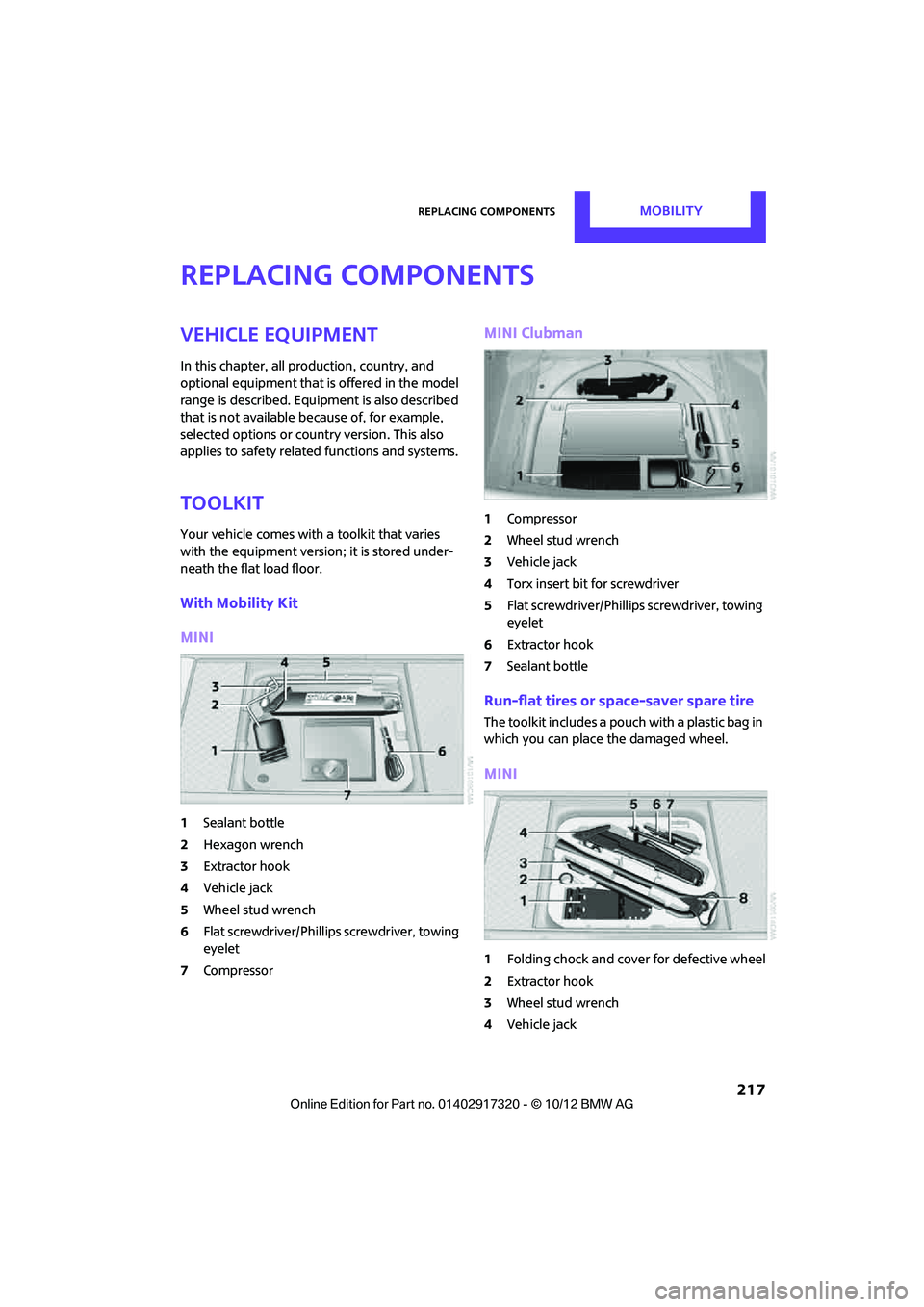
Your vehicle comes with a toolkit that varies
with the equipment version; it is stored under-
neath the flat load floor.
With Mobility Kit
MINI
1 Sealant bottle
2 Hexagon wrench
3 Extractor hook
4 Vehicle jack
5 Wheel stud wrench
6 Flat screwdriver/Phillips screwdriver, towing
eyelet
7 Compressor
MINI Clubman
1Compressor
2 Wheel stud wrench
3 Vehicle jack
4 Torx insert bit for screwdriver
5 Flat screwdriver/Phillips screwdriver, towing
eyelet
6 Extractor hook
7 Sealant bottle
Run-flat tires or space-saver spare tire
The toolkit includes a pouch with a plastic bag in
which you can place the damaged wheel.
MINI
1Folding chock and cove r for defective wheel
2 Extractor hook
3 Wheel stud wrench
4 Vehicle jack
00320051004F004C00510048000300280047004C0057004C005200510003
Page 219 of 267
MOBILITYReplacing components
218
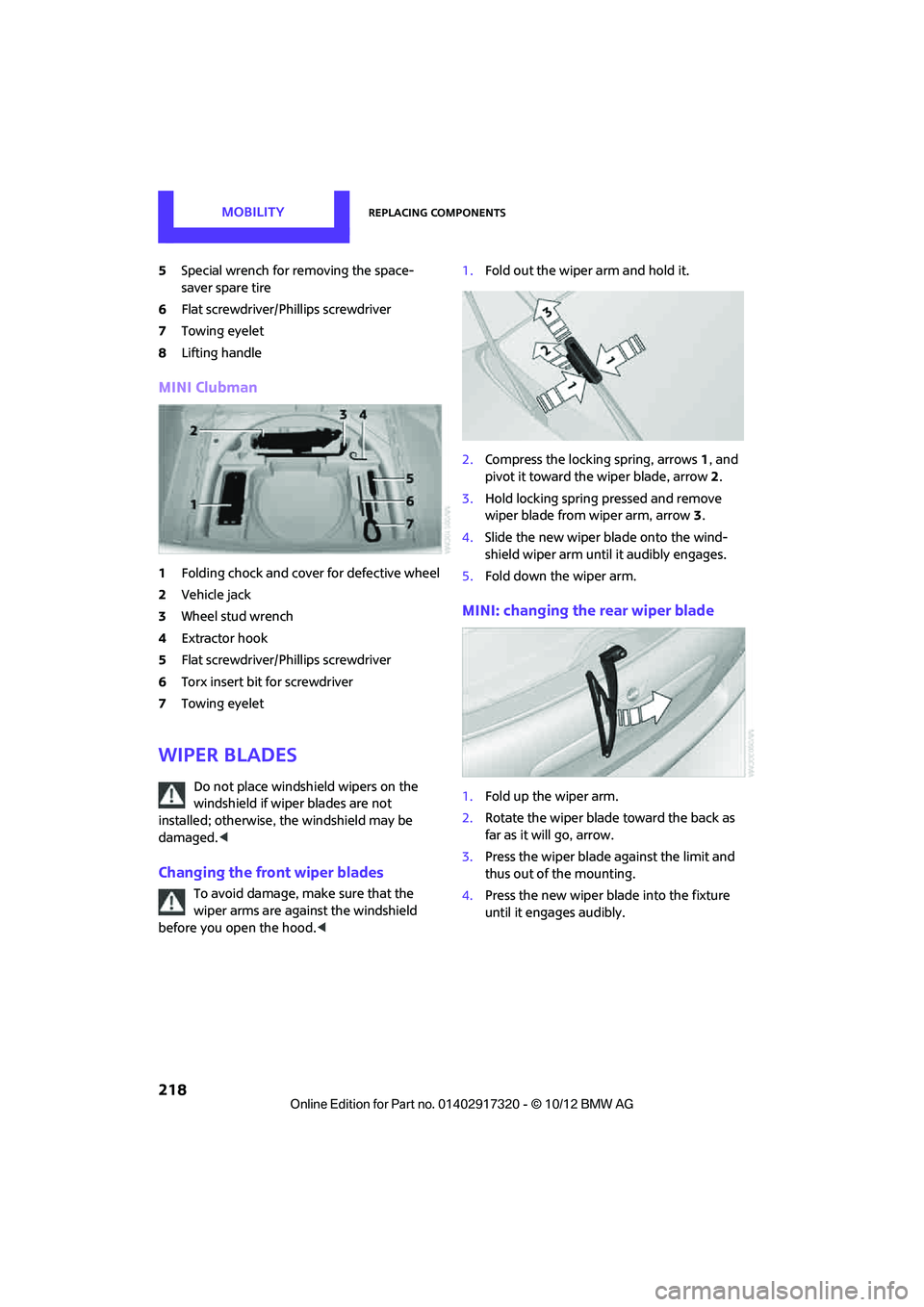
5Special wrench for removing the space-
saver spare tire
6 Flat screwdriver/Phillips screwdriver
7 Towing eyelet
8 Lifting handle
MINI Clubman
1Folding chock and cover for defective wheel
2 Vehicle jack
3 Wheel stud wrench
4 Extractor hook
5 Flat screwdriver/Phillips screwdriver
6 Torx insert bit for screwdriver
7 Towing eyelet
Wiper blades
Do not place windshield wipers on the
windshield if wiper blades are not
installed; otherwise, the windshield may be
damaged. <
Changing the front wiper blades
To avoid damage, make sure that the
wiper arms are against the windshield
before you open the hood. <1.
Fold out the wiper arm and hold it.
2. Compress the locking spring, arrows 1, and
pivot it toward the wiper blade, arrow 2.
3. Hold locking spring pressed and remove
wiper blade from wiper arm, arrow 3.
4. Slide the new wiper blade onto the wind-
shield wiper arm until it audibly engages.
5. Fold down the wiper arm.
MINI: changing the rear wiper blade
1.Fold up the wiper arm.
2. Rotate the wiper blade toward the back as
far as it will go, arrow.
3. Press the wiper blade against the limit and
thus out of the mounting.
4. Press the new wiper blade into the fixture
until it engages audibly.
00320051004F004C00510048000300280047004C0057004C005200510003
Page 224 of 267
Replacing componentsMOBILITY
223
3.To insert the new bulb and replace the
cover, proceed in reverse order.
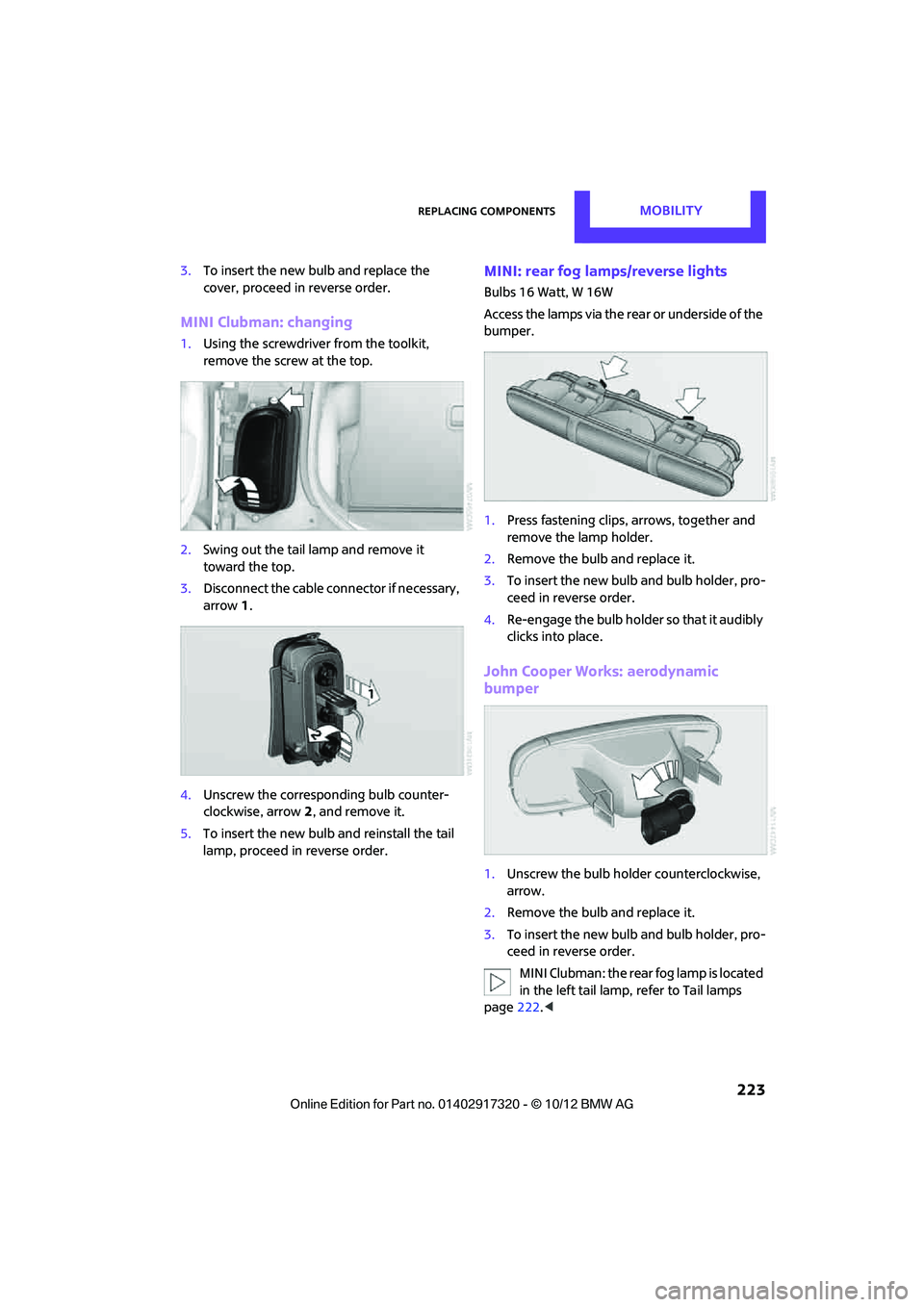
MINI Clubman: changing
1.Using the screwdriver from the toolkit,
remove the screw at the top.
2. Swing out the tail la mp and remove it
toward the top.
3. Disconnect the cable connector if necessary,
arrow 1.
4. Unscrew the corresponding bulb counter-
clockwise, arrow 2, and remove it.
5. To insert the new bulb and reinstall the tail
lamp, proceed in reverse order.
MINI: rear fog lamps/reverse lights
Bulbs 16 Watt, W 16W
Access the lamps via the rear or underside of the
bumper.
1. Press fastening clips, arrows, together and
remove the lamp holder.
2. Remove the bulb and replace it.
3. To insert the new bulb and bulb holder, pro-
ceed in reverse order.
4. Re-engage the bulb holder so that it audibly
clicks into place.
John Cooper Works: aerodynamic
bumper
1.Unscrew the bulb holder counterclockwise,
arrow.
2. Remove the bulb and replace it.
3. To insert the new bulb and bulb holder, pro-
ceed in reverse order.
MINI Clubman: the rear fog lamp is located
in the left tail lamp, refer to Tail lamps
page 222.<
00320051004F004C00510048000300280047004C0057004C005200510003
Page 227 of 267
MOBILITYReplacing components
226
to about 5 bar/73 psi. Do not switch off the
compressor during this phase.<
Do not run the comp ressor for longer
than 10 minutes; otherwise, the
device will overheat and possibly be dam-
aged.<
8. Switch off the compressor.
If an inflation pressure of 1.8 bar/26 psi is not
reached:
1. Unscrew the filling hose 2 from the wheel
and drive the vehicle forward and backward
approx. 33 ft/10 m to distribute the liquid
sealant in the tire evenly.
2. Inflate the tire again with the compressor.
If an inflation pressure of 1.8 bar/26 psi is
not reached, then the tire is too badly
damaged. Please contact the nearest MINI
dealer. <
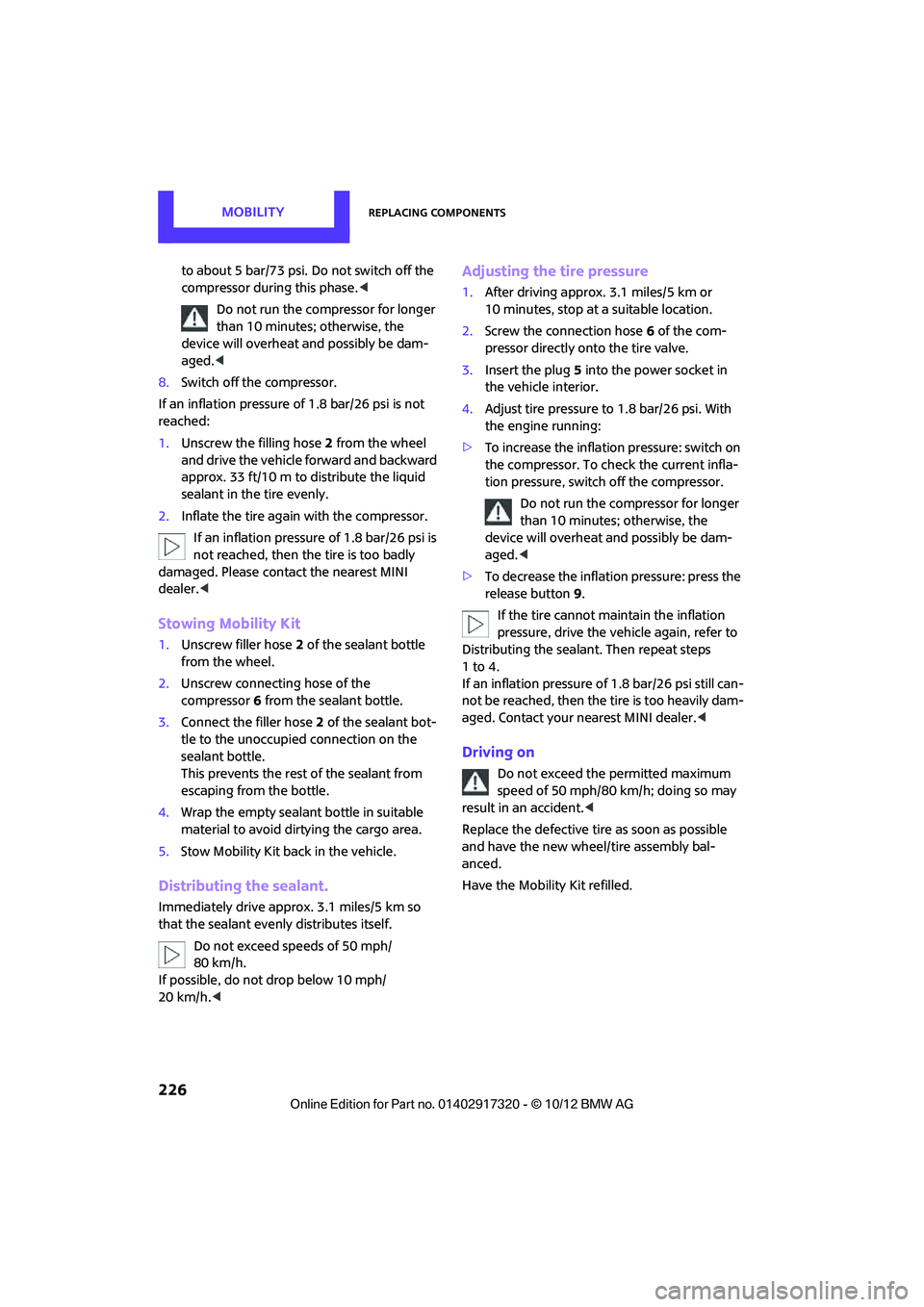
Stowing Mobility Kit
1.Unscrew filler hose 2 of the sealant bottle
from the wheel.
2. Unscrew connecting hose of the
compressor 6 from the sealant bottle.
3. Connect the filler hose 2 of the sealant bot-
tle to the unoccupied connection on the
sealant bottle.
This prevents the rest of the sealant from
escaping from the bottle.
4. Wrap the empty sealant bottle in suitable
material to avoid dirt ying the cargo area.
5. Stow Mobility Kit back in the vehicle.
Distributing the sealant.
Immediately drive approx. 3.1 miles/5 km so
that the sealant evenly distributes itself.
Do not exceed speeds of 50 mph/
80 km/h.
If possible, do not drop below 10 mph/
20 km/h. <
Adjusting the tire pressure
1.After driving approx. 3.1 miles/5 km or
10 minutes, stop at a suitable location.
2. Screw the connection hose 6 of the com-
pressor directly onto the tire valve.
3. Insert the plug 5 into the power socket in
the vehicle interior.
4. Adjust tire pressure to 1.8 bar/26 psi. With
the engine running:
> To increase the inflatio n pressure: switch on
the compressor. To ch eck the current infla-
tion pressure, switch off the compressor.
Do not run the compressor for longer
than 10 minutes; otherwise, the
device will overheat and possibly be dam-
aged.<
> To decrease the inflat ion pressure: press the
release button 9.
If the tire cannot m aintain the inflation
pressure, drive the vehicle again, refer to
Distributing the sealan t. Then repeat steps
1to4.
If an inflation pressure of 1.8 bar/26 psi still can-
not be reached, then the tire is too heavily dam-
aged. Contact your ne arest MINI dealer.<
Driving on
Do not exceed the permitted maximum
speed of 50 mph/80 km/h; doing so may
result in an accident. <
Replace the defective tire as soon as possible
and have the new wheel/tire assembly bal-
anced.
Have the Mobility Kit refilled.
00320051004F004C00510048000300280047004C0057004C005200510003
Page 228 of 267
Replacing componentsMOBILITY
227
Changing wheels
Run-flat tires
Tire change for run-flat tires:
>Prepare for tire change, page 228
> Jack up vehicle, page 228
> Tighten lug bolts, page 229
Space-saver spare tire
Tire change with space-saver spare tire:
>Remove the space-saver spare tire,
page 228
> Prepare for tire change, page 228
> Jack up vehicle, page 228
> Mount space-saver spare tire, page 229
> Tighten lug bolts, page 229
> Drive with space-saver spare tire, page 228
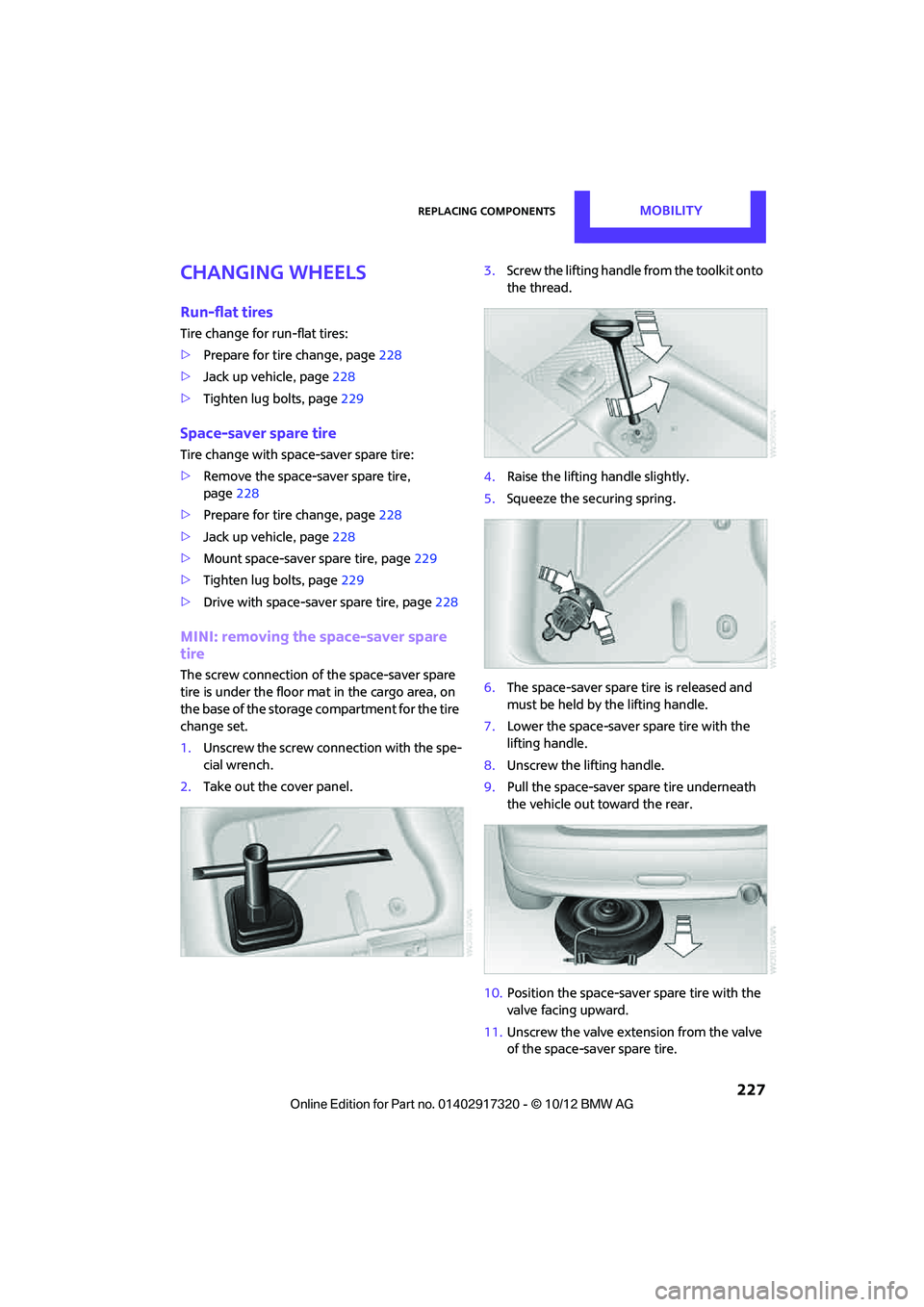
MINI: removing the space-saver spare
tire
The screw connection of the space-saver spare
tire is under the floor mat in the cargo area, on
the base of the storage compartment for the tire
change set.
1.Unscrew the screw conn ection with the spe-
cial wrench.
2. Take out the cover panel. 3.
Screw the lifting handle from the toolkit onto
the thread.
4. Raise the lifting handle slightly.
5. Squeeze the securing spring.
6. The space-saver spare tire is released and
must be held by the lifting handle.
7. Lower the space-saver spare tire with the
lifting handle.
8. Unscrew the lifting handle.
9. Pull the space-saver spare tire underneath
the vehicle out toward the rear.
10. Position the space-saver spare tire with the
valve facing upward.
11. Unscrew the valve extension from the valve
of the space-saver spare tire.
00320051004F004C00510048000300280047004C0057004C005200510003