steering wheel MINI COOPER CONVERTIBLE 2008 User Guide
[x] Cancel search | Manufacturer: MINI, Model Year: 2008, Model line: COOPER CONVERTIBLE, Model: MINI COOPER CONVERTIBLE 2008Pages: 176, PDF Size: 2.4 MB
Page 68 of 176
66
CRUISE CONTROL
*
To activate via the multifunction
sports steering wheel
1. Start the engine
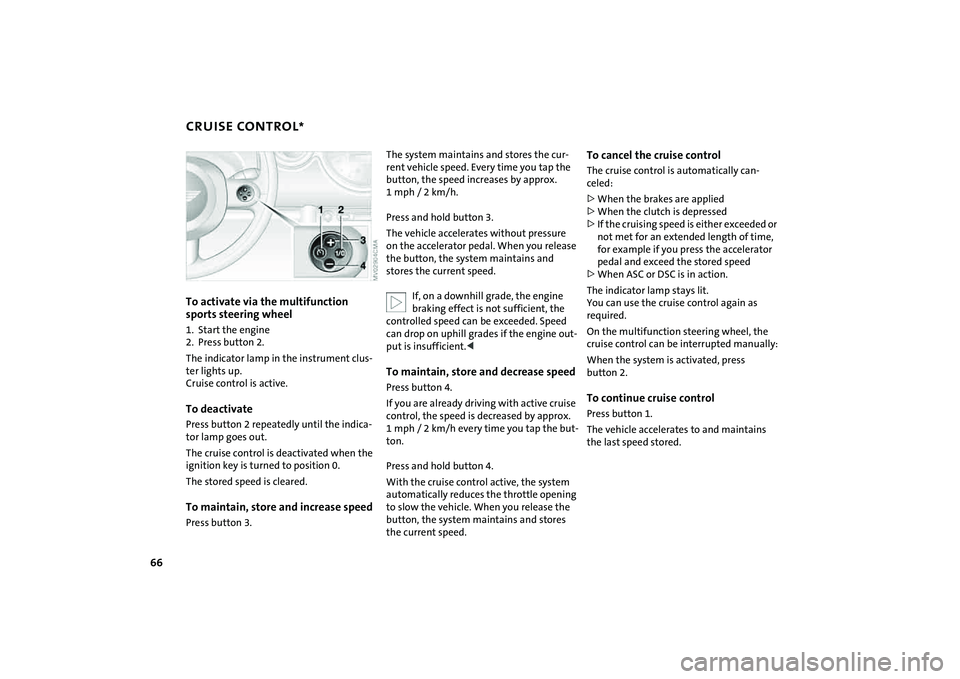
2. Press button 2.
The indicator lamp in the instrument clus-
ter lights up.
Cruise control is active.To deactivatePress button 2 repeatedly until the indica-
tor lamp goes out.
The cruise control is deactivated when the
ignition key is turned to position 0.
The stored speed is cleared.To maintain, store and increase speedPress button 3.
The system maintains and stores the cur-
rent vehicle speed. Every time you tap the
button, the speed increases by approx.
1mph/ 2km/h.
Press and hold button 3.
The vehicle accelerates without pressure
on the accelerator pedal. When you release
the button, the system maintains and
stores the current speed.
If, on a downhill grade, the engine
braking effect is not sufficient, the
controlled speed can be exceeded. Speed
can drop on uphill grades if the engine out-
put is insufficient.
control, the speed is decreased by approx.
1 mph / 2 km/h every time you tap the but-
ton.
Press and hold button 4.
With the cruise control active, the system
automatically reduces the throttle opening
to slow the vehicle. When you release the
button, the system maintains and stores
the current speed.
To cancel the cruise controlThe cruise control is automatically can-
celed:
>When the brakes are applied
>When the clutch is depressed
>If the cruising speed is either exceeded or
not met for an extended length of time,
for example if you press the accelerator
pedal and exceed the stored speed
>When ASC or DSC is in action.
The indicator lamp stays lit.
You can use the cruise control again as
required.
On the multifunction steering wheel, the
cruise control can be interrupted manually:
When the system is activated, press
button 2.To continue cruise controlPress button 1.
The vehicle accelerates to and maintains
the last speed stored.
Page 74 of 176
72
DRIVING STABILITY CONTROL SYSTEMSYour MINI or MINI Convertible is equipped
with a series of systems that help maintain
driving stability even in adverse driving sit-
uations.Antilock Brake System (ABS)ABS keeps the wheels from locking during
braking. Steering stability is maintained
even during full brake applications. In this
way, active safety is enhanced.
ABS is operational each time the engine is
started. Braking safely, refer to page103.Cornering Brake Control CBCDriving stability and steering characteris-
tics are further enhanced while braking in
turns or during a lane change.Electronic Brake Force Distribution
(EBD)The system controls brake-force applica-
tion at the rear wheels in order to obtain
increased stability in the vehicle's braking
response.All Season traction Control (ASC)*ASC prevents slip at the drive wheels while
starting off and accelerating the vehicle.
ASC also recognizes unstable vehicle condi-tions, such as fishtailing or nose-diving. In
these cases, and subject to physical limits,
ASC helps to keep the vehicle on a steady
course by reducing engine speed and by
applying brakes at individual wheels. This
system optimizes driving stability and trac-
tion, especially when just starting off,
when accelerating or when cornering.
The ASC is operational each time you start
the engine. It integrates the Antilock Brake
System (ABS) and Electronic Brake Force
Distribution (EBD).
The laws of physics cannot be
repealed, even with ASC. An appropri-
ate driving style always remains the
responsibility of the driver. Avoid using the
additional safety margin provided by the
system as an excuse for taking unnecessary
risks.
Do not make any modifications to the ASC
system. Allow only authorized technicians
to perform service procedures on the
ASC.<
Dynamic Stability Control (DSC)*DSC prevents slip at the drive wheels while
starting off and accelerating the vehicle.
DSC also recognizes unstable vehicle condi-
tions, such as fishtailing or nose-diving. In
these cases, and subject to physical limits,
DSC helps to keep the vehicle on a steady
course by reducing engine speed and by
applying brakes at individual wheels.
The DSC is operational every time you start
the engine. It integrates All Season traction
Control (ASC).
The laws of physics cannot be
repealed, even with DSC. An appro-
priate driving style always remains the
responsibility of the driver. Avoid using the
additional safety margin provided by the
system as an excuse for taking unnecessary
risks.
Do not make any modifications to the DSC
system. Allow only authorized technicians
to perform service procedures on the
DSC.<
Page 79 of 176
77
OVERVIEW REPAIRS OPERATIONCONTROLS DATA INDEX
TIRE PRESSURE MONITOR
*
Message for low tire inflation pressure
The warning lamp lights up in yel-
low. An acoustic signal also sounds.
A flat tire or a severe loss in pres-
sure has occurred in one or more tires.
1. Reduce speed and stop the vehicle with
caution. Avoid hard brake applications
and steering maneuvers.
2. Identify the damaged wheel or wheels.
If this cannot be determined, con-
tact your MINI Dealer.<
3. Replace the damaged wheel, refer to
Wheel change on page139.
4. Check the tire inflation pressure and cor-
rect it if necessary.
The compact wheel is not equipped with
the necessary TPM electronics and is not
monitored after it is mounted. When driv-
ing with a compact wheel, the system indi-
cates that a malfunction is occurring.
Vehicles with Run Flat tires:
1. Reduce vehicle speed carefully to under
50 mph / 80 km/h. Avoid hard brake
applications and steering maneuvers.
Do not exceed a speed of 50 mph /
80 km/h.
Do not continue driving if the vehi-
cle is not equipped with Run Flat
tires, refer to page115. If you continue
to drive with a flat tire, a serious acci-
dent could result.<
2. Check the tire inflation pressure in all
four tires at the earliest opportunity.
If the tire inflation pressure is cor-
rect in all four tires, it is possible
that the Tire Pressure Monitor was not
initialized. In this case, initialize the sys-
tem.<
3. If there is a total loss of tire inflation
pressure, 0 psi/0 kPa, or obvious tire
damage, you can gauge the mileage for
continued driving on the basis of the fol-
lowing indications:
>With a light load:
1 to 2 persons without luggage:
approx. 155 miles/250 km
>With a medium load:
2 persons, luggage compartment full, or
4 persons without luggage:
approx. 90 miles/150 km
>With a full load:
4 or more persons, luggage compart-
ment full:
ca. 30 miles/50 km.
Drive cautiously. Do not exceed a
speed of 50 mph / 80 km/h. In case of
tire pressure loss you must expect changes
in vehicle handling such as lower track sta-
bility during braking, longer braking dis-
tances and changes in self-steering proper-
ties when close to the handling limit.
For safety reasons, the manufacturer of
your MINI recommends not having dam-
aged Run Flat tires repaired, but to consult
a MINI Dealer in such cases.
and then lights up permanently.
No punctures can be detected.
This type of message is shown in the fol-
lowing situations:
>If there is a malfunction
Have the system checked.
>If a wheel without TPM electronics is
mounted, e.g. a compact wheel.
Page 139 of 176
137
OVERVIEW REPAIRSOPERATION CONTROLS DATA INDEX
REPAIRING A FLAT TIRE SPACE-SAVER SPARE TIRE
*
Safety measures in the event of a
flat:
Park the vehicle as far away from flowing
traffic as possible, and switch on the haz-
ard warning flashers.
Turn the steering wheel to the straight-
ahead wheel position and engage the
steering lock. Engage the parking brake and
shift into 1st or reverse gear – selector lever
in P.
All passengers should be outside the vehi-
cle and well away from your immediate
working area – behind a guardrail, for
instance.
If a portable hazard warning lamp is avail-
able, set it up on the roadside at an appro-
priate distance from the rear of the vehicle.
Comply with all safety guidelines and regu-
lations.<
In the event of a flat tire, different proce-
dures should be followed depending on the
equipment included in your vehicle:
>Vehicles with Run-Flat Tires, refer to
page115
>Vehicles with a space-saver spare tire,
refer to the following section
>Vehicles with MINI Mobility System,
refer to page141.
To change a space-saver spare tire, proceed
as follows:
>Remove space-saver spare tire, refer to
the section after the next one
>Prepare for tire change, refer to page139
>Jack up the vehicle, refer to page140
>Mount the space-saver spare tire, refer
to page140
>Tighten the lug bolts, refer to page140
>Drive with space-saver spare tire, refer to
page139.
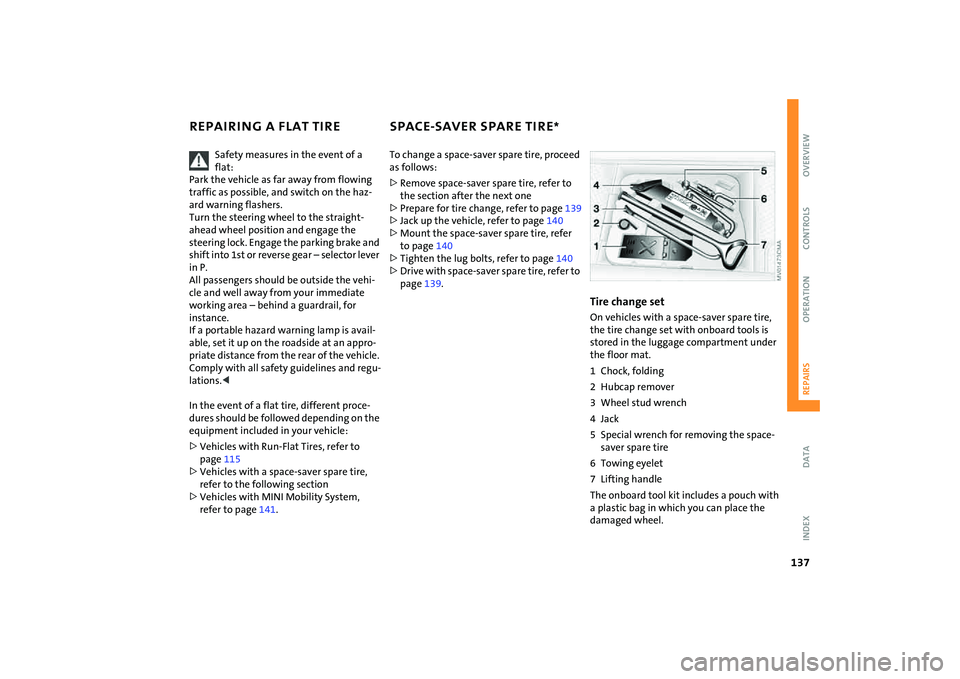
Tire change setOn vehicles with a space-saver spare tire,
the tire change set with onboard tools is
stored in the luggage compartment under
the floor mat.
1 Chock, folding
2 Hubcap remover
3 Wheel stud wrench
4Jack
5 Special wrench for removing the space-
saver spare tire
6 Towing eyelet
7 Lifting handle
The onboard tool kit includes a pouch with
a plastic bag in which you can place the
damaged wheel.
Page 141 of 176
139
OVERVIEW REPAIRSOPERATION CONTROLS DATA INDEX
SPACE-SAVER SPARE TIRE
*
CHANGING TIRES
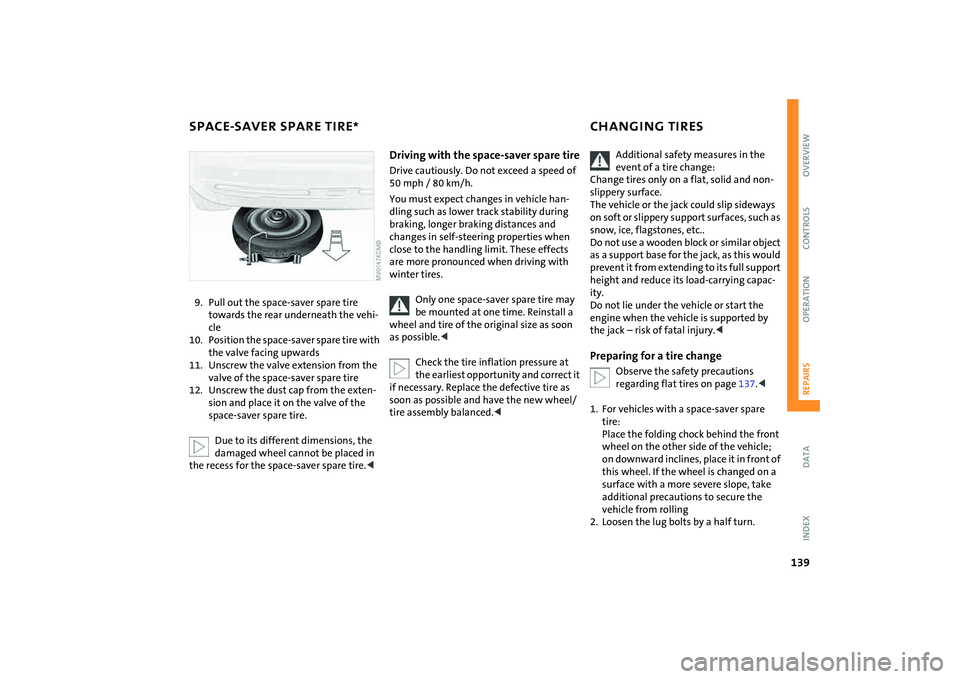
9. Pull out the space-saver spare tire
towards the rear underneath the vehi-
cle
10. Position the space-saver spare tire with
the valve facing upwards
11. Unscrew the valve extension from the
valve of the space-saver spare tire
12. Unscrew the dust cap from the exten-
sion and place it on the valve of the
space-saver spare tire.
Due to its different dimensions, the
damaged wheel cannot be placed in
the recess for the space-saver spare tire.<
Driving with the space-saver spare tireDrive cautiously. Do not exceed a speed of
50 mph / 80 km/h.
You must expect changes in vehicle han-
dling such as lower track stability during
braking, longer braking distances and
changes in self-steering properties when
close to the handling limit. These effects
are more pronounced when driving with
winter tires.
Only one space-saver spare tire may
be mounted at one time. Reinstall a
wheel and tire of the original size as soon
as possible.<
Check the tire inflation pressure at
the earliest opportunity and correct it
if necessary. Replace the defective tire as
soon as possible and have the new wheel/
tire assembly balanced.<
Additional safety measures in the
event of a tire change:
Change tires only on a flat, solid and non-
slippery surface.
The vehicle or the jack could slip sideways
on soft or slippery support surfaces, such as
snow, ice, flagstones, etc..
Do not use a wooden block or similar object
as a support base for the jack, as this would
prevent it from extending to its full support
height and reduce its load-carrying capac-
ity.
Do not lie under the vehicle or start the
engine when the vehicle is supported by
the jack – risk of fatal injury.<
Preparing for a tire change
Observe the safety precautions
regarding flat tires on page137.<
1. For vehicles with a space-saver spare
tire:
Place the folding chock behind the front
wheel on the other side of the vehicle;
on downward inclines, place it in front of
this wheel. If the wheel is changed on a
surface with a more severe slope, take
additional precautions to secure the
vehicle from rolling
2. Loosen the lug bolts by a half turn.
Page 143 of 176
141
OVERVIEW REPAIRSOPERATION CONTROLS DATA INDEX
MINI MOBILITY SYSTEM
*
MINI Mobility System
The MINI Mobility System is provided to
help you repair a flat tire. With the help of
this system you can apply a liquid sealant
on the inside of the tire, which seals the
damaged area and enables you to continue
to drive.Preparing for tire repair
Before using the MINI Mobility Sys-
tem read the warning and danger
precautions on the equipment.<
If possible, leave objects in which have
been forced into the tire.
Take off the tag regarding speed limits and
stick it onto the steering wheel.
Using the MINI Mobility SystemIn order to repair a flat tire with the MINI
Mobility System, proceed as follows:
>Pump in liquid sealant, refer to page142
>Reinflate the tire, refer to page142
>Distribute liquid sealant, refer to
page143
>Check tire inflation pressure, refer to
page143
>Drive on, refer to page143.
MINI Mobility System with onboard
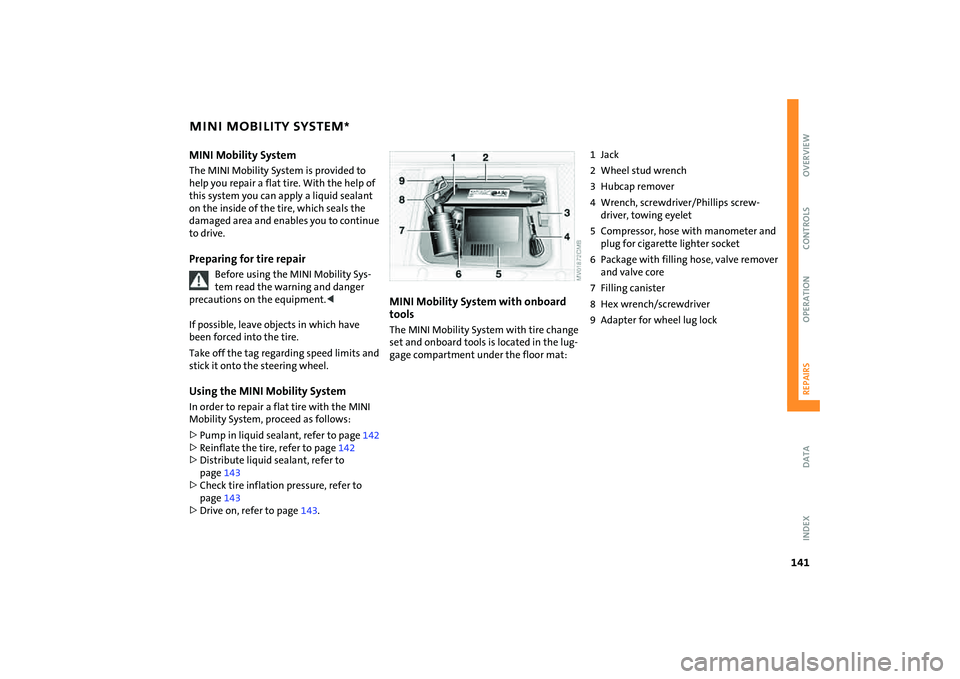
tools The MINI Mobility System with tire change
set and onboard tools is located in the lug-
gage compartment under the floor mat:
1Jack
2 Wheel stud wrench
3 Hubcap remover
4 Wrench, screwdriver/Phillips screw-
driver, towing eyelet
5 Compressor, hose with manometer and
plug for cigarette lighter socket
6 Package with filling hose, valve remover
and valve core
7 Filling canister
8 Hex wrench/screwdriver
9 Adapter for wheel lug lock
Page 163 of 176
EVERYTHING FROM A TO Z
161
OVERVIEW REPAIRS OPERATION CONTROLS DATA INDEX
Brake pads103
break-in procedures102
warning lamp18
Brakes124
ABS72
brake fluid124
brake pads103
break-in procedures102
CBC72
indicator/warning
lamps16
,17,18
parking brake54
Brake system124
brake fluid124
brake pads103
break-in procedures102
disc brakes103
warning lamp17
Brake wear warning
brake pads103
warning lamp18
Breaking in102
Bulb replacement, refer to
Lamps and bulbs133
Buttons on multifunction
steering wheel20
automatic transmission with
Steptronic58C
California Proposition 65
warning7
Capacities157
Car care, refer to Caring for your
vehicle126
Car-care products126
Care, vehicle126
Care of plastics127
Care of synthetic leather127
Cargo area
opening from the outside29
opening with the remote
control26
volume155
,156
Cargo area, refer to Luggage
compartment in the MINI93
Cargo area cover, refer to
Luggage compartment
cover93
Car keys, refer to Keys24
Carpet care128
Car radio, refer to separate
Owner's Manual
Car telephone, refer to separate
Owner's Manual
Car vacuum cleaner,
connecting, refer to Cigarette
lighter socket90
Car wash126Car wash, refer to Washing
your vehicle126
Cassette operation, refer to
Owner's Manual for Radio
Catalytic converter, refer to
Hot exhaust system104
CBC Cornering Brake Control72
CD changer, refer to Owner's
Manual for Radio
CD operation, refer to
Owner's Manual for Radio
Center armrest89
Central locking system24
interior28
Changing bulbs133
Changing the wiper
blades132
,133
Changing tires139
space-saver spare tire137
Charge-current indicator
light16
Children, transporting50
Child-restraint fixing system,
LATCH52
Child-restraint systems50
Child seat, refer to Installing
child-restraint systems50
Chock, folding
space-saver spare tire137
Chrome parts, refer to Caring
for your vehicle127Chrome-plated parts, care127
Cigarette lighter90
Cigarette lighter socket90
Cigarette tray, refer to
Ashtray89
Circulation of air, refer to
Recirculated air mode83
,86
Cleaning the rear window64
Cleaning the vehicle, refer to
Caring for your vehicle126
Clock67
12-hour/24-hour mode67
changing the time67
Closing
from inside28
from outside25
Clothes hooks104
Clutch53
break-in procedures102
Cockpit12
Coding, tires112
Cold start, refer to Starting the
engine53
Compact disk operation, refer
to Owner's Manual for Radio
Compartments, refer to
Storage compartments88
Computer, refer to Onboard
computer70
Condensed water, refer to Air
conditioning83
,86
Page 164 of 176

EVERYTHING FROM A TO Z
162
Configuring settings, refer to
Vehicle Memory49
Consumption, refer to
Average consumption71
Current fuel consumption71
Contents2
Control elements, refer to
Cockpit12
Convenience operation
convertible top37
from outside26
,27
glass sunroof, electric33
windows31
Convertible top35
care128
convenience operation37
electrical malfunction37
emergency closing37
malfunction37
Coolant122
indicator lamp16
level123
temperature gauge68
Coolant temperature68
Cooling
air conditioning mode86
cooling function83
Cooling function
air conditioning system83
automatic climate control86Cooling system, refer to
Capacities157
Copyright2
Cornering Brake Control
(CBC)72
warning lamp17
Correct tires112
Cosmetic mirror, refer to
Illuminated vanity mirror48
Cruise control65
buttons on the steering
wheel20
indicator lamp19
Cup holders, refer to Beverage
holders89
Curb weight, refer to
Weights155
,156
Current fuel consumption71
setting units71
Cylinders, refer to Engine
data152
D
Daily odometer, refer to Trip
odometer67
Dashboard, refer to Cockpit12
Dashboard lighting, refer to
Instrument lighting62Data
capacities157
dimensions153
engine152
technical152
weights155
Date of the Owner's Manual7
Daytime running lamps61
Defrosting and demisting
windows
air conditioning system84
automatic climate control87
Defrosting front windows, refer
to Defrosting and demisting
windows84
,87
Defrosting windows84
,87
air conditioning system83
automatic climate control86
Defrosting windshield, refer to
Defrosting and demisting
windows84
,87
Defrost setting, refer to
Defrosting and demisting
windows84,87
Demisting windows84
,87
Digital clock67
Dimensions153
,154
Dimming interior rearview
mirror102
Dipstick, engine oil121Directional turn signal,
refer to Turn signal
indicators61
Disc brakes103
Disengaging the locks, refer to
Unlocking26
Displacement, refer to Engine
data152
Display elements13
with navigation system or
Cockpit Chrono Pack14
Display lighting, refer to
Instrument lighting62
Disposal
coolant122
vehicle battery144
Distance covered, refer to
Odometer67
Distance warning, refer to Park
Distance Control (PDC)81
Door keys24
Door lock27
Doors, locking and unlocking
acknowledgment
signals26
,27
from inside28
from outside26
DOT quality grades112
Draft-free ventilation84
,87
Drink holders, refer to Beverage
holders89
Page 166 of 176
EVERYTHING FROM A TO Z
164
Flat tire
Flat Tire Monitor74
,75
MINI Mobility System141
Run-Flat Tires75
space-saver spare tire137
Tire Pressure Monitor
TPM76
Flat tire, refer to Changing
tires139
Flat tire, refer to Tire
condition113
Flat Tire Monitor74
indicator lamp17
issuing a flat tire warning75
malfunction75
,77
Floor coverings, carpets128
Floor mats128
Fog lamps62
indicator lamp62
Foldable rear backrest93
,94
Folding roof, refer to
Convertible top with
integrated sliding sunroof35
Foot braking, refer to General
driving notes103
Fresh air nozzles,
refer to Draft-free
ventilation84
Front airbags79
Front turn signal indicators,
bulb replacement134Fuel105
average consumption71
gauge67
,68
quality105
tank capacity157
Fuel filler door105
unlocking in the event of
electrical
malfunction106
,107
Fuses145
G
Garage door opener, refer to
Integrated universal remote
control91
Gas, refer to Average
consumption71
Gas, refer to Fuel quality105
Gas cap105
Gasoline, refer to Fuel
quality105
Gasoline gauge, refer to Fuel
gauge67
,68
Gear indicator, for automatic
transmission with
Steptronic57
Gearshift lever
automatic transmission with
Steptronic56
manual transmission55Gear shifts, automatic
transmission with
Steptronic56
General driving notes102
Glass sunroof, electric33
convenience operation27
opening and closing in the
event of an electrical
malfunction34
remote control26
Glove compartment88
Gross weight, refer to
Weights155
,156
H
Handbrake, refer to Parking
brake54
Hazard warning flashers12
Head airbags79
Headlamp flasher61
indicator lamp19
Headlamps
bulb replacement134
care127
Headlamp washer reservoir64
capacity, refer to
Capacities157
Headlamp washer system
cleaning headlamps64
washer fluid64
Head restraints44Heated rear window
air conditioning system83
automatic climate control86
Heating82
exterior mirrors48
mirrors48
rear window83
,86
seats47
windshield83
,86
Heavy load, refer to Loading97
Height, refer to
Dimensions153,154
Height adjustment
seats43
steering wheel47
High beams61
bulb replacement134
headlamp flasher61
indicator lamp19
High Performance Synthetic
Oil, refer to Engine oil122
recommended oils122
specified oils122
Holders for beverages89
Horn12
Hot exhaust system104
Hydraulic brake124
Hydroplaning103
Page 167 of 176

EVERYTHING FROM A TO Z
165
OVERVIEW REPAIRS OPERATION CONTROLS DATA INDEX
I
Ice warning, refer to Outside
temperature warning70
Ignition53
Ignition key24
Ignition key positions, refer to
Ignition lock53
Ignition lock53
Illuminated vanity mirror48
Imitation leather127
Imprint2
Index160
Indicator/warning lamp
airbags80
ASC73
brakes124
coolant temperature68
DSC73
fasten safety belts46
Flat Tire Monitor75
fog lamps62
reserve fuel capacity67
,68
Indicator and warning lamps
Tire Pressure Monitor
TPM77
Indicator and warning lamps,
overview16
Individual air distribution87
Individual settings, refer to
Vehicle Memory49Inflation pressure, refer to Tire
inflation pressure108
Inflation pressure monitor,
refer to Flat Tire Monitor74
Inflation pressure monitoring,
refer to Tire Pressure Monitor
TPM76
Inspection69
Instrument cluster, refer to
Display elements13
Instrument lighting62
Instrument panel, refer to
Cockpit12
Integrated universal remote
control91
Interior lamp, remote
control26
Interior lamps62
Interior rearview mirror48
automatic dimming102
Interlock, refer to Steering
locked53
Intermittent operation of the
wipers63
Interval
display, service125
J
Jack137
,141
points140Jack, refer to Tire change set
MINI Mobility System141
Run-Flat Tires115
space-saver spare tire137
Jacking points140
Jets, refer to Ventilation84
,87
Jets, refer to Windshield
washer jets64
John Cooper Works Kit152
Jump-starting146
K
Keys24
Kickdown57
Knock control105
L
Lamp defect133
Lamp replacement, refer to
Lamps and bulbs133
Lamps, refer to Parking lamps/
Low beams60
Lamps and bulbs133
Lashing eyelets, refer to
Securing the load97
LATCH child-restraint fixing
system52
Leather care128
LEDs light-emitting diodes136
Length, refer to
Dimensions153
,154License plate lamp, bulb
replacement136
Lifting handle, space-saver
spare tire137
Light-alloy wheels, care127
Light-emitting diodes
(LEDs)136
Lighter90
Lighting
lamps and bulbs133
Lighting of the instruments62
Lights on warning61
Light switch60
Loading
securing cargo97
stowing cargo97
Loading the vehicle95
Loads, refer to Loading cargo95
Load securing devices, refer to
Securing the load97
Locking
from inside28
from outside26
Locking/unlocking the vehicle,
acknowledgment
signals26
,27
Low beams60
bulb replacement134
Lower back support, refer to
Lumbar support44