lights MINI COOPER CONVERTIBLE 2011 User Guide
[x] Cancel search | Manufacturer: MINI, Model Year: 2011, Model line: COOPER CONVERTIBLE, Model: MINI COOPER CONVERTIBLE 2011Pages: 186, PDF Size: 3.25 MB
Page 76 of 186

Lamps
74
Setting the duration or deactivating the
function
1.Switch on the ignition, refer to page44.
2.Briefly press the button in the turn signal
lever repeatedly until "SET/INFO" is dis-
played.
3.Press and hold the button until the display
changes.
4.Briefly press the button repeatedly until the
symbol and "SET" are displayed.
5.Press and hold the button until the display
changes.
6.Briefly press the button repeatedly until the
display shows the illustrated symbol.
7.Press and hold the button until the display
changes.8.Briefly press the button to select:
>
The function is deactivated.
> ...
Select the appropriate duration, e.g.
40 seconds.
9.Press the button for a longer period.
The setting is stored.
Daytime running lights*
The light switch can remain in the lamps off,
parking lamps or automatic headlamp control
*
position.
In the lamps off position, the exterior lighting is
automatically switched off after the vehicle is
parked. In the parking lamps position, the park-
ing lamps will stay on after the ignition is
switched off.
Switch on the parking lamps separately if
needed.
Activating/deactivating daytime
running lights
The setting is stored for the remote control in
use, refer to Personal Profile, page18.
1.Switch on the ignition, refer to page44.
2.Briefly press the button in the turn signal
lever repeatedly until "SET/INFO" is dis-
played.
3.Press and hold the button until the display
changes.
Page 77 of 186

75
AT A GLANCE REFERENCE MOBILITYCONTROLS DRIVING TIPS COMMUNICATIONS
4.Briefly press the button repeatedly until the
symbol and "SET" are displayed.
5.Press and hold the button until the display
changes.
6.Briefly press the button repeatedly until the
display shows the illustrated symbol, arrow.
7.Press and hold the button until the display
changes.
8.Briefly press the button to select:
>
Daytime running lights activated.
>
Daytime running lights deactivated.
9.Press the button for a longer period.
The setting is stored.
Adaptive Light Control*
The concept
Adaptive Light Control is a variable headlamp
control system that enables better illumination
of the road surface. Depending on the steering
angle and other parameters, the light from the
headlamp follows the course of the road.
Activating Adaptive Light Control
With the ignition switched on, turn the light
switch to position 3, refer to page73.
Standstill function
*: to avoid blinding oncoming
traffic, the Adaptive Light Control directs light
toward the front passenger side when the vehi-
cle is at a standstill.
In reverse, the Adaptive Light Control is not acti-
vated.
Malfunction
A message is displayed.
The Adaptive Light Control is malfunctioning or
failed. Have the system checked as soon as pos-
sible.
High beams/
roadside parking lamps
1Turn signals/roadside parking lamps*
2Switching on high beams
3Switching off high beams/headlamp flasher
Roadside parking lamps, left or right*
The vehicle can be illuminated on one side for
parking. Comply with local regulations when
doing so.
Switching on
After parking the vehicle, press the lever up or
down, arrow 1.
The roadside parking lamps drain the bat-
tery. Therefore, do not leave them on for
unduly long periods of time; otherwise, the bat-
Page 79 of 186

77
AT A GLANCE REFERENCE MOBILITYCONTROLS DRIVING TIPS COMMUNICATIONS
Interior lamps
The interior lamps, the footwell lamps* and the
cargo area lamp are controlled automatically.
To reduce the drain on the battery, a short
while after the ignition is switched off,
refer to Start/Stop button on page44, all lights in
the vehicle's passenger compartment are
switched off.<
Switching interior lamps on/off manually
To switch the interior lamps on/off.
Press the switch.
To switch off the interior lamps permanently,
press the button for about 3 seconds.
Reading lamps*
To switch the reading lamps on and off.
In front: press the switch.
In the rear: press the button.
Ambient lighting*
The color and brightness of the ambient lighting
can be changed.
>Press the switch forward.
The color changes in stages.
>Press the switch toward the rear.
The brightness changes in stages.
Intermediate settings and colors are possible.
For a continuous color change in the
ambient lighting, press and hold the
switch toward the front for longer than
10 seconds.<
Page 100 of 186
Things to remember when driving
98
When loading, make sure that there is sufficient
space for the movement of the glass sunroof
and that no objects protrude into the swiveling
area of the liftgate; otherwise, damage can
occur.
Fasten roof-mounted cargo correctly and
securely to prevent it from shifting or falling off
during the trip.
Drive smoothly. Avoid sudden acceleration and
braking maneuvers, and take corners gently.
Saving fuel
Fuel consumption depends on a number of dif-
ferent factors. The implementation of certain
measures, your driving style and regular mainte-
nance can have an influence on fuel consump-
tion and on the environmental impact.
Remove unnecessary cargo
Additional weight increases fuel consumption.
Remove attached parts no longer in use
Remove auxiliary mirrors, roof- or rear-mounted
luggage racks whenever you are not using
them.
Attached parts on the vehicle affect its aerody-
namics and increase fuel consumption.
Check tire inflation pressure regularly
Check and, if necessary, correct tire inflation
pressure at least twice a month and before start-
ing on a long trip.
Low inflation pressure increases rolling resis-
tance and thus leads to greater fuel consump-
tion and tire wear.
Drive off immediately
Do no t wa it for t he eng ine to warm u p wh ile the
vehicle remains stationary. Start driving right
away, but at moderate engine speeds. This is the
fastest way for the cold engine to reach its oper-
ating temperature.
Think ahead while driving
Avoid unnecessary acceleration and braking by
maintaining a suitable distance to the vehicle
driving ahead.
Driving smoothly and anticipating impending
traffic situations reduces fuel consumption.
Avoid high engine speeds
Use first gear only for driving off. In second and
higher gears, accelerate smoothly to a suitable
engine and road speed. In doing so, avoid high
engine speeds and shift up early.
When you reach your desired traveling speed,
shift to the highest suitable gear and drive at
constant speed.
As a rule: driving at low engine speeds lowers
fuel consumption and reduces wear.
Coasting
When approaching a red traffic light, take your
foot off the accelerator and let the vehicle coast
to a halt in the highest suitable gear.
On a downhill gradient, take your foot off the
accelerator and let the vehicle coast in a suitable
gear.
Fuel supply is shut off automatically when the
vehicle is coasting.
Switch off the engine during lengthy
stops
Switch off the engine when stopping for lengthy
periods, e.g. at traffic lights, railroad crossings or
in traffic jams.
Have the vehicle serviced
Have your vehicle serviced regularly to achieve
good economy and a long vehicle life. The man-
ufacturer of your MINI recommends having the
vehicle serviced by a MINI dealer. Also note the
MINI Maintenance System, page131.
Page 140 of 186

Replacing components
138
When working on electrical systems,
always begin by switching off the con-
sumer in question; otherwise, short circuits
could result. To avoid possible injury or equip-
ment damage when replacing bulbs, observe
any instructions provided by the bulb manufac-
turer.<
Caring for headlamps, refer to page134.
For any bulb replacement not described
below, contact a MINI dealer or a work-
shop that has specially trained personnel work-
ing in accordance with the specifications of the
MINI manufacturer.<
For checking and adjusting headlamp aim,
please contact your MINI dealer.<
Light-emitting diodes LEDs
Light-emitting diodes installed behind translu-
cent lenses serve as the light sources for many of
the controls and displays in your vehicle. These
light-emitting diodes are related to conven-
tional laser diodes, and legislation defines them
as Class 1 light-emitting diodes.
Do not remove the covers or expose the
eyes directly to the unfiltered light source
for several hours; otherwise, this could cause
irritation of the retina.<
Headlight glass lens
In cool or humid weather, condensation may
occur on the interior of outside lights. The con-
densation disappears a short time after the light
is switched on. The headlamp glasses do not
need to be changed. If a lot of moisture is
present, e.g. water droplets in the light, have
them checked by your service center.
Xenon lamps*
The service life of these bulbs is very long and
the probability of failure very low, provided that
they are not switched on and off an excessive
number of times. If a xenon lamp fails neverthe-
less, switch on the fog lamps and continue the
journey with great care, provided that local leg-
islation does not prohibit this.Have any work on the xenon lamp system,
including bulb replacement, carried out
only by a MINI dealer or a workshop that has
specially trained personnel working in accor-
dance with the specifications of the MINI manu-
facturer. Due to high voltage, there is a risk of
fatal injury if work on the xenon lamps is carried
out improperly.<
Halogen low beams and high beams
H13 bulb, 60/55 watts
The H13 bulb is pressurized. Therefore,
wear safety glasses and protective gloves.
Otherwise, there is a risk of injury if the bulb is
damaged.<
Be careful when installing the cover; oth-
erwise, leaks could occur and cause dam-
age to the headlamp system.<
Accessing the lamp from the engine
compartment
The low-beam/high-beam bulb can be changed
from the engine compartment.
Removing the cover:
1.Press the tab.
2.Flip open the cover and take it out of the
holder.
Follow the same steps in reverse order to reat-
tach the cover.
Be careful when installing the cover; oth-
erwise, leaks could occur and cause dam-
age to the headlamp system.<
Page 143 of 186
141
AT A GLANCE REFERENCEMOBILITYCONTROLS DRIVING TIPS COMMUNICATIONS
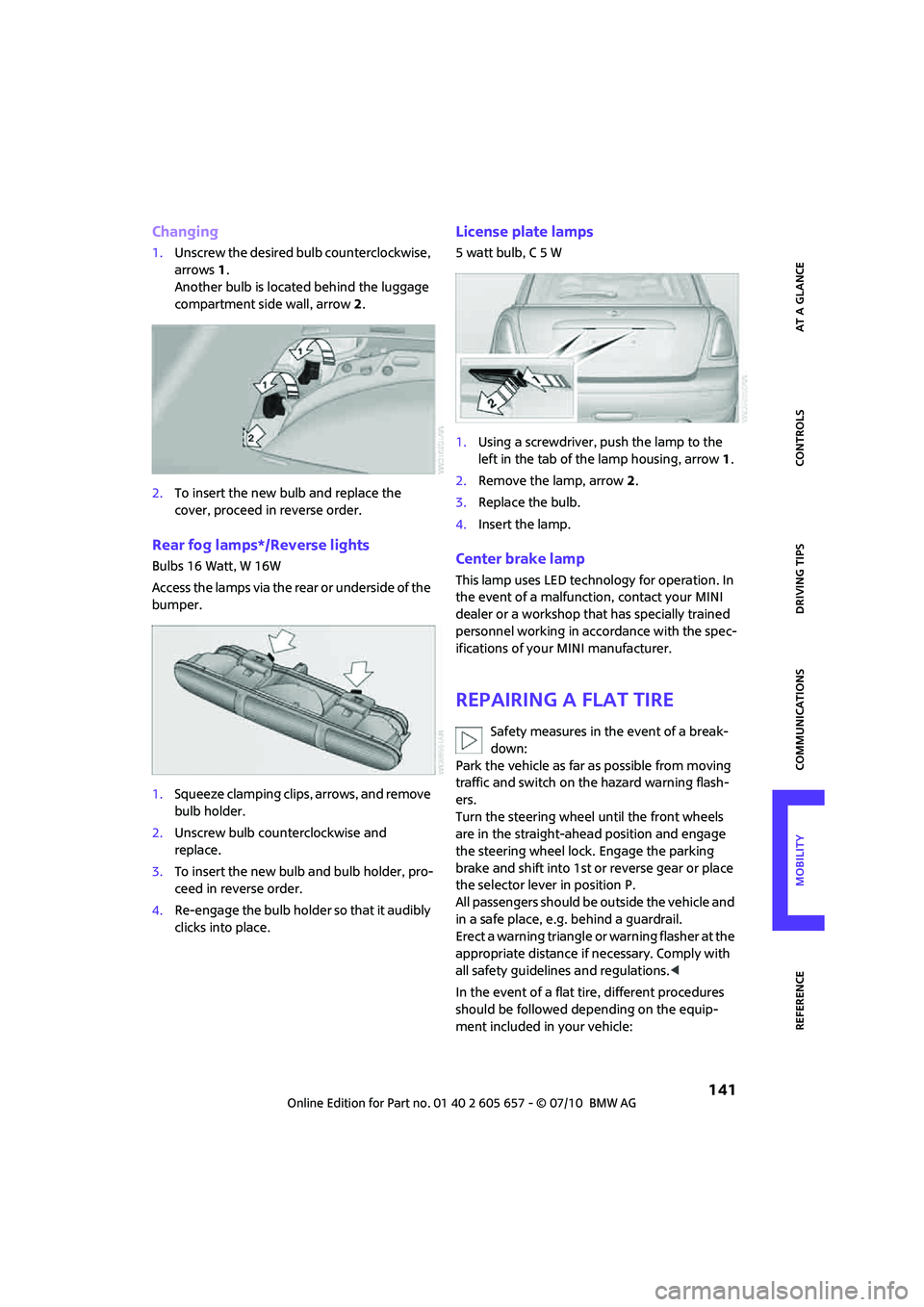
Changing
1.Unscrew the desired bulb counterclockwise,
arrows1.
Another bulb is located behind the luggage
compartment side wall, arrow2.
2.To insert the new bulb and replace the
cover, proceed in reverse order.
Rear fog lamps*/Reverse lights
Bulbs 16 Watt, W 16W
Access the lamps via the rear or underside of the
bumper.
1.Squeeze clamping clips, arrows, and remove
bulb holder.
2.Unscrew bulb counterclockwise and
replace.
3.To insert the new bulb and bulb holder, pro-
ceed in reverse order.
4.Re-enga ge the bulb holde r so th at it au dibly
clicks into place.
License plate lamps
5watt bulb, C5W
1.Using a screwdriver, push the lamp to the
left in the tab of the lamp housing, arrow1.
2.Remove the lamp, arrow 2.
3.Replace the bulb.
4.Insert the lamp.
Center brake lamp
This lamp uses LED technology for operation. In
the event of a malfunction, contact your MINI
dealer or a workshop that has specially trained
personnel working in accordance with the spec-
ifications of your MINI manufacturer.
Repairing a flat tire
Safety measures in the event of a break-
down:
Park the vehicle as far as possible from moving
traffic and switch on the hazard warning flash-
ers.
Turn the steering wheel until the front wheels
are in the straight-ahead position and engage
the steering wheel lock. Engage the parking
brake and shift into 1st or reverse gear or place
the selector lever in position P.
All passengers should be outside the vehicle and
in a safe place, e.g. behind a guardrail.
Erect a warning triangle or warning flasher at the
appropriate distance if necessary. Comply with
all safety guidelines and regulations.<
In the event of a flat tire, different procedures
should be followed depending on the equip-
ment included in your vehicle:
Page 155 of 186
153
AT A GLANCE REFERENCEMOBILITYCONTROLS DRIVING TIPS COMMUNICATIONS
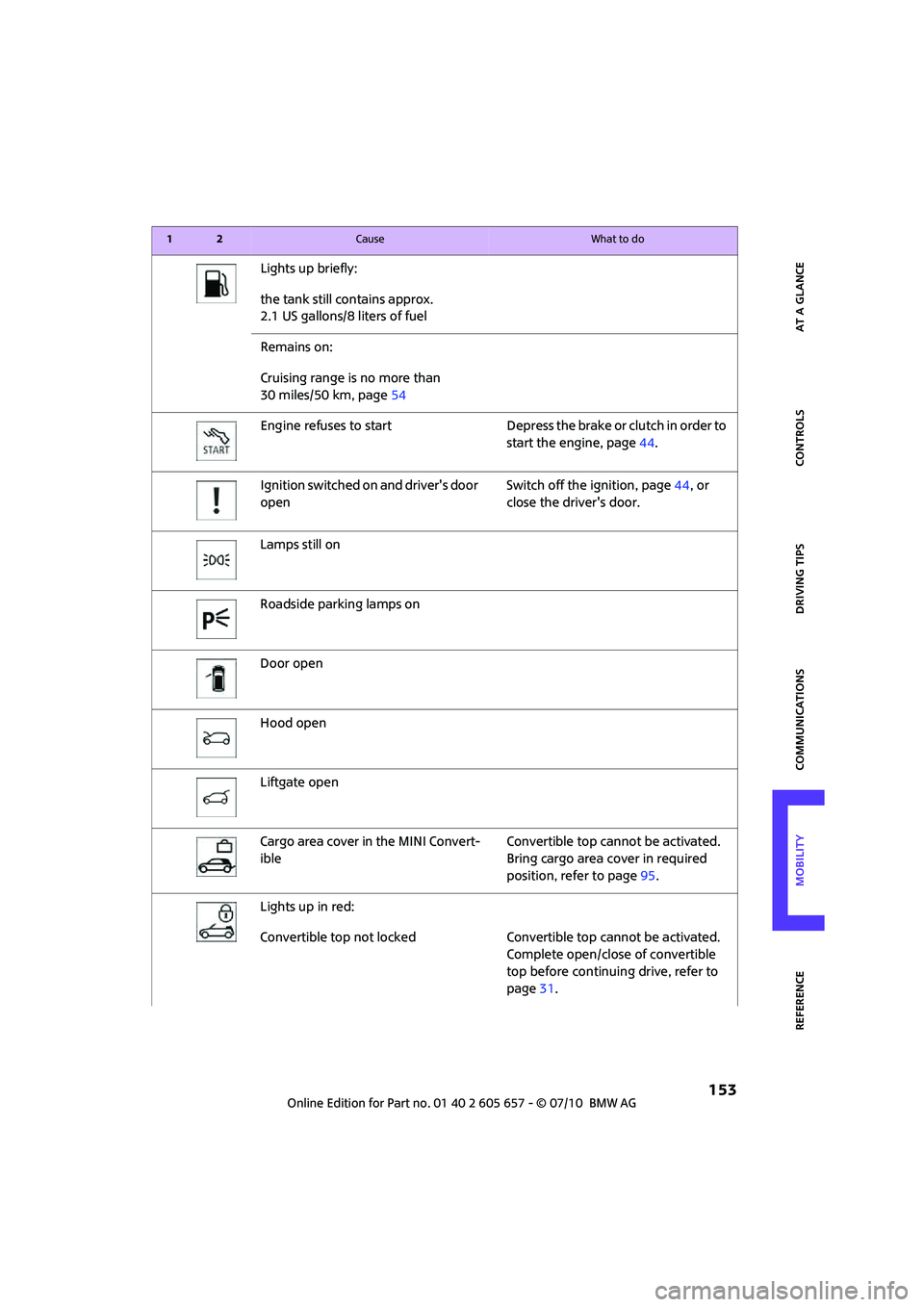
Lights up briefly:
the tank still contains approx.
2.1 US gallons/8 liters of fuel
Remains on:
Cruising range is no more than
30 miles/50 km, page54
Engine refuses to start Depress the brake or clutch in order to
start the engine, page44.
Ignition switched on and driver's door
openSwitch off the ignition, page44, or
close the driver's door.
Lamps still on
Roadside parking lamps on
Door open
Hood open
Liftgate open
Cargo area cover in the MINI Convert-
ibleConvertible top cannot be activated.
Bring cargo area cover in required
position, refer to page95.
Lights up in red:
Convertible top not locked Convertible top cannot be activated.
Complete open/close of convertible
top before continuing drive, refer to
page31.
12Cause What to do
Page 156 of 186
Indicator and warning lamps
154
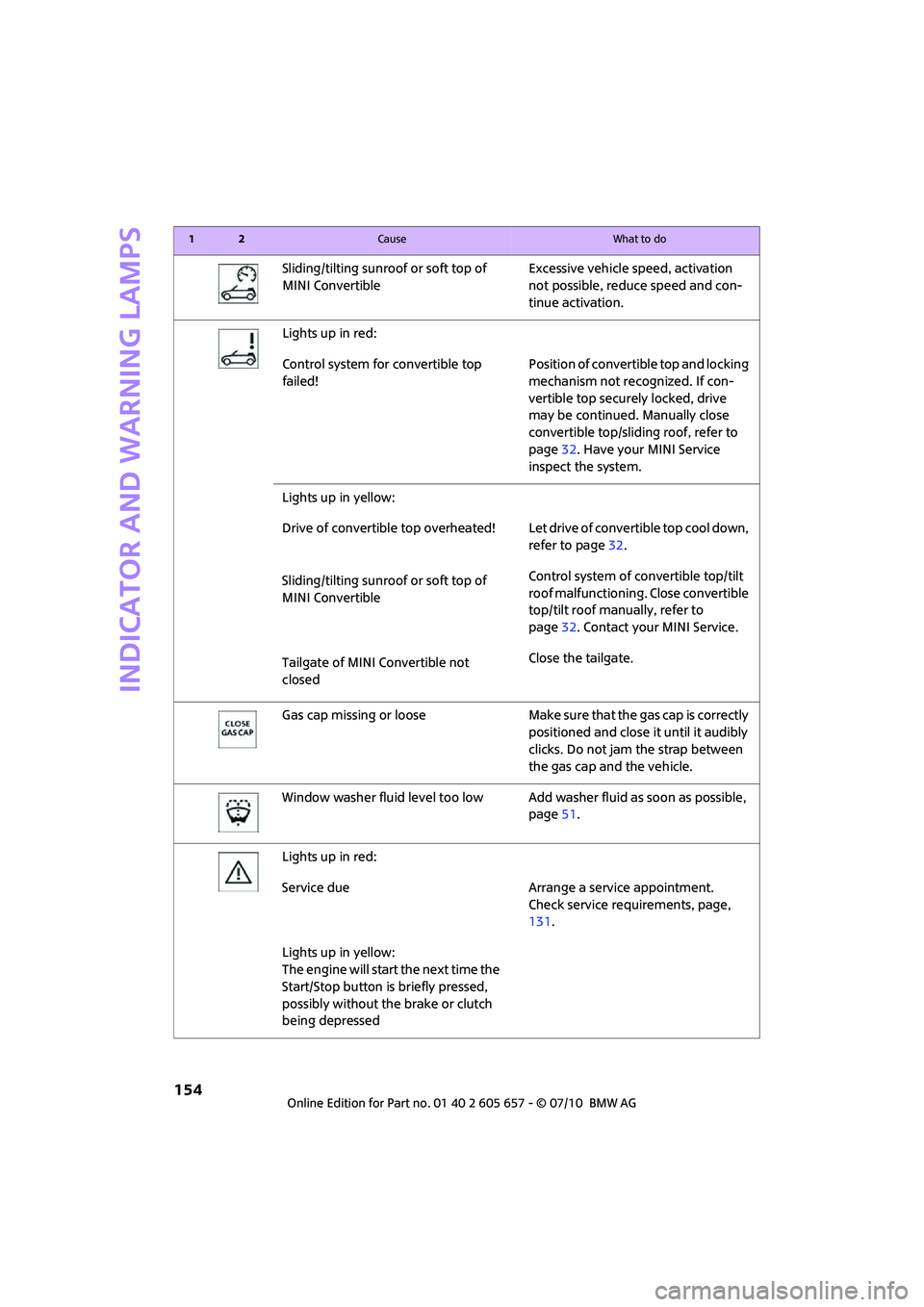
Sliding/tilting sunroof or soft top of
MINI ConvertibleExcessive vehicle speed, activation
not possible, reduce speed and con-
tinue activation.
Lights up in red:
Control system for convertible top
failed!Position of convertible top and locking
mechanism not recognized. If con-
vertible top securely locked, drive
may be continued. Manually close
convertible top/sliding roof, refer to
page32. Have your MINI Service
inspect the system.
Lights up in yellow:
Drive of convertible top overheated! Let drive of convertible top cool down,
refer to page32.
Sliding/tilting sunroof or soft top of
MINI ConvertibleControl system of convertible top/tilt
roof malfunctioning. Close convertible
top/tilt roof manually, refer to
page32. Contact your MINI Service.
Tailgate of MINI Convertible not
closedClose the tailgate.
Gas cap missing or loose Make sure that the gas cap is correctly
positioned and close it until it audibly
clicks. Do not jam the strap between
the gas cap and the vehicle.
Window washer fluid level too low Add washer fluid as soon as possible,
page51.
Lights up in red:
Service due Arrange a service appointment.
Check service requirements, page,
131.
Lights up in yellow:
The engine will start the next time the
Start/Stop button is briefly pressed,
possibly without the brake or clutch
being depressed
12Cause What to do
Page 157 of 186

155
AT A GLANCE REFERENCEMOBILITYCONTROLS DRIVING TIPS COMMUNICATIONS
Remote control malfunctioning or, in
cars with Comfort Access, not
detectedThe engine cannot be started. Have
the remote control checked, if neces-
sary.
Remote control battery is discharged Use the remote control for a longer
journey or, in cars with Comfort
Access, replace the battery.
Belt tensioners and/or airbag system
failedHave the system checked immedi-
ately. Fasten the safety belts anyway.
Power steering failed You can continue your journey, but
moderate your speed and exercise
due caution. Steering response will be
markedly different. Have the system
checked without delay.
Lights up in red:
Engine malfunction
Stop the car and switch off the
engine. You cannot continue your
journey. Contact your MINI dealer.
Lights up in yellow:
Full engine power no longer available You can continue your journey, but
moderate your speed and exercise
due caution. Have the engine
checked as soon as possible.
Indicator lamp1 flashes:
Engine malfunction under high load.
High engine load will result in dam-
age to the catalytic converterYou can continue your journey, but
moderate your speed and exercise
due caution. Have the vehicle
checked without delay.
Indicator lamp1 comes on:
Engine malfunction with adverse
effect on exhaust emissionsYou can continue your journey, but
moderate your speed and exercise
due caution. Have the car checked as
soon as possible.
12Cause What to do
Page 158 of 186

Indicator and warning lamps
156
Lights up in red:
Engine overheating Carefully bring the car to a stop,
switch off the engine and allow it to
cool down. Do not open the hood;
otherwise, there is a risk of injury from
scalding. Contact your MINI dealer.
Lights up in yellow:
Engine too hot Continue driving at more moderate
speed so that the engine can cool
down. Have the engine checked with-
out delay if the situation reoccurs.
Lights up in red:
Battery is no longer being charged.
Alternator malfunctionSwitch off all unnecessary electrical
consumers. Have the battery checked
without delay.
Lights up in yellow:
Battery charge level very low, battery
aged or not securely connectedHave the battery checked as soon as
possible.
Indication in US models
Parking brake applied
Indication in Canadian models
Parking brake applied
12Cause What to do