radio MINI COOPER CONVERTIBLE 2011 Owner's Manual
[x] Cancel search | Manufacturer: MINI, Model Year: 2011, Model line: COOPER CONVERTIBLE, Model: MINI COOPER CONVERTIBLE 2011Pages: 186, PDF Size: 3.25 MB
Page 110 of 186
Telephone
108
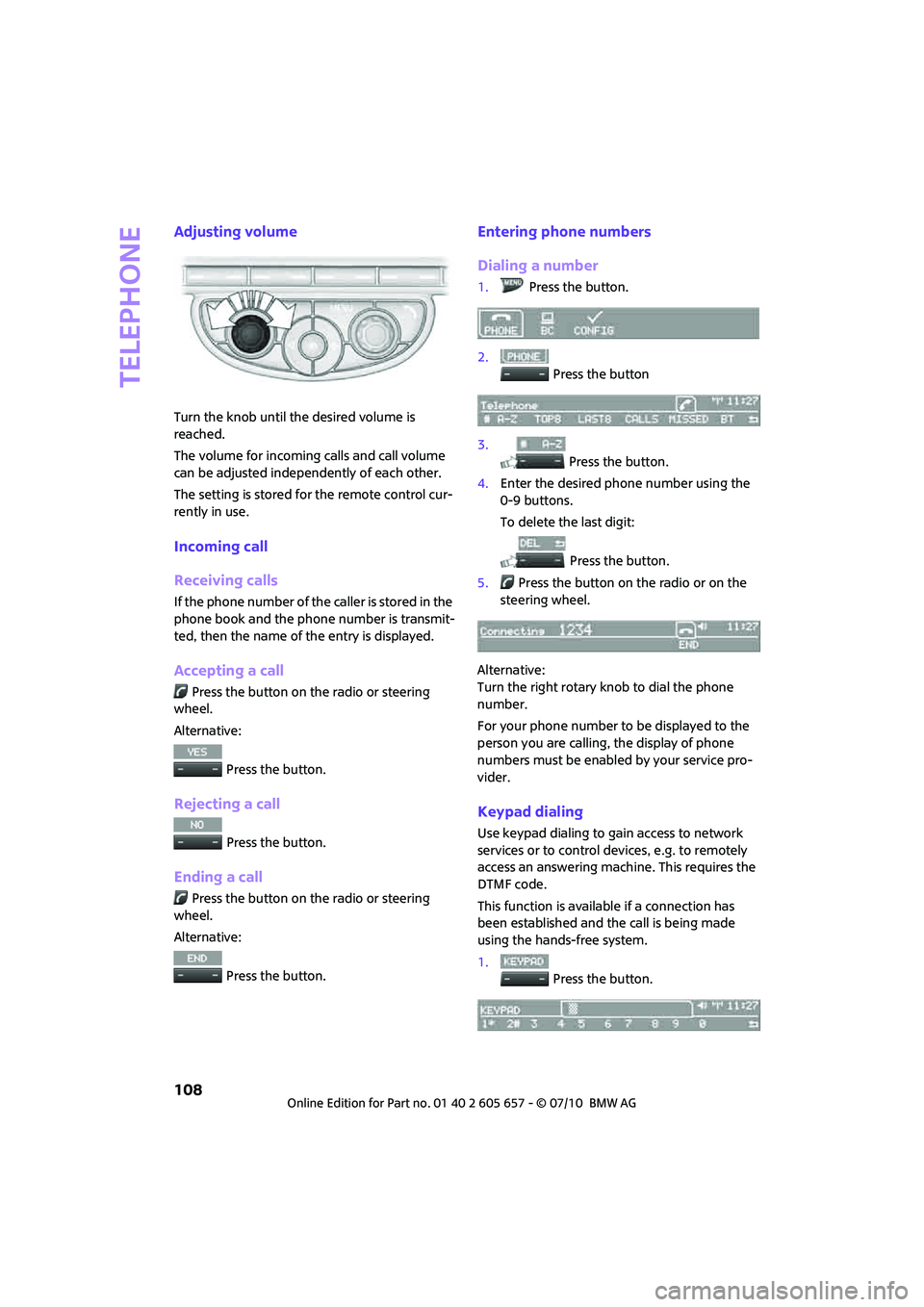
Adjusting volume
Turn the knob until the desired volume is
reached.
The volume for incoming calls and call volume
can be adjusted independently of each other.
The setting is stored for the remote control cur-
rently in use.
Incoming call
Receiving calls
If the phone number of the caller is stored in the
phone book and the phone number is transmit-
ted, then the name of the entry is displayed.
Accepting a call
Press the button on the radio or steering
wheel.
Alternative:
Press the button.
Rejecting a call
Press the button.
Ending a call
Press the button on the radio or steering
wheel.
Alternative:
Press the button.
Entering phone numbers
Dialing a number
1.Press the button.
2.
Press the button
3.
Press the button.
4.Enter the desired phone number using the
0-9 buttons.
To delete the last digit:
Press the button.
5.Press the button on the radio or on the
steering wheel.
Alternative:
Turn the right rotary knob to dial the phone
number.
For your phone number to be displayed to the
person you are calling, the display of phone
numbers must be enabled by your service pro-
vider.
Keypad dialing
Use keypad dialing to gain access to network
services or to control devices, e.g. to remotely
access an answering machine. This requires the
DTMF code.
This function is available if a connection has
been established and the call is being made
using the hands-free system.
1.
Press the button.
Page 111 of 186
109
AT A GLANCE REFERENCE MOBILITYCONTROLS DRIVING TIPS COMMUNICATIONS
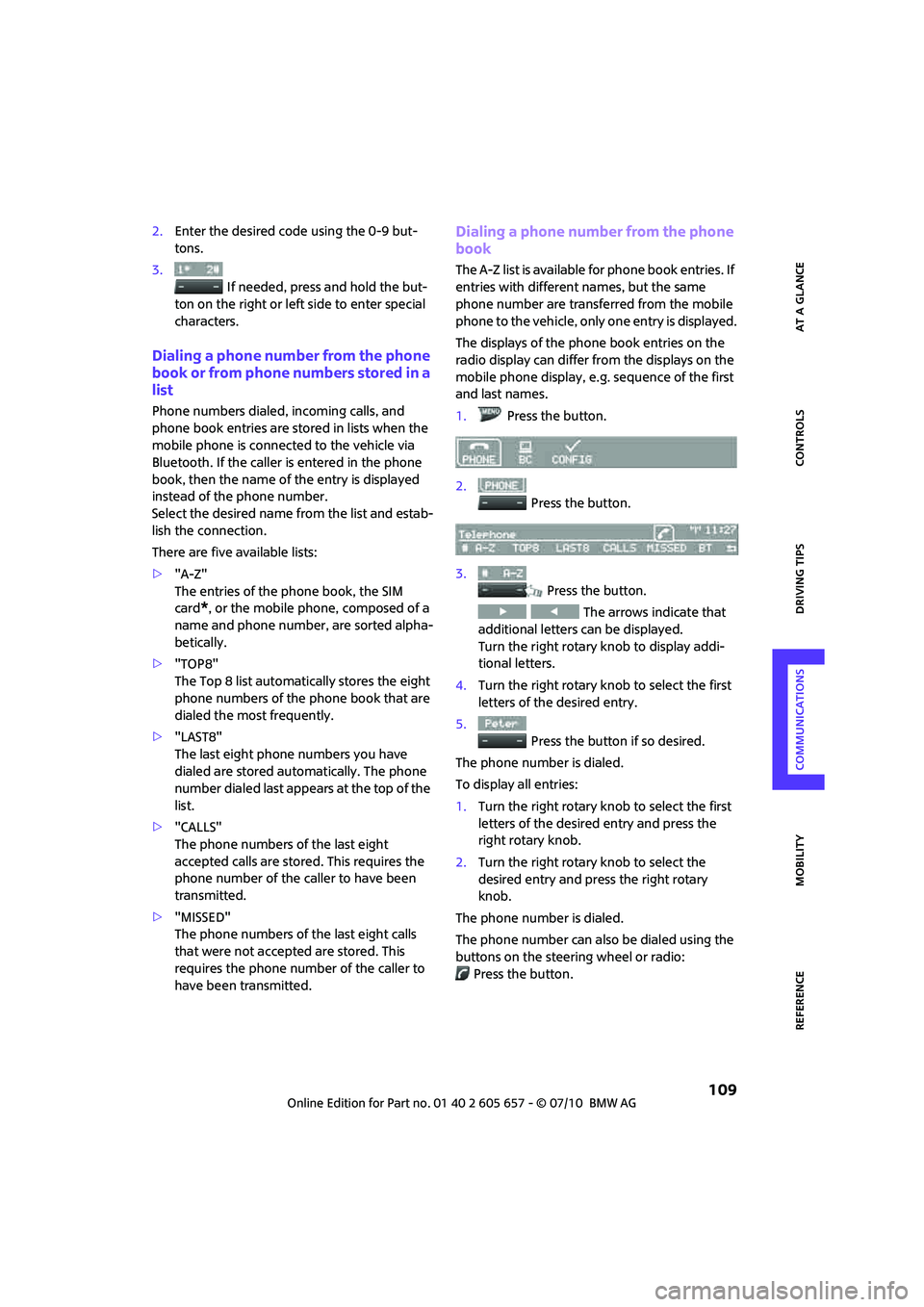
2.Enter the desired code using the 0-9 but-
tons.
3.
If needed, press and hold the but-
ton on the right or left side to enter special
characters.
Dialing a phone number from the phone
book or from phone numbers stored in a
list
Phone numbers dialed, incoming calls, and
phone book entries are stored in lists when the
mobile phone is connected to the vehicle via
Bluetooth. If the caller is entered in the phone
book, then the name of the entry is displayed
instead of the phone number.
Select the desired name from the list and estab-
lish the connection.
There are five available lists:
>"A-Z"
The entries of the phone book, the SIM
card
*, or the mobile phone, composed of a
name and phone number, are sorted alpha-
betically.
>"TOP8"
The Top 8 list automatically stores the eight
phone numbers of the phone book that are
dialed the most frequently.
>"LAST8"
The last eight phone numbers you have
dialed are stored automatically. The phone
number dialed last appears at the top of the
list.
>"CALLS"
The phone numbers of the last eight
accepted calls are stored. This requires the
phone number of the caller to have been
transmitted.
>"MISSED"
The phone numbers of the last eight calls
that were not accepted are stored. This
requires the phone number of the caller to
have been transmitted.
Dialing a phone number from the phone
book
The A-Z list is available for phone book entries. If
entries with different names, but the same
phone number are transferred from the mobile
phone to the vehicle, only one entry is displayed.
The displays of the phone book entries on the
radio display can differ from the displays on the
mobile phone display, e.g. sequence of the first
and last names.
1.Press the button.
2.
Press the button.
3.
Press the button.
The arrows indicate that
additional letters can be displayed.
Turn the right rotary knob to display addi-
tional letters.
4.Turn the right rotary knob to select the first
letters of the desired entry.
5.
Press the button if so desired.
The phone number is dialed.
To display all entries:
1.Turn the right rotary knob to select the first
letters of the desired entry and press the
right rotary knob.
2.Turn the right rotary knob to select the
desired entry and press the right rotary
knob.
The phone number is dialed.
The phone number can also be dialed using the
buttons on the steering wheel or radio:
Press the button.
Page 113 of 186

111
AT A GLANCE REFERENCE MOBILITYCONTROLS DRIVING TIPS COMMUNICATIONS
Operation by voice*
The concept
>The mobile phone can be operated without
removing your hand from the steering
wheel.
>In many cases, the entry process is sup-
ported by means of announcements or
questions.
>{...} Verbal instructions to use with the voice
activation system.
>{{...}} Indicates responses of the voice acti-
vation system.
Voice commands
Activating voice activation system
1.Briefly press the button on the steering
wheel.
An acoustic signal indicates that commands
can be spoken aloud. Display on the radio:
2.Say the command.
Finishing voice input
Press the button on the steering wheel
briefly
or
Possible commands
Having possible commands read aloud
The system understands default commands that
must be spoken word for word.
Possible commands are read aloud.
The system recognizes digits from zero to nine.
Each digit can be spoken individually or com-
bined into a sequence to accelerate the entry
process.
Using alternative commands
There are often a number of commands to run a
function, e.g.:
Example: dialing phone numbers
To start the dialog:
Press the button on the steering wheel.
{Cancel}.
{Help}.
{Dial name} or {Name}.
You sayThe voice control answers
{Dial number}{{Please say the number}}
For example: {123 456 7890}Depending on equipment:
{{123 456 7890. Continue ?}}
{Dial}{{Dialing number}}
Page 138 of 186

Care
136
Carpets/floor mats*
Keep floor mats, carpet, and other objects
out of the movement range of the pedals;
otherwise, they may inhibit the function of the
pedals during driving.
Do not place additional floor mats onto an exist-
ing one or onto other objects.
O n l y u s e f l o o r m a t s t h a t h a v e b e e n a p p r o v e d f o r
the vehicle and can be appropriately fastened.
Make sure that the floor mats are securely fas-
tened again after they have been removed, e.g.
for cleaning.<
Floor mats can be removed to be cleaned.
If the carpets are very dirty, clean with a microfi-
ber cloth and water or an interior cleaner. When
doing so, rub forward and back in the driving
direction; otherwise, the carpet may become
matted.
Interior plastic parts
These include:
>Plastic surfaces
>Lamp glass
>Display panes
>Mat parts
Only clean with water and, if necessary, solvent-
free plastic cleaners.
Do not use solvents such as alcohol, lac-
quer thinner, cold cleaners, fuel, or similar,
as these will damage the surfaces.<
Decorative strips*
Only clean decorative strips with moist cloths.
Wipe dry with a soft cloth.
Safety belts
Dirty belt straps impede the reeling action and
thus have a negative impact on safety.
Do not clean chemically, as this may
destroy the webbing.<
Displays
To clean displays such as radios or display ele-
ments, use a display cleaning cloth or a soft,
non-scratching, lint-free cloth.
Avoid pressing too hard when cleaning
the display as this can cause damage.<
Do not use chemical or abrasive house-
hold cleaning agents. Keep fluids of any
kind away from the device. Surfaces or electrical
components may otherwise become corroded
or damaged.<
CD/DVD drives
Do not use cleaning CDs as this could
damage parts of the drive.<
Vehicle storage
If you are not going to drive your car for more
than three months, please ask for advice from
your MINI dealer or a workshop that works
according to MINI manufacturer specifications.
Page 149 of 186
147
AT A GLANCE REFERENCEMOBILITYCONTROLS DRIVING TIPS COMMUNICATIONS
ensure that all comfort functions are fully avail-
able.
Charging the battery
Only charge the battery in the vehicle when the
engine is off. Connections, refer to Jump-start-
ing on page148.
Disposal
After replacing old batteries, return the
used batteries to your MINI dealer or to a
recycling center. Maintain the battery in an
upright position for transport and storage.
Always secure the battery against tipping over
during transport.<
Power failure
After a temporary power loss, some equipment
may not be fully functional and may require ini-
tialization. Individual settings are also lost and
must be reprogrammed:
>Time and date
These values must be updated, page60.
>Radio
Stations must be stored again, refer to the
separate Owner's Manual for Radio.
>Glass sunroof
*, electric
It may only be possible to raise the sunroof,
if applicable. The system must be initialized.
Contact your nearest MINI dealer.
Fuses
Do not attempt to repair a blown fuse or
replace it with a fuse of a different color or
Ampere rating. To do this could cause a fire in
the vehicle resulting from a circuit overload.
Have the fuse changed only by a MINI dealer or
a workshop that has specially trained personnel
working in accordance with the specifications of
the MINI manufacturer.<
A fuse allocation diagram is located on the inside
of the fuse box cover panels.
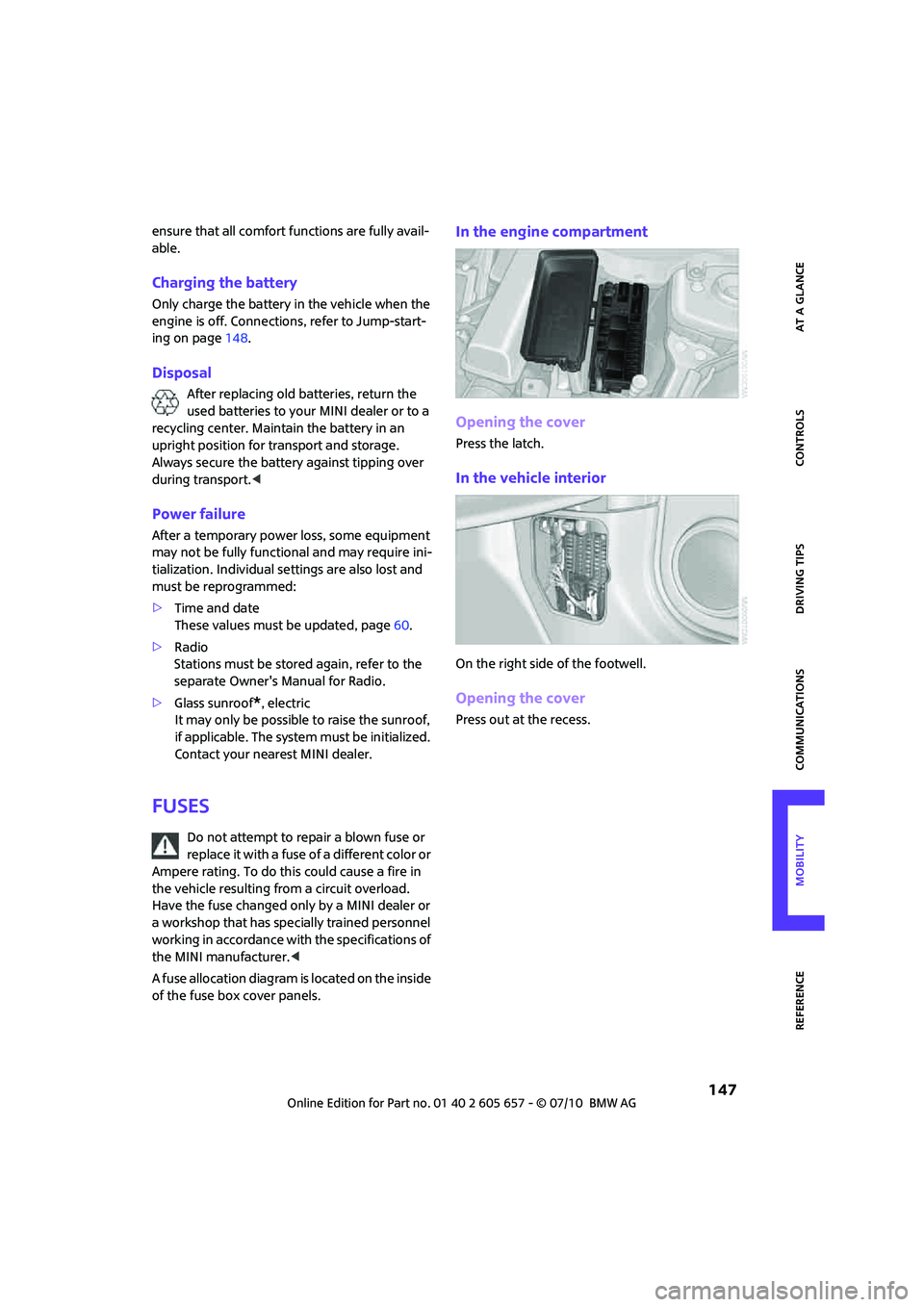
In the engine compartment
Opening the cover
Press the latch.
In the vehicle interior
On the right side of the footwell.
Opening the cover
Press out at the recess.
Page 162 of 186
Indicator and warning lamps
160
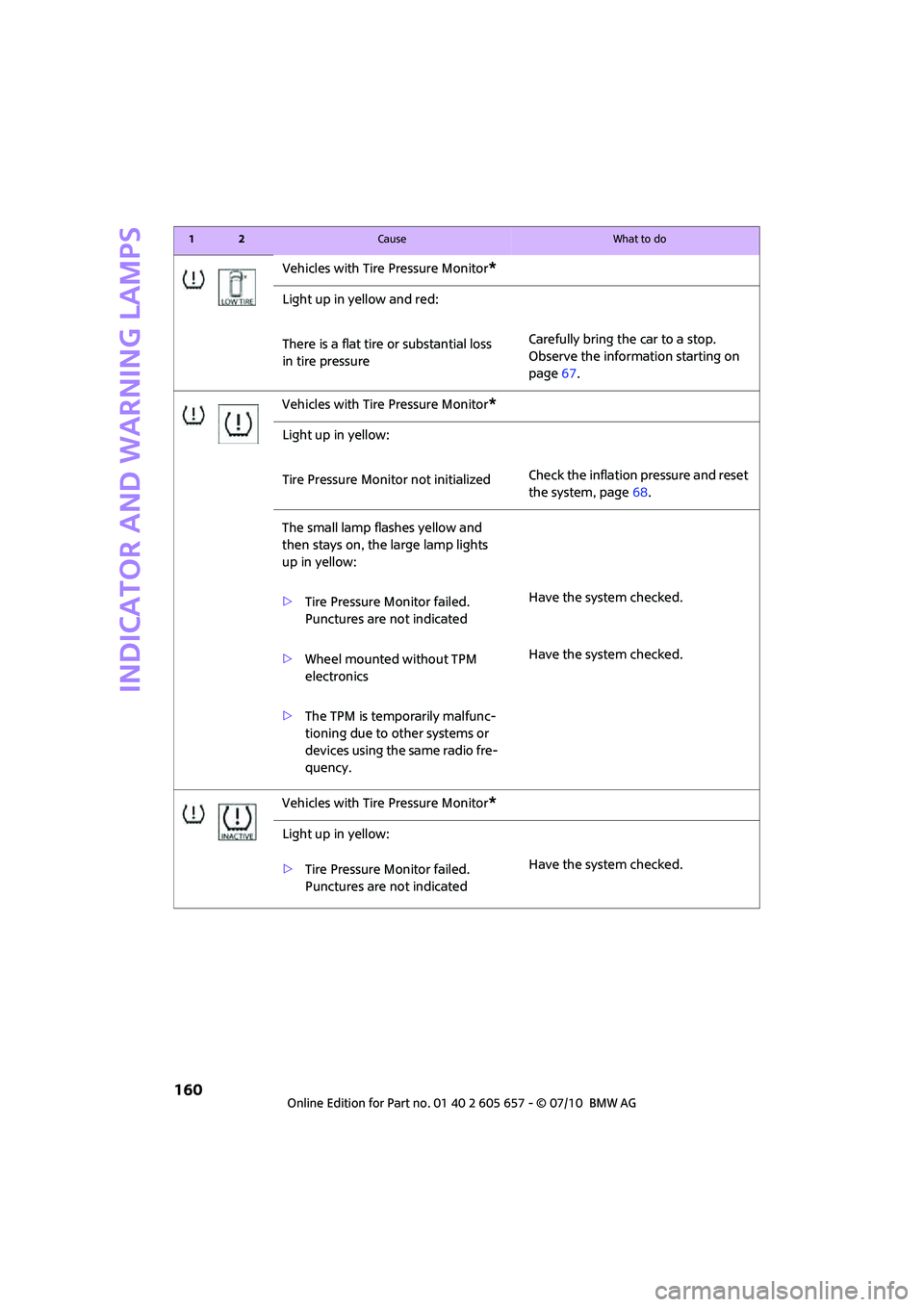
Vehicles with Tire Pressure Monitor*
Light up in yellow and red:
There is a flat tire or substantial loss
in tire pressureCarefully bring the car to a stop.
Observe the information starting on
page67.
Vehicles with Tire Pressure Monitor
*
Light up in yellow:
Tire Pressure Monitor not initializedCheck the inflation pressure and reset
the system, page68.
The small lamp flashes yellow and
then stays on, the large lamp lights
up in yellow:
>Tire Pressure Monitor failed.
Punctures are not indicatedHave the system checked.
>Wheel mounted without TPM
electronicsHave the system checked.
>The TPM is temporarily malfunc-
tioning due to other systems or
devices using the same radio fre-
quency.
Vehicles with Tire Pressure Monitor
*
Light up in yellow:
>Tire Pressure Monitor failed.
Punctures are not indicatedHave the system checked.
12Cause What to do
Page 178 of 186
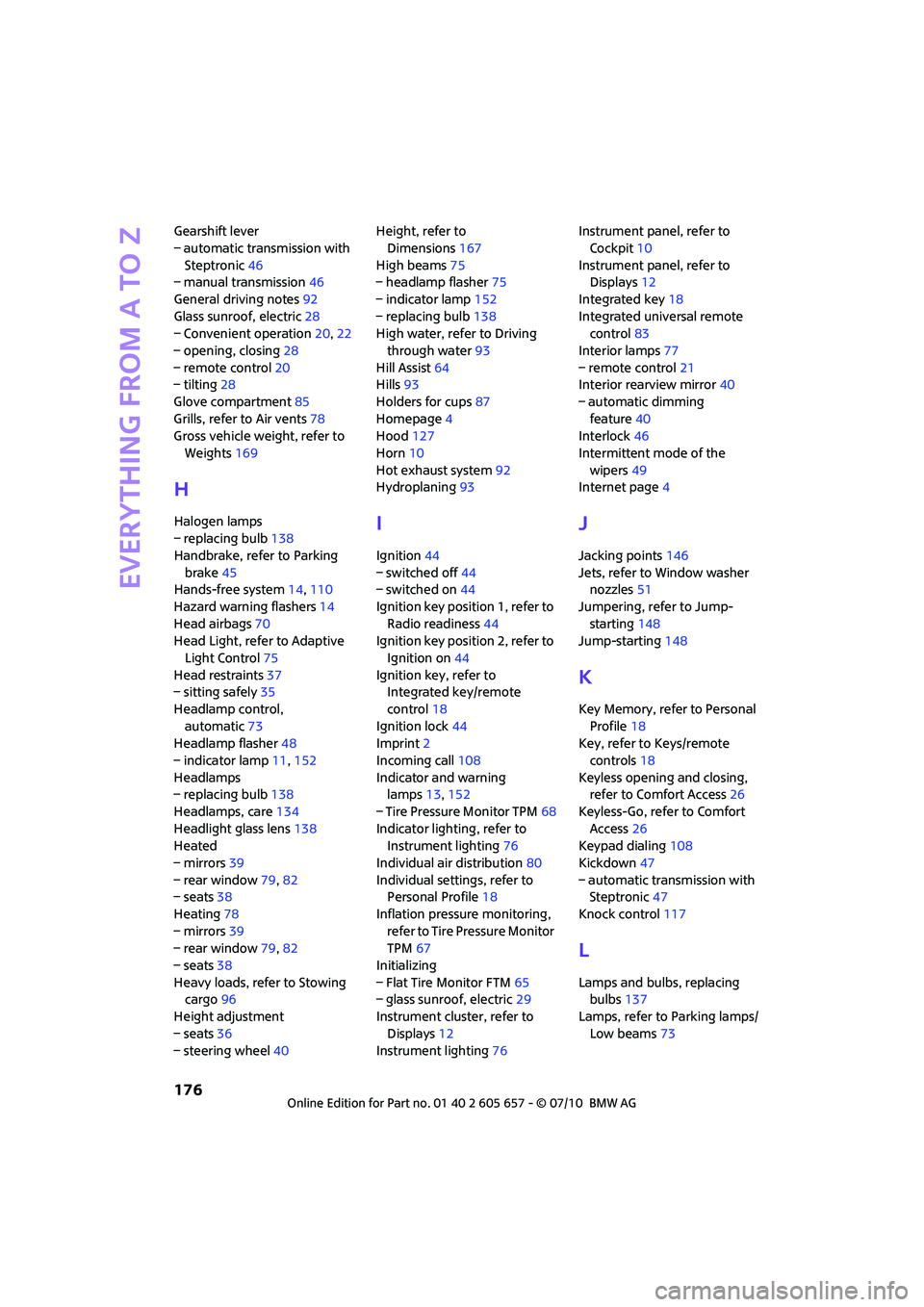
Everything from A to Z
176
Gearshift lever
– automatic transmission with
Steptronic46
– manual transmission46
General driving notes92
Glass sunroof, electric28
– Convenient operation20,22
– opening, closing28
– remote control20
– tilting28
Glove compartment85
Grills, refer to Air vents78
Gross vehicle weight, refer to
Weights169
H
Halogen lamps
– replacing bulb138
Handbrake, refer to Parking
brake45
Hands-free system14,110
Hazard warning flashers14
Head airbags70
Head Light, refer to Adaptive
Light Control75
Head restraints37
– sitting safely35
Headlamp control,
automatic73
Headlamp flasher48
– indicator lamp11,152
Headlamps
– replacing bulb138
Headlamps, care134
Headlight glass lens138
Heated
– mirrors39
– rear window79,82
– seats38
Heating78
– mirrors39
– rear window79,82
– seats38
Heavy loads, refer to Stowing
cargo96
Height adjustment
– seats36
– steering wheel40Height, refer to
Dimensions167
High beams75
– headlamp flasher75
– indicator lamp152
– replacing bulb138
High water, refer to Driving
through water93
Hill Assist64
Hills93
Holders for cups87
Homepage4
Hood127
Horn10
Hot exhaust system92
Hydroplaning93I
Ignition44
– switched off44
– switched on44
Ignition key position 1, refer to
Radio readiness44
Ignition key position 2, refer to
Ignition on44
Ignition key, refer to
Integrated key/remote
control18
Ignition lock44
Imprint2
Incoming call108
Indicator and warning
lamps13,152
– Tire Pressure Monitor TPM68
Indicator lighting, refer to
Instrument lighting76
Individual air distribution80
Individual settings, refer to
Personal Profile18
Inflation pressure monitoring,
refer to Tire Pressure Monitor
TPM67
Initializing
– Flat Tire Monitor FTM65
– glass sunroof, electric29
Instrument cluster, refer to
Displays12
Instrument lighting76Instrument panel, refer to
Cockpit10
Instrument panel, refer to
Displays12
Integrated key18
Integrated universal remote
control83
Interior lamps77
– remote control21
Interior rearview mirror40
– automatic dimming
feature40
Interlock46
Intermittent mode of the
wipers49
Internet page4
J
Jacking points146
Jets, refer to Window washer
nozzles51
Jumpering, refer to Jump-
starting148
Jump-starting148
K
Key Memory, refer to Personal
Profile18
Key, refer to Keys/remote
controls18
Keyless opening and closing,
refer to Comfort Access26
Keyless-Go, refer to Comfort
Access26
Keypad dialing108
Kickdown47
– automatic transmission with
Steptronic47
Knock control117
L
Lamps and bulbs, replacing
bulbs137
Lamps, refer to Parking lamps/
Low beams73
Page 180 of 186

Everything from A to Z
178
N
Neck support, refer to Head
restraints37
Nets, refer to Storage
compartments86
New tires125
Number of cylinders, refer to
Engine data166
Number of safety belts35
Nylon rope, refer to Tow
rope151
O
OBD socket, refer to Socket for
On-Board Diagnosis131
Octane ratings, refer to Fuel
specifications117
Odometer53
Oil consumption128
Oil level128
Oil, refer to Engine oil128
Oil types129
Old batteries, refer to
Disposal147
On-board vehicle tool kit137
Opening and closing
– Comfort Access26
– from inside23
– from outside19
– using the door lock22
– using the remote control19
Opening and unlocking
– from inside23
Outlets
– refer to Ventilation82
Outlets, refer to Air vents78
Output, refer to Engine
data166
Outside temperature display
– change units of measure57
– in the onboard computer57
Outside-air mode
– automatic climate control81
Overheated engine, refer to
Coolant temperature53
P
Paintwork, care135
Park Distance Control PDC62
Parking
– vehicle45
Parking aid, refer to Park
Distance Control PDC62
Parking brake45
Parking lamps, replacing
bulb139
Parking lamps/low beams73
Parts and accessories, refer to
Your individual vehicle4
Pathway lighting73
Personal Profile18
Phone numbers
– dialing108
Pinch protection system
– windows30
Plastic parts, care136
Pollen
– refer to Microfilter for air
conditioner80
– refer to Microfilter/activated-
charcoal filter for automatic
climate control82
Power convertible top30
Power failure147
Power windows29
Power windows, refer to
Windows29
Pressure monitoring of tires,
refer to Tire Pressure Monitor
TPM67
Pressure monitoring, tires65
– Flat Tire Monitor65
Pressure, tires118
Protective function, refer to
Pinch protection system
– windows30
Puncture
– Flat Tire Monitor65
R
Radio key, refer to Integrated
key/remote control18Radio position, refer to Radio
readiness44
Radio readiness44
– switched off44
– switched on44
Rain sensor49
Range, refer to Cruising
range54
Reading lamps77
Rear fog lamp76
– indicator lamp152
– replacing bulb141
Rear lamps
– bulb replacement141
Rear lamps, refer to Tail
lamps140
Rear seat backrest, folding94
Rear seats
– folding the backrests94
Rear window defroster79,82
Rearview mirror, refer to
Mirrors39
Recirculated-air mode79,81
Recirculation of air, refer to
Recirculated-air
mode79,81
Reclining seat, refer to
Backrest36
Refueling116
Releasing
– hood127
Remote control18
– battery renewal28
– Comfort Access26
– garage door opener83
– liftgate21
– malfunctions22,27
– service data131
Replacement remote
control18
Replacing bulbs, refer to
Lamps and bulbs137
Replacing tires, refer to New
wheels and tires125
Reporting safety defects6
Reserve warning, refer to Fuel
gauge53
Reservoir for washer
systems51