display MINI COOPER CONVERTIBLE 2015 Service Manual
[x] Cancel search | Manufacturer: MINI, Model Year: 2015, Model line: COOPER CONVERTIBLE, Model: MINI COOPER CONVERTIBLE 2015Pages: 231, PDF Size: 5.56 MB
Page 128 of 231
Radio MINI Boost CDVehicle equipment
This chapter describes all series equipment as
well as country-specific and special equipment
offered for this model series. Therefore, it also
describes equipment that may not be found in
your vehicle, for instance due to the selectedspecial equipment or the country version. This
also applies to safety-related functions and sys‐
tems.
When using the features and systems described
here, adhere to local regulations.
General information
At a glance
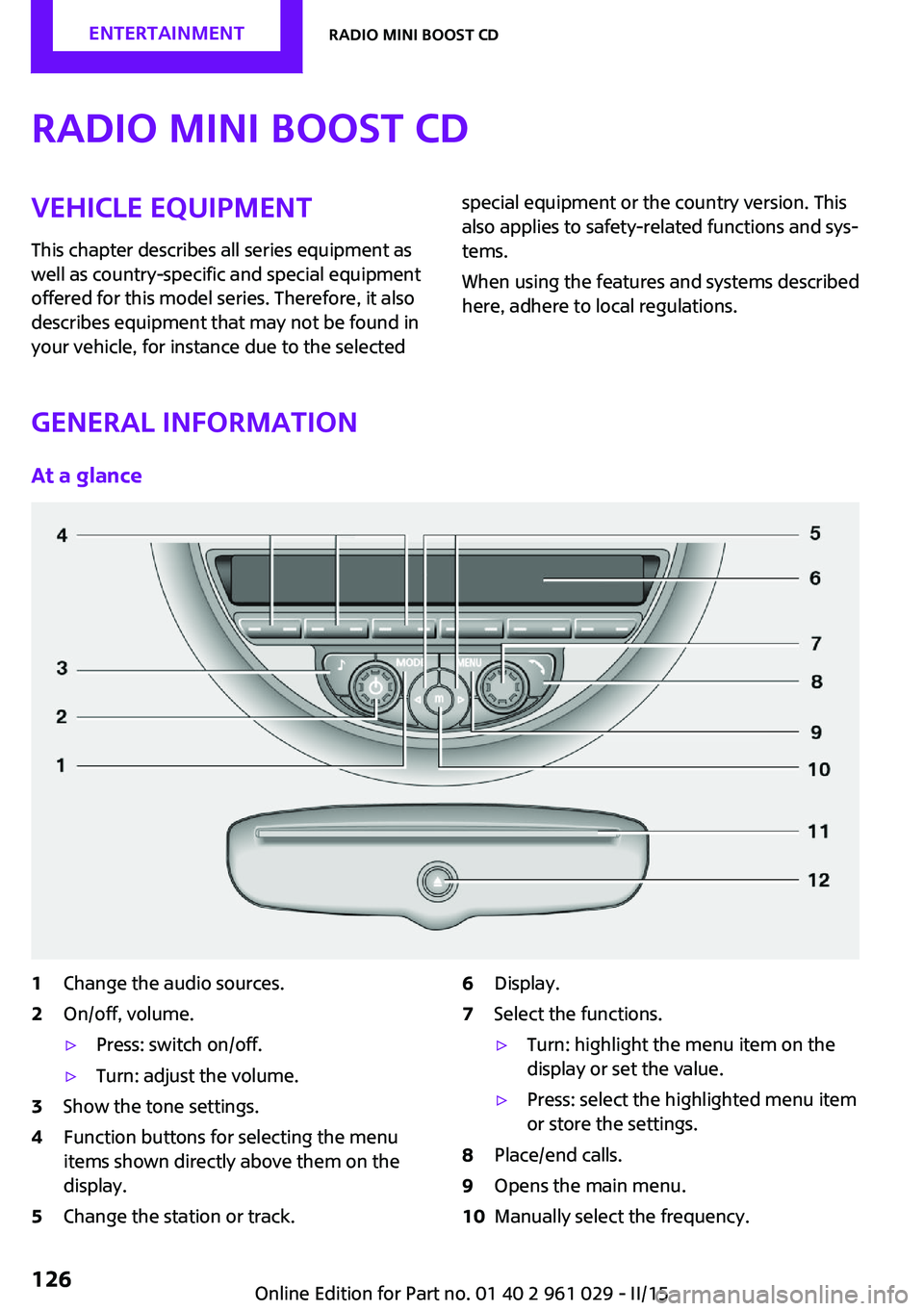
1Change the audio sources.2On/off, volume.▷Press: switch on/off.▷Turn: adjust the volume.3Show the tone settings.4Function buttons for selecting the menu
items shown directly above them on the
display.5Change the station or track.6Display.7Select the functions.▷Turn: highlight the menu item on the
display or set the value.▷Press: select the highlighted menu item
or store the settings.8Place/end calls.9Opens the main menu.10Manually select the frequency.Seite 126ENTERTAINMENTRadio MINI Boost CD126
Online Edition for Part no. 01 40 2 961 029 - II/15
Page 129 of 231

11CD slot.12Eject the CD.Representation in the Owner's Manual
"…" Identifies radio display texts used to select individual functions.
Menu navigation Radio and telephone functions can be opened
using buttons on the radio and menus.
Opening menu items
To display the menu items:▷ Press the button once for the audio
sources menu.▷ Press the button for the main
menu.
Selecting menu items
There are several ways to select a menu item
on the display.
Using the right knob
▷To mark a menu item: turn the right knob,
arrow 2.▷To select a menu item: press the right knob,
arrow 1.
Using the function buttons
Press the left or right side of the function
button under the menu item.
If only one menu item is displayed above the
function button, press the middle of the button.
Via the MODE button Press the button repeatedly until the
desired audio menu is selected.
Symbols on the displaySymbolMeaning Function is selected. Function is activated. The function is deactivated. Leave the menu, one menu back. Display additional menu items. Scroll display. The list contains more
than two entries. Change to the higher level directory.
Setting values
For setting numerical values or values on a
scale:
1.Mark the desired menu item and press the
right knob.2.Turn the right knob to set the value.3.Press the right knob to store the value.
Switching on/off
Press the left knob. The radio selects the audio
source set last: radio, satellite radio, CD, exter‐
nal audio device, or USB audio interface.
Listening to the radio with the ignition
switched off
When the radio ready state or the ignition is
switched off, the radio functions are available
Seite 127Radio MINI Boost CDENTERTAINMENT127
Online Edition for Part no. 01 40 2 961 029 - II/15
Page 131 of 231

Setting the units of measure of the
computer and the language1.Switch on the radio ready state or the igni‐
tion.2. Press the button.3."CONFIG"4.▷"DIST": change the unit of measure for
the range.▷"LANG": select the language of the dis‐
play texts.▷"CONSMP": change the unit of measure
for the average fuel consumption.▷"TEMP": change the unit of measure for
the external temperature.5.Highlight the desired menu item and press
the button.6.Create the desired setting.
Computer
The following vehicle information can be call up
via the computer:
▷Average fuel consumption▷Average speed▷Range
Displaying information
1.Switch on the radio ready state or the igni‐
tion.2. Press the button.3."COMP"
Average fuel consumption
The average fuel consumption is calculated for
the time during which the engine is running.
To start calculation of the average fuel con‐
sumption:
1."CONSMP"2."RESET"The previous display is set to zero and the sys‐
tem begins recalculating the average fuel con‐
sumption.
Average speed
The average speed is calculated for the time
during which the engine is running.
To start calculation of the average speed:1."SPEED"2."RESET"
Estimated range
"RANGE"
The display shows the estimated distance that
can be still be driven on the remaining fuel,
taking into consideration the driving style over
the last 18 miles/30 km.
Radio
Listening to the radio
The radio is designed for reception in the FM
and AM wavebands.
1.Switch on the radio, refer to page 127.2. Press this button if necessary.3."TUNER"4."FM" or"AM"
Press the corresponding button repeatedly
until the desired waveband is displayed.▷FM: FM1, FM2, FMA▷AM: AM, AMA
Selecting a station
The setting is stored for the remote control cur‐
rently in use.
Next station
Press the button.
Seite 129Radio MINI Boost CDENTERTAINMENT129
Online Edition for Part no. 01 40 2 961 029 - II/15
Page 132 of 231

The next station with reception is selected.Selecting the station manually by
frequency1. Press the button.2.▷Press the respective function button to
set the desired frequency.▷Turn the right knob until the desired
frequency is set.
Automatically updating the stations
with the best reception, AUTOSTORE
In the FMA and AMA memory levels, stations
are automatically stored according to their re‐
ception strength. If the AUTOSTORE function is
not used, six stations can be manually stored in
each of the FMA and AMA memory levels.
1."FM" or"AM"
Press the corresponding button until the
following is displayed:
"AUTOSTORE"
It may take several seconds for the stations to
be stored and for one of these stations to be
played back.
Briefly playing and selecting a station "SC"
All stations with reception are played briefly.
To interrupt the function and select a station:
"SC"
Storing and retrieving a station
Memory locations It is possible to store up to 30 stations.
▷FM1, FM2, AM: six stations each.▷FMA, AMA: the six stations with the best re‐
ception (automatically) or any six stations
(manually).Storing a station1."FM" or"AM"
Select the desired function repeatedly until
the desired waveband is displayed.2.Select the station.3."1" ... "6"
Press and hold the function button under
the desired memory location until the sta‐
tion is audible again after a brief interrup‐
tion.
Retrieving a stored station
1."FM" or"AM"
Select the desired function repeatedly until
the desired waveband is displayed.2."1" ... "6"
Press and hold the desired function button
or turn the right knob until the desired sta‐
tion is displayed.
Radio Data System, RDS
RDS broadcasts additional information, such as
the station name or text messages, in the FM
waveband. When playing a station with multi‐
ple frequencies, the system automatically
switches to the frequency with the best recep‐
tion, if needed.
Some stations broadcast the type of program
received, or PTY, via RDS. This information is
displayed briefly when the station is selected,
for instance NEWS.
PTY can also be used to display catastrophe
alerts, such as "ALARM".
The alert is issued on the loudspeakers.
Switching the RDS on/off
1."SET"2."RDS"
When the RDS is switched off, the PTY function
is switched off as well.
Seite 130ENTERTAINMENTRadio MINI Boost CD130
Online Edition for Part no. 01 40 2 961 029 - II/15
Page 133 of 231
Switching the program type display
on/off1."SET"2."PTY"
HD Radio™ reception
Many stations broadcast both analog and digi‐
tal signals. These stations can be received digi‐
tally and therefore with better sound quality. A
digital radio network must be available to be
able to receive digital stations.
License conditions
HD Radio Technology manufactured under li‐
cense from iBiquity Digital Corporation. U.S.
and Foreign Patents. HD Radio™ and the HD,
HD Radio, and Arc logos are proprietary trade‐
marks of iBiquity Digital Corp.
Activating/deactivating digital radio
reception
1. Press the button.2."TUNER"3."SET"4."HD"
Displays
▷"HD": a station is received digitally.▷"(HD)": a station broadcasts digital signals
but digital radio reception is switched off.
In areas in which the selected station is not
continuously received in digital mode, playback
switches between analog and digital reception.
In this case, switch off digital radio reception.
Selecting the programs of a digital
station
Some stations broadcast multiple programs. To
select one of these programs:
1. Press the button repeatedly
until the desired digital station is displayed.
If a station broadcasts multiple programs,the following display appears, for example:
"HD1"2."LIST"3."HD1" ... "HD8" Select the desired pro‐
gram. Up to eight programs can be se‐
lected per station.
Displaying additional information
For digital stations, additional information can
be displayed on the current track, such as the
name of the artist.
"INFO"
Operational displays
▷"acquiring": the system is looking for digital
stations.▷"No Signal": no digital stations are being re‐
ceived.
Satellite radio
Over 100 different channels with high fidelity
can be received. The channels are offered in
fixed packages and must be activated.
You may experience signal drops and muting
events related to this new technology.
Activating or deactivated channels
1. Press the button.2."SAT"3."CAT"4.Select the desired category.
The channels are displayed.
This symbol identifies the current chan‐
nel.
Activating
1.Turn the right knob to select a channel that
is not yet activated.2.Press the right knob to confirm a channel.Seite 131Radio MINI Boost CDENTERTAINMENT131
Online Edition for Part no. 01 40 2 961 029 - II/15
Page 134 of 231

A phone number and the electronic serial
number, ESN, are displayed. The electronic
serial number is required for activation.3.To have the channels activated, call the
phone number.
Deactivating
1. Press the button.2."SAT"3."SAT"
Hold the button down.
A phone number and the electronic serial
number, ESN, are displayed. The electronic
serial number is required for deactivation.4.To have the channels deactivated, call the
phone number.
Selecting and storing a channel
1. Press the button.2."SAT"3."CAT"4.Select the desired category.5.Select the desired channel.
To display all channels:
"ALL"
To store a channel:
1. Select the symbol.2."SAT"
Press the button repeatedly until the de‐
sired memory level, SAT 1 or SAT 2, is
reached.3."1" ... "6"
Press and hold the function button under
the desired memory location until the
channel is audible again after a brief inter‐
ruption.
Changing to the current channel
"CURR"
Additional information
The name of the channel and additional infor‐
mation on the current track are displayed, such
as the name of the artist.1.Select the desired channel.2."INFO"
Changing the channel using the buttons
Press the button for the corre‐
sponding direction. The next enabled channel
is opened.
Search
1. Press and hold the button for
the corresponding direction. The activated
channels appear on the display one after
the other.2.Release the button to select the displayed
channel.
Notes
When there is a signal blockage or the trans‐
mission is suspended momentarily for more
than 4 seconds, a message will appear on the
display.
Service may be interrupted or unavailable for
specific reasons such as environmental or topo‐
graphic conditions and others that Satellite
Radio cannot directly control. Signal may not be
available under tunnels, in parking garages,
next to tall buildings, nearby trees with dense
foliage, nearby mountains or other possible
strong sources of radio interference. Service
should resume normally after the source of sig‐
nal unavailability has been cleared.
CD player
Loading the CD player Insert the CD into the CD drive with the printed
side up.
Seite 132ENTERTAINMENTRadio MINI Boost CD132
Online Edition for Part no. 01 40 2 961 029 - II/15
Page 135 of 231

Playback begins automatically.
Reading can take a few minutes with com‐
pressed audio files.
Starting the CD player
A CD is contained in the CD player.1.Switch on the car radio if necessary.2. Press the button.3."CD"
Skipping to another track
Press the button repeatedly until
the desired track is played.
With the right knob:
Turn the right knob until the desired track is
played back.
Fast forward/reverse
Hold the button down.
Tracks can be heard but are distorted.
Briefly playing and selecting a track
"SC"
All tracks are played briefly one after the other.
To interrupt the function and select a track:
"SC"
Random playback "RND"
To end random playback:
"RND"
Compressed audio files CD players can play back CDs with compressed
audio data: MP3 and WMA.
Selecting a track1."LIST"2.Select the desired directory using the right
knob.▷ : press the right knob to open a di‐
rectory.▷ : press the right knob to close a di‐
rectory.3.Select other directories if you wish.4.Highlight the desired track and press the
right knob.
You can scroll through the directories during
playback.
To change to the current track:
"CURR"
Displaying information on the track
Any information stored on the currently se‐
lected track can be displayed.
1."LIST"2."TRACK"
Ejecting a CD from the CD player
Press the button.
The CD emerges slightly from the CD drive.
Operational displays
▷"Insert CD"
The CD slot is empty.▷"Error CD"
The CD cannot be read or is defective.▷"Temp. CD"
Operating temperature is too high.Seite 133Radio MINI Boost CDENTERTAINMENT133
Online Edition for Part no. 01 40 2 961 029 - II/15
Page 139 of 231

Random playback
"RND"
To end random playback: "RND"
Selecting a track
Depending on the connected device, the track
can be selected via the following category:▷"LIST": playback lists.▷"GEN": musical genre.▷"ART": artist.▷"ALB": album.1.Select the desired category.2.If necessary, select the desired directory us‐
ing the right knob.▷ : press the right knob to open a di‐
rectory.▷ : press the right knob to close a di‐
rectory.3.Select other directories if you wish.4.Highlight the desired track and press the
right knob.
You can scroll through the directories during
playback.
To change to the current track:
"CURR"
Displaying information on the track
Any information stored on the currently se‐
lected track can be displayed.
"TRACK"
Adjusting the volumeThe volume of the sound output is dependent
on the audio device. If this volume differs
markedly from the volume of the other audio
sources, it is advisable to adjust the volumes.
1."LEV"2.Turn the right knob until the desired vol‐
ume is set and press the knob.Notes
Do not expose the audio device to extreme en‐
vironmental conditions, such as very high tem‐
peratures; refer to the audio device operating
instructions.
Depending on the configuration of the audio
files, e.g., bit rates greater than 256 kbit/s, the
files may not play back correctly in each case.
Information on connection▷It is only possible to connect one iPod/
iPhone to the vehicle at a time.▷Playback from the iPod/iPhone is only pos‐
sible via the USB audio interface if a snap-in
adapter is not used.▷The connected audio device is supplied
with a max. power of 500 mA if supported
by the device. Therefore, do not addition‐
ally connect the device to a socket in the
vehicle; otherwise, playback may be com‐
promised.▷Do not use force when plugging the con‐
nector into the USB interface.▷Do not connect devices such as fans or
lamps to the USB audio interface.▷Do not connect USB hard drives.▷Do not use the USB audio interface to re‐
charge external devices.Seite 137Radio MINI Boost CDENTERTAINMENT137
Online Edition for Part no. 01 40 2 961 029 - II/15
Page 142 of 231
TelephoneVehicle equipment
This chapter describes all series equipment as
well as country-specific and special equipment
offered for this model series. Therefore, it also
describes equipment that may not be found in
your vehicle, for instance due to the selected
special equipment or the country version. This
also applies to safety-related functions and sys‐
tems.
When using the features and systems described
here, adhere to local regulations.
At a glance
The concept
Mobile phones can be connected with the vehi‐
cle via Bluetooth.
After a suitable mobile phone is paired with the
vehicle once, you can operate the mobile
phone via the radio and via the buttons on the
steering wheel.
Bluetooth® is a registered trademark of Blue‐
tooth® SIG, Inc.
Certain functions may need to be enabled by
the mobile phone provider or service provider.
Using the mobile phone while driving
Make entries only when traffic and road
conditions allow. Do not hold the mobile phone
in your hand while you are driving; use the
hands-free system instead. If you do not ob‐
serve this precaution, you can endanger the ve‐
hicle occupants and other road users. ◀
Snap-in adapter
The snap-in adapter is used to:▷Hold the mobile phone.▷Recharge the battery.▷Connect the mobile phone to an outside
antenna of the vehicle.
This provides for better network reception
and consistent sound quality.
Do not operate a mobile phone that is con‐
nected to the vehicle on the mobile phone key‐
pad, as this may lead to a malfunction.
Approved mobile phones
Details on which mobile phones with a Blue‐
tooth interface are supported by the mobile
phone preparation package can be obtained at
www.mini.com/connectivity.
Notes At high temperatures, the charging function of
the mobile phone may be limited and functions
may not be executed.
Controls
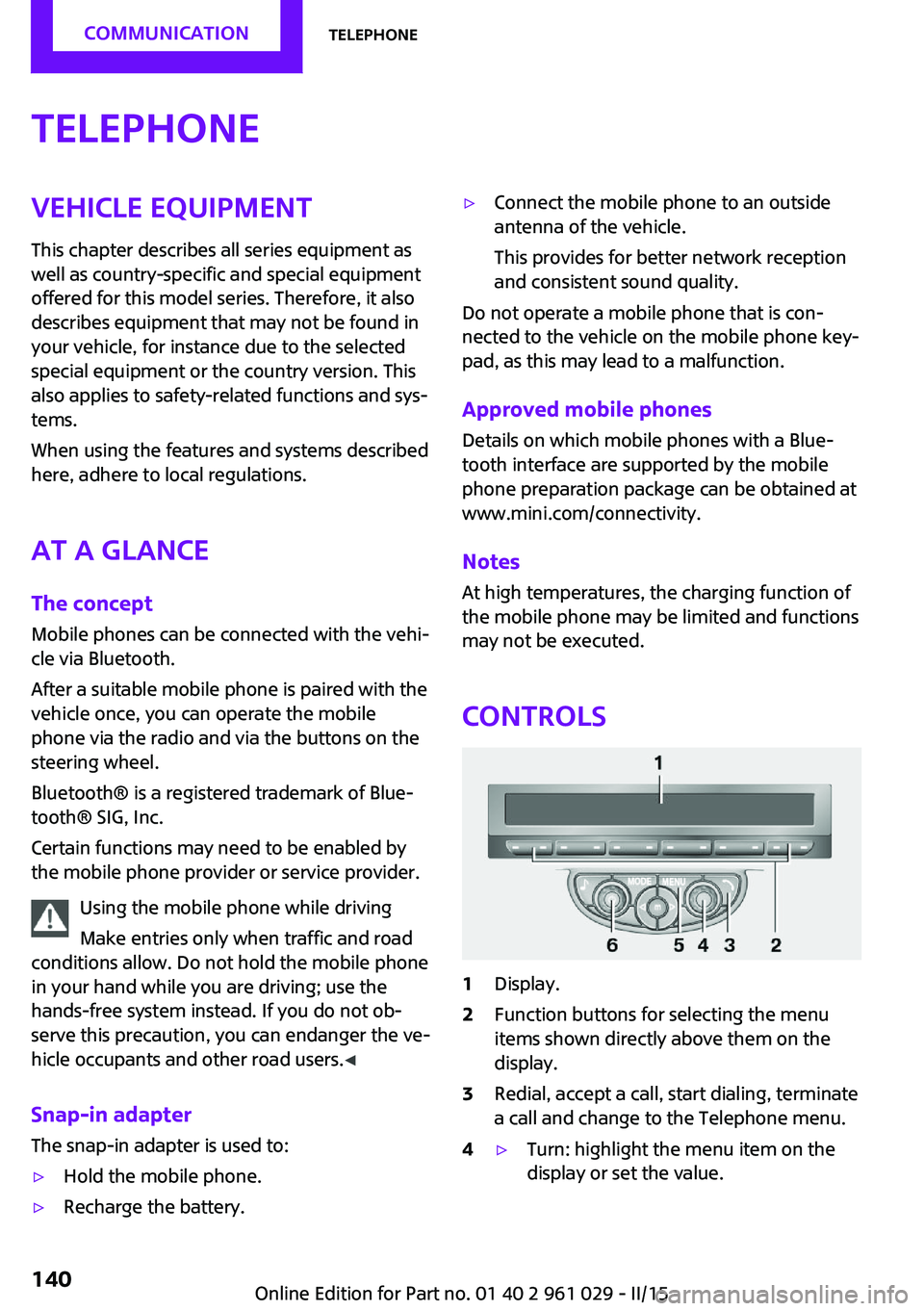
1Display.2Function buttons for selecting the menu
items shown directly above them on the
display.3Redial, accept a call, start dialing, terminate
a call and change to the Telephone menu.4▷Turn: highlight the menu item on the
display or set the value.Seite 140COMMUNICATIONTelephone140
Online Edition for Part no. 01 40 2 961 029 - II/15
Page 143 of 231

▷Press: select the highlighted menu item
or store the setting.5Opens the main menu.6On/off, volume control.
Menu navigation
Selecting menu items
There are two ways to select a menu item on
the display.
Using the right knob
▷To mark a menu item: turn the right knob,
arrow 2.▷To select a menu item: press the right knob,
arrow 1.
Using the function buttons
Press the left or right side of the functionbutton under the menu item.
If only one menu item is displayed above the
function button, press the middle of the button.
Representation in the Owner's Manual
"…" Identifies radio display texts used to select
individual functions.
Symbols on the displaySymbolMeaning Function is selected. Leave the menu, one menu back. Display additional menu items. Scroll display. The list contains more
than two entries. Reception of the wireless network:
the display depends on the signal
strength. Using the hands-free system. Roaming is active.
Pairing/unpairing the
mobile phone
Requirements
▷The mobile phone is suitable, refer to
page 140.▷The mobile phone is ready for operation.▷Bluetooth is activated in the vehicle and on
the mobile phone.▷Bluetooth presettings may need to be
made on the mobile phone, e.g., for a con‐
nection without confirmation or visibility,
refer to the mobile phone operating in‐
structions.▷A number with at least four and a maxi‐
mum of 16 digits was defined as the Blue‐
tooth passkey. It is only required once for
pairing.▷The ignition is switched on.
Activating/deactivating Bluetooth
Bluetooth is not permitted everywhere. Comply
with all safety guidelines and regulations.
Seite 141TelephoneCOMMUNICATION141
Online Edition for Part no. 01 40 2 961 029 - II/15