brake light MINI Countryman 2011 (Mini Connected) User Guide
[x] Cancel search | Manufacturer: MINI, Model Year: 2011, Model line: Countryman, Model: MINI Countryman 2011Pages: 254, PDF Size: 3.84 MB
Page 107 of 254

Things to remember when drivingDRIVING TIPS
105
>After driving through water at low speed,
lightly press the brake pedal several times to
dry the brakes and to prevent the braking
effect from being reduced by wetness.
> Depending on the condition of the surface, it
may be practical to briefly activate DTC, refer
to DTC Dynamic Traction Control on
page 68.
> If the drive wheels spin on one side, depress
the accelerator pedal sufficiently so that the
driving stability control systems can distrib-
ute the drive forces to the individual wheels.
After driving on poor roads, please observe the
following points to maintain the driving safety of
the vehicle:
> Clean the coarsest dirt from the body.
> Clean mud, snow, ice, etc. from the wheels
and tires and check the tires for damage.
Page 207 of 254

CareMOBILITY
205
5.Insert the remote control in the ignition lock
so that the vehicle can roll.
Steam jets/high-pressure washers
When using steam jets or high-pressure
washers, make sure th at you maintain suf-
ficient distance from the vehicle and do not
exceed a maximum temperature of 140 7/60 6.
If the distance is too close, the pressure too high,
or the temperature too high, parts of the vehicle
can be damaged, or water can penetrate.
Observe the operating in structions for high-
pressure washers. <
Do not spray sensors such as Park Dis-
tance Control with hi gh-pressure washers
for a long time and main tain the greatest possi-
ble distance of approx. 1 ft/30 cm from them. <
Manual washing
Use a great deal of water and, if necessary, car
shampoo when washing your car by hand. Clean
the vehicle with a sponge or a washing brush
applying a slight amount of pressure.
Before cleaning the windshield, deacti-
vate the rain sensor or turn off the ignition
to prevent unintentional wiping. <
Observe local regulati ons regarding wash-
ing vehicles by hand. <
Headlamps
Do not wipe dry and do not use abrasive or cor-
rosive cleaning agents. Remove dirt and con-
tamination, such as inse cts, by soaking with
shampoo and then washing with plenty of
water.
Do not remove accumula ted ice and snow with
an ice scraper; use window deicers instead.
Windows
Clean the outside and inside of the windows and
mirrors with a window cleaner.
Do not clean the mirrors with cleaners
containing quartz. <
Wiper blades
Clean with soapy water an d change regularly to
prevent the formation of streaks.
Wax, preservatives and dirt on the win-
dows cause streaks when the windshield
wipers are on, and can cause premature wear of
the wiper blades and interfere with the rain sen-
sor. <
Paintwork, care
Regular care helps your vehicle retain its value
and protects the pain t from the long-term
effects of aggressive substances.
In some regions, envi ronmental factors can
affect the vehicl e paintwork and damage it. It is
therefore important to adjust the frequency and
extent of vehicle ca re correspondingly.
Immediately remove aggr essive materials such
as spilled fuel, oil, grease, brake fluid, tree sap or
bird droppings to preven t damage to the paint-
work.
Removing paintwork damage
Depending on the severity of the damage,
immediately repair stone damage or
scratches to prevent rusting. <
The manufacturer of the MINI recommends
repairing paint damage pr ofessionally according
to factory specifications with original MINI
paints.
Preservation
Preservation is necessary when water no longer
beads on the clean paint surface. To preserve
the paint, only use pres ervatives that contain
carnauba or synthetic waxes.
Rubber seals
Only treat with water or rubber care products.
Do not use silicon spra ys or other silicon-
containing care products on rubber seals;
otherwise, noise and damage could occur. <
Page 208 of 254

MOBILITYCare
206
Chrome parts*
Carefully clean vehicle parts such as the radiator
grill and door handles with copious quantities of
water and, if necessary, a shampoo additive,
especially when contaminated with road salt.
For additional treatmen t, use chrome polish.
Light alloy wheels*
The system produces brake dust that collects on
the light alloy wheels. Clean them regularly with
acid-free wheel cleaner.
Do not use aggressive, acid-containing,
highly alkaline, or abrasive cleansers or
steam jets hotter than 140 7/60 6 as they may
cause damage. <
External sensors
Keep the outside sensors on the vehicle
such as the Park Di stance Control clean
and ice-free to ensure that they function prop-
erly. <
internal Care
Upholstery/fabrics
Regularly use a vacuum cleaner to remove sur-
face dirt.
In case of serious spots su ch as liquid stains, use
a soft sponge or lint-free microfiber cloth and
suitable interior cleaners. Observe the instruc-
tions on the packaging.
Clean upholstery up to the seams. Do not
rub forcefully. <
Velcro fasteners on pa nts or other items of
clothing can damage seat covers. Make
sure that all Velcro fasteners are closed. <
Leather/leather coverings*
The leather processed by the manufac-
turer of your MINI is a high-quality natural
product. Light variations in the grain is one of
the typical properties of natural leather.
leather have an abrasive effect, leading to
increased wear and causing the leather surface
to become brittle prematurely. Use a cloth or
vacuum cleaner to remo ve dust on a regular
basis.
Especially when the leather has a light color, it
should be cleaned regularl y since it tends to get
heavily soiled.
Treat the leather twice a year using a leather
lotion since dirt and grease will gradually attack
the leather's protective layer.
Carpets/floor mats*
Keep floor mats, carpet, and other objects
out of the movement range of the pedals;
otherwise, they may inhibit the function of the
pedals during driving.
Do not place additional floor mats onto an exist-
ing one or onto other objects.
Only use floor mats that have been approved for
the vehicle and can be appropriately fastened.
Make sure that the floo r mats are securely fas-
tened again after they ha ve been removed, e.g.
for cleaning. <
Floor mats can be removed to be cleaned.
If the carpets are very di rty, clean with a microfi-
ber cloth and water or an interior cleaner. When
doing so, rub forward and back in the driving
direction; otherwise, the carpet may become
matted.
Interior plastic parts
These include:
> Plastic surfaces
> Lamp glass
> Display panes
> Mat parts
Only clean with water and, if necessary, solvent-
free plastic cleaners. Do not use solvents such as alcohol, lac-
quer thinner, cold clea ners, fuel, or similar,
as these will damage the surfaces. <
Page 213 of 254
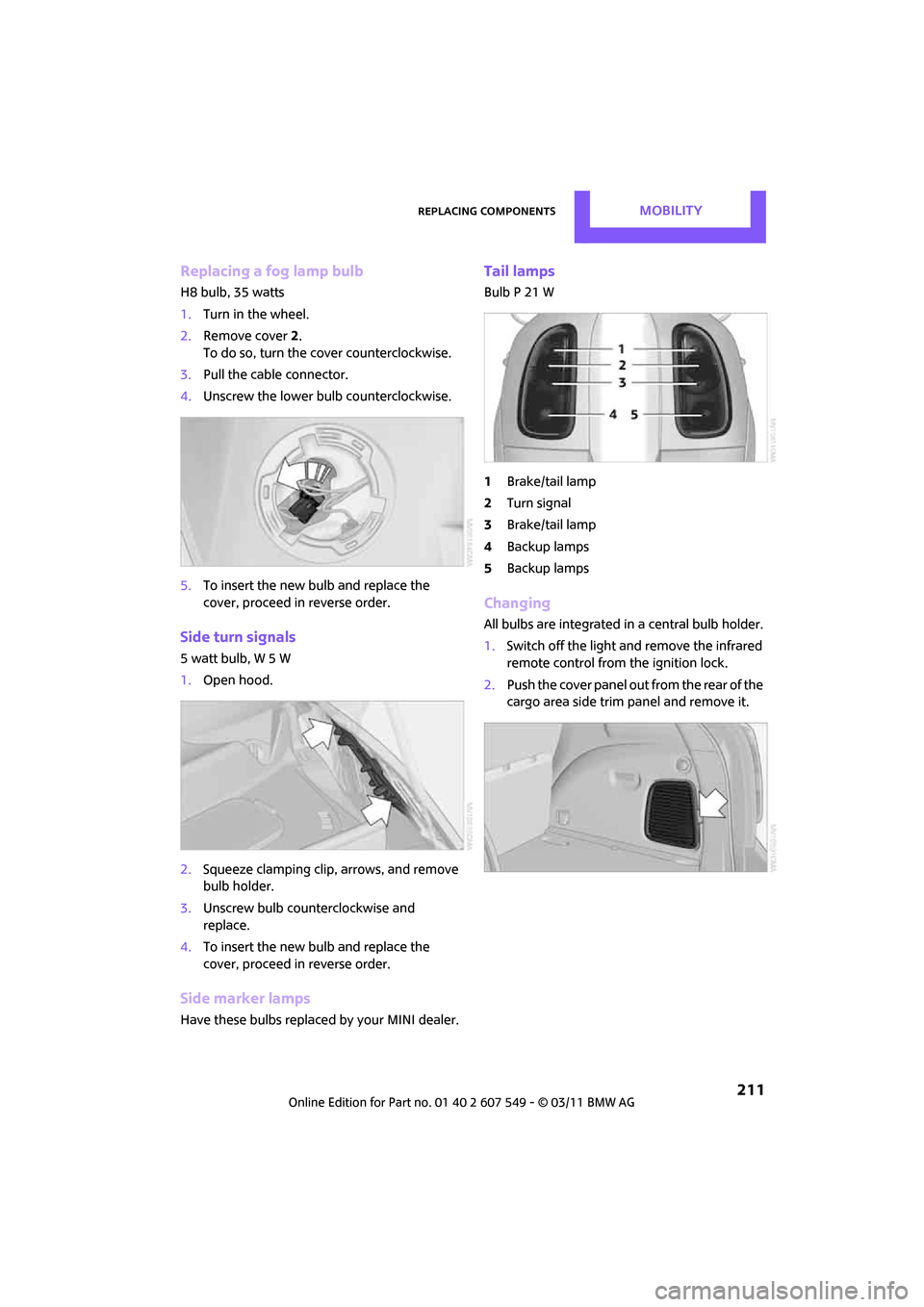
Replacing componentsMOBILITY
211
Replacing a fog lamp bulb
H8 bulb, 35 watts
1.Turn in the wheel.
2. Remove cover 2.
To do so, turn the cover counterclockwise.
3. Pull the cable connector.
4. Unscrew the lower bulb counterclockwise.
5. To insert the new bulb and replace the
cover, proceed in reverse order.
Side turn signals
5watt bulb, W5W
1.Open hood.
2. Squeeze clamping clip, arrows, and remove
bulb holder.
3. Unscrew bulb counterclockwise and
replace.
4. To insert the new bulb and replace the
cover, proceed in reverse order.
Side marker lamps
Have these bulbs replaced by your MINI dealer.
Tail lamps
Bulb P 21 W
1Brake/tail lamp
2 Turn signal
3 Brake/tail lamp
4 Backup lamps
5 Backup lamps
Changing
All bulbs are integrated in a central bulb holder.
1.Switch off the light and remove the infrared
remote control from the ignition lock.
2. Push the cover panel out from the rear of the
cargo area side trim panel and remove it.
Page 238 of 254
236
REFERENCEEverything from A to Z
Everything from A to Z
INDEX
A
ABS Antilock Brake System67
Accessories, refer to Your individual vehicle 4
Acknowledgment signals for
locking/unlocking vehicle 28
Activated-charcoa l filter for
automatic climate control 87
Adaptive Light Control 80
Additives
– coolant 200
– engine oil 200
Address, entering 115
Address for navigation
– entering 109,115
Adjusting temperature inside the car, refer to Air
conditioner 84
Adjusting temperature inside
the car, refer to Automatic
climate control 85
Adjusting the tone during
audio operation, refer to
Tone control 131
Air conditioner 83
Air conditioning mode
– air conditioner 84
– automatic cl imate control85
– ventilation 87
Air distribution
– automatic 86
– individual 85
– manual 85
Air flow rate 84,86
– air conditioning system 84
– automatic cl imate control86
– heating, ventilation 84
Air outlets, refer to Air vents 83
Air pressure, checking, refer to Tire inflation pressure 190Air recirculation, refer to
Recirculated-air
mode 84,86
Air supply
– air conditioner 84
– automatic climate control 85
– ventilation 87
Air vents 83
Airbags 76
– sitting safely 37
– warning lamp 78
Airing, refer to Ventilation87
AKI, refer to Fuel grade 189
Alarm system 31
ALL4 all-wheel drive system 69
All-season tires, refer to Winter tires 197
All-wheel drive, refer to
ALL4 69
AM, wa
veband 132
Ambient air, refer to Recirculated-air
mode 84,86
Ambient lighting 82
Antenna, care 204
Antifreeze
– coolant 200
– washer fluid 53
Antilock Brake System ABS 67
Anti-theft alarm system, refer to Alarm system 31
Approved axle loads, refer to
Weights 226
Approved engine oils 200
Approved gross vehicle
weight, refer to Weights 226
Armrest, refer to Center armrest 91
Arrival time
– computer 57
– route guidance 118Ashtray
92
Assistant systems, refer to
– Dynamic Stability Control
DSC 67
Audio 130
– controls 130
– switching on/off 130
– tone control 131
– volume 130
Audio device, external 90
AUTO program for automatic climate control 86
Automatic
– air distribution 86
– air flow rate 86
– cruise control 53
– headlamp control 79
Automatic climate control 83
– automatic air distribution 86
Automatic transmission with
Steptronic 48
– interlock 48
– overriding selector lever
lock 50
– shiftlock 48
– sport program 49
Auxiliary phone 164
AUX-IN connection 142
AUX-IN, refer to External audio
device 90
Average fuel consumption 56
– setting the units 58
Average speed 56
Avoiding highways for navigation 118
Axle loads, refer to Weights 22
6
Page 239 of 254
Everything from A to ZREFERENCE
237
B
Background lighting, refer to
Ambient lighting 82
Backrests, refer to Seats 38
Backup lamps
– replacing bulb 211
Band-aids, refer to First aid pouch 218
Bar, refer to Tow-starting,
towing away 220
Base plate for telephone or mobile phone
– refer to Snap-in adapter 174
Bass sounds, refer to Tone control 131
Battery 216
– charging 216
– disposal 34,216
– jump-starting 218
– temporary power failure 216
Battery renewal
– remote control 34
Being towed 220
Belt tensioner, refer to Safety
belts 40
Belts, refer to Safety belts 40
Beverage holders, refer to
Cupholders 92
Black ice, refer to External
temperature warning 56
Blower, refer to Air flow rate 84,86
Bluetooth, activating/ deactivating 154,164
Bluetooth audio 146
– device pairing 146
– disconnecting an audio connection 148
– playback 147
– unpairing device 148
– What to do if... 148
Bottle holders, refer to Cupholders 92
Brake Assist 67
Brake fluid, refer to Service requirements 59 Brake lamps
– replacing bulbs
211
Brake pads, breaking in 96
Brake rotors 97
– brakes 96
– breaking in 96
Brake system 96
– breaking in 96
– disc brakes 97
– MINI Maintenance
System 202
Brakes
– ABS 67
– b
reaking in 96
– MINI Maintenance System 202
– parking brake 47
– service requirements 59
Brakes, refer to Braking
safely 97
Breakdown service, refer to Roadside Assistance 218
Break-in period 96
Breaking in the clutch 96
Brightness of Control
Display 65
Bulb changing, refer to Lamps and bulbs 208
Button for starting the engine 46
Buttons on the steering wheel 11
C
Calendar 179
– displaying appointment 180
– selecting calendar day 180
California Proposition 65
warning 5
Call
– accepting 157,168
– ending 157,168
– muting the microphone 158,170
– rejecting 157,168 Calling, refer to Phone
numbers, dialing 157,169
Can holders, refer to Cupholders 92
Capacities 226
Car battery, refer to Vehicle battery 216
Car care 204
Car key, refer to Keys/remote controls 26
Car phone
– installation location, refer to Center armrest 91
Car phone, refer to Telephone 154,163
Car radio, refer to Radio 132
Car wash
– before driving in 47
Car wash, care 204
Car washes 204
Care 204
– car washes 204
– car-care products 204
– CD/DVD drives 207
– external 204
– high-pressure washers 205
– internal 206
– leather 206
– manual washing 205
– upholstery and fabrics 206
– windows 205
– wiper blades 205
Cargo area 98
– capacity 226
– Comfort Access 33
– lamp 82
– opening from outside 30
– trunk lid, refer to Liftgate 30
Cargo area, expanding 98
Cargo area lamp 82
Cargo area li
d, refer to
Liftgate 30
Cargo area partition net, refer to Cargo net 100
Page 240 of 254
REFERENCEEverything from A to Z
238
Cargo loading101
– securing cargo 102
– stowing cargo 102
– vehicle 98
Cargo net 100
Cargo, securing 102
Carpets, care 206
Catalytic conver ter, refer to
Hot exhaust system 96
CD, audio playback 140
CD player 140
– controls 130
– fast forward/reverse 141
– random order 141
– selecting a track 140
– switching on/off 130
– tone control 131
– volume 130
Center armrest 91
Center brake lamp 212
Center console, refer to Around the center
console 14
Center Rail 91
Center Rail, refer to Storage
compartments 91
Central locking system 27
– Comfort Access 32
– from inside 30
– from outside 27
– setting unlocking behavior 27
Changing bulbs 208
Changing the language on the Control Display 65
Changing the measurement
units on the Control
Display 58
Changing wheels 214
Chassis number, refer to Engine compartment 199
Check Control 62
Child restraint fixing system LATCH 44
Child restraint systems 43
Child seats 43
Child-safety locks 45Chrome parts, care
206
Chrome parts, refer to Care 204
Cigarette lighter 92
Cleaning headlamps 52
– washer fluid 53
Clock
– 12 h/24 h mode 61
– setting time 61
Closing
– f
rom inside 30
– from outside 27
Clothes hooks 92
Cockpit 10
Cold start, refer to Starting the engine 46
Comfort Access 32
– replacing the battery 34
– what to observe before
entering a car wash 34
Comfort area, refer to Around the center console 14
Compartment for remote control, refer to Ignition
lock 46
Computer 56
– displays on Control Display 57
Condensation, refer to When the vehicle is parked 98
Condition Based Service CBS 202
Configuring settings, refer to
Personal Profile 26
Connecting vacuum cleaner, refer to Connecting electrical
appliances 92
Consumption, refer to Average fuel consumption 56
Contacts 161,176
– deleting 162,179
– displaying 162
– editing 162
– exporting/importing 179
– new contact 178
Control Display
– adjusting brightness 65Control Display, refer to iDrive
– switching on/off
19
Control Display, refer to On- board computer
– adjusting brightness 65
Control Display, refer to On-board computer 16
Control stick, refer to On-board computer 16
Control unit, refer to On-board
computer 16
Controls and displays 10
Convenient access, refer to
Comfort Access 32
Convenient operation
– windows 28
Convenient star t, refer to
Starting the engine 46
Coolant 200
– checking level 201
– filling 201
– temperature 201
Coolant temperature 201
Coo
ling fluid, refer to
Coolant 200
Cooling, maximum 86
Copyright 2
Cornering light, refer to
Adaptive Light Control 80
Criteria for route 118
Cruise control
– indicator lamp 13
Cruising range 56
Cupholders 92
Curb weight, refer to Weights 226
Current fuel consumption 56
Current playback
– external devices 145
D
Dashboard instruments, refer
to Displays 12
Dashboard lighting, refer to
Instrument lighting 81
Dashboard, refer to Cockpit 10
Page 241 of 254
Everything from A to ZREFERENCE
239
Data224
– capacities 226
– dimensions 225
– engine 224
– weights 226
Data memory 203
Date
– setting 62
– setting format 62
Daytime running lights 80
DBC Dynamic Brake Control, refer to Brake Assist 67
Deactivating front passenger
airbags 76
Deadlocking, refer to Locking 28
Defect
– door lock 29
– fuel filler flap 188
Defining a home address 178
Defogging windows 85,87
Defrost position, refer to
Defrosting windows 85,87
Defrosting windows 85,87
Defrosting windows and
removing condensation
– air conditioner 85
– automatic climate control 87
Defrosting windshield, refer to Defrosting windows 85,87
Destination address
– entering 109,115
Destination for navigation
– entering 109
– entering via map 114
Differential, breaking in 96
Digital radio, refer to HD Radio 133
Dimensions 225
Dipstick, engine oil 199
Direction announcements, refer to Voice
instructions 122
Direction instructions, refer to Voice instructions 122
Directional indicators, refer to Turn signals 50 Directory for navigation, refer
to Address book 111
Displacement, re fer to Engine
data 224
Display lighting, refer to Instrument lighting 81
Display, refer to On-board
computer controls 16
Displaying contact
pictures 17
8
Displaying special destinations 114
Displays 12
– instrument cluster 12
– on the Control Display 16
Displays and controls 10
Displays, care 207
Disposal
– of coolant 200
– remote control battery 34
– vehicle battery 216
Distance, refe r to Computer 57
Distance remaining to service, refer to Service
requirements 59
Distance to dest ination, refer
to Computer 57
Distance warning, refer to Park
Distance Control PDC 66
Door key, refer to Integrated
key/remote control 26
Door lock 29
Door lock, confirmation
signals 28
Doors, manual operation 29
DOT Quality Grades 194
Drinks holders, refer to Cupholders 92
Drive-off assistant, refer to Hill
Assist 69
Driving dynamics control, refer to Sport button 69
Driving lamps, refer to Parking lamps/low beams 79
Driving notes 96
Driving off on inclines, refer to Hill Assist 69 Driving stability control
systems 67
Driving through water 97
Driving tips, refer to Driving
notes 96
Dry air, refer to Cooling function 87
DSC Dynamic Stability Control 67
DTC Dynamic Traction
Control 68
Dynamic Brake Control DBC, refer to Brake Assist 67
Dynamic route guidance 125
Dynamic Stability Control DSC 67
Dynamic Traction Control DTC 68
E
Eject button, refer to Buttons
on the CD player 130
Electrical malfunction
– door lock 29
– fuel filler flap 188
Electronic brake-force distribution 67
Electronic Stability Program ESP, refer to Dynamic
Stability Control DSC 67
Emergency operation, refer to Manual operation
– door lock 29
– fuel filler flap 188
– transmission lock, automatic
transmission 50
Emergency services, refer to Roadside Assistance 218
Page 243 of 254
Everything from A to ZREFERENCE
241
Fuel display, refer to Fuel gauge 55
Fuel filler flap 188
– releasing in the event of
electrical malfunction 188
Fuses 216
G
Garage door op ener, refer to
Integrated universal remote
control 88
Gasoline
– refer to Average fuel consumption 56
Gasoline display, refer to Fuel
gauge 55
Gasoline, refer to Required
fuel 189
Gear indicator
– automatic transmission with Steptronic 48
Gear shifting
– automatic transmission 48
– manual transmission 48
Gearshift lever
– automatic transmission with Steptronic 48
– manual transmission 48
General driving notes 96
Glass roof, electric 34
– convenient operation 28,29
– opening, closing 35
– remote control 28
– tilting 34
Glove compartment 90
GPS navigation, refer to Navigation system 108
Grills, refer to Air vents 83
Gross vehicle weight, refer to Weights 226
H
Halogen lamps
– replacing bulb 209
Handbrake, refer to Parking brake 47
Hands-free device
Bluetooth 154
Hands-free system 14,160 ,172
Hazard warning flashers 14
HD Radio 133
Head airbags 76
Head Light, refer to Adaptive Light Control 80
Head restraints 39
– sitting safely 37
Headlamp control, automatic 79
Headlamp flasher 50
– indicator lamp 11,13
Headlamp glass lens 209
Headlamps
– replacing bulb 209
Headlamps, care 205
Heated
– mirrors 41
– rear window 84,86
– seats 40
Heating 83
– mirrors 41
– rear window 84,86
– seats 40
Heavy loads, refer to Stowing cargo 102
Height adjustment
– seats 38
– steering wheel 42
Height, refer to
Dimensions 225
High beams 81
– headlamp flasher 81
– indicator lamp 13
– replacing bulb 209
High water, refer to Driving
through water 97 Highway, refer to Route
criteria 118
Hill Assist 69
Hills 97
Holders for cups 92
Homepage 4
Hood 198
Horn 10
Hot exhaust system 96
Hy
droplaning 97
I
IBOC, refer to HD Radio 133
Ice warning, refer to External temperature warning 56
Ignition 46
– switched off 46
– switched on 46
Ignition key position 1, refer to Radio readiness 46
Ignition key position 2, refer to
Ignition on 46
Ignition key, refer to Integrated key/remote
control 26
Ignition lock 46
Imprint 2
Incoming call 157,168
Indicator and warning
lamps 13
– Tire Pressure Monitor TPM 73
Indicator lighting, refer to
Instrument lighting 81
Individual air distribution 85
Individual settings, refer to
Personal Profile 26
Inflation pressure monitoring, refer to Tire Pressure Monitor
TPM 72
Information
– on another location 112
– on current position 112
– on destination location 112
Page 246 of 254
REFERENCEEverything from A to Z
244
O
OBD socket, refer to Socket for On-Board Diagnosis 203
Octane ratings, refer to Fuel specifications 189
Odometer 55
Office 176
– current office 176
– What to do if…. 182
Oil consumption 199
Oil level 199
Oil, refer to Engine oil 199
Oil types 200
Old batteries, refer to
Disposal 216
On-board computer 16
– changing language 65
– menu guidance 17
– operating principles 16
– overview 16
– status information 19
Opening and closing
– Comfort Access 32
– from inside 30
– from outside 27
– using the door lock 29
– using the remote control 27
Opening and unlocking
– from inside 30
Options, selecting for navigation 118
Orientation menu, refer to
Main menu 17
Outlets
– refer to Ventilation 87
Outlets, refer to Air vents 83
Output, refer to Engine data 224
Outside-air mode
– automatic cl imate control86
Overheated engine, refer to
Coolant temperature 201
P
Paintwork, care205
Park Distance Control PDC 66
Parking
– vehicle 47
Parking aid, refer to Park
Distance Control PDC 66
Parking brake 47
– indicator lamp 13
Parking lamps, replacing bulb 210
Parking lamps/low beams 79
Parts and accessories, refer to Your individual vehicle 4
Pathway lighting 79
Personal Profile 26
Phone numbers
– dialing 157,169
Pinch protection system
– windows 36
Plastic parts, care 206
Pollen
– refer to Microfilter for air conditioner 85
– refer to Microfilter/activated-
charcoal filter for automatic
climate control 87
Power failure 216
Power window
– safety switch 36
Power windows 35
Power windows, refer to Windows 35
Pressure monitoring of tires,
refer to Tire Pressure Monitor
TPM 72
Pressure monitoring, tires 69
– Flat Tire Monitor 69
Pressure, tires 190
Protective function, refer to
Pinch protection system
– windows 36
Puncture
– Flat Tire Monitor 69
R
Radio
– controls130
– HD Radio 133
– satellite radio 134
– select waveband 132
– storing stations 133
– switching on/off 130
– tone control 131
– volume 130
Radio key, refer to Integrated key/remote control 26
Radio position, refer to Radio readiness 46
Radio readiness 46
– switched off 46
– switched on 46
Rain sensor 51
Random sequence
– external devices 145
Range, refer to Cruising
range 56
Reading aloud 182
Reading lamps 82
Rear lamps
– bulb replacement 211
Rear lamps, refer to Tail
lamps 211
Rear seat backrest, folding 98
Rear seats
– adjusting 39
– folding down the
backrests 98
Rear window
– windshield wiper 52
Rear window defroster 84,86
Rear window safety switch 36
Rear-mounted luggage
rack 103
Rearview mirror, refer to Mirrors 41
Reception
– quality 133
– radio station 133
Recirculated-air mode 84,86