battery change MINI Countryman 2014 Owner's Manual
[x] Cancel search | Manufacturer: MINI, Model Year: 2014, Model line: Countryman, Model: MINI Countryman 2014Pages: 218, PDF Size: 5.45 MB
Page 26 of 218
The function is deactivated.9.Press and hold the button until the display
changes. The setting is stored.
Switching on the interior lamps
When the vehicle is locked:
Press the button.
You can also use this function to locate your ve‐
hicle in parking garages, etc.
Unlocking the tailgate
Press the button for approx. 1 second
and then release it.
The tailgate pivots back and up when it opens.
Ensure that adequate clearance is available be‐
fore opening.
Malfunctions The function of the remote control may be im‐
paired by local radio waves. If this occurs, un‐
lock and lock the vehicle at the door lock with
the integrated key.
If it should become impossible to lock the vehi‐
cle with a remote control, the battery in the re‐
mote control is discharged. Use this remote
control on an extended trip to recharge the
battery, refer to page 22.
For US owners only The transmitter and receiver units comply with
part 15 of the FCC/Federal Communication
Commission regulations. Operation is governed
by the following:
FCC ID:
LX8766S
LX8766E
LX8CAS
Compliance statement:
This device complies with part 15 of the FCC
Rules. Operation is subject to the following two
conditions:
▷This device may not cause harmful interfer‐
ence, and▷this device must accept any interference re‐
ceived, including interference that may
cause undesired operation.
Any unauthorized modifications or changes to
these devices could void the user's authority to
operate this equipment.
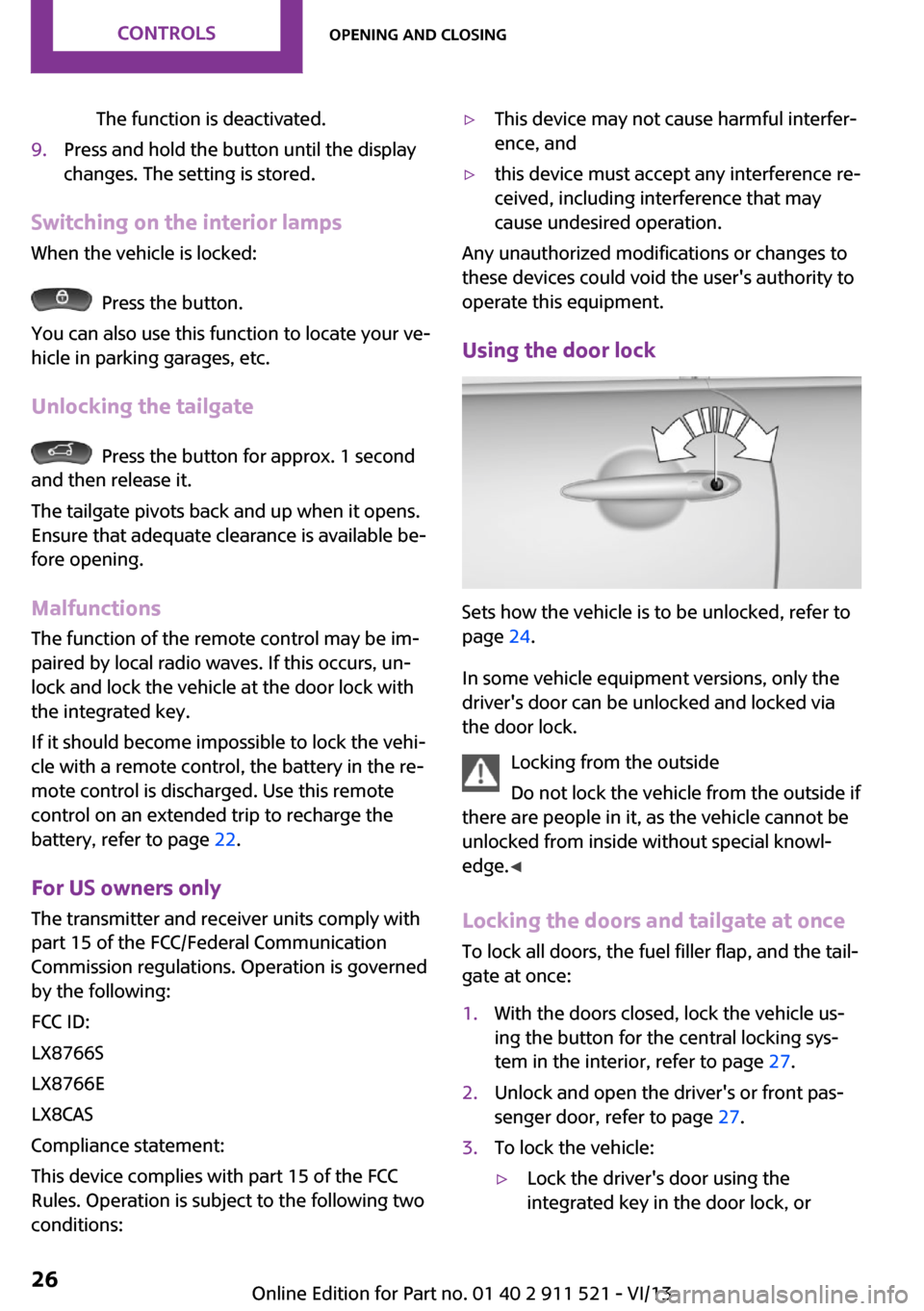
Using the door lock
Sets how the vehicle is to be unlocked, refer to
page 24.
In some vehicle equipment versions, only the
driver's door can be unlocked and locked via
the door lock.
Locking from the outside
Do not lock the vehicle from the outside if
there are people in it, as the vehicle cannot be
unlocked from inside without special knowl‐
edge. ◀
Locking the doors and tailgate at once
To lock all doors, the fuel filler flap, and the tail‐
gate at once:
1.With the doors closed, lock the vehicle us‐
ing the button for the central locking sys‐
tem in the interior, refer to page 27.2.Unlock and open the driver's or front pas‐
senger door, refer to page 27.3.To lock the vehicle:▷Lock the driver's door using the
integrated key in the door lock, orSeite 26ControlsOpening and closing26
Online Edition for Part no. 01 40 2 911 521 - VI/13
Page 32 of 218
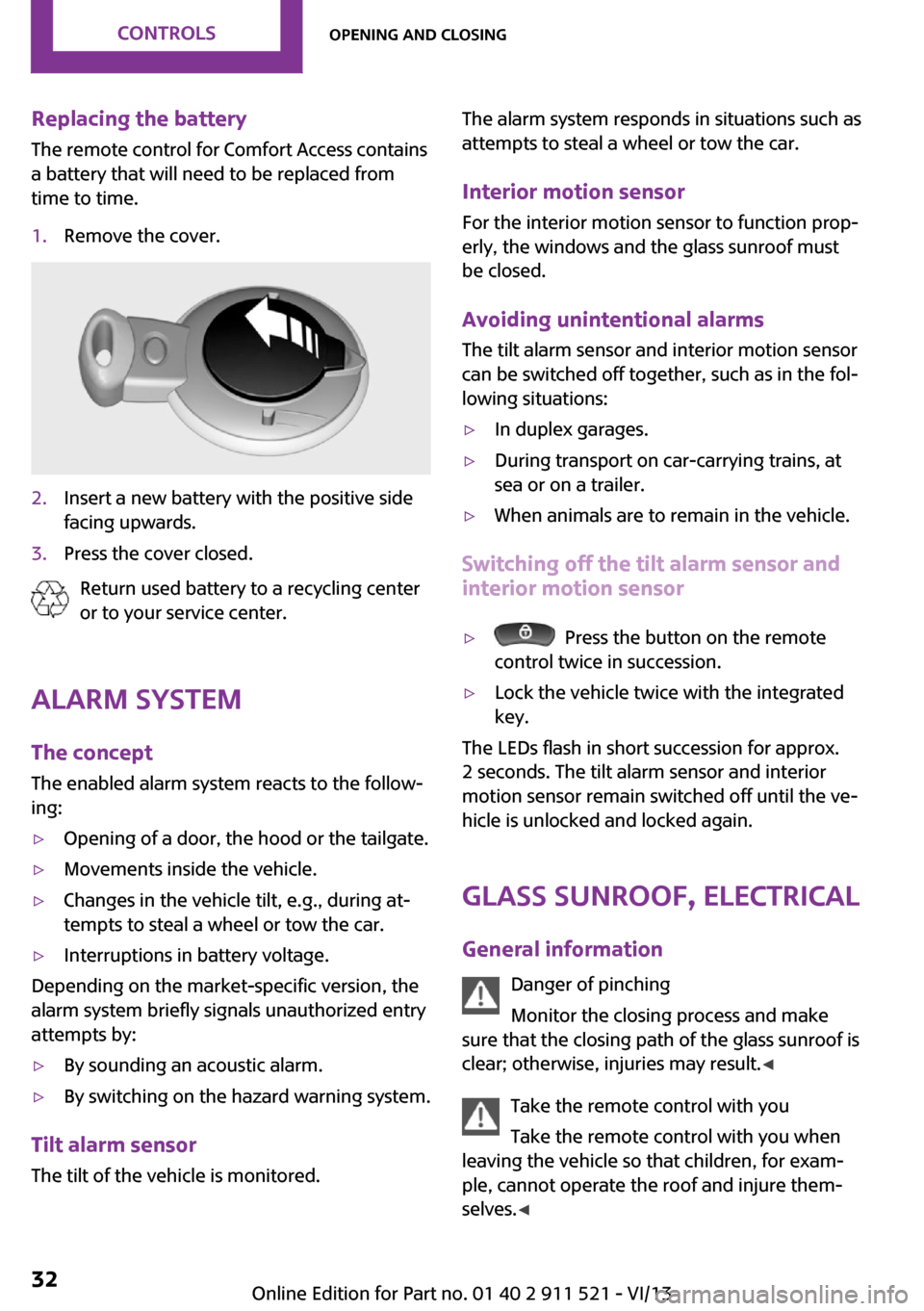
Replacing the battery
The remote control for Comfort Access contains
a battery that will need to be replaced from
time to time.1.Remove the cover.2.Insert a new battery with the positive side
facing upwards.3.Press the cover closed.
Return used battery to a recycling center
or to your service center.
Alarm system
The concept
The enabled alarm system reacts to the follow‐
ing:
▷Opening of a door, the hood or the tailgate.▷Movements inside the vehicle.▷Changes in the vehicle tilt, e.g., during at‐
tempts to steal a wheel or tow the car.▷Interruptions in battery voltage.
Depending on the market-specific version, the
alarm system briefly signals unauthorized entry
attempts by:
▷By sounding an acoustic alarm.▷By switching on the hazard warning system.
Tilt alarm sensor
The tilt of the vehicle is monitored.
The alarm system responds in situations such as
attempts to steal a wheel or tow the car.
Interior motion sensor For the interior motion sensor to function prop‐
erly, the windows and the glass sunroof must
be closed.
Avoiding unintentional alarms
The tilt alarm sensor and interior motion sensor
can be switched off together, such as in the fol‐
lowing situations:▷In duplex garages.▷During transport on car-carrying trains, at
sea or on a trailer.▷When animals are to remain in the vehicle.
Switching off the tilt alarm sensor and
interior motion sensor
▷ Press the button on the remote
control twice in succession.▷Lock the vehicle twice with the integrated
key.
The LEDs flash in short succession for approx.
2 seconds. The tilt alarm sensor and interior
motion sensor remain switched off until the ve‐
hicle is unlocked and locked again.
Glass sunroof, electrical
General information Danger of pinching
Monitor the closing process and make
sure that the closing path of the glass sunroof is
clear; otherwise, injuries may result. ◀
Take the remote control with you
Take the remote control with you when
leaving the vehicle so that children, for exam‐
ple, cannot operate the roof and injure them‐
selves. ◀
Seite 32ControlsOpening and closing32
Online Edition for Part no. 01 40 2 911 521 - VI/13
Page 68 of 218
When the daytime running lights are activated,
the low beams are always switched on in
switch position 3 when the ignition is switched
on.
The exterior lighting goes out automatically af‐
ter the vehicle is switched off.
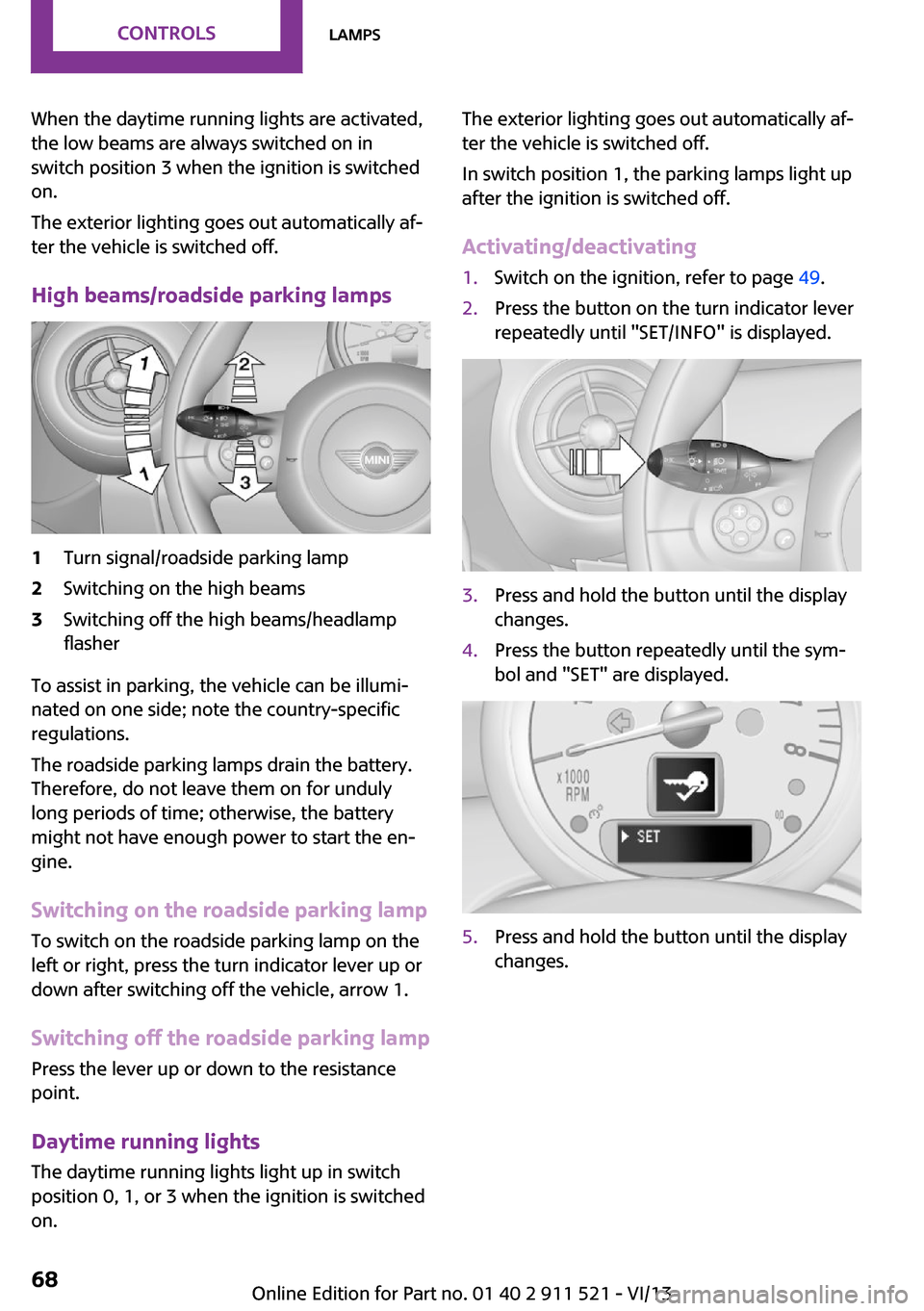
High beams/roadside parking lamps1Turn signal/roadside parking lamp2Switching on the high beams3Switching off the high beams/headlamp
flasher
To assist in parking, the vehicle can be illumi‐
nated on one side; note the country-specific
regulations.
The roadside parking lamps drain the battery.
Therefore, do not leave them on for unduly
long periods of time; otherwise, the battery
might not have enough power to start the en‐
gine.
Switching on the roadside parking lamp
To switch on the roadside parking lamp on the
left or right, press the turn indicator lever up or
down after switching off the vehicle, arrow 1.
Switching off the roadside parking lamp
Press the lever up or down to the resistance
point.
Daytime running lights
The daytime running lights light up in switch
position 0, 1, or 3 when the ignition is switched
on.
The exterior lighting goes out automatically af‐
ter the vehicle is switched off.
In switch position 1, the parking lamps light up
after the ignition is switched off.
Activating/deactivating1.Switch on the ignition, refer to page 49.2.Press the button on the turn indicator lever
repeatedly until "SET/INFO" is displayed.3.Press and hold the button until the display
changes.4.Press the button repeatedly until the sym‐
bol and "SET" are displayed.5.Press and hold the button until the display
changes.Seite 68ControlsLamps68
Online Edition for Part no. 01 40 2 911 521 - VI/13
Page 70 of 218
Depending on the steering angle and other pa‐
rameters, the light from the headlamp follows
the course of the road.
Activating With the ignition switch on, turn the light switch
to position 3, refer to page 67.
To avoid blinding oncoming traffic, the Adap‐
tive Light Control does not swivel to the driver's
side when the vehicle is at a standstill.
When driving in reverse, Adaptive Light Control
is not active.
Malfunction The warning lamp lights up. Adaptive
Light Control is malfunctioning or has
failed. Have the system checked as
soon as possible.
More information, refer to page 190.
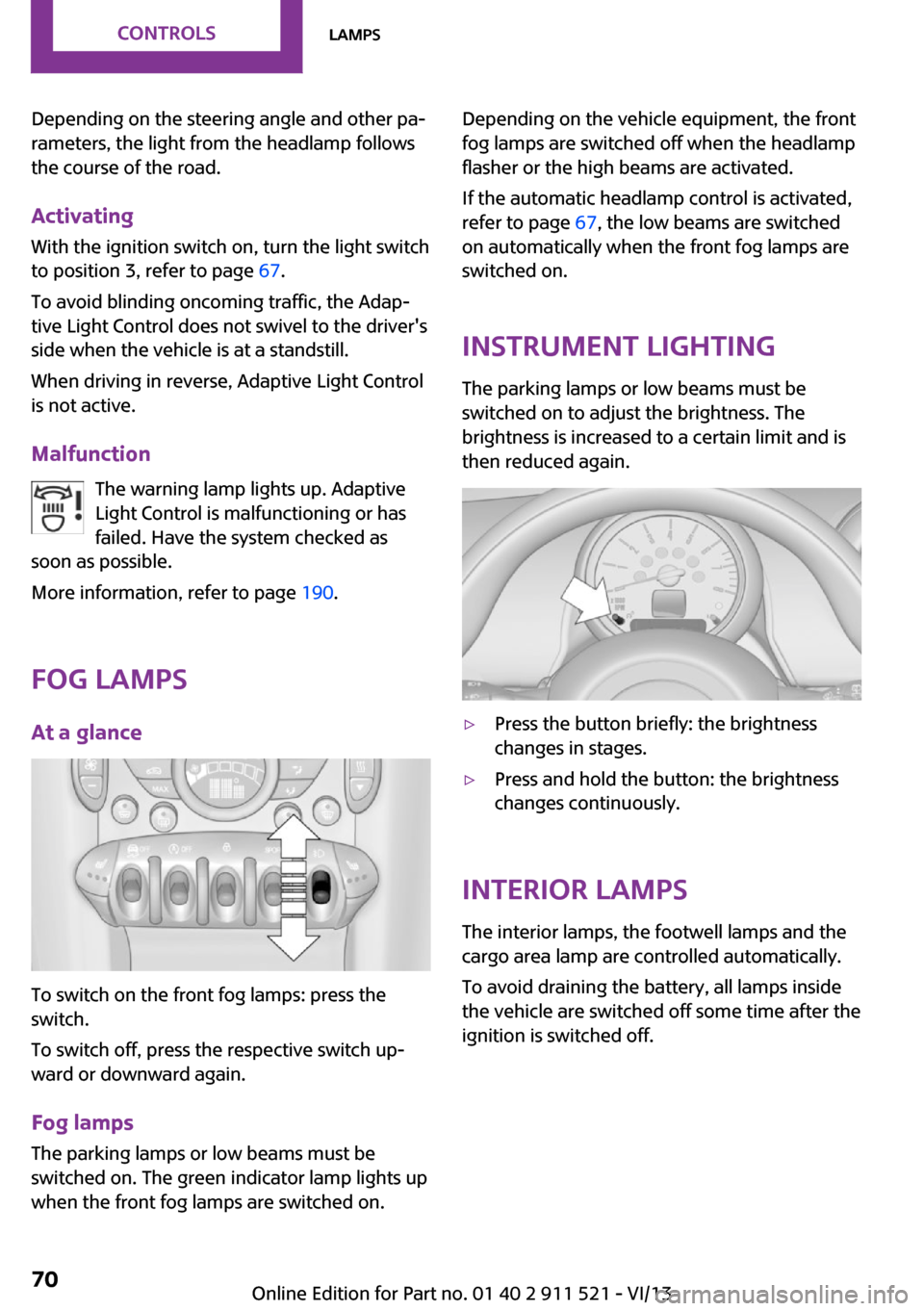
Fog lamps
At a glance
To switch on the front fog lamps: press the
switch.
To switch off, press the respective switch up‐
ward or downward again.
Fog lamps
The parking lamps or low beams must be
switched on. The green indicator lamp lights up
when the front fog lamps are switched on.
Depending on the vehicle equipment, the front
fog lamps are switched off when the headlamp
flasher or the high beams are activated.
If the automatic headlamp control is activated,
refer to page 67, the low beams are switched
on automatically when the front fog lamps are
switched on.
Instrument lighting
The parking lamps or low beams must be
switched on to adjust the brightness. The
brightness is increased to a certain limit and is then reduced again.▷Press the button briefly: the brightness
changes in stages.▷Press and hold the button: the brightness
changes continuously.
Interior lamps
The interior lamps, the footwell lamps and the
cargo area lamp are controlled automatically.
To avoid draining the battery, all lamps inside
the vehicle are switched off some time after the
ignition is switched off.
Seite 70ControlsLamps70
Online Edition for Part no. 01 40 2 911 521 - VI/13
Page 123 of 218
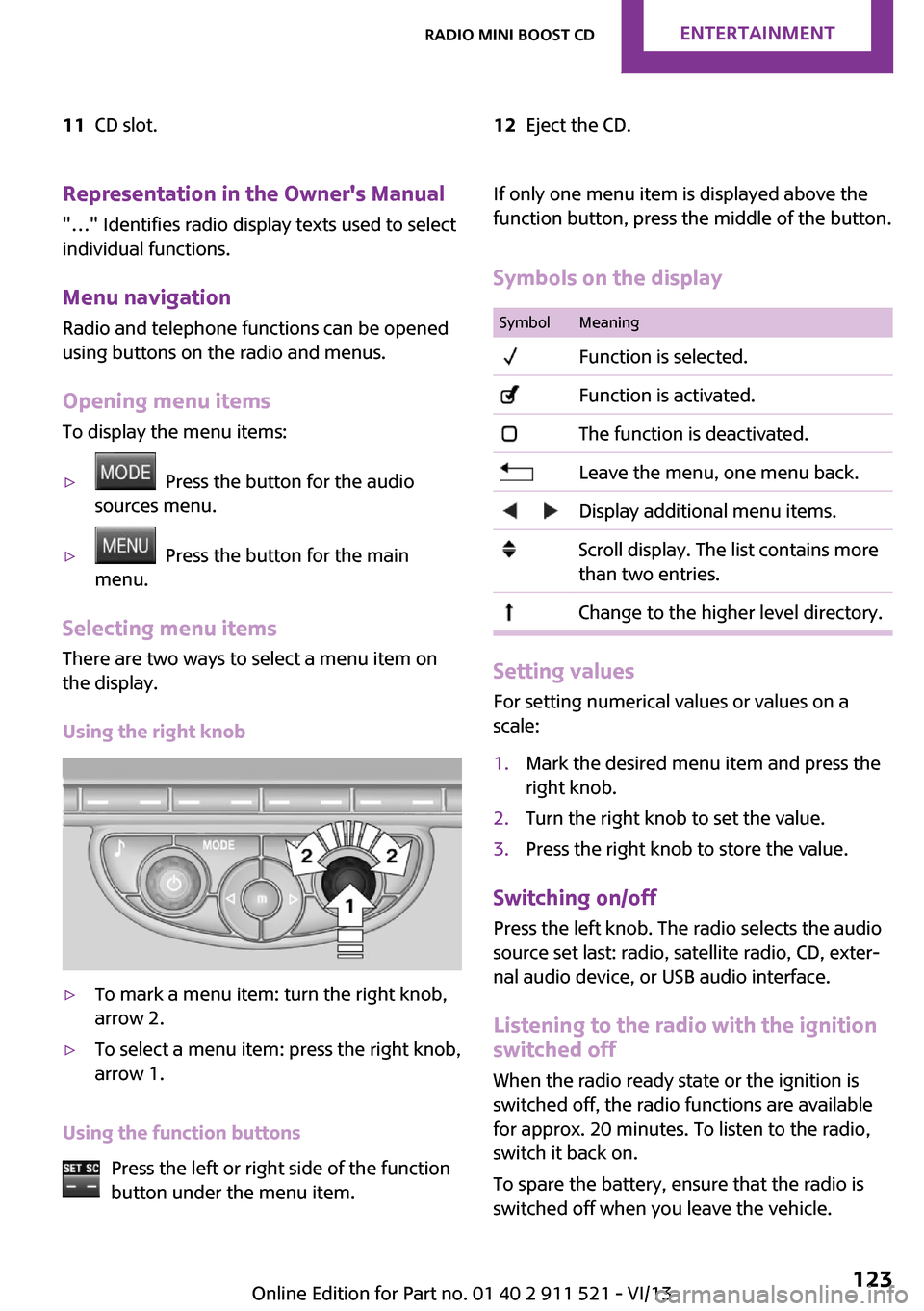
11CD slot.12Eject the CD.Representation in the Owner's Manual
"…" Identifies radio display texts used to select individual functions.
Menu navigation Radio and telephone functions can be opened
using buttons on the radio and menus.
Opening menu items
To display the menu items:▷ Press the button for the audio
sources menu.▷ Press the button for the main
menu.
Selecting menu items
There are two ways to select a menu item on
the display.
Using the right knob
▷To mark a menu item: turn the right knob,
arrow 2.▷To select a menu item: press the right knob,
arrow 1.
Using the function buttons
Press the left or right side of the function
button under the menu item.
If only one menu item is displayed above the
function button, press the middle of the button.
Symbols on the displaySymbolMeaning Function is selected. Function is activated. The function is deactivated. Leave the menu, one menu back. Display additional menu items. Scroll display. The list contains more
than two entries. Change to the higher level directory.
Setting values
For setting numerical values or values on a
scale:
1.Mark the desired menu item and press the
right knob.2.Turn the right knob to set the value.3.Press the right knob to store the value.
Switching on/off
Press the left knob. The radio selects the audio
source set last: radio, satellite radio, CD, exter‐
nal audio device, or USB audio interface.
Listening to the radio with the ignition
switched off
When the radio ready state or the ignition is
switched off, the radio functions are available for approx. 20 minutes. To listen to the radio,
switch it back on.
To spare the battery, ensure that the radio is
switched off when you leave the vehicle.
Seite 123Radio MINI Boost CDEntertainment123
Online Edition for Part no. 01 40 2 911 521 - VI/13
Page 136 of 218
TelephoneVehicle equipment
This chapter describes all series equipment as
well as country-specific and special equipment
offered for this model series.Therefore, it also
describes equipment that may not be found in
your vehicle, for instance due to the selected
special equipment or the country version. This
also applies to safety-related functions and sys‐
tems.
At a glance The concept
Mobile phones can be connected with the vehi‐
cle via Bluetooth.
After a suitable mobile phone is paired with the
vehicle once, you can operate the mobile
phone via the radio, the buttons on the steer‐
ing wheel, and via voice activation.
Bluetooth® is a registered trademark of Blue‐
tooth® SIG, Inc.
Certain functions may need to be enabled by
the mobile phone provider or service provider.
Using the mobile phone while driving
Make entries only when traffic and road
conditions allow. Do not hold the mobile phone
in your hand while you are driving; use the
hands-free system instead. If you do not ob‐
serve this precaution, you can endanger the ve‐
hicle occupants and other road users. ◀
Snap-in adapter The snap-in adapter is used to:▷Hold the mobile phone.▷Recharge the battery.▷Connect the mobile phone to an outside
antenna of the vehicle.This provides for better network reception
and consistent sound quality.
Do not operate a mobile phone that is con‐
nected to the vehicle on the mobile phone key‐
pad, as this may lead to a malfunction.
Approved mobile phones
Details on which mobile phones with a Blue‐
tooth interface are supported by the mobile
phone preparation package can be obtained at
www.mini.com/connectivity.
Notes At high temperatures, the charging function of
the mobile phone may be limited and functions
may not be executed.
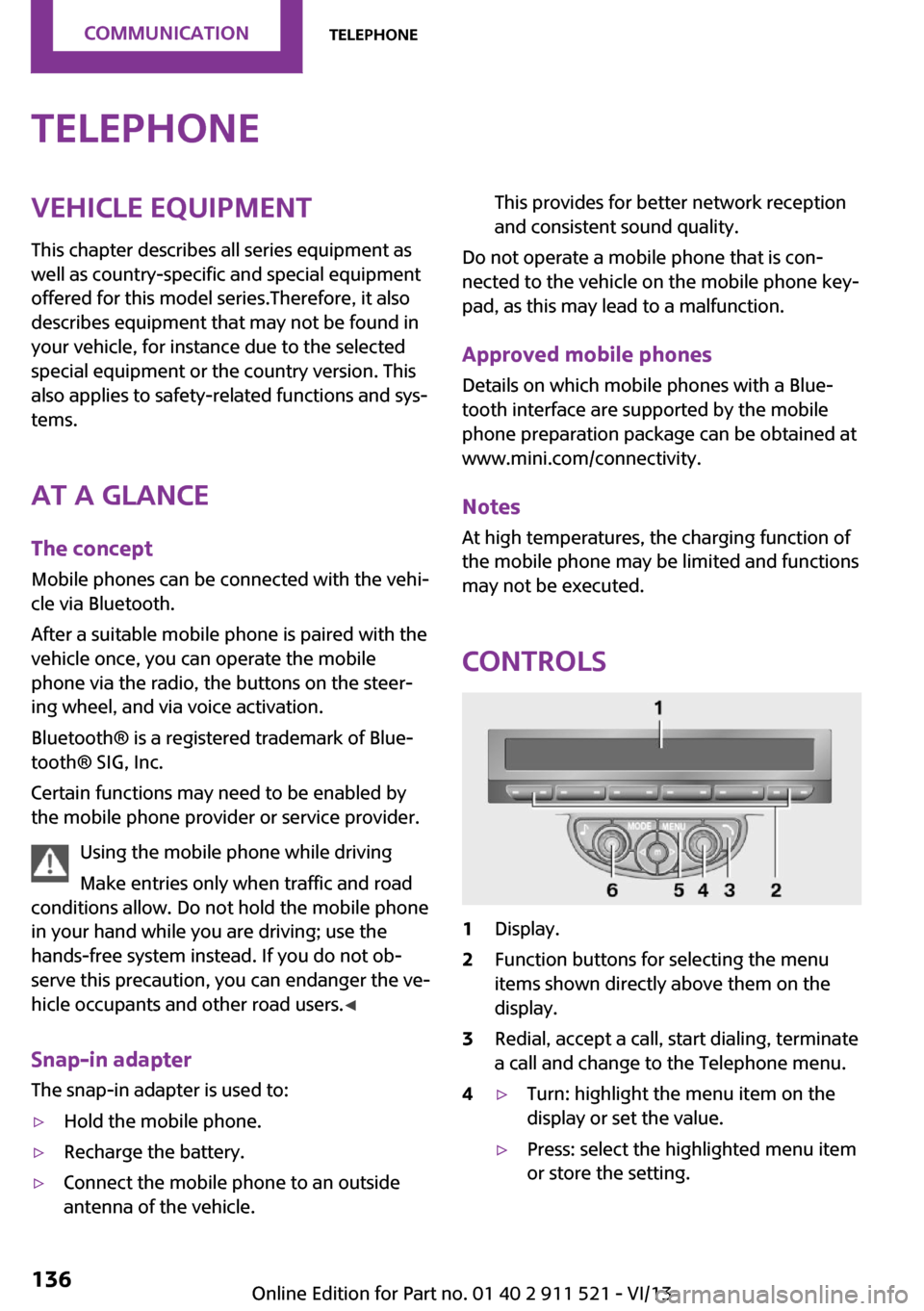
Controls
1Display.2Function buttons for selecting the menu
items shown directly above them on the
display.3Redial, accept a call, start dialing, terminate
a call and change to the Telephone menu.4▷Turn: highlight the menu item on the
display or set the value.▷Press: select the highlighted menu item
or store the setting.Seite 136CommunicationTelephone136
Online Edition for Part no. 01 40 2 911 521 - VI/13
Page 182 of 218
the battery, or to the engine or body
ground of the vehicle to be started.
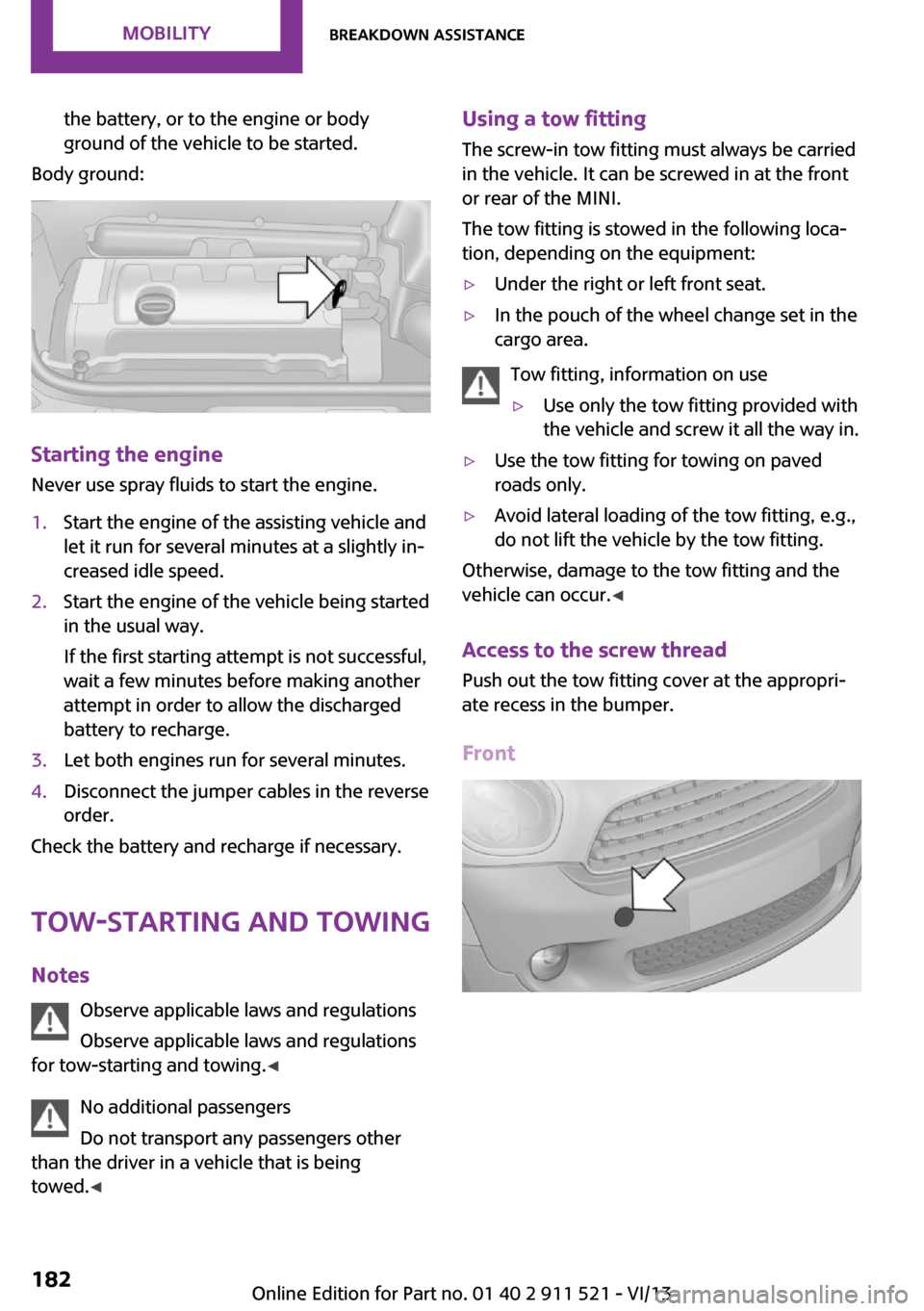
Body ground:
Starting the engine
Never use spray fluids to start the engine.
1.Start the engine of the assisting vehicle and
let it run for several minutes at a slightly in‐
creased idle speed.2.Start the engine of the vehicle being started
in the usual way.
If the first starting attempt is not successful,
wait a few minutes before making another
attempt in order to allow the discharged
battery to recharge.3.Let both engines run for several minutes.4.Disconnect the jumper cables in the reverse
order.
Check the battery and recharge if necessary.
Tow-starting and towing
Notes Observe applicable laws and regulations
Observe applicable laws and regulations
for tow-starting and towing. ◀
No additional passengers
Do not transport any passengers other
than the driver in a vehicle that is being
towed. ◀
Using a tow fitting
The screw-in tow fitting must always be carried
in the vehicle. It can be screwed in at the front
or rear of the MINI.
The tow fitting is stowed in the following loca‐
tion, depending on the equipment:▷Under the right or left front seat.▷In the pouch of the wheel change set in the
cargo area.
Tow fitting, information on use
▷Use only the tow fitting provided with
the vehicle and screw it all the way in.▷Use the tow fitting for towing on paved
roads only.▷Avoid lateral loading of the tow fitting, e.g.,
do not lift the vehicle by the tow fitting.
Otherwise, damage to the tow fitting and the
vehicle can occur. ◀
Access to the screw thread Push out the tow fitting cover at the appropri‐
ate recess in the bumper.
Front
Seite 182MobilityBreakdown assistance182
Online Edition for Part no. 01 40 2 911 521 - VI/13
Page 209 of 218
Breakdown assistance, Road‐side Assistance 180
Breaking in 110
Buckle tongue, rear– Height adjustment 39
Button for starting the engine,
refer to Start/Stop button 49
C
California Proposition 65 Warning 7
Car battery, refer to Vehicle battery 178
Car care products 187
Care, displays 189
Care, vehicle 187
Cargo area
– Comfort Access 30– Flat loading floor 99– Multi-function hook 101– Opening from the out‐
side 28– Partition net 100
Cargo area, enlarging
– Cargo cover 98
Cargo area lamp, refer to Inte‐
rior lamps 70
Cargo area tailgate, refer to Tailgate 28
Car horn, refer to Horn 14
Carpet, care 189
Car phone, refer to Tele‐ phone 136
Car wash 186
CBC, Cornering Brake Con‐ trol 81
CBS Condition Based Serv‐ ice 169
CD/DVD drives, care 189
Center armrest 103
Center console, refer to Around the center con‐
sole 17
Center rail 104
Center rail, refer to Storage compartments 104
Central locking– Comfort Access 30– From the inside 27– From the outside 24
Central locking system
– Concept 23– From the outside 23
Changes, technical, refer to
Safety 7
Changing wheels/tires 159
Check Control 65
Children, transporting 44
Child restraint fixing system
LATCH 45
Child restraint fixing sys‐ tems 44
Child restraint fixing systems, mounting 44
Child seat, mounting 44
Child seats, refer to Transport‐ ing children safely 44
Chrome parts, care 189
Circulation of air, refer to Re‐ circulated air mode 88, 90
Cleaning, displays 189
Cleaning, refer to Care 186
Climate 87
Climate mode
– Ventilation 91
Clock 59
Clock
– 12h/24h format 62
Closing
– From the inside 27– From the outside 24
Clutch, breaking in 110
Cockpit 14
Cold start, refer to Starting the engine 50
Combination instrument, refer to Displays 16
Combination switch, refer to Turn signal/high beams/
headlamp flasher 52
Combination switch, refer to Washer/wiper system 53
Comfort Access– In the car wash 31– Replacing the battery 32
Comfort area, refer to Around
the center console 17
Compartment for remote con‐ trol, refer to Ignition lock 49
Compass, digital 94
Computer 60
Computer, displaying informa‐ tion 60
Condition Based Service CBS 169
Confirmation signals for vehi‐ cle locking/unlocking 25
Consumption, refer to Aver‐ age fuel consumption 61
Control Display, care 189
Controls and displays 14
Control systems, driving stabil‐ ity 81
Convenient operation
– Windows 25
Coolant temperature 60
Cooling function, switching on and off 91
Cooling, maximum 90
Cornering Brake Control, CBC 81
Corrosion on brake discs 112
Cradle for telephone or mobile phone, refer to Snap-in
adapter 143
Cruise control 84
Cupholders 96
Current fuel consumption 61
Curve lights, refer to Adaptive Light Control 69
Cylinders, number of, refer to Engine data 204
D
Dashboard lighting, refer to Instrument lighting 70
Dashboard, refer to Cock‐ pit 14
Seite 209Everything from A to ZReference209
Online Edition for Part no. 01 40 2 911 521 - VI/13
Page 210 of 218
Dashboard, refer to Dis‐plays 16
Data, technical 204
Date– Display format 62– Setting 63
Daytime running lights 68
Decorative trim, care 189
Defogging windows 88
Defroster
– Rear window 88, 91
Defrosting windows 88
Defrost setting, refer to De‐ frosting windows 88
Digital compass 94
Dip stick, engine oil 166
Directional indicators, refer to Turn signals 52
Displacement, refer to Engine data 204
Display lighting, refer to In‐ strument lighting 70
Displays 16
Displays and controls 14
Displays, care 189
Displays, cleaning 189
Displays, refer to Instrument cluster 16
Disposal
– Remote control battery 32
Distance warning, refer to
Park Distance Control
PDC 85
Door key, refer to Remote control with integrated
key 22
Door lock 26
Door lock, confirmation sig‐ nals 25
Doors, manual operation 27
Doors, unlocking and locking
– Confirmation signals 25– From the inside 27– From the outside 24
DOT Quality Grades 156
Drive-off assistant, refer to Hill drive-off assistant 83
Driving notes, breaking
in 110
Driving off on hills, refer to Hill drive-off assistant 83
Driving on poor roads 113
Driving stability control sys‐ tems 81
Driving tips, refer to Driving notes 110
Dry air, refer to Cooling func‐ tion 91
DSC Dynamic Stability Con‐ trol 81
DTC Dynamic Traction Con‐ trol 82
Dynamic Stability Control DSC 81
Dynamic Traction Control DTC 82
E Electrical malfunction– Door lock 27– Fuel filler flap 148
Electronic brake-force distri‐
bution 81
Electronic Stability Program ESP, refer to Dynamic Stabil‐
ity Control DSC 81
Emergency activation
– Automatic transmission, re‐
fer to Overriding selector
lever lock 58
Emergency operation, fuel
filler flap, unlocking man‐
ually 148
Emergency operation, refer to
Manual operation
– Door lock 27
Energy, saving, refer to Saving
fuel 118
Engine, breaking in 110
Engine compartment 164
Engine oil, adding 166
Engine oil, additives, refer to Approved engine oils 167
Engine oil, alternative oil
types 167
Engine oil change intervals, refer to Service require‐
ments 64
Engine oil, dip stick 166
Engine oil, filling capacity 207
Engine oil, MINI maintenance system 169
Engine oil types, alterna‐ tive 167
Engine oil types, ap‐ proved 167
Engine, overheating, refer to Coolant temperature 60
Engine power, refer to Engine data 204
Engine, RPM 204
Engine start, assistance 180
Engine, starting 50
Engine, starting– Comfort Access 30
Engine, starting, Start/Stop
button 49
Engine, stopping, Start/Stop button 49
Engine, switching off 51
Equipment, interior 92
ESP Electronic Stability Pro‐ gram, refer to Dynamic Sta‐
bility Control DSC 81
Exchanging wheels/tires 159
Exterior mirrors 42
Exterior mirrors, adjusting 42
Exterior mirrors, folding in and out 42
Exterior sensors, care 189
External temperature dis‐ play 59
External temperature display
– Changing the units 62– On the computer 62
External temperature warn‐
ing 59
Externel temperature dis‐ play 59
Seite 210ReferenceEverything from A to Z210
Online Edition for Part no. 01 40 2 911 521 - VI/13
Page 216 of 218
Trip-distance counter, refer toTrip odometer 59
Triple turn signal activa‐ tion 52
Trip odometer 59
Trunk lid, refer to Tailgate 28
Trunk, refer to Cargo area 28
Turning lamps, refer to Adap‐ tive Light Control 69
Turn signal– Indicator lamp 16
Turn signal, bulb replace‐
ment 173
Turn signals 52
Turn signals, triple turn signal activation 52
U
Uniform Tire Quality Grading/ UTQG 156
Unintentional alarms, avoid‐ ing 32
Units
– Average fuel consump‐
tion 62– Temperature 62
Universal remote control 92
Unlocking
– From the inside 27– From the outside 24– Tailgate 30– Without remote control, re‐
fer to Comfort Access 30
Upholstery care 188
Upholstery material care 188
USB audio interface 131
V Vehicle battery 178
Vehicle, breaking in 110
Vehicle care 187
Vehicle care, refer to Care 186
Vehicle equipment 6
Vehicle paintwork, care 188
Vehicle storage 189
Vehicle, switching off 51
Vehicle wash 186
Ventilation– Air conditioning 91
W
Warning and indicator lamps 17
Warning and indicator lamps, overview 190
Warning messages, refer to Check Control 65
Warning triangle 180
Washer/wiper system 53
Washer/wiper system, rain sensor 53
Washer/wiper system, washer fluid 55
Washer fluid 55
Washer fluid reservoir 55
Washing, vehicle 186
Welcome lamps 69
Wheel change 177
Wheels and tires 152
Wheels, changing 159
Wheels, Flat Tire Monitor FTM 75
Windows
– Closing 34– Convenient operation 25– Opening 34
Windows, care 187
Windows, defrosting and de‐ fogging 88
Windows, pinch protection 34
Windshield
– Defrosting and defogging 88
Windshield, defrosting, refer
to Defrosting windows 88
Windshield wash 53
Windshield washer fluid 55
Windshield wash, rear win‐ dow 55
Windshield wash, reservoir for washer fluid 55
Windshield wash, washer
fluid 55
Windshield wiper blades, changing 171
Windshield wiper, refer to Washer/wiper system 53
Winter storage, care 189
Winter tires 159
Winter tires, tread 157
Wiper blades, care 187
Wiper blades, changing 171
Wiper fluid 55
Y
Your individual vehicle– Settings, refer to Personal
Profile 22Seite 216ReferenceEverything from A to Z216
Online Edition for Part no. 01 40 2 911 521 - VI/13