display MINI Countryman 2016 (Mini Connected) Workshop Manual
[x] Cancel search | Manufacturer: MINI, Model Year: 2016, Model line: Countryman, Model: MINI Countryman 2016Pages: 282, PDF Size: 6.79 MB
Page 136 of 282

Add, refer to page 142, a destination as a
further destination.
Address book
Create contacts, refer to page 185.
Selecting a destination from the
address book
1."Navigation"2."Address book"
Contacts with addresses are displayed if
these addresses have been checked as des‐
tinations in the contacts.
If the contacts with addresses from the mo‐
bile phone are not displayed, they first
need to be checked as destinations, refer to
page 187.3.Select a contact in the list or, if desired, with
"A-Z search".4."Business address" or "Home address"Storing the destination in the address
book
After entering the destination, store the desti‐
nation in the address book.1."Navigation"2."Map"3."Guidance"4.Open "Options".5."Store as new contact" or "Add to existing
contact"6.Select an existing contact, if available.7."Business address" or "Home address"8.Enter "Last name" and, if necessary, "First
name".9."Store in vehicle"
Storing the position
The current position can be stored in the ad‐
dress book.
1."Navigation"2.Open "Options".Seite 136NAVIGATIONDestination entry136
Online Edition for Part no. 01 40 2 964 459 - VI/15
Page 138 of 282
Editing the destination
Destinations can be edited, for example to
change the house number of an existing entry.1."Navigation"2."Last destinations"3.Highlight the destination.4.Open "Options".5."Edit destination"
Deleting the last destinations
1."Navigation"2."Last destinations"3.Highlight the destination.4.Open "Options".5."Delete entry" or "Delete all last
destinations"
Special destinations
General information
Even with the latest navigation data, informa‐
tion on individual Points of Interest may have
changed; for example, gas stations might not
be in operation.
Opening the search for Points of
Interest
Selection of Points of Interest, such as hotels or
tourist attractions.
1."Navigation"2."Points of Interest"3.Select the search function.
A-Z search
1."A-Z search"2."Town/City"3.Select or enter the town/city.4."Category"5.Select the category.6."Category details"
For some Points of Interest, it may be possi‐
ble to select multiple category details.
Move the MINI joystick to the left to leave
the category details.7."Keyword"8.Enter the keyword.
A list of the Points of Interest is displayed.9.Select a special destination.
Details are displayed.
If multiple details are stored, you can leaf
through the pages.
If a phone number is available, a connec‐
tion can be established if necessary.10. Select the symbol.11."Start guidance" or "Add as another
destination"
Add a destination as a further destination,
refer to page 142.
Category search
1."Category search"2."Search destination"3.Select or enter the town/city.4."Category"5.Select the category.6."Category details"
For some Points of Interest, it may be possi‐
ble to select multiple category details.
Move the MINI joystick to the left to leave
the category details.7."Start search"
A list of the Points of Interest is displayed.8.Select a special destination.
Details are displayed.
If multiple details are stored, you can leaf
through the pages.Seite 138NAVIGATIONDestination entry138
Online Edition for Part no. 01 40 2 964 459 - VI/15
Page 139 of 282

If a phone number is available, a connec‐
tion can be established if necessary.9. Select the symbol.10."Start guidance" or "Add as another
destination"
Add a destination as a further destination,
refer to page 142.
Position of Points of Interest
When entering the search location, various op‐
tions can be selected.
▷"At current location"▷"At destination"▷"At different location"▷If destination guidance is active: "Along
route"
Starting the search for Points of Interest
1."Start search"2.A list of the Points of Interest is displayed.▷"At current location"
The Points of Interest are listed accord‐
ing to their distance and are displayed
with a directional arrow pointing to the
destination.▷"At destination", "At different location", "Along route"
Special destinations are listed according
to their distance from the location
where the search is being performed.▷Destinations of the selected category
are displayed in the map view as sym‐bols. The display depends on the map
scale and the category.3.Highlight the special destination.4.Select a special destination.5. Select the symbol.6."Start guidance" or "Add as another
destination"
The direct distance to destination is dis‐
played.
Displaying Points of Interest in the map
To display symbols of the Points of Interest in
the map view:
1."Navigation"2."Map"3.Open "Options".4."Display Points of Interest"5.Select the setting.
Destination entry by map
General information If only the location of the destination town/city
or street is known, the destination can be en‐
tered using the map.
Selecting the destination
1."Navigation"2."Map"
The current position of the vehicle is dis‐
played on the map.Seite 139Destination entryNAVIGATION139
Online Edition for Part no. 01 40 2 964 459 - VI/15
Page 140 of 282
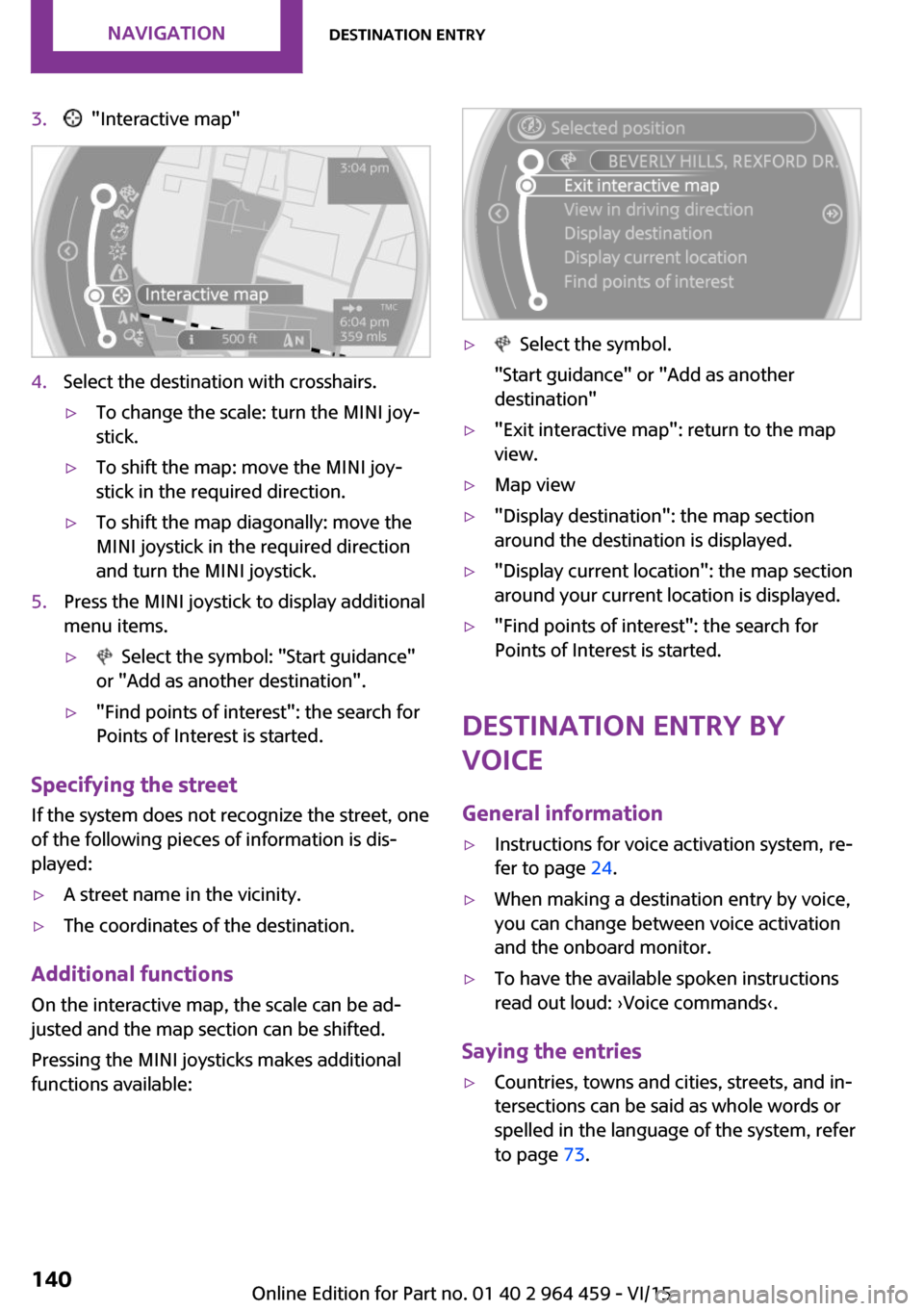
3. "Interactive map"4.Select the destination with crosshairs.▷To change the scale: turn the MINI joy‐
stick.▷To shift the map: move the MINI joy‐
stick in the required direction.▷To shift the map diagonally: move the
MINI joystick in the required direction
and turn the MINI joystick.5.Press the MINI joystick to display additional
menu items.▷ Select the symbol: "Start guidance"
or "Add as another destination".▷"Find points of interest": the search for
Points of Interest is started.
Specifying the street
If the system does not recognize the street, one
of the following pieces of information is dis‐
played:
▷A street name in the vicinity.▷The coordinates of the destination.
Additional functions
On the interactive map, the scale can be ad‐
justed and the map section can be shifted.
Pressing the MINI joysticks makes additional
functions available:
▷ Select the symbol.
"Start guidance" or "Add as another
destination"▷"Exit interactive map": return to the map
view.▷Map view▷"Display destination": the map section
around the destination is displayed.▷"Display current location": the map section
around your current location is displayed.▷"Find points of interest": the search for
Points of Interest is started.
Destination entry by
voice
General information
▷Instructions for voice activation system, re‐
fer to page 24.▷When making a destination entry by voice,
you can change between voice activation
and the onboard monitor.▷To have the available spoken instructions
read out loud: ›Voice commands‹.
Saying the entries
▷Countries, towns and cities, streets, and in‐
tersections can be said as whole words or
spelled in the language of the system, refer
to page 73.Seite 140NAVIGATIONDestination entry140
Online Edition for Part no. 01 40 2 964 459 - VI/15
Page 141 of 282
Example: to enter a town/city in a US states
as a whole word, the language of the sys‐
tem must be English.▷Spell the entry if the spoken language and
the language of the system differ.▷Say the letters smoothly, and avoid exag‐
gerating the pronunciation and inserting
lengthy pauses between the letters.▷The methods of entry depend on the navi‐
gation data in use and the country and lan‐
guage settings.
Entering a town/city separately
The town/city can be said as a complete word.
1. Press the button on the steering
wheel.2.›City‹ or ›Spell city‹3.Wait for the system to prompt you for the
town/city.4.Say the name of the town/city, or name at
least the first three letters.5.Select a location:▷Select a recommended town/city: ›Yes‹.▷Select a different town/city: ›New
entry‹.▷Select an entry: ›Entry ...‹, for instance,
entry 2.▷Spell an entry: ›Spell city‹.6.Continue making the entry as prompted by
the system.
If there are several towns/cities with the same
name:
Towns/cities of the same name are grouped in
a list and displayed as one location followed by
an ellipsis.
1.Select an entry: ›Yes‹ or ›Entry ...‹, e. g., En‐
try 2.2.Select the desired town/city.
The town/city can also be selected from the
list on the onboard monitor:Turn the MINI joystick until the destination
town/city is selected and press the
MINI joystick.
Entering a street or intersection
separately
Enter a street and intersection in the same way
as you would enter a town/city.
Entering a house number separately Depending on the data in the navigation sys‐
tem, house numbers up to number 2,000 can
be entered.
1.›House number‹2.Say the house number.3.›Yes‹ to confirm the house number.4.›Accept destination‹
Starting destination guidance
›Start guidance‹
Adding further intermediate
destinations
›Add as another destination‹
Further intermediate destinations can be
added.
Storing a destination The destination is automatically added to the
list of last destinations.
Planning a trip with in‐termediate destinations
New trip
Various intermediate destinations can be en‐
tered for a trip. The trip destination needs to be
entered first, destination entry, refer to
page 134.
Seite 141Destination entryNAVIGATION141
Online Edition for Part no. 01 40 2 964 459 - VI/15
Page 143 of 282
Destination guidanceVehicle features and op‐tions
This chapter describes all standard, country-
specific and optional features offered with the
series. It also describes features that are not
necessarily available in your car, e. g., due to
the selected options or country versions. This
also applies to safety-related functions and sys‐
tems.
When using the features and systems described
here, adhere to local regulations.
Starting destination
guidance1."Navigation"2.Make a destination entry, refer to
page 134.3."Accept destination"4."Start guidance"
The route is shown on the Control Display.
The distance to the destination/intermediate
destination and the estimated time of arrival
are displayed in the map view.
The arrow view may appear on the Control Dis‐
play.
Terminating destination
guidance
1."Navigation"2."Map"3. Select the symbol.4."Stop guidance"Continuing destination
guidance
If the destination was not reached during the
last trip, destination guidance can be resumed.
"Resume guidance"
Route criteria
General information▷The route calculated can be influenced by
selecting certain criteria.▷The route criteria can be changed when the
destination is entered and during destina‐
tion guidance.▷Road types are part of the navigation data
and are taken into consideration when
planning a route, e.g., avoid highways.▷The recommended route may differ from
the route you would take based on per‐
sonal experience.▷The settings are stored for the remote con‐
trol currently in use.▷Destination guidance with traffic bulletins,
refer to page 149.
Changing the route criteria
1."Navigation"2."Map"3. "Route preference"4.Select the criterion:▷ "Fast route": time-optimized route,
being a combination of the shortest
possible route and the fastest roads.▷ "Efficient route": optimized combi‐
nation of the fastest and shortest route.Seite 143Destination guidanceNAVIGATION143
Online Edition for Part no. 01 40 2 964 459 - VI/15
Page 144 of 282

▷ "Short route": short distance, irre‐
spective of how fast or slow progress
will be.▷"Alternative routes": if available, alter‐
native routes are suggested during ac‐
tive destination guidance.5.Select additional criteria for the route, if
necessary. Where possible, the selected cri‐
teria are avoided on the route.▷"Avoid highways": highways are
avoided wherever possible.▷"Avoid toll roads": toll roads are
avoided wherever possible.▷"Avoid ferries": ferries are avoided
where possible.
Route
Different views of the route are available during
destination guidance:
▷Arrow view.▷List of route sections.▷Map view, refer to page 146.
Arrow view
The following information is displayed during
destination guidance:
▷Large arrow: indicates the current direction
of travel.▷Street name of the currently traveled street.▷Small arrow: indicates the next change in
direction.▷Intersection view.▷Lane information.▷Traffic bulletins.▷Distance to the next change in direction.▷Street name at the next change in direc‐
tion.
Lane information
On multilane roads, the recommended lanes
are marked in the arrow view by a triangle.
▷Solid triangle: best lane.▷Empty triangle: possible lane. However, an‐
other lane change may be needed shortly.
Displaying list of route sections
When destination guidance is activated, a list of
route sections can be displayed. The driving
distance and traffic bulletins are displayed for
each route section.
1."Navigation"2."Route information"3.Highlight route section.
Bypassing a section of
the route
Calculate a new route for a route section.
1."Navigation"2."Route information"Seite 144NAVIGATIONDestination guidance144
Online Edition for Part no. 01 40 2 964 459 - VI/15
Page 145 of 282

3."New route for"4.Turn the MINI joystick. Enter the number of
kilometers within which you would like to
return to the original route.5.Press the MINI joystick.
Resuming the original route
If the route section should no longer be by‐
passed:
1."Navigation"2."Route information"3."New route for:"4."Remove blocking"
Gas station recommenda‐
tion
The remaining range is calculated, and if
needed gas stations along the route are dis‐
played.
Even with the latest navigation data, informa‐
tion on individual Points of Interest may have
changed; for example, gas stations might not
be in operation.
1."Navigation"2."Route information"3."Recommended refuel"
A list of the gas stations is displayed.4.Highlight a gas station.5.Select the gas station.6. Select the symbol.7."Start guidance": destination guidance to
the selected gas station is started.
"Add as another destination": the gas sta‐
tion is added to the route.
Destination guidance
through voice instruc‐
tions
Switching spoken instructions on/off The spoken instructions can be switched on or
off during destination guidance.
Settings are stored for the remote control cur‐
rently in use.
1."Navigation"2."Map"3. Select the symbol.SymbolFunction The spoken instructions are switched
on. Spoken instructions are switched off.
Repeating a spoken instruction
1."Navigation"2."Map"3. Highlight the symbol.4.Press the MINI joystick twice.
Volume of spoken instructions
Turn the volume button during the spoken in‐
structions until the desired volume is set.
Seite 145Destination guidanceNAVIGATION145
Online Edition for Part no. 01 40 2 964 459 - VI/15
Page 146 of 282

This volume is independent of the volume of
the audio sources.
Settings are stored for the remote control cur‐
rently in use.
Map view
Selecting the map view
1."Navigation"2."Map"
Overview
1Function bar2Route section with traffic obstruction3Traffic sign for traffic obstruction4Planned route5Current location6Upper status field7Lower status field
Lines in the map Streets and routes are displayed in different
colors and styles depending on their classifica‐
tion. Dashed lines represent railways and ferry
connections. Country borders are indicated by
thin lines.
Traffic obstructions
Small triangles along the planned route indicate
route sections with traffic obstructions, de‐
pending on the map scale. The direction of the
triangles indicates the direction of the obstruc‐
tion.
The traffic signs indicate the significance of the
obstruction.▷Red traffic sign: the obstruction affects the
planned route or direction.▷Gray traffic sign: the obstruction does not
affect the planned route or direction.
Traffic bulletins, refer to page 147.
Planned route After destination guidance is started, the plan‐
ned route is displayed on the map.
Status fields
To show/hide: press the MINI joystick.
▷Upper status field: time, telephone, and en‐
tertainment details.▷Lower status field: symbol for active desti‐
nation guidance, status of traffic bulletins,
time of arrival, and distance to destination.
Function bar
The following functions are available in the
function bar:
SymbolFunction Start/end destination guidance. Switch spoken instructions on/
off. Change the route criteria. Search for a special destina‐
tion.Seite 146NAVIGATIONDestination guidance146
Online Edition for Part no. 01 40 2 964 459 - VI/15
Page 147 of 282

SymbolFunction Display traffic bulletins. Open the interactive map. Adjust the map views. Adjust the arrow view. Change the scale.
Changing the map section
"Interactive map"
▷To shift the map: move the MINI joystick in
the required direction.▷To shift the map diagonally: move the
MINI joystick in the required direction and
turn the MINI joystick.
Changing the scale
1. Select the symbol.2.To change the scale: turn the MINI joystick.
Automatically scaled map scale
In the map view facing north, turn the MINI joy‐
stick in any direction until the AUTO is dis‐
played for the scale. The entire route between
the current location and the destination is dis‐
played on the map.
Settings for the map view
The settings are stored for the remote control
currently in use.
1."Navigation"2."Map"3.Open "Options".4."Settings"5.To set the map view:▷"Day/night mode"
Select and create the necessary settings
depending on the light conditions."Traffic conditions/gray map" active:
the setting is disregarded.▷"Traffic conditions/gray map"
The map is optimized for displaying
traffic bulletins.
Symbols for the Points of Interest are no
longer displayed.
Arrow view
When destination guidance is activated, the ar‐
row view can additionally be displayed in the
map view on the right side of the display.
1."Navigation"2.Open "Options".3."Arrow display on map"
The arrow view is shown on the map.
Traffic bulletins
Overview
▷Display the traffic bulletins from radio sta‐
tions that broadcast the TI Traffic Informa‐
tion of a traffic information service. Infor‐
mation on traffic obstructions and hazards
is updated continuously.▷The traffic bulletins are indicated on the
map by symbols.
The symbol in the function bar of the map
view turns red if there are traffic bulletins that
affect the calculated route.
Seite 147Destination guidanceNAVIGATION147
Online Edition for Part no. 01 40 2 964 459 - VI/15