bulb MINI Countryman 2016 Owner's Manual (Mini Connected)
[x] Cancel search | Manufacturer: MINI, Model Year: 2016, Model line: Countryman, Model: MINI Countryman 2016Pages: 282, PDF Size: 6.79 MB
Page 61 of 282

Releasing
Pull up slightly, press the button, and lower the
lever.
Information If for once use during driving is required, en‐
gage the parking brake slightly and hold the
button down.
The brake lights do not light up when the park‐
ing brake is pulled.
Turn signal, high-beams,
headlight flasher
1Turn signal2Switching on the high-beams3Switching off the high-beams/headlight
flasher
Turn signal
Press the lever beyond the resistance point.
To switch off manually, press the lever to the
resistance point.
Unusually rapid flashing of the indicator lamp
indicates that a turn signal bulb has failed.
Signaling a turn briefly Press the lever to the resistance point and hold
it there for as long as you want the turn signal
to flash.
Triple turn signal activation Press the lever to the resistance point.
The turn signal flashes three times.
This function can be activated or deactivated:1."Settings"2."Lighting"3."Triple turn signal"
Settings are stored for the remote control cur‐
rently in use.
Washer/wiper system
Information Do not use the wipers if the windshield is dry,
as this may damage the wiper blades or cause
them to become worn more quickly.
CAUTION
If the wipers are frozen to the windshield,
the wiper blades can be torn off and the wiper
motor overheat on switching on. There is risk of
property damage. Defrost the windshield prior
to switching the wipers on. ◀
Seite 61DrivingCONTROLS61
Online Edition for Part no. 01 40 2 964 459 - VI/15
Page 239 of 282

3.Press the wiper blade against the stop to
push it out of the fixation.4.Press the new wiper blade into the fixation
until it engages audibly.5.Fold down the wiper arm.
Lamp and bulb replace‐
ment
Information
Lamps and bulbs Lamps and bulbs make an essential contribu‐
tion to vehicle safety. Therefore, exercise cau‐
tion when handling lights and bulbs.
The vehicle manufacturer recommends that
you have the necessary work performed by a
dealer’s service center or another qualified
service center or repair shop if you are unfami‐
liar with it or it is not described here.
A spare lamp box is available from a dealer’s
service center or another qualified service cen‐
ter or repair shop.
WARNING
Bulbs can get hot during operation. Con‐
tact with the bulbs can cause burns. There is
risk of injuries. Only change bulbs after they
have cooled off. ◀
WARNING
Work on switched-on lighting systems
can cause short circuits. There is risk of injuries
or risk of property damage. When working on
the lighting system, switch off the lamps in
question. If necessary, heed the bulb manufac‐
turer's instructions. ◀
CAUTION
Contaminated bulbs reduce their service
life. There is risk of property damage. Do not
hold new bulbs with your bare hands. Use a
clean cloth or something similar, or hold the
bulb by its base. ◀
Caring for the headlights, refer to page 255.
For bulb replacement procedures that are not
described here, contact a dealer’s service cen‐
ter or another qualified service center or repair
shop.
For checking and adjusting headlamp aim, con‐
tact a dealer’s service center or another quali‐
fied service center or repair shop.
Light-emitting diodes LEDs In some equipment, the light source is provided
by light-emitting diodes behind a cover.
These light-emitting diodes, which operate us‐
ing a concept similar to that applied in conven‐
tional lasers, are designated as Class 1 light-
emitting diodes.
WARNING
Too intensive brightness can irritate or
damage the retina of the eye. There is risk of
injuries. Do not look directly into the headlights
or other light sources for an extended period of
time. Do not remove the LED covers. ◀
Headlight glass
Condensation can form on the inside of the ex‐
ternal lights in cool or humid weather. When
you drive with the lights switched on, the con‐
densation evaporates after a short time. The
headlight glass does not need to be changed.
If despite driving with the lights switched on,
increasing humidity forms, e. g. water droplets
in the lamp, the manufacturer of your vehicle
recommends having it checked by a dealer’s
service center or another qualified service cen‐
ter or repair shop.
Bi-xenon headlights
These bulbs have a very long life and the likeli‐
hood of failure is very low, provided that they
are not switched on and off excessively. If a
bulb should nevertheless fail, you can continueSeite 239Replacing componentsMOBILITY239
Online Edition for Part no. 01 40 2 964 459 - VI/15
Page 240 of 282

driving cautiously with the front fog lights, pro‐
vided this is permitted by local laws.
DANGER
There can be high voltage in the lighting
system. There is danger to life. The manufac‐
turer of your vehicle recommends that the
work on the lighting system including bulb re‐
placement be performed by a dealer’s service
center or another qualified service center or re‐
pair shop. ◀
Front lights, bulb replacement
Overview
Headlights1Low beams/high-beams2Turn signal
Lower front lights
1Parking lights2Daytime running lights or fog lightsLower LED front lights1Parking lights / daytime running lights2Fog lights
Halogen low beams and high-beams
H13 bulb, 60/55 watt
Access to the bulbs through the engine
compartment
Follow the general instructions on lamps and
bulbs, refer to page 239.
Low beam/high-beam bulbs can be changed
from the engine compartment.
To remove the cover:
1.Press the tab.2.Fold away the cover and take it out of the
holder.
Proceed in reverse order to attach the cover.
Seite 240MOBILITYReplacing components240
Online Edition for Part no. 01 40 2 964 459 - VI/15
Page 241 of 282

Replacing the bulb1.Turn the bulb counterclockwise, arrow 1,
and remove it, arrow 2.2.Press the release, arrow 1, and pull off the
connector, arrow 2.3.Insert the new bulb and attach the cover in
reverse order.
LED parking lights/LED fog lights/LED
daytime running lights
Follow the general instructions on lamps and
bulbs, refer to page 239.
Lights are implemented using LED technology.
In case of a malfunction, contact a dealer’s
service center or another qualified service cen‐
ter or repair shop.
Turn signals/parking lights/roadside
parking lights/fog lights/and daytime running lights
Access to the bulbs via the wheel housing
Follow the general instructions on lamps and
bulbs, refer to page 239.
1Turn signal2Parking lights/roadside parking lights/fog
lights/and daytime running lights
Replacing the turn signal bulb
21-watt bulb, P 21 W, or PY 21 W
1.Turn the wheel.2.Remove cover 1.
To do this, turn the cover counterclockwise.3.Remove the inside cover. To do this, turn
the cover counterclockwise.4.Turn the bulb counterclockwise and re‐
move it.5.Insert the new bulb and attach the covers
in reverse order.Seite 241Replacing componentsMOBILITY241
Online Edition for Part no. 01 40 2 964 459 - VI/15
Page 242 of 282

Replacing the parking light bulb and
roadside parking light bulb
5-watt bulb, W 5 W1.Turn the wheel.2.Remove cover 2.
To do this, turn the cover counterclockwise.3.Turn the upper bulb counterclockwise and
remove it.4.Insert the new bulb and attach the cover in
reverse order.
Replacing the front fog light bulb
H8 bulb, 35 watt
1.Turn the wheel.2.Remove cover 2.
To do this, turn the cover counterclockwise.3.Pull off the plug-in cable connector.4.Turn the lower bulb counterclockwise and
remove it.5.Insert the new bulb and attach the cover in
reverse order.Replacing the daytime running light bulb
Bulb PSX24W1.Turn the wheel.2.Remove cover 2.
To do this, turn the cover counterclockwise.3.Pull off the plug-in cable connector.4.Squeeze the lower bulb at both tabs and
pull out.5.Insert the new bulb and attach the cover in
reverse order.
Lateral turn signals
5-watt bulb, W 5 W
1.Open the hood.2.Squeeze the clip, arrows, and remove the
bulb holder.3.Remove the bulb by turning it to the left
and replace it.4.Insert the new bulb and attach the cover in
reverse order.Seite 242MOBILITYReplacing components242
Online Edition for Part no. 01 40 2 964 459 - VI/15
Page 243 of 282

Side marker lights
To replace these bulbs, contact a dealer’s serv‐
ice center or another qualified service center or
repair shop.
Tail lights, bulb replacement
Follow the general instructions on lamps and
bulbs, refer to page 239.
Turn signal: 21-watt bulb, PY 21 W
MINI Countryman1Brake/tail light2Turn signal3Brake/tail light4Backup light
MINI Paceman
1Brake light2Tail light3Turn signal4Backup lightReplacing
All bulbs are integrated in a central bulb holder.
MINI Countryman1.Switch off the lights and take the remote
control out of the ignition lock.2.Open the tailgate.3.Press the cover out of the cargo area side
panel at the rear and remove it.4.Detach the emergency release of the fuel
filler flap, refer to page 214, and push it
aside with the foam insert.
Ensure that the emergency release is not
damaged.5.Disengage the bulb holder by pushing
down the clip, arrow 1.6.Take out the bulb holder and detach the
cable, arrow 2.7.Apply gentle pressure to the bulb while
turning it to the left and remove it.8.Insert the new bulb and mount the bulb
holder in reverse order. Ensure that the
bulb holder engages in all fasteners.Seite 243Replacing componentsMOBILITY243
Online Edition for Part no. 01 40 2 964 459 - VI/15
Page 244 of 282
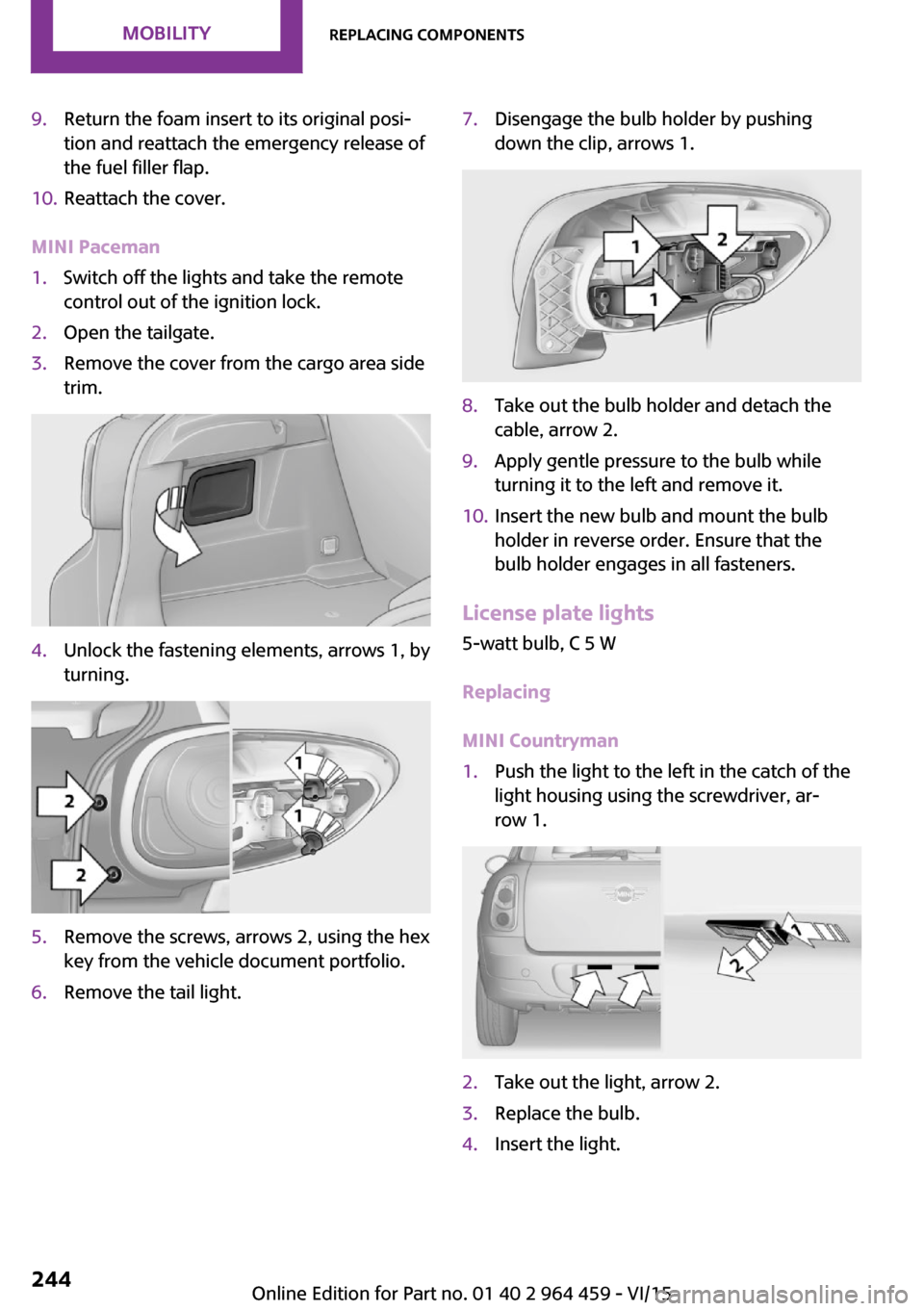
9.Return the foam insert to its original posi‐
tion and reattach the emergency release of
the fuel filler flap.10.Reattach the cover.
MINI Paceman
1.Switch off the lights and take the remote
control out of the ignition lock.2.Open the tailgate.3.Remove the cover from the cargo area side
trim.4.Unlock the fastening elements, arrows 1, by
turning.5.Remove the screws, arrows 2, using the hex
key from the vehicle document portfolio.6.Remove the tail light.7.Disengage the bulb holder by pushing
down the clip, arrows 1.8.Take out the bulb holder and detach the
cable, arrow 2.9.Apply gentle pressure to the bulb while
turning it to the left and remove it.10.Insert the new bulb and mount the bulb
holder in reverse order. Ensure that the
bulb holder engages in all fasteners.
License plate lights
5-watt bulb, C 5 W
Replacing
MINI Countryman
1.Push the light to the left in the catch of the
light housing using the screwdriver, ar‐
row 1.2.Take out the light, arrow 2.3.Replace the bulb.4.Insert the light.Seite 244MOBILITYReplacing components244
Online Edition for Part no. 01 40 2 964 459 - VI/15
Page 245 of 282

MINI Paceman1.Push the light to the left in the catch of the
light housing using the screwdriver, ar‐
row 1.2.Take out the light, arrow 2.3.Replace the bulb.4.Insert the light.
Center brake light
This light uses LED technology for operation. In
case of a malfunction, contact a dealer’s service
center or another qualified service center or re‐
pair shop.
Changing wheels InformationThe vehicle may be equipped with conven‐tional tires with the Mobility System, refer to
page 226, or with run-flat tires, refer to
page 226.
No spare tire is available in the case of a flat
tire.
The suitable tools for changing wheels are
available as accessories from a dealer’s service
center or another qualified service center or re‐
pair shop.
Safety measures
▷Park the vehicle as far as possible from
passing traffic and on solid ground. Switch
on the hazard warning system.▷Set the parking brake and move the selec‐
tor lever to position P.▷Have all vehicle occupants get out of the
vehicle and ensure that they remain out‐
side the immediate area in a safe place,
such as behind a guardrail.▷If a warning triangle or portable hazard
warning lamp is required, set it up on the
roadside at an appropriate distance from
the rear of the vehicle.▷Change the wheel only on a level, firm sur‐
face which is not slippery. The vehicle or
the jack could slip to the side if you attempt
to raise the vehicle on a soft or slippery sur‐
face such as snow, ice, tiles, etc.▷Do not use a wooden block or similar object
as a support base for the jack, as this would
prevent it from extending to its full support
height and reduce its load-carrying ca‐
pacity.▷To avoid serious or fatal injury: never lie un‐
der the vehicle, and never start the engine
while it is supported by the jack.
Jacking points for the vehicle jack
MINI Countryman:
MINI Paceman:
Seite 245Replacing componentsMOBILITY245
Online Edition for Part no. 01 40 2 964 459 - VI/15
Page 270 of 282
Everything from A to ZIndexA
ABS, Antilock Brake Sys‐ tem 93
Acoustic signal, refer to Check Control 75
Activated charcoal filter with automatic climate con‐
trol 104
Adaptive Light Control 80
Additional telephone 188
Additives, engine oil 233
Airbags 82
Airbags, indicator/warning light 85
Air circulation, refer to Recir‐ culated air mode, air condi‐
tioner 101
Air circulation, refer to Recir‐ culated air mode, automatic
climate control 103
Air conditioning 100
Air conditioning mode, air conditioner 100
Air conditioning mode, auto‐ matic climate control 102
Air distribution, air condi‐ tioner, manual 101
Air distribution, auto‐ matic 103
Air distribution, automatic cli‐ mate control, manual 103
Air distribution, individual 101
Air drying, refer to Cooling function 104
Air flow rate for air condi‐ tioner 100
Air flow rate with automatic climate control 103
Air pressure, refer to Tire infla‐ tion pressure 218 Air supply, air conditioner 100
Air supply, automatic climate control 102
Alarm system 39
Alarm system, avoiding unin‐ tentional alarms 40
Alarm system, ending an alarm 39
Alarm system, interior motion sensor 40
Alarm system, tilt alarm sen‐ sor 40
ALL4 all-wheel system 95
All-wheel drive, refer to ALL4 95
Alternating-code hand-held transmitter 106
AM/FM station 156
Ambient lighting 81
Announcement, navigation, see Spoken instructions 145
Antifreeze, washer fluid 64
Antilock Brake System, ABS 93
Anti-slip control, refer to Dy‐ namic Stability Control
DSC 93
Anti-theft protection 31
Appointments 204
Approved engine oils 233
Ashtray 109
Assistance, roadside 248
Assistance when driving off, refer to Hill drive-off assis‐
tant 95
Assistance with starting en‐ gine, refer to Jump-start‐
ing 248
Audio playback 165
Audio playback, Blue‐ tooth 171 Automatic air distribution 103
Automatic air flow 103
Automatic car wash 254
Automatic climate con‐ trol 102
Automatic climate control, au‐ tomatic air distribution 103
Automatic, cruise control 97
Automatic headlight con‐ trol 78
Automatic transmission with Steptronic 65
AUTO program with auto‐ matic climate control 103
AUX-IN port 167
Average fuel consumption 70
Average speed 70
Average speed, refer to Com‐ puter 69
B Backrest curvature, refer to Lumbar support 45
Backrests, refer to Seats 44
Backup lights, bulb replace‐ ment 243
Balance 154
Bass 154
Battery disposal 39
Battery, refer to Vehicle bat‐ tery 246
Battery, remote control 30
Battery replacement, remote control 39
Belts, refer to Safety belts 46
Belt tensioners, refer to Safety belts 46
Bi-xenon headlights 239
Black and white map dis‐ play 148 Seite 270REFERENCEEverything from A to Z270
Online Edition for Part no. 01 40 2 964 459 - VI/15
Page 273 of 282
Dynamic Stability ControlDSC 93
Dynamic Traction Control DTC 94
E Electrical malfunction, door lock 34
Electrical malfunction, fuel filler flap 214
Electronic brake-force distri‐ bution 93
Electronic Stability Program ESP, refer to Dynamic Stabil‐
ity Control DSC 93
Emergency operation, fuel filler flap, unlocking man‐
ually 214
Emergency operation, refer to Manual operation 34
Emergency operation, Step‐ tronic transmission, refer to
Selector lever lock, overrid‐
ing 67
Energy, saving, refer to Saving fuel 128
Engine, breaking in 120
Engine compartment 230
Engine oil, adding 232
Engine oil, additives, refer to Approved engine oils 233
Engine oil, alternative oil types 233
Engine oil change intervals, refer to Service require‐
ments 74
Engine oil, dip stick 232
Engine oil, filling capacity 263
Engine oil, MINI maintenance system 236
Engine oil types, alterna‐ tive 233
Engine oil types, ap‐ proved 233 Engine, overheating, refer to
Coolant temperature 69
Engine start, assistance 248
Engine, starting 59
Engine, starting, Comfort Ac‐ cess 37
Engine, starting, Start/Stop button 58
Engine, stopping, Start/Stop button 58
Engine, switching off 60
Equipment, interior 105
ESP Electronic Stability Pro‐ gram, refer to Dynamic Sta‐
bility Control DSC 93
Exchanging wheels/tires 224
Exterior mirrors 50
Exterior mirrors, adjusting 50
Exterior mirrors, folding in and out 51
Exterior sensors, care 257
External devices 167
External temperature dis‐ play 68
External temperature display, changing the unit of meas‐
ure 72
External temperature display, on onboard computer 72
External temperature warn‐ ing 68
F Fader 154
Failure messages, refer to Check Control 75
False alarm, refer to Avoiding unintentional alarms 40
Fan, refer to Air flow rate for air conditioner 100
Fan, refer to Air flow rate with automatic climate con‐
trol 103
Fastening safety belts, refer to Safety belts 46 Fault messages, refer to Check
Control 75
Filling capacities 263
Filter, refer to Activated-char‐ coal filter 102
Filter, refer to Microfilter 102
Filter, refer to Microfilter/acti‐ vated-charcoal filter with au‐
tomatic climate control 104
First aid kit 248
First aid, refer to First aid kit 248
Flashing when locking/unlock‐ ing 33
Flat tire, Flat Tire Monitor 86
Flat tire, indicator/warning lamp 86
Flat Tire Monitor FTM 85
Flat Tire Monitor FTM, flat tire message 86
Flat Tire Monitor FTM, initializ‐ ing the system 86
Flat Tire Monitor FTM, snow chains 85
Flat Tire Monitor FTM, system limits 85
Flat tire, run-flat tire 87
Flat tire, Tire Pressure Moni‐ tor 87
Flat tire, Tire Pressure Monitor TPM 87
Flat tire, wheel change 245
Floor mats, care 257
FM/AM station 156
Fog lights 80
Foot brake 121
Footwell lights, refer to Inte‐ rior lights 81
Four-wheel drive, refer to ALL4 95
Front airbags 82
Front fog light, bulb replace‐ ment 241
Front fog lights 80
Front lights, bulb replace‐ ment 240 Seite 273Everything from A to ZREFERENCE273
Online Edition for Part no. 01 40 2 964 459 - VI/15