service MINI COUPE ROADSTER CONVERTIBLE 2012 Owner's Manual
[x] Cancel search | Manufacturer: MINI, Model Year: 2012, Model line: COUPE ROADSTER CONVERTIBLE, Model: MINI COUPE ROADSTER CONVERTIBLE 2012Pages: 283, PDF Size: 9.38 MB
Page 226 of 283
MaintenanceMOBILITY
225
Maintenance
Vehicle equipment
In this chapter, all production, country, and
optional equipment that is offered in the model
range is described. Equipment is also described
that is not available because of, for example,
selected options or count ry version. This also
applies to safety related functions and systems.
MINI Maintenance System
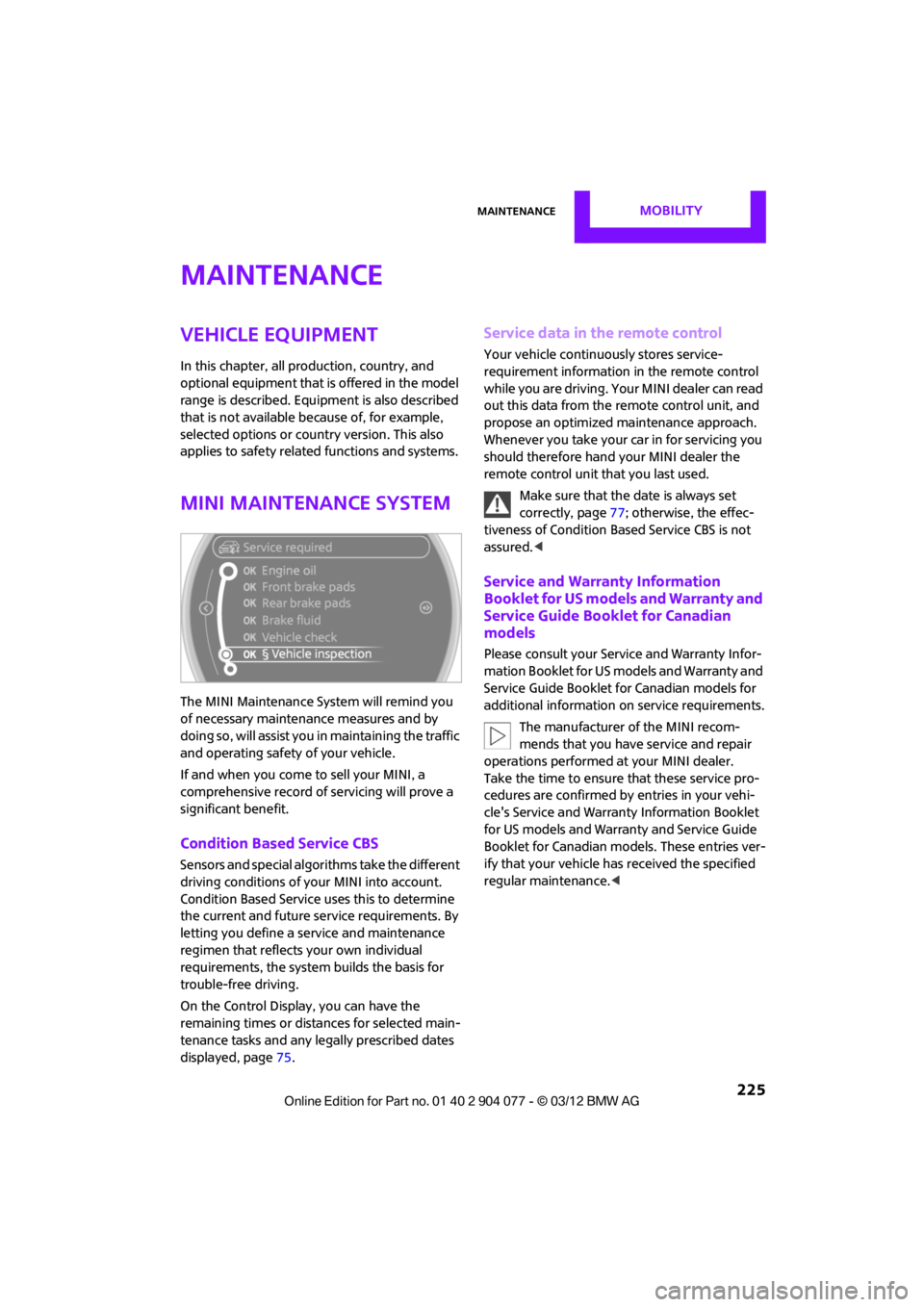
The MINI Maintenance System will remind you
of necessary maintenance measures and by
doing so, will assist you in maintaining the traffic
and operating safety of your vehicle.
If and when you come to sell your MINI, a
comprehensive record of servicing will prove a
significant benefit.
Condition Based Service CBS
Sensors and special algori thms take the different
driving conditions of your MINI into account.
Condition Based Service uses this to determine
the current and future se rvice requirements. By
letting you define a service and maintenance
regimen that reflects your own individual
requirements, the system builds the basis for
trouble-free driving.
On the Control Display, you can have the
remaining times or distan ces for selected main-
tenance tasks and any legally prescribed dates
displayed, page 75.
Service data in the remote control
Your vehicle continuously stores service-
requirement info rmation in the remote control
while you are driving. Your MINI dealer can read
out this data from the remote control unit, and
propose an optimized maintenance approach.
Whenever you take your car in for servicing you
should therefore hand your MINI dealer the
remote control unit that you last used.
Make sure that the date is always set
correctly, page 77; otherwise, the effec-
tiveness of Condition Based Service CBS is not
assured. <
Service and Warranty Information
Booklet for US models and Warranty and
Service Guide Booklet for Canadian
models
Please consult your Service and Warranty Infor-
mation Booklet for US models and Warranty and
Service Guide Booklet for Canadian models for
additional information on service requirements.
The manufacturer of the MINI recom-
mends that you have service and repair
operations performed at your MINI dealer.
Take the time to ensure that these service pro-
cedures are confirmed by entries in your vehi-
cle's Service and Warranty Information Booklet
for US models and Warranty and Service Guide
Booklet for Canadian models. These entries ver-
ify that your vehicle has received the specified
regular maintenance. <
00320051004F004C00510048000300280047004C0057004C005200510003
Page 227 of 283
MOBILITYMaintenance
226
Socket for On-Board
Diagnosis OBD
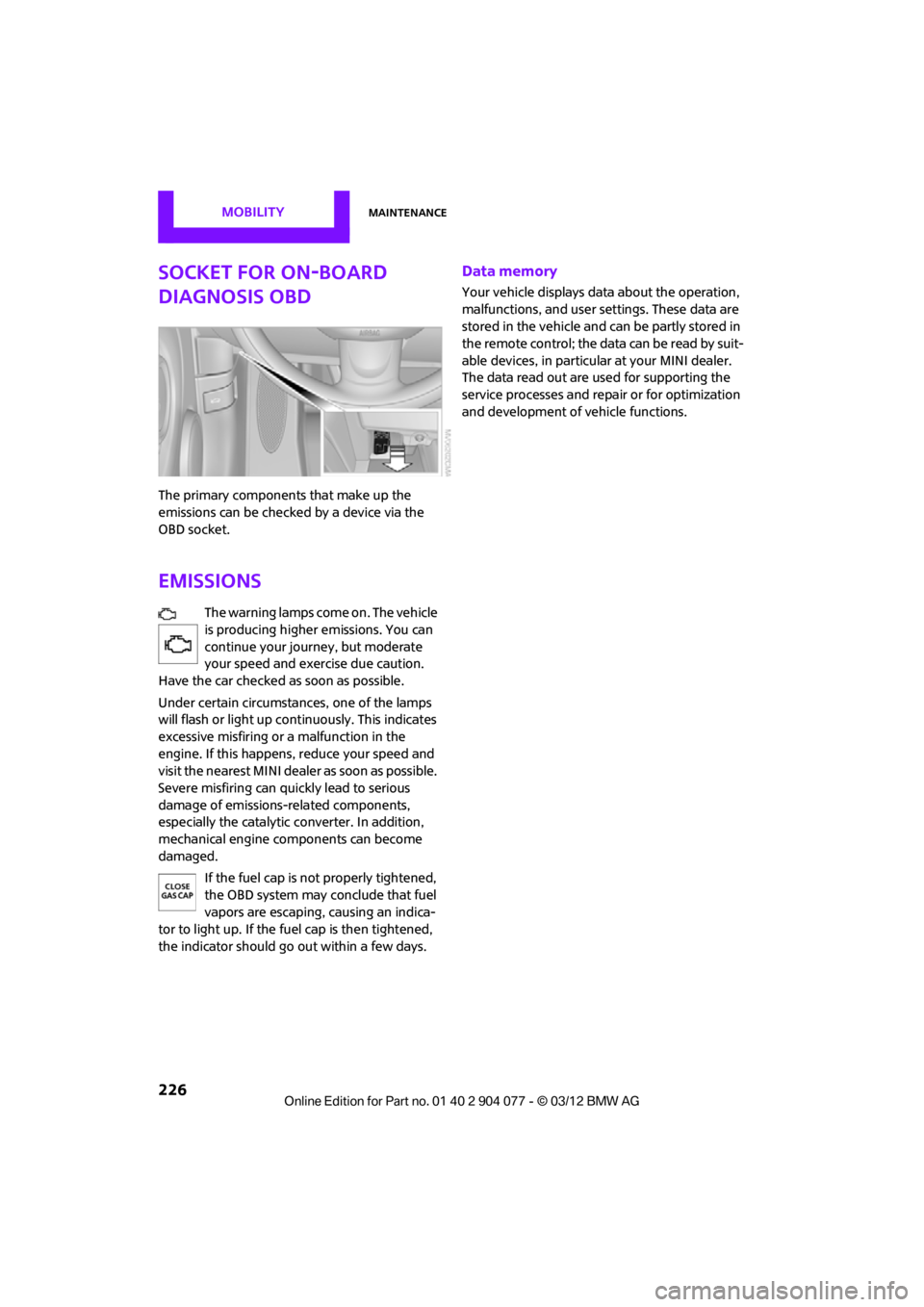
The primary components that make up the
emissions can be checked by a device via the
OBD socket.
Emissions
The warning lamps come on. The vehicle
is producing higher emissions. You can
continue your journey, but moderate
your speed and exercise due caution.
Have the car checked as soon as possible.
Under certain circumstances, one of the lamps
will flash or light up cont inuously. This indicates
excessive misfiring or a malfunction in the
engine. If this happens, reduce your speed and
visit the nearest MINI dealer as soon as possible.
Severe misfiring can quickly lead to serious
damage of emissions-related components,
especially the catalytic converter. In addition,
mechanical engine components can become
damaged.
If the fuel cap is not properly tightened,
the OBD system may conclude that fuel
vapors are escaping, causing an indica-
tor to light up. If the fuel cap is then tightened,
the indicator should go out within a few days.
Data memory
Your vehicle displays data about the operation,
malfunctions, and user settings. These data are
stored in the vehicle and can be partly stored in
the remote control; the data can be read by suit-
able devices, in particul ar at your MINI dealer.
The data read out are used for supporting the
service processes and repair or for optimization
and development of vehicle functions.
00320051004F004C00510048000300280047004C0057004C005200510003
Page 228 of 283
CareMOBILITY
227
Care
Vehicle equipment
In this chapter, all production, country, and
optional equipment that is offered in the model
range is described. Equipment is also described
that is not available because of, for example,
selected options or count ry version. This also
applies to safety related functions and systems.
Car-care products
Regular cleaning and care helps to maintain the
value of your MINI.
The manufacturer of your MINI recommends
using manufacturer-approved products to clean
and care for your vehicle.
Your MINI dealer would be pleased to advise
you on cleaning and care products and services
for your MINI.
The ingredients of original MINI Care Prod-
ucts have been tested, and the products
have been tested in the laboratory and in prac-
tice. They offer optimum care and protection for
your vehicle.<
Do not use any cleansers containing
alcohol or solvents as these may cause
damage. <
Cleaning agents may contain hazardous
or health-damaging substances. Follow
the warning and hazard instructions on the
packaging. For interior cleaning, always open
the doors or windows of the vehicle.
Do not use any products that are not intended
for cleaning the vehicle. <
External care
Washing your vehicle
Especially during the winter months the
vehicle should be frequently washed. Dirt
and road salt can damage the vehicle.<
After washing the vehicle, apply the
brakes briefly to dry them; otherwise,
water can reduce braking efficiency over the
short term and the brake rotors can corrode. <
Car washes
Preference should be given to cloth car washes.
Do not use automatic high-pressure car
washes; otherwise, water may drip into
the vehicle around the windows. <
Before driving into the car wash, check if the
system is suitable for your MINI. Observe the
following points:
> Vehicle dimensions, page 251.
> If necessary: fold in the outside mirrors,
page 54.
> Maximum permissible tire width.
Avoid car washes with tracks higher than
4 in/10 cm; otherwise, the chassis could
be damaged. <
Preparations for driving into the car wash:
> Unscrew the rod antenna.
> MINI Coupe, MINI Roadster: retract spoiler.
> Deactivate the rain sensor to prevent
unintentional wiping.
> Remove additional attachments, e.g. spoil-
ers or telephone antennas, if there is a
possibility that they could be damaged.
> Insert the remote control into the ignition
lock.
00320051004F004C00510048000300280047004C0057004C005200510003
Page 229 of 283

MOBILITYCare
228
Automatic transmission
Before driving into the car wash, make sure that
the vehicle can roll:
1.Place the remote control, even with Comfort
Access, in the ignition lock.
2. Move the selector lever to position N.
3. Release the parking brake.
4. Switch off the engine.
5. Insert the remote control in the ignition lock
so that the vehicle can roll.
Steam jets/high-pressure washers
When using steam jets or high-pressure
washers, make sure that you maintain
sufficient distance from the vehicle and do not
exceed a maximum temperature of 140 7/
60 6 .
If the distance is too close, the pressure too high,
or the temperature too high, parts of the vehicle
can be damaged, or water can penetrate.
Observe the operating instructions for high-
pressure washers. <
Do not spray sensors, such as the Park Dis-
tance Control, with high-pressure washers
for a long time or at a distance of less than 1 ft/
30 cm. <
Manual washing
Use a great deal of water and, if necessary, car
shampoo when washing your car by hand. Clean
the vehicle with a sponge or a washing brush
applying a slight amount of pressure.
Before cleaning the windshield, deacti-
vate the rain sensor or turn off the ignition
to prevent unintentional wiping. <
Observe local regulations regarding wash-
ing vehicles by hand. <
Headlamps
Do not wipe dry and do not use abrasive or
corrosive cleaning agen ts. Remove dirt and
contamination, such as in sects, by soaking with
shampoo and then washing with plenty of
water.
Do not remove accumulated ice and snow with
an ice scraper; use window deicers instead.
Windows
Clean the outside and inside of the windows and
mirrors with a window cleaner.
Do not clean the mirrors with cleaners
containing quartz. <
Wiper blades
Clean with soapy water and change regularly to
prevent the formation of streaks.
Wax, preservatives and dirt on the win-
dows cause streaks wh en the windshield
wipers are on, and can cause premature wear
of the wiper blades and interfere with the rain
sensor. <
Care of the convertible top
The appearance and service life of the convert-
ible top largely depends on its proper care and
operation.
Please follow these instructions:
>Never attempt to fold and stow the convert-
ible top in the convertible compartment
when the top is wet or frozen. Otherwise,
water stains, mildew, and chafe marks may
occur.
> If water spots occur on the inside headliner
despite precautions, remove them using a
microfiber cloth and interior cleaner.
> If the vehicle is parked in an enclosed area
for a longer period of time, make sure that
there is sufficient ventilation.
> Remove any bird droppings immediately,
since they have corrosive properties which
will corrode the conver tible top and damage
the rubber seals.
00320051004F004C00510048000300280047004C0057004C005200510003
Page 233 of 283
MOBILITYReplacing components
232
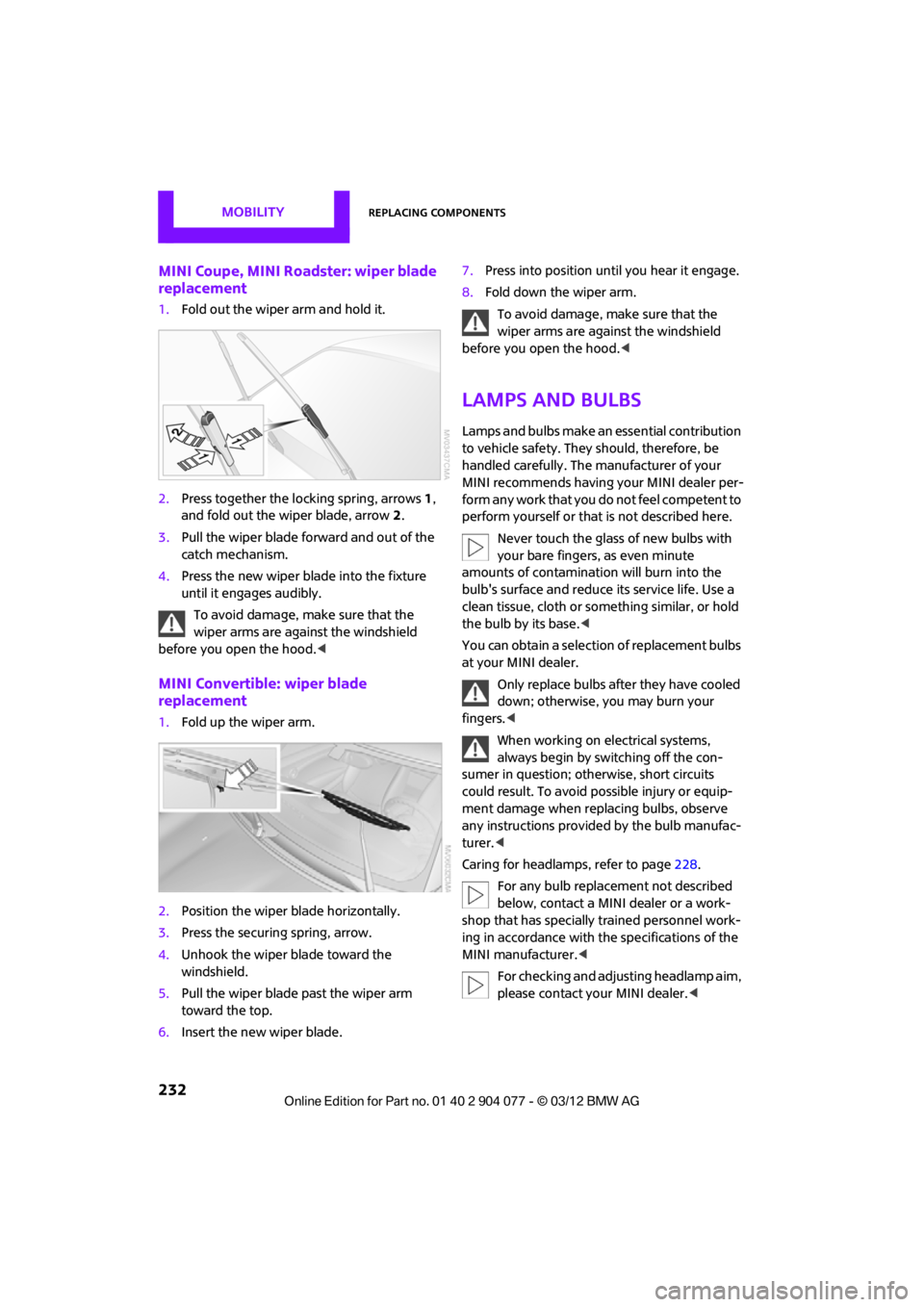
MINI Coupe, MINI Roadster: wiper blade
replacement
1.Fold out the wiper arm and hold it.
2. Press together the lo cking spring, arrows1,
and fold out the wiper blade, arrow 2.
3. Pull the wiper blade forward and out of the
catch mechanism.
4. Press the new wiper blade into the fixture
until it engages audibly.
To avoid damage, make sure that the
wiper arms are against the windshield
before you open the hood. <
MINI Convertible: wiper blade
replacement
1.Fold up the wiper arm.
2. Position the wiper blade horizontally.
3. Press the securing spring, arrow.
4. Unhook the wiper blade toward the
windshield.
5. Pull the wiper blade past the wiper arm
toward the top.
6. Insert the new wiper blade. 7.
Press into position until you hear it engage.
8. Fold down the wiper arm.
To avoid damage, make sure that the
wiper arms are against the windshield
before you open the hood. <
Lamps and bulbs
Lamps and bulbs make an essential contribution
to vehicle safety. They should, therefore, be
handled carefully. The manufacturer of your
MINI recommends having your MINI dealer per-
form any work that you do not feel competent to
perform yourself or that is not described here.
Never touch the glass of new bulbs with
your bare fingers, as even minute
amounts of contaminatio n will burn into the
bulb's surface and reduce its service life. Use a
clean tissue, cloth or some thing similar, or hold
the bulb by its base. <
You can obtain a selectio n of replacement bulbs
at your MINI dealer.
Only replace bulbs after they have cooled
down; otherwise, you may burn your
fingers. <
When working on electrical systems,
always begin by switching off the con-
sumer in question; otherwise, short circuits
could result. To avoid possible injury or equip-
ment damage when replacing bulbs, observe
any instructions provided by the bulb manufac-
turer.<
Caring for headlamp s, refer to page228.
For any bulb replacement not described
below, contact a MINI dealer or a work-
shop that has specially trained personnel work-
ing in accordance with th e specifications of the
MINI manufacturer.<
For checking and adjusting headlamp aim,
please contact your MINI dealer. <
00320051004F004C00510048000300280047004C0057004C005200510003
Page 234 of 283
Replacing componentsMOBILITY
233
Light-emitting diodes LEDs
Light-emitting diodes installed behind translu-
cent lenses serve as the light sources for many of
the controls and displays in your vehicle. These
light-emitting diodes are related to conven-
tional laser diodes, and legislation defines them
as Class 1 light-emitting diodes.
Do not remove the covers or expose the
eyes directly to the unfiltered light source
for several hours; otherw ise, this could cause
irritation of the retina. <
Headlamp glass lens
In cool or humid weather, condensation may
occur on the interiors of the headlamps. The
condensation disappears a short time after the
light is switched on. The headlamps do not need
to be changed.
Do not remove the condensation from head-
lamps, despite driving with lights on, and if
condensation increases, e.g., because of water
droplets, have this checked by your MINI dealer.
Xenon lamps
The service life of these bulbs is very long and
the probability of failure very low, provided that
they are not switched on and off an excessive
number of times. If a xenon lamp fails neverthe-
less, switch on the fog lamps and continue the
journey with great care, provided that local leg-
islation does not prohibit this.
Work on the xenon lighting system,
including lamp replacem ent, is only to be
carried out only by your MINI dealer. Due to high
voltage, there is a risk of fatal injury if work on
the xenon lamps is carried out improperly. <
Halogen low beams and high beams
H13 bulb, 60/5 watts
The H13 bulb is pressurized. Therefore,
wear safety glasses an d protective gloves.
Otherwise, there is a risk of injury if the bulb is
damaged. < Be careful when inst
alling the cover;
otherwise, leaks could occur and cause
damage to the headlamp system. <
Accessing the lamp from the engine
compartment
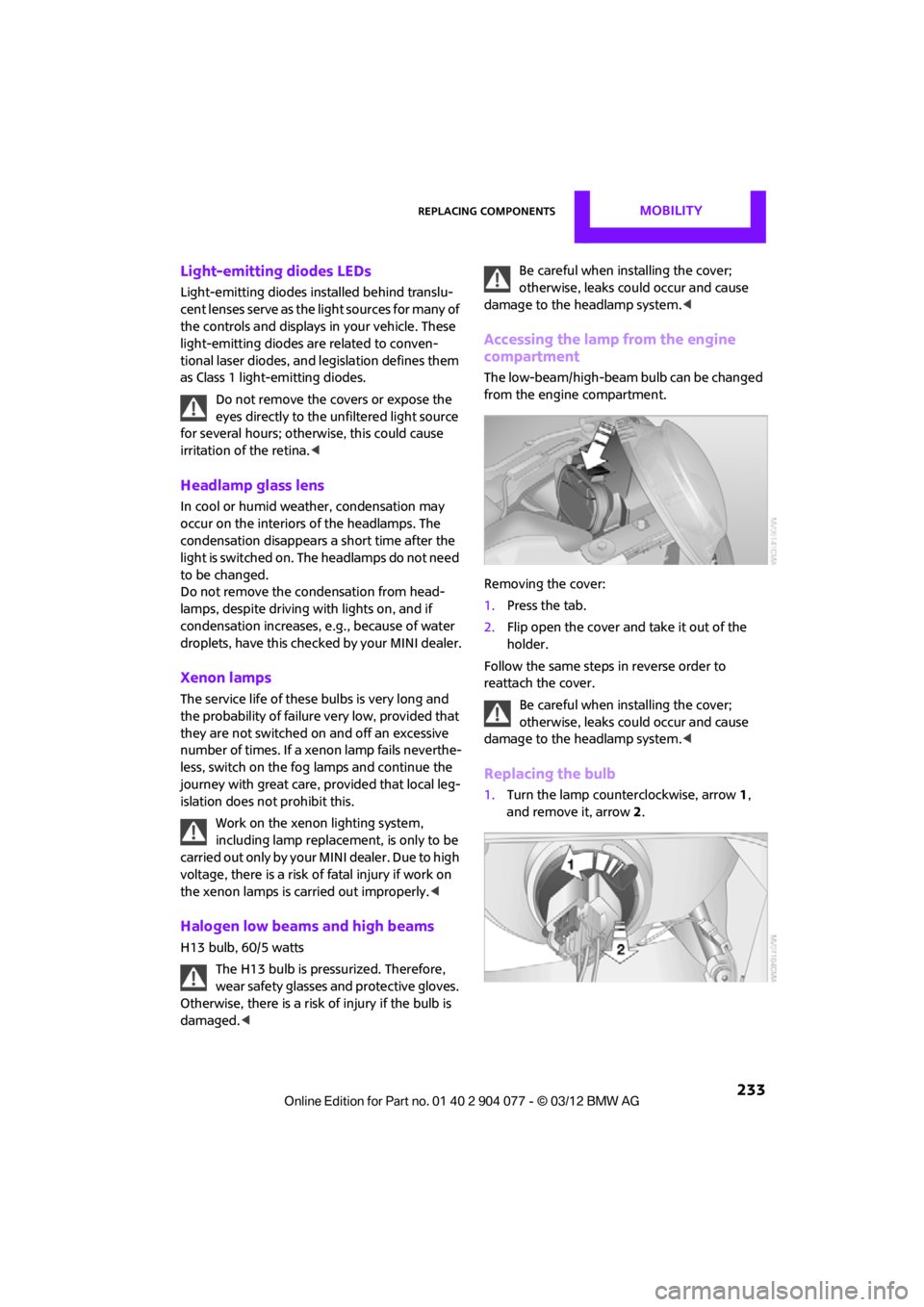
The low-beam/high-beam bulb can be changed
from the engine compartment.
Removing the cover:
1.Press the tab.
2. Flip open the cover and take it out of the
holder.
Follow the same steps in reverse order to
reattach the cover.
Be careful when inst alling the cover;
otherwise, leaks could occur and cause
damage to the headlamp system. <
Replacing the bulb
1.Turn the lamp counterclockwise, arrow 1,
and remove it, arrow 2.
00320051004F004C00510048000300280047004C0057004C005200510003
Page 261 of 283

REFERENCEShort commands for the voice activation system
260
Short commands for the voice
activation system
Vehicle equipment
In this chapter, all production, country, and
optional equipment that is offered in the model
range is described. Equipment is also described
that is not available because of, for example,
selected options or coun try version. This also
applies to safety relate d functions and systems.
General information
Instructions for the voice activation system, refer
to page23.
Having the possible sp oken commands read
aloud: {Voice commands }
The following short commands apply to vehicles
with voice activation sy stem. They do not work
for equipment with which only the mobile
phone can be operated by voice.
Useful short commands
FunctionCommand
Accessing tone control {Tone }
Accessing settings {Settings }
Accessing the onboard computer {Onboard info }
Accessing contacts {Contacts }
To display phone book {Phonebook }
Accessing services {Assist }
Selecting destination entry {Enter address}
Selecting route guidance {Guidance }
00320051004F004C00510048000300280047004C0057004C005200510003
Page 270 of 283

Everything from A to ZREFERENCE
269
Average fuel consumption72
– setting the units 74
Average speed 72
Avoiding highways for
navigation 135
Axle loads, refer to Weights 257
B
Background ligh ting, refer to
Ambient lighting 100
Backrests, refer to Seats 51
Backup lamps
– replacing bulb 235
Band-aids, refer to First aid
pouch 243
Bar, refer to Tow-starting, towing away 245
Base plate for telephone or mobile phone
– refer to Snap-in adapter 191
Bass sounds, refer to Tone control 147
Battery 241
– disposal 38,242
– jump-starting 243
– temporary power failure 242
Battery renewal
– remote control 38
Being towed 245
Belts, refer to Safety belts 53
Belt tensioner, refer to Safety
belts 53
Beverage holders, refer to Cupholders 109
Black ice, refer to External temperature warning 71
Blower, refer to Air flow
rate 102,104
Bluetooth, activating/ deactivating 171,181 Bluetooth audio
163
– device pairing 163
– disconnecting an audio connection 165
– playback 164
– unpairing device 165
– what to do if... 166
Bottle holders, refer to Cupholders 109
Brake Assist 83
Brake fluid, refer to Service requirements 75
Brake lamps
– replacing bulbs 235
Brake pads, breaking in 114
Brake rotors 116
– brakes 114
– breaking in 114
Brakes
– ABS 83
– breaking in 114
– MINI Maintenance
System 225
– parking brake 62
– service requirements 75
Br akes,
refer to Braking
safely 115
Brake system 114
– breaking in 114
– disc brakes 116
– MINI Maintenance System 225
Breakdown service, refer to
Roadside Assistance 243
Breaking in the clutch 114
Break-in period 114
Bulb changing, refer to Lamps and bulbs 232
Button for starting the
engine 60
Buttons on the steering wheel 11
C
Calendar 197
– displaying appointment 197
– selecting calendar day 197
California Proposition 65 warning 5
Call
– accepting 173,185
– ending 174,186
– muting the microphone 187
Calling, refer to Phone numbers, dialing 174,186
Calling, refer to Telephone 108
Can holders, refer to Cupholders 109
Capacities 259
Car battery, refer to Vehicle battery 241
Car care 227
Care 227
– car-care products 227
– car washes 227
– CD/DVD drives 230
– high-pressure washers 228
– leather 230
– manual washing 228
– upholstery and fabrics 229
– windows 228
– wiper blades 228
Cargo, securing 119
Cargo area 116
– capacity 257
– Comfort Access 37
– lamp 99
– opening from outside 33
Cargo area lamp 99
Cargo area lid, refer to Tailgate 33
Cargo loading 118
– securing cargo 119
– stowing cargo 119
– vehicle 116
Car key, refer to Keys/remote controls 28
00320051004F004C00510048000300280047004C0057004C005200510003
Page 271 of 283

REFERENCEEverything from A to Z
270
Carpets, care230
Car phone
– installation location, refer to Center armrest 108
– refer to Telephone 108
Car phone, refer to Telephone 170,180
Car radio, refer to Radio 149
Car wash, care 227
Car washes 227
Catalytic conver ter, refer to
Hot exhaust system 115
CD, audio playback 157
CD player 157
– controls 146
– fast forward/reverse 158
– random order 158
– selecting a track 157
– switching on/off 146
– tone control 147
– volume 147
Center armrest 108
Center brake lamp 236
Center console, refer to Around the center
console 14
Central locking system 29
– Comfort Access 36
– from inside 32
– from outside 29
Changing bulbs 232
Changing the language on the Control Display 80
Changing the measurement units on the Control
Display 74
Changing wheels 239
Charging the battery 241
Chassis number, refer to
Engine compartment 221
Check Control 77
Child restraint fixing system
LATCH 57
Child restraint systems 56
Child seats 56 Chrome parts, care
229
Chrome parts, refer to Care 227
Cigarette lighter 109
Cleaning headlamps 67
– washer fluid 67
Clock
– setting time 76
– 12 h/24 h mode 76
Closing
– from inside 32
– from outside 29
Cl ot
hes hooks 108
Cockpit 10
Cold start, refer to Starting the engine 61
Comfort Access 36
– replacing the battery 38
– what to observe before
entering a car wash 37
Comfort area, refer to Around the center console 14
Compartment for remote control, refer to Ignition
lock 60
Computer 71
– displays on Control Display 73
Condensation, refer to When the vehicle is parked 116
Condition Based Service CBS 225
Configuring settings, refer to
Personal Profile 28
Connecting vacuum cleaner, refer to Connecting electrical
appliances 110
Consumption, refer to Average fuel consumption 72
Contact editing 178
Contacts 177,194
– new contact 195
Continuing route guidance 135
Control Display
– settings 73 Control Display, refer to iDrive
– switching on/off
17
Control Display, refer to Onboard computer 17
Controls and displays 10
Control stick, refer to Onboard computer 17
Control unit, refer to Onboard computer 17
Convenience operation
– convertible top 32
– windows 30
Convenient access, refer to
Comfort Access 36
Convenient star t, refer to
Starting the engine 61
Convertible top 39
– manual 44
– mechanical 44
Coolant 224
– checking level 224
– filling 224
Coolant temperature 224
Cooling, maximum 104
Cooling fluid, refer to
Coolant 224
Copyright 2
Corneri n
g li
ght, refer to
Adaptive Light Control 97
Criteria for route 135
Cruise control
– indicator lamp 13
Cruising range 71
Cupholders 109
Curb weight, refer to Weights 257
Current fuel consumption 72
Current playback
– external devices 162
D
Dashboard, refer to Cockpit 10
Dashboard instruments, refer to Displays 12
Dashboard lighting, refer to Instrument lighting 99
00320051004F004C00510048000300280047004C0057004C005200510003
Page 272 of 283

Everything from A to ZREFERENCE
271
Data250
– capacities 259
– dimensions 251
– engine 250
– weights 257
Data memory 226
Date
– setting 77
– setting format 77
Daytime running lights 97
DBC Dynamic Brake Control, refer to Brake Assist 83
Deactivating front passenger
airbags 93
Deadlocking, refer to Locking 30
Defect
– door lock 32
– fuel filler flap 206
Defining a home address 195
Defogging windows 103,105
Defrosting windows 103,105
Defrosting windows and removing condensation
– air conditioner 103
– automatic climate control 105
Defrosting windshield, refer to
Defrosting
windows 103,105
Defrost position, refer to Defrosting
windows 103,105
Deleting contacts 179,196
Destination address
– entering 126,132
Destination for navigation
– entering 126
– entering via map 131
Differential, breaking in 114
Digital radio, refer to HD Radio 150
Dimensions 251
Dipstick, engine oil 222
Directional indicators, refer to
Turn signals 65 Direction announcements,
refer to Voice
instructions 139
Direction instructions, refer to
Voice instructions 139
Directory for navigation, refer to Address book 128
Displacement, re fer to Engine
data 250
Display, refer to Onboard
computer controls 17
Disp laying cont
act
pictures 196
Displaying contacts 178
Displaying special destinations 131
Display lighting, refer to Instrument lighting 99
Displays 12
– instrument cluster 12
– on the Control Display 17
Displays, care 230
Displays and controls 10
Disposal
– of coolant 224
– remote control battery 38
– vehicle battery 242
Distance remaining to service,
refer to Service
requirements 75
Distance warning, refer to Park Distance Control PDC 82
Door key, refer to Integrated
key/remote control 28
Door lock 31
Door lock, confirmation
signals 30
Doors, manual operation 32
DOT Quality Grades 217
Drinks holders, refer to Cupholders 109
Drive-off assistant, refer to Hill
Assist 85
Driving dynamics control, refer to Sport button 85
Driving lamps, refer to Parking lamps/low beams 96Driving notes
114
Driving off on inclines, refer to Hill Assist 85
Driving stability control
systems 83
Driving through water 115
Driving tips, refer to Driving
notes 114
Dry air, refer to Cooling function 105
DSC Dynamic Stability Control 83
DTC Dynamic Traction
Control 84
Dynamic Brake Control DBC, refer to Brake Assist 83
Dynamic route guidance 142
Dynamic Stability Control DSC 83
Dynamic Traction Control DTC 84
E
Eject button, refer to Buttons
on the CD player 146
Electrical malfunction
– convertible top 41,48
– door lock 32
– fuel filler flap 206
– tailgate 33
Electric power windows
– initializing 39
Electronic brake-force distribution 83
Electronic Stability Program
ESP, refer to Dynamic
Stability Control DSC 83
E-mail 197
Emergency operation, refer to Manual operation
– convertible top 41,48
– door lock 32
– fuel filler flap 206
– tailgate 33
– transmission lock, automatic transmission 64
00320051004F004C00510048000300280047004C0057004C005200510003