traction control MINI COUPE ROADSTER CONVERTIBLE 2012 Owners Manual
[x] Cancel search | Manufacturer: MINI, Model Year: 2012, Model line: COUPE ROADSTER CONVERTIBLE, Model: MINI COUPE ROADSTER CONVERTIBLE 2012Pages: 283, PDF Size: 9.38 MB
Page 16 of 283
CockpitAT A GLANCE
15
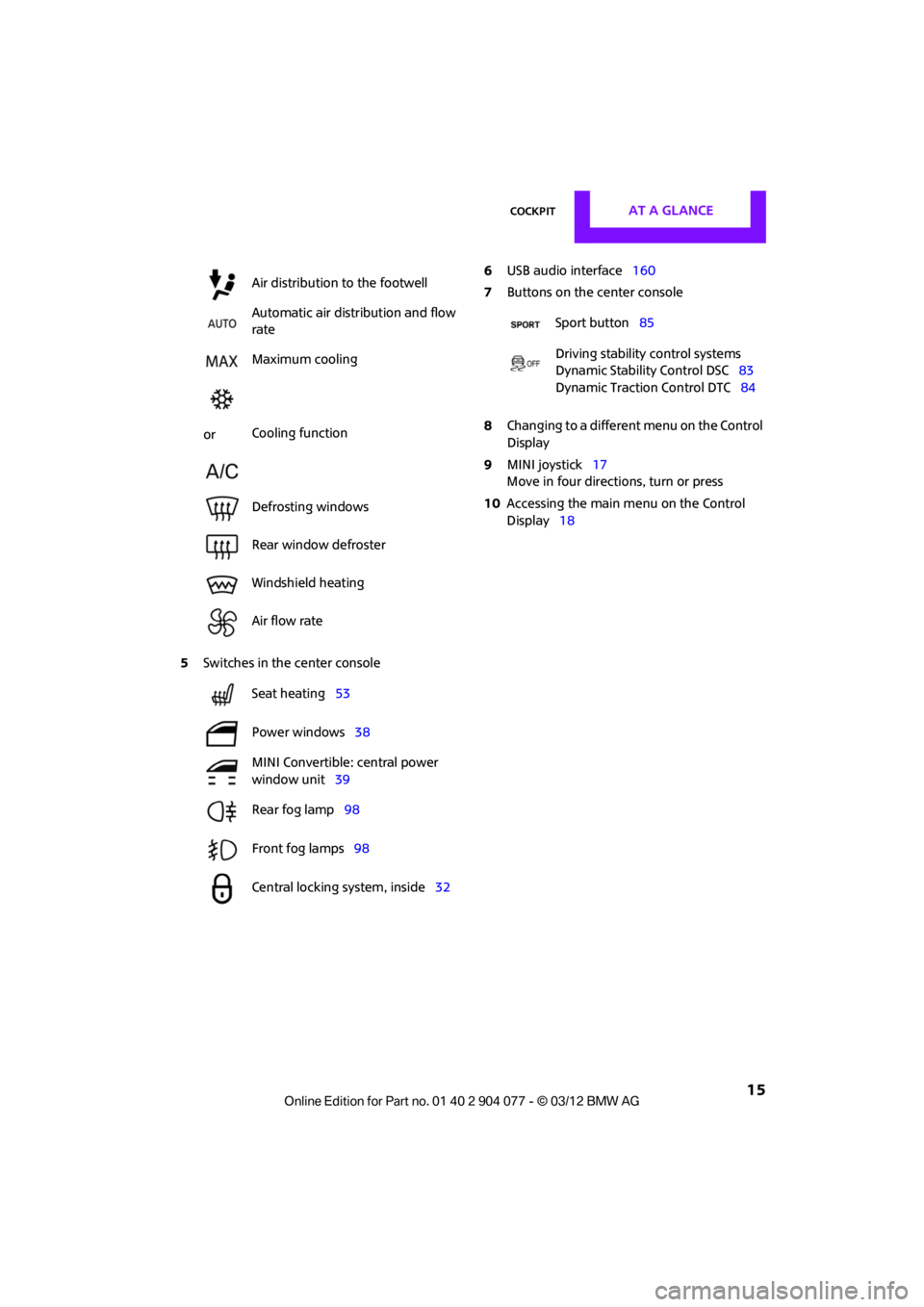
5Switches in the center console 6
USB audio interface 160
7 Buttons on the center console
8 Changing to a differen t menu on the Control
Display
9 MINI joystick 17
Move in four directions, turn or press
10 Accessing the main me nu on the Control
Display 18
Air distribution to the footwell
Automatic air distribution and flow
rate
Maximum cooling
or Cooling function
Defrosting windows
Rear window defroster
Windshield heating
Air flow rate
Seat heating
53
Power windows 38
MINI Convertible: central power
window unit 39
Rear fog lamp 98
Front fog lamps 98
Central locking system, inside 32
Sport button85
Driving stability control systems
Dynamic Stability Control DSC 83
Dynamic Traction Control DTC 84
00320051004F004C00510048000300280047004C0057004C005200510003
Page 63 of 283
CONTROLSDriving
62
Automatic transmission
1.With the car at a stop, move the selector
lever to position P.
2. Press the Start/Stop button.
3. Forcefully apply the parking brake.
Before driving into a car wash
By following these steps, the vehicle is able to
roll:
1.Place the remote control, even with Comfort
Access, in the ignition lock.
2. Depress the brake.
3. Move the selector lever to position N.
4. Switch off the engine.
Parking brake
The parking brake is primarily intended to
prevent the vehicle from rolling while parked; it
brakes the rear wheels.
In addition, follow the instructions on page 61
under Switching off the engine.
Applying
The lever locks in position automatically.
Releasing
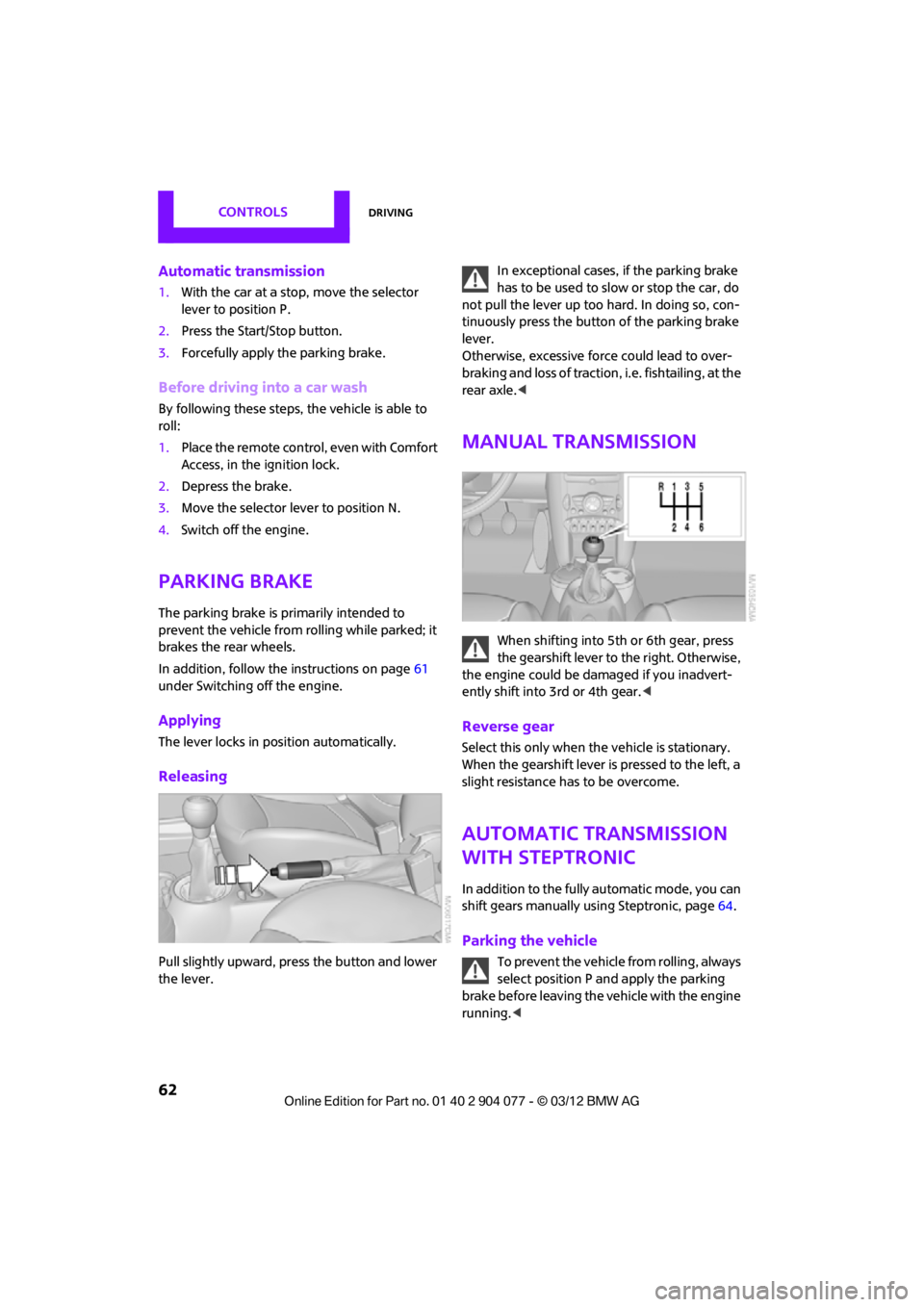
Pull slightly upward, press the button and lower
the lever. In exceptional cases, if the parking brake
has to be used to slow or stop the car, do
not pull the lever up too hard. In doing so, con-
tinuously press the button of the parking brake
lever.
Otherwise, excessive force could lead to over-
braking and loss of traction , i.e. fishtailing, at the
rear axle. <
Manual transmission
When shifting into 5t h or 6th gear, press
the gearshift lever to the right. Otherwise,
the engine could be damaged if you inadvert-
ently shift into 3rd or 4th gear. <
Reverse gear
Select this only when the vehicle is stationary.
When the gearshift lever is pressed to the left, a
slight resistance has to be overcome.
Automatic transmission
with Steptronic
In addition to the fully automatic mode, you can
shift gears manually using Steptronic, page 64.
Parking the vehicle
To prevent the vehicle from rolling, always
select position P and apply the parking
brake before leaving the vehicle with the engine
running. <
00320051004F004C00510048000300280047004C0057004C005200510003
Page 84 of 283

Technology for driving comfort and safetyCONTROLS
83
enter the sensors' blind spots before or after a
continuous audible signal is given. Higher, pro-
truding objects, such as wall ledges, may not be
detectable. Therefore, always drive cautiously;
otherwise, there is a risk of personal injury or
property damage. Loud sound sources outside
or inside the car can drown out the PDC signal. <
Driving stability control
systems
Your MINI has a number of systems that help to
maintain the vehicle's st ability even in adverse
driving conditions.
The laws of physics cannot be repealed,
even with driving stability control systems.
An appropriate driving style always remains the
responsibility of the driver. Therefore do not
reduce the additional safety margin by engaging
in hazardous driving thereby running the risk of
an accident. <
Antilock Brake System ABS
ABS prevents locking of the wheels during
braking. Safe steering response is maintained
even during full braking. Active safety is thus
increased.
Braking safely, refer to page 115.
ABS is operational every time you start the
engine.
Cornering Brake Control CBC
Driving stability and steering characteristics
are further enhanced while braking in turns or
during a lane change.
Electronic brake-forc e distribution EBV
The system controls the brake pressure in the
rear wheels to ensure stable braking behavior.
Brake Assist
Rapidly depressing the brake causes this system
to automatically develop maximum braking
force. Thus, the system helps keep braking
distance to a minimum. At the same time, all the
benefits provided by ABS are exploited.
Do not reduce the pressure on the brake for the
duration of the full braking application.
Dynamic Stability Control DSC
The concept
DSC prevents the driving wheels from losing
traction when you pull away from rest or
accelerate.
DSC also detects unstable driving conditions
such as when the vehicle' s rear end fishtails or
the vehicle is sliding on its front wheels. In these
cases, DSC helps the vehicle maintain a safe
course within physical limits by reducing engine
output and through br aking actions at the
individual wheels.
Every time that the engine is started, DSC is
ready to operate.
Deactivating DSC
Press the button until the DSC OFF indicator
lamp on the speedometer is on and DSC OFF is
displayed on the tachometer. DSC is deacti-
vated. Stabilizing and propulsion promoting
actions are no longer executed.
When driving with snow chains or to 'rock free'
in snow, it can be helpfu l to switch off DSC for a
brief period.
To increase vehicle stability, activate DSC again
as soon as possible.
00320051004F004C00510048000300280047004C0057004C005200510003
Page 85 of 283
CONTROLSTechnology for driving comfort and safety
84
Activating DSC
Press the button again: the DSC indicator lamps
in the display elements go out.
For better control
The indicator lamp on the tachometer is
flashing:
DSC controls the driving and braking
forces.
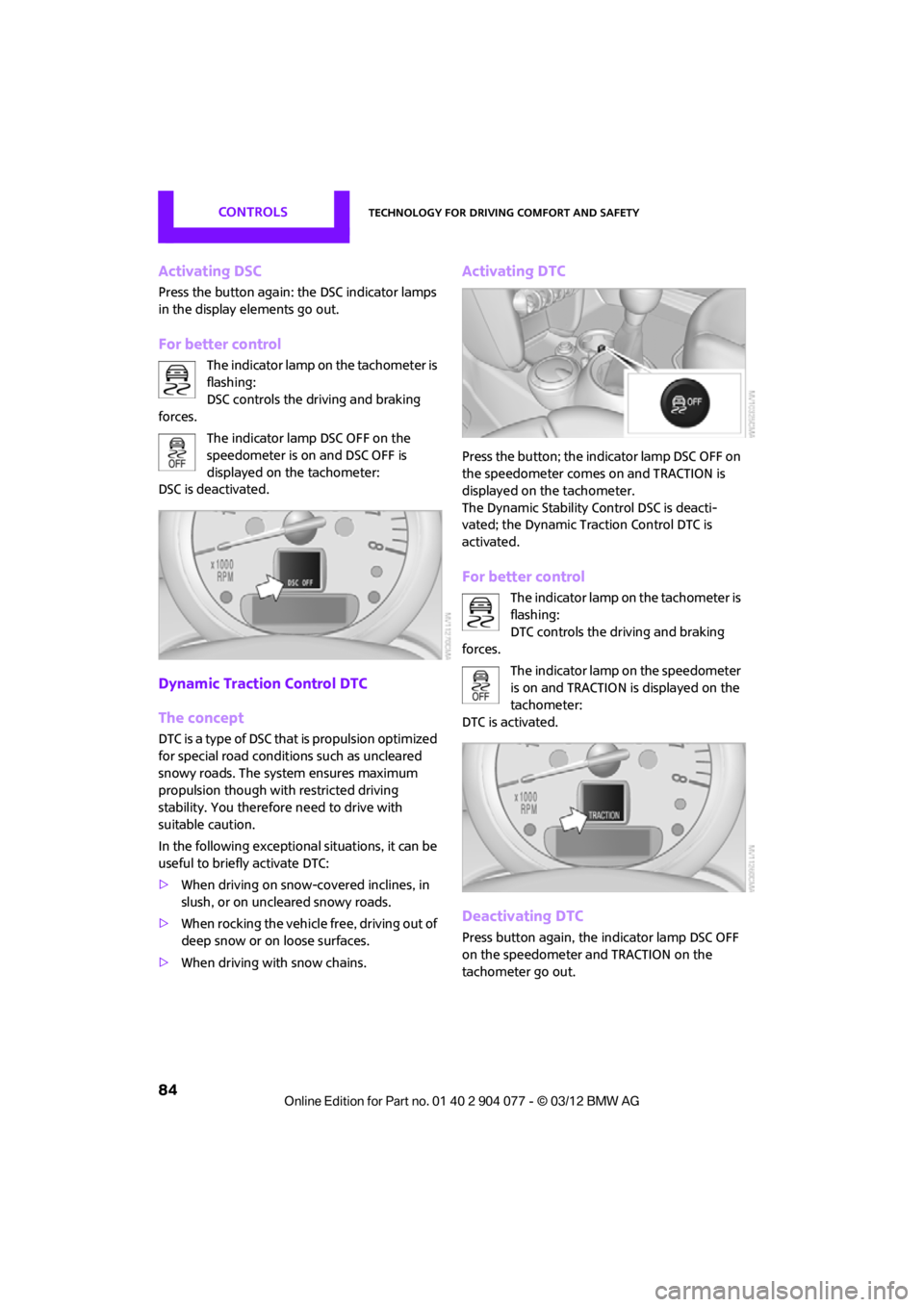
The indicator lamp DSC OFF on the
speedometer is on and DSC OFF is
displayed on the tachometer:
DSC is deactivated.
Dynamic Traction Control DTC
The concept
DTC is a type of DSC that is propulsion optimized
for special road conditions such as uncleared
snowy roads. The syst em ensures maximum
propulsion though with restricted driving
stability. You therefore need to drive with
suitable caution.
In the following exceptiona l situations, it can be
useful to briefly activate DTC:
> When driving on snow-c overed inclines, in
slush, or on uncleared snowy roads.
> When rocking the vehicle free, driving out of
deep snow or on loose surfaces.
> When driving with snow chains.
Activating DTC
Press the button; the indicator lamp DSC OFF on
the speedometer comes on and TRACTION is
displayed on the tachometer.
The Dynamic Stability Control DSC is deacti-
vated; the Dynamic Traction Control DTC is
activated.
For better control
The indicator lamp on the tachometer is
flashing:
DTC controls the driving and braking
forces.
The indicator lamp on the speedometer
is on and TRACTION is displayed on the
tachometer:
DTC is activated.
Deactivating DTC
Press button again, the indicator lamp DSC OFF
on the speedometer and TRACTION on the
tachometer go out.
00320051004F004C00510048000300280047004C0057004C005200510003
Page 86 of 283
Technology for driving comfort and safetyCONTROLS
85
Deactivating both DTC and DSC
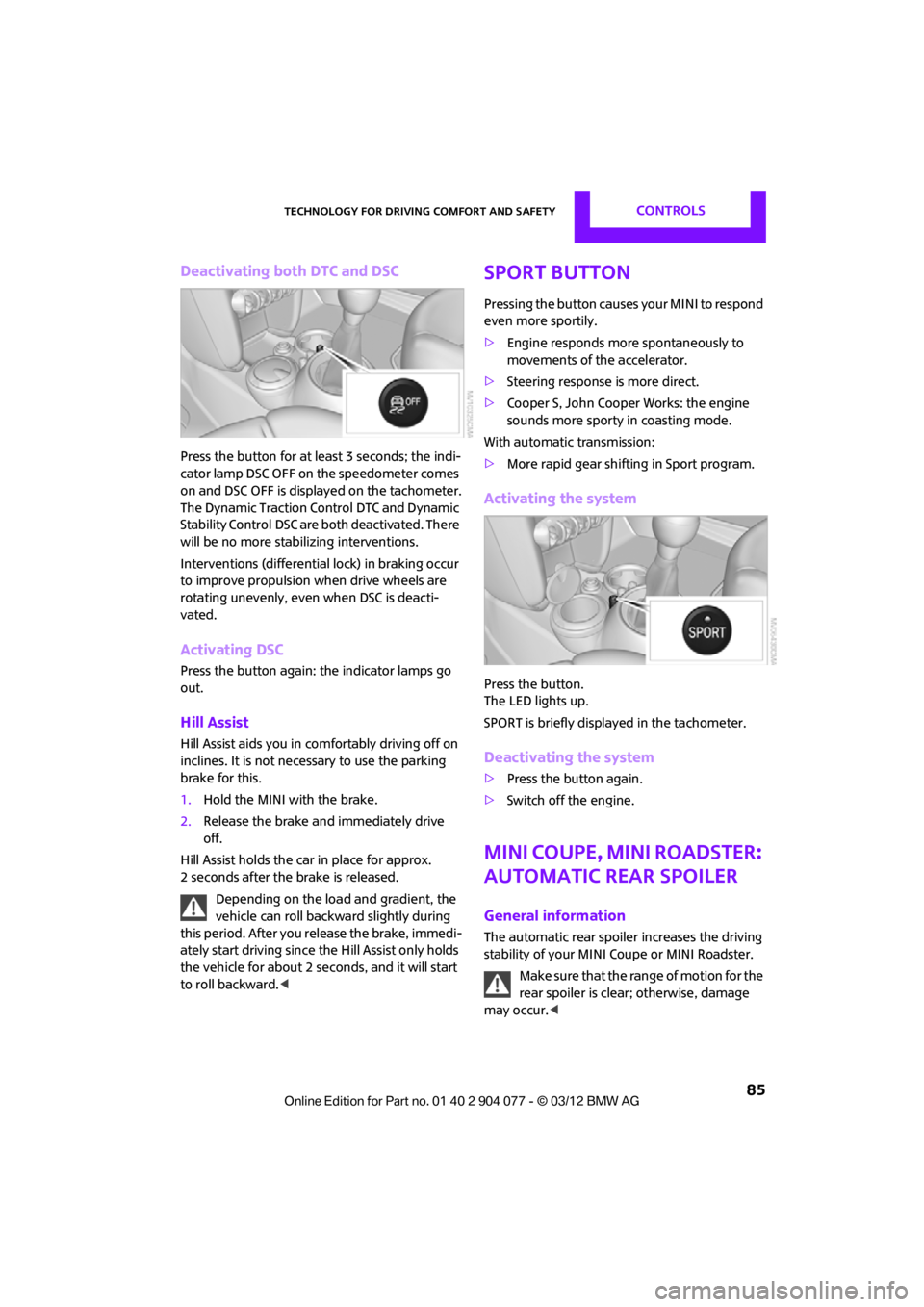
Press the button for at least 3 seconds; the indi-
cator lamp DSC OFF on the speedometer comes
on and DSC OFF is displayed on the tachometer.
The Dynamic Traction Control DTC and Dynamic
Stability Control DSC are both deactivated. There
will be no more stab ilizing interventions.
Interventions (differentia l lock) in braking occur
to improve propulsion when drive wheels are
rotating unevenly, even when DSC is deacti-
vated.
Activating DSC
Press the button again: the indicator lamps go
out.
Hill Assist
Hill Assist aids you in co mfortably driving off on
inclines. It is not necessary to use the parking
brake for this.
1. Hold the MINI with the brake.
2. Release the brake and immediately drive
off.
Hill Assist holds the car in place for approx.
2 seconds after the brake is released. Depending on the load and gradient, the
vehicle can roll backwa rd slightly during
this period. After you release the brake, immedi-
ately start driving since the Hill Assist only holds
the vehicle for about 2 seconds, and it will start
to roll backward. <
Sport button
Pressing the button causes your MINI to respond
even more sportily.
>Engine responds more spontaneously to
movements of the accelerator.
> Steering response is more direct.
> Cooper S, John Cooper Works: the engine
sounds more sporty in coasting mode.
With automatic transmission:
> More rapid gear shifting in Sport program.
Activating the system
Press the button.
The LED lights up.
SPORT is briefly displayed in the tachometer.
Deactivating the system
>Press the button again.
> Switch off the engine.
MINI Coupe, MINI Roadster:
Automatic rear spoiler
General information
The automatic rear spoile r increases the driving
stability of your MINI Coupe or MINI Roadster.
Make sure that the range of motion for the
rear spoiler is clear; otherwise, damage
may occur. <
00320051004F004C00510048000300280047004C0057004C005200510003
Page 87 of 283
CONTROLSTechnology for driving comfort and safety
86
Do not push on the rear spoiler; otherwise, it
may be damaged.
For information on car washing facilities and
care, see page227 and following.
Automatic mode
When starting the engine, a retracted rear
spoiler is in the automatic mode. It is possible
that there will be some noise for a short time
when driving off because of the initialization of
the system.
Automatic extension:
When driving at speeds in excess of approx.
50 mph/80 km/h.
Automatic retraction:
When driving at speeds below 38 mph/60 km/h.
In the automatic mode, the rear spoiler
can not be retracted manually at speeds
greater than 37 mph/60 km/h.<
Manual mode
The manual mode can, for example, be used
when cleaning the rear spoiler while the ignition
is on or the engine is running. LED on switch is
on.
If the rear spoiler stops in an intermediate
position after repeat edly being extended
and retracted, then the system has become
overheated. After a short cooling down time, the
rear spoiler can again be operated.<
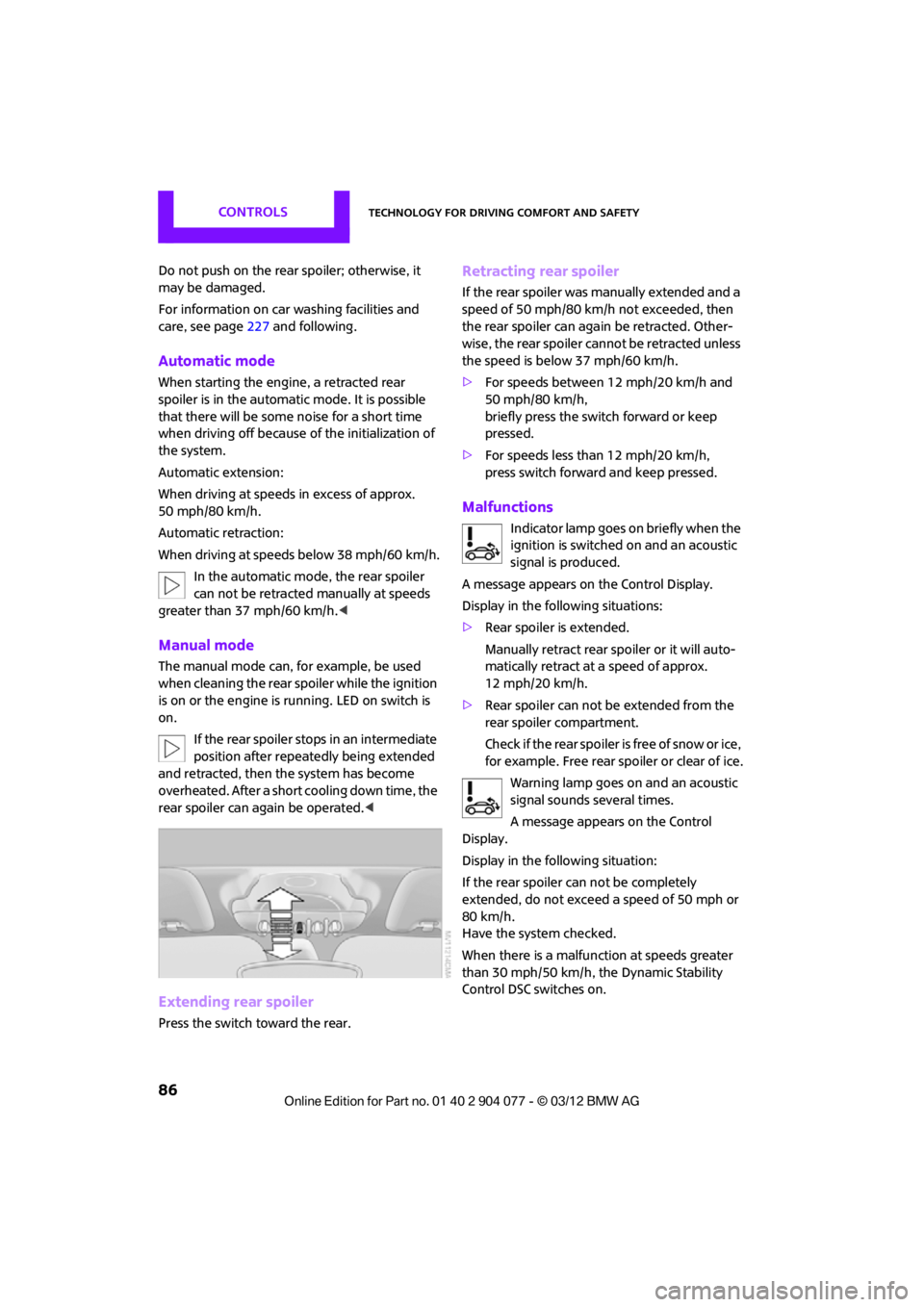
Extending rear spoiler
Press the switch toward the rear.
Retracting rear spoiler
If the rear spoiler was manually extended and a
speed of 50 mph/80 km/h not exceeded, then
the rear spoiler can agai n be retracted. Other-
wise, the rear spoiler cannot be retracted unless
the speed is below 37 mph/60 km/h.
> For speeds between 12 mph/20 km/h and
50 mph/80 km/h,
briefly press the switch forward or keep
pressed.
> For speeds less than 12 mph/20 km/h,
press switch forward and keep pressed.
Malfunctions
Indicator lamp goes on briefly when the
ignition is switched on and an acoustic
signal is produced.
A message appears on the Control Display.
Display in the following situations:
> Rear spoiler is extended.
Manually retract rear spoiler or it will auto-
matically retract at a speed of approx.
12 mph/20 km/h.
> Rear spoiler can not be extended from the
rear spoiler compartment.
Check if the rear spoiler is free of snow or ice,
for example. Free rear spoiler or clear of ice.
Warning lamp goes on and an acoustic
signal sounds several times.
A message appears on the Control
Display.
Display in the following situation:
If the rear spoiler ca n not be completely
extended, do not exceed a speed of 50 mph or
80 km/h.
Have the system checked.
When there is a malfunction at speeds greater
than 30 mph/50 km/h, the Dynamic Stability
Control DSC switches on.
00320051004F004C00510048000300280047004C0057004C005200510003
Page 115 of 283
DRIVING TIPSThings to remember when driving
114
Things to remember when driving
Vehicle equipment
In this chapter, all production, country, and
optional equipment that is offered in the model
range is described. Equipment is also described
that is not available because of, for example,
selected options or coun try version. This also
applies to safety relate d functions and systems.
Break-in period
Moving parts need breaking-in time to adjust to
each other. Please follow the instructions below
in order to achieve the optimal service life and
economy of operation for your vehicle.
Engine and differential
Always obey all official speed limits.
Up to 1,200 miles/2,000 km
Drive at varying engine and road speeds, but do
not exceed the following:
> Gasoline engine
4,500 rpm or 100 mph/160 km/h
Avoid full-throttle operation and use of the
transmission's kickdown mode.
After driving 1,200 miles/2,000 km
Engine and vehicle speeds can be gradually
increased.
Tires
Due to technical factors associated with their
manufacture, tires do not achieve their full
traction potential until af ter an initial break-in
period. Therefore, drive cautiously during the
first 200 miles/300 km.
Brake system
Brakes require an initial break-in period of
approx. 300 miles/500 km to achieve optimized
contact and wear patterns between brake pads
and rotors. Drive cautiously during this break-in
period.
Clutch
The function of the clutch reaches its optimal
level only after a distan ce driven of approx.
300 miles/500 km. During this break-in period,
engage the clutch gently.
Following part replacement
The same break-in procedures should be
observed if any of the components mentioned
above have to be renewed in the course of the
vehicle's operating life.
General driving notes
Close the tailgate
Only drive with the t ailgate closed. Failure
to do so may endanger passengers or
other road users or may damage the vehicle in
the event of an accident or a braking and eva-
sive maneuver. In addi tion, exhaust gas may
flow into the passenger compartment. <
If special circumstances make it absolutely
necessary to drive with the tailgate open:
1. Coupe: close all windows.
2. Switch off the recirculated-air mode and
switch the airflow contro l of the heating, air
conditioner, or automa tic climate control to
high, refer to page 102 or104.
00320051004F004C00510048000300280047004C0057004C005200510003
Page 218 of 283
Wheels and tiresMOBILITY
217
Uniform Tire Quality Grading
Quality grades can be found where applicable
on the tire sidewall between tread shoulder and
maximum section width. For example:
Tread wear 200 Traction AA
Temperature A
DOT Quality Grades
Tread wear
Traction AA A B C
Temperature A B C
All passenger car tires must conform to
Federal Safety Requirements in addition
to these grades. <
Tread wear
The tread wear grade is a comparative rating
based on the wear rate of the tire when tested
under controlled conditions on a specified gov-
ernment test course. For example, a tire graded
150 would wear one and one-half (1 γ) times as
well on the government course as a tire graded
100. The relative performance of tires depends
upon the actual conditio ns of their use, how-
ever, and may depart si gnificantly from the
norm due to variations in driving habits, service
practices and differences in road characteristics
and climate.
Traction
The traction grades, from highest to lowest, are
AA, A, B, and C.
Those grades represent the tire's ability to stop
on wet pavement, as measured under con-
trolled conditions on specified government test
surfaces of asphalt and concrete. A tire marked C
may have poor traction performance.
The traction grade assigned to this tire
is based on straight-ahead braking trac-
tion tests, and does not include acceleration,
cornering, hydroplaning, or peak traction
characteristics. <
Temperature
The temperature grades are A, the highest, B,
and C, representing the tire's resistance to the
generation of heat and its ability to dissipate
heat when tested under controlled conditions
on a specified indoor labo ratory test wheel. Sus-
tained high temperature can cause the material
of the tire to degenerate and reduce tire life, and
excessive temperature can lead to sudden tire
failure. The grade C corresponds to a level of
performance which all passenger car tires must
meet under the Federal Motor Vehicle Safety
Standard No. 109. Grades B and A represent lev-
els of performance on the laboratory test wheel
that exceed the minimum required by law.
The temperature grade for this tire is
established for a tire that is properly
inflated and not overloaded. Excessive speed,
underinflation, or excessive loading, either
separately or in combin ation, can cause heat
buildup and possible tire failure.<
RSC - run-flat tires
You will recognize run-flat tires by a circular
symbol containing the letters RSC on the side of
the tire, page 218.
M+S
Winter and all-season tires.
These have better winter properties than
summer tires.
XL
Designation for specia lly reinforced tires.
Tire condition
Inspect your tires regularly for tread wear, signs
of damage and for foreig n objects lodged in the
tread. Check the tread depth.
00320051004F004C00510048000300280047004C0057004C005200510003
Page 272 of 283

Everything from A to ZREFERENCE
271
Data250
– capacities 259
– dimensions 251
– engine 250
– weights 257
Data memory 226
Date
– setting 77
– setting format 77
Daytime running lights 97
DBC Dynamic Brake Control, refer to Brake Assist 83
Deactivating front passenger
airbags 93
Deadlocking, refer to Locking 30
Defect
– door lock 32
– fuel filler flap 206
Defining a home address 195
Defogging windows 103,105
Defrosting windows 103,105
Defrosting windows and removing condensation
– air conditioner 103
– automatic climate control 105
Defrosting windshield, refer to
Defrosting
windows 103,105
Defrost position, refer to Defrosting
windows 103,105
Deleting contacts 179,196
Destination address
– entering 126,132
Destination for navigation
– entering 126
– entering via map 131
Differential, breaking in 114
Digital radio, refer to HD Radio 150
Dimensions 251
Dipstick, engine oil 222
Directional indicators, refer to
Turn signals 65 Direction announcements,
refer to Voice
instructions 139
Direction instructions, refer to
Voice instructions 139
Directory for navigation, refer to Address book 128
Displacement, re fer to Engine
data 250
Display, refer to Onboard
computer controls 17
Disp laying cont
act
pictures 196
Displaying contacts 178
Displaying special destinations 131
Display lighting, refer to Instrument lighting 99
Displays 12
– instrument cluster 12
– on the Control Display 17
Displays, care 230
Displays and controls 10
Disposal
– of coolant 224
– remote control battery 38
– vehicle battery 242
Distance remaining to service,
refer to Service
requirements 75
Distance warning, refer to Park Distance Control PDC 82
Door key, refer to Integrated
key/remote control 28
Door lock 31
Door lock, confirmation
signals 30
Doors, manual operation 32
DOT Quality Grades 217
Drinks holders, refer to Cupholders 109
Drive-off assistant, refer to Hill
Assist 85
Driving dynamics control, refer to Sport button 85
Driving lamps, refer to Parking lamps/low beams 96Driving notes
114
Driving off on inclines, refer to Hill Assist 85
Driving stability control
systems 83
Driving through water 115
Driving tips, refer to Driving
notes 114
Dry air, refer to Cooling function 105
DSC Dynamic Stability Control 83
DTC Dynamic Traction
Control 84
Dynamic Brake Control DBC, refer to Brake Assist 83
Dynamic route guidance 142
Dynamic Stability Control DSC 83
Dynamic Traction Control DTC 84
E
Eject button, refer to Buttons
on the CD player 146
Electrical malfunction
– convertible top 41,48
– door lock 32
– fuel filler flap 206
– tailgate 33
Electric power windows
– initializing 39
Electronic brake-force distribution 83
Electronic Stability Program
ESP, refer to Dynamic
Stability Control DSC 83
E-mail 197
Emergency operation, refer to Manual operation
– convertible top 41,48
– door lock 32
– fuel filler flap 206
– tailgate 33
– transmission lock, automatic transmission 64
00320051004F004C00510048000300280047004C0057004C005200510003
Page 280 of 283

Everything from A to ZREFERENCE
279
T
Tachometer70
Tailgate 33
– Comfort Access 37
– emergency operation 34
– emergency unlocking 34
– manually releasing 33
– opening/closing 33
– opening from outside 33
– unlocking with remote control 31
Tail lamp, refer to Tail
lamps 235
– replacing bulb 235
Tail lamps 235
Tank volume, refer to Capacities 259
Target cursor for
navigation 131
Tasks 198
Technical data 250
Technical modifications 5
Telephone
– hands-free system 177,189
– installation location, refer to Center armrest 108
– voice commands 189
Telephone receiving power, refer to Status
information 21
Temperature display
– setting the units 74
Temperature of coolant, refer to Coolant temperature 224
Temperature setting
– air conditioner 103
– automatic climate control 105
Tempomat, refer to Cruise control 68
Tensioning straps, refer to
Securing cargo 119
Text message 196
Third brake lamp, refer to
Center brake lamp 236
Three-point safety belt 53Tightening the lug bolts
– keys
231
– torque 241
Tightening torque, refer to
Tightening lug bolts 241
Tire change set
– space-saver spare tire 231
Tire failure
– Flat Tire Monitor 88
– indicator/warning lamp 88
– MINI Mobility Kit 237
– run-flat tires 88
– space-saver spare tire 239
– Tire Pressure Monitor 89
Tire inflation pressure 209
– loss 88,
89
– spac
e-saver
spare tire 209
Tire pressure mo nitoring, refer
to Flat Tire Monitor 87
Tire Pressure Monitor TPM 89
– limitations of system 89
– resetting system 90
– warning lamp 90
Tire Quality Grading 217
Tires
– age 218
– breaking in 114
– changing, refe r to Changing
wheels 239
– condition 217
– damage 217,218
– inflation pressure 209
– inflation pressure loss 90
– minimum tread depth 218
– new tires 219
– pressure monitoring, refer to
Flat Tire Monitor 87
– pressure monitoring, refer to Tire Pressure Monitor
TPM 89
– puncture 88
– size 216
– wear indicators, refer to Minimum tread depth 218
– winter tires 220
– with emergency operation properties 218 Tires with emergency
operation properties, refer to
Run-flat tires 218
Tires with safety features, refer
to Run-flat tires 218
TMC station, refer to Traffic information 139
Tone
– middle setting 148
Tone during audio playback
– adjusting 147
Toolkit 231
Tools, refer to Toolkit 231
Torque 250
– lug bolts 241
Tow bar 245
Tow fitting 245
– screw thread 245
Tow fittings for tow-starting
and towing away 245
Towing 244
– car with automatic
transmission 245
– methods 245
Tow rope 246
Tow-starting 244
TPM, refer to T
i
re Pressure
Monitor 89
Track
– selecting on CD 157
Track width, refer to Dimension 251
Traction control, refer to
– Dynamic Stability Control DSC 83
Traffic bulletins
– categories 141
Traffic bulletins, filtering 141
Traffic congestion
– displaying traffic information 139
– refer to Route, bypassing
segments 136
Traffic information for navigation
– displaying 140
00320051004F004C00510048000300280047004C0057004C005200510003