warning MINI Hardtop 2 Door 2006 User Guide
[x] Cancel search | Manufacturer: MINI, Model Year: 2006, Model line: Hardtop 2 Door, Model: MINI Hardtop 2 Door 2006Pages: 168, PDF Size: 2.22 MB
Page 26 of 168

24
KEYS CENTRAL LOCKING SYSTEM
Depending on your vehicle's equipment
vesion, you will have received the following
keys:
1 Master keys with remote control
2 Spare key
Master keys with remote control
In every master key with remote control,
there is an extended-life battery as a power
supply that is charged automatically in the
ignition lock as you drive.
You should therefore use each master key at
least twice a year to maintain the charge sta-
tus.
Depending on which master key the vehicle
detects when it is unlocked, different settings
will be called up and executed inside the vehi-
cle, refer to Vehicle Memory on page49.
Spare key
For keeping in a safe place, e.g. in your wal-
let. This key is not intended for constant
use.
The concept
The central locking system is ready for
operation whenever the driver's door is
closed. The doors, the tailgate and the fuel
filler door are unlocked or locked.
The central locking system locks or unlocks
your vehicle:
>When operated from the outside via the
remote control as well as via the door
lock
>When operated from the inside via a
switch
>The vehicle is unlocked automatically
when the ignition key is pulled out of the
ignition switch.
If operated from outside, the anti-theft sys-
tem is activated at the same time. This pre-
vents the doors from being unlocked via
safety lock buttons or door handles.
In the event of a sufficiently severe acci-
dent, the central locking system unlocks
automatically. The hazard warning flashers
and interior lamps are also switched on.
Page 28 of 168
26
OPENING AND CLOSING: FROM OUTSIDE
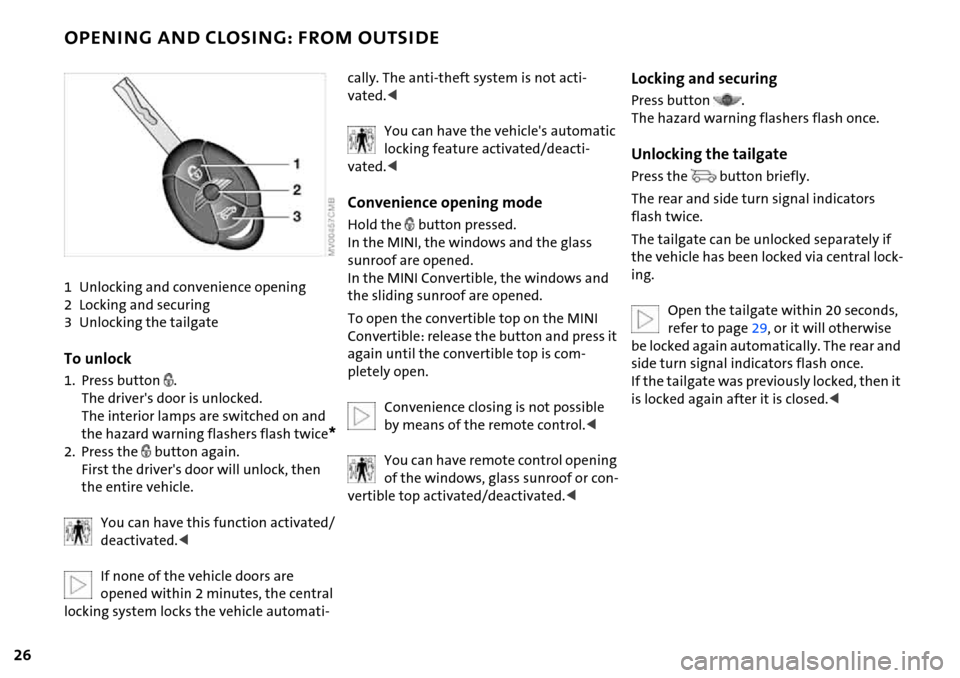
1 Unlocking and convenience opening
2 Locking and securing
3 Unlocking the tailgate
To unlock
1. Press button .
The driver's door is unlocked.
The interior lamps are switched on and
the hazard warning flashers flash twice
*
2. Press the button again.
First the driver's door will unlock, then
the entire vehicle.
You can have this function activated/
deactivated.<
If none of the vehicle doors are
opened within 2 minutes, the central
locking system locks the vehicle automati-
cally. The anti-theft system is not acti-
vated.<
You can have the vehicle's automatic
locking feature activated/deacti-
vated.<
Convenience opening mode
Hold the button pressed.
In the MINI, the windows and the glass
sunroof are opened.
In the MINI Convertible, the windows and
the sliding sunroof are opened.
To open the convertible top on the MINI
Convertible: release the button and press it
again until the convertible top is com-
pletely open.
Convenience closing is not possible
by means of the remote control.<
You can have remote control opening
of the windows, glass sunroof or con-
vertible top activated/deactivated.<
Locking and securing
Press button .
The hazard warning flashers flash once.
Unlocking the tailgate
Press the button briefly.
The rear and side turn signal indicators
flash twice.
The tailgate can be unlocked separately if
the vehicle has been locked via central lock-
ing.
Open the tailgate within 20 seconds,
refer to page29, or it will otherwise
be locked again automatically. The rear and
side turn signal indicators flash once.
If the tailgate was previously locked, then it
is locked again after it is closed.<
Page 29 of 168

27
OVERVIEW REPAIRS OPERATIONCONTROLS DATA INDEX
OPENING AND CLOSING: FROM OUTSIDE
Malfunction
Local radio waves can interfere with func-
tions of the remote control.
If this occurs, lock and unlock the vehicle
via a door lock.
In the event of a system malfunction,
please contact your MINI Dealer. You can
also obtain replacement keys there.
If it is no longer possible to lock the
vehicle with the remote control, then
the battery is discharged. Use the corre-
sponding key for a longer journey so that
its battery can be recharged.<
Via the door lock
1. Turn the key.
The driver's door is unlocked.
2. Turn the key again.
All other doors, the tailgate and the fuel
filler door are unlocked.
You can have this function activated/
deactivated.<
When the vehicle is locked, the hazard
warning flashers flash once.
When the vehicle is unlocked, the hazard
warning flashers flash twice
*.
Manual operation
In the event of an electrical malfunction,
the driver's door can be unlocked or locked
by turning the key in the door lock to the
end positions.
Convenience closing via the door lock
You can also close the power windows,
glass sunroof or the convertible top via the
door lock.
With the door closed, hold the key in the
locking position.
In the MINI Convertible, the convertible top
is closed first and then the side windows.
You can have the closing of the win-
dows and glass sunroof via the door
lock activated/deactivated.<
Page 62 of 168

60
PARKING LAMPS/LOW BEAMS TURN SIGNAL INDICATOR/HEADLAMP FLASHER
'Lights on' warning
If the lights have not been switched off and
the ignition key is in position 0, an acoustic
signal sounds for a few seconds when you
open the driver's door to remind you that
the lights have not been switched off.
Daytime driving lamps*
If convenient, the light switch can be left in
position 2.
When the ignition is switched off, the
external lights go out.
You can have this function activated/
deactivated.<
1 Turn signal indicators
2 High beams/Headlamp flasher
To signal briefly
Gently push the lever up to the point of
resistance and hold it there, if necessary.
The indicator lamp flashes and the
relay clicks faster than normal: a turn
signal indicator has failed.<
Page 69 of 168

67
OVERVIEW REPAIRS OPERATIONCONTROLS DATA INDEX
FUEL GAUGE COOLANT TEMPERATURE GAUGE
In the navigation system*
Please also comply with the instruc-
tions in the previous section.<
If the LED changes from orange to red,
there are approx. 2.1 gallons/8 liters of fuel
left in the tank.
Coolant temperature gauge
Depending on the equipment version, a
coolant temperature gauge is located in
the speedometer or the Cockpit Chrono
Pack.
Low temperature:
The engine is still cold. Drive at moderate
engine and vehicle speeds.
Center position:
Normal operating temperature of the
engine.
High temperature:
As soon as there is a deviation from the
center position upwards or to the left:
Drive with moderation and at low engine
speeds. If necessary, switch off the engine
and allow it to cool down.
Checking coolant level, refer to page115.
Temperature warning
LED 1 lights up while driving:
Engine is too hot. Switch off the engine
immediately and allow it to cool down.
When you switch on the ignition, the LED 1
lights up briefly to confirm that the system
is operational.
Equipment with navigation system* or
Cockpit Chrono Pack*
Coolant-temperature warning
lamp 2 lights up while driving:
Engine is too hot. Switch off the
engine immediately and allow it to cool
down.
Page 71 of 168

69
OVERVIEW REPAIRS OPERATIONCONTROLS DATA INDEX
ONBOARD COMPUTER*
Mode selection
You can use the button in the turn signal
indicator lever to retrieve information from
the onboard computer for display in the
tachometer. By pressing the button briefly,
you can call up a new function for display.
The order of the displays:
Outside temperature, range, average con-
sumption and current consumption, aver-
age speed and current speed.
If the vehicle is equipped with a navi-
gation system, you will find more
information on the onboard computer in
the Owner's Manual for Navigation Sys-
tem.<
Outside temperature
If the vehicle is not equipped with an
onboard computer, only the outside tem-
perature is displayed.
Press the button in the turn indicator lever
to switch the display from outside temper-
ature to current speed and vice versa.
You can have the unit of measure set
to7 or6.<
Outside temperature warning
If the temperature falls to approx. +36/
377, the onboard computer automati-
cally switches to the outside temperature
display.
In addition, a signal sounds and the display
flashes.
Black ice can occur at temperatures
above +36/377 as well. You
should therefore drive carefully on bridges
and shaded roads, for example; as other-
wise there is an increased risk of an acci-
dent.<
With navigation system:
The temperature is displayed in the status
line of the navigation system, refer to the
Owner's Manual for Navigation System.
Current vehicle speed
If the vehicle is not equipped with an
onboard computer, only the current speed
is displayed.
Press the button in the turn indicator lever
to switch the display from outside temper-
ature to current speed and vice versa.
Range
The display shows a range estimate based
on the available fuel. The amount of fuel
remaining in the tank is measured, and the
range is estimated from your driving style
over the last 20 miles/30 km.
If the range displayed is less than
35 miles/50 km, be sure to refuel;
Page 75 of 168
73
OVERVIEW REPAIRS OPERATIONCONTROLS DATA INDEX
FLAT TIRE MONITOR
The concept
As you drive, the Flat Tire Monitor keeps
track of the tire inflation pressure in all four
tires. The system alerts you when there is a
substantial pressure loss in one of the tires
relative to another.
In the event of tire pressure loss, the rolling
radius of the tire changes, thereby affect-
ing the rotational speed of the wheels. This
change is detected, and a flat tire warning
is issued to the driver.
System requirements
To ensure the reliability of flat tire warn-
ings, the system must be initialized with
the correct tire inflation pressures.
Each time you correct the pressure in
a tire, or change a wheel or tire, the
system must be reinitialized.<
System limitations
The Flat Tire Monitor cannot alert you
to severe and sudden tire damage
caused by external factors, nor does it
detect the gradual and minor loss of pres-
sure in all four tires.<
The system could issue a false warning or
function in a delayed manner in the follow-
ing situations:
>System was not initialized
>You are driving on a snow-covered or
slippery road surface
>Performance-oriented driving: slip at the
drive wheels, high rates of lateral accel-
eration
>You are driving with snow chains.
When driving with a space-saver spare tire,
the Flat Tire Monitor cannot function.
Initializing the system
Initialization is completed while you
are driving, but you can stop the car
at any time. Initialization is automatically
continued when you continue driving. Do
not initialize the system if you are driving
with snow chains or a space-saver spare
tire.<
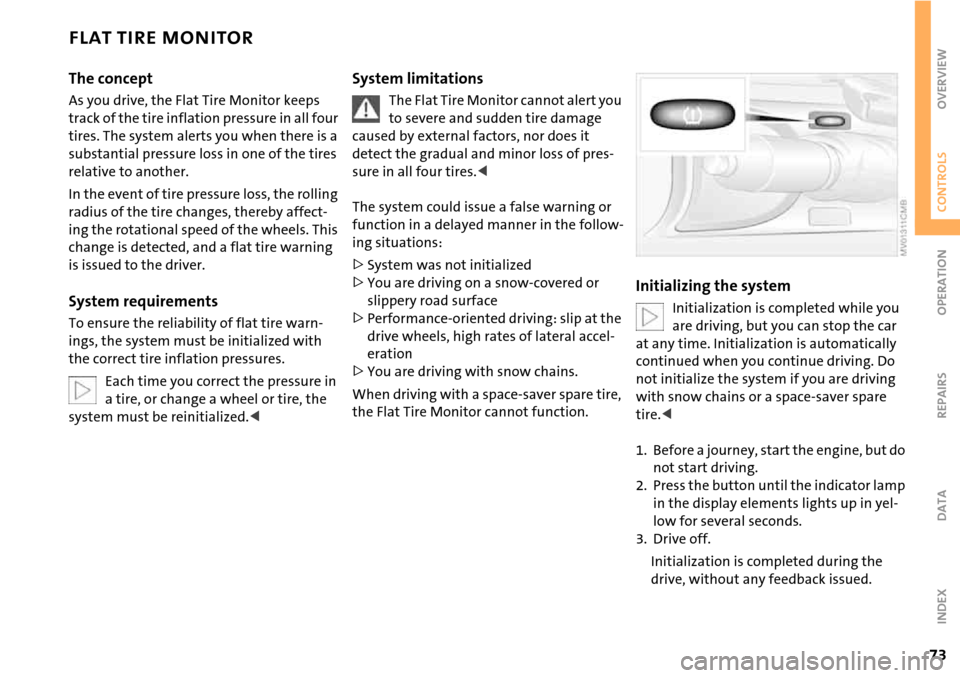
1. Before a journey, start the engine, but do
not start driving.
2. Press the button until the indicator lamp
in the display elements lights up in yel-
low for several seconds.
3. Drive off.
Initialization is completed during the
drive, without any feedback issued.
Page 76 of 168
74
FLAT TIRE MONITOR
Flat tire warning
The warning lamp lights up in yel-
low. An acoustic signal also sounds.
There is a flat tire or a significant
loss of pressure in a tire.
1. Reduce speed and stop the vehicle with
caution. Avoid hard brake applications
and steering maneuvers.
2. Determine which tire is damaged.
If this cannot be determined, con-
tact your MINI Dealer.<
3. Repair the flat tire, refer to page131.
Vehicles with Run Flat tires:
1. Reduce vehicle speed carefully to under
50 mph / 80 km/h. Avoid hard brake
applications and steering maneuvers. Do
not exceed a speed of 50 mph /
80 km/h.
Do not continue driving if the vehi-
cle is not equipped with Run Flat
tires, refer to page108. If you continue
to drive with a flat tire, a serious acci-
dent could result.<
2. Check the tire inflation pressure in all
four tires at the earliest opportunity.
If the tire inflation pressure is cor-
rect in all four tires, it is possible
that the Flat Tire Monitor was not initial-
ized. In this case, initialize the system.<
3. If there is a total loss of tire inflation
pressure, 0 psi/0 kPa, or obvious tire
damage, you can gauge the mileage for
continued driving on the basis of the fol-
lowing indications:
>With a light load:
1 to 2 persons without luggage:
approx. 155 miles/250 km
>With a medium load:
2 persons, full luggage compartment, or
4 persons without luggage:
approx. 90 miles/150 km
>With a full load:
4 persons or more, full luggage compart-
ment:
approx. 30 miles/50 km.
Drive cautiously. Do not exceed a
speed of 50 mph / 80 km/h. In case of
tire pressure loss you must expect changes
in vehicle handling such as lower track sta-
bility during braking, longer braking dis-
tances and changes in self-steering proper-
ties when close to the handling limit.
For safety reasons, the manufacturer of
your MINI recommends not having dam-
aged Run Flat tires repaired, but to consult
a MINI Dealer in such cases.
low. There is a malfunction in the
Flat Tire Monitor or the system has
failed. Have the system checked as soon as
possible.
Page 77 of 168

75
OVERVIEW REPAIRS OPERATIONCONTROLS DATA INDEX
AIRBAGS
The following airbags are located under the
marked covers:
MINI
1 Side airbags in the backrests
2 Head airbags
3 Front airbags
MINI Convertible
1 Side/head airbags in the backrests
3 Front airbags
Protective effect
Comply with the instructions on
page42, or the occupants' personal
safety will be diminished.<
The front airbags supplement the safety
belts by providing additional protection for
the driver and front passenger in the event
of a frontal collision in which the protec-
tion afforded by the belts alone may no
longer be sufficient. When needed, the
head and side airbags help to furnish pro-
tection in the event of side impact. Each of
the side airbags is designed to help support
the seat occupant's upper body. The corre-
sponding side/head airbag in the MINI Con-
vertible or the head airbag in the MINI sup-
ports the head.
The airbags are designed to not be trig-
gered in certain types of collisions, e.g. in
minor accidents or rear impacts.
For information on the ideal seating posi-
tion, refer to page42.
Do not apply adhesive materials to
the cover panels of the airbags, cover
them or modify them in any other way. Do
not fit covers, cushions or other items to
the front seats that have not been specially
approved for seats with integrated side air-
bags. Do not hang clothing, e. g. jackets,
over the backrests.
Do not attempt to remove the airbag
restraint system from the vehicle. Do not
touch the individual components directly after the system has been triggered; other-
wise there is a danger of burns. In the event
of malfunctions, deactivation or deploy-
ment of the airbag restraint system, have
the system checked, repaired or disassem-
bled only by a MINI Dealer or a workshop
with specially trained personnel working in
accordance with the specifications of the
MINI manufacturer and having the neces-
sary permits for handling explosive devices.
Unprofessional attempts to service the sys-
tem could lead to failure in an emergency
or undesired airbag activation, either of
which could result in personal injury.<
Warning notices and information regard-
ing airbags can also be found on the sun
visors.
Automatic deactivation of the front
passenger airbags
An analysis of the impression in the front
passenger seat cushion determines
whether and how the seat is occupied. The
system correspondingly activates or deacti-
vates the front and side airbags for the
front passenger.
The indicator lamp above the interior
rearview mirror shows the current
status of the front passenger airbags, deac-
Page 78 of 168
76
AIRBAGS
tivated or activated, refer to Functional sta-
tus of the front passenger airbags below. <
Before transporting a child on the
front passenger seat, read the safety
notes and instructions under Transporting
children safely, refer to page50.
Adolescents and adults sitting in certain
positions could also deactivate the front
and side airbags for the front passenger;
the indicator lamp for the front passenger
airbags comes on. In such cases, the occu-
pant should change his or her sitting posi-
tion so that the front passenger airbags are
activated and the indicator lamp goes out.
If the airbags are not activated although
the seat occupant has changed his or her
position, have the occupant sit on a rear
seat. Do not attach covers, cushions, ball
mats or other items to the front passenger
seat unless they are specifically recom-
mended by the manufacturer of your MINI.
Do not place any objects under the seat
which could press against the seat from
below. Otherwise, a correct analysis of the
seat cushion is not ensured.<
Functional status of the front
passenger airbags
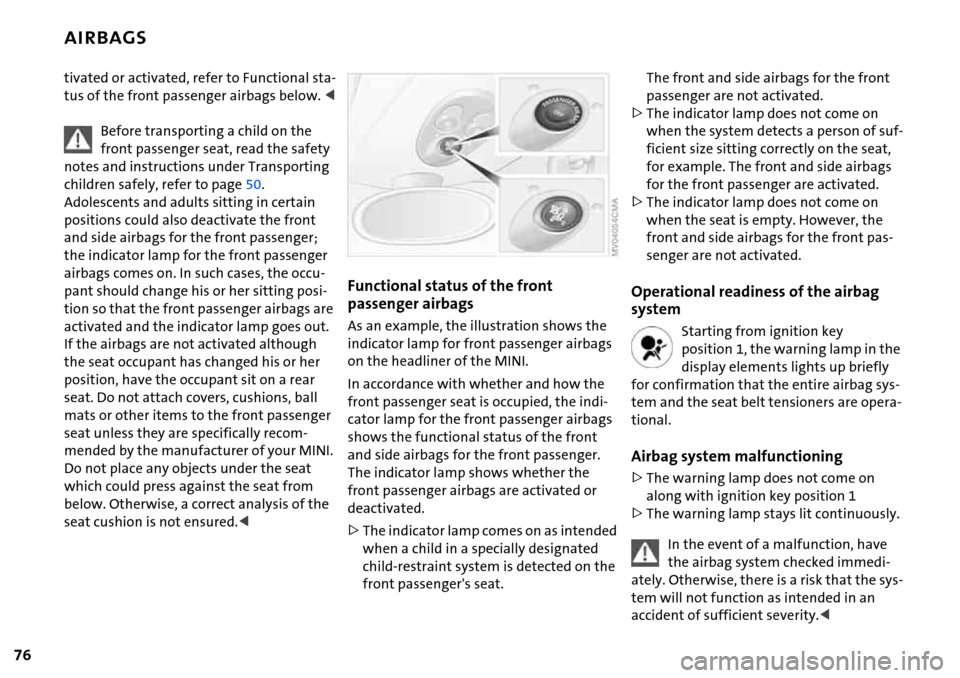
As an example, the illustration shows the
indicator lamp for front passenger airbags
on the headliner of the MINI.
In accordance with whether and how the
front passenger seat is occupied, the indi-
cator lamp for the front passenger airbags
shows the functional status of the front
and side airbags for the front passenger.
The indicator lamp shows whether the
front passenger airbags are activated or
deactivated.
>The indicator lamp comes on as intended
when a child in a specially designated
child-restraint system is detected on the
front passenger's seat.
The front and side airbags for the front
passenger are not activated.
>The indicator lamp does not come on
when the system detects a person of suf-
ficient size sitting correctly on the seat,
for example. The front and side airbags
for the front passenger are activated.
>The indicator lamp does not come on
when the seat is empty. However, the
front and side airbags for the front pas-
senger are not activated.
Operational readiness of the airbag
system
Starting from ignition key
position 1, the warning lamp in the
display elements lights up briefly
for confirmation that the entire airbag sys-
tem and the seat belt tensioners are opera-
tional.
Airbag system malfunctioning
>The warning lamp does not come on
along with ignition key position 1
>The warning lamp stays lit continuously.
In the event of a malfunction, have
the airbag system checked immedi-
ately. Otherwise, there is a risk that the sys-
tem will not function as intended in an
accident of sufficient severity.<