radio MINI Hardtop 2 Door 2015 Service Manual
[x] Cancel search | Manufacturer: MINI, Model Year: 2015, Model line: Hardtop 2 Door, Model: MINI Hardtop 2 Door 2015Pages: 251, PDF Size: 11.4 MB
Page 158 of 251
MultimediaExternal devices
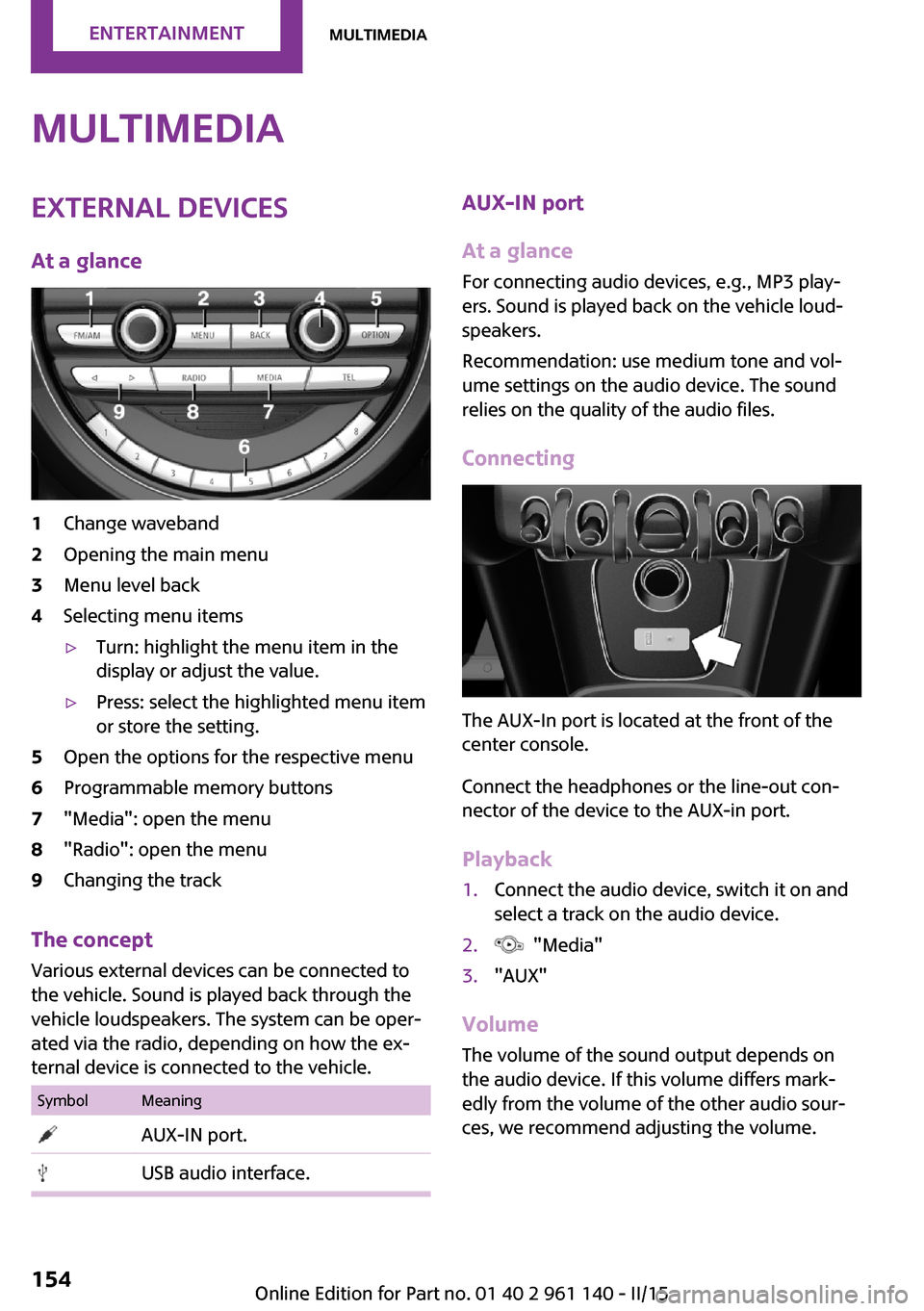
At a glance1Change waveband2Opening the main menu3Menu level back4Selecting menu items▷Turn: highlight the menu item in the
display or adjust the value.▷Press: select the highlighted menu item
or store the setting.5Open the options for the respective menu6Programmable memory buttons7"Media": open the menu8"Radio": open the menu9Changing the track
The concept
Various external devices can be connected to
the vehicle. Sound is played back through the
vehicle loudspeakers. The system can be oper‐
ated via the radio, depending on how the ex‐
ternal device is connected to the vehicle.
SymbolMeaning AUX-IN port. USB audio interface.AUX-IN port
At a glance
For connecting audio devices, e.g., MP3 play‐
ers. Sound is played back on the vehicle loud‐
speakers.
Recommendation: use medium tone and vol‐
ume settings on the audio device. The sound
relies on the quality of the audio files.
Connecting
The AUX-In port is located at the front of the
center console.
Connect the headphones or the line-out con‐
nector of the device to the AUX-in port.
Playback
1.Connect the audio device, switch it on and
select a track on the audio device.2. "Media"3."AUX"
Volume
The volume of the sound output depends on
the audio device. If this volume differs mark‐
edly from the volume of the other audio sour‐
ces, we recommend adjusting the volume.
Seite 154ENTERTAINMENTMultimedia154
Online Edition for Part no. 01 40 2 961 140 - II/15
Page 159 of 251
Adjusting the volume1. "Media"2."AUX"3."Volume"4.Set the desired volume.
USB audio interface
At a glance
It is possible to connect external devices. Set
via radio. Sound is played back on the vehicle
loudspeakers.
Connectors for external devices
Connection via USB audio interface: Apple iPod/
iPhone, USB devices, e.g., MP3 players, USB
flash drives, or mobile phones that are sup‐
ported by the USB audio interface.
Due to the large number of audio devices avail‐
able on the market, it cannot be guaranteed
that every device/mobile phone is operable on
the vehicle.
Depending on the configuration of the audio
files, for example bit rates greater than
256 kbit/s or the number of different compres‐
sion technologies, the files may not play back
correctly in each case.
Information about suitable USB devices can be
found at www.miniusa.com/bluetooth.
Audio files
Standard audio files and playlists can be played
back.
File systems
Popular file systems for USB devices are sup‐
ported. FAT32 and exFAT are the recom‐
mended formats.
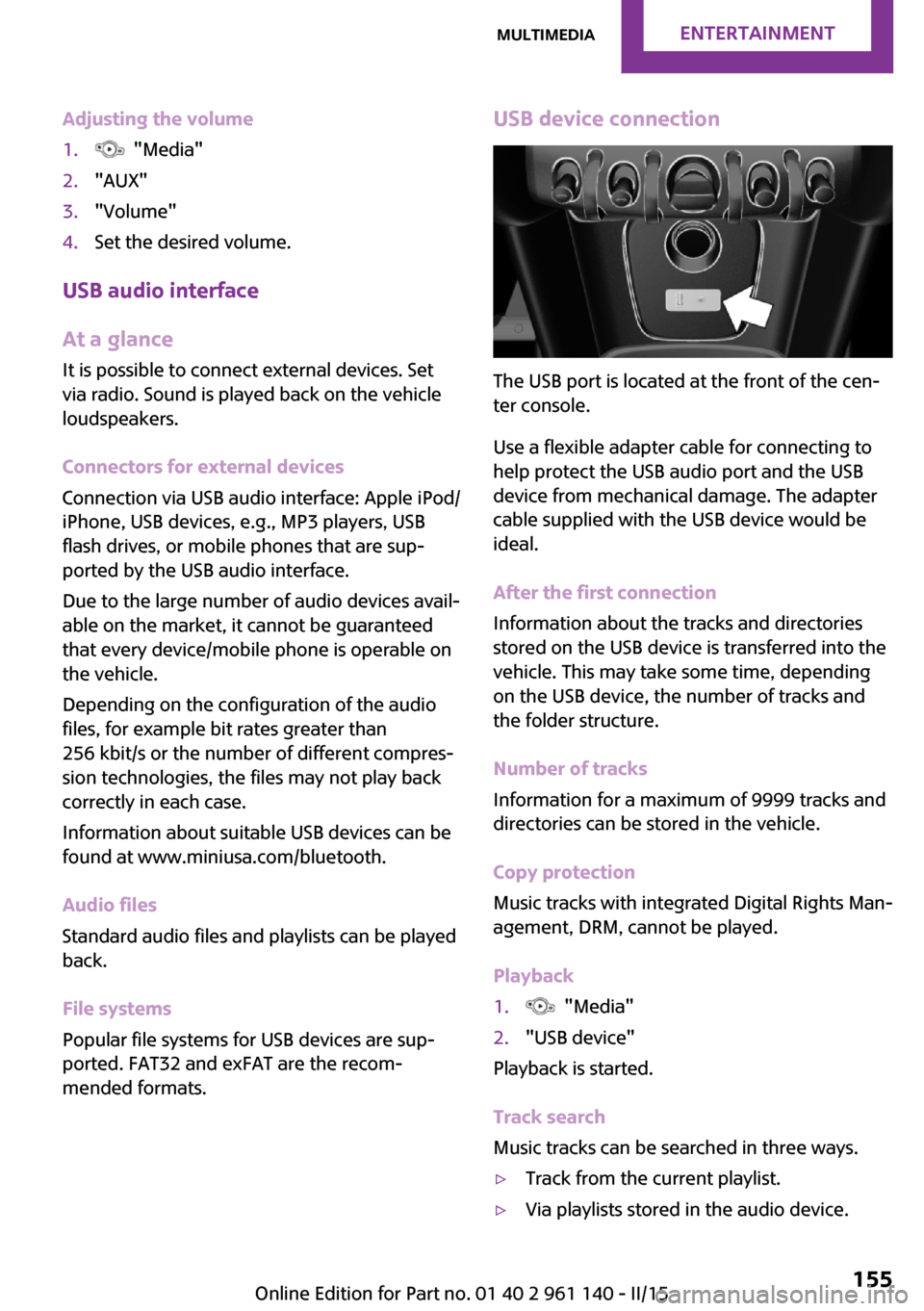
USB device connection
The USB port is located at the front of the cen‐
ter console.
Use a flexible adapter cable for connecting to
help protect the USB audio port and the USB
device from mechanical damage. The adapter
cable supplied with the USB device would be
ideal.
After the first connection
Information about the tracks and directories
stored on the USB device is transferred into the
vehicle. This may take some time, depending
on the USB device, the number of tracks and
the folder structure.
Number of tracks
Information for a maximum of 9999 tracks and
directories can be stored in the vehicle.
Copy protection
Music tracks with integrated Digital Rights Man‐
agement, DRM, cannot be played.
Playback
1. "Media"2."USB device"
Playback is started.
Track search
Music tracks can be searched in three ways.
▷Track from the current playlist.▷Via playlists stored in the audio device.Seite 155MultimediaENTERTAINMENT155
Online Edition for Part no. 01 40 2 961 140 - II/15
Page 161 of 251
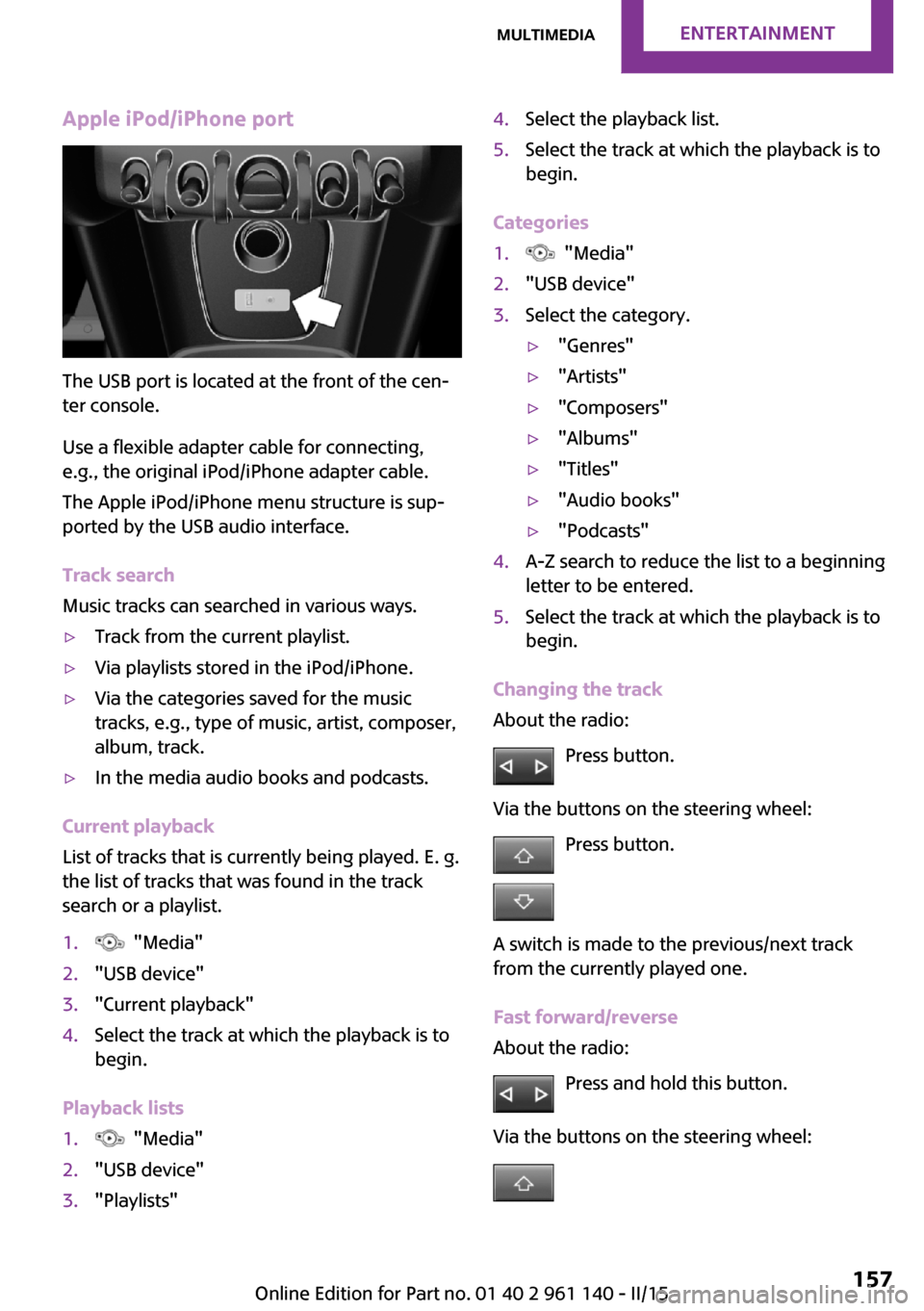
Apple iPod/iPhone port
The USB port is located at the front of the cen‐
ter console.
Use a flexible adapter cable for connecting,
e.g., the original iPod/iPhone adapter cable.
The Apple iPod/iPhone menu structure is sup‐
ported by the USB audio interface.
Track search
Music tracks can searched in various ways.
▷Track from the current playlist.▷Via playlists stored in the iPod/iPhone.▷Via the categories saved for the music
tracks, e.g., type of music, artist, composer,
album, track.▷In the media audio books and podcasts.
Current playback
List of tracks that is currently being played. E. g.
the list of tracks that was found in the track
search or a playlist.
1. "Media"2."USB device"3."Current playback"4.Select the track at which the playback is to
begin.
Playback lists
1. "Media"2."USB device"3."Playlists"4.Select the playback list.5.Select the track at which the playback is to
begin.
Categories
1. "Media"2."USB device"3.Select the category.▷"Genres"▷"Artists"▷"Composers"▷"Albums"▷"Titles"▷"Audio books"▷"Podcasts"4.A-Z search to reduce the list to a beginning
letter to be entered.5.Select the track at which the playback is to
begin.
Changing the track
About the radio:
Press button.
Via the buttons on the steering wheel: Press button.
A switch is made to the previous/next track
from the currently played one.
Fast forward/reverse
About the radio:
Press and hold this button.
Via the buttons on the steering wheel:
Seite 157MultimediaENTERTAINMENT157
Online Edition for Part no. 01 40 2 961 140 - II/15
Page 166 of 251
Bluetooth hands-free systemVehicle features and op‐
tions
This chapter describes all standard, country-
specific and optional features offered with the
series. It also describes features that are not
necessarily available in your car, e. g., due to
the selected options or country versions. This
also applies to safety-related functions and sys‐
tems. The respectively applicable country provi‐
sions must be observed when using the respec‐
tive features and systems.
The concept Mobile phones can be connected to the vehicle
via Bluetooth. After the mobile phones are
paired once, they are recognized automatically
when the ignition is switched on. As soon as
they are inside the vehicle they can be oper‐
ated via the radio and via the buttons on the
steering wheel.
Hints Using the mobile phone while driving
Make entries only when traffic and road
conditions allow. Do not hold the mobile phone
in your hand while you are driving; use the
hands-free system instead. If you do not ob‐
serve this precaution, you can endanger the ve‐
hicle's occupants and other traffic. ◀
Certain functions may need to be enabled by the mobile phone provider or service provider.
At high temperatures, the charge functions of
the mobile phone can be limited under certain
circumstances, and some functions are no lon‐
ger executed.Do not operate a mobile phone that is con‐
nected to the vehicle on the mobile phone key‐
pad, as this may lead to a malfunction.
When the mobile phone is used via the vehicle,
refer to the operating manual of the mobile
phone.
Approved mobile phones Accurate information about which mobile
phones are supported with a Bluetooth inter‐
face is available at www.mini.com/connectivity.
These approved mobile phones, with a certain
software version, support the vehicle functions
described below.
Malfunctions may occur with other mobile
phones or software versions.
Displaying the vehicle identification
number and software part number
The vehicle identification number and software
part number are needed to determine which
mobile phones are supported by the mobile
phone installation package. The software ver‐
sion of the mobile phone may also be required.1. "Telephone"2. Press button.3."Bluetooth® info"4."System information"
Pairing/unpairing the
mobile phone
Requirements
▷The mobile phone is compatible.▷The mobile phone is ready for operation.Seite 162COMMUNICATIONBluetooth hands-free system162
Online Edition for Part no. 01 40 2 961 140 - II/15
Page 168 of 251
The mobile phone could not be paired or con‐
nected.▷Is Bluetooth activated in the vehicle and on
the mobile phone? Activate Bluetooth.▷Do the Bluetooth passkeys on the mobile
phone and the vehicle match? Enter the
same passkey on the mobile phone and on
the radio.▷Did it take longer than 30 seconds to enter
the passkey? Repeat the pairing procedure.▷Do the control numbers on the mobile
phone and vehicle match? Repeat the pair‐
ing procedure.▷Are too many Bluetooth devices connected
to the mobile phone? Delete connections to
other devices.▷Is the mobile phone in power-save mode or
does it have only a limited remaining bat‐
tery life? Charge the mobile phone.
The mobile phone no longer reacts?
▷Switch the mobile phone off and on again.▷Ambient temperature too high or too low?
Do not subject the mobile phone to ex‐
treme ambient temperatures.
No or not all phone book entries are displayed,
or they are incomplete.
▷Transmission of the entries is not yet com‐
plete.▷It is possible that only the phone book en‐
tries from the mobile phone or from the
SIM card are transmitted.▷It may not be possible to display phone
book entries with special characters.▷The number of phone book entries being
stored is too high.
The phone connection quality is poor.
▷It may be possible to adjust the strength of
the Bluetooth signal on the mobile phone.▷Adjust the volume of the microphone and
loudspeakers separately.If all points in this list have been checked and
the required function is still not available, con‐
tact the hotline or the service center.
Controls
Adjusting the volume During an active call, turn the left knob on the
radio until the desired volume is selected.
Automatic volume control
The automatic volume control can only be ad‐
justed during an active conversation.1. "Settings"2."Tone"3."Volume settings"4.Select the desired setting: "Microphone" or
"Loudspeak."5.Adjusting: press and turn right button.6.Storing: press right button.
Incoming call
Receiving calls If the number of the caller is stored in the
phone book and is transmitted by the network,
the name of the contact is displayed. Other‐
wise, only the phone number or "Unknown
caller"is displayed.
Accepting a call
About the radio
"Accept"
Via the button on the steering wheel
Press button.
Via the instrument cluster
"Accept"
Seite 164COMMUNICATIONBluetooth hands-free system164
Online Edition for Part no. 01 40 2 961 140 - II/15
Page 169 of 251
Rejecting a call
About the radio
"Reject"
Via the instrument cluster
"Reject"
Ending a call About the radio
"End call ( )"
Via the button on the steering wheel
Press button.
Via the instrument cluster
"End call"
Dialing a number
1. "Telephone"2."Dial number"3.Enter numbers using the right rotary knob.4. Select the symbol.
Calls with multiple parties
Accepting a second call
If a second call is received during an ongoing
call, a call waiting signal sounds.
"Accept"
The second call is accepted and the current call
is put on hold.
Establishing a second call Establish an additional call during an active call.
Dial the new phone number or select it from a
list.
▷"Phone book"▷"Outgoing calls"▷"Received calls"The first call is put on hold.
Switching between two calls, hold call You can switch between two calls.
Select line with symbol in order to switch
between the conversations.
Active conversation.
Call on hold.
Establishing/ending a conference call
Two calls can be connected to a single tele‐
phone conference call.
1.Establish two calls.2. "Conference call"
When terminating the conference call, both
calls are ended. If one call is terminated by an‐
other party, the other call is continued if
needed.
Muting the microphone When a call is active, the microphone can be
muted.
"Mute microphone"
The muted microphone is automatically muted:
▷When a new connection is established.▷If using call-switching to switch between
call parties.
DTMF suffix dialing
DTMF suffix dialing can be used for gaining ac‐
cess to network services or for controlling devi‐
ces, e.g., to make a remote inquiry of an an‐
swering machine. The DTMF code is needed for
this purpose. The DTMF code is only available
during an active call.
1."Keypad dialing"2.Enter DTMF code.Seite 165Bluetooth hands-free systemCOMMUNICATION165
Online Edition for Part no. 01 40 2 961 140 - II/15
Page 196 of 251

Engine oilVehicle features and op‐
tions
This chapter describes all standard, country-
specific and optional features offered with the
series. It also describes features that are not
necessarily available in your car, e. g., due to
the selected options or country versions. This
also applies to safety-related functions and sys‐
tems. The respectively applicable country provi‐
sions must be observed when using the respec‐
tive features and systems.
General information The engine oil consumption is dependent on
the driving style and driving conditions.
The engine oil consumption can increase in
case of, for example:▷Sporty driving.▷Break-in the engine.▷Idling of the engine.▷Usage of non-approved engine oil grades.
Therefore, regularly check the engine oil level
after refueling.
The vehicle is equipped with electronic oil
measurement.
The electronic oil measurement has two meas‐
uring principles:
▷Status display.▷Detailed measurement.Electronic oil measure‐
ment
Status display
The concept
The engine oil level is monitored electronically
while driving and shown on the radio display.
If the engine oil level reaches the minimum
level, a check control message is displayed.
RequirementsA current measured value is available after ap‐
prox. 30 minutes of driving. During a shorter
trip, the status of the last, sufficiently long trip is
displayed.
With frequent short-distance trips, perform a
detailed measurement.
Displaying the engine oil level1. Press button.2. "Vehicle Info"3."Vehicle status"4."Engine oil level"
The engine oil level is displayed.
Engine oil level display messages Different messages appear on the display de‐
pending on the engine oil level. Pay attention
to these messages.
If the engine oil level is too low within the next
125 miles/200 km, add engine oil, refer to
page 193.
Engine oil level too low
Add engine oil immediately; otherwise,
an insufficient amount of engine oil could result
in engine damage. ◀
Seite 192MOBILITYEngine oil192
Online Edition for Part no. 01 40 2 961 140 - II/15
Page 201 of 251

MaintenanceVehicle features and op‐
tions
This chapter describes all standard, country-
specific and optional features offered with the
series. It also describes features that are not
necessarily available in your car, e. g., due to
the selected options or country versions. This
also applies to safety-related functions and sys‐
tems. The respectively applicable country provi‐
sions must be observed when using the respec‐
tive features and systems.
MINI maintenance system
The maintenance system indicates required
maintenance measures, and thereby provides
support in maintaining road safety and the op‐
erational reliability of the vehicle.
In some cases scopes and intervals may vary
according to the country-specific version. Re‐
placement work, spare parts, fuels and lubri‐
cants and wear materials are calculated sepa‐
rately. Additional information is available from
the service center.
Condition Based Service
CBS
Sensors and special algorithms take into ac‐
count the driving conditions of your vehicle.
Based on this, Condition Based Service recog‐
nizes the maintenance requirements.
The system makes it possible to adapt the
amount of maintenance corresponding to your
user profile.
Detailed information on service requirements,
refer to page 65, can be displayed on the radio.For service data
Information on the required maintenance is
continuously stored in the remote control. Your
service center will read out this data and sug‐
gest the right array of service procedures for
your vehicle.
Therefore, hand your service specialist the re‐
mote control that you used most recently.
Storage periods
Storage periods during which the vehicle bat‐
tery was disconnected are not taken into ac‐
count.
If this occurs, have a service center update the
time-dependent maintenance procedures, such
as checking brake fluid and, if needed, chang‐
ing the engine oil and the microfilter/activated-
charcoal filter.
Service and Warranty In‐
formation Booklet for
US models and Warranty
and Service Guide Book‐
let for Canadian models
Please consult your Service and Warranty Infor‐
mation Booklet for US models and Warranty
and Service Guide Booklet for Canadian models
for additional information on service require‐
ments.
Maintenance and repair should be performed
by your service center. Make sure to have regu‐
lar maintenance procedures recorded in the ve‐
hicle's Service and Warranty Information Book‐
let for US models, and in the Warranty and
Service Guide Booklet for Canadian models.
These entries are proof of regular maintenance.Seite 197MaintenanceMOBILITY197
Online Edition for Part no. 01 40 2 961 140 - II/15
Page 215 of 251
Breakdown assistanceVehicle features and op‐
tions
This chapter describes all standard, country-
specific and optional features offered with the
series. It also describes features that are not
necessarily available in your car, e. g., due to
the selected options or country versions. This
also applies to safety-related functions and sys‐
tems. The respectively applicable country provi‐
sions must be observed when using the respec‐
tive features and systems.
Hazard warning flash‐
ers
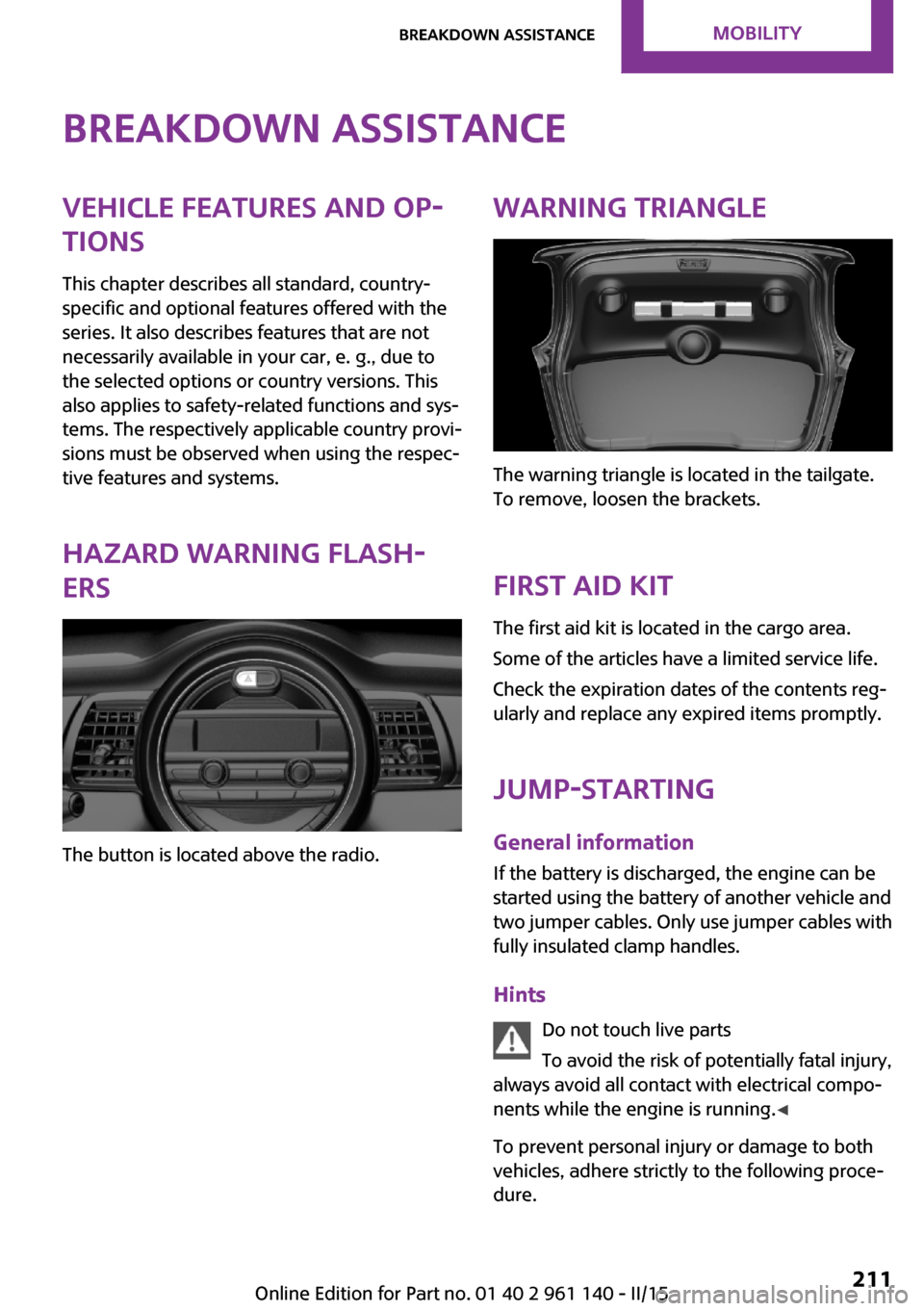
The button is located above the radio.
Warning triangle
The warning triangle is located in the tailgate.
To remove, loosen the brackets.
First aid kit
The first aid kit is located in the cargo area.
Some of the articles have a limited service life.
Check the expiration dates of the contents reg‐
ularly and replace any expired items promptly.
Jump-starting
General information If the battery is discharged, the engine can be
started using the battery of another vehicle and
two jumper cables. Only use jumper cables with
fully insulated clamp handles.
Hints Do not touch live parts
To avoid the risk of potentially fatal injury,
always avoid all contact with electrical compo‐
nents while the engine is running. ◀
To prevent personal injury or damage to both
vehicles, adhere strictly to the following proce‐
dure.
Seite 211Breakdown assistanceMOBILITY211
Online Edition for Part no. 01 40 2 961 140 - II/15
Page 235 of 251

License Texts and CertificationsBluetoothBrazil
Europe
Register model name: UK001
Product code: MRBE307A
Hrvatski
Ovim, Alpine, izjavljuje da ovaj tip RADIO UKL
zadovoljava bitne zahtjeve i ostale važece
odrednice, a sukladno Smjernici 1999/5/EC.
Čeština
Alpine tímto prohlašuje, že tento RADIO UKL je
ve shodě se základními požadavky a dalšími
príslušnými ustanoveními smernice 1999/5/ES.
Dansk Undertegnede Alpine erklærer herved, at
følgende udstyr RADIO UKL overholder de væ‐
sentlige krav og øvrige relevante krav i direktiv
1999/5/EF.
Deutsch
Hiermit erklärt Alpine, dass sich das Gerät
RADIO UKL in Übereinstimmung mit den
grundlegenden Anforderungen und den übri‐ gen einschlägigen Bestimmungen der Richtlinie
1999/5/EG befindet.
Eesti Käesolevaga kinnitab Alpine seadme RADIO
UKL vastavust direktiivi 1999/5/EÜ põhinõue‐
tele ja nimetatud direktiivist tulenevatele teis‐
tele asjakohastele sätetele.
English Hereby, Alpine, declares that this RADIO UKL is
in compliance with the essential requirements
and other relevant provisions of Directive
1999/5/EC.
Español
Por medio de la presente Alpine declara que el
RADIO UKL cumple con los requisitos esen‐
ciales y cualesquiera otras disposiciones aplica‐
bles o exigibles de la Directiva 1999/5/CE.
Ελληνικά
ΜΕ ΤΗΝ ΠΑΡΟΥΣΑ Alpine ∆ΗΛΩΝΕΙ ΟΤΙ RADIO
UKL ΣΥΜΜΟΡΦΩΝΕΤΑΙ ΠΡΟΣ ΤΙΣ ΟΥΣΙΩ∆ΕΙΣ ΑΠΑΙΤΗΣΕΙΣ ΚΑΙ ΤΙΣ ΛΟΙΠΕΣ ΣΧΕΤΙΚΕΣ
∆ΙΑΤΑΞΕΙΣ ΤΗΣ Ο∆ΗΓΙΑΣ 1999/5/ΕΚ.
Français
Par la présente Alpine déclare que l'appareil
RADIO UKL est conforme aux exigences essen‐
tielles et aux autres dispositions pertinentes de
la directive 1999/5/CE.Seite 231License Texts and CertificationsREFERENCE231
Online Edition for Part no. 01 40 2 961 140 - II/15