flat tire MINI Paceman 2015 Owner's Guide
[x] Cancel search | Manufacturer: MINI, Model Year: 2015, Model line: Paceman, Model: MINI Paceman 2015Pages: 223, PDF Size: 5.51 MB
Page 163 of 223
▷If a warning triangle or portable hazard
warning lamp is required, set it up on the
roadside at an appropriate distance from
the rear of the vehicle. Comply with all
safety guidelines and regulations. ◀
The procedure to correct a flat tire depends on
the equipment in the vehicle:
▷Run-flat tires, refer to page 160.▷MINI Mobility System, refer to page 161.
MINI Mobility System
Notes
▷Follow the instructions on using the Mobi‐
lity System found on the compressor and
sealant bottle.▷Use of the Mobility System may be ineffec‐
tive if tire damage is greater than approx.
1/8 in/4 mm in size.▷Contact the nearest service center if the tire
cannot be made drivable.▷If possible, do not remove foreign bodies
that have penetrated the tire.▷Pull the speed limit sticker off the sealant
bottle and apply it to the steering wheel.
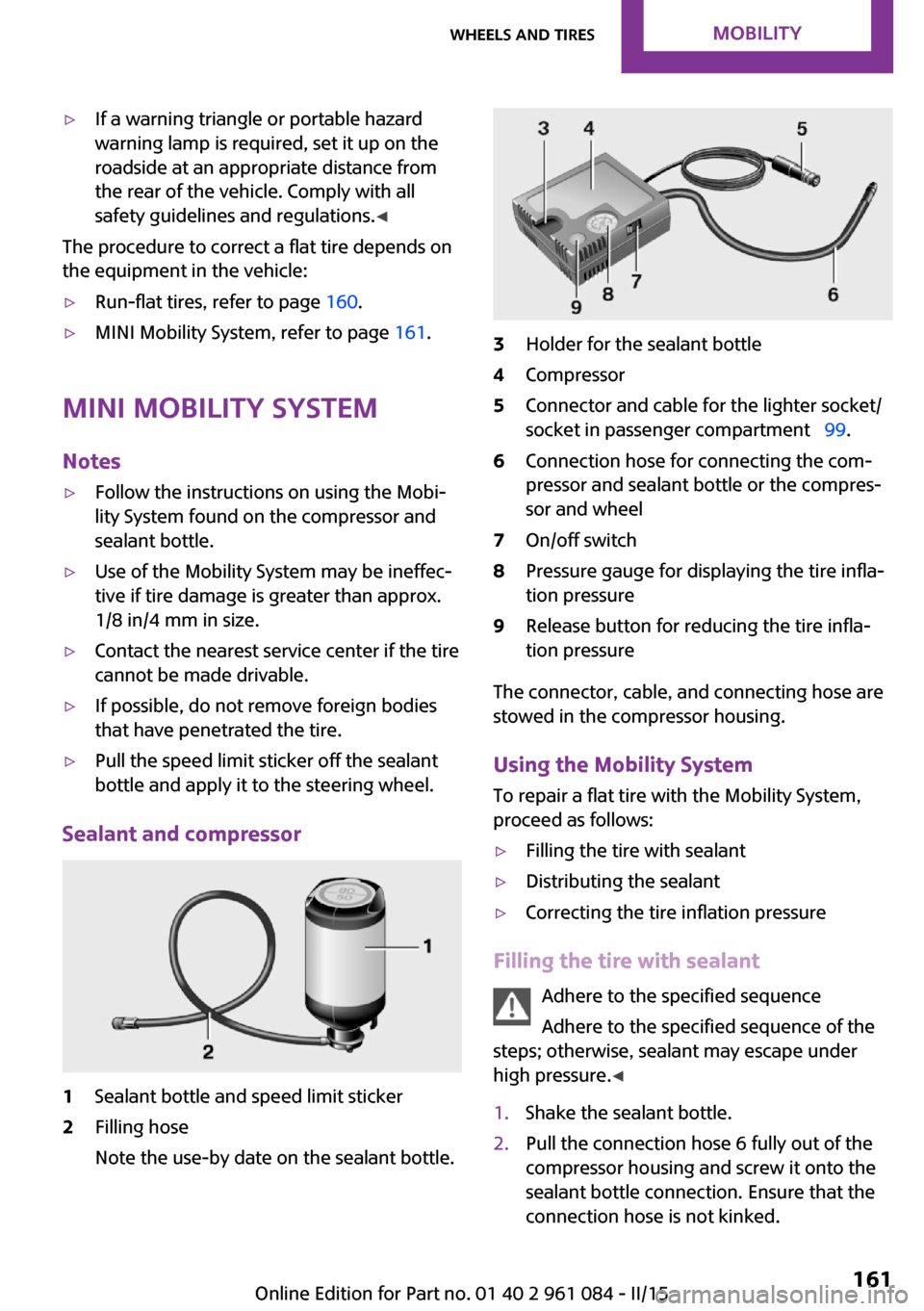
Sealant and compressor
1Sealant bottle and speed limit sticker2Filling hose
Note the use-by date on the sealant bottle.3Holder for the sealant bottle4Compressor5Connector and cable for the lighter socket/
socket in passenger compartment 99.6Connection hose for connecting the com‐
pressor and sealant bottle or the compres‐
sor and wheel7On/off switch8Pressure gauge for displaying the tire infla‐
tion pressure9Release button for reducing the tire infla‐
tion pressure
The connector, cable, and connecting hose are
stowed in the compressor housing.
Using the Mobility System
To repair a flat tire with the Mobility System,
proceed as follows:
▷Filling the tire with sealant▷Distributing the sealant▷Correcting the tire inflation pressure
Filling the tire with sealant
Adhere to the specified sequence
Adhere to the specified sequence of the
steps; otherwise, sealant may escape under
high pressure. ◀
1.Shake the sealant bottle.2.Pull the connection hose 6 fully out of the
compressor housing and screw it onto the
sealant bottle connection. Ensure that the
connection hose is not kinked.Seite 161Wheels and tiresMOBILITY161
Online Edition for Part no. 01 40 2 961 084 - II/15
Page 164 of 223
3.Insert the sealant bottle into the compres‐
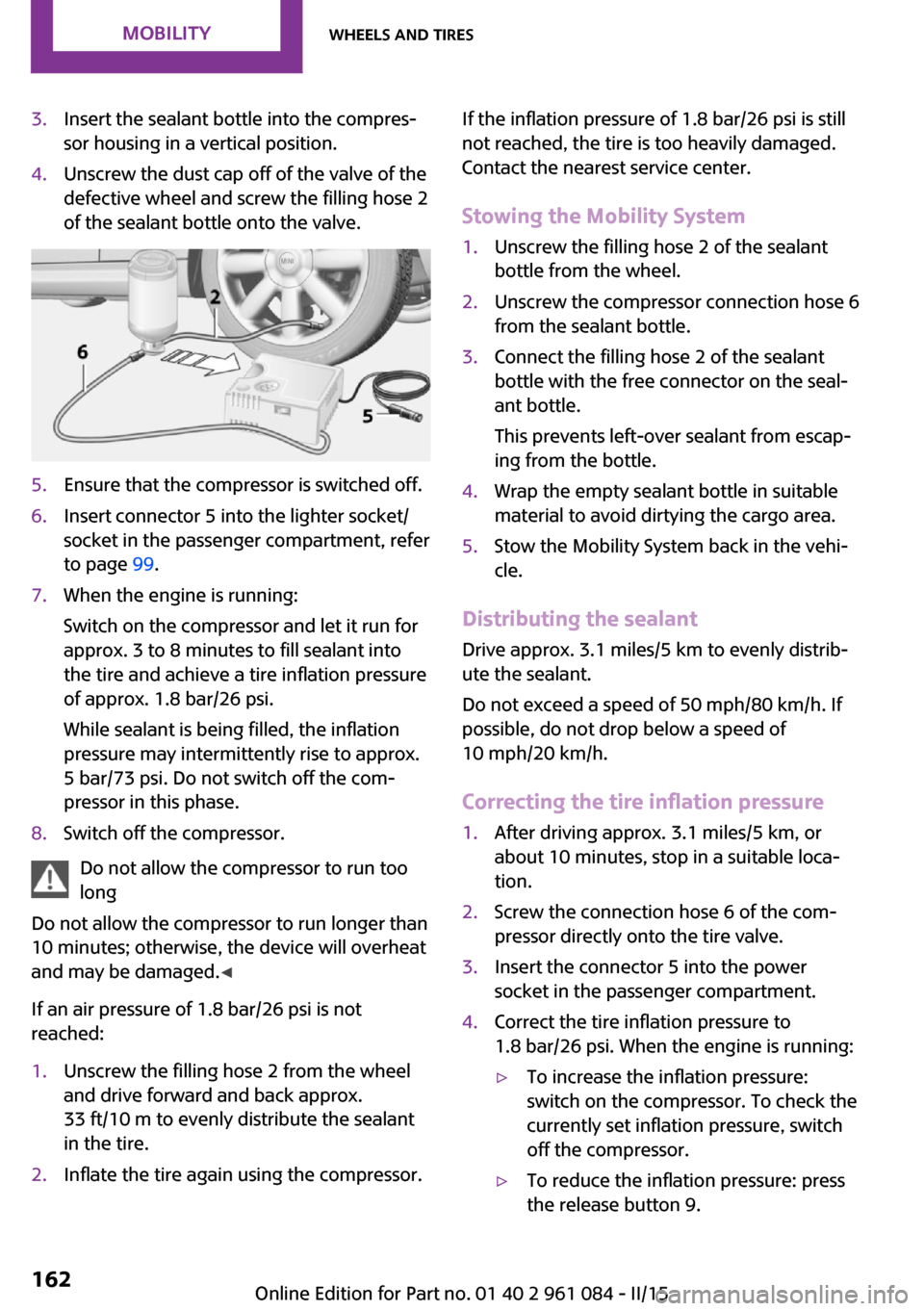
sor housing in a vertical position.4.Unscrew the dust cap off of the valve of the
defective wheel and screw the filling hose 2
of the sealant bottle onto the valve.5.Ensure that the compressor is switched off.6.Insert connector 5 into the lighter socket/
socket in the passenger compartment, refer
to page 99.7.When the engine is running:
Switch on the compressor and let it run for
approx. 3 to 8 minutes to fill sealant into
the tire and achieve a tire inflation pressure
of approx. 1.8 bar/26 psi.
While sealant is being filled, the inflation
pressure may intermittently rise to approx.
5 bar/73 psi. Do not switch off the com‐
pressor in this phase.8.Switch off the compressor.
Do not allow the compressor to run too
long
Do not allow the compressor to run longer than
10 minutes; otherwise, the device will overheat
and may be damaged. ◀
If an air pressure of 1.8 bar/26 psi is not
reached:
1.Unscrew the filling hose 2 from the wheel
and drive forward and back approx.
33 ft/10 m to evenly distribute the sealant
in the tire.2.Inflate the tire again using the compressor.If the inflation pressure of 1.8 bar/26 psi is still
not reached, the tire is too heavily damaged.
Contact the nearest service center.
Stowing the Mobility System1.Unscrew the filling hose 2 of the sealant
bottle from the wheel.2.Unscrew the compressor connection hose 6
from the sealant bottle.3.Connect the filling hose 2 of the sealant
bottle with the free connector on the seal‐
ant bottle.
This prevents left-over sealant from escap‐
ing from the bottle.4.Wrap the empty sealant bottle in suitable
material to avoid dirtying the cargo area.5.Stow the Mobility System back in the vehi‐
cle.
Distributing the sealant
Drive approx. 3.1 miles/5 km to evenly distrib‐
ute the sealant.
Do not exceed a speed of 50 mph/80 km/h. If
possible, do not drop below a speed of
10 mph/20 km/h.
Correcting the tire inflation pressure
1.After driving approx. 3.1 miles/5 km, or
about 10 minutes, stop in a suitable loca‐
tion.2.Screw the connection hose 6 of the com‐
pressor directly onto the tire valve.3.Insert the connector 5 into the power
socket in the passenger compartment.4.Correct the tire inflation pressure to
1.8 bar/26 psi. When the engine is running:▷To increase the inflation pressure:
switch on the compressor. To check the
currently set inflation pressure, switch
off the compressor.▷To reduce the inflation pressure: press
the release button 9.Seite 162MOBILITYWheels and tires162
Online Edition for Part no. 01 40 2 961 084 - II/15
Page 165 of 223
Do not allow the compressor to run too
long
Do not allow the compressor to run longer than
10 minutes; otherwise, the device will overheat
and may be damaged. ◀
If the inflation pressure is not maintained, take
the vehicle on another drive, distributing the
sealant, refer to page 162. Then repeat steps
1 to 4 once.
If the inflation pressure of 1.8 bar/26 psi is still
not reached, the tire is too heavily damaged.
Contact the nearest service center.
Continuing the trip Note the maximum speed
Do not exceed the maximum speed of
50 mph/80 km/h; otherwise, accidents can oc‐
cur. ◀
Replace the defective tire as soon as possible
and have the wheel balanced.
Have the Mobility System refilled.
Snow chains
Only certain fine-link snow chains have been
tested by MINI, classified as safe for use, and
recommended. Consult your service center for more information.
Use only in pairs on the front wheels, equipped
with tires of the following size:
195/60 R 16 M+S
With ALL4 all-wheel drive: only mount snow
chains on the front wheels.
Observe the manufacturer's instructions when
mounting snow chains. Do not exceed a speed
of 30 mph or 50 km/h when using snow chains.
Do not initialize the Flat Tire Monitor if snow
chains are mounted; otherwise, the instrument
might issue an incorrect reading.Do not initialize the Tire Pressure Monitor if
snow chains are mounted; otherwise, the in‐
strument might issue an incorrect reading.
When driving with snow chains, it may be use‐
ful to temporarily deactivate DSC or activate
DTC, refer to page 81.Seite 163Wheels and tiresMOBILITY163
Online Edition for Part no. 01 40 2 961 084 - II/15
Page 180 of 223
9.Apply gentle pressure to the bulb while
turning it to the left and remove it.10.Insert the new bulb and mount the bulb
holder in reverse order. Ensure that the
bulb holder engages in all fasteners.
License plate lights
5-watt bulb, C 5 W
Replacing
MINI Countryman
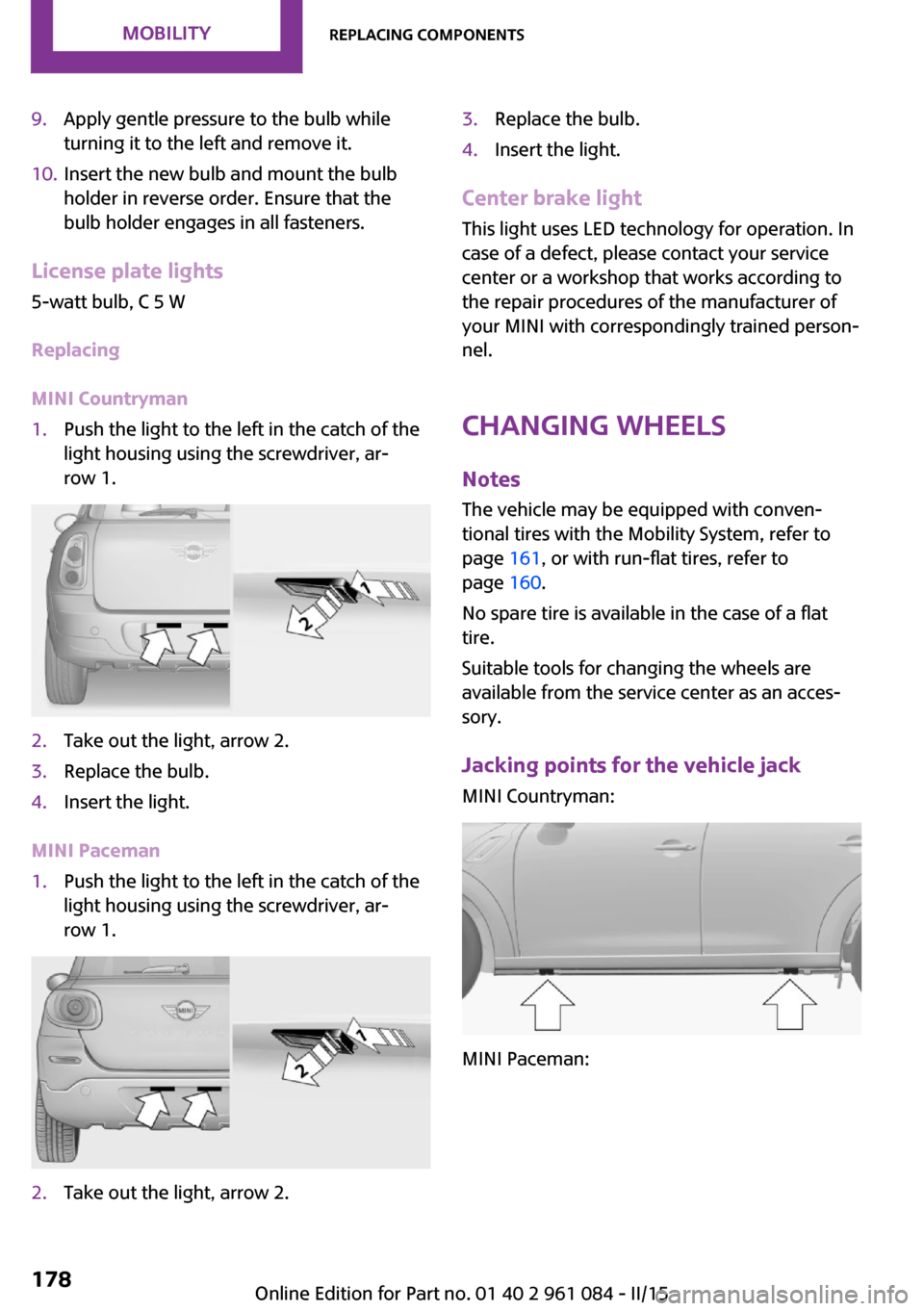
1.Push the light to the left in the catch of the
light housing using the screwdriver, ar‐
row 1.2.Take out the light, arrow 2.3.Replace the bulb.4.Insert the light.
MINI Paceman
1.Push the light to the left in the catch of the
light housing using the screwdriver, ar‐
row 1.2.Take out the light, arrow 2.3.Replace the bulb.4.Insert the light.
Center brake light
This light uses LED technology for operation. In
case of a defect, please contact your service
center or a workshop that works according to
the repair procedures of the manufacturer of
your MINI with correspondingly trained person‐
nel.
Changing wheels
Notes The vehicle may be equipped with conven‐tional tires with the Mobility System, refer to
page 161, or with run-flat tires, refer to
page 160.
No spare tire is available in the case of a flat
tire.
Suitable tools for changing the wheels are
available from the service center as an acces‐
sory.
Jacking points for the vehicle jack MINI Countryman:
MINI Paceman:
Seite 178MOBILITYReplacing components178
Online Edition for Part no. 01 40 2 961 084 - II/15
Page 200 of 223
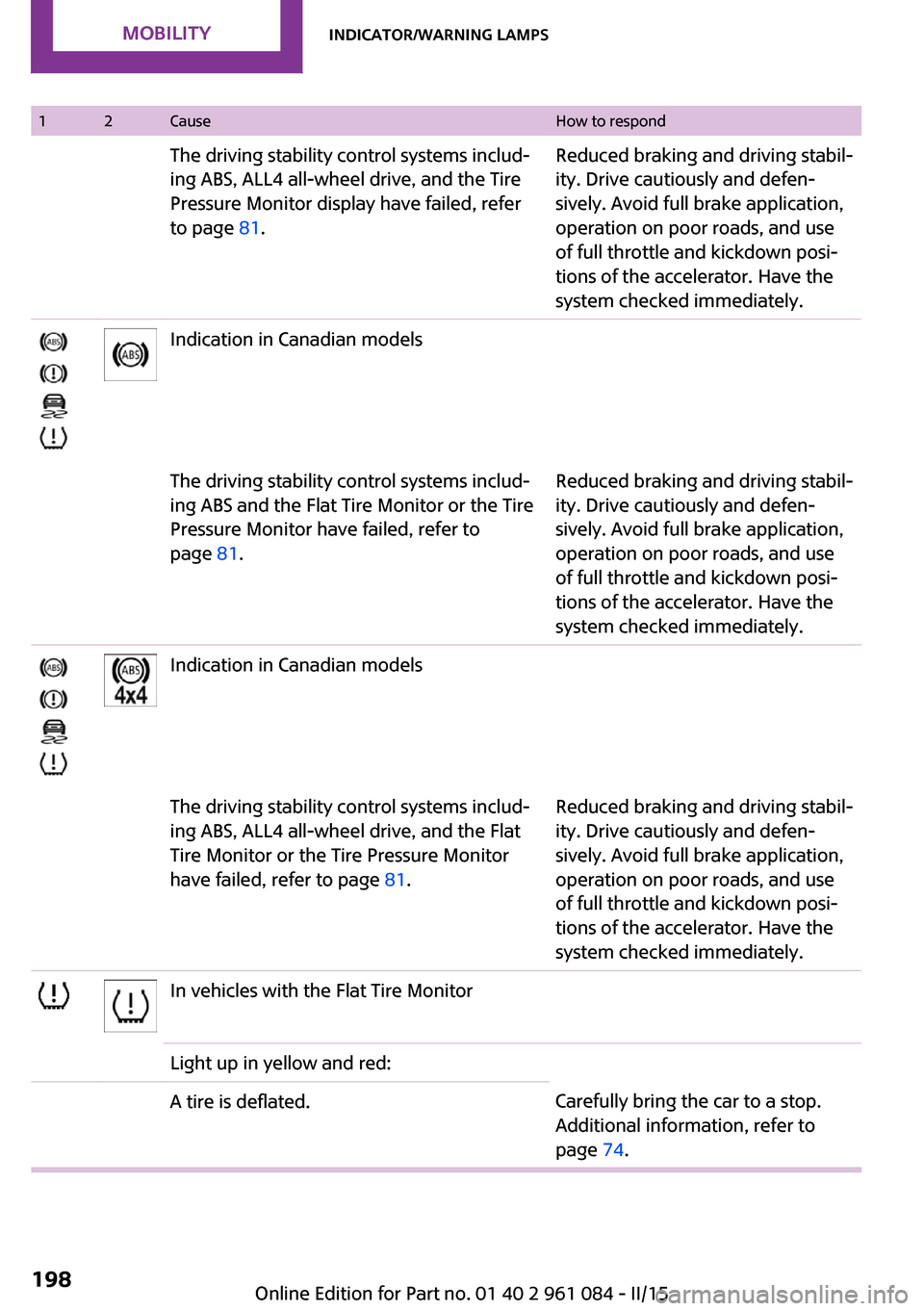
12CauseHow to respondThe driving stability control systems includ‐
ing ABS, ALL4 all-wheel drive, and the Tire
Pressure Monitor display have failed, refer
to page 81.Reduced braking and driving stabil‐
ity. Drive cautiously and defen‐
sively. Avoid full brake application,
operation on poor roads, and use
of full throttle and kickdown posi‐
tions of the accelerator. Have the
system checked immediately.Indication in Canadian modelsThe driving stability control systems includ‐
ing ABS and the Flat Tire Monitor or the Tire
Pressure Monitor have failed, refer to
page 81.Reduced braking and driving stabil‐
ity. Drive cautiously and defen‐
sively. Avoid full brake application,
operation on poor roads, and use
of full throttle and kickdown posi‐
tions of the accelerator. Have the
system checked immediately.Indication in Canadian modelsThe driving stability control systems includ‐
ing ABS, ALL4 all-wheel drive, and the Flat
Tire Monitor or the Tire Pressure Monitor
have failed, refer to page 81.Reduced braking and driving stabil‐
ity. Drive cautiously and defen‐
sively. Avoid full brake application,
operation on poor roads, and use
of full throttle and kickdown posi‐
tions of the accelerator. Have the
system checked immediately.In vehicles with the Flat Tire MonitorLight up in yellow and red:A tire is deflated.Carefully bring the car to a stop.
Additional information, refer to
page 74.Seite 198MOBILITYIndicator/warning lamps198
Online Edition for Part no. 01 40 2 961 084 - II/15
Page 201 of 223
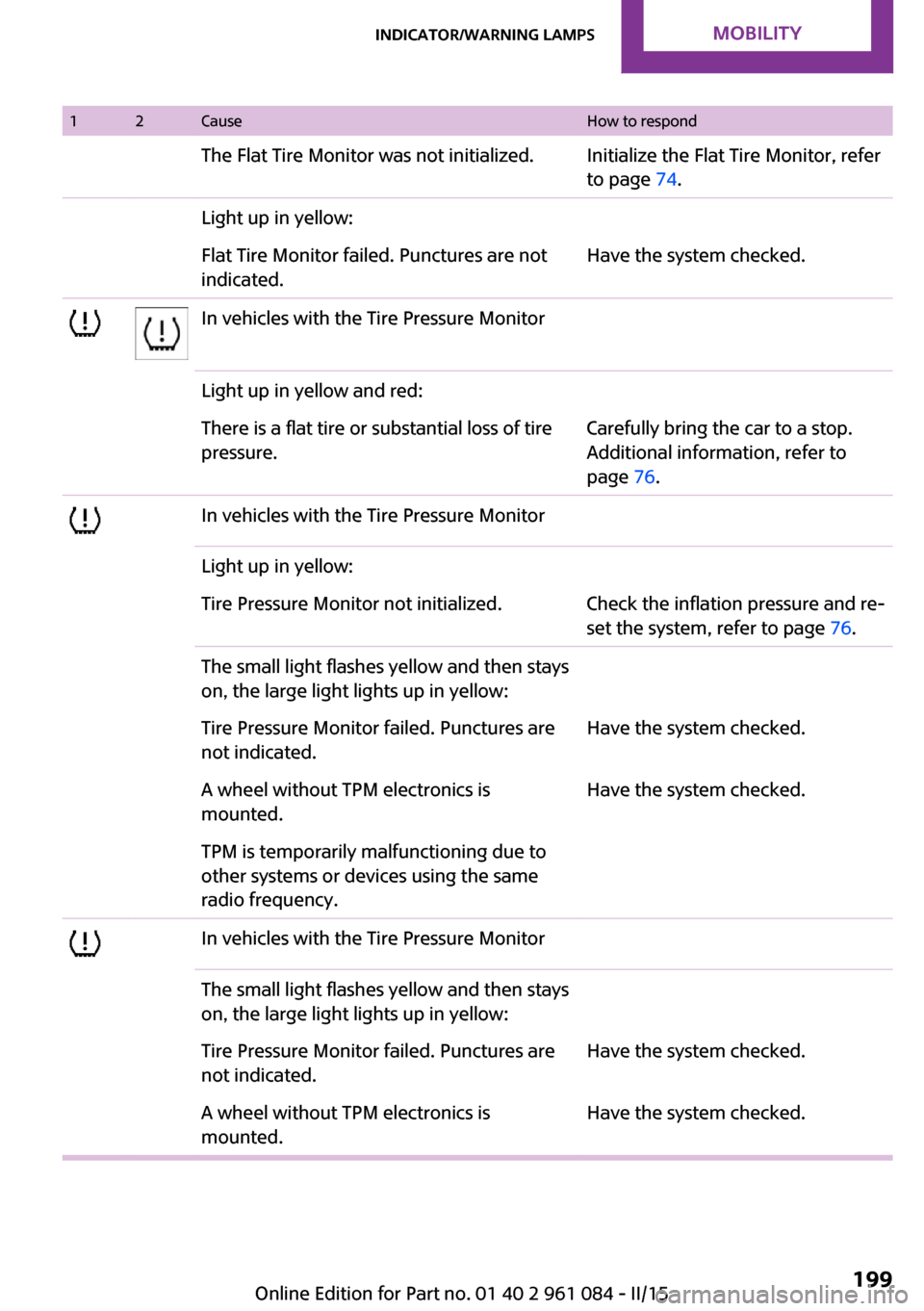
12CauseHow to respondThe Flat Tire Monitor was not initialized.Initialize the Flat Tire Monitor, refer
to page 74.Light up in yellow:Flat Tire Monitor failed. Punctures are not
indicated.Have the system checked.In vehicles with the Tire Pressure MonitorLight up in yellow and red:There is a flat tire or substantial loss of tire
pressure.Carefully bring the car to a stop.
Additional information, refer to
page 76.In vehicles with the Tire Pressure MonitorLight up in yellow:Tire Pressure Monitor not initialized.Check the inflation pressure and re‐
set the system, refer to page 76.The small light flashes yellow and then stays
on, the large light lights up in yellow:Tire Pressure Monitor failed. Punctures are
not indicated.Have the system checked.A wheel without TPM electronics is
mounted.Have the system checked.TPM is temporarily malfunctioning due to
other systems or devices using the same
radio frequency.In vehicles with the Tire Pressure MonitorThe small light flashes yellow and then stays
on, the large light lights up in yellow:Tire Pressure Monitor failed. Punctures are
not indicated.Have the system checked.A wheel without TPM electronics is
mounted.Have the system checked.Seite 199Indicator/warning lampsMOBILITY199
Online Edition for Part no. 01 40 2 961 084 - II/15
Page 213 of 223
Brakes, MINI maintenancesystem 169
Brakes, service require‐ ments 63
Brake system, MINI mainte‐ nance system 169
Braking, notes 111
Braking, parking brake 50
Breakdown assistance, Road‐ side Assistance 181
Breaking in 110
Buckle tongue, height adjust‐ ment 38
Button for starting the engine, refer to Start/Stop button 48
C
California Proposition 65 Warning 7
Car battery, refer to Vehicle battery 179
Car care products 187
Care, displays 189
Care, vehicle 187
Cargo area, Comfort Ac‐ cess 28
Cargo area door, refer to Tail‐ gate 26
Cargo area, enlarging, cargo cover 100
Cargo area, flat loading floor 102
Cargo area light, refer to Inte‐ rior lights 69
Cargo area, multi-function hook 103
Cargo area, opening from the outside 26
Cargo area, partition net 102
Car horn, refer to Horn 12
Carpet, care 189
Car phone, refer to Tele‐ phone 136
Car wash 186 CBC, Cornering Brake Con‐
trol 81
CBS Condition Based Serv‐ ice 169
CD/DVD drives, care 190
Center armrest 105
Center console, refer to Around the center con‐
sole 15
Center rail 105
Center rail, refer to Storage compartments 105
Central locking, Comfort Ac‐ cess 28
Central locking from the in‐ side 25
Central locking system, con‐ cept 21
Central locking system, from the outside 21
Changes, technical, refer to Safety 6
Changing wheels/tires 159
Check Control 64
Children, transporting 43
Child restraint fixing system LATCH 44
Child restraint fixing sys‐ tems 43
Child restraint fixing systems, mounting 43
Child seat, mounting 43
Child seats, refer to Transport‐ ing children safely 43
Chrome parts, care 189
Circulation of air, refer to Re‐ circulated air mode, air con‐
ditioner 89
Circulation of air, refer to Re‐ circulated air mode, auto‐
matic climate control 91
Cleaning, displays 189
Cleaning, refer to Care 186
Climate 88
Climate mode, ventilation 93
Clock 58 Clock, 12h/24h mode 61
Closing from the inside 25
Closing, from the outside 22
Clutch, breaking in 110
Cockpit 12
Cold start, refer to Starting the engine 49
Combination instrument, refer to Displays 14
Combination switch, refer to Turn signal/high-beams/
headlight flasher 51
Combination switch, refer to Washer/wiper system 52
Comfort Access 28
Comfort Access, in the car wash 29
Comfort Access, replacing the battery 30
Comfort area, refer to Around the center console 15
Compartment for remote con‐ trol, refer to Ignition lock 48
Compass, digital 96
Computer 59
Computer, displaying informa‐ tion 59
Condition Based Service CBS 169
Confirmation signals for vehi‐ cle locking/unlocking 23
Consumption, refer to Aver‐ age fuel consumption 60
Control Display, care 189
Controls and displays 12
Control systems, driving stabil‐ ity 81
Convenient operation, win‐ dow 23
Coolant temperature 59
Cooling function, switching on and off 92
Cooling, maximum 91
Cornering Brake Control, CBC 81
Corrosion on brake discs 112 Seite 211Everything from A to ZREFERENCE211
Online Edition for Part no. 01 40 2 961 084 - II/15
Page 215 of 223
ESP Electronic Stability Pro‐gram, refer to Dynamic Sta‐
bility Control DSC 81
Exchanging wheels/tires 159
Exterior mirrors 40
Exterior mirrors, adjusting 40
Exterior mirrors, folding in and out 41
Exterior sensors, care 189
External temperature dis‐ play 58
External temperature display, changing the units 61
External temperature warn‐ ing 58
F Failure messages, refer to Check Control 64
False alarm, refer to Avoiding unintentional alarms 31
Fan, refer to Air flow rate for air conditioner 89
Fan, refer to Air flow rate with automatic climate con‐
trol 91
Fastening safety belts, refer to Safety belts 37
Fault messages, refer to Check Control 64
Filling capacities 209
Filter, refer to Activated-char‐ coal filter 90
Filter, refer to Microfilter 90
Filter, refer to Microfilter/acti‐ vated-charcoal filter with au‐
tomatic climate control 92
First aid kit 181
First aid, refer to First aid kit 181
Flashing when locking/unlock‐ ing 23
Flat tire, Flat Tire Monitor 75
Flat tire, indicator/warning lamp 75 Flat Tire Monitor FTM 74
Flat Tire Monitor FTM, flat tire message 75
Flat Tire Monitor FTM, initializ‐ ing the system 74
Flat Tire Monitor FTM, snow chains 74
Flat Tire Monitor FTM, system limits 74
Flat tire, run-flat tire 75
Flat tire, Tire Pressure Moni‐ tor 76
Flat tire, Tire Pressure Monitor TPM 76
Flat tire, wheel change 178
Floor mats, care 189
Fog lights 69
Foot brake 111
Footwell lights, refer to Inte‐ rior lights 69
Four-wheel drive, refer to ALL4 83
Front airbags 71
Front fog light, bulb replace‐ ment 174
Front fog lights 69
Front lights, bulb replace‐ ment 173
Front passenger airbags, de‐ activating 72
FTM Flat Tire Monitor 74
Fuel 150
Fuel, additives 150
Fuel, average consump‐ tion 60
Fuel cap, closing 148
Fuel consumption display, average fuel consump‐
tion 60
Fuel filler flap, closing 148
Fuel filler flap, opening 148
Fuel filler flap, unlocking in case of an electrical malfunc‐
tion 148
Fuel gauge 59 Fuel, refer to Average fuel
consumption 60
Fuel, saving 118
Fuel tank capacity, refer to Filling capacities 209
Fuel tank contents, refer to Filling capacities 209
Fuel tank, refer to Filling ca‐ pacities 209
Fuse 179
G Garage door opener, refer to Integrated universal remote
control 94
Gasoline 150
Gasoline gauge, refer to Fuel gauge 59
Gear change, manual trans‐ mission 55
Gear change, Steptronic trans‐ mission 56
Gear display, Steptronic trans‐ mission 55
Glare protection 96
Glass sunroof, electrical 31
Glass sunroof, electrical, open‐ ing/closing 32
Glass sunroof, electrical, rais‐ ing 32
Glass sunroof, electric, con‐ venient operation 23
Glass sunroof, electric, remote control 23
H Halogen headlights, bulb re‐ placement 173
Handbrake, refer to Parking brake 50
Hand car wash, care 187
Hand-held transmitter, alter‐ nating code 95
Hands-free microphone 15 Seite 213Everything from A to ZREFERENCE213
Online Edition for Part no. 01 40 2 961 084 - II/15
Page 216 of 223
Hazard warning system 15
Head airbags 71
Headlamp control, refer to Parking lamps/low
beams 66
Headlamps, care 187
Headlight control, auto‐ matic 66
Headlight courtesy delay fea‐ ture 68
Headlight flasher 51
Headlights 66
Headlights, cleaning, washer fluid 54
Head restraints 39
Head restraints, adjusting the height 39
Head restraints, removing 40
Heatable rear window, air conditioner 89
Heatable windshield 92
Heating, rear window with au‐ tomatic climate control 92
Heating, seats 37
Heating, windshield 92
Height adjustment, seats 35
High-beams 67
High beams, bulb replace‐ ment 173
Hill drive-off assistant 83
Hills 112
Holder for remote control, re‐ fer to Ignition lock 48
Homepage 6
Hood 165
Hood, closing 165
Hood, opening 165
Hood, unlocking 165
Horn 12
Hydraulic brake assistant 81
I
Ice warning, refer to External temperature warning 58 Icy roads, refer to External
temperature warning 58
Identification marks, run-flat tires 160
Identification marks, tires 156
Ignition 49
Ignition key position 1, refer to Radio ready state 48
Ignition key position 2, refer to Ignition on 49
Ignition key, refer to Remote control with integrated
key 20
Ignition lock 48
Ignition, switched off 49
Ignition, switched on 49
Indicator and warning lamps, overview 191
Indicator and warning lamps, Tire Pressure Monitor
TPM 77
Indicator and warning lights 15
Individual air distribution 89
Inflation pressure monitor, re‐ fer to Flat Tire Monitor 74
Inflation pressure monitor, re‐ fer to Tire Pressure Monitor
TPM 76
Inflation pressure, refer to Tire inflation pressure 152
Initializing, compass, refer to Calibrating 97
Initializing, Flat Tire Monitor FTM 74
Initializing, glass sunroof, electrical 32
Instrument cluster, refer to Displays 14
Instrument lighting 69
Instruments, refer to Cock‐ pit 12
Integrated key 20
Integrated universal remote control 94
Interior equipment 94 Interior lights 69
Interior lights, remote con‐ trol 24
Interior mirror 41
Interior motion sensor 31
Interior rearview mirror, com‐ pass 96
Interior temperature, setting, air conditioner 88
Interior temperature, setting, automatic climate con‐
trol 90
Internet page 6
J Jump-starting 181
K
Keyless Go, refer to Comfort Access 28
Keyless opening and closing, refer to Comfort Access 28
Key Memory, refer to Personal Profile 20
Key, refer to Remote control with integrated key 20
Kickdown, Steptronic trans‐ mission 56
Knee airbag 71
Knocking control 150
L Lamp and bulb replacement, bulb replacement 172
Lamp, replacing, refer to Lamp and bulb replace‐
ment 172
Lamps 66
Lamps, automatic headlight control 66
Lap-and-shoulder belt, refer to Safety belts 37 Seite 214REFERENCEEverything from A to Z214
Online Edition for Part no. 01 40 2 961 084 - II/15
Page 219 of 223
Restraining systems, refer toSafety belts 37
Restraint systems for chil‐ dren 43
Retreaded tires 159
Reverse gear, manual trans‐ mission 55
Roadside Assistance 181
Roadside parking light, bulb replacement 174
Roadside parking lights 67
RON recommended fuel grade 150
RON, refer to Fuel quality 150
Rubber seals, care 189
Run-flat tires 160
Run-flat tires, flat tire 75
Run-flat tires, tire inflation pressure 152
S
Safe braking 111
Safety 6
Safety belts 37
Safety belts, care 189
Safety belts, damage 39
Safety belts, indicator/warning lamp 39
Safety belts, rear center safety belt 38
Safety belts, reminder 39
Safety systems, airbags 71
Safety systems, safety belts 37
Saving fuel 118
Seat adjustment 36
Seat adjustment, manual 35
Seat heating 37
Seats 35
Seats, adjusting 35
Seats, heating 37
Seats, sitting safely 35
Selector lever lock, overrid‐ ing 57 Selector lever lock, refer to Se‐
lector level positions, chang‐
ing, shiftlock 56
Selector lever positions, Step‐ tronic transmission 56
Selector lever, Steptronic transmission 56
Service and warranty 7
Service data in the remote control 169
Service interval display, refer to Condition Based Service
CBS 169
Service interval display, refer to Service requirements 63
Service requirements 63
Service requirements, CBS Condition Based Service 169
Settings and information 60
Settings, clock 61
Settings, configuring, refer to Personal Profile 20
Shifting, manual transmis‐ sion 55
Shifting, Steptronic transmis‐ sion 56
Shift lever, Steptronic trans‐ mission 56
Shift paddles on the steering wheel 57
Side airbags 71
Side windows, refer to Win‐ dows 32
Sitting safely 35
Sliding/tilting sunroof, refer to Glass sunroof, electrical 31
Slot for remote control 48
Snap-in adapter, mobile phone 143
Snow chains 163
Socket, OBD Onboard Diagno‐ sis 170
Special equipment, series equipment 6
Speed, average 60
Speedometer 14 Speed, with winter tires 160
Sport button 83
Sport program, Steptronic transmission 56
Stability control systems 81
Start/Stop button 48
Start/Stop button, starting the engine 49
Start/Stop button, switching off the engine 50
Starting the engine 49
Start problems, refer to Jump- starting 181
Steering wheel 42
Steering wheel, adjusting 42
Steering wheel lock 48
Steering wheel, shift pad‐ dles 57
Steptronic transmission 55
Steptronic transmission, kick‐ down 56
Steptronic transmission, over‐ riding the selector lever
lock 57
Stopping, engine 50
Storage, tires 160
Storing the vehicle 190
Summer tires, refer to Wheels and tires 152
Summer tires, tread 157
Sun visor 96
Switches, refer to Cockpit 12
Switching off, engine 50
Switching off, vehicle 50
Symbols 6
T Tachometer 59
Tailgate 26
Tailgate, Comfort Access 28
Tailgate, opening/closing 26
Tailgate, opening from the outside 26
Tail lights 176 Seite 217Everything from A to ZREFERENCE217
Online Edition for Part no. 01 40 2 961 084 - II/15