wiring MITSUBISHI 380 2005 Workshop Manual
[x] Cancel search | Manufacturer: MITSUBISHI, Model Year: 2005, Model line: 380, Model: MITSUBISHI 380 2005Pages: 1500, PDF Size: 47.87 MB
Page 1236 of 1500
HOW TO USE TROUBLESHOOTING/INSPECTION SERVICE POINTS
GENERAL00-15
4. VERIFY THE INTERMITTENT MALFUNCTION IS
ELIMINATED
Repair the malfunctioning part and try to duplicate the condi-
tion(s) again to verify the intermittent malfunction has been
eliminated.
.
SIMULATION TESTS
NOTE: In case of difficulty in finding the cause of the intermit-
tent malfunction, the data recorder function in the
DIAGNOSTIC TOOL (MUT-III) is effective.
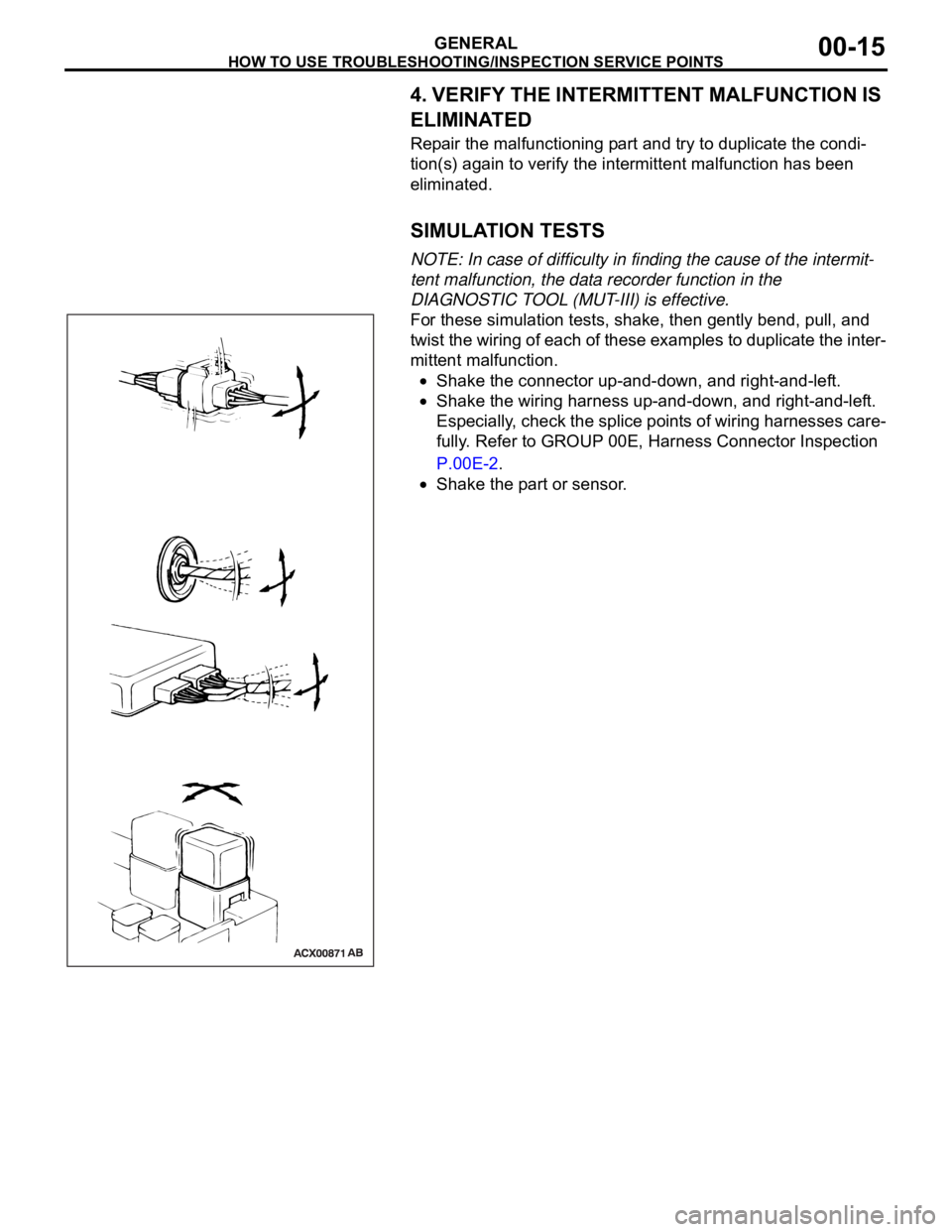
For these simulation tests, shake, then gently bend, pull, and
twist the wiring of each of these examples to duplicate the inter-
mittent malfunction.
Shake the connector up-and-down, and right-and-left.
Shake the wiring harness up-and-down, and right-and-left.
Especially, check the splice points of wiring harnesses care-
fully. Refer to GROUP 00E, Harness Connector Inspection
P.00E-2.
Shake the part or sensor.
Page 1237 of 1500
HOW TO USE TROUBLESHOOTING/INSPECTION SERVICE POINTS
GENERAL00-16
INSPECTION SERVICE POINTS FOR A BLOWN
FUSE
M1001013800067
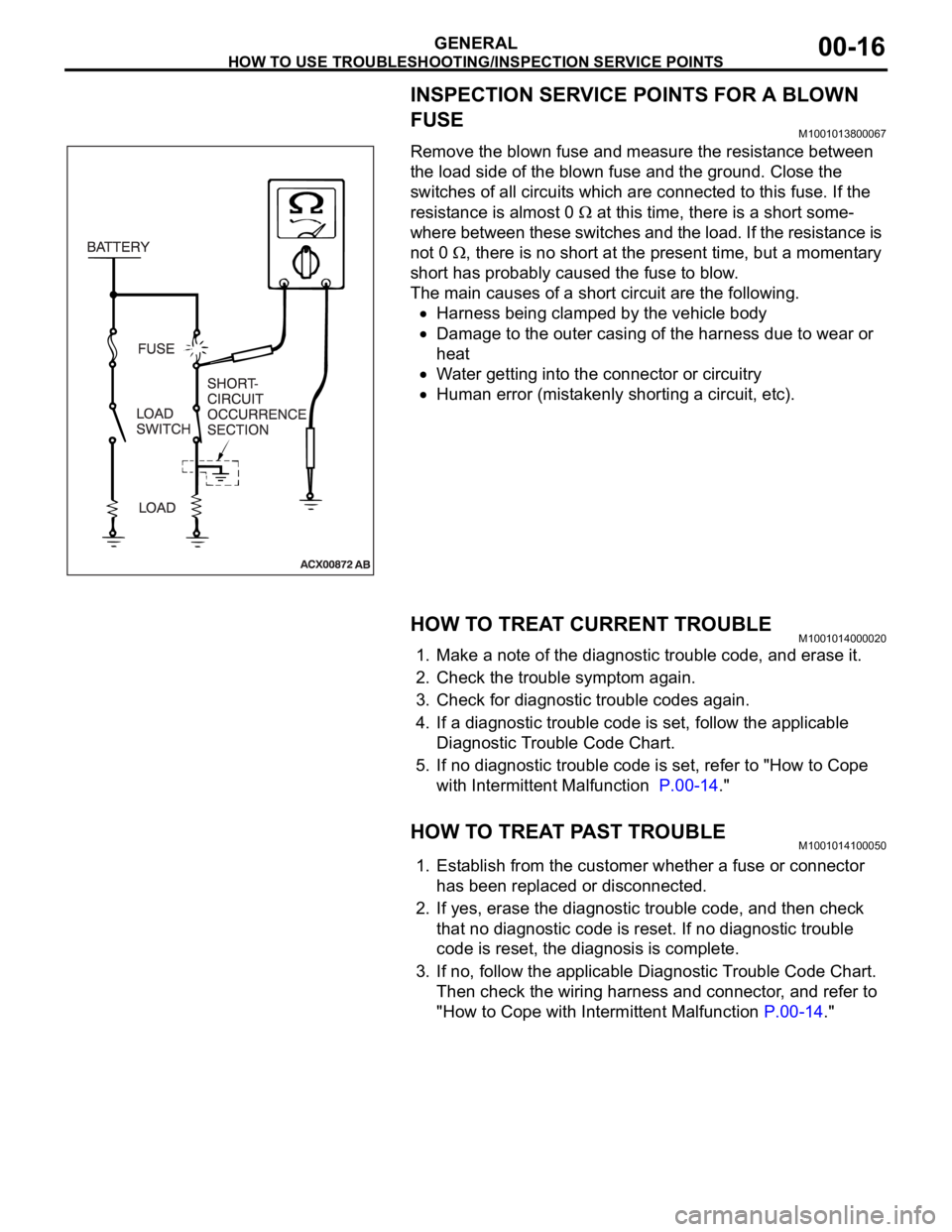
Remove the blown fuse and measure the resistance between
the load side of the blown fuse and the ground. Close the
switches of all circuits which are connected to this fuse. If the
resistance is almost 0
at this time, there is a short some-
where between these switches and the load. If the resistance is
not 0
, there is no short at the present time, but a momentary
short has probably caused the fuse to blow.
The main causes of a short circuit are the following.
Harness being clamped by the vehicle body
Damage to the outer casing of the harness due to wear or
heat
Water getting into the connector or circuitry
Human error (mistakenly shorting a circuit, etc).
HOW TO TREAT CURRENT TROUBLEM1001014000020
1. Make a note of the diagnostic trouble code, and erase it.
2. Check the trouble symptom again.
3. Check for diagnostic trouble codes again.
4. If a diagnostic trouble code is set, follow the applicable
Diagnostic Trouble Code Chart.
5. If no diagnostic trouble code is set, refer to "How to Cope
with Intermittent Malfunction P.00-14."
HOW TO TREAT PAST TROUBLEM1001014100050
1. Establish from the customer whether a fuse or connector
has been replaced or disconnected.
2. If yes, erase the diagnostic trouble code, and then check
that no diagnostic code is reset. If no diagnostic trouble
code is reset, the diagnosis is complete.
3. If no, follow the applicable Diagnostic Trouble Code Chart.
Then check the wiring harness and connector, and refer to
"How to Cope with Intermittent Malfunction P.00-14."
Page 1245 of 1500
PRECAUTIONS BEFORE SERVICE
GENERAL00-24
SERVICING ELECTRICAL SYSTEMM1001011900057
Battery posts, terminals and related accessories con-
tain lead and lead compounds. WASH HANDS AFTER
HANDLING.
1. Note the following before proceeding with working on the
electrical system.
Never perform unauthorized modifications to any electrical
device or wiring. Such modifications might lead to a vehicle
malfunction, over-capacity or short-circuit that could result in
a fire in the vehicle.
Before connecting or disconnecting the negative bat-
tery cable, be sure to turn the ignition switch to the
"LOCK" (OFF) position and turn off the lights (If this is
not done, there is the possibility of semiconductor
parts being damaged).
After completion of the work (and the negative battery
terminals is connected), warm up the engine and allow
it to idle for approximately 10 minutes under the condi-
tions described below in order to stabilize engine con-
trol conditions, and then check to be sure that the idle
is satisfactory.
Engine coolant temperature: 85 to 95C (185 to
203
F)
Lights and all accessories: OFF
Transaxle: "N" or "P" position
Steering wheel: straight-forward position
2. When servicing the electrical system, disconnect the
negative cable terminal from the battery.
VEHICLE WASHINGM1001012000057
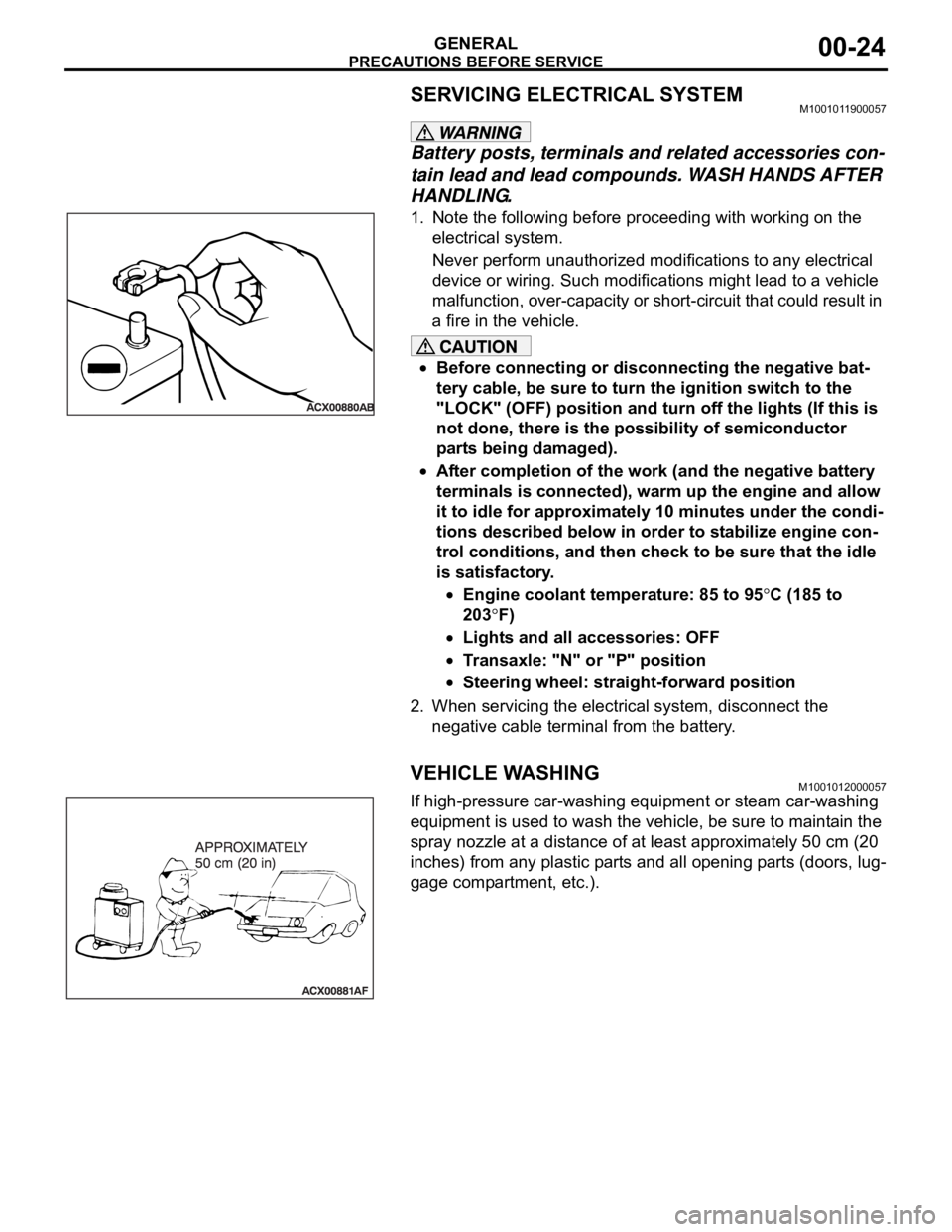
If high-pressure car-washing equipment or steam car-washing
equipment is used to wash the vehicle, be sure to maintain the
spray nozzle at a distance of at least approximately 50 cm (20
inches) from any plastic parts and all opening parts (doors, lug-
gage compartment, etc.).
Page 1273 of 1500
MAINTENANCE SERVICE
GENERAL00-52
FRONT IMPACT SENSORS
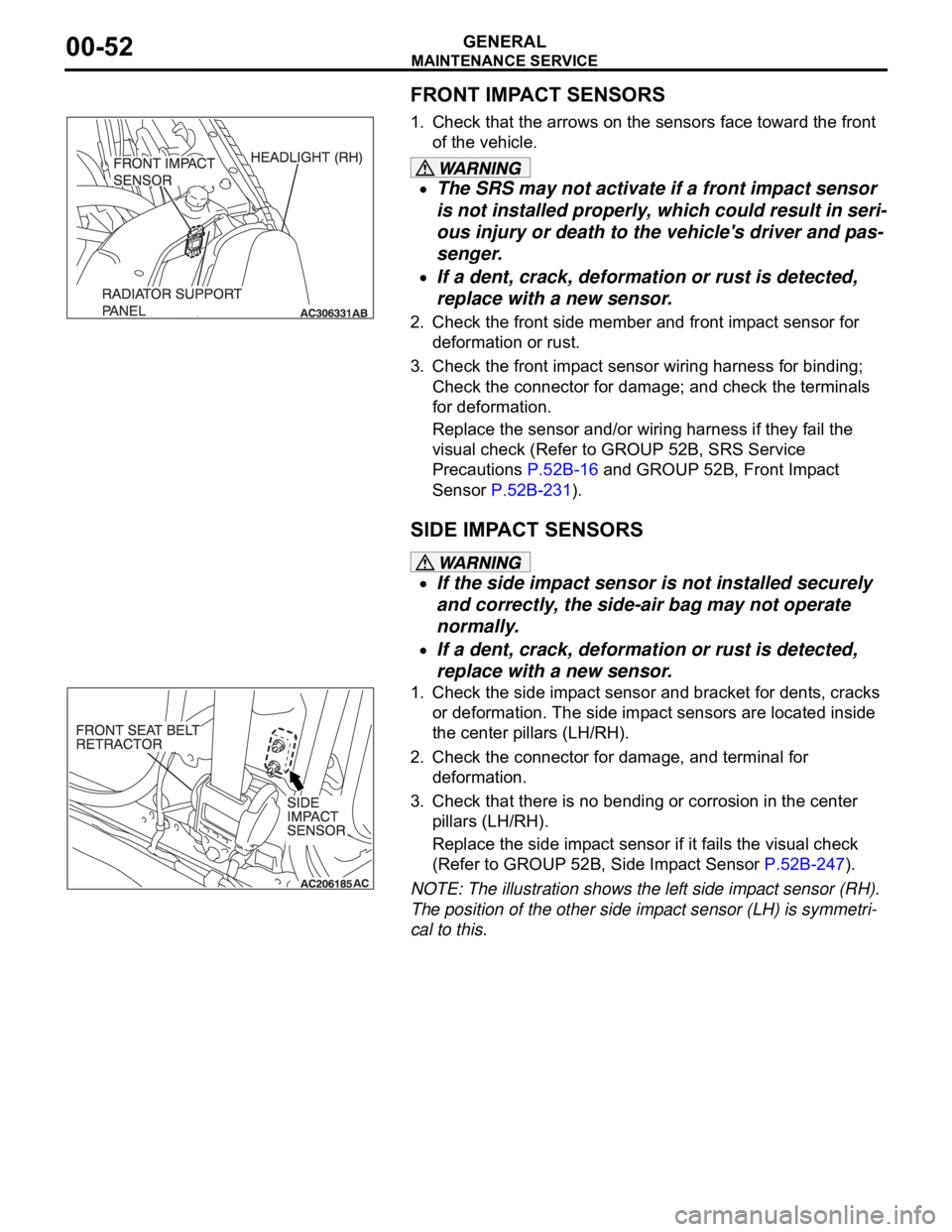
1. Check that the arrows on the sensors face toward the front
of the vehicle.
The SRS may not activate if a front impact sensor
is not installed properly, which could result in seri-
ous injury or death to the vehicle's driver and pas-
senger.
If a dent, crack, deformation or rust is detected,
replace with a new sensor.
2. Check the front side member and front impact sensor for
deformation or rust.
3. Check the front impact sensor wiring harness for binding;
Check the connector for damage; and check the terminals
for deformation.
Replace the sensor and/or wiring harness if they fail the
visual check (Refer to GROUP 52B, SRS Service
Precautions P.52B-16 and GROUP 52B, Front Impact
Sensor P.52B-231).
SIDE IMPACT SENSORS
If the side impact sensor is not installed securely
and correctly, the side-air bag may not operate
normally.
If a dent, crack, deformation or rust is detected,
replace with a new sensor.
1. Check the side impact sensor and bracket for dents, cracks
or deformation. The side impact sensors are located inside
the center pillars (LH/RH).
2. Check the connector for damage, and terminal for
deformation.
3. Check that there is no bending or corrosion in the center
pillars (LH/RH).
Replace the side impact sensor if it fails the visual check
(Refer to GROUP 52B, Side Impact Sensor P.52B-247).
NOTE: The illustration shows the left side impact sensor (RH).
The position of the other side impact sensor (LH) is symmetri-
cal to this.
Page 1277 of 1500
MAINTENANCE SERVICE
GENERAL00-56
WIRING HARNESS
1. Check the connector for poor connection.
The SRS system may not operate if SRS harnesses or
connectors are damaged or improperly connected,
which could result in serious injury or death to the
vehicle's driver and front passenger.
2. Check the harness for binds, the connectors for damage,
and the terminals for deformation. Replace any connector or
harness that fails the visual inspection (Refer to GROUP
52B, SRS Precaution P.52B-16).
Page 1287 of 1500
TRACTION CONTROL SYSTEM (TCL) DIAGNOSIS
TRACTION CONTROL SYSTEM (TCL)13C-8
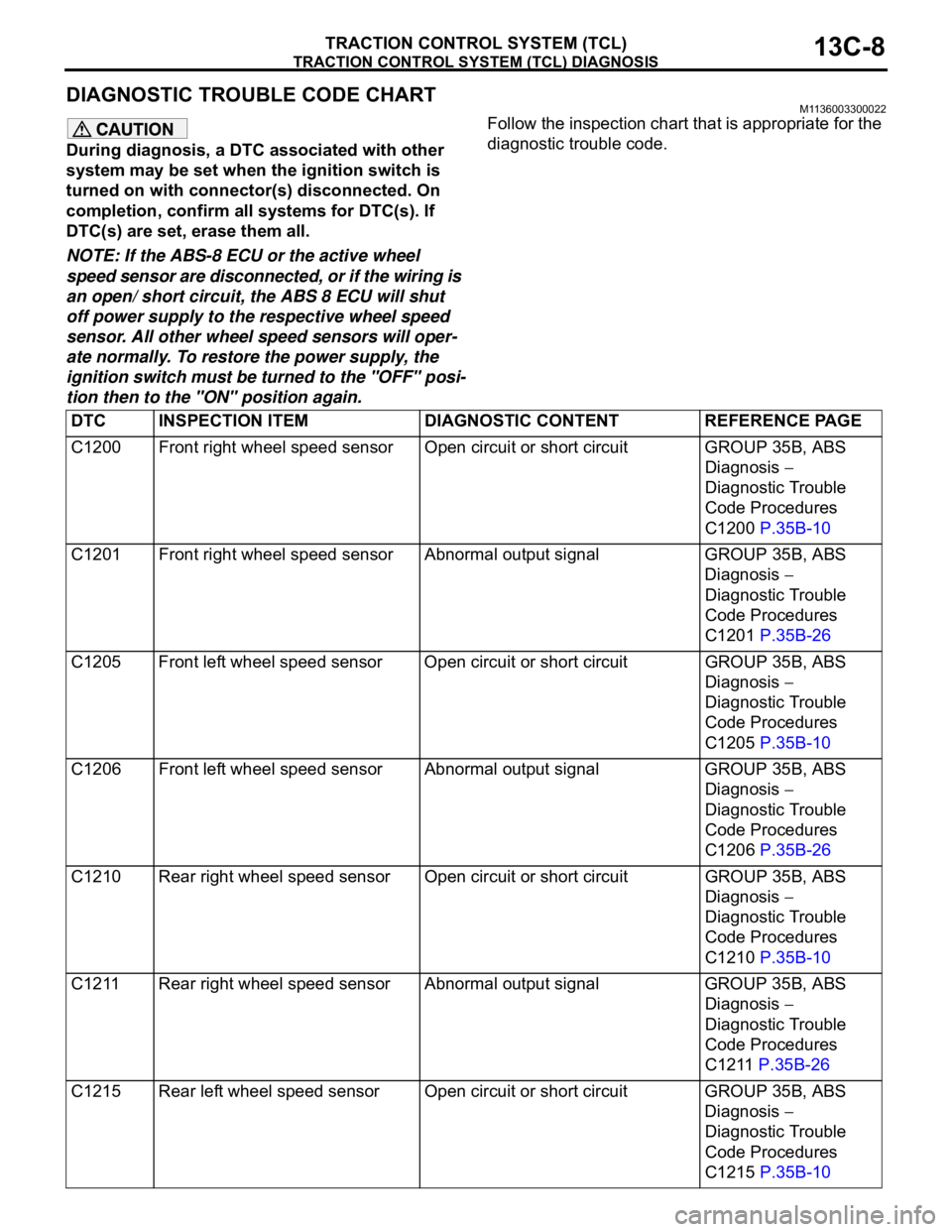
DIAGNOSTIC TROUBLE CODE CHARTM1136003300022
During diagnosis, a DTC associated with other
system may be set when the ignition switch is
turned on with connector(s) disconnected. On
completion, confirm all systems for DTC(s). If
DTC(s) are set, erase them all.
NOTE: If the ABS-8 ECU or the active wheel
speed sensor are disconnected, or if the wiring is
an open/ short circuit, the ABS 8 ECU will shut
off power supply to the respective wheel speed
sensor. All other wheel speed sensors will oper-
ate normally. To restore the power supply, the
ignition switch must be turned to the "OFF" posi-
tion then to the "ON" position again.Follow the inspection chart that is appropriate for the
diagnostic trouble code.
DTC INSPECTION ITEM DIAGNOSTIC CONTENT REFERENCE PAGE
C1200 Front right wheel speed sensor Open circuit or short circuit GROUP 35B, ABS
Diagnosis
Diagnostic Trouble
Code Procedures
C1200 P.35B-10
C1201 Front right wheel speed sensor Abnormal output signal GROUP 35B, ABS
Diagnosis
Diagnostic Trouble
Code Procedures
C1201 P.35B-26
C1205 Front left wheel speed sensor Open circuit or short circuitGROUP 35B, ABS
Diagnosis
Diagnostic Trouble
Code Procedures
C1205 P.35B-10
C1206 Front left wheel speed sensor Abnormal output signal GROUP 35B, ABS
Diagnosis
Diagnostic Trouble
Code Procedures
C1206 P.35B-26
C1210 Rear right wheel speed sensor Open circuit or short circuitGROUP 35B, ABS
Diagnosis
Diagnostic Trouble
Code Procedures
C1210 P.35B-10
C1211 Rear right wheel speed sensor Abnormal output signal GROUP 35B, ABS
Diagnosis
Diagnostic Trouble
Code Procedures
C1211 P.35B-26
C1215 Rear left wheel speed sensor Open circuit or short circuit GROUP 35B, ABS
Diagnosis
Diagnostic Trouble
Code Procedures
C1215 P.35B-10
Page 1289 of 1500
TRACTION CONTROL SYSTEM (TCL) DIAGNOSIS
TRACTION CONTROL SYSTEM (TCL)13C-10
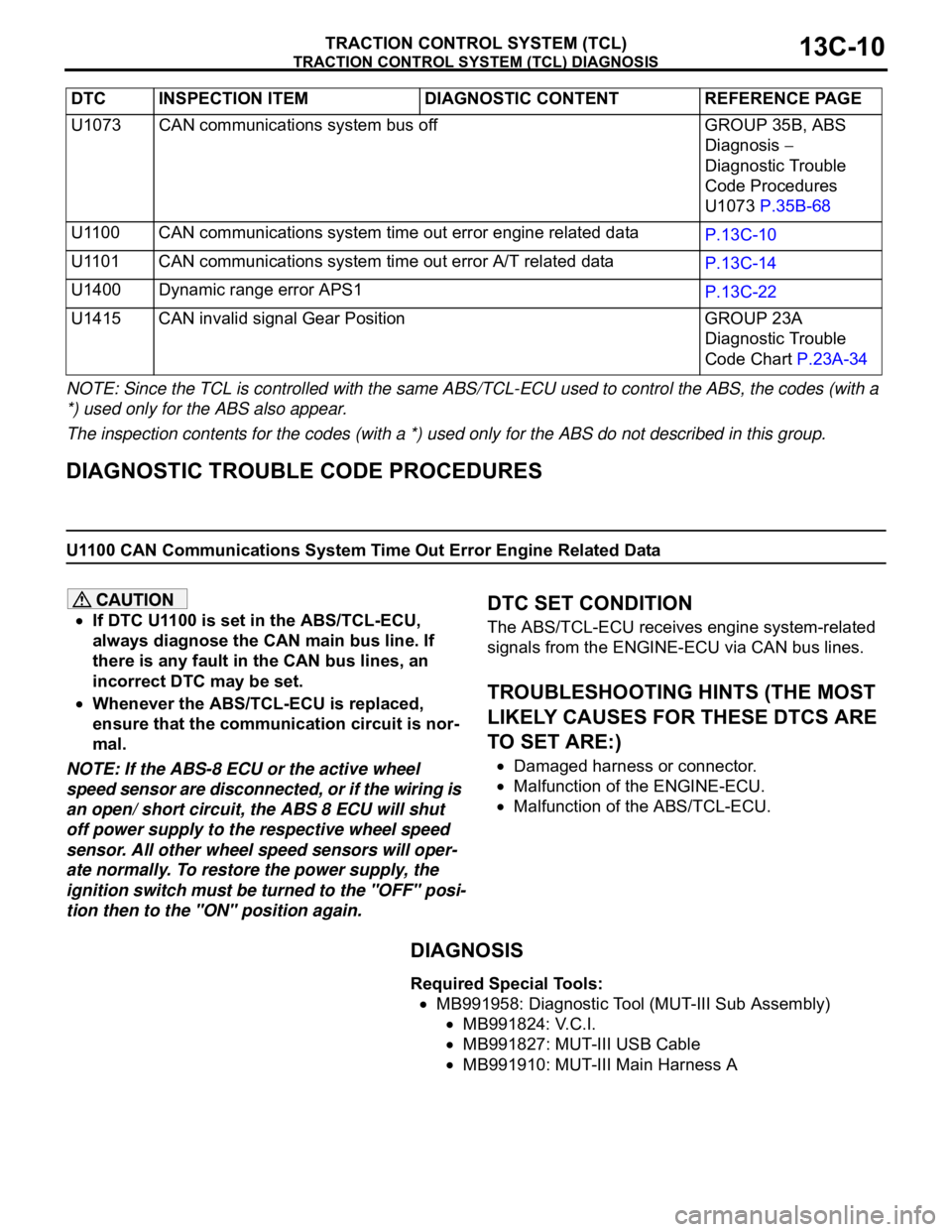
NOTE: Since the TCL is controlled with the same ABS/TCL-ECU used to control the ABS, the codes (with a
*) used only for the ABS also appear.
The inspection contents for the codes (with a *) used only for the ABS do not described in this group.
DIAGNOSTIC TROUBLE CODE PROCEDURES
U1100 CAN Communications System Time Out Error Engine Related Data
If DTC U1100 is set in the ABS/TCL-ECU,
always diagnose the CAN main bus line. If
there is any fault in the CAN bus lines, an
incorrect DTC may be set.
Whenever the ABS/TCL-ECU is replaced,
ensure that the communication circuit is nor-
mal.
NOTE: If the ABS-8 ECU or the active wheel
speed sensor are disconnected, or if the wiring is
an open/ short circuit, the ABS 8 ECU will shut
off power supply to the respective wheel speed
sensor. All other wheel speed sensors will oper-
ate normally. To restore the power supply, the
ignition switch must be turned to the "OFF" posi-
tion then to the "ON" position again.
.
DTC SET CONDITION
The ABS/TCL-ECU receives engine system-related
signals from the ENGINE-ECU via CAN bus lines.
.
TROUBLESHOOTING HINTS (THE MOST
LIKELY CAUSES FOR THESE DTCS ARE
TO SET ARE:)
Damaged harness or connector.
Malfunction of the ENGINE-ECU.
Malfunction of the ABS/TCL-ECU.
DIAGNOSIS
Required Special Tools:
MB991958: Diagnostic Tool (MUT-III Sub Assembly)
MB991824: V.C.I.
MB991827: MUT-III USB Cable
MB991910: MUT-III Main Harness A U1073 CAN communications system bus off GROUP 35B, ABS
Diagnosis
Diagnostic Trouble
Code Procedures
U1073 P.35B-68
U1100 CAN communications system time out error engine related data
P.13C-10
U1101 CAN communications system time out error A/T related data
P.13C-14
U1400 Dynamic range error APS1
P.13C-22
U1415 CAN invalid signal Gear Position GROUP 23A
Diagnostic Trouble
Code Chart P.23A-34 DTC INSPECTION ITEM DIAGNOSTIC CONTENT REFERENCE PAGE
Page 1293 of 1500
TRACTION CONTROL SYSTEM (TCL) DIAGNOSIS
TRACTION CONTROL SYSTEM (TCL)13C-14
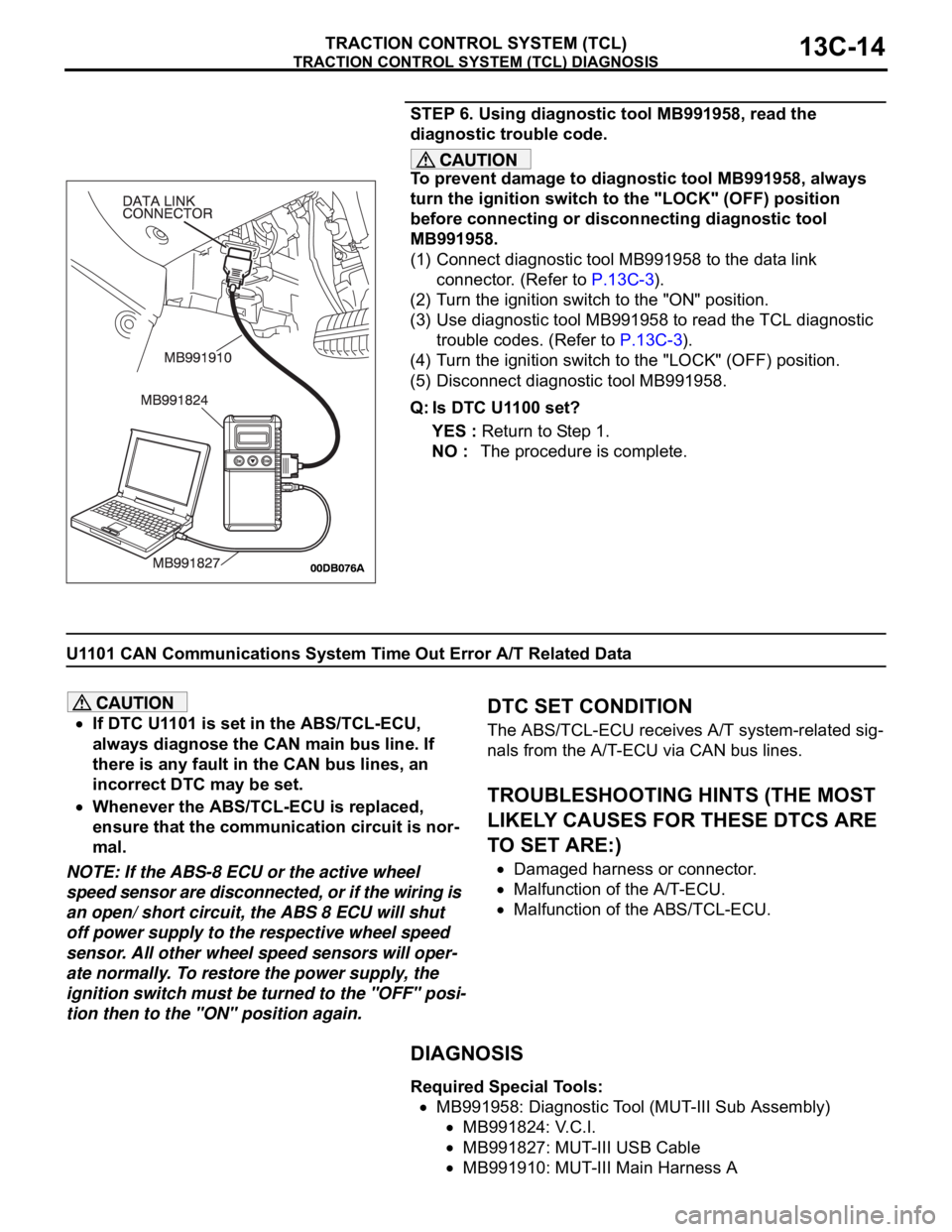
STEP 6. Using diagnostic tool MB991958, read the
diagnostic trouble code.
To prevent damage to diagnostic tool MB991958, always
turn the ignition switch to the "LOCK" (OFF) position
before connecting or disconnecting diagnostic tool
MB991958.
(1) Connect diagnostic tool MB991958 to the data link
connector. (Refer to P.13C-3).
(2) Turn the ignition switch to the "ON" position.
(3) Use diagnostic tool MB991958 to read the TCL diagnostic
trouble codes. (Refer to P.13C-3).
(4) Turn the ignition switch to the "LOCK" (OFF) position.
(5) Disconnect diagnostic tool MB991958.
Q: Is DTC U1100 set?
YES : Return to Step 1.
NO : The procedure is complete.
U1101 CAN Communications System Time Out Error A/T Related Data
If DTC U1101 is set in the ABS/TCL-ECU,
always diagnose the CAN main bus line. If
there is any fault in the CAN bus lines, an
incorrect DTC may be set.
Whenever the ABS/TCL-ECU is replaced,
ensure that the communication circuit is nor-
mal.
NOTE: If the ABS-8 ECU or the active wheel
speed sensor are disconnected, or if the wiring is
an open/ short circuit, the ABS 8 ECU will shut
off power supply to the respective wheel speed
sensor. All other wheel speed sensors will oper-
ate normally. To restore the power supply, the
ignition switch must be turned to the "OFF" posi-
tion then to the "ON" position again.
.
DTC SET CONDITION
The ABS/TCL-ECU receives A/T system-related sig-
nals from the A/T-ECU via CAN bus lines.
.
TROUBLESHOOTING HINTS (THE MOST
LIKELY CAUSES FOR THESE DTCS ARE
TO SET ARE:)
Damaged harness or connector.
Malfunction of the A/T-ECU.
Malfunction of the ABS/TCL-ECU.
DIAGNOSIS
Required Special Tools:
MB991958: Diagnostic Tool (MUT-III Sub Assembly)
MB991824: V.C.I.
MB991827: MUT-III USB Cable
MB991910: MUT-III Main Harness A
Page 1297 of 1500
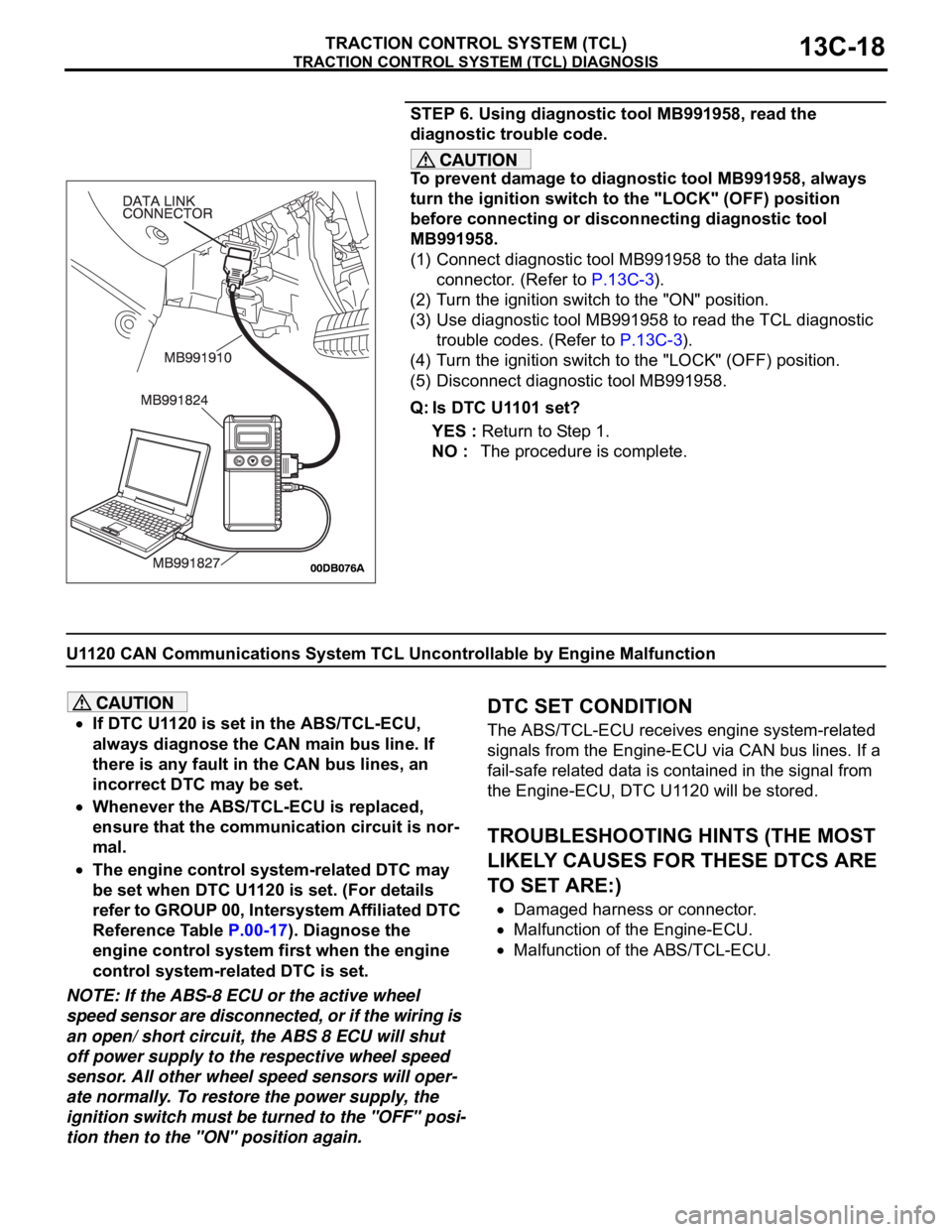
TRACTION CONTROL SYSTEM (TCL) DIAGNOSIS
TRACTION CONTROL SYSTEM (TCL)13C-18
STEP 6. Using diagnostic tool MB991958, read the
diagnostic trouble code.
To prevent damage to diagnostic tool MB991958, always
turn the ignition switch to the "LOCK" (OFF) position
before connecting or disconnecting diagnostic tool
MB991958.
(1) Connect diagnostic tool MB991958 to the data link
connector. (Refer to P.13C-3).
(2) Turn the ignition switch to the "ON" position.
(3) Use diagnostic tool MB991958 to read the TCL diagnostic
trouble codes. (Refer to P.13C-3).
(4) Turn the ignition switch to the "LOCK" (OFF) position.
(5) Disconnect diagnostic tool MB991958.
Q: Is DTC U1101 set?
YES : Return to Step 1.
NO : The procedure is complete.
U1120 CAN Communications System TCL Uncontrollable by Engine Malfunction
If DTC U1120 is set in the ABS/TCL-ECU,
always diagnose the CAN main bus line. If
there is any fault in the CAN bus lines, an
incorrect DTC may be set.
Whenever the ABS/TCL-ECU is replaced,
ensure that the communication circuit is nor-
mal.
The engine control system-related DTC may
be set when DTC U1120 is set. (For details
refer to GROUP 00, Intersystem Affiliated DTC
Reference Table P.00-17). Diagnose the
engine control system first when the engine
control system-related DTC is set.
NOTE: If the ABS-8 ECU or the active wheel
speed sensor are disconnected, or if the wiring is
an open/ short circuit, the ABS 8 ECU will shut
off power supply to the respective wheel speed
sensor. All other wheel speed sensors will oper-
ate normally. To restore the power supply, the
ignition switch must be turned to the "OFF" posi-
tion then to the "ON" position again.
.
DTC SET CONDITION
The ABS/TCL-ECU receives engine system-related
signals from the Engine-ECU via CAN bus lines. If a
fail-safe related data is contained in the signal from
the Engine-ECU, DTC U1120 will be stored.
.
TROUBLESHOOTING HINTS (THE MOST
LIKELY CAUSES FOR THESE DTCS ARE
TO SET ARE:)
Damaged harness or connector.
Malfunction of the Engine-ECU.
Malfunction of the ABS/TCL-ECU.
Page 1304 of 1500

TRACTION CONTROL SYSTEM (TCL) DIAGNOSIS
TRACTION CONTROL SYSTEM (TCL)13C-25
NOTE: If you press the TCL switch to deactivate the
TCL and then keep the TCL switch pressed for about
10 seconds, an error prevention function will auto-
matically reactivate the TCL. If you then still wish to
deactivate the TCL, press the TCL switch again to
deactivate it.NOTE: If the ABS-8 ECU or the active wheel
speed sensor are disconnected, or if the wiring is
an open/ short circuit, the ABS 8 ECU will shut
off power supply to the respective wheel speed
sensor. All other wheel speed sensors will oper-
ate normally. To restore the power supply, the
ignition switch must be turned to the "OFF" posi-
tion then to the "ON" position again.
.