engine MITSUBISHI ASX 2009 1.G Owners Manual
[x] Cancel search | Manufacturer: MITSUBISHI, Model Year: 2009, Model line: ASX, Model: MITSUBISHI ASX 2009 1.GPages: 368, PDF Size: 8.13 MB
Page 211 of 368
Foot/demister position
Air flows to the leg area, the windscreen and the
door windows. Demister position
Air
flows mainly to the windscreen and the door
windows. CAUTION
l
When
using the mode selection dial be-
tween the “ ” and “ ” positions, pre-
vent fogging by pressing the air selection
switch to select outside air.
(Refer to “Air selection switch” on page
5-04.)
NOTE l With
the mode selection dial between the
“ ”
and “ ” positions, the air flows main-
ly to the upper part of the passenger compart-
ment. With the mode selection dial between
the “ ”
and “ ” positions, the air flows
mainly to the leg area.
l With the mode selection dial in the “ ”
po-
sition, a small amount of air flows to the wind-
screen and the door windows.
l With the mode selection dial between the
“ ”
and “ ” positions, the air flows main-
ly to the leg area. With the mode selection di-
al between the “ ”
and “ ” positions, the
air flows mainly to the windscreen and door
windows. Heater/Air conditioning
E00700500449
The
heater/air conditioning can only be used while
the engine is running.
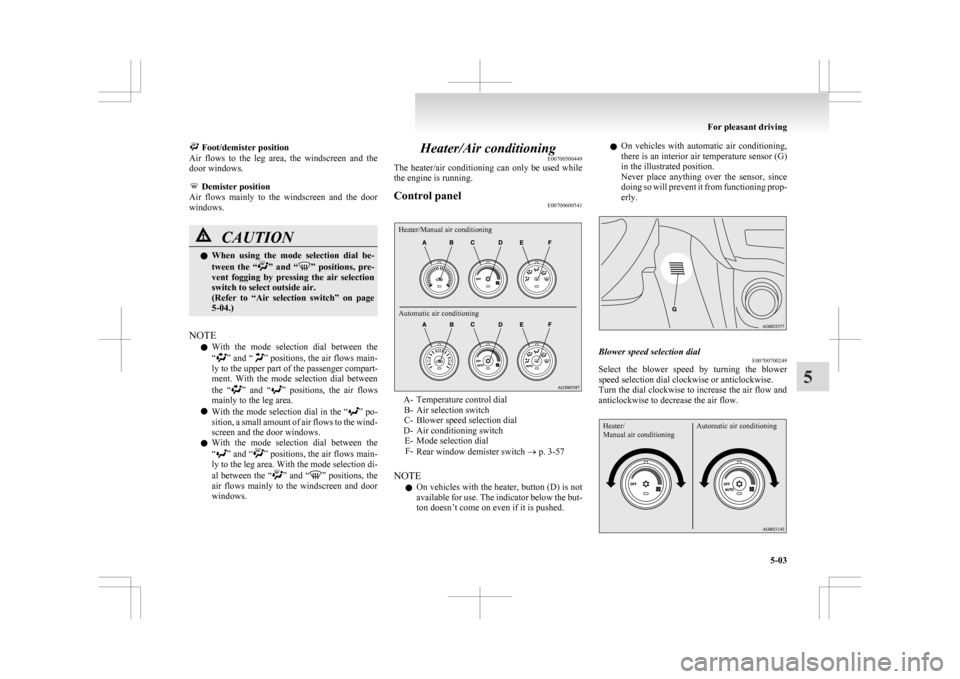
Control panel E00700600541
Heater/Manual air conditioning
Automatic air conditioning A- Temperature control dial
B-
Air selection switch
C- Blower speed selection dial
D- Air conditioning switch E- Mode selection dialF- Rear window demister switch ® p. 3-57
NOTE l On vehicles with the heater, button (D) is not
available for use. The indicator below the but-
ton doesn’t come on even if it is pushed. l
On
vehicles with automatic air conditioning,
there is an interior air temperature sensor (G)
in the illustrated position.
Never place anything over the sensor, since
doing so will prevent it from functioning prop-
erly. Blower speed selection dial
E00700700249
Select the blower speed by turning the blower
speed selection dial clockwise or anticlockwise.
Turn
the dial clockwise to increase the air flow and
anticlockwise to decrease the air flow.
Heater/
Manual air conditioning Automatic air conditioning For pleasant driving
5-03 5
Page 212 of 368
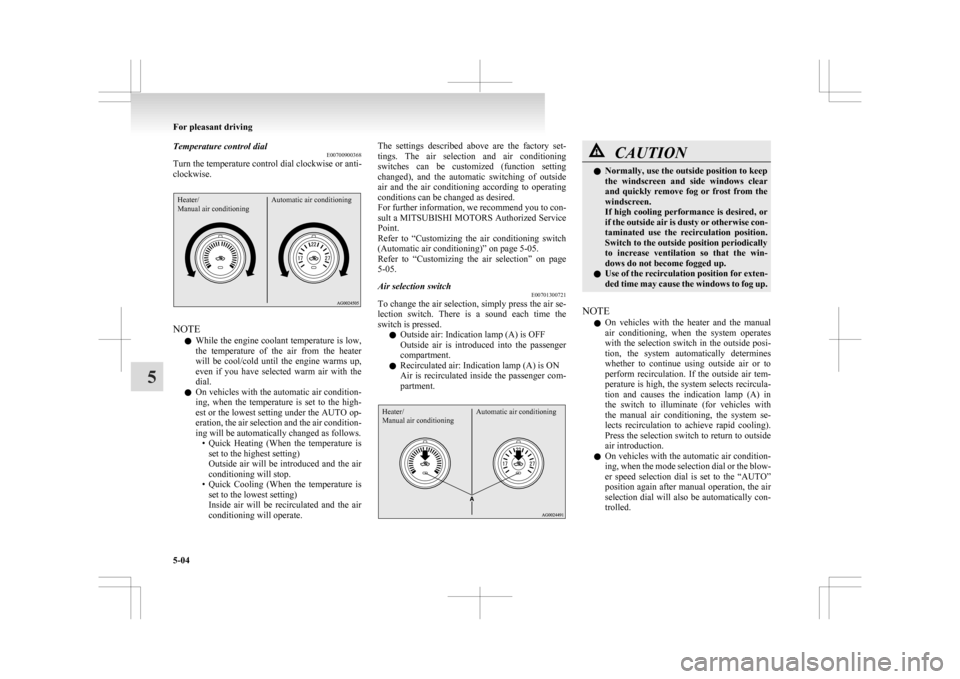
Temperature control dial
E00700900368
Turn the temperature control dial clockwise or anti-
clockwise.Heater/
Manual air conditioning Automatic air conditioningNOTE
l While
the engine coolant temperature is low,
the temperature of the air from the heater
will be cool/cold until the engine warms up,
even if you have selected warm air with the
dial.
l On vehicles with the automatic air condition-
ing, when the temperature is set to the high-
est or the lowest setting under the AUTO op-
eration, the air selection and the air condition-
ing will be automatically changed as follows.
• Quick Heating (When the temperature isset to the highest setting)
Outside air will be introduced and the air
conditioning will stop.
• Quick Cooling (When the temperature is set to the lowest setting)
Inside air will be recirculated and the air
conditioning will operate. The settings described above are the factory set-
tings.
The air selection and air conditioning
switches can be customized (function setting
changed), and the automatic switching of outside
air and the air conditioning according to operating
conditions can be changed as desired.
For further information, we recommend you to con-
sult a MITSUBISHI MOTORS Authorized Service
Point.
Refer to “Customizing the air conditioning switch
(Automatic air conditioning)” on page 5-05.
Refer to “Customizing the air selection” on page
5-05.
Air selection switch E00701300721
To change the air selection, simply press the air se-
lection
switch. There is a sound each time the
switch is pressed.
l Outside air: Indication lamp (A) is OFF
Outside air is introduced into the passenger
compartment.
l Recirculated air: Indication lamp (A) is ON
Air is recirculated inside the passenger com-
partment.
Heater/
Manual air conditioning Automatic air conditioning CAUTION
l
Normally, use the outside position to keep
the
windscreen and side windows clear
and quickly remove fog or frost from the
windscreen.
If high cooling performance is desired, or
if the outside air is dusty or otherwise con-
taminated use the recirculation position.
Switch to the outside position periodically
to increase ventilation so that the win-
dows do not become fogged up.
l Use of the recirculation position for exten-
ded time may cause the windows to fog up.
NOTE l On
vehicles with the heater and the manual
air conditioning, when the system operates
with the selection switch in the outside posi-
tion, the system automatically determines
whether to continue using outside air or to
perform recirculation. If the outside air tem-
perature is high, the system selects recircula-
tion and causes the indication lamp (A) in
the switch to illuminate (for vehicles with
the manual air conditioning, the system se-
lects recirculation to achieve rapid cooling).
Press the selection switch to return to outside
air introduction.
l On vehicles with the automatic air condition-
ing, when the mode selection dial or the blow-
er speed selection dial is set to the “AUTO”
position again after manual operation, the air
selection dial will also be automatically con-
trolled. For pleasant driving
5-04
5
Page 213 of 368
l
On vehicles with the automatic air condition-
ing, when the engine coolant temperature
rises to a certain level, the air selection is au-
tomatically switched to the recirculation posi-
tion and the indication lamp (A) comes on.
At this time, the system will not switch to the
outside position even if the air selection
switch is pushed.
Customizing the air selection E00732500107
Functions can be changed as desired, as stated below.
l Enable automatic air control
•
Heater/Manual air conditioning:When the system operates, the air selec-
tion switch will be automatically control-
led.
• Automatic air conditioning: When the mode selection dial or blower
speed selection dial is turned to the “AU-
TO” position, the air selection switch is al-
so controlled automatically.
l Disable automatic air control
• Heater/Manual air conditioning:Even when the system operates, the air se-
lection switch will not be automatically
controlled.
• Automatic air conditioning: Even when the mode selection dial or
blower speed selection dial is turned to
the “AUTO” position, the air selection
switch is not controlled automatically.
l Setting change method
Hold down the air selection switch for about
10 seconds or more.
When the setting is changed, a sound is emit-
ted and the indication lamp flashes. • When
the setting is changed from enable
to disable 3 sounds are emitted and the in-
dication lamp flashes 3 times.
• When the setting is changed from disable to enable 2 sounds are emitted and the in-
dication lamp flashes 3 times.
NOTE l The factory setting is “Enable automatic air
control.”
l When the mode selection dial is turned to
“ ”,
in order to prevent misting of the win-
dows the ventilator automatically switches to
outside air even if “Disable automatic air con-
trol” is set.
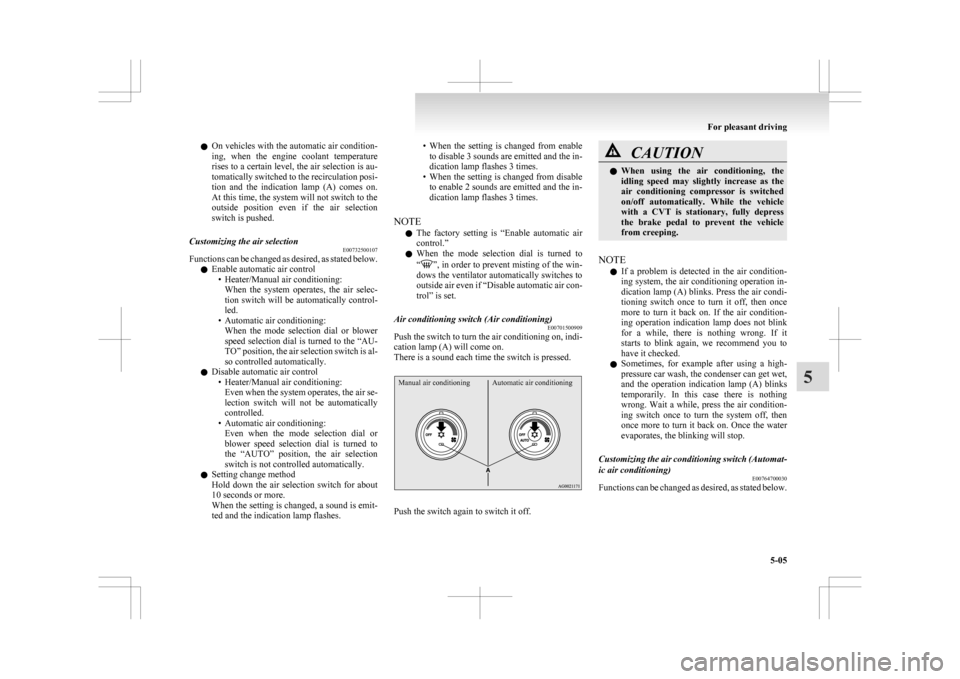
Air conditioning switch (Air conditioning) E00701500909
Push the switch to turn the air conditioning on, indi-
cation lamp (A) will come on.
There is a sound each time the switch is pressed.
Manual air conditioning Automatic air conditioning Push the switch again to switch it off. CAUTION
l
When
using the air conditioning, the
idling speed may slightly increase as the
air conditioning compressor is switched
on/off automatically. While the vehicle
with a CVT is stationary, fully depress
the brake pedal to prevent the vehicle
from creeping.
NOTE l If
a problem is detected in the air condition-
ing system, the air conditioning operation in-
dication lamp (A) blinks. Press the air condi-
tioning switch once to turn it off, then once
more to turn it back on. If the air condition-
ing operation indication lamp does not blink
for a while, there is nothing wrong. If it
starts to blink again, we recommend you to
have it checked.
l Sometimes, for example after using a high-
pressure car wash, the condenser can get wet,
and the operation indication lamp (A) blinks
temporarily. In this case there is nothing
wrong. Wait a while, press the air condition-
ing switch once to turn the system off, then
once more to turn it back on. Once the water
evaporates, the blinking will stop.
Customizing the air conditioning switch (Automat-
ic air conditioning) E00764700030
Functions can be changed as desired, as stated below. For pleasant driving
5-05 5
Page 215 of 368
NOTE
l When
the air conditioning operates with the
selection switch in the outside position, the
system automatically determines whether to
continue using outside air or to perform recir-
culation. If the outside air temperature is
high, the system selects recirculation to ach-
ieve rapid cooling and causes the indication
lamp in the switch to illuminate. Press the se-
lection switch to return to outside air intro-
duction.
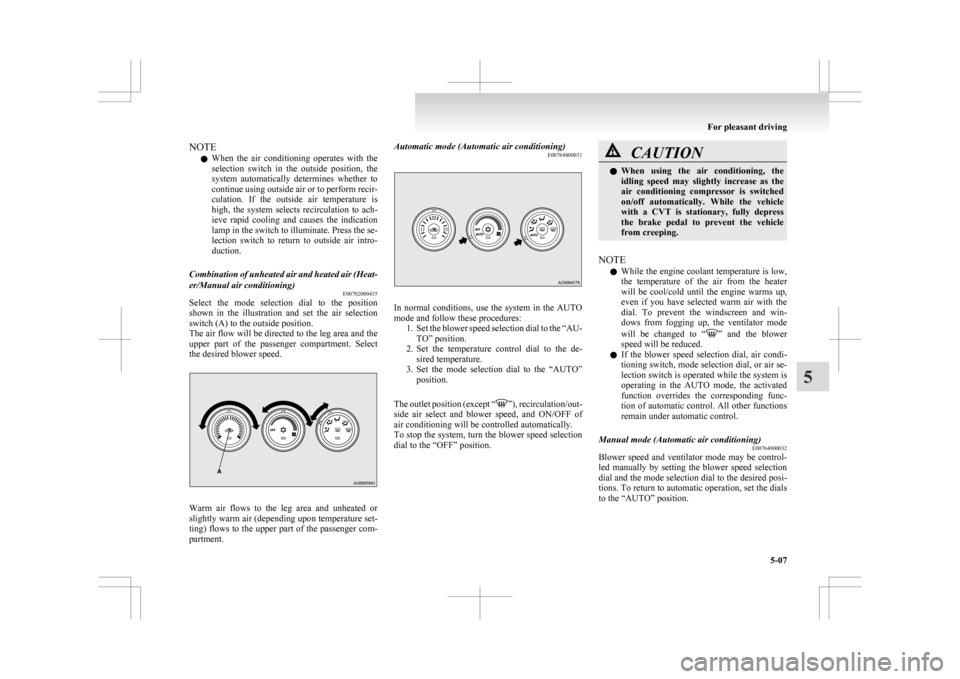
Combination of unheated air and heated air (Heat-
er/Manual air conditioning) E00702000435
Select the mode selection dial to the position
shown
in the illustration and set the air selection
switch (A) to the outside position.
The air flow will be directed to the leg area and the
upper part of the passenger compartment. Select
the desired blower speed. Warm air flows to the leg area and unheated or
slightly
warm air (depending upon temperature set-
ting) flows to the upper part of the passenger com-
partment. Automatic mode (Automatic air conditioning)
E00764800031 In normal conditions, use the system in the AUTO
mode and follow these procedures:
1. Set
the blower speed selection dial to the “AU-
TO” position.
2. Set the temperature control dial to the de- sired temperature.
3. Set the mode selection dial to the “AUTO” position.
The outlet position (except “ ”),
recirculation/out-
side air select and blower speed, and ON/OFF of
air conditioning will be controlled automatically.
To stop the system, turn the blower speed selection
dial to the “OFF” position. CAUTION
l
When
using the air conditioning, the
idling speed may slightly increase as the
air conditioning compressor is switched
on/off automatically. While the vehicle
with a CVT is stationary, fully depress
the brake pedal to prevent the vehicle
from creeping.
NOTE l While
the engine coolant temperature is low,
the temperature of the air from the heater
will be cool/cold until the engine warms up,
even if you have selected warm air with the
dial. To prevent the windscreen and win-
dows from fogging up, the ventilator mode
will be changed to “ ”
and the blower
speed will be reduced.
l If the blower speed selection dial, air condi-
tioning switch, mode selection dial, or air se-
lection switch is operated while the system is
operating in the AUTO mode, the activated
function overrides the corresponding func-
tion of automatic control. All other functions
remain under automatic control.
Manual mode (Automatic air conditioning) E00764900032
Blower speed and ventilator mode may be control-
led
manually by setting the blower speed selection
dial and the mode selection dial to the desired posi-
tions. To return to automatic operation, set the dials
to the “AUTO” position. For pleasant driving
5-07 5
Page 217 of 368
l
For vehicles with the Auto Stop & Go
(AS&G) system, if the mode selection dial is
set to the demister position shown in the illus-
tration, the Auto Stop & Go (AS&G) system
will not operate and the engine will not stop
automatically even if the vehicle is stopped.
This is to ensure that good visibility is main-
tained.
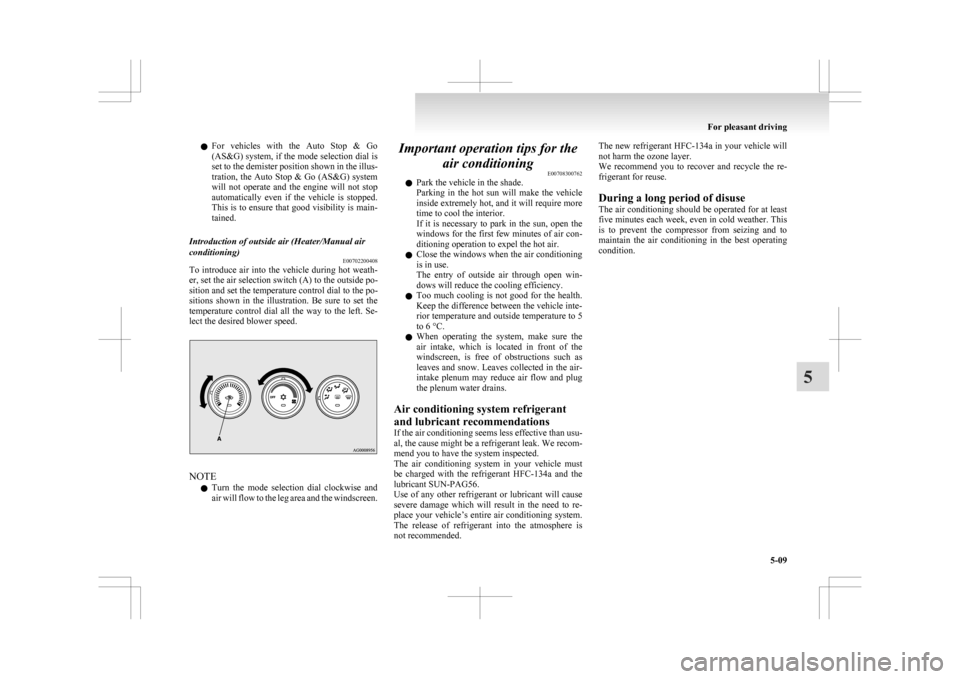
Introduction of outside air (Heater/Manual air
conditioning) E00702200408
To introduce air into the vehicle during hot weath-
er, set the air selection switch (A) to the outside po-
sition and set the temperature control dial to the po-
sitions
shown in the illustration. Be sure to set the
temperature control dial all the way to the left. Se-
lect the desired blower speed. NOTE
l Turn
the mode selection dial clockwise and
air will flow to the leg area and the windscreen. Important operation tips for the
air conditioning E00708300762
l Park the vehicle in the shade.
Parking
in the hot sun will make the vehicle
inside extremely hot, and it will require more
time to cool the interior.
If it is necessary to park in the sun, open the
windows for the first few minutes of air con-
ditioning operation to expel the hot air.
l Close the windows when the air conditioning
is in use.
The entry of outside air through open win-
dows will reduce the cooling efficiency.
l Too much cooling is not good for the health.
Keep the difference between the vehicle inte-
rior temperature and outside temperature to 5
to 6 °C.
l When operating the system, make sure the
air intake, which is located in front of the
windscreen, is free of obstructions such as
leaves and snow. Leaves collected in the air-
intake plenum may reduce air flow and plug
the plenum water drains.
Air conditioning system refrigerant
and lubricant recommendations
If the air conditioning seems less effective than usu-
al, the cause might be a refrigerant leak. We recom-
mend you to have the system inspected.
The air conditioning system in your vehicle must
be charged with the refrigerant HFC-134a and the
lubricant SUN-PAG56.
Use of any other refrigerant or lubricant will cause
severe damage which will result in the need to re-
place your vehicle’s entire air conditioning system.
The release of refrigerant into the atmosphere is
not recommended. The new refrigerant HFC-134a
in your vehicle will
not harm the ozone layer.
We recommend you to recover and recycle the re-
frigerant for reuse.
During a long period of disuse
The air conditioning should be operated for at least
five minutes each week, even in cold weather. This
is to prevent the compressor from seizing and to
maintain the air conditioning in the best operating
condition. For pleasant driving
5-09 5
Page 218 of 368
Air purifier
E00708400561
An
air filter has been incorporated into the air con-
ditioning so that pollen and dust are cleaned from
the air.
Replace the air filter periodically as its ability to
clean the air will be reduced as it collects pollen
and dirt. For the maintenance interval, refer to the
“SERVICE BOOKLET”.
NOTE
l Operation in certain conditions such as driv-
ing on a dusty road and frequent use of the
air conditioning can lead to reduction of serv-
ice life of the filter. When you feel that the
air flow is lower than normal or when the
windscreen or windows start to fog up easily,
replace the air filter.
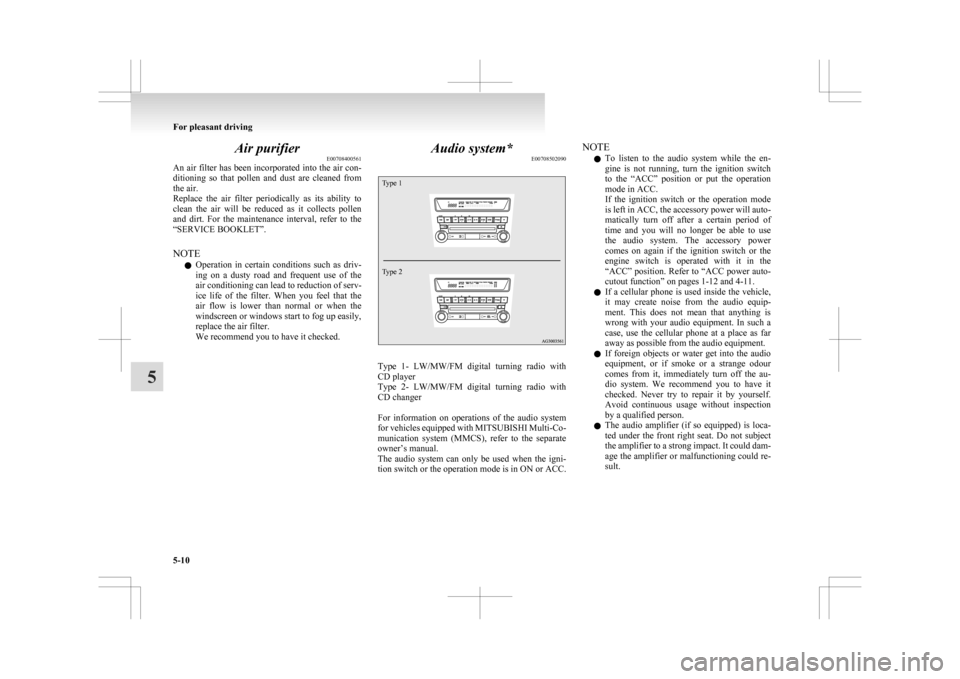
We recommend you to have it checked. Audio system*
E00708502090
Type 1
Type 2 Type 1- LW/MW/FM digital turning radio with
CD player
Type
2- LW/MW/FM digital turning radio with
CD changer
For information on operations of the audio system
for vehicles equipped with MITSUBISHI Multi-Co-
munication system (MMCS), refer to the separate
owner’s manual.
The audio system can only be used when the igni-
tion switch or the operation mode is in ON or ACC. NOTE
l To
listen to the audio system while the en-
gine is not running, turn the ignition switch
to the “ACC” position or put the operation
mode in ACC.
If the ignition switch or the operation mode
is left in ACC, the accessory power will auto-
matically turn off after a certain period of
time and you will no longer be able to use
the audio system. The accessory power
comes on again if the ignition switch or the
engine switch is operated with it in the
“ACC” position. Refer to “ACC power auto-
cutout function” on pages 1-12 and 4-11.
l If a cellular phone is used inside the vehicle,
it may create noise from the audio equip-
ment. This does not mean that anything is
wrong with your audio equipment. In such a
case, use the cellular phone at a place as far
away as possible from the audio equipment.
l If foreign objects or water get into the audio
equipment, or if smoke or a strange odour
comes from it, immediately turn off the au-
dio system. We recommend you to have it
checked. Never try to repair it by yourself.
Avoid continuous usage without inspection
by a qualified person.
l The audio amplifier (if so equipped) is loca-
ted under the front right seat. Do not subject
the amplifier to a strong impact. It could dam-
age the amplifier or malfunctioning could re-
sult. For pleasant driving
5-10
5
Page 250 of 368
WARNING
l Although the Bluetooth ®
2.0 interface al-
lows you to make hands-free calls, if you
choose to use the cellular phone while driv-
ing, you must not allow yourself to be dis-
tracted from the safe operation of your ve-
hicle. Anything, including cellular phone
usage, that distracts you from the safe op-
eration of your vehicle increases your
risk of an accident.
l Refer to and comply with all state and lo-
cal laws in your area regarding cellular
phone usage while driving.
NOTE l If
the ignition switch or the operation mode
is left in ACC, the accessory power will auto-
matically turn off after a certain period of
time and you will no longer be able to use
the Bluetooth ®
2.0 interface. The accessory
power comes on again if the ignition switch
or the engine switch is operated.
Refer to “ACC power auto-cutout function”
on page 4-11.
l The Bluetooth ®
2.0 interface cannot be used
if the Bluetooth ®
device has a flat battery or
the device power is turned off.
l Hands-free calls will not be possible if your
phone does not have service available.
l If you place the Bluetooth ®
device in the lug-
gage compartment, you may not be able to
use the Bluetooth ®
2.0 interface.
l Some Bluetooth ®
devices are not compatible
with the Bluetooth ®
2.0 interface.
Steering control switch ® p. 5-42 Voice recognition function
® p. 5-43
Useful voice commands ® p. 5-43
Speaker enrollment function
® p. 5-45
Connecting the Bluetooth® 2.0 interface and Blue-
tooth® device ® p. 5-46
Operating a music player connected via Blue-
tooth® ® p. 5-48
How to make or receive hands-free
calls ® p. 5-48
Phone book function ® p. 5-50
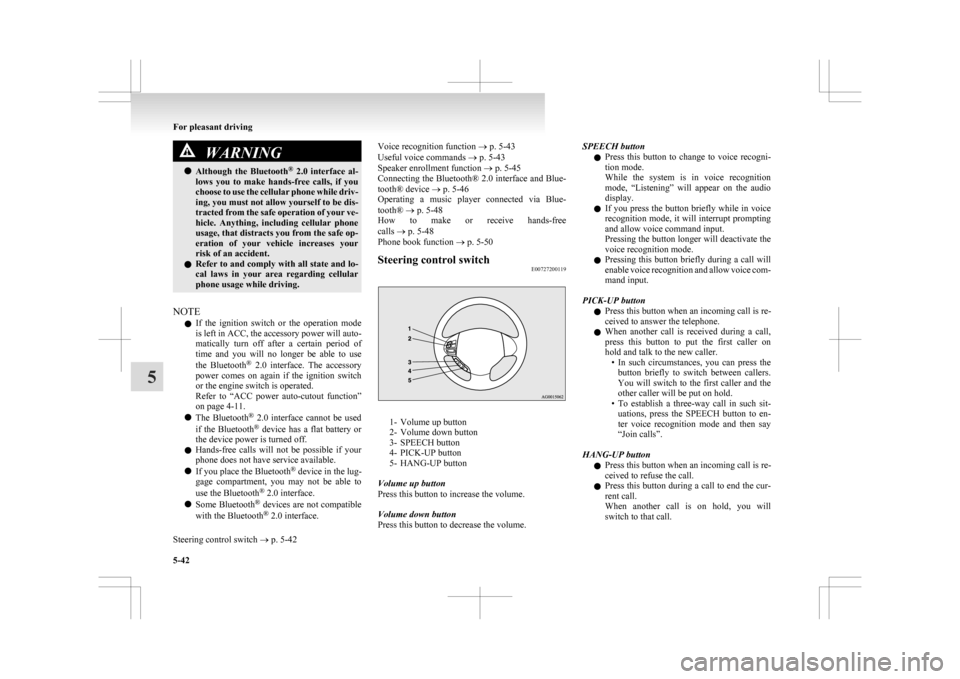
Steering control switch E00727200119 1- Volume up button
2-
Volume down button
3- SPEECH button
4- PICK-UP button
5- HANG-UP button
Volume up button
Press this button to increase the volume.
Volume down button
Press this button to decrease the volume. SPEECH button
l Press
this button to change to voice recogni-
tion mode.
While the system is in voice recognition
mode, “Listening” will appear on the audio
display.
l If you press the button briefly while in voice
recognition mode, it will interrupt prompting
and allow voice command input.
Pressing the button longer will deactivate the
voice recognition mode.
l Pressing this button briefly during a call will
enable voice recognition and allow voice com-
mand input.
PICK-UP button l Press this button when an incoming call is re-
ceived to answer the telephone.
l When another call is received during a call,
press this button to put the first caller on
hold and talk to the new caller.
• In such circumstances, you can press thebutton briefly to switch between callers.
You will switch to the first caller and the
other caller will be put on hold.
• To establish a three-way call in such sit- uations, press the SPEECH button to en-
ter voice recognition mode and then say
“Join calls”.
HANG-UP button l Press this button when an incoming call is re-
ceived to refuse the call.
l Press this button during a call to end the cur-
rent call.
When another call is on hold, you will
switch to that call. For pleasant driving
5-42
5
Page 252 of 368
With the confirmation function activated, you are
given
more opportunities than normal to confirm a
command when making various settings to Blue-
tooth ®
2.0 interface. This allows you to decrease
the possibility that a setting is accidentally changed.
The confirmation function can be turned on or off
by following the steps below. 1. Press the SPEECH button.
2. Say “Setup”.
3. Say “Confirmation prompts”.
4. The voice guide will say “Confirmationprompts are
confirmation prompts
Answer “Yes” to change the setting or an-
swer “No” to keep the current setting.
5. The voice guide will say “Confirmation prompts are
will return to the main menu.
Security function E00760500043
It is possible to use a password as a security func-
tion
by setting a password of your choice for the
Bluetooth ®
2.0 interface.
When the security function is turned on, it is neces-
sary to make a voice input of a 4-digit password in
order to use all functions of the Bluetooth ®
2.0 in-
terface, except for reception.
Setting the password
Use the following procedure to turn on the security
function by setting a password. 1. Press the SPEECH button.
2. Say “Setup”.
3. Say “Password.” 4. The
voice guide will say “Password is disa-
bled. Would you like to enable it?” Answer
“Yes.”
Answer “No” to cancel the setting of the pass-
word and return to the main menu.
5. The voice guide will say “Please say a 4-dig- it password. Remember this password. It will
be required to use this system”.
Say a 4-digit number which you want to set
as a password.
6. For confirmation purposes, the voice guide will say “Password <4-digit password>. Is
this correct?” Answer “Yes.”
Answer “No” to return to the password input
in Step 5.
7. When the registration of the password is com- pleted, the voice guide will say “Password is
enabled” and the system will return to the
main menu.
NOTE l Password will be required to access the sys-
tem after the next ignition cycle.
l It is required for a little time after engine
stop that the entered password is actually re-
corded in the system.
If the ignition switch or the operation mode
is made to ACC or ON or the engine is star-
ted immediately after engine stop, there is a
case when the entered password is not recor-
ded in the system. At this time, please try to
enter the password again. Entering the password
If
a password has been set and the security function
is enabled, the voice guide will say “Hands-free sys-
tem is locked. State the password to continue”
when the SPEECH button is pressed to enter voice
recognition mode. Say the 4-digit password num-
ber to enter the password.
If the entered password is wrong, the voice guide
will say “<4- digit password>, Incorrect password.
Please try again”. Enter the correct password.
NOTE
l You can re-enter the password as many times
as you want.
l If you have forgotten your password, say
“Cancel” to quit the voice input mode and
then check with a MITSUBISHI MOTORS
Authorized Service Point.
Disabling the password
Use the following procedure to turn off the security
function by disabling the password.
NOTE l System must be unlocked to disable the pass-
word.
1. Press the SPEECH button.
2. Say “Setup”.
3. Say “Password.”
4. The voice guide will say “Password is en- abled. Would you like to disable it?” An-
swer “Yes.”
Answer “No” to cancel the disabling of
the password and return to the main menu. For pleasant driving
5-44
5
Page 269 of 368
CAUTION
l
Do not allow children to operate or play
with the cigarette lighter as burns may oc-
cur.
l Something is wrong with the cigarette
lighter if it does not pop back out within
approximately 30 seconds of being push-
ed in.
Pull it out and have the problem correc-
ted at MITSUBISHI MOTORS Author-
ized Service Point.
l Do not use any electric appliance that is
not approved by MITSUBISHI
MOTORS. Doing so could damage the
socket. If you used the cigarette lighter af-
ter damaging the socket, the cigarette
lighter might pop out or fail to come out
after being pushed in.
l When the cigarette lighter socket is used
as a power source for an electric appli-
ance, be sure that the electric appliance
operates at 12 V and has an electric ca-
pacity of 120 W or less. In addition, long
use of the electric appliance without run-
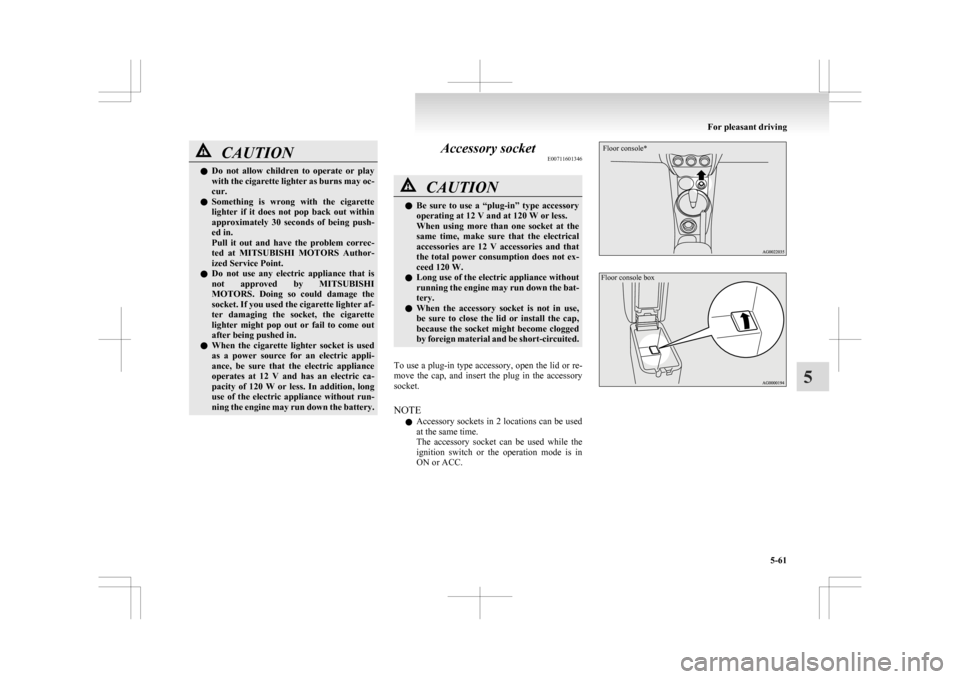
ning the engine may run down the battery. Accessory socket
E00711601346 CAUTION
l
Be
sure to use a “plug-in” type accessory
operating at 12 V and at 120 W or less.
When using more than one socket at the
same time, make sure that the electrical
accessories are 12 V accessories and that
the total power consumption does not ex-
ceed 120 W.
l Long use of the electric appliance without
running the engine may run down the bat-
tery.
l When the accessory socket is not in use,
be sure to close the lid or install the cap,
because the socket might become clogged
by foreign material and be short-circuited.
To use a plug-in type accessory, open the lid or re-
move
the cap, and insert the plug in the accessory
socket.
NOTE
l Accessory sockets in 2 locations can be used
at the same time.
The accessory socket can be used while the
ignition switch or the operation mode is in
ON or ACC.
Floor console*
Floor console box For pleasant driving
5-61 5
Page 270 of 368
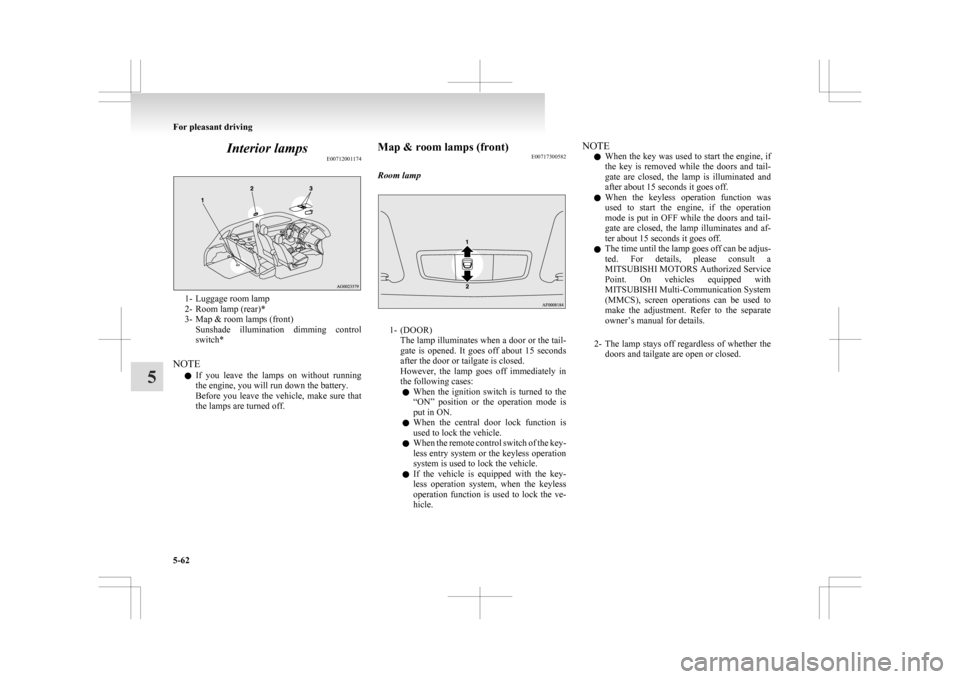
Interior lamps
E007120011741- Luggage room lamp
2-
Room lamp (rear)*
3- Map & room lamps (front) Sunshade illumination dimming control
switch*
NOTE l If you leave the lamps on without running
the engine, you will run down the battery.
Before you leave the vehicle, make sure that
the lamps are turned off. Map & room lamps (front)
E00717300582
Room lamp 1- (DOOR)
The
lamp illuminates when a door or the tail-
gate is opened. It goes off about 15 seconds
after the door or tailgate is closed.
However, the lamp goes off immediately in
the following cases:
l When the ignition switch is turned to the
“ON” position or the operation mode is
put in ON.
l When the central door lock function is
used to lock the vehicle.
l When the remote control switch of the key-
less entry system or the keyless operation
system is used to lock the vehicle.
l If the vehicle is equipped with the key-
less operation system, when the keyless
operation function is used to lock the ve-
hicle. NOTE
l When
the key was used to start the engine, if
the key is removed while the doors and tail-
gate are closed, the lamp is illuminated and
after about 15 seconds it goes off.
l When the keyless operation function was
used to start the engine, if the operation
mode is put in OFF while the doors and tail-
gate are closed, the lamp illuminates and af-
ter about 15 seconds it goes off.
l The time until the lamp goes off can be adjus-
ted. For details, please consult a
MITSUBISHI MOTORS Authorized Service
Point. On vehicles equipped with
MITSUBISHI Multi-Communication System
(MMCS), screen operations can be used to
make the adjustment. Refer to the separate
owner’s manual for details.
2- The lamp stays off regardless of whether the doors and tailgate are open or closed. For pleasant driving
5-62
5