brake MITSUBISHI ASX 2014 (in English) Workshop Manual
[x] Cancel search | Manufacturer: MITSUBISHI, Model Year: 2014, Model line: ASX, Model: MITSUBISHI ASX 2014Pages: 418, PDF Size: 14.02 MB
Page 225 of 418
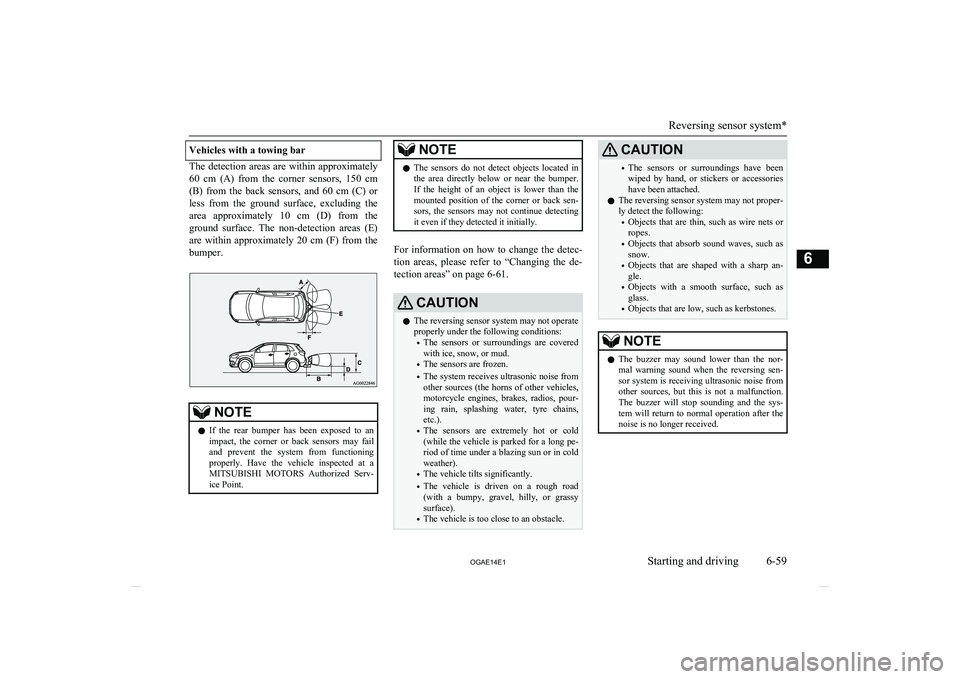
Vehicles with a towing bar
The detection areas are within approximately60 cm (A) from the corner sensors, 150 cm
(B) from the back sensors, and 60 cm (C) or less from the ground surface, excluding the
area approximately 10 cm (D) from the
ground surface. The non-detection areas (E) are within approximately 20 cm (F) from thebumper.
NOTEl If the rear bumper has been exposed to an
impact, the corner or back sensors may failand prevent the system from functioning
properly. Have the vehicle inspected at a
MITSUBISHI MOTORS Authorized Serv-
ice Point.NOTEl The sensors do not detect objects located in
the area directly below or near the bumper. If the height of an object is lower than the
mounted position of the corner or back sen-
sors, the sensors may not continue detecting it even if they detected it initially.
For information on how to change the detec-
tion areas, please refer to “Changing the de- tection areas” on page 6-61.
CAUTIONl The reversing sensor system may not operate
properly under the following conditions:
• The sensors or surroundings are covered
with ice, snow, or mud.
• The sensors are frozen.
• The system receives ultrasonic noise from
other sources (the horns of other vehicles, motorcycle engines, brakes, radios, pour-
ing rain, splashing water, tyre chains, etc.).
• The sensors are extremely hot or cold
(while the vehicle is parked for a long pe- riod of time under a blazing sun or in coldweather).
• The vehicle tilts significantly.
• The vehicle is driven on a rough road
(with a bumpy, gravel, hilly, or grassy surface).
• The vehicle is too close to an obstacle.CAUTION•The sensors or surroundings have been
wiped by hand, or stickers or accessorieshave been attached.
l The reversing sensor system may not proper-
ly detect the following:
• Objects that are thin, such as wire nets or
ropes.
• Objects that absorb sound waves, such as
snow.
• Objects that are shaped with a sharp an-
gle.
• Objects with a smooth surface, such as
glass.
• Objects that are low, such as kerbstones.NOTEl The buzzer may sound lower than the nor-
mal warning sound when the reversing sen-sor system is receiving ultrasonic noise from
other sources, but this is not a malfunction.
The buzzer will stop sounding and the sys- tem will return to normal operation after thenoise is no longer received.
Reversing sensor system*
6-59
OGAE14E1Starting and driving6
Page 230 of 418
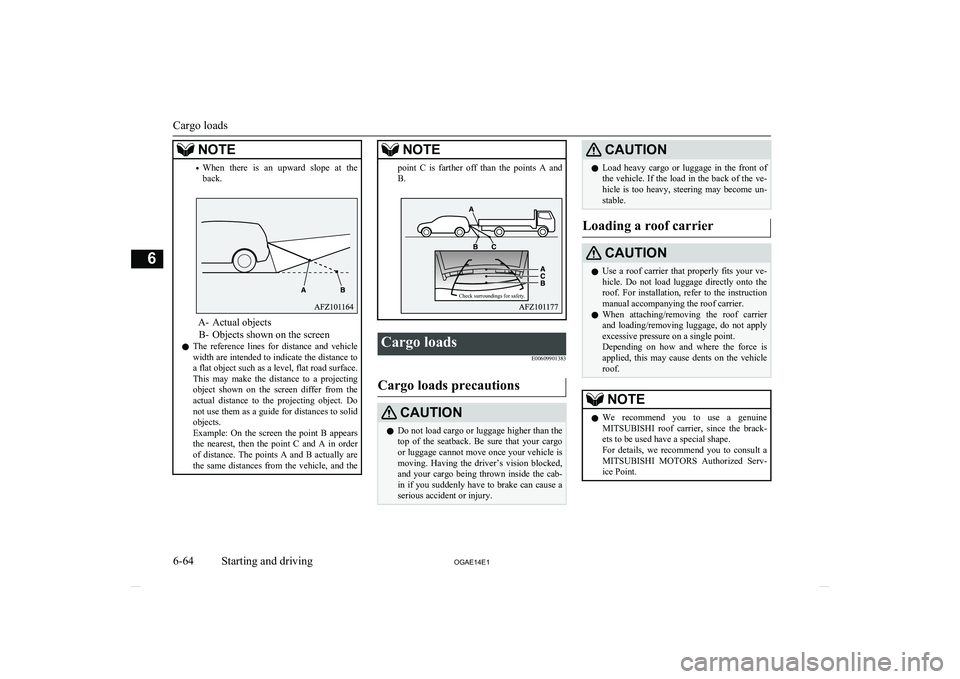
NOTE•When there is an upward slope at the
back.
A- Actual objects
B- Objects shown on the screen
l The reference lines for distance and vehicle
width are intended to indicate the distance to
a flat object such as a level, flat road surface. This may make the distance to a projectingobject shown on the screen differ from the
actual distance to the projecting object. Do not use them as a guide for distances to solid
objects.
Example: On the screen the point B appears
the nearest, then the point C and A in order of distance. The points A and B actually are the same distances from the vehicle, and the
NOTEpoint C is farther off than the points A and
B.Cargo loads
E00609901383
Cargo loads precautions
CAUTIONlDo not load cargo or luggage higher than the
top of the seatback. Be sure that your cargo
or luggage cannot move once your vehicle is moving. Having the driver’s vision blocked,
and your cargo being thrown inside the cab- in if you suddenly have to brake can cause a
serious accident or injury.CAUTIONl Load heavy cargo or luggage in the front of
the vehicle. If the load in the back of the ve-
hicle is too heavy, steering may become un- stable.
Loading a roof carrier
CAUTIONl Use a roof carrier that properly fits your ve-
hicle. Do not load luggage directly onto the
roof. For installation, refer to the instruction manual accompanying the roof carrier.
l When attaching/removing the roof carrier
and loading/removing luggage, do not apply excessive pressure on a single point.
Depending on how and where the force is applied, this may cause dents on the vehicle
roof.NOTEl We recommend you to use a genuine
MITSUBISHI roof carrier, since the brack-
ets to be used have a special shape.
For details, we recommend you to consult a
MITSUBISHI MOTORS Authorized Serv-
ice Point.
Cargo loads
6-64 OGAE14E1Starting and driving6 Check surroundings for safety.
Page 232 of 418
NOTElTo prevent wind noise or reduction in fuel
economy, remove the roof carrier when not
in use.
l Remove the roof carrier before using an au-
tomatic car wash.
l Be sure that adequate clearance is main-
tained for raising the tailgate when installing a roof carrier.Trailer towing
E00610000680
In order to tow a trailer with your vehicle,
have a trailer towing device that meets all rel- evant regulations in your area, mounted con-sult a MITSUBISHI MOTORS Authorized
Service Point.
The regulations concerning the towing of a
trailer may differ from country to country. You are advised to obey the regulations in each area.
CAUTIONl Danger of Accident!
A towing bar should be fitted according to MITSUBISHI MOTORS guidelines.Maximum towable weight with
brake and maximum trailer- nose weight
Never exceed the maximum towable weight
with brake and the maximum trailer-nose weight as listed in the specifications.
(Refer to page 11-07.)
If you tow a trailer at an altitude of more than
1,000 m above sea-level, reduce your weight by 10 % of the gross combination weight for
every increase of 1,000 m above sea-level, as
the engine output is lowered owing to de-
crease in atmospheric pressure.
Towing bar mounting specifi-
cations
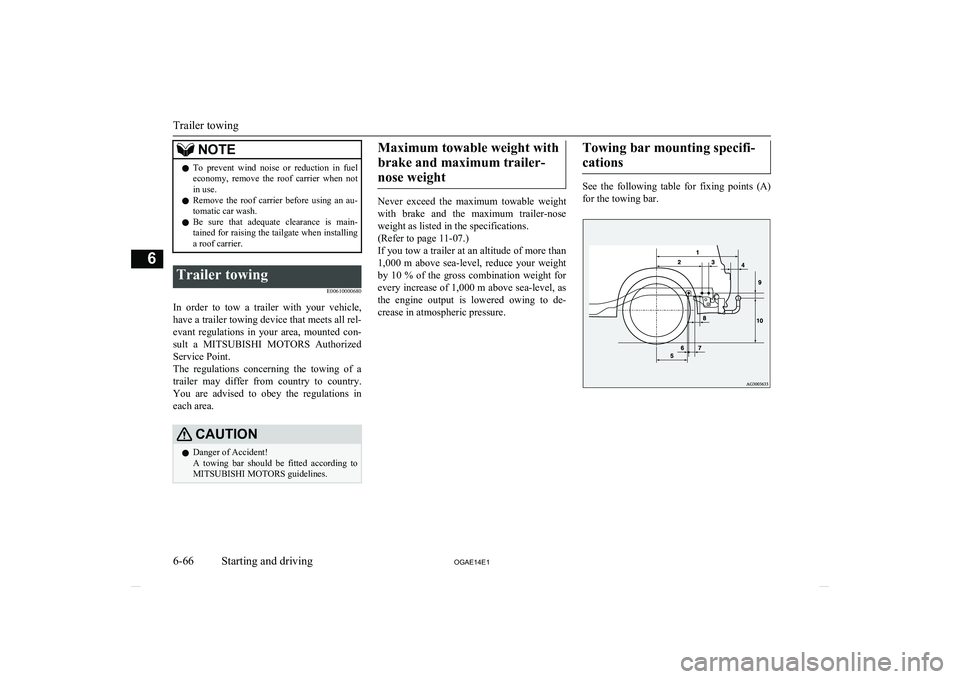
See the following table for fixing points (A) for the towing bar.
Trailer towing
6-66 OGAE14E1Starting and driving6
Page 233 of 418
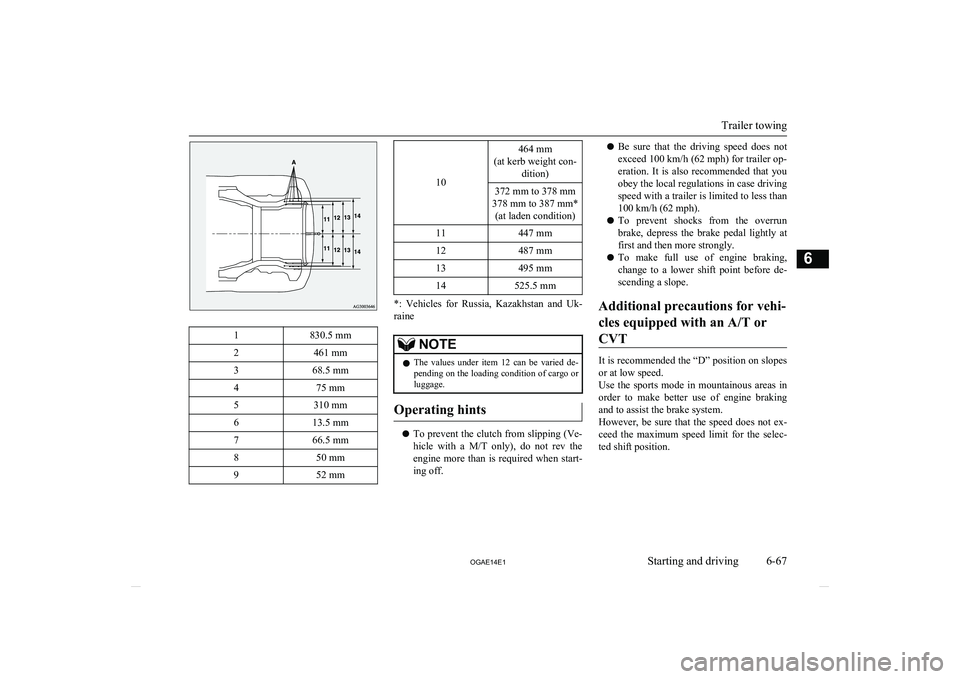
1830.5 mm2461 mm368.5 mm475 mm5310 mm613.5 mm766.5 mm850 mm952 mm
10
464 mm
(at kerb weight con- dition)372 mm to 378 mm
378 mm to 387 mm* (at laden condition)11447 mm12487 mm13495 mm14525.5 mm
*: Vehicles for Russia, Kazakhstan and Uk-
raine
NOTEl The values under item 12 can be varied de-
pending on the loading condition of cargo orluggage.
Operating hints
l To prevent the clutch from slipping (Ve-
hicle with a M/T only), do not rev the
engine more than is required when start- ing off.
l Be sure that the driving speed does not
exceed 100 km/h (62 mph) for trailer op-
eration. It is also recommended that you obey the local regulations in case driving
speed with a trailer is limited to less than
100 km/h (62 mph).
l To prevent shocks from the overrun
brake, depress the brake pedal lightly at first and then more strongly.
l To make full use of engine braking,
change to a lower shift point before de- scending a slope.
Additional precautions for vehi- cles equipped with an A/T orCVT
It is recommended the “D” position on slopes
or at low speed.
Use the sports mode in mountainous areas in order to make better use of engine braking
and to assist the brake system.
However, be sure that the speed does not ex-
ceed the maximum speed limit for the selec-ted shift position.
Trailer towing
6-67
OGAE14E1Starting and driving6
Page 240 of 418
NOTElOn vehicles with the automatic air condi-
tioning, when the mode selection dial or the
blower speed selection dial is set to the “AUTO” position again after manual opera-tion, the air selection dial will also be auto- matically controlled.
l On vehicles with the automatic air condi-
tioning, when the engine coolant tempera-
ture rises to a certain level, the air selection is automatically switched to the recirculation
position and the indication lamp (A) comes on. At this time, the system will not switch
to the outside position even if the air selec-
tion switch is pushed.Customizing the air selection
E00732500107
Functions can be changed as desired, as sta-
ted below.
l Enable automatic air control
• Heater/Manual air conditioning: When the system operates, the air se-
lection switch will be automatically controlled.
• Automatic air conditioning: When the mode selection dial or
blower speed selection dial is turned
to the “AUTO” position, the air selec-
tion switch is also controlled automat- ically.
l Disable automatic air control
• Heater/Manual air conditioning:
Even when the system operates, theair selection switch will not be auto-
matically controlled.
• Automatic air conditioning: Even when the mode selection dial orblower speed selection dial is turned
to the “AUTO” position, the air selec-
tion switch is not controlled automati- cally.
l Setting change method
Hold down the air selection switch for about 10 seconds or more.
When the setting is changed, a sound is
emitted and the indication lamp flashes. • When the setting is changed from ena-
ble to disable 3 sounds are emitted and
the indication lamp flashes 3 times.
• When the setting is changed from dis-
able to enable 2 sounds are emitted and the indication lamp flashes 3times.NOTEl The factory setting is “Enable automatic air
control.”
l When the mode selection dial is turned to
“
”, in order to prevent misting of the
windows the ventilator automatically switches to outside air even if “Disable auto-matic air control” is set.
Air conditioning switch (Air
conditioning)
E00701501052
Push the switch to turn the air conditioning
on, indication lamp (A) will come on.
There is a sound each time the switch is pressed.
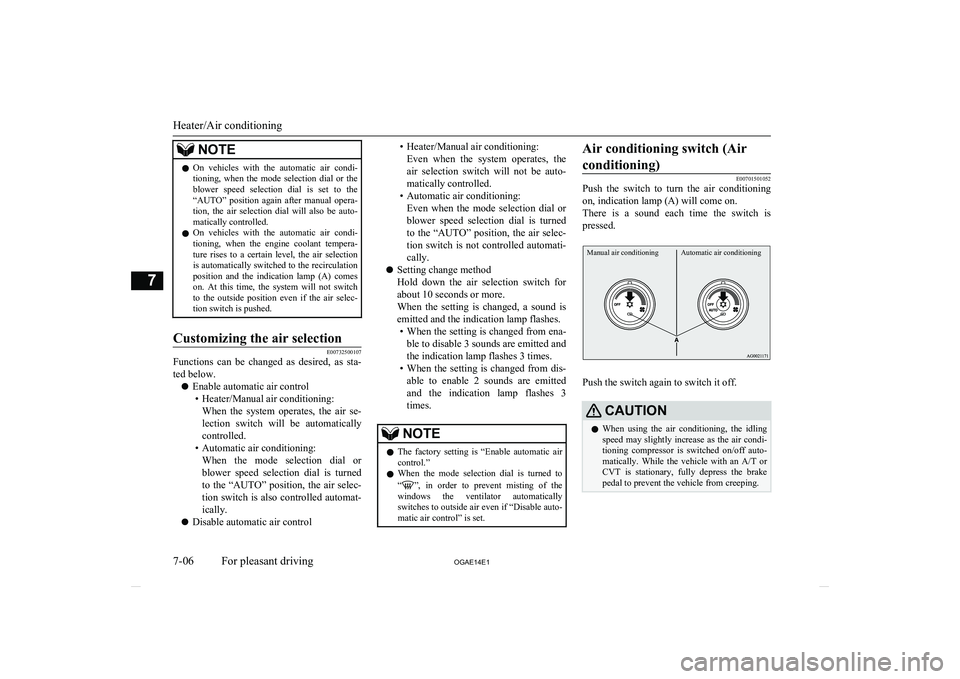
Manual air conditioningAutomatic air conditioning
Push the switch again to switch it off.
CAUTIONl When using the air conditioning, the idling
speed may slightly increase as the air condi-
tioning compressor is switched on/off auto- matically. While the vehicle with an A/T or
CVT is stationary, fully depress the brake pedal to prevent the vehicle from creeping.
Heater/Air conditioning
7-06 OGAE14E1For pleasant driving7
Page 243 of 418
Automatic mode (Automatic airconditioning)
E00764800073
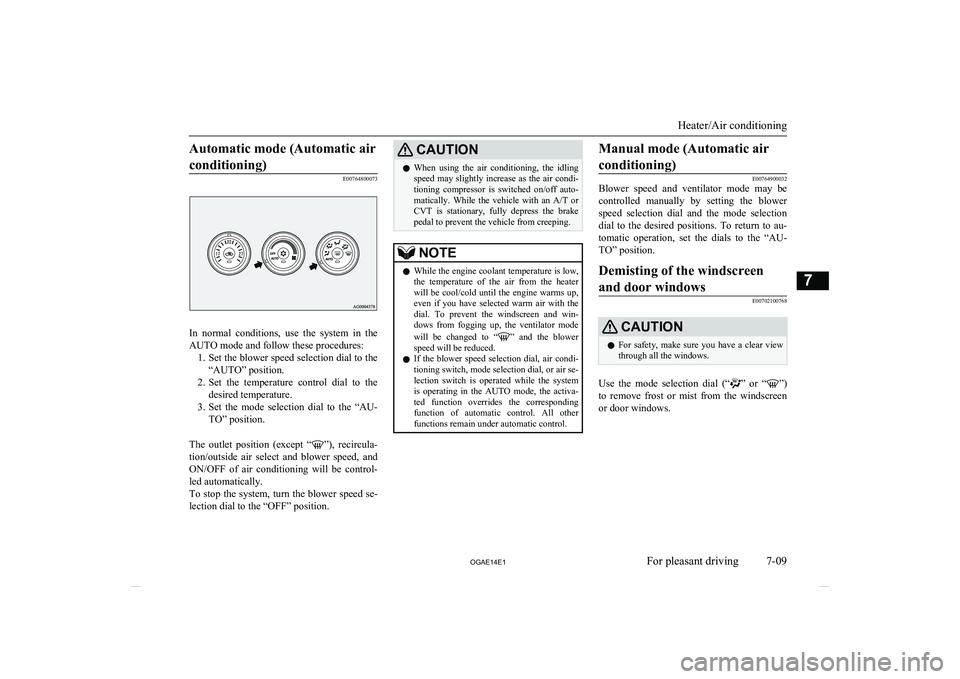
In normal conditions, use the system in the
AUTO mode and follow these procedures: 1. Set the blower speed selection dial to the
“AUTO” position.
2. Set the temperature control dial to the
desired temperature.
3. Set the mode selection dial to the “AU-
TO” position.
The outlet position (except “
”), recircula-
tion/outside air select and blower speed, and ON/OFF of air conditioning will be control- led automatically.
To stop the system, turn the blower speed se- lection dial to the “OFF” position.
CAUTIONl When using the air conditioning, the idling
speed may slightly increase as the air condi-
tioning compressor is switched on/off auto- matically. While the vehicle with an A/T or
CVT is stationary, fully depress the brake pedal to prevent the vehicle from creeping.NOTEl While the engine coolant temperature is low,
the temperature of the air from the heaterwill be cool/cold until the engine warms up, even if you have selected warm air with the
dial. To prevent the windscreen and win-
dows from fogging up, the ventilator mode
will be changed to “
” and the blower
speed will be reduced.
l If the blower speed selection dial, air condi-
tioning switch, mode selection dial, or air se-
lection switch is operated while the system is operating in the AUTO mode, the activa-ted function overrides the corresponding
function of automatic control. All other
functions remain under automatic control.
Manual mode (Automatic air
conditioning)
E00764900032
Blower speed and ventilator mode may be
controlled manually by setting the blower speed selection dial and the mode selection
dial to the desired positions. To return to au-
tomatic operation, set the dials to the “AU- TO” position.
Demisting of the windscreen
and door windows
E00702100768
CAUTIONl For safety, make sure you have a clear view
through all the windows.
Use the mode selection dial (“” or “”)
to remove frost or mist from the windscreen or door windows.
Heater/Air conditioning
7-09
OGAE14E1For pleasant driving7
Page 285 of 418
NOTElIf you have forgotten your password, say
“Cancel” to quit the voice input mode andthen check with a MITSUBISHI MOTORS
Authorized Service Point.
Disabling the password
Use the following procedure to turn off the
security function by disabling the password.
NOTEl System must be unlocked to disable the
password.
1
. Press the SPEECH button.
2 . Say “Setup”.
3 . Say “Password.”
4 . The voice guide will say “Password
is enabled. Would you like to disableit?” Answer “Yes.”
Answer “No” to cancel the disabling of the password and return to the
main menu.
5 . When the disabling of the password
is completed, the voice guide will say
“Password is disabled” and the sys-
tem will return to the main menu.Speaker enrollment function
E00727400238
The Bluetooth ®
2.0 interface can use the
speaker enrollment function to create a voice model for one person per language.
This makes it easier for the Bluetooth ®
2.0
interface to recognise voice commands said by you.
You can turn a voice model registered with
the speaker enrollment function on and off
whenever you want.
Speaker enrollment
E00727500301
It takes about 2 to 3 minutes to complete the speaker enrollment process.
To ensure the best results, run through the
process while in the driver’s seat, in an envi- ronment that is as quiet as possible (whenthere is no rain or strong winds and the vehi-cle windows are closed). Please turn off your
phone while in speaker enrollment to prevent
interruption of the process.
Use the following procedure for speaker en- rollment. 1. Stop your vehicle in a safe area, put the
gearshift lever in the “N” (Neutral) posi-
tion ( M/T), or the selector lever in the
“P” (PARK) position ( A/T or CVT), and
pull the parking brake lever.
NOTEl Speaker enrollment is not possible unless the
vehicle is parked. Make sure you park the
vehicle in a safe area before attempting speaker enrollment.
2. Press the SPEECH button.
3. Say “Voice training”.
4. The voice guide will say “This operation
must be performed in a quiet environ- ment while the vehicle is stopped. See
the owner’s manual for the list of re- quired training phrases. Press and re-
lease the SPEECH button when you are ready to begin. Press the HANG-UP but-
ton to cancel at any time”.
Press the SPEECH button to start the
speaker enrollment process.
NOTEl If you do not start the speaker enrollment
process within 3 minutes of pressing the SPEECH button, the speaker enrollment function will time out.
The voice guide will say “Speaker Enroll-
ment has timed out”. The system will then beep and the voice recognition mode will be
deactivated.
5. The voice guide will prompt for phrase
1. Repeat the corresponding phrase lis-
Bluetooth ®
2.0 interface*
7-51
OGAE14E1For pleasant driving7
Page 287 of 418
To pair
To pair a Bluetooth®
device with the Blue-
tooth ®
2.0 interface, follow the steps below.
1. Stop your vehicle in a safe area, put the
gearshift lever in the “N” (Neutral) posi-
tion ( M/T) or the selector lever in the
“P” (PARK) position ( A/T or CVT) and
pull the parking brake lever.
NOTEl You cannot pair Bluetooth ®
devices with the
Bluetooth ®
2.0 interface unless the vehicle is
parked. Before pairing a Bluetooth ®
device
with the Bluetooth ®
2.0 interface, confirm
that the vehicle is parked in a safe location.
2. Press the SPEECH button.
3. Say “Setup”.
4. Say “Pairing options.”
5. The voice guide will say “Select one of
the following: pair, edit, delete, or list.”
Say “Pair.”
NOTEl If 7 devices have already been paired, the
voice guide will say “Maximum devicespaired” and then the system will end the
pairing process. To register a new device, delete one device and then repeat the pairing
process.
(Refer to “Selecting a device: Deleting a de- vice” on page 7-54.)
6. The voice guide will say “Please say a 4-
digit pairing code.” Say a 4-digit num- ber.
When the confirmation function is on, the system will confirm whether the
number said is acceptable. Answer
“Yes.”
Answer “No” to return to pairing code selection.
NOTEl Some Bluetooth ®
devices require a specific
pairing code.
Please refer to the device manual for pairing
code requirements.NOTEl The pairing code entered here is only used
for the Bluetooth ®
connection certification.
It is any 4-digit number the user would like
to select.
Remember the pairing code as it needs to be
keyed into the Bluetooth ®
device later in the
pairing process.
Depending on the connection settings of the
Bluetooth ®
device, this code may have to be
entered each time you connect the Blue-
tooth ®
device to the Bluetooth ®
2.0 inter-
face. For the default connection settings, re-
fer to the instructions for the device.
7. The voice guide will say “Start pairing
procedure on the device. See the device manual for instructions.” Enter in the
Bluetooth ®
device the 4-digit number
you have registered in Step 6.
NOTEl According to the corresponding device to
Bluetooth ®
, it might take a few minutes to
pair the Bluetooth ®
device with the Blue-
tooth ®
2.0 interface.
l If the Bluetooth ®
2.0 interface cannot recog-
nize the Bluetooth ®
device, the voice guide
will say “Pairing has timed out” and the pairing process will be cancelled.
Confirm that the device you are pairing sup-
ports Bluetooth ®
, and try pairing it again.
Bluetooth ®
2.0 interface*
7-53
OGAE14E1For pleasant driving7
Page 318 of 418
If the vehicle breaks downE00800101108
If the vehicle breaks down on the road, move it to the shoulder and turn on the hazard
warning flashers and set up a warning trian- gle, flashing lamp, etc.
Refer to “Hazard warning flasher switch” on
page 5-54.
If the engine stops/fails
Vehicle operation and control are affected if
the engine stops.
Before moving the vehicle to a safe area, be
aware of the following:
l The brake booster becomes inoperative
and the pedal effort will increase. Press down the brake pedal harder than usual.
l Since the power steering system is no
longer operative, the steering wheel feels
heavy when turning it.
Emergency starting
E00800502851
If the engine cannot be started because thebattery is weak or dead, the battery from an-other vehicle can be used with jumper cables to start the engine.
WARNINGl To start the engine using jumper cables
connected to another vehicle, perform the
correct procedures according to the in- struction below. Incorrect procedures could result in a fire or explosion or dam-
age to the vehicles.CAUTIONl Do not attempt to start the engine by pulling
or pushing the vehicle.
It could damage your vehicle.
l Always wear protective eye goggles when
working near the battery.
l Keep the battery out of the reach of children.
1.
Get the vehicles close enough so the
jumper cables can reach, but be sure the vehicles aren’t touching each other.
CAUTIONl Check the other vehicle. It must have a 12-
volt battery.
If the other system isn’t 12-volt, shorting can
damage both vehicles.
2. Turn off all lamps, heater and other elec-
trical loads.
3. Set the parking brake firmly on each ve-
hicle. Put an A/T, CVT in “P” (PARK)
or a M/T in “N” (Neutral).
4. Turn the ignition switch to the “LOCK”
position or put the operation mode in OFF.WARNINGl Perform step 4 on both vehicles before-
hand.
Make sure that the cables or your clothes cannot be caught by the fan or drive belt.
Personal injury could result.
5. Make sure battery electrolyte is at the
proper level.
Refer to “Battery” on page 10-08.
WARNINGl If electrolyte fluid is not visible, or ap-
pears to be frozen, Do Not Attempt Jump
Starting!
A battery might rupture or explode if the temperature is below the freezing point orif it is not filled to the proper level.
6. Connect one end of one jumper cable to
the positive (+) terminal of the dis-charged battery (A), and the other end to
the positive (+) terminal of the booster
battery (B).
If the vehicle breaks down
8-02 OGAE14E1For emergencies8
Page 320 of 418
NOTElFor vehicles equipped with the Auto Stop &
Go (AS&G) system, press the “Auto Stop &Go (AS&G) OFF” switch to deactivate theAuto Stop & Go (AS&G) system and pre- vent the engine from automatically stoppingbefore the battery is sufficiently charged.Refer to “To deactivate” on page 6-21.
9. After the engine is started, disconnect
the cables in the reverse order and keep
the engine running for several minutes.
WARNINGl If the battery has to be charged while fit-
ted in the vehicle, disconnect the vehicle side negative (-) terminal connected to the
battery.
l Keep sparks, cigarettes and flames away
from the battery because the battery may produce an explosion.
l Use adequate ventilation when charging
or using the battery in an enclosed space.
l Remove all the caps before charging the
battery.WARNINGl Electrolyte is corrosive diluted sulphuric
acid.
If electrolyte (battery acid) comes into contact with your hands, eyes, clothes and
the painted surface of your vehicle, it should be thoroughly flushed with water.If electrolyte gets in your eyes, flush them
with water immediately and thoroughly, and get prompt medical attention.NOTEl If the vehicle is put in motion without fully
charging the battery, it might cause the loss
of smooth engine operation and the anti-lock brake warning lamp to illuminate.
Refer to “Anti-lock brake system (ABS)” on
page 6-46.Engine overheating
E00800603761
When the engine is overheating, the informa-tion screen in the multi-information display
will be interrupted and the engine coolant
temperature warning display will appear. Al- so “
” will blink.
If this occurs, take the following corrective measures: 1. Stop the vehicle in a safe place.
2. Check whether steam is coming from the
engine compartment.
[If steam does not come from the engine
compartment]
With the engine still running, raise the
bonnet to ventilate the engine compart-
ment.NOTEl For vehicles equipped with the Auto Stop &
Go (AS&G) system, press the “Auto Stop &Go (AS&G) OFF” switch to deactivate theAuto Stop & Go (AS&G) system before stopping the vehicle.
Refer to “To deactivate” on page 6-21.
[If steam is coming from the engine
compartment]
Stop the engine, and when the steam
stops, raise the bonnet to ventilate the engine compartment. Restart the engine.
WARNINGl Do not open the bonnet while steam is
coming from the engine compartment. It
could cause steam or hot water to spurt out, causing burns. Hot water could spurt
out even when there is no steam coming out, and some parts will be very hot. Be
very careful when opening the bonnet.
Engine overheating
8-04 OGAE14E1For emergencies8