Gear 1 MITSUBISHI ASX 2014 Owner's Manual (in English)
[x] Cancel search | Manufacturer: MITSUBISHI, Model Year: 2014, Model line: ASX, Model: MITSUBISHI ASX 2014Pages: 418, PDF Size: 14.02 MB
Page 6 of 418
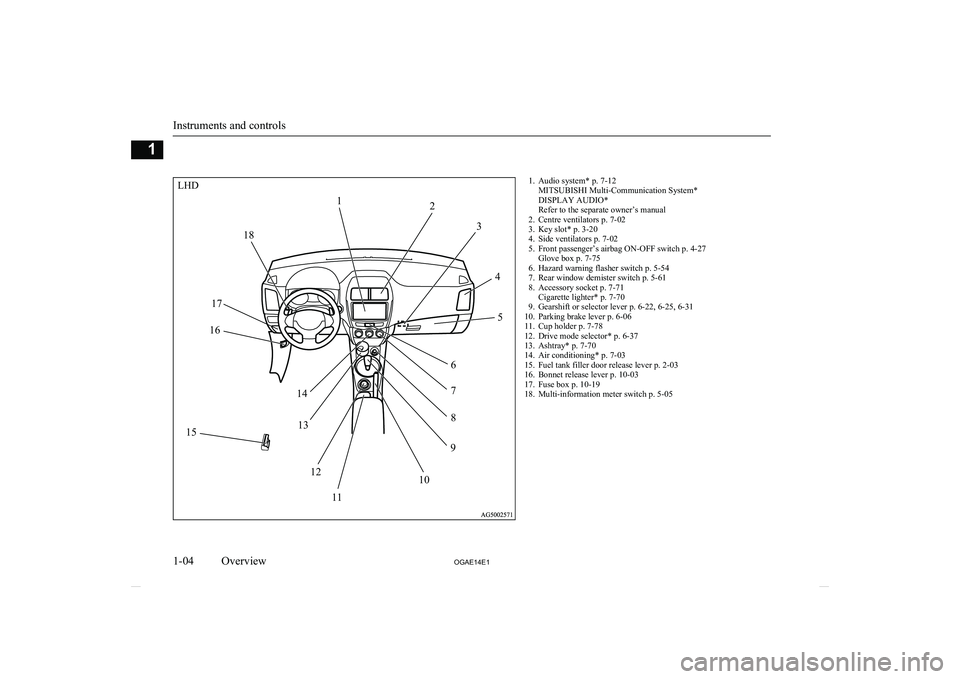
1. Audio system* p. 7-12MITSUBISHI Multi-Communication System*
DISPLAY AUDIO*
Refer to the separate owner’s manual
2. Centre ventilators p. 7-02
3. Key slot* p. 3-20
4. Side ventilators p. 7-02
5. Front passenger’s airbag ON-OFF switch p. 4-27 Glove box p. 7-75
6. Hazard warning flasher switch p. 5-54
7. Rear window demister switch p. 5-61
8. Accessory socket p. 7-71 Cigarette lighter* p. 7-70
9. Gearshift or selector lever p. 6-22, 6-25, 6-31
10. Parking brake lever p. 6-06
11. Cup holder p. 7-78
12. Drive mode selector* p. 6-37
13. Ashtray* p. 7-70
14. Air conditioning* p. 7-03
15. Fuel tank filler door release lever p. 2-03
16. Bonnet release lever p. 10-03
17. Fuse box p. 10-19
18. Multi-information meter switch p. 5-05
Instruments and controls
1-04 OGAE14E1Overview1LHD12
3
45
6 7
8
9
10
11
12
13
14
15 16
17 18
Page 7 of 418
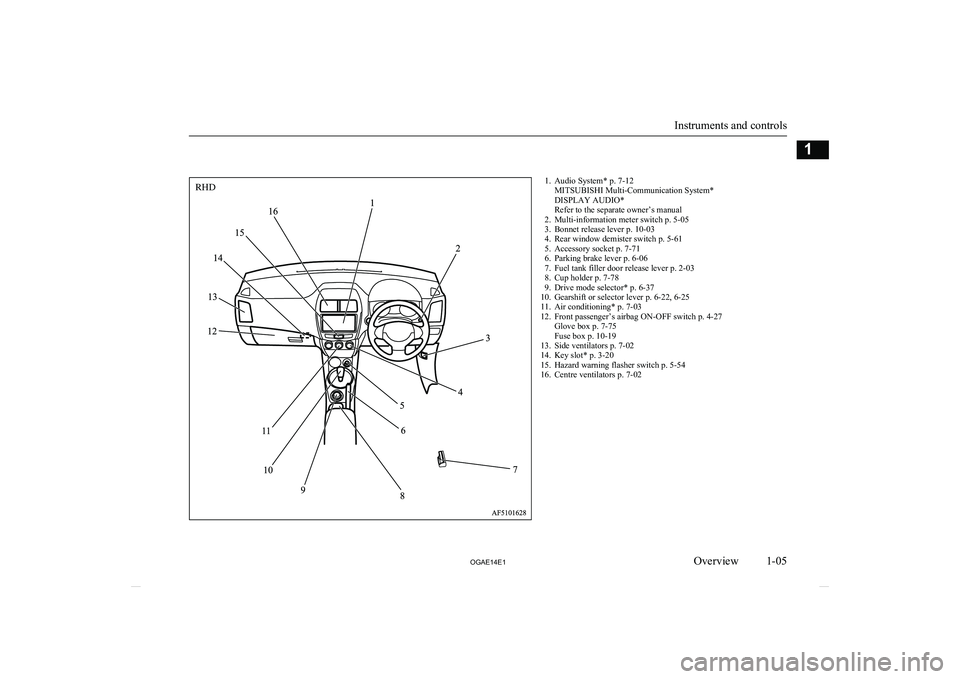
1. Audio System* p. 7-12MITSUBISHI Multi-Communication System*
DISPLAY AUDIO*
Refer to the separate owner’s manual
2. Multi-information meter switch p. 5-05
3. Bonnet release lever p. 10-03
4. Rear window demister switch p. 5-61
5. Accessory socket p. 7-71
6. Parking brake lever p. 6-06
7. Fuel tank filler door release lever p. 2-03
8. Cup holder p. 7-78
9. Drive mode selector* p. 6-37
10. Gearshift or selector lever p. 6-22, 6-25
11. Air conditioning* p. 7-03
12. Front passenger’s airbag ON-OFF switch p. 4-27 Glove box p. 7-75
Fuse box p. 10-19
13. Side ventilators p. 7-02
14. Key slot* p. 3-20
15. Hazard warning flasher switch p. 5-54
16. Centre ventilators p. 7-02
Instruments and controls
1-05
OGAE14E1Overview1RHD
Page 23 of 418
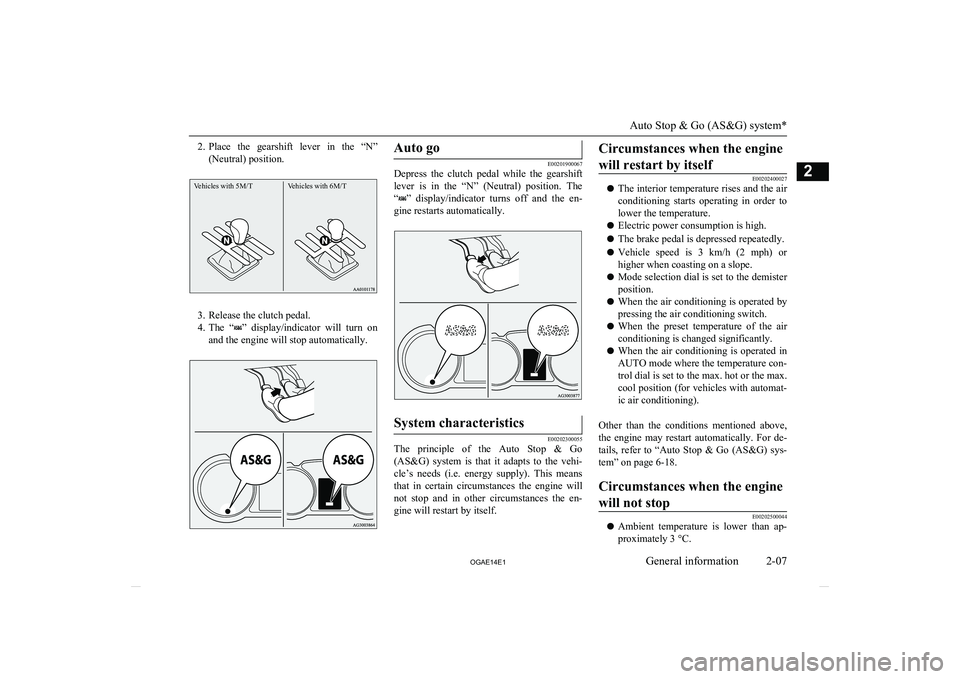
2.Place the gearshift lever in the “N”
(Neutral) position.Vehicles with 5M/TVehicles with 6M/T
3. Release the clutch pedal.
4. The “
” display/indicator will turn on
and the engine will stop automatically.
Auto go
E00201900067
Depress the clutch pedal while the gearshift
lever is in the “N” (Neutral) position. The
“
” display/indicator turns off and the en-
gine restarts automatically.
System characteristics
E00202300055
The principle of the Auto Stop & Go (AS&G) system is that it adapts to the vehi- cle’s needs (i.e. energy supply). This means
that in certain circumstances the engine will not stop and in other circumstances the en-
gine will restart by itself.
Circumstances when the engine
will restart by itself
E00202400027
l The interior temperature rises and the air
conditioning starts operating in order to lower the temperature.
l Electric power consumption is high.
l The brake pedal is depressed repeatedly.
l Vehicle speed is 3 km/h (2 mph)
or
higher when coasting on a slope.
l Mode selection dial is set to the demister
position.
l When the air conditioning is operated by
pressing the air conditioning switch.
l When the preset temperature of the air
conditioning is changed significantly.
l When the air conditioning is operated in
AUTO mode where the temperature con-
trol dial is set to the max. hot or the max.
cool position (for vehicles with automat- ic air conditioning).
Other than the conditions mentioned above, the engine may restart automatically. For de-
tails, refer to “Auto Stop & Go (AS&G) sys- tem” on page 6-18.
Circumstances when the engine
will not stop
E00202500044
l Ambient temperature is lower than ap-
proximately 3 °C.
Auto Stop & Go (AS&G) system*
2-07
OGAE14E1General information2
Page 41 of 418
NOTElWhen the following operation is performed
with the operation mode in OFF, the steering wheel is locked.
• Open or close one of the doors (except the
tailgate).
• Lock all doors and the tailgate with the
keyless entry system or the keyless opera- tion function.
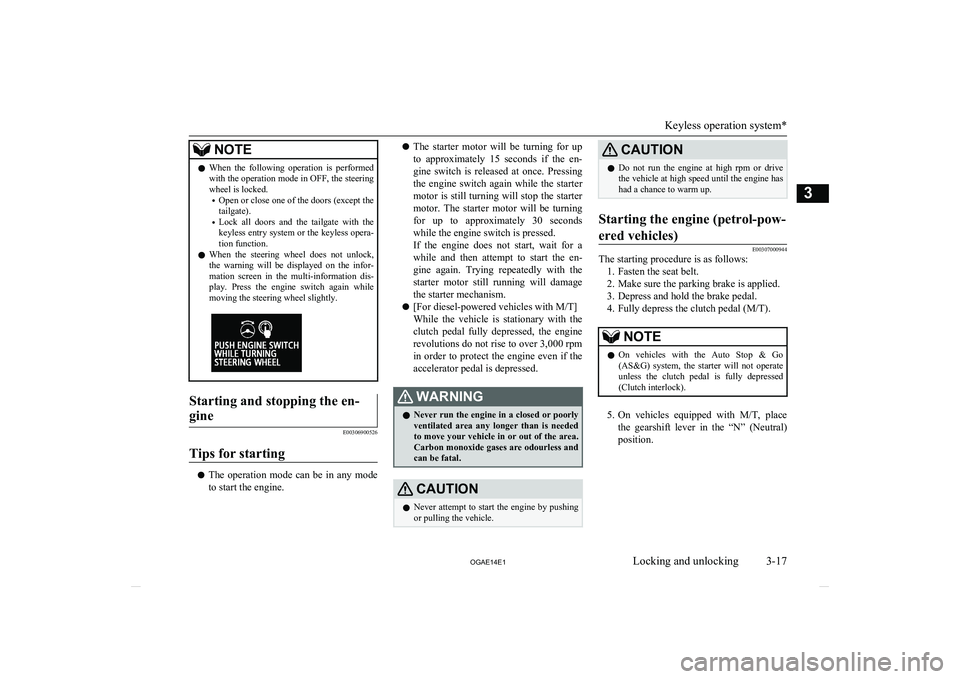
l When the steering wheel does not unlock,
the warning will be displayed on the infor-
mation screen in the multi-information dis-
play. Press the engine switch again while moving the steering wheel slightly.Starting and stopping the en-
gine
E00306900526
Tips for starting
l The operation mode can be in any mode
to start the engine.
l The starter motor will be turning for up
to approximately 15 seconds if the en-
gine switch is released at once. Pressing the engine switch again while the starter
motor is still turning will stop the starter motor. The starter motor will be turningfor up to approximately 30 seconds while the engine switch is pressed.
If the engine does not start, wait for a
while and then attempt to start the en- gine again. Trying repeatedly with the
starter motor still running will damage the starter mechanism.
l [For diesel-powered vehicles with M/T]
While the vehicle is stationary with the
clutch pedal fully depressed, the engine revolutions do not rise to over 3,000 rpm
in order to protect the engine even if the accelerator pedal is depressed.WARNINGl Never run the engine in a closed or poorly
ventilated area any longer than is needed to move your vehicle in or out of the area.Carbon monoxide gases are odourless and can be fatal.CAUTIONl Never attempt to start the engine by pushing
or pulling the vehicle.CAUTIONl Do not run the engine at high rpm or drive
the vehicle at high speed until the engine hashad a chance to warm up.Starting the engine (petrol-pow-
ered vehicles)
E00307000944
The starting procedure is as follows: 1. Fasten the seat belt.
2. Make sure the parking brake is applied.
3. Depress and hold the brake pedal.
4. Fully depress the clutch pedal (M/T).
NOTEl On vehicles with the Auto Stop & Go
(AS&G) system, the starter will not operate
unless the clutch pedal is fully depressed
(Clutch interlock).
5. On vehicles equipped with M/T, place
the gearshift lever in the “N” (Neutral) position.
Keyless operation system*
3-17
OGAE14E1Locking and unlocking3
Page 43 of 418
NOTElOn vehicles with the Auto Stop & Go
(AS&G) system, the starter will not operate
unless the clutch pedal is fully depressed
(Clutch interlock).
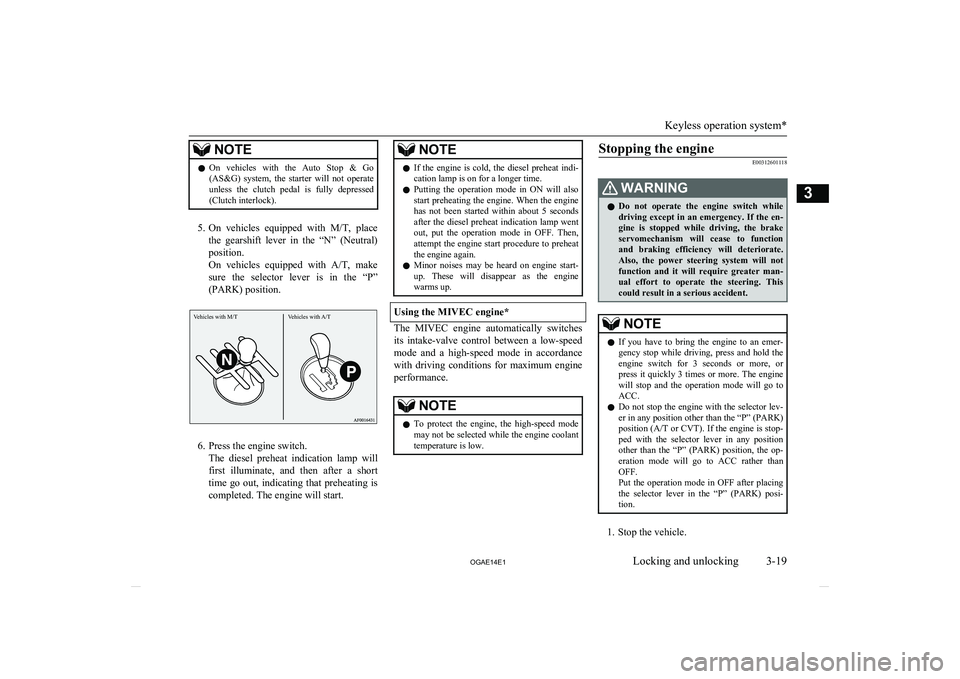
5. On vehicles equipped with M/T, place
the gearshift lever in the “N” (Neutral) position.
On vehicles equipped with A/T, make
sure the selector lever is in the “P”
(PARK) position.
6. Press the engine switch. The diesel preheat indication lamp willfirst illuminate, and then after a short
time go out, indicating that preheating is completed. The engine will start.
NOTEl If the engine is cold, the diesel preheat indi-
cation lamp is on for a longer time.
l Putting the operation mode in ON will also
start preheating the engine. When the engine
has not been started within about 5 seconds after the diesel preheat indication lamp went
out, put the operation mode in OFF. Then, attempt the engine start procedure to preheatthe engine again.
l Minor noises may be heard on engine start-
up. These will disappear as the engine
warms up.
Using the MIVEC engine*
The MIVEC engine automatically switches
its intake-valve control between a low-speed mode and a high-speed mode in accordancewith driving conditions for maximum engine
performance.
NOTEl To protect the engine, the high-speed mode
may not be selected while the engine coolanttemperature is low.Stopping the engine
E00312601118WARNINGl Do not operate the engine switch while
driving except in an emergency. If the en-
gine is stopped while driving, the brake servomechanism will cease to function
and braking efficiency will deteriorate. Also, the power steering system will notfunction and it will require greater man-
ual effort to operate the steering. This
could result in a serious accident.NOTEl If you have to bring the engine to an emer-
gency stop while driving, press and hold the engine switch for 3 seconds or more, or
press it quickly 3 times or more. The engine will stop and the operation mode will go to ACC.
l Do not stop the engine with the selector lev-
er in any position other than the “P” (PARK) position (A/T or CVT ). If the engine is stop-
ped with the selector lever in any position
other than the “P” (PARK) position, the op- eration mode will go to ACC rather thanOFF.
Put the operation mode in OFF after placing the selector lever in the “P” (PARK) posi-
tion.
1. Stop the vehicle.
Keyless operation system*
3-19
OGAE14E1Locking and unlocking3 Vehicles with M/T Vehicles with A/T
Page 44 of 418
2.Fully engage the parking brake while de-
pressing the brake pedal.
3. On vehicles with M/T, press the engine
switch to stop the engine, move the gear-
shift lever to the 1 st
(on an uphill) or “R”
(Reverse) (on a downhill) position.
On vehicles with A/T or CVT , move the
selector lever to the “P” (PARK) posi- tion, press the engine switch to stop the
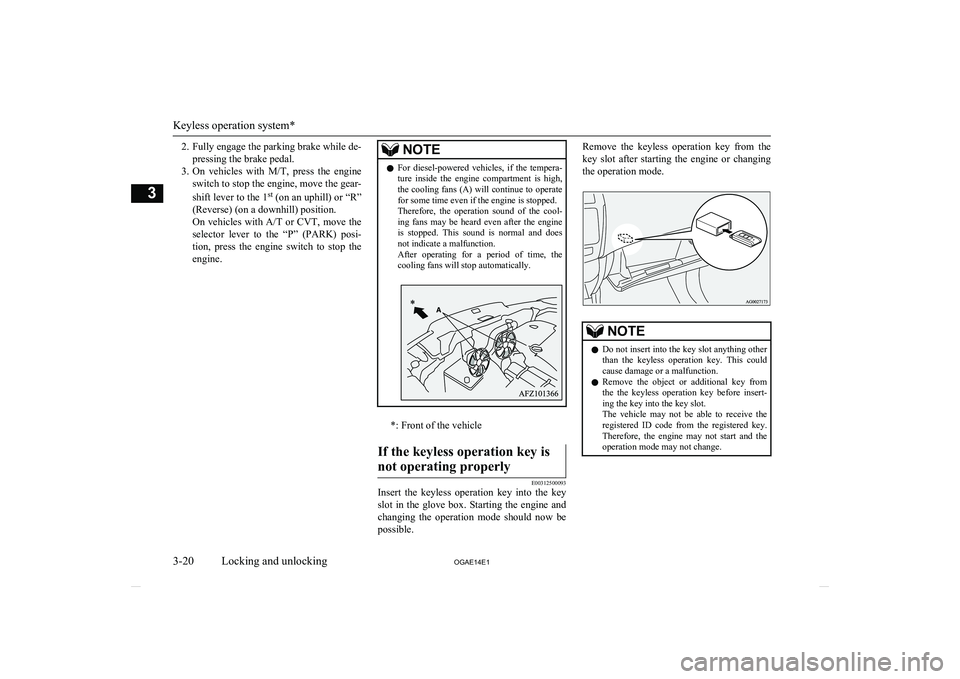
engine.NOTEl For diesel-powered vehicles, if the tempera-
ture inside the engine compartment is high,
the cooling fans (A) will continue to operate for some time even if the engine is stopped.
Therefore, the operation sound of the cool-
ing fans may be heard even after the engine is stopped. This sound is normal and does
not indicate a malfunction.
After operating for a period of time, the cooling fans will stop automatically.
*: Front of the vehicle
If the keyless operation key is
not operating properly
E00312500093
Insert the keyless operation key into the key
slot in the glove box. Starting the engine and changing the operation mode should now be possible.
Remove the keyless operation key from the
key slot after starting the engine or changing the operation mode.NOTEl Do not insert into the key slot anything other
than the keyless operation key. This couldcause damage or a malfunction.
l Remove the object or additional key from
the the keyless operation key before insert-ing the key into the key slot.
The vehicle may not be able to receive the
registered ID code from the registered key.
Therefore, the engine may not start and the
operation mode may not change.
Keyless operation system*
3-20 OGAE14E1Locking and unlocking3
Page 108 of 418
5- mark display screen (when the igni-
tion switch or the operation mode is ON)
® p. 5-09
6- Active Stability Control (ASC) OFF dis- play screen* ® p. 5-09
7- Information screen (when the ignition switch or the operation mode is ON)
® p. 5-10
Interrupt display screen (when the igni-
tion switch or the operation mode is ON)
® p. 5-148- Selector lever position display screen*
® p. 5-15
9- Outside temperature display screen ® p. 5-15
10- Fuel remaining display screen ® p. 5-15
11- Engine coolant temperature display* ® p. 5-11
12- Gearshift indicator display screen* ® p. 6-2213- Auto Stop & Go (AS&G) display
screen* ® p. 6-18
Auto Stop & Go (AS&G) OFF display screen* ® p. 6-22NOTEl The fuel units, temperature units, display language, and other settings can be changed.
Refer to “Changing the function settings (when the ignition switch or the operation mode is ON)” on page 5-19.
l The display screen is different depending on whether the ignition switch or the operation mode is OFF or ON.
Refer to “Information screen (when the ignition switch or the operation mode is OFF)” on page 5-05.
Refer to “Warning display list (when the ignition switch or the operation mode is OFF)” on page 5-29.
Refer to “Information screen (when the ignition switch is turned from the “LOCK” position to the “ON” position or the operation mode is changed from OFF to ON)” on page 5-08.
Refer to “Information screen (when the ignition switch or the operation mode is ON)” on page 5-10.
Refer to “Warning display list (when the ignition switch or the operation mode is ON)” on page 5-32.
Multi-information display
5-04 OGAE14E1Instruments and controls5
Page 123 of 418
Door ajar warning displayscreen (when the ignition switch or the operation mode isON)
E00522600565
Type 1
Type 2
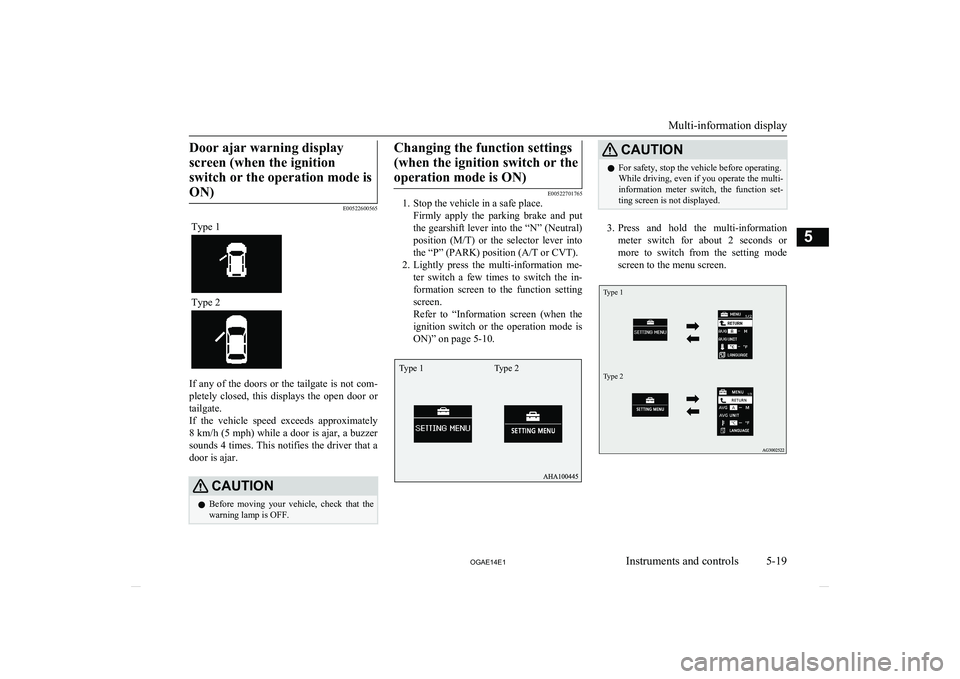
If any of the doors or the tailgate is not com-
pletely closed, this displays the open door or
tailgate.
If the vehicle speed exceeds approximately 8 km/h (5 mph) while a door is ajar, a buzzer
sounds 4 times. This notifies the driver that a
door is ajar.
CAUTIONl Before moving your vehicle, check that the
warning lamp is OFF.Changing the function settings
(when the ignition switch or theoperation mode is ON)
E00522701765
1. Stop the vehicle in a safe place.
Firmly apply the parking brake and put
the gearshift lever into the “N” (Neutral) position ( M/T) or the selector lever into
the “P” (PARK) position (A/T or CVT).
2. Lightly press the multi-information me-
ter switch a few times to switch the in-
formation screen to the function setting screen.
Refer to “Information screen (when the
ignition switch or the operation mode is ON)” on page 5-10.
CAUTIONl For safety, stop the vehicle before operating.
While driving, even if you operate the multi- information meter switch, the function set- ting screen is not displayed.
3. Press and hold the multi-information
meter switch for about 2 seconds or more to switch from the setting mode
screen to the menu screen.
Type 1Type 2
Multi-information display
5-19
OGAE14E1Instruments and controls5 Type 1 Type 2
Page 144 of 418
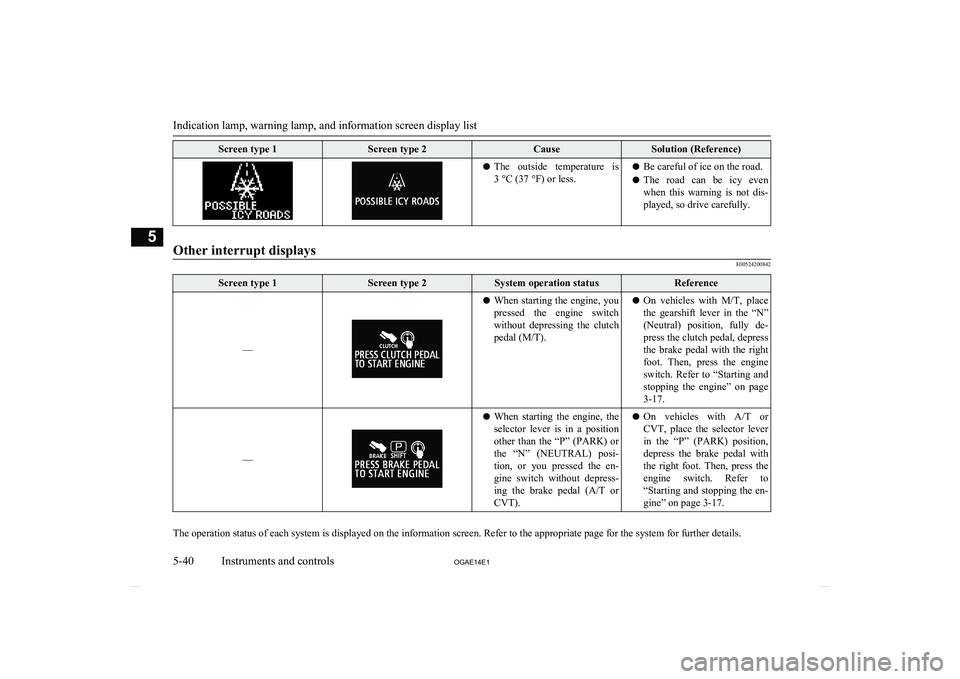
Screen type 1Screen type 2CauseSolution (Reference)lThe outside temperature is
3 °C (37 °F) or less.l Be careful of ice on the road.
l The road can be icy even
when this warning is not dis- played, so drive carefully.
Other interrupt displays
E00524200842
Screen type 1Screen type 2System operation statusReference
––
l When starting the engine, you
pressed the engine switch without depressing the clutch pedal (M/T).l On vehicles with
M/T, place
the gearshift lever in the “N” (Neutral) position, fully de- press the clutch pedal, depressthe brake pedal with the rightfoot. Then, press the engine
switch. Refer to “Starting and stopping the engine” on page
3-17.
––
l When starting the engine, the
selector lever is in a position
other than the “P” (PARK) or
the “N” (NEUTRAL) posi- tion, or you pressed the en-
gine switch without depress-
ing the brake pedal ( A/T or
CVT).l On vehicles with
A/T or
CVT, place the selector lever in the “P” (PARK) position,
depress the brake pedal with the right foot. Then, press the
engine switch. Refer to “Starting and stopping the en- gine” on page 3-17.
The operation status of each system is displayed on the information screen. Refer to the appropriate page for the system for further details.
Indication lamp, warning lamp, and information screen display list
5-40 OGAE14E1Instruments and controls5
Page 160 of 418
NOTElTo turn the rear fog lamp on again, turn the
knob twice in the “ON” direction after turn-ing on the headlamps. (Vehicle with frontfog lamps)Wiper and washer switch
E00507101218CAUTIONlIf the washer is used in cold weather, the
washer fluid sprayed against the glass may
freeze, which may hinder visibility. Warm the glass with the defroster or rear window
demister before using the washer.Windscreen wipers
E00516900648NOTEl To ensure a clear rearward view, the rear
window wiper will automatically perform several continuous operations if the gearshiftlever or the selector lever is put in the “R”
position while the windscreen wipers are op- erating.
Refer to “Rear window wiper and washer” on page 5-60.Except for vehicles equipped
with rain sensor
The windscreen wipers can be operated with
the ignition switch or the operation mode is in ON or ACC.
If the blades are frozen to the windscreen or
rear window, do not operate the wipers until the ice has melted and the blades are freed,
otherwise the wiper motor may be damaged.
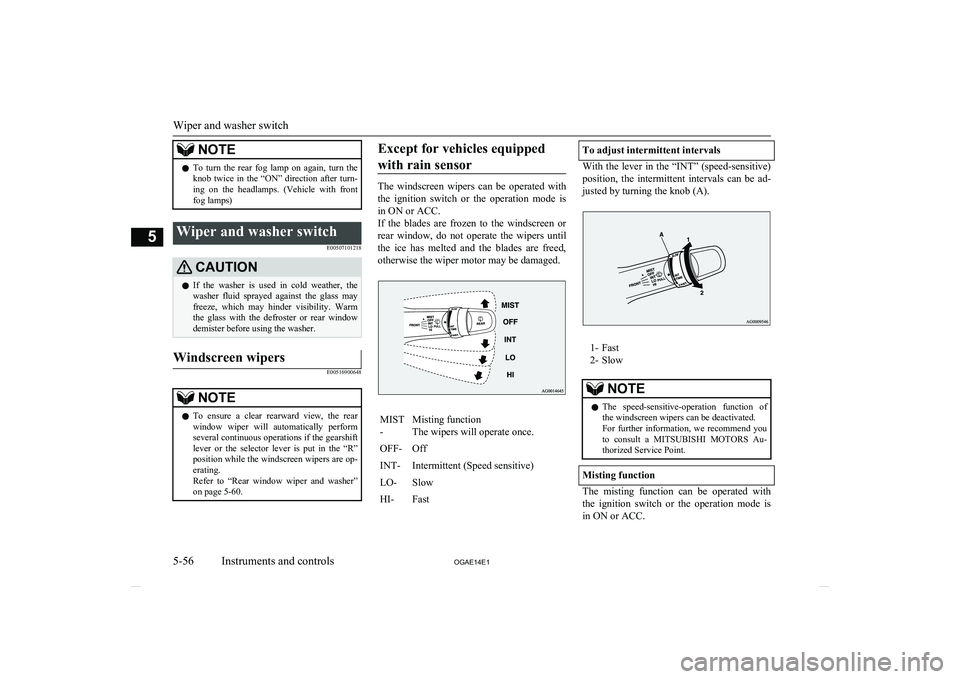
MIST
-Misting function
The wipers will operate once.OFF-OffINT-Intermittent (Speed sensitive)LO-SlowHI-FastTo adjust intermittent intervals
With the lever in the “INT” (speed-sensitive) position, the intermittent intervals can be ad-justed by turning the knob (A).
1- Fast
2- Slow
NOTEl The speed-sensitive-operation function of
the windscreen wipers can be deactivated.
For further information, we recommend you to consult a MITSUBISHI MOTORS Au-
thorized Service Point.
Misting function
The misting function can be operated with
the ignition switch or the operation mode isin ON or ACC.
Wiper and washer switch
5-56 OGAE14E1Instruments and controls5