reset MITSUBISHI ASX 2018 (in English) User Guide
[x] Cancel search | Manufacturer: MITSUBISHI, Model Year: 2018, Model line: ASX, Model: MITSUBISHI ASX 2018Pages: 514, PDF Size: 34.89 MB
Page 130 of 514
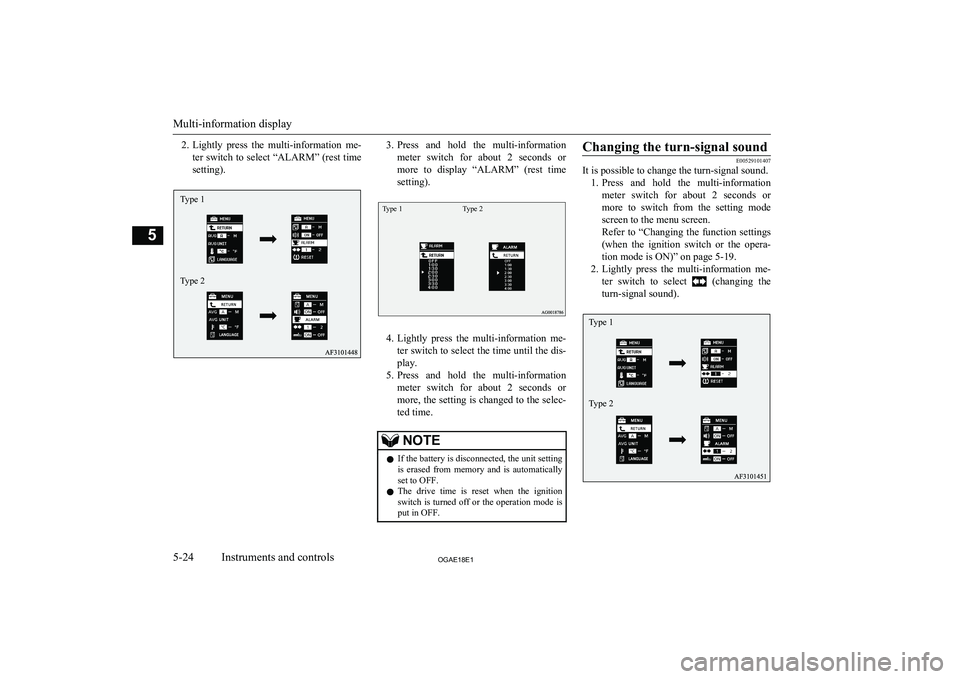
2.Lightly press the multi-information me-
ter switch to select “ALARM” (rest time
setting).3. Press and hold the multi-information
meter switch for about 2 seconds or more to display “ALARM” (rest time
setting).Type 1Type 2
4. Lightly press the multi-information me-
ter switch to select the time until the dis- play.
5. Press and hold the multi-information
meter switch for about 2 seconds or more, the setting is changed to the selec- ted time.
NOTEl If the battery is disconnected, the unit setting
is erased from memory and is automatically
set to OFF.
l The drive time is reset when the ignition
switch is turned off or the operation mode is
put in OFF.Changing the turn-signal sound
E00529101407
It is possible to change the turn-signal sound.
1. Press and hold the multi-information
meter switch for about 2 seconds or more to switch from the setting mode
screen to the menu screen.
Refer to “Changing the function settings (when the ignition switch or the opera- tion mode is ON)” on page 5-19.
2. Lightly press the multi-information me-
ter switch to select
(changing the
turn-signal sound).
Multi-information display
5-24OGAE18E1Instruments and controls5Type 1
Type 2 Type 1
Type 2
Page 131 of 514
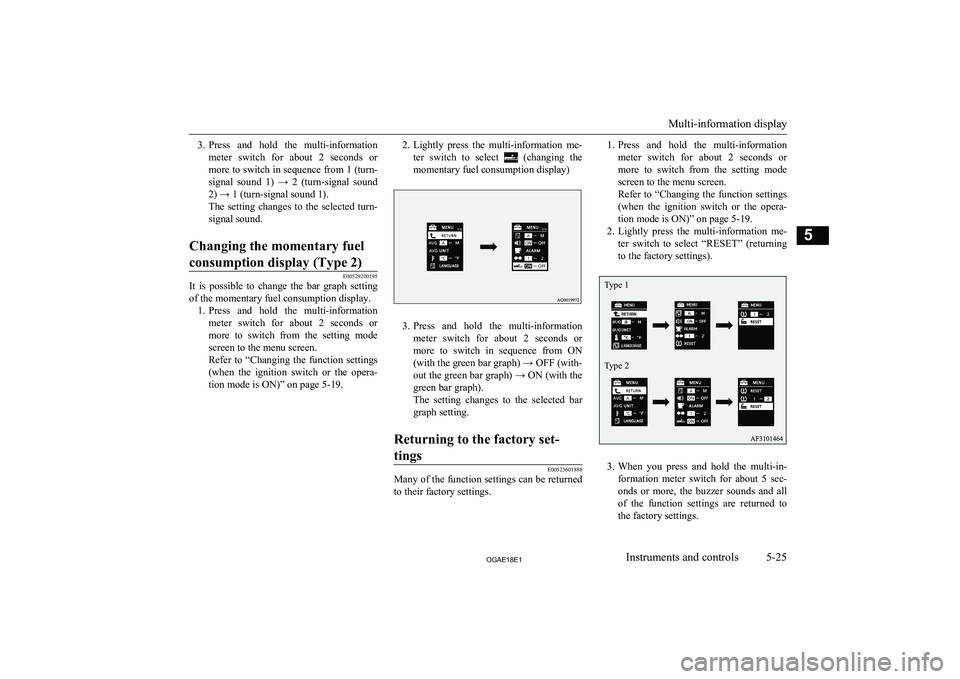
3.Press and hold the multi-information
meter switch for about 2 seconds or more to switch in sequence from 1 (turn- signal sound 1) → 2 (turn-signal sound
2) → 1 (turn-signal sound 1).
The setting changes to the selected turn- signal sound.Changing the momentary fuel
consumption display (Type 2)
E00529200195
It is possible to change the bar graph setting of the momentary fuel consumption display. 1. Press and hold the multi-information
meter switch for about 2 seconds ormore to switch from the setting mode
screen to the menu screen.
Refer to “Changing the function settings (when the ignition switch or the opera-
tion mode is ON)” on page 5-19.
2. Lightly press the multi-information me-
ter switch to select
(changing the
momentary fuel consumption display)
3. Press and hold the multi-information
meter switch for about 2 seconds or more to switch in sequence from ON(with the green bar graph) → OFF (with-
out the green bar graph) → ON (with the green bar graph).
The setting changes to the selected bar
graph setting.
Returning to the factory set-
tings
E00523601888
Many of the function settings can be returned
to their factory settings.
1. Press and hold the multi-information
meter switch for about 2 seconds or more to switch from the setting mode
screen to the menu screen.
Refer to “Changing the function settings (when the ignition switch or the opera- tion mode is ON)” on page 5-19.
2. Lightly press the multi-information me-
ter switch to select “RESET” (returning to the factory settings).
3. When you press and hold the multi-in-
formation meter switch for about 5 sec-
onds or more, the buzzer sounds and all of the function settings are returned to
the factory settings.
Multi-information display
5-25OGAE18E1Instruments and controls5 Type 1
Type 2
Page 132 of 514
NOTElThe factory settings are as follows.
• Average fuel consumption and average
speed reset mode: A (Auto reset)
• Fuel consumption display unit: L/100 km
• Temperature unit: °C (Celsius)
• Display language: ENGLISH or RUSSI-
ANNOTE• Cooperative language setting: A
• Operation sounds: ON (Operation sounds
on)
• “REST REMINDER” display: OFF
• Turn-signal sound: Turn-signal sound 1NOTE•Momentary fuel consumption with the
green bar graph (Type 2): ON
l The low tyre pressure warning threshold and
tyre ID set cannot be returned to their facto- ry settings.Indication lamp, warning lamp, and information screen display list
E00523700013
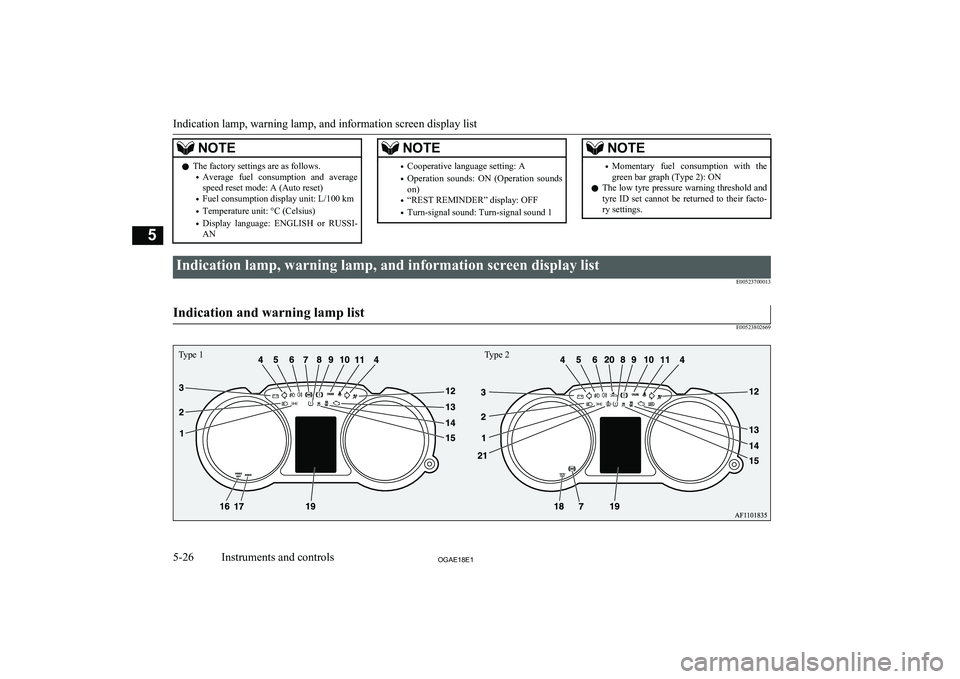
Indication and warning lamp list
E00523802669
Indication lamp, warning lamp, and information screen display list
5-26OGAE18E1Instruments and controls5 Type 1Type 2
Page 151 of 514
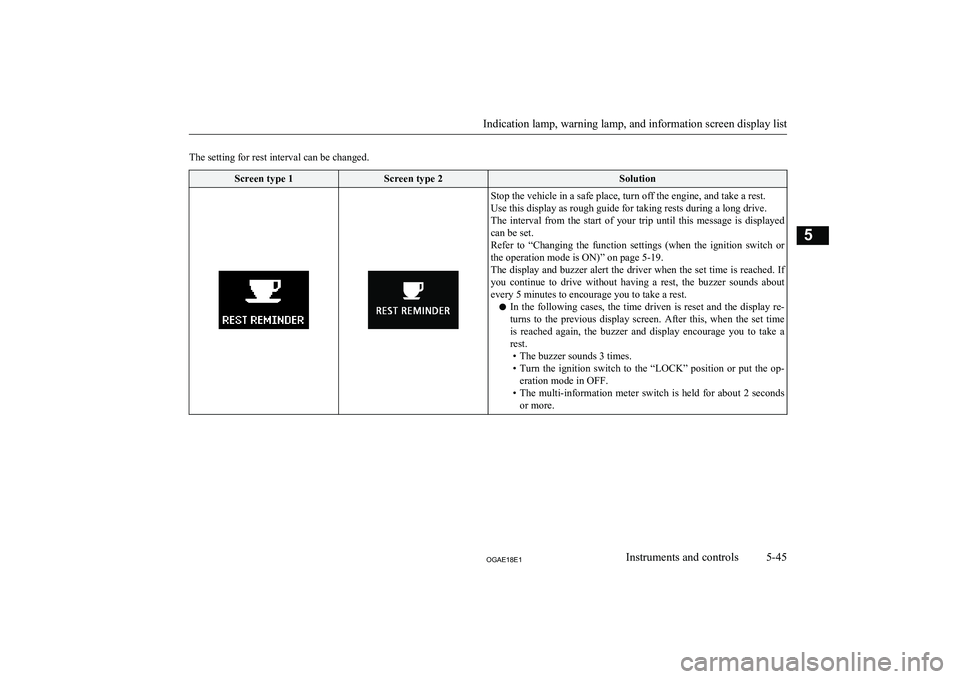
The setting for rest interval can be changed.Screen type 1Screen type 2SolutionStop the vehicle in a safe place, turn off the engine, and take a rest.
Use this display as rough guide for taking rests during a long drive.
The interval from the start of your trip until this message is displayed
can be set.
Refer to “Changing the function settings (when the ignition switch or the operation mode is ON)” on page 5-19.
The display and buzzer alert the driver when the set time is reached. If you continue to drive without having a rest, the buzzer sounds about every 5 minutes to encourage you to take a rest.
l In the following cases, the time driven is reset and the display re-
turns to the previous display screen. After this, when the set time
is reached again, the buzzer and display encourage you to take a rest.
• The buzzer sounds 3 times.
• Turn the ignition switch to the “LOCK” position or put the op-
eration mode in OFF.
• The multi-information meter switch is held for about 2 seconds
or more.
Indication lamp, warning lamp, and information screen display list
5-45OGAE18E1Instruments and controls5
Page 193 of 514
NOTE•Electric power consumption is high, such
as when the rear window demister or oth-
er electrical components are operating or
the blower speed is set to a high setting.
• Battery voltage or battery performance is
low.
• Check engine warning lamp is illuminated
or the “
” display/indicator is blinking.
l Do not rest your foot on the clutch pedal
while driving because this will cause detec-
tion of clutch pedal malfunction and blink-
ing of Auto Stop & Go (AS&G) OFF dis- play/indicator, and the Auto Stop & Go
(AS&G) system will not operate.
l If the Auto Stop & Go (AS&G) system oper-
ates while the air conditioning is operating,
both the engine and the air conditioning
compressor will stop. Therefore, the wind- screen and door windows may mist up be-
cause only the blower will operate.
If the windscreen and door windows mist up,
set the mode selection dial to “
” to restart
the engine.
→ “Mode selection dial” on page 7-03
l If the windscreen and door windows mist up
every time the engine stops, it is recommen-
ded to deactivate the Auto Stop & Go
(AS&G) system by pressing the “Auto Stop & Go (AS&G) OFF” switch.
→ “To deactivate” on page 6-22
l If the air conditioning is operating, set the
temperature control dial higher to lengthen
the time that the engine is stopped automati- cally.
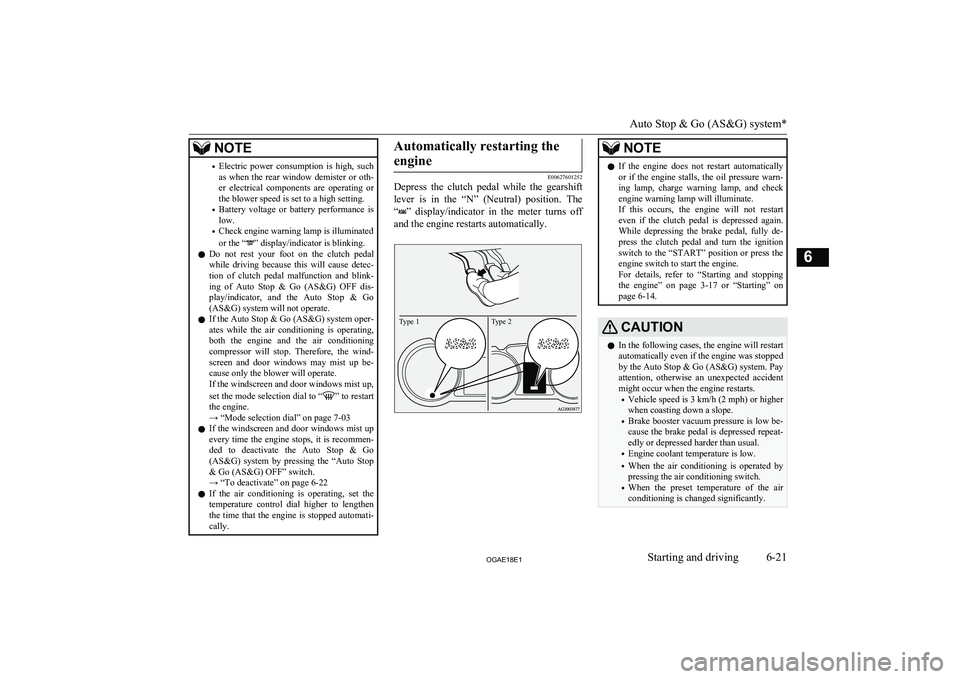
Automatically restarting the
engine
E00627601252
Depress the clutch pedal while the gearshift
lever is in the “N” (Neutral) position. The
“
” display/indicator in the meter turns off
and the engine restarts automatically.
Type 2Type 1
NOTEl If the engine does not restart automatically
or if the engine stalls, the oil pressure warn- ing lamp, charge warning lamp, and check
engine warning lamp will illuminate.
If this occurs, the engine will not restart even if the clutch pedal is depressed again. While depressing the brake pedal, fully de-
press the clutch pedal and turn the ignition switch to the “START” position or press the
engine switch to start the engine.
For details, refer to “Starting and stopping the engine” on page 3-17 or “Starting” on
page 6-14.CAUTIONl In the following cases, the engine will restart
automatically even if the engine was stopped
by the Auto Stop & Go (AS&G) system. Pay attention, otherwise an unexpected accidentmight occur when the engine restarts.
• Vehicle speed is 3 km/h (2 mph) or higher
when coasting down a slope.
• Brake booster vacuum pressure is low be-
cause the brake pedal is depressed repeat- edly or depressed harder than usual.
• Engine coolant temperature is low.
• When the air conditioning is operated by
pressing the air conditioning switch.
• When the preset temperature of the air
conditioning is changed significantly.
Auto Stop & Go (AS&G) system*
6-21OGAE18E1Starting and driving6
Page 243 of 514
CAUTION•When the vehicle is moving in a place
where lane markings are interrupted, such
as a toll booth entrance and motorway junction.
• When running on a road portion with in-
completely removed old lane markings, shadows, lingering snow, truck-like pud-
dles mistakable for lane markings (espe- cially after the rain when road surface is reflecting light) or similar confusing fac-
tors.
• When running in a lane other than the
cruising lane and passing lane.
• When running beside a closed lane sec-
tion or in a provisional lane in a traffic work zone.
• When running in an extremely narrow
lane.
• When the following distance between
your vehicle and a vehicle in front be- comes extremely reduced (especially
when a marking is hidden by a vehicle in front this is running too close to the mark- ing).
• When entering a junction or other point of
road where lanes are laid out complicated-
ly.
• When passing a road section where the
number of lanes increases/decreases or multiple lanes are crossing each other.
• When the lane is marked by double or
otherwise special lines.
• When driving on a winding or rough road.CAUTION•When driving on a slippery road covered
by rain water, snow, ice, etc.
• When passing through a place where the
brightness suddenly changes, like the inlet or outlet of a tunnel.
• When turning steep curves.
• When the road surface is reflecting the
light shining from the direction opposite
to the running direction.
• Vehicle largely lurches when it is running
over steps or other irregularities of the
road surface.
• When the headlamp illumination is inade-
quate because of contaminated or deterio-
rated lenses or improperly aimed head- lamps.
• When the vehicle is leaning much to one
side due to heavy luggage on it or improp-
erly adjusted tyre pressures.
• When oncoming vehicles’ headlamps
shine the sensor.
• When the vehicle is equipped with non-
standard tyres (including excessively worn tyres and temporary spare tyre),uses snow traction device (tyre chains), or
has non-specified components such as a modified suspension.
• When the windscreen is covered with wa-
ter droplets, snow, dust, etc.
l Follow the instructions given below to keep
your LDW in good operating conditions.
• Always keep the windscreen clean.CAUTION•Avoid applying a strong shock or pressure
to the sensor. Do not attempt to detach or disassemble it.
• Do not put anything like a sticker on the
area in front of the sensor of the wind- screen.
• Use only
MITSUBISHI MOTORS GEN-
UINE parts when replacing the wind- screen wipers.Tyre pressure monitoring
system (TPMS)* E00637100279
The tyre pressure monitoring system (TPMS)
uses tyre inflation pressure sensors (A) on the wheels to monitor the tyre inflation pressures.
The system only indicates when a tyre is sig-
nificantly under-inflated.
The base tyre pressure can be set at desired value by the driver with the reset function ex-
ecution. (The low pressure warning threshold is set based on the reset.)
Tyre pressure monitoring system (TPMS)*
6-71OGAE18E1Starting and driving6
Page 248 of 514
NOTElTyre inflation pressures vary with the ambi-
ent temperature. If the vehicle is subjected to large variations in ambient temperature, the tyre inflation pressures may be low (causing
the warning lamp/display to come on) when the ambient temperature is relatively low. If the warning lamp/display comes on, adjustthe tyre inflation pressure.Whenever the tyres and wheels
are replaced with new ones
E00637400025
If new wheels with new tyre inflation pres- sure sensors are installed, their ID codes must be programmed into the tyre pressure moni- toring system. Have tyre and wheel replace-
ment performed by a MITSUBISHI
MOTORS Authorized Service Point to avoid
the risk of damaging the tyre inflation pres- sure sensors. If the wheel replacement is not
done by a MITSUBISHI MOTORS Author-
ized Service Point, it is not covered by your warranty.
CAUTIONl The use of non-genuine wheels will prevent
the proper fit of the tyre inflation pressure sensors, resulting air leakage or damage of
the sensors.Reset of low tyre pressure
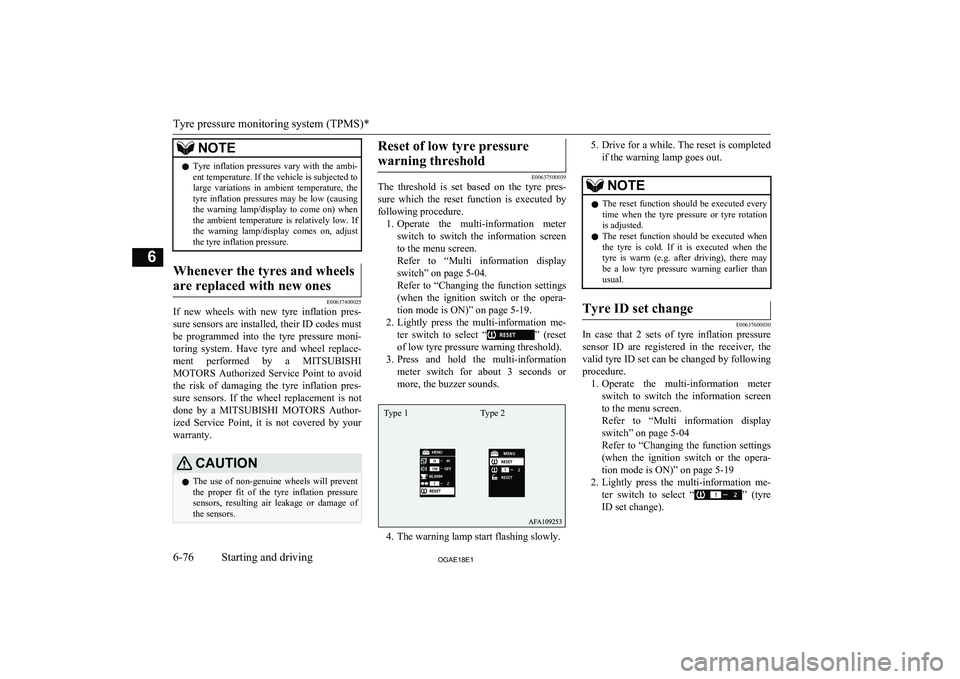
warning threshold
E00637500039
The threshold is set based on the tyre pres-
sure which the reset function is executed by
following procedure. 1. Operate the multi-information meter
switch to switch the information screen
to the menu screen.
Refer to “Multi information display switch” on page 5-04.
Refer to “Changing the function settings (when the ignition switch or the opera- tion mode is ON)” on page 5-19.
2. Lightly press the multi-information me-
ter switch to select “
” (reset
of low tyre pressure warning threshold).
3. Press and hold the multi-information
meter switch for about 3 seconds or more, the buzzer sounds.
4. The warning lamp start flashing slowly.
5. Drive for a while. The reset is completed
if the warning lamp goes out.NOTEl The reset function should be executed every
time when the tyre pressure or tyre rotationis adjusted.
l The reset function should be executed when
the tyre is cold. If it is executed when the
tyre is warm (e.g. after driving), there may be a low tyre pressure warning earlier than
usual.Tyre ID set change
E00637600030
In case that 2 sets of tyre inflation pressure
sensor ID are registered in the receiver, the
valid tyre ID set can be changed by following
procedure. 1. Operate the multi-information meter
switch to switch the information screen
to the menu screen.
Refer to “Multi information display switch” on page 5-04
Refer to “Changing the function settings (when the ignition switch or the opera-
tion mode is ON)” on page 5-19
2. Lightly press the multi-information me-
ter switch to select “
” (tyre
ID set change).
Tyre pressure monitoring system (TPMS)*
6-76OGAE18E1Starting and driving6 Type 1 Type 2
Page 249 of 514
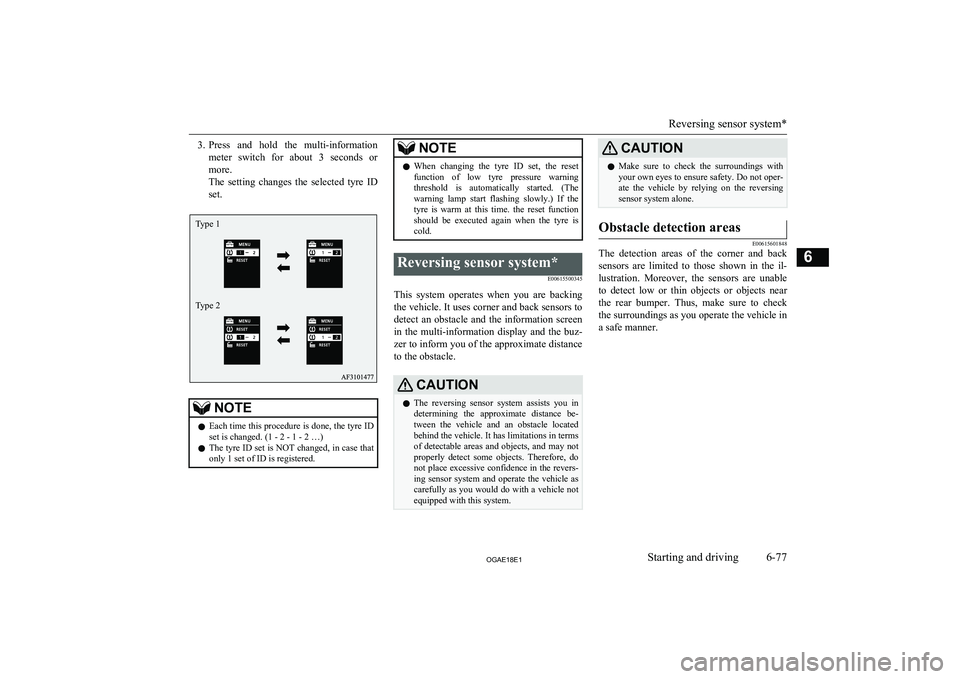
3.Press and hold the multi-information
meter switch for about 3 seconds or more.
The setting changes the selected tyre ID set.NOTEl Each time this procedure is done, the tyre ID
set is changed. (1 - 2 - 1 - 2 …)
l The tyre ID set is NOT changed, in case that
only 1 set of ID is registered.NOTEl When changing the tyre ID set, the reset
function of low tyre pressure warning threshold is automatically started. (The
warning lamp start flashing slowly.) If the
tyre is warm at this time. the reset function should be executed again when the tyre iscold.Reversing sensor system*
E00615500345
This system operates when you are backingthe vehicle. It uses corner and back sensors to detect an obstacle and the information screen
in the multi-information display and the buz-
zer to inform you of the approximate distance to the obstacle.
CAUTIONl The reversing sensor system assists you in
determining the approximate distance be-
tween the vehicle and an obstacle located behind the vehicle. It has limitations in terms
of detectable areas and objects, and may not
properly detect some objects. Therefore, do not place excessive confidence in the revers-
ing sensor system and operate the vehicle as carefully as you would do with a vehicle not equipped with this system.CAUTIONl Make sure to check the surroundings with
your own eyes to ensure safety. Do not oper-
ate the vehicle by relying on the reversing sensor system alone.Obstacle detection areas
E00615601848
The detection areas of the corner and back
sensors are limited to those shown in the il-
lustration. Moreover, the sensors are unable to detect low or thin objects or objects nearthe rear bumper. Thus, make sure to check
the surroundings as you operate the vehicle in a safe manner.
Reversing sensor system*
6-77OGAE18E1Starting and driving6Type 1
Type 2
Page 282 of 514
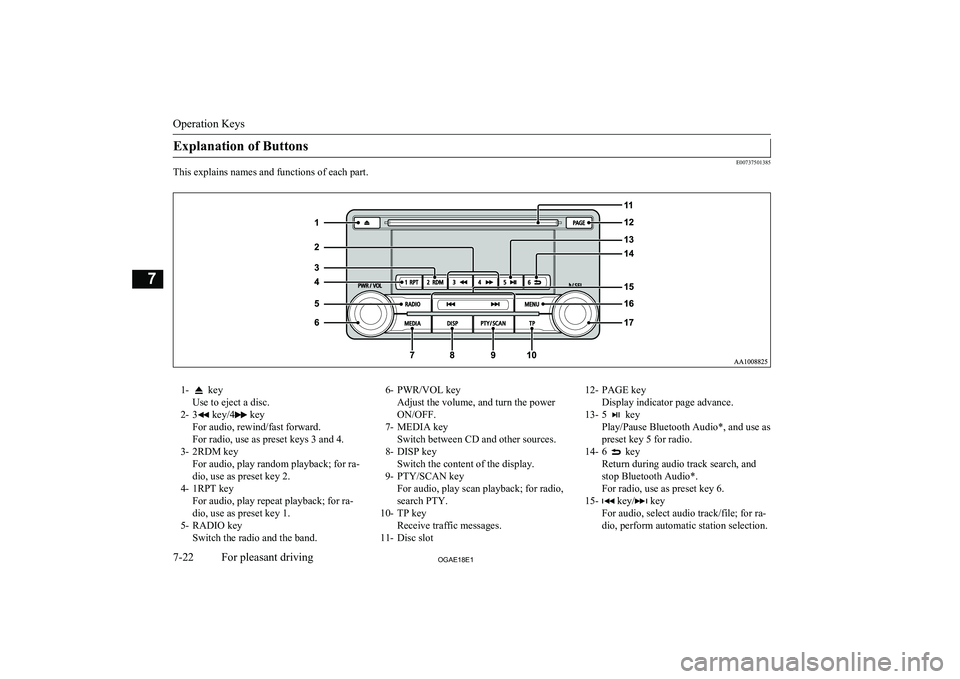
Explanation of Buttons
E00737501385
This explains names and functions of each part.
1- key
Use to eject a disc.
2- 3
key/4 key
For audio, rewind/fast forward.
For radio, use as preset keys 3 and 4.
3- 2RDM key For audio, play random playback; for ra-
dio, use as preset key 2.
4- 1RPT key For audio, play repeat playback; for ra-dio, use as preset key 1.
5- RADIO key Switch the radio and the band.
6- PWR/VOL key
Adjust the volume, and turn the power
ON/OFF.
7- MEDIA key Switch between CD and other sources.
8- DISP key Switch the content of the display.
9- PTY/SCAN key For audio, play scan playback; for radio,
search PTY.
10- TP key Receive traffic messages.
11- Disc slot12- PAGE key
Display indicator page advance.
13- 5
key
Play/Pause Bluetooth Audio*, and use as preset key 5 for radio.
14- 6
key
Return during audio track search, and stop Bluetooth Audio*.
For radio, use as preset key 6.
15-
key/ key
For audio, select audio track/file; for ra-
dio, perform automatic station selection.
Operation Keys
7-22OGAE18E1For pleasant driving7
Page 284 of 514
/SEL key
(counter-
clockwise)Reduces the frequency being
received./SEL key
(clockwise)Increases the frequency be-
ing received. key
(hold down)Release the button to start
seek station selection, and
when a station is received,
scanning stops. key
(hold down)
Preset Memory
Register the broadcast station in advance, and select this at a later time.
1. Tune in to the frequency to register.
2. Hold down any of the keys from the
1RPT key to the 6
key.
A “Beep” sounds, and the preset key is registered.
NOTEl The preset memory can register a maximum
of 6 stations for each band (FM1, FM2,
FM3).
l If a preset key that already has a station reg-
istered is selected, then this is overwritten with the new preset.NOTEl Pressing the preset key will select the previ-
ously registered frequency.
Auto Memory (Auto Store)
The top 6 stations with a strong signal can be
automatically registered in order with preset keys.
Hold down the RADIO key.
After completion of auto store operations, the product will receive the station registered in
the preset key [1].
CAUTIONl Please be aware that the formerly-registered
frequency in the memory will be overwrit- ten.NOTEl Using auto store for FM1 and FM2 switches
to FM3.
PTY Search
Select PTY (program content), and automati-
cally scan for stations.
1. During FM reception, press the PTY/
SCAN key.
This switches to the PTY selection mode.
2. Turn the
/SEL key to select PTY.
The PTY (program content) indicator
will flash, and station selection will au- tomatically start. When a station is re-
ceived, the station name is displayed.
NOTEl This receives the station detected first.
l 10 seconds after reception, PTY search
mode will be cancelled.Listen to DAB*
E00739100014
This explains how to listen to DAB.
To listen to DAB
1. Press the RADIO key to switch the
band.
Switch between DAB1, DAB2, and DAB3 bands.
The selected band is indicated on the display.
Listen to DAB*
7-24OGAE18E1For pleasant driving7