display MITSUBISHI CARISMA 2000 1.G User Guide
[x] Cancel search | Manufacturer: MITSUBISHI, Model Year: 2000, Model line: CARISMA, Model: MITSUBISHI CARISMA 2000 1.GPages: 280, PDF Size: 2.32 MB
Page 95 of 280
INSTRUMENTS AND CONTROLS
4–29
D92I001a
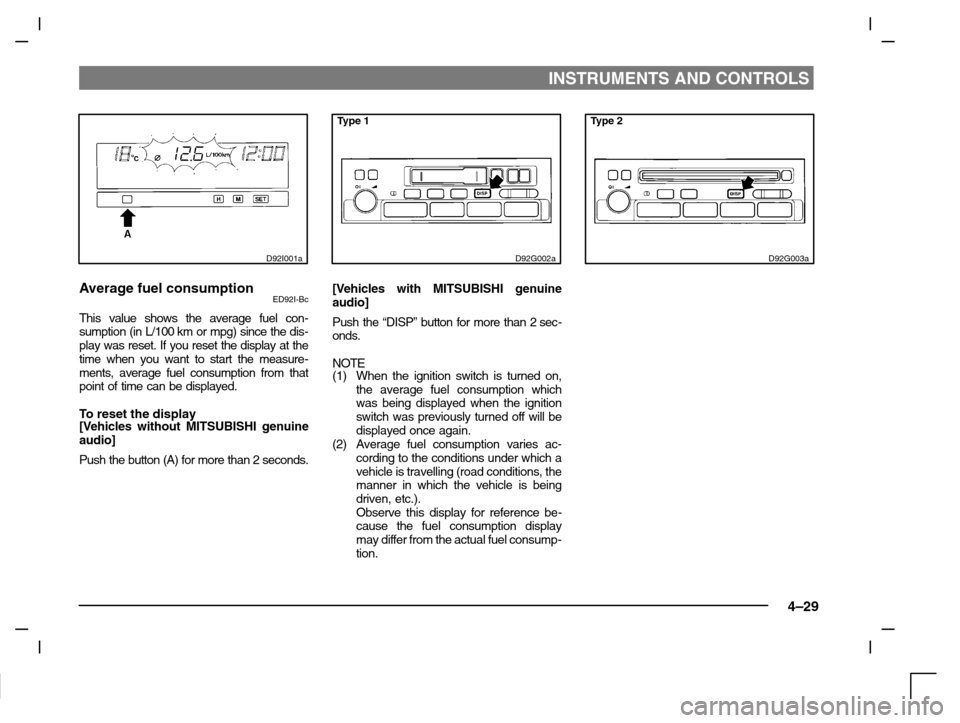
Average fuel consumptionED92I-Bc
This value shows the average fuel con-
sumption (in L/100 km or mpg) since the dis-
play was reset. If you reset the display at the
time when you want to start the measure-
ments, average fuel consumption from that
point of time can be displayed.
To reset the display[Vehicles without MITSUBISHI genuine
audio]
Push the button (A) for more than 2 seconds.
Type 1
D92G002a
[Vehicles with MITSUBISHI genuine
audio]
Push the “DISP” button for more than 2 sec-
onds.
NOTE
(1) When the ignition switch is turned on,
the average fuel consumption which
was being displayed when the ignition
switch was previously turned off will be
displayed once again.
(2) Average fuel consumption varies ac-
cording to the conditions under which a
vehicle is travelling (road conditions, the
manner in which the vehicle is being
driven, etc.).
Observe this display for reference be-
cause the fuel consumption display
may differ from the actual fuel consump-
tion.
Type 2
D92G003a
Page 96 of 280
INSTRUMENTS AND CONTROLS
4–30
D92C032a
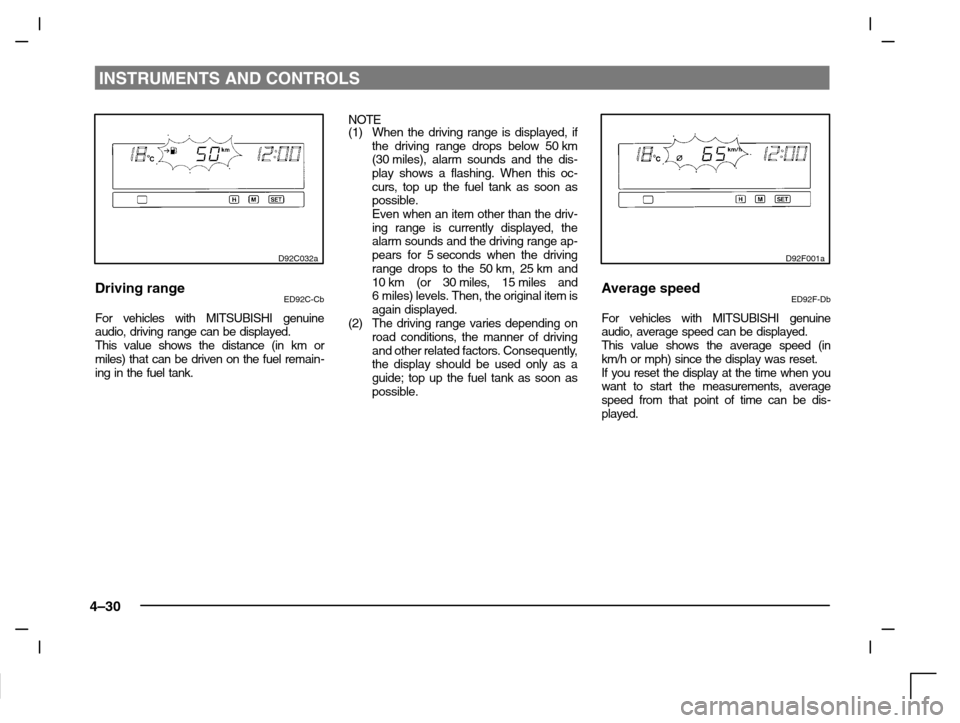
Driving rangeED92C-Cb
For vehicles with MITSUBISHI genuine
audio, driving range can be displayed.
This value shows the distance (in km or
miles) that can be driven on the fuel remain-
ing in the fuel tank.NOTE
(1) When the driving range is displayed, if
the driving range drops below 50 km
(30 miles), alarm sounds and the dis-
play shows a flashing. When this oc-
curs, top up the fuel tank as soon as
possible.
Even when an item other than the driv-
ing range is currently displayed, the
alarm sounds and the driving range ap-
pears for 5 seconds when the driving
range drops to the 50 km, 25 km and
10 km (or 30 miles, 15 miles and
6 miles) levels. Then, the original item is
again displayed.
(2) The driving range varies depending on
road conditions, the manner of driving
and other related factors. Consequently,
the display should be used only as a
guide; top up the fuel tank as soon as
possible.
D92F001a
Average speedED92F-Db
For vehicles with MITSUBISHI genuine
audio, average speed can be displayed.
This value shows the average speed (in
km/h or mph) since the display was reset.
If you reset the display at the time when you
want to start the measurements, average
speed from that point of time can be dis-
played.
Page 97 of 280
INSTRUMENTS AND CONTROLS
4–31
Type 1
D92G002a
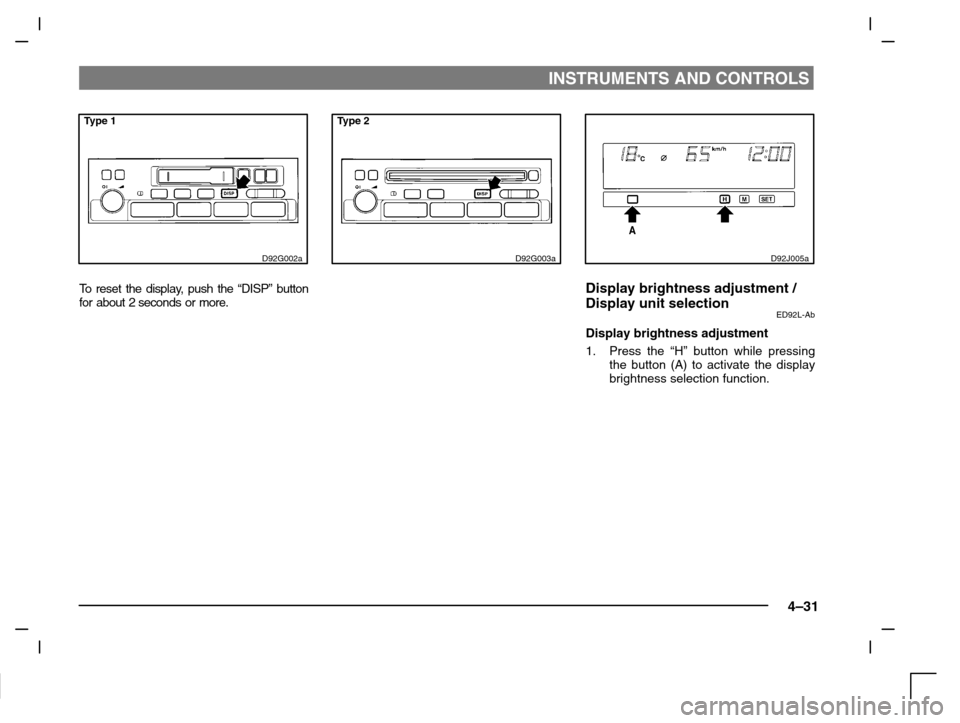
To r e s e t the display, push the “DISP” button
for about 2 seconds or more.
Type 2
D92G003aD92J005a
Display brightness adjustment /
Display unit selection
ED92L-Ab
Display brightness adjustment
1. Press the “H” button while pressing
the button (A) to activate the display
brightness selection function.
Page 98 of 280
INSTRUMENTS AND CONTROLS
4–32
D92J006a
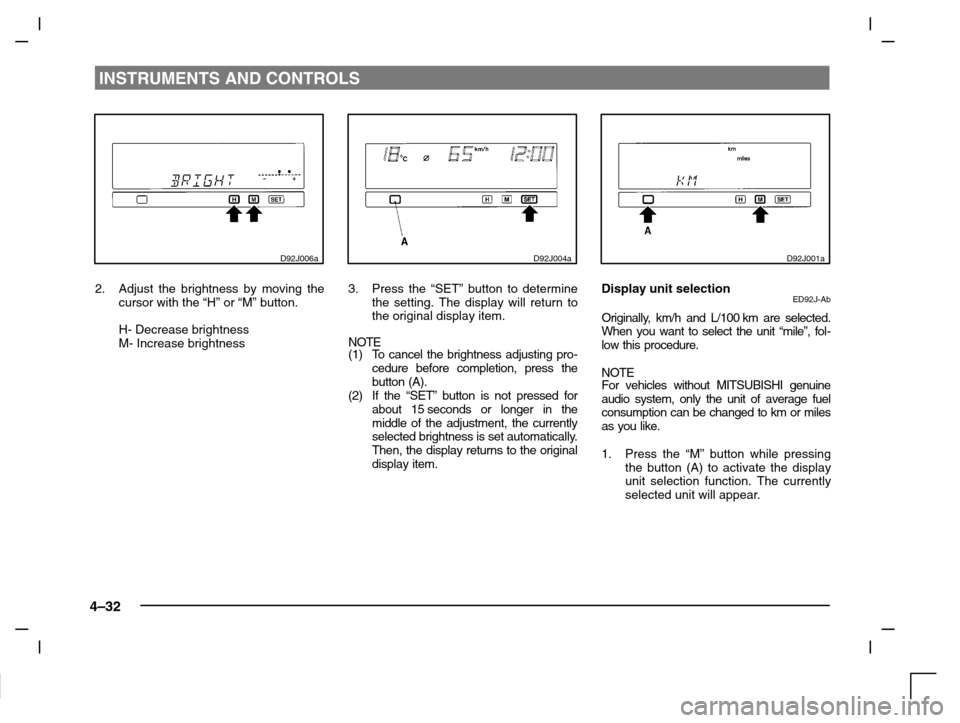
2. Adjust the brightness by moving the
cursor with the “H” or “M” button.
H- Decrease brightness
M- Increase brightness
D92J004a
3. Press the “SET” button to determine
the setting. The display will return to
the original display item.
NOTE
(1) To cancel the brightness adjusting pro-
cedure before completion, press the
button (A).
(2) If the “SET” button is not pressed for
about 15 seconds or longer in the
middle of the adjustment, the currently
selected brightness is set automatically.
Then, the display returns to the original
display item.
D92J001a
Display unit selectionED92J-Ab
Originally, km/h and L/100 km are selected.
When you want to select the unit “mile”, fol-
low this procedure.
NOTE
For vehicles without MITSUBISHI genuine
audio system, only the unit of average fuel
consumption can be changed to km or miles
as you like.
1. Press the “M” button while pressing
the button (A) to activate the display
unit selection function. The currently
selected unit will appear.
Page 99 of 280
INSTRUMENTS AND CONTROLS
4–33
D92J002a
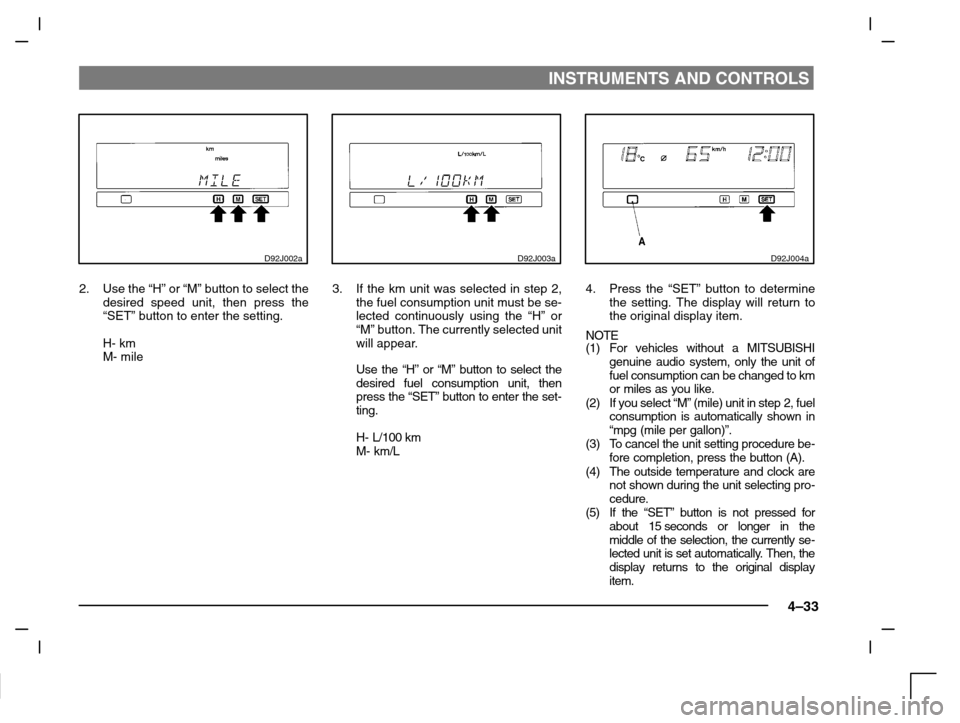
2. Use the “H” or “M” button to select the
desired speed unit, then press the
“SET” button to enter the setting.
H- km
M- mile
D92J003a
3. If the km unit was selected in step 2,
the fuel consumption unit must be se-
lected continuously using the “H” or
“M” button. The currently selected unit
will appear.
Use the “H” or “M” button to select the
desired fuel consumption unit, then
press the “SET” button to enter the set-
ting.
H- L/100 km
M- km/L
D92J004a
4. Press the “SET” button to determine
the setting. The display will return to
the original display item.
NOTE
(1) For vehicles without a MITSUBISHI
genuine audio system, only the unit of
fuel consumption can be changed to km
or miles as you like.
(2) If you select “M” (mile) unit in step 2, fuel
consumption is automatically shown in
“mpg (mile per gallon)”.
(3) To cancel the unit setting procedure be-
fore completion, press the button (A).
(4) The outside temperature and clock are
not shown during the unit selecting pro-
cedure.
(5) If the “SET” button is not pressed for
about 15 seconds or longer in the
middle of the selection, the currently se-
lected unit is set automatically. Then, the
display returns to the original display
item.
Page 102 of 280
STARTING AND DRIVING
5–2
Running-in
recommendations
EA01AMKi
During the running-in period for the first
1,000 km, it is advisable to drive your new
vehicle using the following precautions as a
guideline to aid long life as well as future
economy and performance.
(1) Do not race the engine at high speeds.
(2) Avoid rapid starting, accelerating, brak-
ing and prolonged high-speed running.
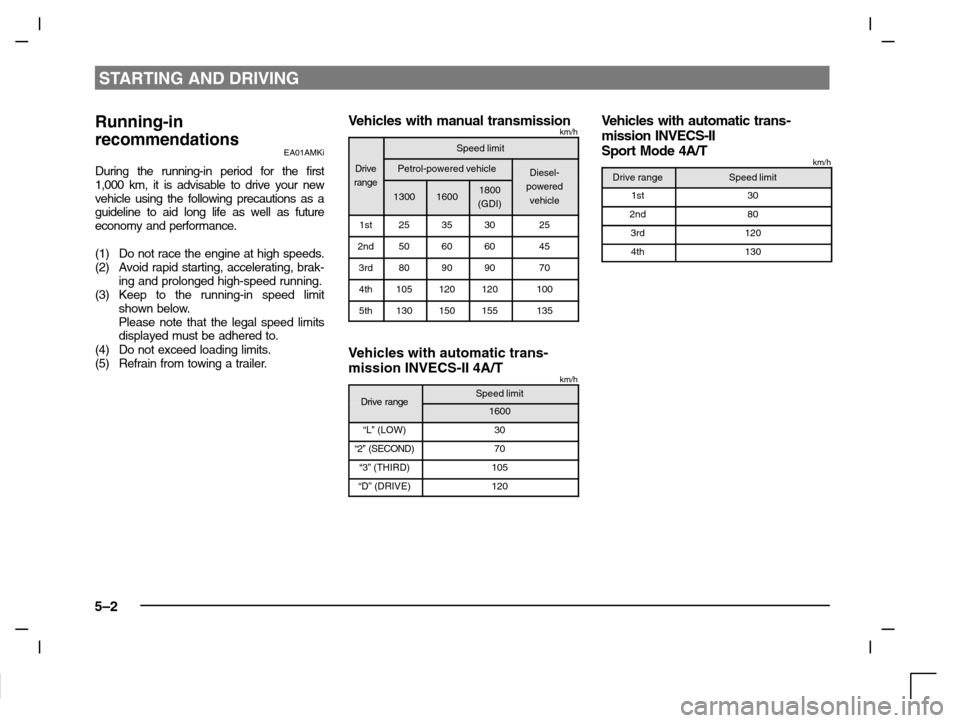
(3) Keep to the running-in speed limit
shown below.
Please note that the legal speed limits
displayed must be adhered to.
(4) Do not exceed loading limits.
(5) Refrain from towing a trailer.
Ve h i c les with manual transmissionkm/h
Speed limit
DrivePetrol-powered vehicleDiesel-range
130016001800
(GDI)powered
vehicle
1st25353025
2nd50606045
3rd80909070
4th105120120100
5th130150155135
Vehicles with automatic trans-
mission INVECS-II 4A/T
km/h
Drive rangeSpeed limitDrive range1600
“L” (LOW)30
“2” (SECOND)70
“3” (THIRD)105
“D” (DRIVE)120
Ve h i c les with automatic trans-
mission INVECS-II
Sport Mode 4A/T
km/h
Drive rangeSpeed limit
1st30
2nd80
3rd120
4th130
Page 142 of 280
FOR PLEASANT DRIVING
6–2
H11A319d
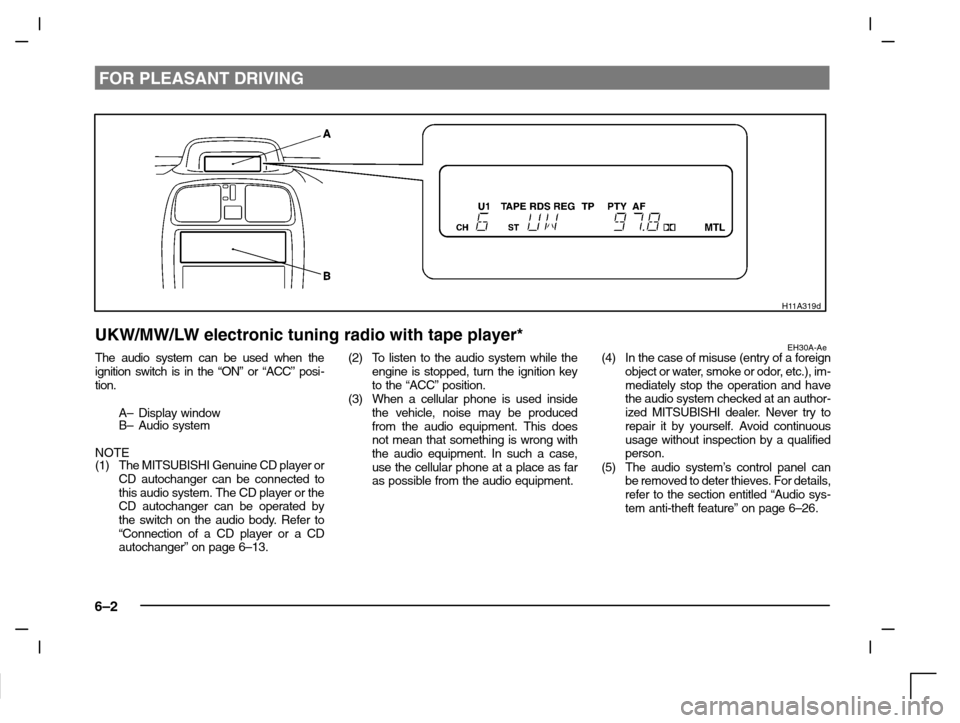
UKW/MW/LW electronic tuning radio with tape player*EH30A-AeThe audio system can be used when the
ignition switch is in the “ON” or “ACC” posi-
tion.
A– Display window
B– Audio system
NOTE
(1) The MITSUBISHI Genuine CD player or
CD autochanger can be connected to
this audio system. The CD player or the
CD autochanger can be operated by
the switch on the audio body. Refer to
“Connection of a CD player or a CD
autochanger” on page 6–13.(2) To listen to the audio system while the
engine is stopped, turn the ignition key
to the “ACC” position.
(3) When a cellular phone is used inside
the vehicle, noise may be produced
from the audio equipment. This does
not mean that something is wrong with
the audio equipment. In such a case,
use the cellular phone at a place as far
as possible from the audio equipment.(4) In the case of misuse (entry of a foreign
object or water, smoke or odor, etc.), im-
mediately stop the operation and have
the audio system checked at an author-
ized MITSUBISHI dealer. Never try to
repair it by yourself. Avoid continuous
usage without inspection by a qualified
person.
(5) The audio system’s control panel can
be removed to deter thieves. For details,
refer to the section entitled “Audio sys-
tem anti-theft feature” on page 6–26.
Page 143 of 280
FOR PLEASANT DRIVING
6–3
H11A323d
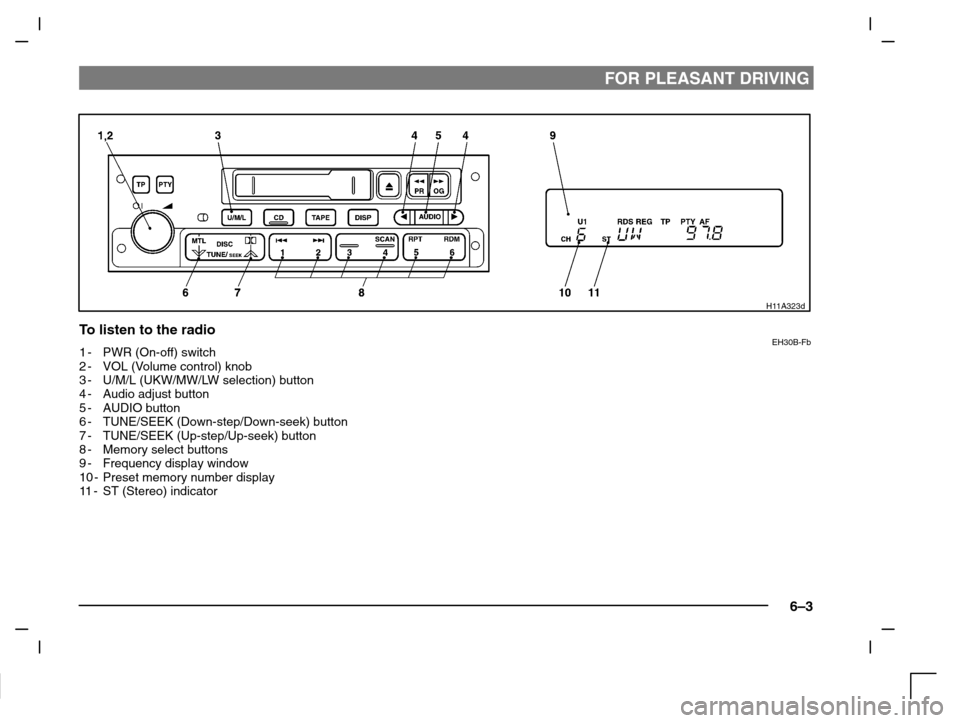
To listen to the radioEH30B-Fb1-PWR (On-off) switch
2-VOL (Volume control) knob
3-U/M/L (UKW/MW/LW selection) button
4-Audio adjust button
5-AUDIO button
6-TUNE/SEEK (Down-step/Down-seek) button
7-TUNE/SEEK (Up-step/Up-seek) button
8-Memory select buttons
9-Frequency display window
10 - Preset memory number display
11-ST (Stereo) indicator
Page 145 of 280
FOR PLEASANT DRIVING
6–5
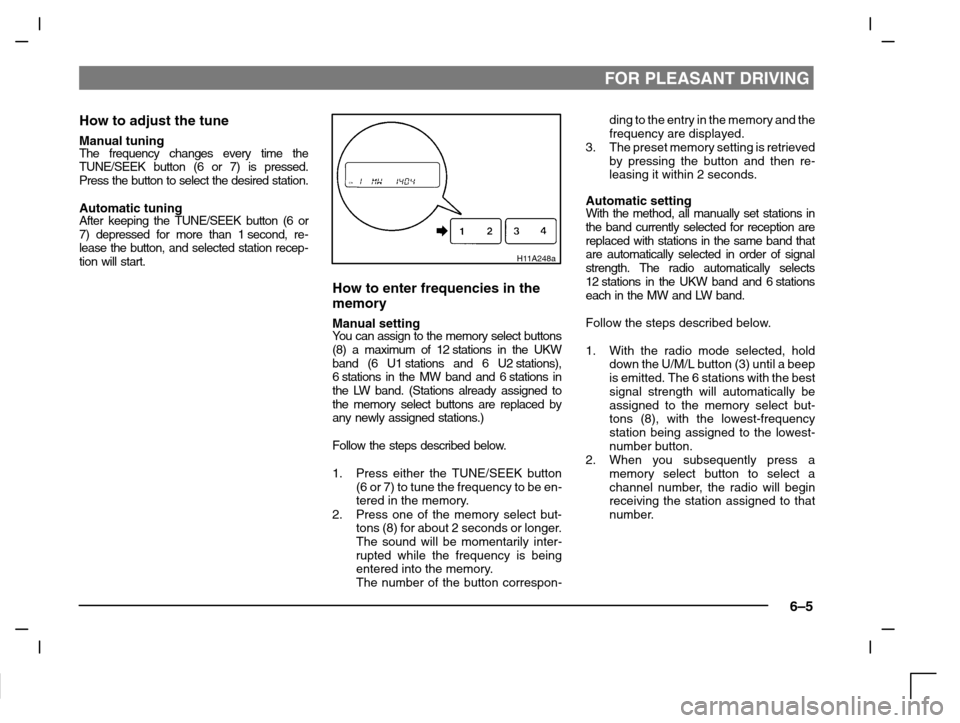
How to adjust the tune
Manual tuningThe frequency changes every time the
TUNE/SEEK button (6 or 7) is pressed.
Press the button to select the desired station.
Automatic tuningAfter keeping the TUNE/SEEK button (6 or
7) depressed for more than 1 second, re-
lease the button, and selected station recep-
tion will start.
H11A248a
How to enter frequencies in the
memory
Manual settingYo u c a n assign to the memory select buttons
(8) a maximum of 12 stations in the UKW
band (6 U1 stations and 6 U2 stations),
6 stations in the MW band and 6 stations in
the LW band. (Stations already assigned to
the memory select buttons are replaced by
any newly assigned stations.)
Follow the steps described below.
1. Press either the TUNE/SEEK button
(6 or 7) to tune the frequency to be en-
tered in the memory.
2. Press one of the memory select but-
tons (8) for about 2 seconds or longer.
The sound will be momentarily inter-
rupted while the frequency is being
entered into the memory.
The number of the button correspon-ding to the entry in the memory and the
frequency are displayed.
3. The preset memory setting is retrieved
by pressing the button and then re-
leasing it within 2 seconds.
Automatic settingWith the method, all manually set stations in
the band currently selected for reception are
replaced with stations in the same band that
are automatically selected in order of signal
strength. The radio automatically selects
12 stations in the UKW band and 6 stations
each in the MW and LW band.
Follow the steps described below.
1. With the radio mode selected, hold
down the U/M/L button (3) until a beep
is emitted. The 6 stations with the best
signal strength will automatically be
assigned to the memory select but-
tons (8), with the lowest-frequency
station being assigned to the lowest-
number button.
2. When you subsequently press a
memory select button to select a
channel number, the radio will begin
receiving the station assigned to that
number.
Page 146 of 280
FOR PLEASANT DRIVING
6–6
H11A344d
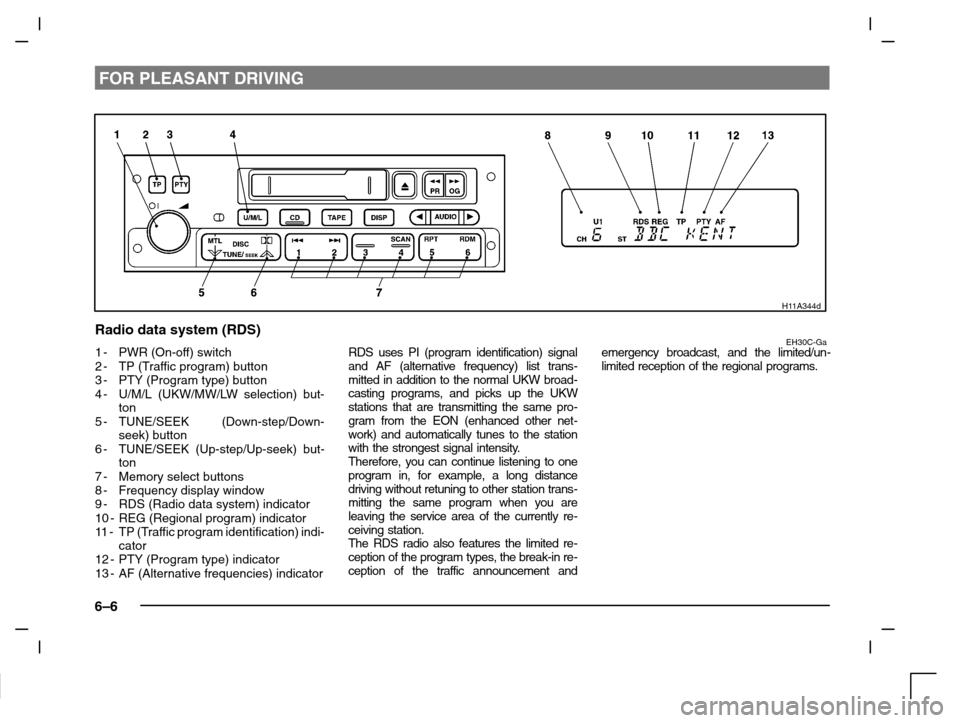
Radio data system (RDS)EH30C-Ga1-PWR (On-off) switch
2-TP (Traffic program) button
3-PTY (Program type) button
4-U/M/L (UKW/MW/LW selection) but-
ton
5-TUNE/SEEK (Down-step/Down-
seek) button
6-TUNE/SEEK (Up-step/Up-seek) but-
ton
7-Memory select buttons
8-Frequency display window
9-RDS (Radio data system) indicator
10 - REG (Regional program) indicator
11-TP (Traffic program identification) indi-
cator
12 - PTY (Program type) indicator
13 - AF (Alternative frequencies) indicatorRDS uses PI (program identification) signal
and AF (alternative frequency) list trans-
mitted in addition to the normal UKW broad-
casting programs, and picks up the UKW
stations that are transmitting the same pro-
gram from the EON (enhanced other net-
work) and automatically tunes to the station
with the strongest signal intensity.
Therefore, you can continue listening to one
program in, for example, a long distance
driving without retuning to other station trans-
mitting the same program when you are
leaving the service area of the currently re-
ceiving station.
The RDS radio also features the limited re-
ception of the program types, the break-in re-
ception of the traffic announcement andemergency broadcast, and the limited/un-
limited reception of the regional programs.