ignition MITSUBISHI COLT 2009 10.G Owners Manual
[x] Cancel search | Manufacturer: MITSUBISHI, Model Year: 2009, Model line: COLT, Model: MITSUBISHI COLT 2009 10.GPages: 273, PDF Size: 17.28 MB
Page 3 of 273
Downloaded from www.Manualslib.com manuals search engine Instruments and controlsE00100104085
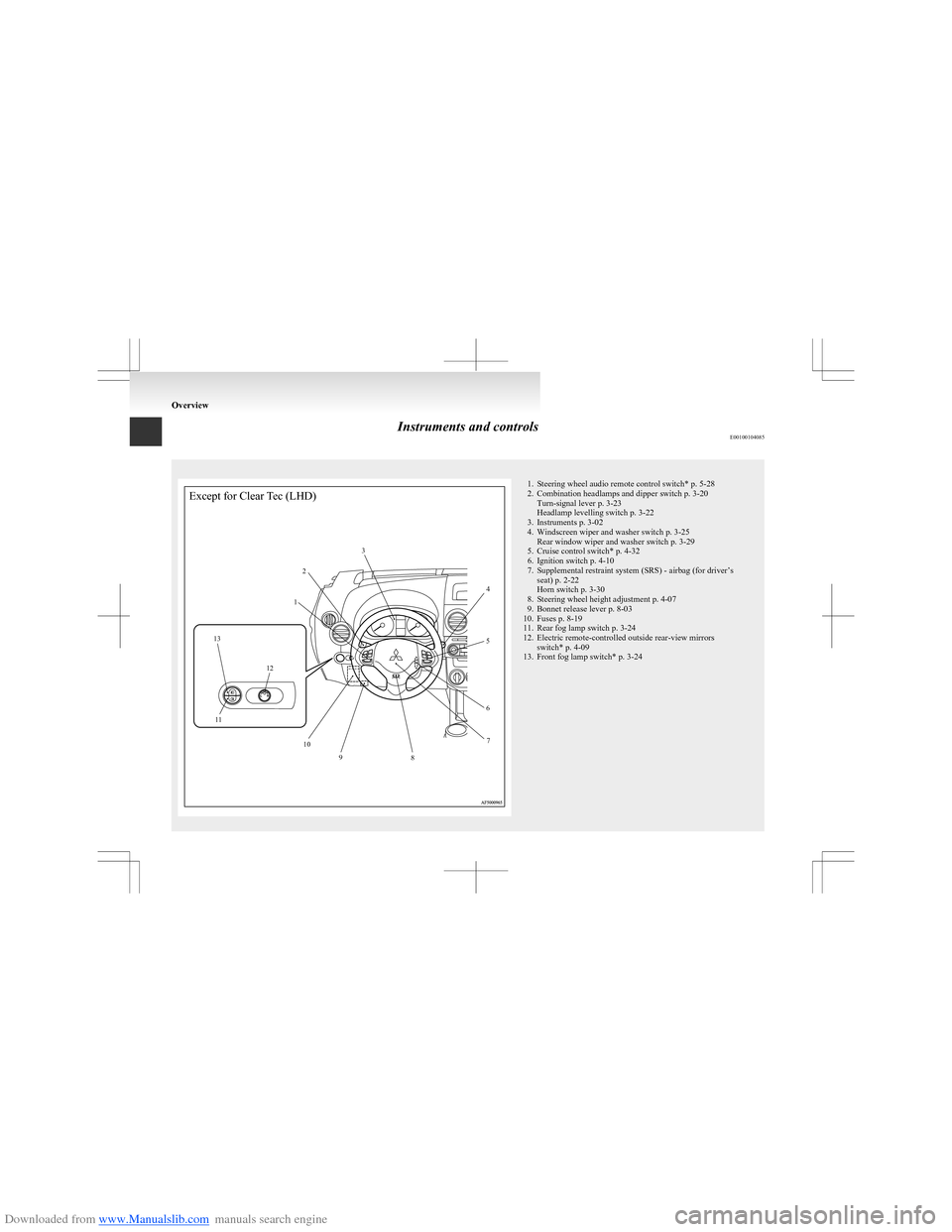
Except for Clear Tec (LHD)123456789101213111. Steering wheel audio remote control switch* p. 5-28
2. Combination headlamps and dipper switch p. 3-20 Turn-signal lever p. 3-23
Headlamp levelling switch p. 3-22
3. Instruments p. 3-02
4. Windscreen wiper and washer switch p. 3-25 Rear window wiper and washer switch p. 3-29
5. Cruise control switch* p. 4-32
6. Ignition switch p. 4-10
7. Supplemental restraint system (SRS) - airbag (for driver’s seat) p. 2-22
Horn switch p. 3-30
8. Steering wheel height adjustment p. 4-07
9. Bonnet release lever p. 8-03
10. Fuses p. 8-19
11. Rear fog lamp switch p. 3-24
12. Electric remote-controlled outside rear-view mirrors switch* p. 4-09
13. Front fog lamp switch* p. 3-24
Overview
Page 4 of 273
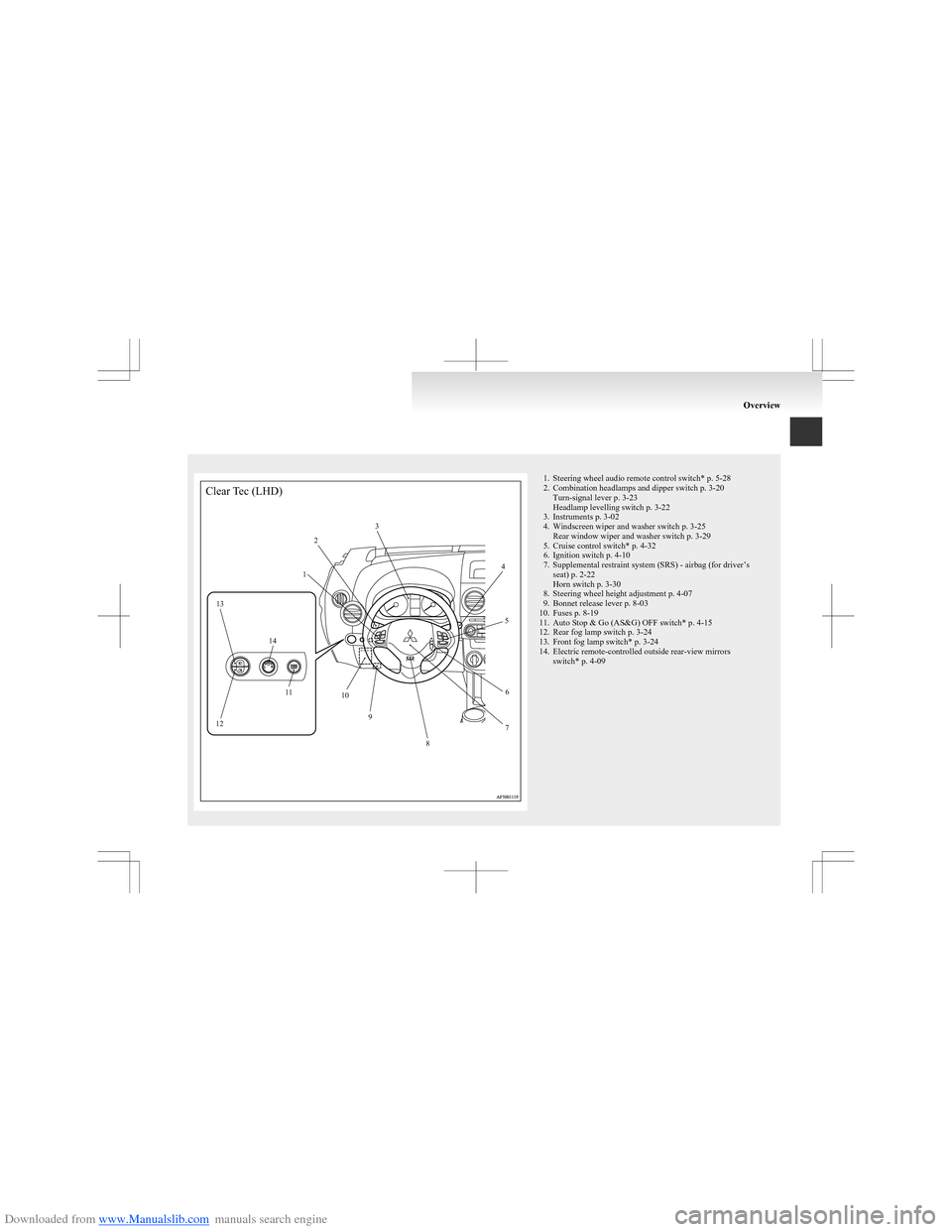
Downloaded from www.Manualslib.com manuals search engine 1. Steering wheel audio remote control switch* p. 5-28
2. Combination headlamps and dipper switch p. 3-20 Turn-signal lever p. 3-23
Headlamp levelling switch p. 3-22
3. Instruments p. 3-02
4. Windscreen wiper and washer switch p. 3-25 Rear window wiper and washer switch p. 3-29
5. Cruise control switch* p. 4-32
6. Ignition switch p. 4-10
7. Supplemental restraint system (SRS) - airbag (for driver’s seat) p. 2-22
Horn switch p. 3-30
8. Steering wheel height adjustment p. 4-07
9. Bonnet release lever p. 8-03
10. Fuses p. 8-19
11. Auto Stop & Go (AS&G) OFF switch* p. 4-15
12. Rear fog lamp switch p. 3-24
13. Front fog lamp switch* p. 3-24
14. Electric remote-controlled outside rear-view mirrors switch* p. 4-09
OverviewClear Tec (LHD)12
3
4
5
6
7
8
9
10
11
12 13
14
Page 5 of 273
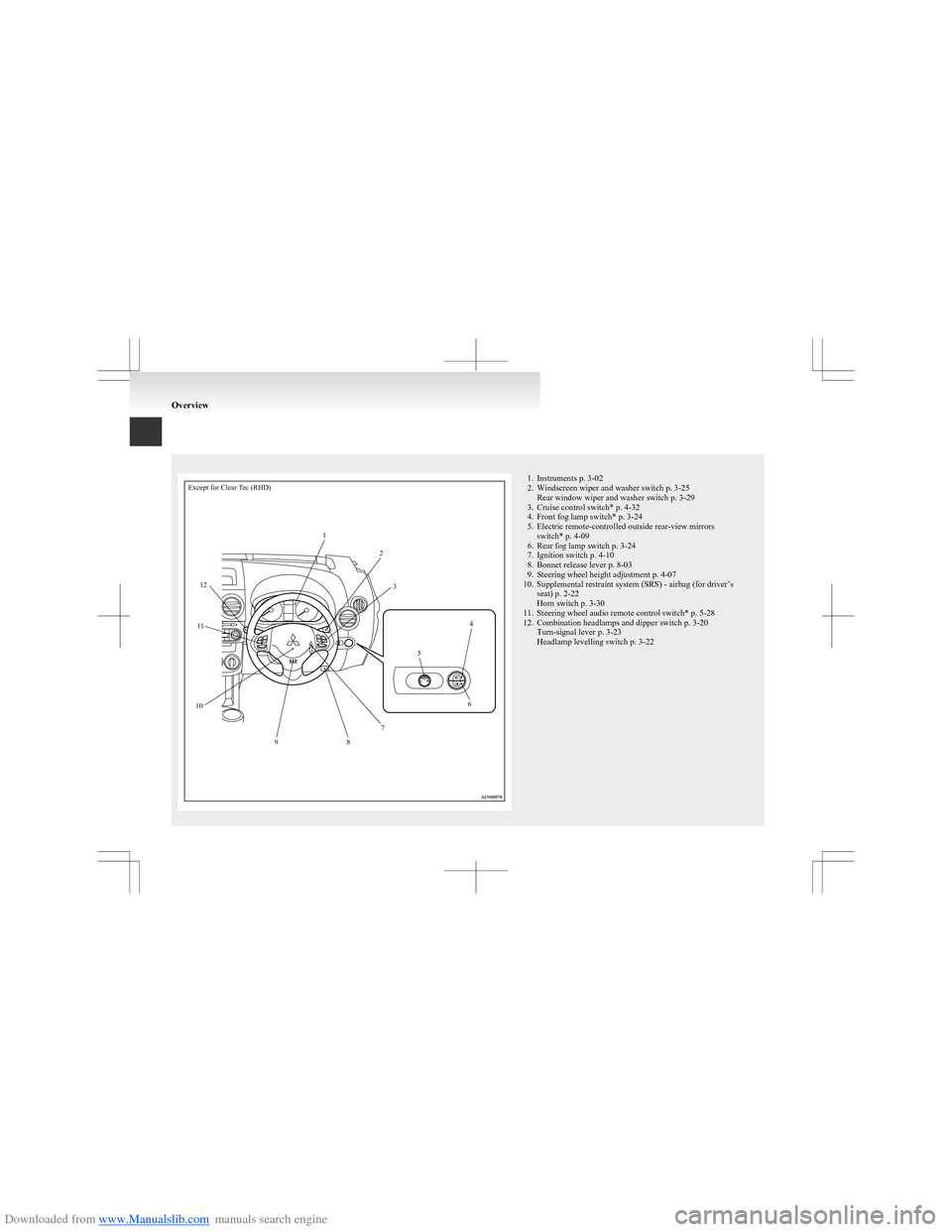
Downloaded from www.Manualslib.com manuals search engine Except for Clear Tec (RHD)1235467891011121. Instruments p. 3-02
2. Windscreen wiper and washer switch p. 3-25 Rear window wiper and washer switch p. 3-29
3. Cruise control switch* p. 4-32
4. Front fog lamp switch* p. 3-24
5. Electric remote-controlled outside rear-view mirrors switch* p. 4-09
6. Rear fog lamp switch p. 3-24
7. Ignition switch p. 4-10
8. Bonnet release lever p. 8-03
9. Steering wheel height adjustment p. 4-07
10. Supplemental restraint system (SRS) - airbag (for driver’s seat) p. 2-22
Horn switch p. 3-30
11. Steering wheel audio remote control switch* p. 5-28
12. Combination headlamps and dipper switch p. 3-20 Turn-signal lever p. 3-23
Headlamp levelling switch p. 3-22
Overview
Page 6 of 273
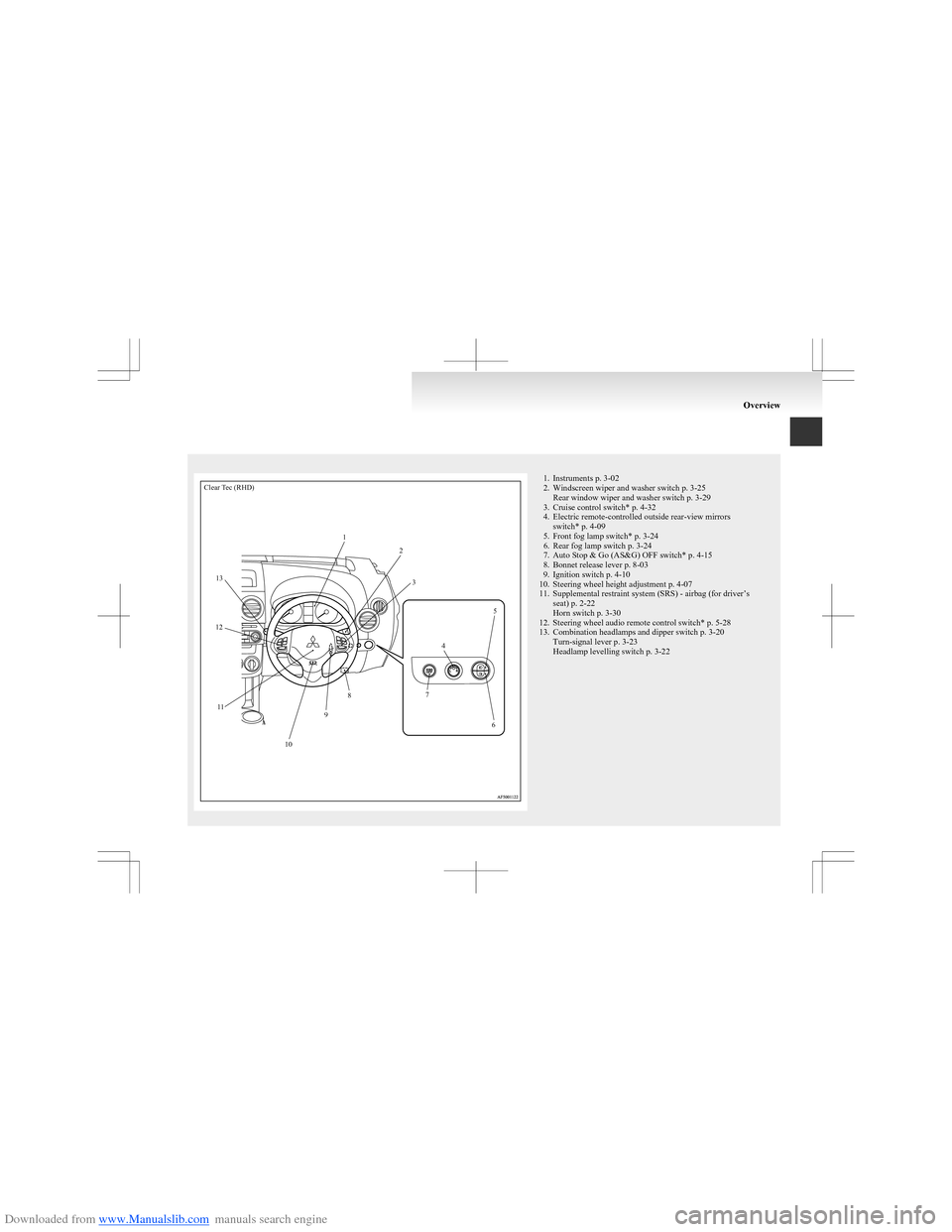
Downloaded from www.Manualslib.com manuals search engine Clear Tec (RHD)123456789101112131. Instruments p. 3-02
2. Windscreen wiper and washer switch p. 3-25 Rear window wiper and washer switch p. 3-29
3. Cruise control switch* p. 4-32
4. Electric remote-controlled outside rear-view mirrors switch* p. 4-09
5. Front fog lamp switch* p. 3-24
6. Rear fog lamp switch p. 3-24
7. Auto Stop & Go (AS&G) OFF switch* p. 4-15
8. Bonnet release lever p. 8-03
9. Ignition switch p. 4-10
10. Steering wheel height adjustment p. 4-07
11. Supplemental restraint system (SRS) - airbag (for driver’s seat) p. 2-22
Horn switch p. 3-30
12. Steering wheel audio remote control switch* p. 5-28
13. Combination headlamps and dipper switch p. 3-20 Turn-signal lever p. 3-23
Headlamp levelling switch p. 3-22
Overview
Page 31 of 273
Downloaded from www.Manualslib.com manuals search engine NOTEl If the UNLOCK switch (2) is pressed and
any of the doors or tailgate is not opened with-
in approximately 30 seconds: relocking will
automatically occur.
l It is possible to modify functions as follows:
For further information, contact your
MITSUBISHI MOTORS Authorized Service
Point. •The time from pressing the UNLOCK
switch (2) to the moment of automatic
locking can be changed.
• The confirmation function (flashing of
the turn-signal lamps) can be set to oper-
ate only when the doors and tailgate are
locked or only when the doors and tail-
gate are unlocked.
• The confirmation function (this indicates
locking or unlocking of the doors and tail-
gate with the flash of the turn-signal
lamps) can be deactivated.
• The number of times the turn-signal
lamps are flashed by the confirmation
function can be changed.
Operation of the Dead Lock System
With a vehicle that has a Dead Lock System, it is
possible to set the Dead Lock System using the re-
mote controller.
(Refer to “Dead Lock System” on page 1-07.)
NOTE l With a vehicle that has a Dead Lock System,
the keyless entry system does not work while
the key is in the ignition switch.l Pressing the LOCK switch (1) has no effect
(no locking takes place) while a door or the
tailgate is open.
l The remote control switch will operate with-
in about 4 m from the vehicle. However, the
operating range of the remote control switch
may change if the vehicle is located near a
TV transmitting tower, power station, or ra-
dio broadcasting station.
l If the turn-signal lamps flash nine times
when you press the remote control switch,
the battery may have run down. For further
information, please consult your
MITSUBISHI MOTORS Authorized Service
Point.
If you replace the battery yourself, refer to
“ Procedure for replacing the remote control
switch battery” on page 1-04.
l If your remote control switch is lost or dam-
aged, please contact your MITSUBISHI
MOTORS Authorized Service Point for a re-
placement remote control switch.
l If you wish to add a remote control switch,
we recommend you to contact your
MITSUBISHI MOTORS Authorized Service
Point.
A maximum of 8 remote control switches are
available for your vehicle.Procedure for replacing the remote
control switch battery E00309500031
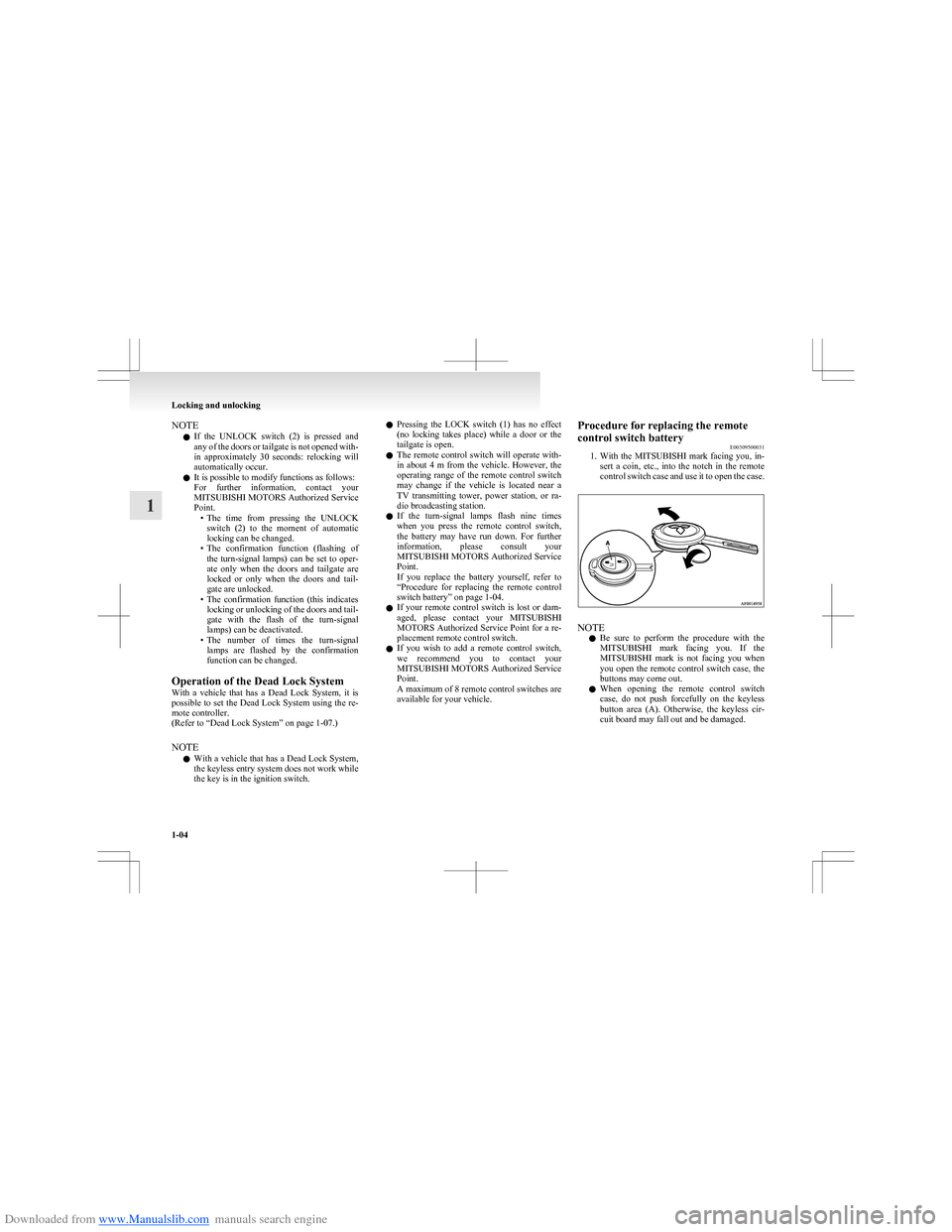
1. With the MITSUBISHI mark facing you, in-
sert a coin, etc., into the notch in the remote
control switch case and use it to open the case.
NOTE
l Be sure to perform the procedure with the
MITSUBISHI mark facing you. If the
MITSUBISHI mark is not facing you when
you open the remote control switch case, the
buttons may come out.
l When opening the remote control switch
case, do not push forcefully on the keyless
button area (A). Otherwise, the keyless cir-
cuit board may fall out and be damaged.
Locking and unlocking
1-04
1
Page 34 of 273
Downloaded from www.Manualslib.com manuals search engine Central door locksE00300801445
NOTE l Each of the doors can be locked or unlocked
independently by using the inside lock knob.
l Repeated continuous operation between lock
and unlock could activate the central door
locking systems built-in protection circuit
and prevent the system from operating.
If this occurs, wait about 1 minute before op-
erating the inside lock knob or the key.
All of the doors and the tailgate can be locked and
unlocked as described hereafter.
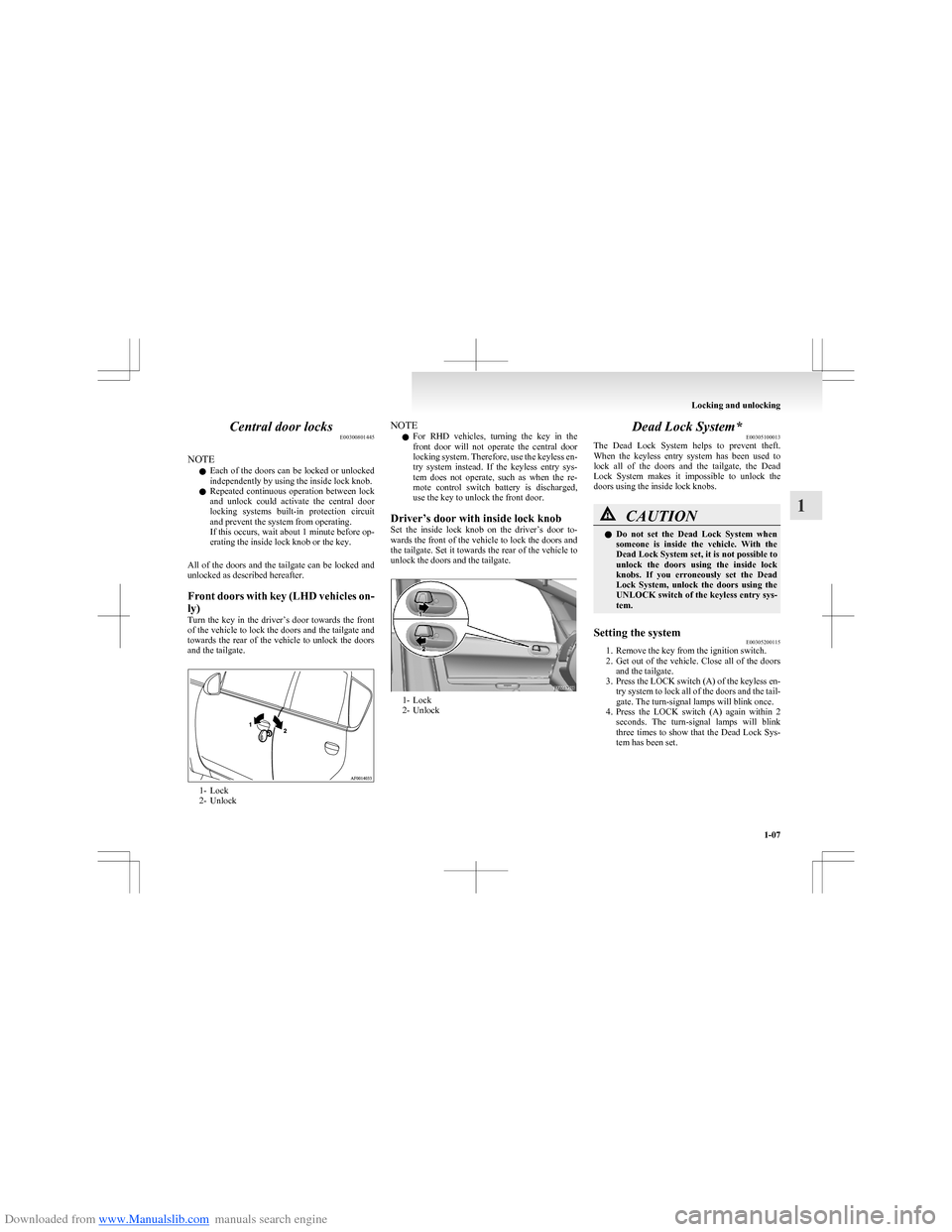
Front doors with key (LHD vehicles on-
ly)
Turn the key in the driver’s door towards the front
of the vehicle to lock the doors and the tailgate and
towards the rear of the vehicle to unlock the doors
and the tailgate.
1- Lock
2- Unlock
NOTE
l For RHD vehicles, turning the key in the
front door will not operate the central door
locking system. Therefore, use the keyless en-
try system instead. If the keyless entry sys-
tem does not operate, such as when the re-
mote control switch battery is discharged,
use the key to unlock the front door.
Driver’s door with inside lock knob
Set the inside lock knob on the driver’s door to-
wards the front of the vehicle to lock the doors and
the tailgate. Set it towards the rear of the vehicle to
unlock the doors and the tailgate.
1- Lock
2- Unlock
Dead Lock System* E00305100013
The Dead Lock System helps to prevent theft.
When the keyless entry system has been used to
lock all of the doors and the tailgate, the Dead
Lock System makes it impossible to unlock the
doors using the inside lock knobs.CAUTIONl Do not set the Dead Lock System when
someone is inside the vehicle. With the
Dead Lock System set, it is not possible to
unlock the doors using the inside lock
knobs. If you erroneously set the Dead
Lock System, unlock the doors using the
UNLOCK switch of the keyless entry sys-
tem.Setting the system E00305200115
1. Remove the key from the ignition switch.
2. Get out of the vehicle. Close all of the doors
and the tailgate.
3. Press the LOCK switch (A) of the keyless en-
try system to lock all of the doors and the tail-
gate. The turn-signal lamps will blink once.
4. Press the LOCK switch (A) again within 2
seconds. The turn-signal lamps will blink
three times to show that the Dead Lock Sys-
tem has been set.
Locking and unlocking
1-07
1
Page 35 of 273
Downloaded from www.Manualslib.com manuals search engine NOTEl Pressing the LOCK switch (A) once while
the Dead Lock System is set causes the turn-
signal lamps to flash three times, so it is pos-
sible to confirm that the Dead Lock System
is set.
l It is possible to alter the system’s functionali-
ty as follows: •It is possible to disable the operation con-
firmation function (flashing of the turn-
signal lamps).
• It is possible to change the number of
times the operation confirmation function
causes the turn-signal lamps to flash for
confirmation of system operation.
For details, please contact a MITSUBISHI
MOTORS Authorized Service Point.
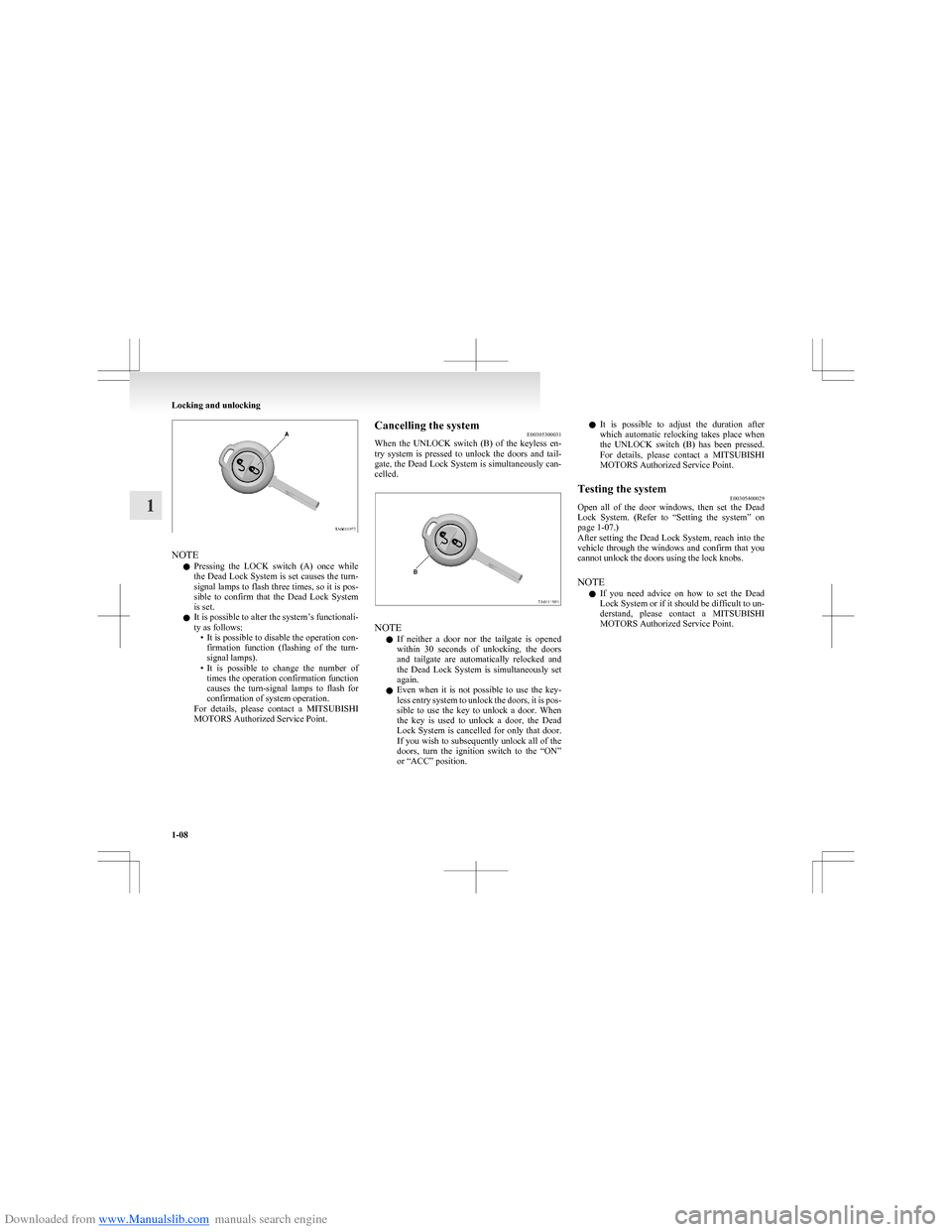
Cancelling the system E00305300031
When the UNLOCK switch (B) of the keyless en-
try system is pressed to unlock the doors and tail-
gate, the Dead Lock System is simultaneously can-
celled.
NOTE
l If neither a door nor the tailgate is opened
within 30 seconds of unlocking, the doors
and tailgate are automatically relocked and
the Dead Lock System is simultaneously set
again.
l Even when it is not possible to use the key-
less entry system to unlock the doors, it is pos-
sible to use the key to unlock a door. When
the key is used to unlock a door, the Dead
Lock System is cancelled for only that door.
If you wish to subsequently unlock all of the
doors, turn the ignition switch to the “ON”
or “ACC” position.
l It is possible to adjust the duration after
which automatic relocking takes place when
the UNLOCK switch (B) has been pressed.
For details, please contact a MITSUBISHI
MOTORS Authorized Service Point.Testing the system E00305400029
Open all of the door windows, then set the Dead
Lock System. (Refer to “Setting the system” on
page 1-07.)
After setting the Dead Lock System, reach into the
vehicle through the windows and confirm that you
cannot unlock the doors using the lock knobs.
NOTE l If you need advice on how to set the Dead
Lock System or if it should be difficult to un-
derstand, please contact a MITSUBISHI
MOTORS Authorized Service Point.
Locking and unlocking
1-08
1
Page 36 of 273
Downloaded from www.Manualslib.com manuals search engine “Child-protection” rear doors (5-door models) E00300900638
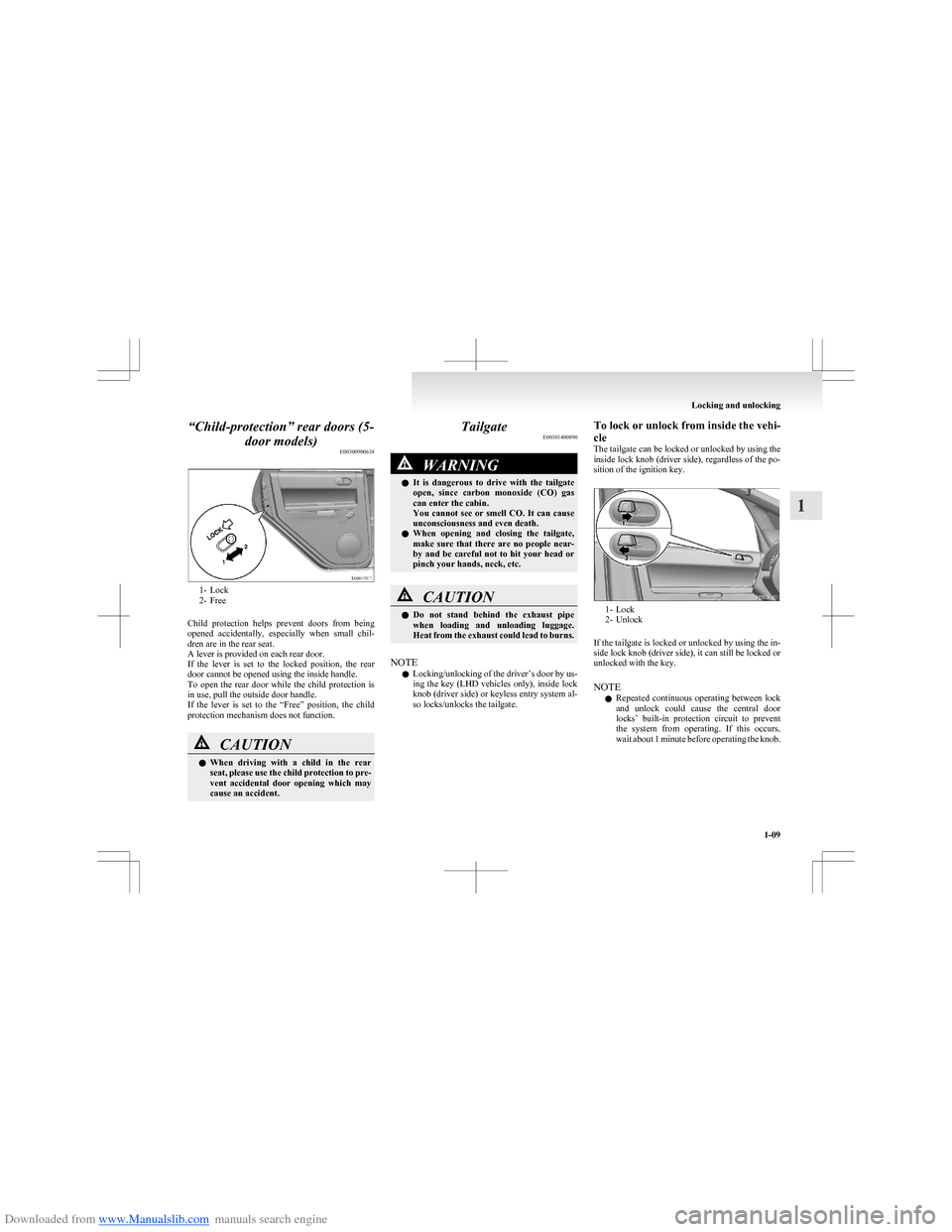
1- Lock
2- Free
Child protection helps prevent doors from being
opened accidentally, especially when small chil-
dren are in the rear seat.
A lever is provided on each rear door.
If the lever is set to the locked position, the rear
door cannot be opened using the inside handle.
To open the rear door while the child protection is
in use, pull the outside door handle.
If the lever is set to the “Free” position, the child
protection mechanism does not function.
CAUTIONl When driving with a child in the rear
seat, please use the child protection to pre-
vent accidental door opening which may
cause an accident.Tailgate E00301400890WARNINGlIt is dangerous to drive with the tailgate
open, since carbon monoxide (CO) gas
can enter the cabin.
You cannot see or smell CO. It can cause
unconsciousness and even death.
l When opening and closing the tailgate,
make sure that there are no people near-
by and be careful not to hit your head or
pinch your hands, neck, etc.CAUTIONl Do not stand behind the exhaust pipe
when loading and unloading luggage.
Heat from the exhaust could lead to burns.
NOTE
l Locking/unlocking of the driver’s door by us-
ing the key (LHD vehicles only), inside lock
knob (driver side) or keyless entry system al-
so locks/unlocks the tailgate.
To lock or unlock from inside the vehi-
cle
The tailgate can be locked or unlocked by using the
inside lock knob (driver side), regardless of the po-
sition of the ignition key.
1- Lock
2- Unlock
If the tailgate is locked or unlocked by using the in-
side lock knob (driver side), it can still be locked or
unlocked with the key.
NOTE l Repeated continuous operating between lock
and unlock could cause the central door
locks’ built-in protection circuit to prevent
the system from operating. If this occurs,
wait about 1 minute before operating the knob.
Locking and unlocking
1-09
1
Page 38 of 273
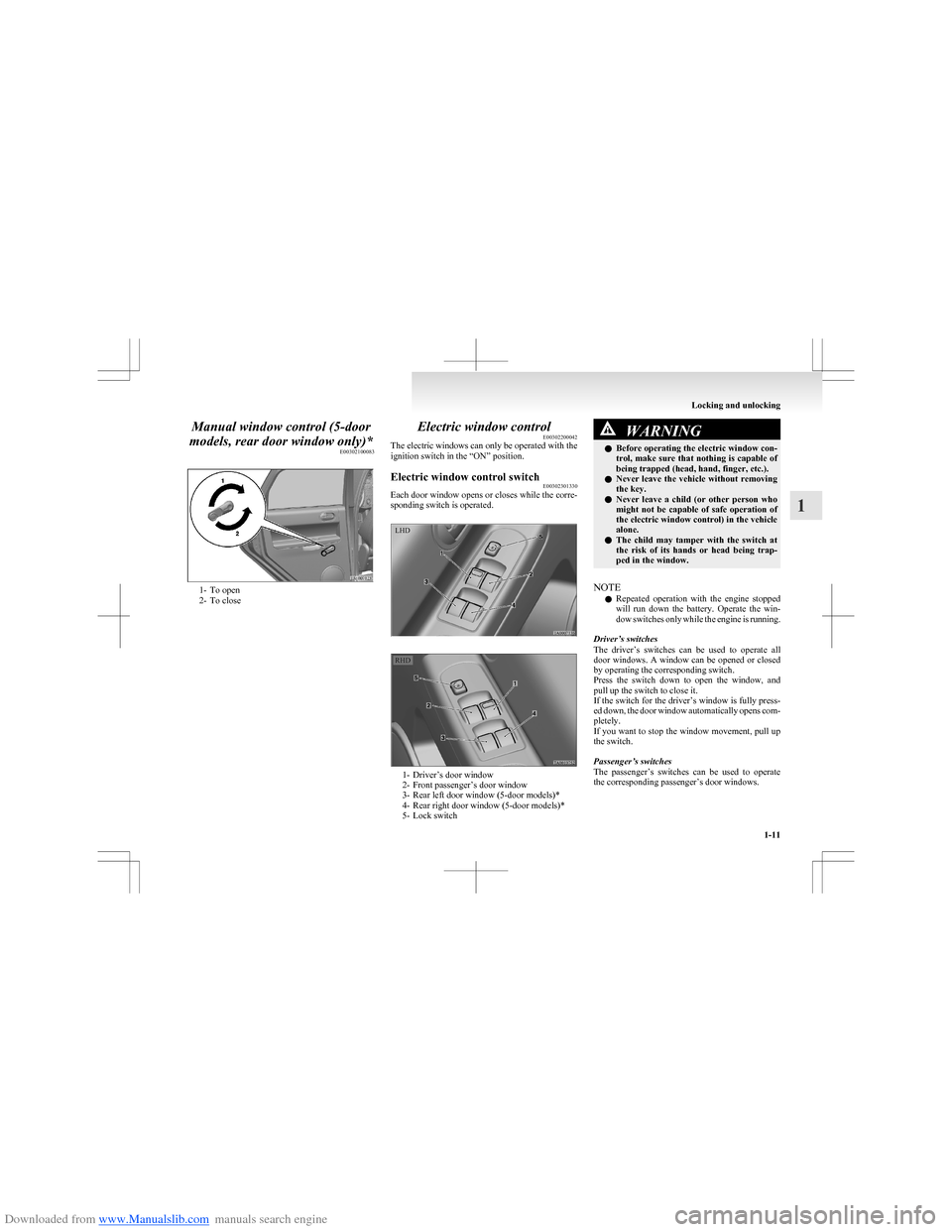
Downloaded from www.Manualslib.com manuals search engine Manual window control (5-door
models, rear door window only)* E00302100083
1- To open
2- To close
Electric window control E00302200042
The electric windows can only be operated with the
ignition switch in the “ON” position.Electric window control switch E00302301330
Each door window opens or closes while the corre-
sponding switch is operated.
1- Driver’s door window
2- Front passenger’s door window
3- Rear left door window (5-door models)*
4- Rear right door window (5-door models)*
5- Lock switch
WARNINGl Before operating the electric window con-
trol, make sure that nothing is capable of
being trapped (head, hand, finger, etc.).
l Never leave the vehicle without removing
the key.
l Never leave a child (or other person who
might not be capable of safe operation of
the electric window control) in the vehicle
alone.
l The child may tamper with the switch at
the risk of its hands or head being trap-
ped in the window.
NOTE
l Repeated operation with the engine stopped
will run down the battery. Operate the win-
dow switches only while the engine is running.
Driver’s switches
The driver’s switches can be used to operate all
door windows. A window can be opened or closed
by operating the corresponding switch.
Press the switch down to open the window, and
pull up the switch to close it.
If the switch for the driver’s window is fully press-
ed down, the door window automatically opens com-
pletely.
If you want to stop the window movement, pull up
the switch.
Passenger’s switches
The passenger’s switches can be used to operate
the corresponding passenger’s door windows.
Locking and unlocking
1-11
1LHD RHD
Page 45 of 273
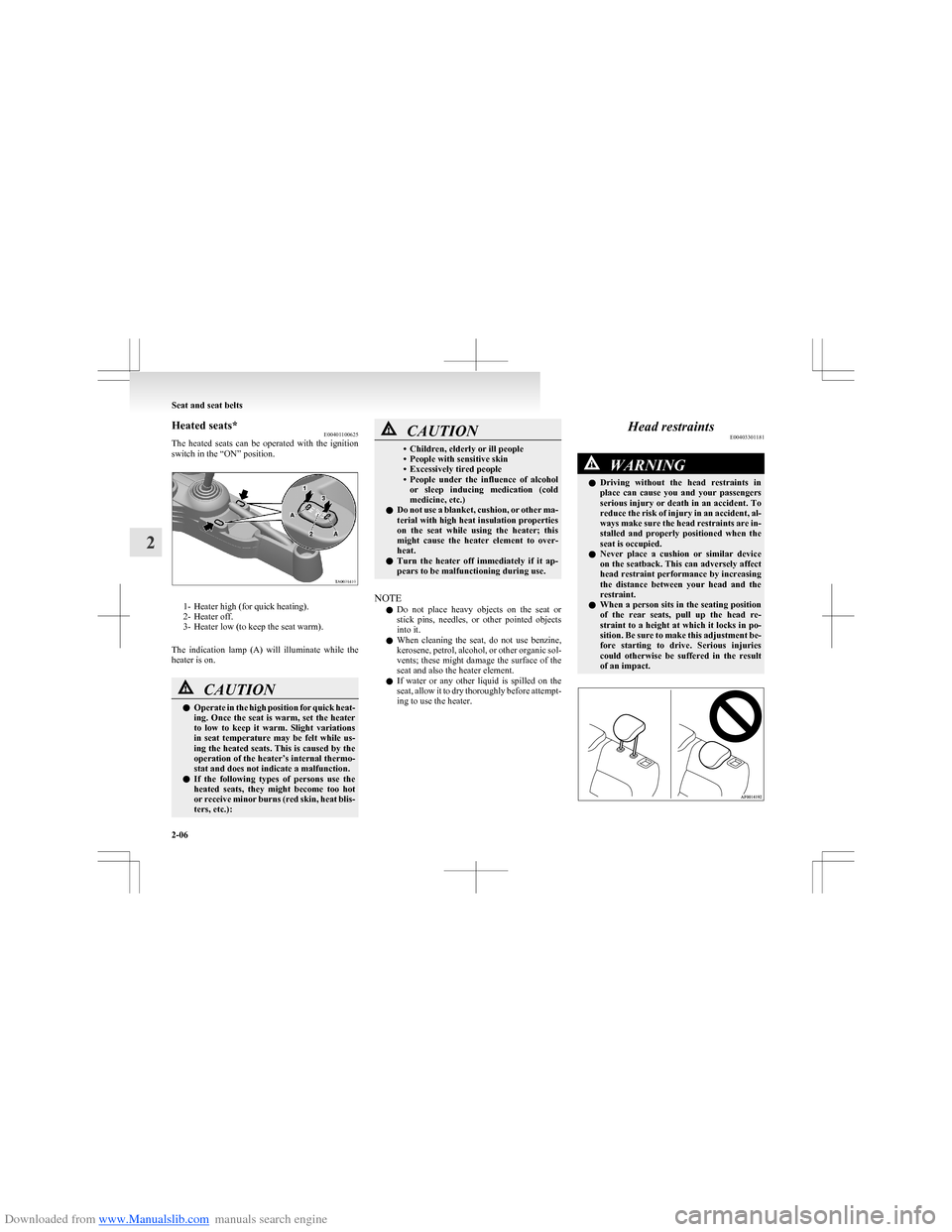
Downloaded from www.Manualslib.com manuals search engine Heated seats*E00401100625
The heated seats can be operated with the ignition
switch in the “ON” position.
1- Heater high (for quick heating).
2- Heater off.
3- Heater low (to keep the seat warm).
The indication lamp (A) will illuminate while the
heater is on.
CAUTIONl Operate in the high position for quick heat-
ing. Once the seat is warm, set the heater
to low to keep it warm. Slight variations
in seat temperature may be felt while us-
ing the heated seats. This is caused by the
operation of the heater’s internal thermo-
stat and does not indicate a malfunction.
l If the following types of persons use the
heated seats, they might become too hot
or receive minor burns (red skin, heat blis-
ters, etc.):CAUTION• Children, elderly or ill people
• People with sensitive skin
• Excessively tired people
• People under the influence of alcohol
or sleep inducing medication (cold
medicine, etc.)
l Do not use a blanket, cushion, or other ma-
terial with high heat insulation properties
on the seat while using the heater; this
might cause the heater element to over-
heat.
l Turn the heater off immediately if it ap-
pears to be malfunctioning during use.
NOTE
l Do not place heavy objects on the seat or
stick pins, needles, or other pointed objects
into it.
l When cleaning the seat, do not use benzine,
kerosene, petrol, alcohol, or other organic sol-
vents; these might damage the surface of the
seat and also the heater element.
l If water or any other liquid is spilled on the
seat, allow it to dry thoroughly before attempt-
ing to use the heater.
Head restraints E00403301181WARNINGlDriving without the head restraints in
place can cause you and your passengers
serious injury or death in an accident. To
reduce the risk of injury in an accident, al-
ways make sure the head restraints are in-
stalled and properly positioned when the
seat is occupied.
l Never place a cushion or similar device
on the seatback. This can adversely affect
head restraint performance by increasing
the distance between your head and the
restraint.
l When a person sits in the seating position
of the rear seats, pull up the head re-
straint to a height at which it locks in po-
sition. Be sure to make this adjustment be-
fore starting to drive. Serious injuries
could otherwise be suffered in the result
of an impact.
Seat and seat belts
2-06
2