check engine MITSUBISHI ENDEAVOR 2004 Service User Guide
[x] Cancel search | Manufacturer: MITSUBISHI, Model Year: 2004, Model line: ENDEAVOR, Model: MITSUBISHI ENDEAVOR 2004Pages: 3870, PDF Size: 98.47 MB
Page 736 of 3870
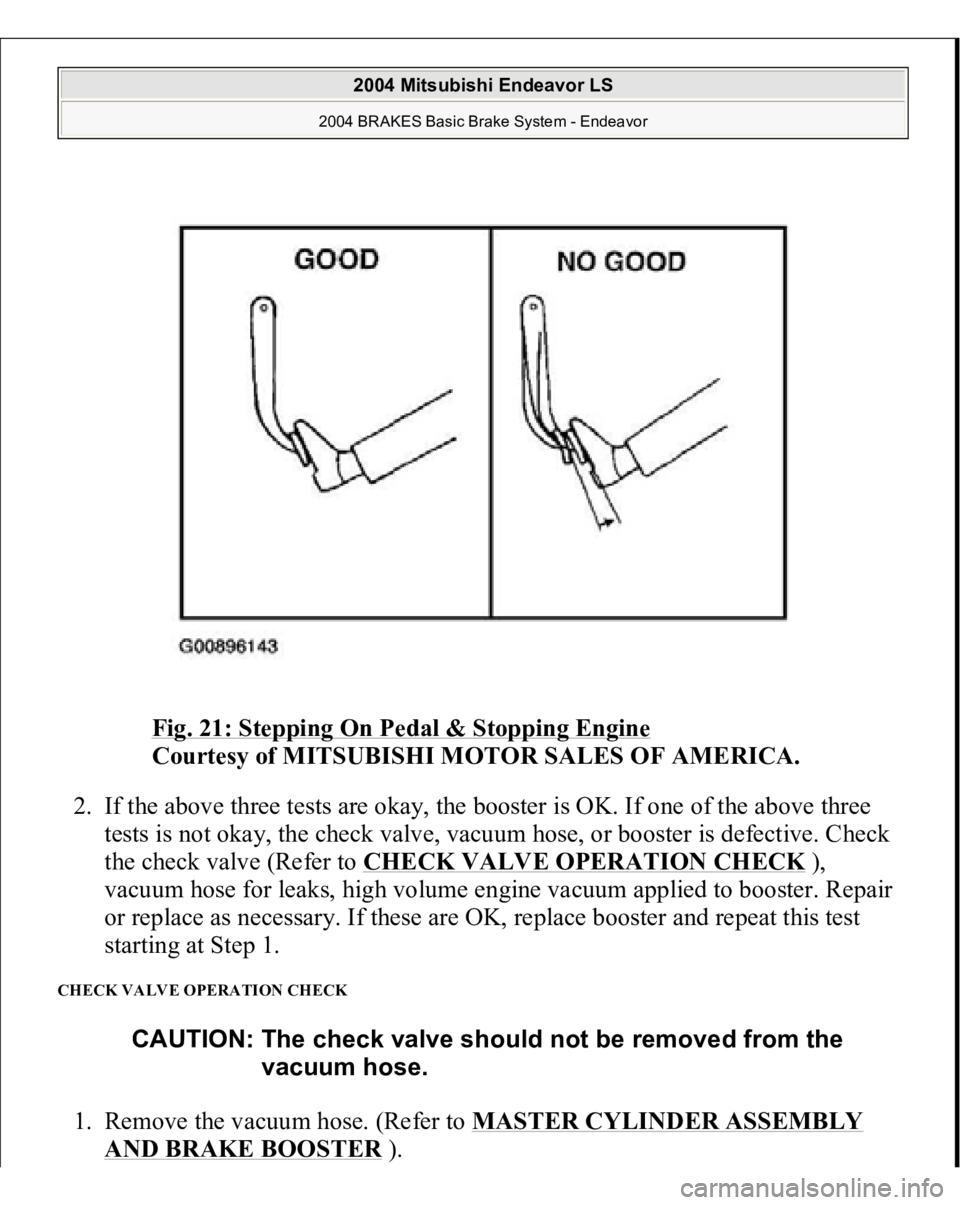
Fig. 21: Stepping On Pedal & Stopping Engine
Courtesy of MITSUBISHI MOTOR SALES OF AMERICA.
2. If the above three tests are okay, the booster is OK. If one of the above three
tests is not okay, the check valve, vacuum hose, or booster is defective. Check
the check valve (Refer to CHECK VALVE OPERATION CHECK
),
vacuum hose for leaks, high volume engine vacuum applied to booster. Repair
or replace as necessary. If these are OK, replace booster and repeat this test
starting at Step 1.
CHECK VALVE OPERATION CHECK 1. Remove the vacuum hose. (Refer to MASTER CYLINDER ASSEMBLY
AND BRAKE BOOSTE
R).
CAUTION: The check valve should not be removed from the
vacuum hose.
2004 Mitsubishi Endeavor LS
2004 BRAKES Basic Brake System - Endeavor
Page 793 of 3870
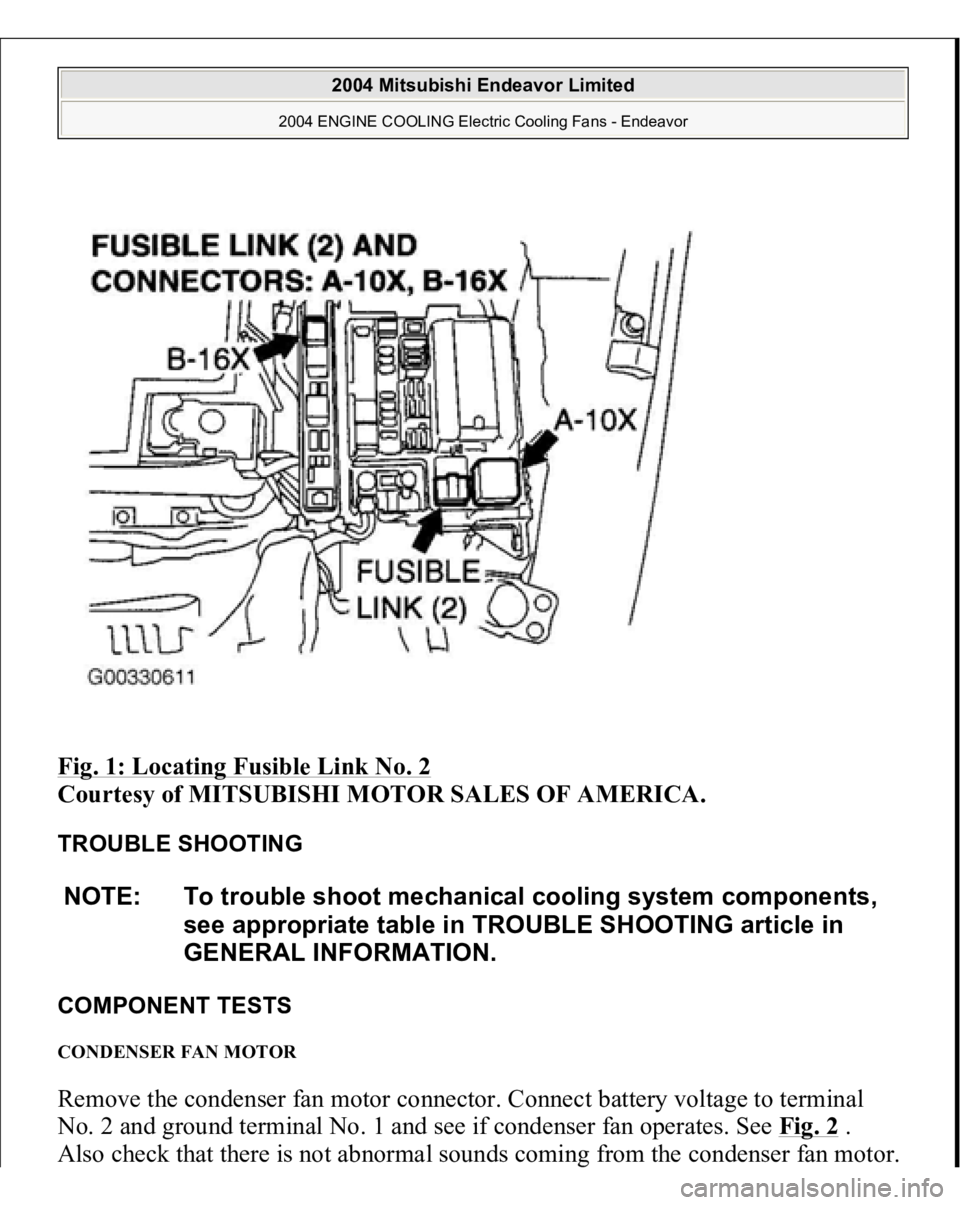
Fig. 1: Locating Fusible Link No. 2
Courtesy of MITSUBISHI MOTOR SALES OF AMERICA.
TROUBLE SHOOTING
COMPONENT TESTS CONDENSER FAN MOTOR Remove the condenser fan motor connector. Connect battery voltage to terminal No. 2 and ground terminal No. 1 and see if condenser fan operates. See Fig. 2
.
Also check that there is not abnormal sounds comin
g from the condenser fan motor.
NOTE: To trouble shoot mechanical cooling system components,
see appropriate table in TROUBLE SHOOTING article in
GENERAL INFORMATION.
2004 Mitsubishi Endeavor Limited
2004 ENGINE COOLING Electric Cooling Fans - Endeavor
Page 794 of 3870
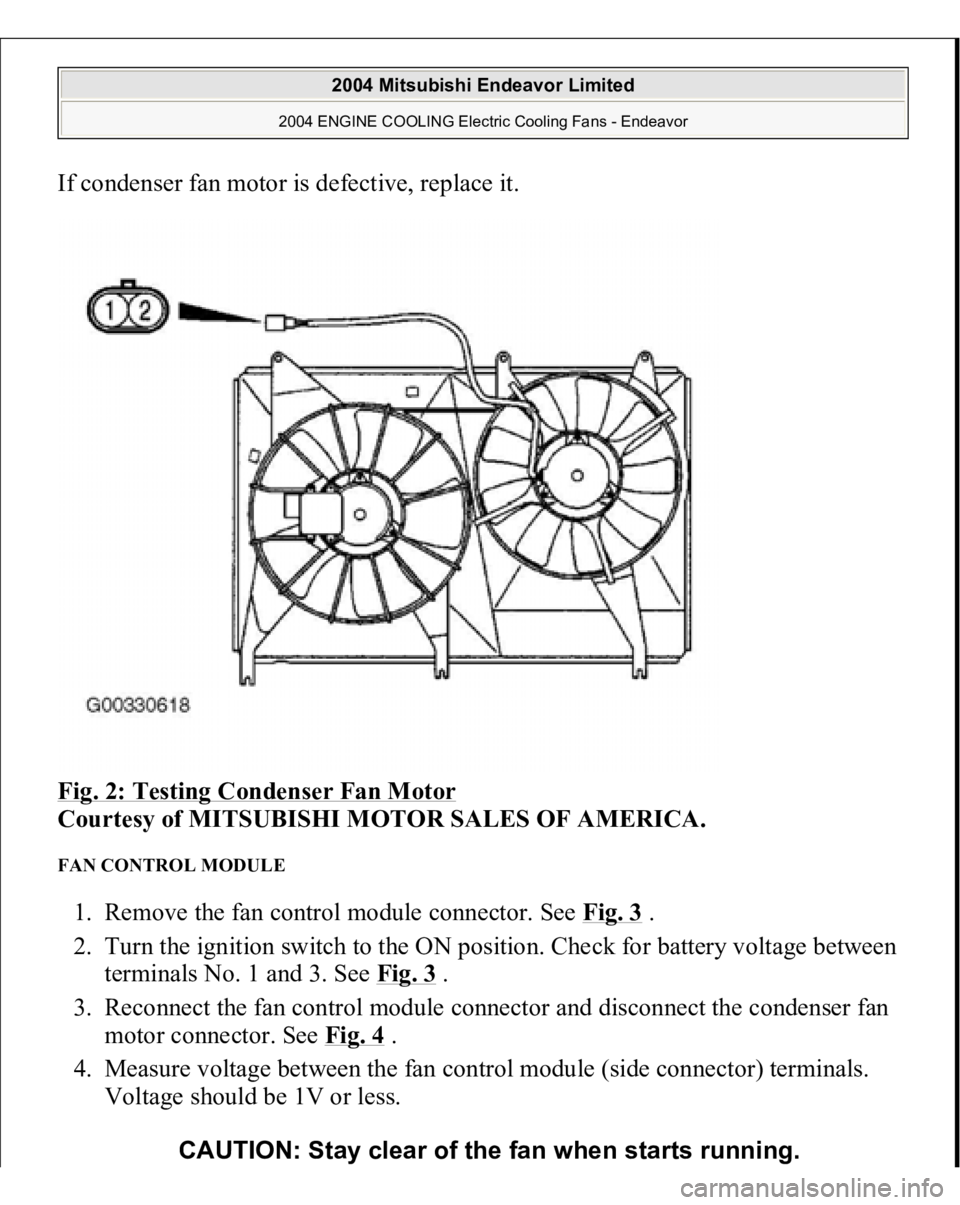
If condenser fan motor is defective, replace it.
Fig. 2: Testing Condenser Fan Motor
Courtesy of MITSUBISHI MOTOR SALES OF AMERICA.
FAN CONTROL MODULE 1. Remove the fan control module connector. See Fig. 3
.
2. Turn the ignition switch to the ON position. Check for battery voltage between
terminals No. 1 and 3. See Fig. 3
.
3. Reconnect the fan control module connector and disconnect the condenser fan
motor connector. See Fig. 4
.
4. Measure voltage between the fan control module (side connector) terminals.
Voltage should be 1V or less.
CAUTION: Stay clear of the fan when starts running.
2004 Mitsubishi Endeavor Limited
2004 ENGINE COOLING Electric Cooling Fans - Endeavor
Page 799 of 3870
Technical Descriptio
n
The cause could be a malfunction of the fan control module power supply or
ground circuit. The cause could also be a malfunction of the fan control module or the PCM.
Troubleshooting Hints
Malfunction of fusible link. Malfunction of fan control relay. Malfunction of MFI relay. Malfunction of radiator fan motor. Malfunction of condenser fan motor. Malfunction of fan control module. Malfunction of PCM. Damaged wiring harness or connector.
Diagnosis 1. Disconnect fan control module connector A-23. See Fig. 7
. Measure for
voltage between terminal No. 3 (harness side of the connector) and ground
when ignition switch is turned to the ON position. If battery voltage is not
achieved, go to next step. If battery voltage is achieved, go to step 8 .
2. Check fan control relay. See FAN CONTROL RELAY under
COMPONENTS TESTS. If fan control relay is okay, go to next step. If fan
control relay is not okay, replace it and retest.
3. Check the MFI relay. See MULTI
-PORT FUEL INJECTION (MFI)
RELAY
under COMPONENT TESTS. If MFI relay is okay, go to next step. If
MFI relay is not okay, replace it and retest.
4. Check for harness damage in Black/Yellow wire between fusible link No. 2
and terminal No. 4 of fan control relay connector A-10X. See Fig. 8
. If wire is
okay, go to next step. If wire is damaged, repair or replace as necessary and
retest.
5. Check for harness damage in Blue wire between terminal No. 2 of fan control
rela
y connector
A-10X and terminal No. 3 of fan control module connector A-
2004 Mitsubishi Endeavor Limited
2004 ENGINE COOLING Electric Cooling Fans - Endeavor
Page 800 of 3870
23. See Fig. 7
and Fig.
8 . If wire is okay, go to next step. If wire is damaged,
repair or replace as necessary and retest.
6. Check intermediate connector A-13 for loose, corroded, or damaged terminals,
or terminals pushed back in the connector. See Fig. 9
. If intermediate
connector is okay, go to next step. If connector A-13 is not okay, repair or
replace as necessary and retest.
7. Check for harness damage in Red wire between terminal No. 4 of MFI relay
connector B-16X and terminal No. 1 of fan control relay connector A-10X. See
Fig. 8
and Fig. 10
. If wire is okay, go to next step. If wire is damaged, repair
or replace as necessary and retest.
8. Check for harness damage between terminal No. 3 of fan control relay
connector A-10X and ground. See Fig. 8
. If wire is damaged, repair it and
retest. If wire is okay, retest.
9. Disconnect fan control module connector A-23. See Fig. 7
. Measure resistance
between terminal No. 1 of fan control module connector A-23 (harness side of
connector) and ground. If the resistance is 2 ohms or more, go to next step. If
resistance is less than 2 ohms, go to step 11 .
10. Check the harness wires between terminal No. 1 of fan control module
connector A-23 and ground. If harness wires are okay go to next step. If
harness wires are damaged, repair as necessary and retest.
11. Disconnect all connectors from the PCM. Connect Power Plant ECU Check
Harness (MB991923) between the PCM and the body-side harness connector.
See Fig. 12
. Start the engine and allow it to idle. Measure the output circuit
volta
ge between terminal No. 10 and
ground. See Fig. 12
. If the volta
ge when
NOTE: First inspect terminal No. 7 of intermediate connector
A-13. See Fig. 9
. Then inspect the wires. If intermediate
connector A-13 is damaged, repair or replace as
necessary and retest.
NOTE: Measure the output circuit voltage at terminal No. 10 of
PCM connector B-18 (Green) by using Power Plant ECU
Check Harness (MB991923). See Fig. 11
and Fig. 12
.
2004 Mitsubishi Endeavor Limited
2004 ENGINE COOLING Electric Cooling Fans - Endeavor
Page 801 of 3870
the radiator fan is operating is less than 0.7V, go to next step. If the voltage
when the radiator fan is operating is 0.7V or more, go to step 13 .
12. Check the Blue/Orange wire between terminal No. 10 of PCM connector B-18
(Green) and terminal No. 2 of fan control module connector A-23. See Fig. 7
and Fig. 11
. If wiring is damaged repair or replace as necessary and retest. If
wiring is okay, go to next step.
13. Pull out terminal No. 10 of PCM connector B-18 (Green). See Fig. 11
. Turn
the ignition switch to the ON position. If the radiator fan motor and condenser
fan motor operate, replace the PCM and retest. If the radiator and the
condenser fan motor do not operate, replace the radiator fan motor and retest.
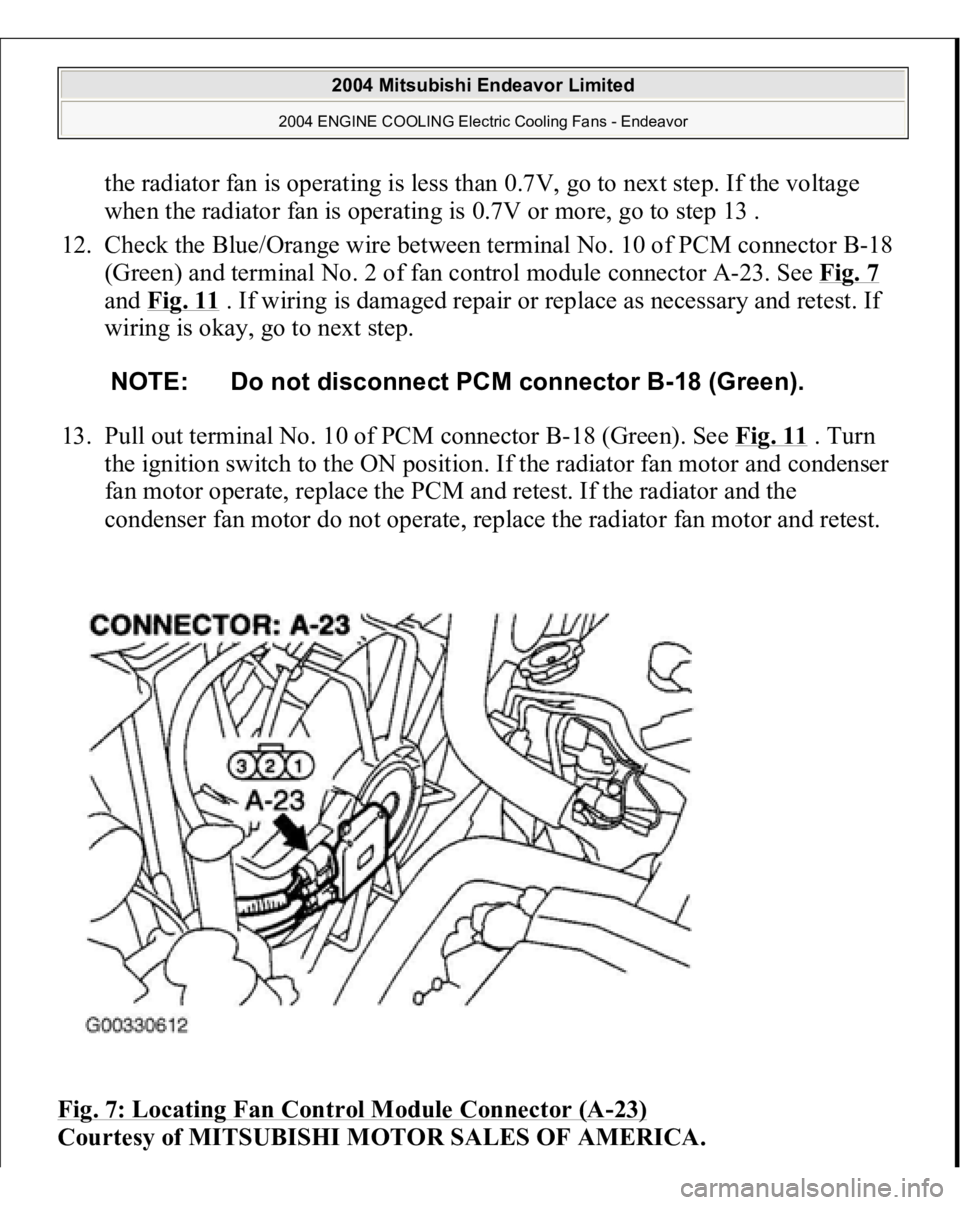
Fig. 7: Locating Fan Control Module Connector (A
-23)
Courtesy of MITSUBISHI MOTOR SALES OF AMERICA.
NOTE: Do not disconnect PCM connector B-18 (Green).
2004 Mitsubishi Endeavor Limited
2004 ENGINE COOLING Electric Cooling Fans - Endeavor
Page 807 of 3870
Fig. 12: Identifying Power Plant ECU Check Harness (MB991923)
Courtesy of MITSUBISHI MOTOR SALES OF AMERICA.
TEST B: RADIATOR FAN & CONDENSER FAN DO NOT CHANGE SPEED OR STOP Technical Description The fan control module has variable control of the radiator fan motor and the
condenser fan motor speeds using signals transmitted from the PCM. Troubleshooting Hints
Malfunction of fan control relay. Malfunction of fan control module. Malfunction of PCM.
Diagnosis 1. Check the fan control relay. See FAN CONTROL RELAY
under
COMPONENT TESTS. If fan control relay is okay, go to next step. If fan
control module is damaged, repair or replace as necessary and retest.
2. Check the harness wire between terminal No. 2 of fan control relay connector
A-10X and terminal No. 3 of fan control module connector A-18. See Fig. 7
and Fig. 8
. If wiring is damaged, repair or replace as necessary and retest. If
wiring is okay, go to next step.
3. Disconnect all the connectors from the PCM. Connect Power Plant ECU Check
Harness (MB991923
) between the PCM and the bod
y-side harness connector.
NOTE: If the engine coolant temperature reaches 230°F (110°C) or
higher, the radiator fan control runs the radiator fan for up
to 5 minutes even after the ignition switch is turned to the
LOCK position. The fan stops its rotation when the engine
coolant temperature decreases to 230°F (110°C) or l ower.
NOTE: Measure the output circuit voltage at terminal No. 10 of
PCM connector B-18 by using Power Plant ECU Check
Harness (MB991923). See Fig. 11
and Fig. 12
.
2004 Mitsubishi Endeavor Limited
2004 ENGINE COOLING Electric Cooling Fans - Endeavor
Page 808 of 3870
See Fig. 12
. Start the engine and allow it to idle. Measure the voltage between
terminal No. 10 of connector B-18 and ground. See Fig. 12
. If the voltage
when the radiator fan is not operating is more than 0.3V, go to next step. If the
voltage when the radiator fan is not operating is less than 0.3V, retest.
4. Check fan control module connector A-23 and PCM connector B-18 for loose,
corroded, or damaged terminals, or terminals pushed back in the connector.
See Fig. 7
and Fig. 11
. If connectors are okay, go to next step. If connectors
are damaged, repair or replace as necessary and retest.
5. Check the harness wire between terminal No. 10 of PCM connector B-18
(Green) and terminal No. 2 of fan control module connector A-23. See Fig. 7
and Fig. 11
. If wiring is damaged repair or replace as necessary and retest. If
wiring is okay, go to next step.
6. Disconnect PCM connector B-18 (Green). See Fig. 11
. Pull out pin No. 10 and
connect it to a body ground. Reconnect PCM connector with pin No. 10 still
removed. Turn the ignition switch to ON position. If the radiator fan motor and
condenser fan motor fan motor stop operating, replace the PCM and retest. If
the radiator fan motor and condenser fan motor do not stop operating, replace
the fan control module and retest.
TEST C: RADIATOR FAN DOES NOT OPERATE Technical Description The cause could be a malfunction of the radiator fan motor or an open circuit
between the fan control module and the radiator fan. Troubleshooting Hints
Malfunction of radiator fan motor.
Diagnosis If radiator fan does not operate, replace the radiator fan.
NOTE: Check terminal No. 7 of intermediate connector A-13,
repair it and then check wiring. See Fig. 9
.
2004 Mitsubishi Endeavor Limited
2004 ENGINE COOLING Electric Cooling Fans - Endeavor
Page 809 of 3870
TEST D: CONDENSER FAN DOES NOT OPERATETechnical Description The cause could be a malfunction of the condenser fan motor or an open circuit
between the fan control module and the radiator fan. Troubleshooting Hints
Malfunction of condenser fan motor. Malfunction of fan control module.
Diagnosis 1. Check the condenser fan motor. See CONDENSER FAN MOTOR
under
COMPONENT TESTS. If condenser fan motor is okay, go to next step. If
radiator fan motor is not okay, replace radiator fan motor and retest.
2. Check the fan control module. See FAN CONTROL MODULE
under
COMPONENT TESTS. If fan control module is okay, retest. If fan control
module is not okay, replace radiator fan motor and retest.
REMOVAL & INSTALLATION RADIATOR FAN Removal & Installation 1. Drain engine coolant.
2. Remove air cleaner.
3. Remove radiator grille.
4. Remove rubber hose. See Fig. 13
.
5. Remove radiator upper hose.
6. Disconnect fan motor connector.
7. Remove shroud assembly.
8. Remove radiator fan.
9. Remove radiator fan motor (integrated with fan control module).
10. Remove condenser fan.
2004 Mitsubishi Endeavor Limited
2004 ENGINE COOLING Electric Cooling Fans - Endeavor
Page 821 of 3870
2. Turn the ignition switch to the "ON" position.
3. Carry out inspection by means of the data list. If there is an abnormality, check
and repair the chassis harnesses and components. (Refer to DATA LIST
REFERENCE TABLE
).
4. Re-check using scan tool MB991958 and check to be sure that the abnormal
input and output have returned to normal because of the repairs.
5. Erase the diagnostic trouble codes.
6. Turn the ignition switch to the "LOCK" (OFF) position.
7. Disconnect scan tool MB991958.
8. Start the engine again and do a test drive to confirm that the problem is
eliminated.
HOW TO DIAGNOSE THE CAN BUS LINE REQUIRED SPECIAL TOOLS:
MB991958: Scan Tool (MUT-III Sub assembly)
MB991824: V.C.I. MB991827: USB Cable MB991910: Main Harness A
1. Connect scan tool MB991958 to the data link connec
tor.
CAUTION: To prevent damage to scan tool MB991958, always
turn the ignition switch to the "LOCK" (OFF) position
before connecting or disconnecting scan tool
MB991958.
2004 Mitsubishi Endeavor LS
2004 BODY & ACCESSORIES Auto, Cruise Control System - Endeavor