Time MITSUBISHI GALANT 2011 9.G MMCS Manual
[x] Cancel search | Manufacturer: MITSUBISHI, Model Year: 2011, Model line: GALANT, Model: MITSUBISHI GALANT 2011 9.GPages: 101, PDF Size: 8.77 MB
Page 15 of 101
Interrupt Displays 2-2
Interrupt Displays
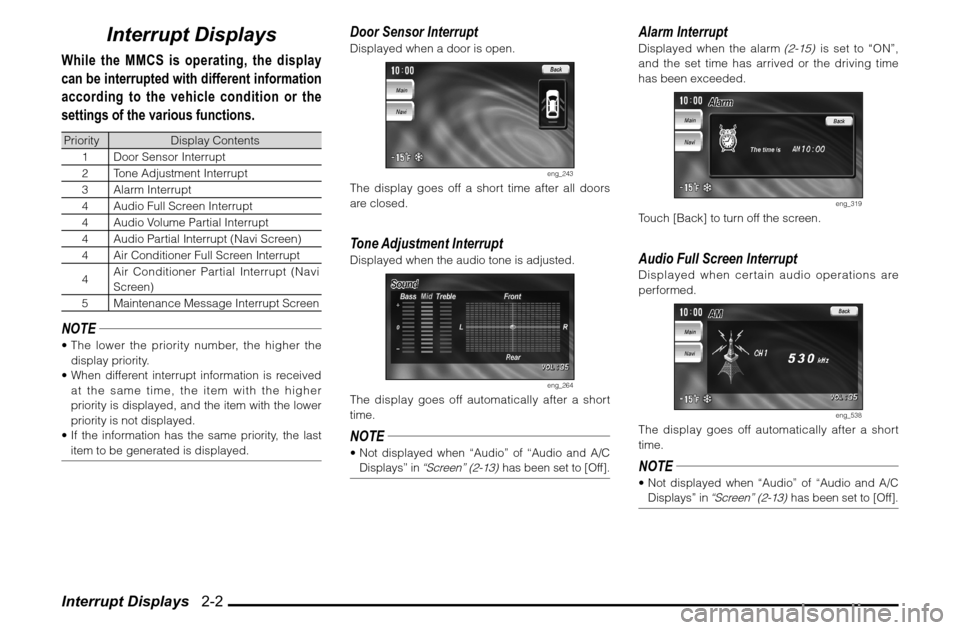
While the MMCS is operating, the display
can be interrupted with different information
according to the vehicle condition or the
settings of the various functions.Priority Display Contents
1 Door Sensor Interrupt
2 Tone Adjustment Interrupt
3 Alarm Interrupt
4 Audio Full Screen Interrupt
4 Audio Volume Partial Interrupt
4 Audio Partial Interrupt (Navi Screen)
4 Air Conditioner Full Screen Interrupt
4Air Conditioner Partial Interrupt (Navi
Screen)
5 Maintenance Message Interrupt ScreenNOTE The lower the priority number, the higher the
display priority.
When different interrupt information is received
at the same time, the item with the higher
priority is displayed, and the item with the lower
priority is not displayed.
If the information has the same priority, the last
item to be generated is displayed.
Door Sensor InterruptDisplayed when a door is open.
eng_243
The display goes off a short time after all doors
are closed.Tone Adjustment InterruptDisplayed when the audio tone is adjusted.
eng_264
The display goes off automatically after a short
time.NOTE Not displayed when “Audio” of “Audio and A/C
Displays” in
“Screen” (2-13)
has been set to [Off].
Alarm InterruptDisplayed when the alarm
(2-15)
is set to “ON”,
and the set time has arrived or the driving time
has been exceeded.
eng_319
Touch [Back] to turn off the screen.Audio Full Screen InterruptDisplayed when certain audio operations are
performed.
eng_538
The display goes off automatically after a short
time.NOTE Not displayed when “Audio” of “Audio and A/C
Displays” in
“Screen” (2-13)
has been set to [Off].
Page 16 of 101
Interrupt Displays 2-3
Operation of MMCS
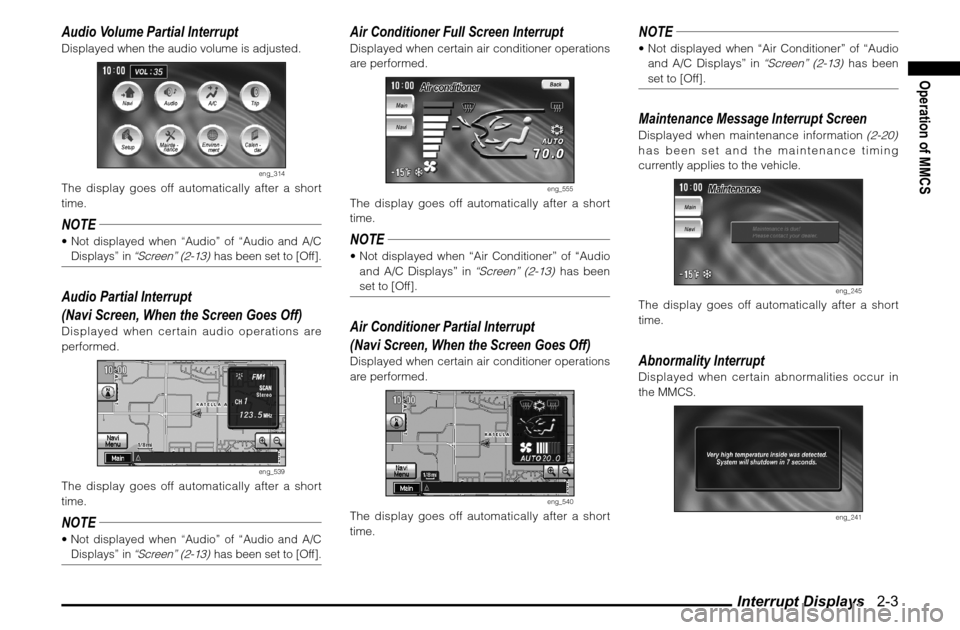
Audio Volume Partial InterruptDisplayed when the audio volume is adjusted.
eng_314
The display goes off automatically after a short
time.NOTE Not displayed when “Audio” of “Audio and A/C
Displays” in
“Screen” (2-13)
has been set to [Off].
Audio Partial Interrupt
(Navi Screen, When the Screen Goes Off)Displayed when certain audio operations are
performed.
eng_539
The display goes off automatically after a short
time.NOTE Not displayed when “Audio” of “Audio and A/C
Displays” in
“Screen” (2-13)
has been set to [Off].
Air Conditioner Full Screen InterruptDisplayed when certain air conditioner operations
are performed.
eng_555
The display goes off automatically after a short
time.NOTE Not displayed when “Air Conditioner” of “Audio
and A/C Displays” in
“Screen” (2-13)
has been
set to [Off].
Air Conditioner Partial Interrupt
(Navi Screen, When the Screen Goes Off)Displayed when certain air conditioner operations
are performed.
eng_540
The display goes off automatically after a short
time.
NOTE Not displayed when “Air Conditioner” of “Audio
and A/C Displays” in
“Screen” (2-13)
has been
set to [Off].
Maintenance Message Interrupt ScreenDisplayed when maintenance information
(2-20)
has been set and the maintenance timing
currently applies to the vehicle.
eng_245
The display goes off automatically after a short
time.Abnormality InterruptDisplayed when certain abnormalities occur in
the MMCS.
eng_241
Page 19 of 101
![MITSUBISHI GALANT 2011 9.G MMCS Manual Audio 2-6
Audio
The audio status can be viewed.
1 Display the Main Menu
2 Touch [Audio]
eng_507
eng_454
Radio
Displayed when the audio source is
the radio (AM/FM1/FM2).
eng_553
1) Selected ban](/img/19/7443/w960_7443-18.png "MITSUBISHI GALANT 2011 9.G MMCS Manual Audio 2-6
Audio
The audio status can be viewed.
1 Display the Main Menu
2 Touch [Audio]
eng_507
eng_454
Radio
Displayed when the audio source is
the radio (AM/FM1/FM2).
eng_553
1) Selected ban")
Audio 2-6
Audio
The audio status can be viewed.
1 Display the Main Menu
2 Touch [Audio]
eng_507
eng_454
Radio
Displayed when the audio source is
the radio (AM/FM1/FM2).
eng_553
1) Selected band
2) Volume
3) Displayed when the sound is stereo.
4) Selected frequency
5) Displayed during scan mode.
CD Changer
Displayed when the audio source is
the CD changer.
eng_428
1) Displays the playback status, such as disc
repeat or random.
2) Volume
3) Playback time
4) Track number
5) Disc numberNOTE Touch [Text] to
display the disc
name and track
name.
(When
the loaded CD
supports CD text)
eng_543
When an MP3 disc
is loaded, touch
and hold [Text] to
display the ID3 tag
mode, showing
information such as the folder name,
eng_544
le name, album name and artist name. 1)
5)
4)
3)
2)
1)
5)
4)
3)
2)
Page 22 of 101
![MITSUBISHI GALANT 2011 9.G MMCS Manual Trip 2-9
Operation of MMCS
Trip
Trip information can be viewed and set.
1 Display the Main Menu
2 Touch [Trip]
eng_507
eng_498
The trip screen is displayed.
The average speed, average mileage a](/img/19/7443/w960_7443-21.png "MITSUBISHI GALANT 2011 9.G MMCS Manual Trip 2-9
Operation of MMCS
Trip
Trip information can be viewed and set.
1 Display the Main Menu
2 Touch [Trip]
eng_507
eng_498
The trip screen is displayed.
The average speed, average mileage a")
Trip 2-9
Operation of MMCS
Trip
Trip information can be viewed and set.
1 Display the Main Menu
2 Touch [Trip]
eng_507
eng_498
The trip screen is displayed.
The average speed, average mileage and current
mileage can be viewed.
NOTE Touch [Graph] to
view the average
speed and average
mileage as a
graph, measured in 5-minute units.
eng_496
Touch [Manual] to change the reset mode to
“Manual Reset Mode”.
>>> “Reset Mode” (2-10)
Touch [ ] or [ ] of “Page” to scroll through
the pages. 3 Touch [
] of “Page”
eng_495
The 2/3 trip screen is displayed.
The distance to empty, distance driven after
refueling and driving time can be viewed.
4 Touch [
] of “Page”
eng_492
The 3/3 trip screen is displayed.
The lap time can be measured. >>> “Lap Time” (2-11)
Page 23 of 101
Trip 2-10
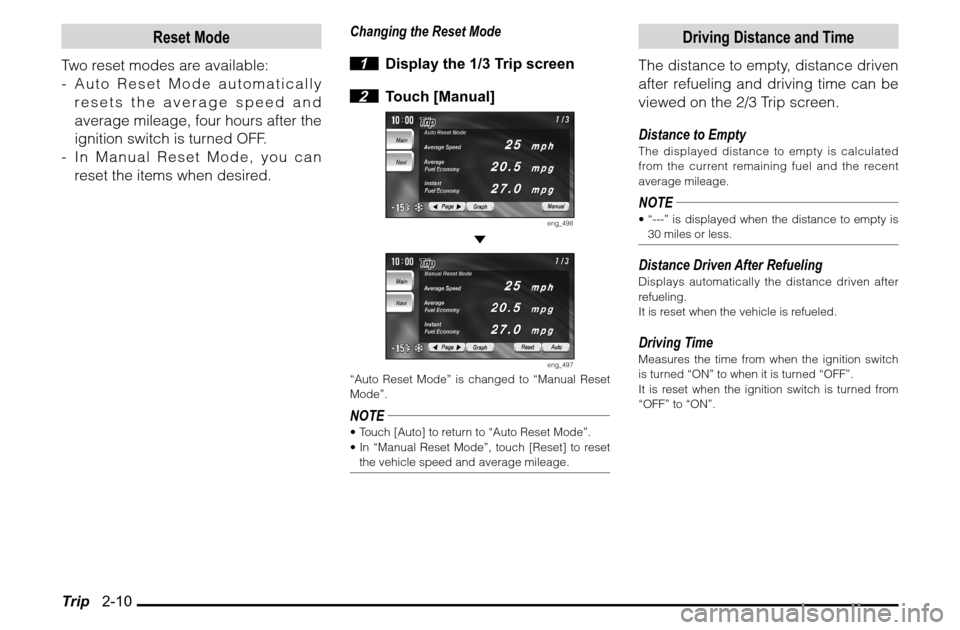
Reset Mode
Two reset modes are available:
- Auto Reset Mode automatically
resets the average speed and
average mileage, four hours after the
ignition switch is turned OFF.
- In Manual Reset Mode, you can
reset the items when desired.
Changing the Reset Mode
1 Display the 1/3 Trip screen
2 Touch [Manual]
eng_498
eng_497
“Auto Reset Mode” is changed to “Manual Reset
Mode”.NOTE Touch [Auto] to return to “Auto Reset Mode”.
In “Manual Reset Mode”, touch [Reset] to reset
the vehicle speed and average mileage.
Driving Distance and Time
The distance to empty, distance driven
after refueling and driving time can be
viewed on the 2/3 Trip screen.
Distance to EmptyThe displayed distance to empty is calculated
from the current remaining fuel and the recent
average mileage.NOTE “---” is displayed when the distance to empty is
30 miles or less.Distance Driven After RefuelingDisplays automatically the distance driven after
refueling.
It is reset when the vehicle is refueled.Driving TimeMeasures the time from when the ignition switch
is turned “ON” to when it is turned “OFF”.
It is reset when the ignition switch is turned from
“OFF” to “ON”.
Page 24 of 101
![MITSUBISHI GALANT 2011 9.G MMCS Manual Trip 2-11
Operation of MMCS
Lap Time
Time, distance, speed and mileage
can be measured.
1 Display the 3/3 Trip screen
2 Touch [Start]
eng_492
Total Line
eng_545
The measurement starts. At thi](/img/19/7443/w960_7443-23.png "MITSUBISHI GALANT 2011 9.G MMCS Manual Trip 2-11
Operation of MMCS
Lap Time
Time, distance, speed and mileage
can be measured.
1 Display the 3/3 Trip screen
2 Touch [Start]
eng_492
Total Line
eng_545
The measurement starts. At thi")
Trip 2-11
Operation of MMCS
Lap Time
Time, distance, speed and mileage
can be measured.
1 Display the 3/3 Trip screen
2 Touch [Start]
eng_492
Total Line
eng_545
The measurement starts. At this time, the speed
and mileage are being measured, so they are not
displayed.
3 Touch [Lap]
eng_546
The current measurement results are displayed in
“A”.NOTE Touch [Lap]
again and the
measurement
results displayed
in "A” are moved
to “B”.
eng_547
4 Touch [Stop]
eng_548
The measurements stop and the measurement
results are displayed in the total line.
NOTE Touch [Start] to restart the measurements from
where they stopped.
The measurements stop if the ignition switch
is turned “OFF” during measurement. If this
happens, the measurements restart when the
ignition switch is turned “ON”. 5 Touch [Reset]
eng_549
All the measurement results are reset.
Page 25 of 101
![MITSUBISHI GALANT 2011 9.G MMCS Manual Setup 2-12
Setup
MMCS setup can be performed.
Picture Quality
The brightness and contrast of the
screen can be adjusted.
1 Display the Main Menu and
touch [Setup]
eng_507
2 Touch [Picture]
eng_](/img/19/7443/w960_7443-24.png "MITSUBISHI GALANT 2011 9.G MMCS Manual Setup 2-12
Setup
MMCS setup can be performed.
Picture Quality
The brightness and contrast of the
screen can be adjusted.
1 Display the Main Menu and
touch [Setup]
eng_507
2 Touch [Picture]
eng_")
Setup 2-12
Setup
MMCS setup can be performed.
Picture Quality
The brightness and contrast of the
screen can be adjusted.
1 Display the Main Menu and
touch [Setup]
eng_507
2 Touch [Picture]
eng_363
The picture quality settings screen is displayed.
3
Touch [ - ] or [ + ] of “Brightness”
or “Contrast” to adjust
eng_360
4 Touch [Back]
The picture quality adjustment is completed.NOTE Press and hold [ - ] or [ + ] to adjust quickly.
The picture quality of the navi screen can be
adjusted by touching [Navigation].
The picture quality of the back ground can be
adjusted by touching [Back Ground].
The brightness and contrast are adjusted at the
same time no matter which screen is adjusted.
“Brightness” can be adjusted with headlights
ON and OFF separately.
Screen
The interrupt displays when changing
the background and during audio
and air conditioner operation can be
turned ON/OFF.
1 Display the Main Menu and
touch [Setup]
eng_507
2 Touch [Screen]
eng_363
Page 27 of 101
![MITSUBISHI GALANT 2011 9.G MMCS Manual Setup 2-14
System
The basic settings required by the
MMCS can be performed here.
1 Display the Main Menu and
touch [Setup]
eng_507
2 Touch [System]
eng_363
3 Touch an item to set
There are 3](/img/19/7443/w960_7443-26.png "MITSUBISHI GALANT 2011 9.G MMCS Manual Setup 2-14
System
The basic settings required by the
MMCS can be performed here.
1 Display the Main Menu and
touch [Setup]
eng_507
2 Touch [System]
eng_363
3 Touch an item to set
There are 3")
Setup 2-14
System
The basic settings required by the
MMCS can be performed here.
1 Display the Main Menu and
touch [Setup]
eng_507
2 Touch [System]
eng_363
3 Touch an item to set
There are 3 pages of setting items. Touch [
]
or [ ] of “Page” to change between the setting
screens and perform the settings.
eng_357
eng_355
eng_353
4 Touch [Back]
The system settings are completed.
Time ZoneTouch [ ] or [ ] to set “Pacific”, “Mountain”,
“Central”, “Eastern”, “Atlantic” or “Newfoundland”
as the time zone.NOTE This item can also be set from the navi menu. >>> “Time Zone” (7-2)Daylight Saving TimeWhether or not to use daylight saving time can be
set.
[On] Use daylight saving time.
[Off] Do not use daylight saving time.NOTE This item can also be set from the navi menu. >>> “Time Zone” (7-2)Date and ClockAdjusted automatically.LanguageTouch [ ] or [ ] to set the language used by
the system.
[English] Change to English.
[Français] Change to French.
[Español] Change to Spanish.NOTE This item can also be set from the navi menu. >>> “Language” (7-1)
Page 28 of 101
![MITSUBISHI GALANT 2011 9.G MMCS Manual Setup 2-15
Operation of MMCS
Display UnitTouch [ ] or [ ] to set the units used by the
system.Trip
miles, mph, mpg Distance miles
Speed mph
Mileage mpg
Altitude ft
Air pressure inHg
km, km/h,](/img/19/7443/w960_7443-27.png "MITSUBISHI GALANT 2011 9.G MMCS Manual Setup 2-15
Operation of MMCS
Display UnitTouch [ ] or [ ] to set the units used by the
system.Trip
miles, mph, mpg Distance miles
Speed mph
Mileage mpg
Altitude ft
Air pressure inHg
km, km/h,")
Setup 2-15
Operation of MMCS
Display UnitTouch [ ] or [ ] to set the units used by the
system.Trip
miles, mph, mpg Distance miles
Speed mph
Mileage mpg
Altitude ft
Air pressure inHg
km, km/h, km/L Distance km
Speed km/h
Mileage km/L
Altitude m
Air pressure kPa
km, km/h,
L/100kmDistance km
Speed km/h
Mileage L/100km
Altitude m
Air pressure kPaNOTE This item can also be set from the navi menu.
>>>“Unit Distance”(7-1)Temperature
Fahrenheit Set to Fahrenheit (°F).
Celsius Set to Celsius (°C).Operation SoundThe operation sound can be set to on or off.
[On] The operation sound is on.
[Off] The operation sound is off.
Touch PanelThe touch panel can be adjusted.
Touch [Adjust], and then set by following the
instructions on the screen.
eng_347
Alarm
The alarm can be set with the clock or
the driving time.
1 Display the Main Menu and
touch [Setup]
eng_507
2 Touch [Alarm]
eng_363
Continued on the Next Page
Page 29 of 101
![MITSUBISHI GALANT 2011 9.G MMCS Manual Setup 2-16 3 Touch [Alarm Set] or [Driving
Time]
eng_554
The “Alarm Set” screen or “Driving Time” screen
is displayed. 4 Touch [Input] of “Time”
eng_343
5 Input the time
eng_339
NO](/img/19/7443/w960_7443-28.png "MITSUBISHI GALANT 2011 9.G MMCS Manual Setup 2-16 3 Touch [Alarm Set] or [Driving
Time]
eng_554
The “Alarm Set” screen or “Driving Time” screen
is displayed. 4 Touch [Input] of “Time”
eng_343
5 Input the time
eng_339
NO")
Setup 2-16 3 Touch [Alarm Set] or [Driving
Time]
eng_554
The “Alarm Set” screen or “Driving Time” screen
is displayed. 4 Touch [Input] of “Time”
eng_343
5 Input the time
eng_339
NOTE An [AM] or [PM] input is required for “Alarm Set”. The minimum setting time for “Driving Time” is 1
minute, and the maximum is 19 hours, 59 minutes. When a “Driving Time” to be set in this screen is
shorter than the “Driving Time”
(2-10)
from when
the ignition switch is turned “ON”, alarm does not
sound and the “Time” is displayed in green.
Touch [Back] to return to the alarm setting
screen without setting the time. 6 Touch [Set]
The screen returns to the alarm setting screen. 7 Touch [Back]
The alarm settings are completed.Turning OFF the Interrupt DisplayTurning off the interrupt display for an alarm
setting that has been set. 1
Display the “Alarm Set” screen
or “Driving Time” screen
(2-16)
2 Touch [Off] of “Alarm”
eng_342
3 Touch [Back]
The OFF setting for the interrupt display is
completed.Deleting the Setting
1
Display the “Alarm Set” screen
or “Driving Time” screen
(2-16)
2 Touch [Clear]
eng_343
The set contents are deleted. 3 Touch [Back]
The setting deletion is completed.