Time MITSUBISHI GALANT 2011 9.G MMCS Manual
[x] Cancel search | Manufacturer: MITSUBISHI, Model Year: 2011, Model line: GALANT, Model: MITSUBISHI GALANT 2011 9.GPages: 101, PDF Size: 8.77 MB
Page 87 of 101
![MITSUBISHI GALANT 2011 9.G MMCS Manual System Options 7-2
Time Zone
Changing the time zone.
1 Touch [Change]
2 Touch the desired zone
eng_127
3 Touch [On] or [Off] for “Daylight
Saving Time”
4 Touch [Done]
eng_128
The time zon](/img/19/7443/w960_7443-86.png "MITSUBISHI GALANT 2011 9.G MMCS Manual System Options 7-2
Time Zone
Changing the time zone.
1 Touch [Change]
2 Touch the desired zone
eng_127
3 Touch [On] or [Off] for “Daylight
Saving Time”
4 Touch [Done]
eng_128
The time zon")
System Options 7-2
Time Zone
Changing the time zone.
1 Touch [Change]
2 Touch the desired zone
eng_127
3 Touch [On] or [Off] for “Daylight
Saving Time”
4 Touch [Done]
eng_128
The time zone settings are completed, and the
display returns to the system options screen.
List Orientation
Changing the list orientation.[Down] The list is displayed with the current
location at the top.
[Up]The list is displayed with the
destination at the top.NOTEChanges to the list orientation apply to the
following screens.
Turn List Screen
(3-11)
FWY Area List Screen
(4-11)
Route Outline Screen
(5-2)
Avoid Street Screen
(5-3)
Keyboard Layout
Changing the layout of the keyboard.[Alphabet]
eng_124
[PC]
eng_129
Page 89 of 101
![MITSUBISHI GALANT 2011 9.G MMCS Manual Screen Options 7-4
POI Icons on Map
Setting whether or not to display the
POI icons on the map.
Individual settings for whether or not
to display can also be made for each
POI.[Show All] Displays](/img/19/7443/w960_7443-88.png "MITSUBISHI GALANT 2011 9.G MMCS Manual Screen Options 7-4
POI Icons on Map
Setting whether or not to display the
POI icons on the map.
Individual settings for whether or not
to display can also be made for each
POI.[Show All] Displays")
Screen Options 7-4
POI Icons on Map
Setting whether or not to display the
POI icons on the map.
Individual settings for whether or not
to display can also be made for each
POI.[Show All] Displays all icons on the map.
[Hide All] Hides all icons from the map.
[Select] Only the icons selected in advance
are shown on the map.Select IconsSetting speci c POI icons to be displayed on the
map. 1 Touch [Select]
2 Touch [
] of “POI Icons on
Map”
3 Touch a checkbox to select a
POI to display
eng_133
NOTE
is displayed,
is not displayed.
The screen changes between
and
each
time it is touched.
Touch [Default] to return to the factory settings.
4 Touch [Done]
eng_134
The display returns to the Screen Options screen,
and the setting of specific POI icons to be
displayed on the map is completed.
POI IconsThe 43 POI icon types are shown below.
POI Icons are color coded based on their
category type.
A (Green) Shopping, Money & Business
B (Dark Blue) Car & Travel
C (Brown) Public Places & Emergency
D (Orange) Restaurant
E (Blue) Recreation & Attraction
Icons/Name Category
AIRPORT BAMUSEMENT PARK EAT M AAUTOMOBILE CLUB BBANK ABUS STATION BCAR RENTAL BCASINO ECITY CENTER CCITY HALL CCIVIC / COMMUNITY CENTER CCOMMUTER RAIL STATION BCONVENTION / EXHIBITION
CENTERCCOURT HOUSE CFERRY TERMINAL B
Page 91 of 101
![MITSUBISHI GALANT 2011 9.G MMCS Manual Route Options 7-6
Route Options
Setting the route search conditions.
1 Display the Navi Menu and
touch [Setup].
eng_002
2 Touch [Route]
eng_097
eng_136
The route options screen is displayed. 3](/img/19/7443/w960_7443-90.png "MITSUBISHI GALANT 2011 9.G MMCS Manual Route Options 7-6
Route Options
Setting the route search conditions.
1 Display the Navi Menu and
touch [Setup].
eng_002
2 Touch [Route]
eng_097
eng_136
The route options screen is displayed. 3")
Route Options 7-6
Route Options
Setting the route search conditions.
1 Display the Navi Menu and
touch [Setup].
eng_002
2 Touch [Route]
eng_097
eng_136
The route options screen is displayed. 3 Touch each item to change the
setting
4 Touch [Done]
eng_137
The setting change is completed.NOTE Touch [Default] to return to the factory settings.
Route Priority
Setting the route search priority.[Fast] Searches for a short route in terms
of time (arriving quickly at the
destination), using freeways and
major roads.
[Short]Searches for the route on the map
with the shortest distance.
[Easy] Search for a route that is easy to
drive, with few left or right turns (in
particular left turns).
Minimize Freeways
Setting the conditions for using
freeways.[Yes] Calculates a route that uses
freeways as little as possible.
[No]Calculates a route that uses
freeways.
Page 92 of 101
![MITSUBISHI GALANT 2011 9.G MMCS Manual Route Options 7-7
Setup
Minimize Toll Roads
Setting the conditions for using toll
roads.[Yes] Calculates a route that uses toll
roads as little as possible.
[No] C a l c u l a t e s a ro u t e](/img/19/7443/w960_7443-91.png "MITSUBISHI GALANT 2011 9.G MMCS Manual Route Options 7-7
Setup
Minimize Toll Roads
Setting the conditions for using toll
roads.[Yes] Calculates a route that uses toll
roads as little as possible.
[No] C a l c u l a t e s a ro u t e")
Route Options 7-7
Setup
Minimize Toll Roads
Setting the conditions for using toll
roads.[Yes] Calculates a route that uses toll
roads as little as possible.
[No] C a l c u l a t e s a ro u t e t h a t u s e s t o l l
roads.
Minimize Ferries
Setting the conditions for using ferries.[Yes] Calculates a route that uses ferries
as little as possible.
[No] Calculates a route that uses ferries.
Avoid Selected Area
Setting whether or not to use the set
avoid areas
(7-10)
.
[Yes] Calculates a route that uses the
avoid areas as little as possible.
[No]Calculates a route that uses the
avoid areas.
Avoid Time Restricted Roads
Setting whether or not to take time
restrictions into account when
performing the search.[Yes] Takes time restricted roads into
account when calculating a route.
[No] Does not take time restricted roads
into account when calculating a
route.
Page 94 of 101
![MITSUBISHI GALANT 2011 9.G MMCS Manual Guidance 7-9
Setup
Arrival Time
Setting the display method for the
arrival time at the destination.[Remaining Driving
Time]The remaining time
required to drive to the
destination is displayed.
[](/img/19/7443/w960_7443-93.png "MITSUBISHI GALANT 2011 9.G MMCS Manual Guidance 7-9
Setup
Arrival Time
Setting the display method for the
arrival time at the destination.[Remaining Driving
Time]The remaining time
required to drive to the
destination is displayed.
[")
Guidance 7-9
Setup
Arrival Time
Setting the display method for the
arrival time at the destination.[Remaining Driving
Time]The remaining time
required to drive to the
destination is displayed.
[Estimated Time]The estimated time of
arrival is displayed.
Time/Distance Remaining
Setting whether to display the arrival
time and direction (direction icon) of
both the destination and the way point.[Destination]Displays the time and
direction to the destination.
[Next Dest.]Displays the time and
direction to the next
location to be reached (way
point or destination).
[Off] Does not display the arrival
time. The direction icon
displays the direction to
the destination.
POI Icons on Guidance Map
Setting whether or not to display POI
icons on the intersection guidance
map.[On] Displays POI icons.
[Off] Does not display POI icons.
Page 97 of 101
![MITSUBISHI GALANT 2011 9.G MMCS Manual Personal Settings 7-12 3 Touch one of the items to edit
eng_152
NOTE Touch [Adjust] to change the position or
change the range in the same way as step 4 of “Registering” (7-10)
.
Touch the](/img/19/7443/w960_7443-96.png "MITSUBISHI GALANT 2011 9.G MMCS Manual Personal Settings 7-12 3 Touch one of the items to edit
eng_152
NOTE Touch [Adjust] to change the position or
change the range in the same way as step 4 of “Registering” (7-10)
.
Touch the")
Personal Settings 7-12 3 Touch one of the items to edit
eng_152
NOTE Touch [Adjust] to change the position or
change the range in the same way as step 4 of “Registering” (7-10)
.
Touch the “Name” button to change the name
of the avoid area in the same way as step 5 of
“Registering” (7-10)
.
4 Touch [Done]
5 Touch [Done]
eng_153
The editing of the avoid area is completed.
DeletingDeleting a stored avoid area. 1 Touch [Delete]
2 Touch the avoid area to delete
eng_154
NOTE The avoid areas targeted for deletion are
displayed with a black highlight. Touch a
location again to remove it from the deletion list.
Multiple locations can be selected at the same
time.
Touch [All] to delete all avoid areas at the same
time.
Touch [Info] to
display the map
of the avoid area vicinity.
eng_155
3 Touch [Done]
eng_156
4 Touch [Yes]
eng_157
The deletion of the selected avoid areas is
completed.
Page 98 of 101
Personal Settings 7-13
Setup
My Categories
Frequently used POI categories can
be stored in “My Categories”.
A maximum of six category items can
be stored in “My Categories”.
1 Touch [Edit]
A list is displayed of all categories.
The remaining operations are the same as from “Editing My Categories” (4-7)
.
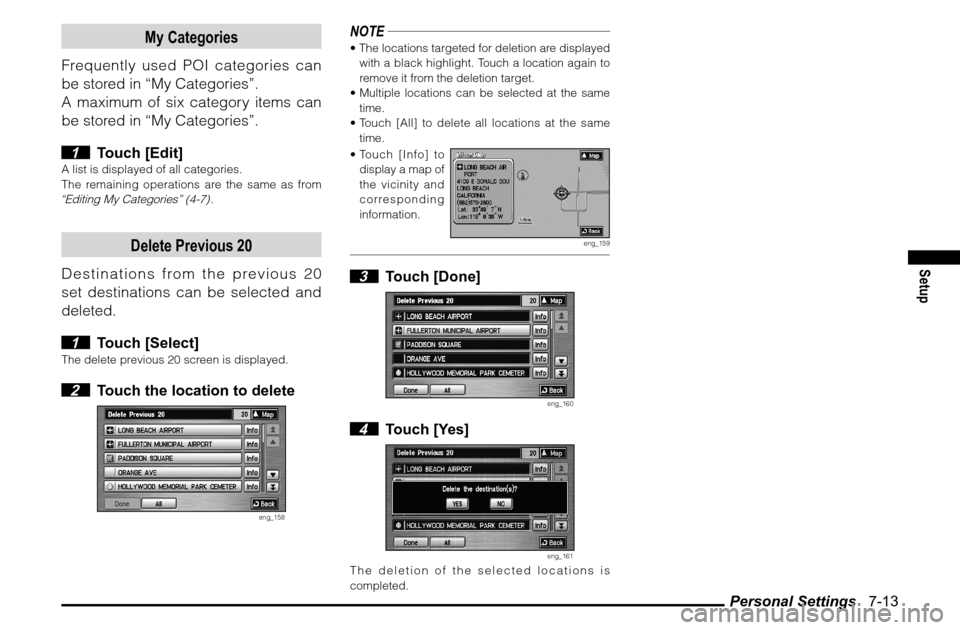
Delete Previous 20
Destinations from the previous 20
set destinations can be selected and
deleted.
1 Touch [Select]
The delete previous 20 screen is displayed. 2 Touch the location to delete
eng_158
NOTE The locations targeted for deletion are displayed
with a black highlight. Touch a location again to
remove it from the deletion target.
Multiple locations can be selected at the same
time.
Touch [All] to delete all locations at the same
time.
Touch [Info] to
display a map of
the vicinity and
corresponding
information.
eng_159
3 Touch [Done]
eng_160
4 Touch [Yes]
eng_161
The deletion of the selected locations is
completed.