air conditioning MITSUBISHI GRANDIS 2008 (in English) User Guide
[x] Cancel search | Manufacturer: MITSUBISHI, Model Year: 2008, Model line: GRANDIS, Model: MITSUBISHI GRANDIS 2008Pages: 458, PDF Size: 18.52 MB
Page 243 of 458
For pleasant driving
5-9
5
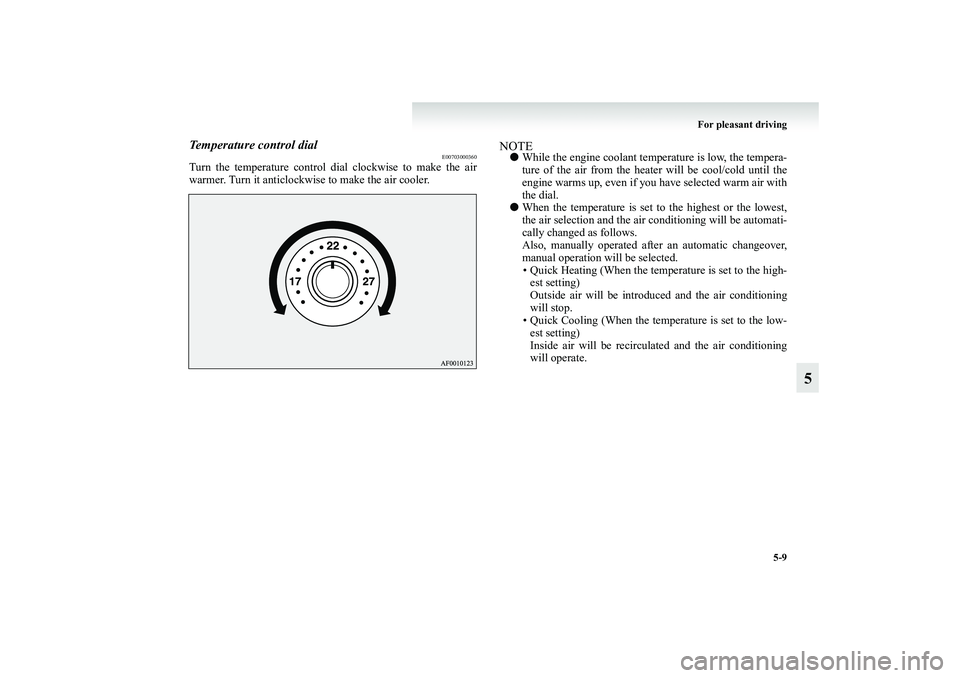
Temperature control dial
E00703000360
Turn the temperature control dial clockwise to make the air
warmer. Turn it anticlockwise to make the air cooler.
NOTE●While the engine coolant temperature is low, the tempera-
ture of the air from the heater will be cool/cold until the
engine warms up, even if you have selected warm air with
the dial.
●When the temperature is set to the highest or the lowest,
the air selection and the air conditioning will be automati-
cally changed as follows.
Also, manually operated after an automatic changeover,
manual operation will be selected.
• Quick Heating (When the temperature is set to the high-
est setting)
Outside air will be introduced and the air conditioning
will stop.
• Quick Cooling (When the temperature is set to the low-
est setting)
Inside air will be recirculated and the air conditioning
will operate.
BK-XP08E1ENUK.en-uk.book Page 9 Monday, August 13, 2007 2:20 PM
Page 245 of 458
For pleasant driving
5-11
5
NOTE●When the mode selection dial or the blower speed selec-
tion dial is set to the “AUTO” position again after manual
operation, the air selection switch will also be automati-
cally controlled.
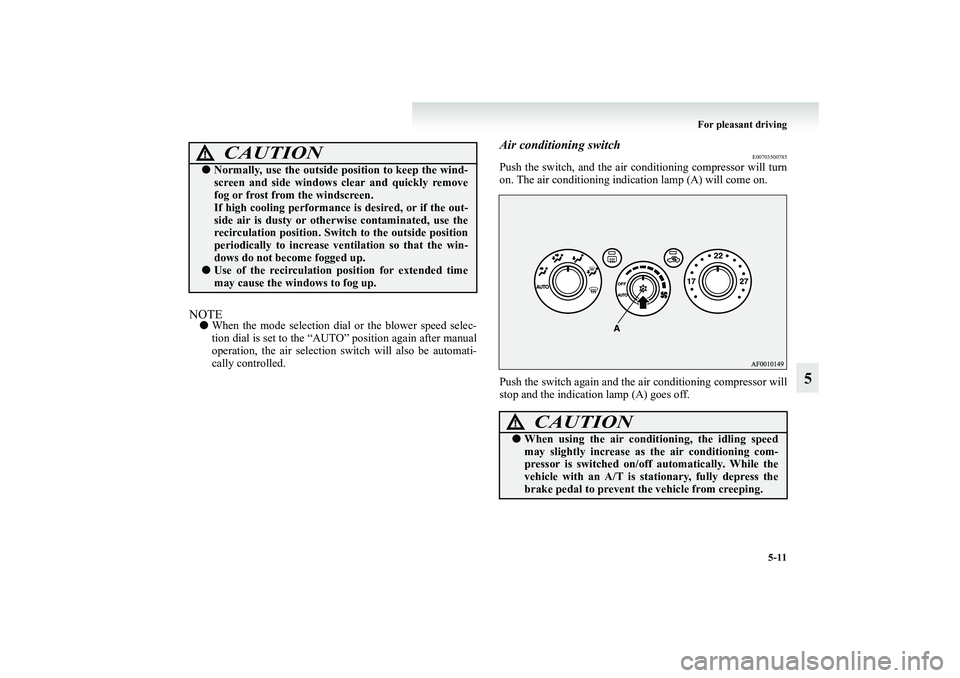
Air conditioning switch
E00703500785
Push the switch, and the air conditioning compressor will turn
on. The air conditioning indication lamp (A) will come on.
Push the switch again and the air conditioning compressor will
stop and the indication lamp (A) goes off.
CAUTION
!●Normally, use the outside position to keep the wind-
screen and side windows clear and quickly remove
fog or frost from the windscreen.
If high cooling performance is desired, or if the out-
side air is dusty or otherwise contaminated, use the
recirculation position. Switch to the outside position
periodically to increase ventilation so that the win-
dows do not become fogged up.●Use of the recirculation position for extended time
may cause the windows to fog up.
CAUTION
!●When using the air conditioning, the idling speed
may slightly increase as the air conditioning com-
pressor is switched on/off automatically. While the
vehicle with an A/T is stationary, fully depress the
brake pedal to prevent the vehicle from creeping.
BK-XP08E1ENUK.en-uk.book Page 11 Monday, August 13, 2007 2:20 PM
Page 246 of 458
5-12 For pleasant driving
5
NOTE●If a problem is detected in the air conditioning system, the
air conditioning operation indication lamp (A) blinks.
Press the air conditioning switch once to turn it off, then
once more to turn it back on. If the air conditioning opera-
tion indication lamp (A) does not blink for a while, there
is nothing wrong. If it starts to blink again, we recommend
you to have it checked.
●Sometimes, for example after using a high-pressure car
wash, the condenser can get wet, and the operation indica-
tion lamp (A) blinks temporarily. In this case there is
nothing wrong. Wait for a while, press the air conditioning
switch once to turn the system off, then once more to turn
it back on. Once the water evaporates, the blinking will
stop.
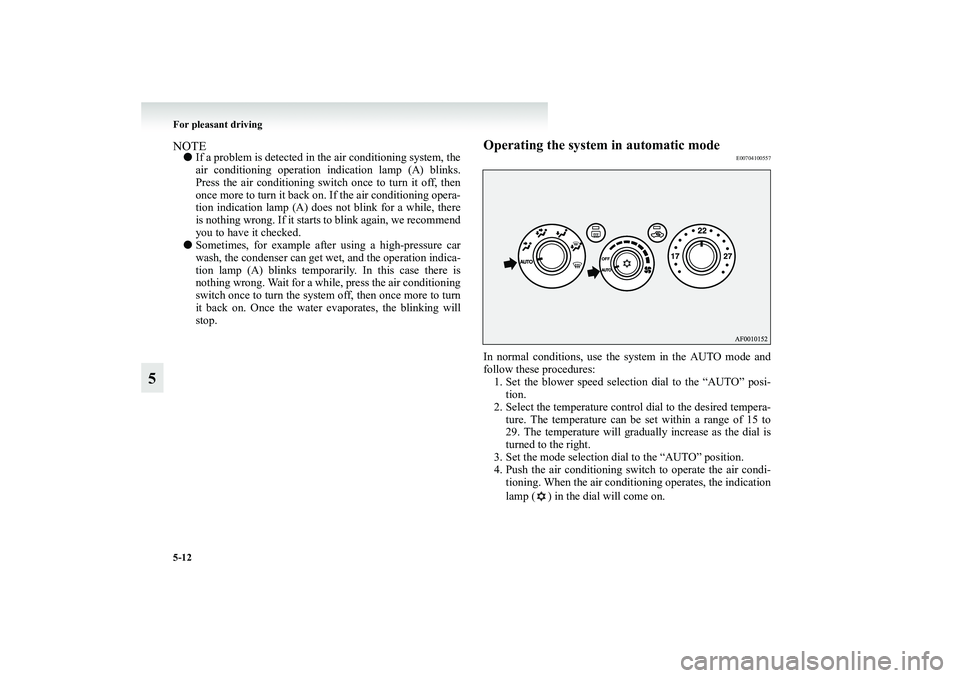
Operating the system in automatic mode
E00704100557
In normal conditions, use the system in the AUTO mode and
follow these procedures:
1. Set the blower speed selection dial to the “AUTO” posi-
tion.
2. Select the temperature control dial to the desired tempera-
ture. The temperature can be set within a range of 15 to
29. The temperature will gradually increase as the dial is
turned to the right.
3. Set the mode selection dial to the “AUTO” position.
4. Push the air conditioning switch to operate the air condi-
tioning. When the air conditioning operates, the indication
lamp ( ) in the dial will come on.
BK-XP08E1ENUK.en-uk.book Page 12 Monday, August 13, 2007 2:20 PM
Page 247 of 458
For pleasant driving
5-13
5
The outlet port (except “ ”), recirculation/outside air select
and blower speed, and ON/OFF of air conditioning will be con-
trolled automatically.
To stop the system, turn the blower speed selection dial to the
“OFF” position.NOTE●Set the temperature at about 22 under normal conditions.
●While the engine coolant temperature is low, the tempera-
ture of the air from the heater will be cool/cold until the
engine warms up, even if you have selected warm air with
the dial. To prevent the windscreen and windows from
fogging up, the ventilator mode will be changed to “ ”
and the blower speed will be reduced.
●If the blower speed selection dial, air conditioning switch,
mode selection dial, or air selection switch is operated
while the system is operating in the AUTO mode, the acti-
vated function overrides the corresponding function of
automatic control. All other functions remain under auto-
matic control.
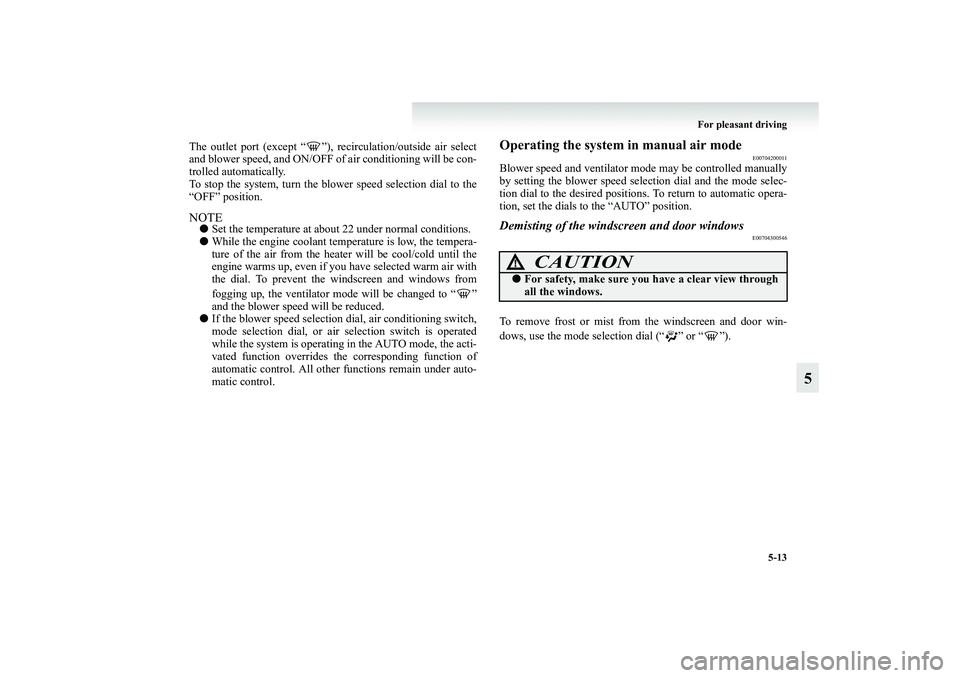
Operating the system in manual air mode
E00704200011
Blower speed and ventilator mode may be controlled manually
by setting the blower speed selection dial and the mode selec-
tion dial to the desired positions. To return to automatic opera-
tion, set the dials to the “AUTO” position.Demisting of the windscreen and door windows
E00704300546
To remove frost or mist from the windscreen and door win-
dows, use the mode selection dial (“ ” or “ ”).
CAUTION
!●For safety, make sure you have a clear view through
all the windows.
BK-XP08E1ENUK.en-uk.book Page 13 Monday, August 13, 2007 2:20 PM
Page 248 of 458
5-14 For pleasant driving
5
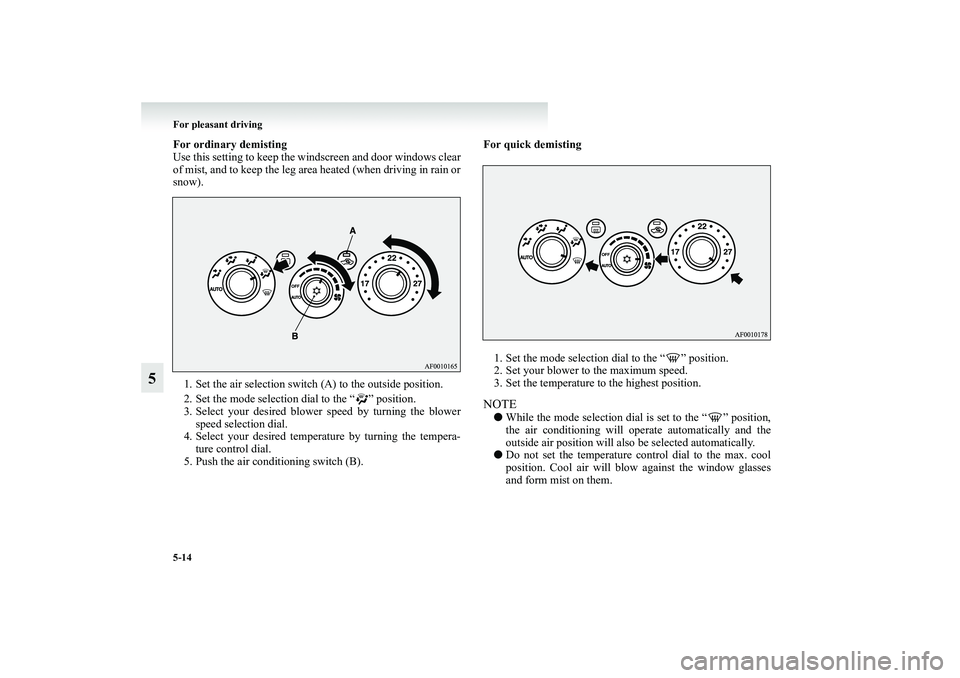
For ordinary demisting
Use this setting to keep the windscreen and door windows clear
of mist, and to keep the leg area heated (when driving in rain or
snow).
1. Set the air selection switch (A) to the outside position.
2. Set the mode selection dial to the “ ” position.
3. Select your desired blower speed by turning the blower
speed selection dial.
4. Select your desired temperature by turning the tempera-
ture control dial.
5. Push the air conditioning switch (B).For quick demisting
1. Set the mode selection dial to the “ ” position.
2. Set your blower to the maximum speed.
3. Set the temperature to the highest position.NOTE●While the mode selection dial is set to the “ ” position,
the air conditioning will operate automatically and the
outside air position will also be selected automatically.
●Do not set the temperature control dial to the max. cool
position. Cool air will blow against the window glasses
and form mist on them.
BK-XP08E1ENUK.en-uk.book Page 14 Monday, August 13, 2007 2:20 PM
Page 249 of 458
For pleasant driving
5-15
5 Rear heater*/Rear cooler*
E00719900016
The rear heater/rear cooler can only be used while the engine is
running.NOTE●Cooling with rear cooler is not possible when the front air
conditioning (cooling and dehumidifying functions) is not
operating. Be sure to activate the front air conditioning
(cooling and dehumidifying functions) before activating
the rear air conditioning.
When the front air conditioning is not operating, only fan
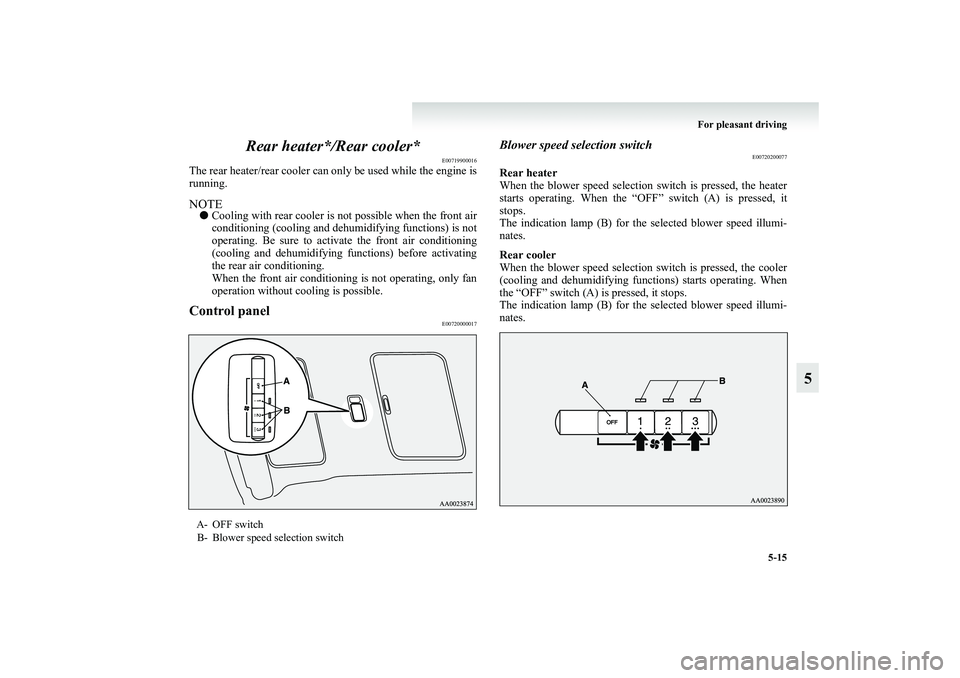
operation without cooling is possible.Control panel
E00720000017
Blower speed selection switch
E00720200077
Rear heater
When the blower speed selection switch is pressed, the heater
starts operating. When the “OFF” switch (A) is pressed, it
stops.
The indication lamp (B) for the selected blower speed illumi-
nates.
Rear cooler
When the blower speed selection switch is pressed, the cooler
(cooling and dehumidifying functions) starts operating. When
the “OFF” switch (A) is pressed, it stops.
The indication lamp (B) for the selected blower speed illumi-
nates.
A- OFF switch
B- Blower speed selection switch
BK-XP08E1ENUK.en-uk.book Page 15 Monday, August 13, 2007 2:20 PM
Page 250 of 458
5-16 For pleasant driving
5
NOTE●The blower speed is memorized when the engine is shut
down.
If the battery is disconnected and reconnected however,
the memory is erased and the blower speed is automati-
cally set to the “OFF” position.
Rear automatic air conditioning
*E00705900028
The air conditioning can only be used while the engine is run-
ning.
While the front air conditioning is on, rear air conditioning is
also possible.NOTE●Cooling is not possible when the front air conditioning
(cooling and dehumidifying functions) is not operating.
Be sure to activate the front air conditioning (cooling and
dehumidifying functions) before activating the rear air
conditioning.
When the front air conditioning is not operating, only fan
operation without cooling is possible.
BK-XP08E1ENUK.en-uk.book Page 16 Monday, August 13, 2007 2:20 PM
Page 251 of 458
For pleasant driving
5-17
5
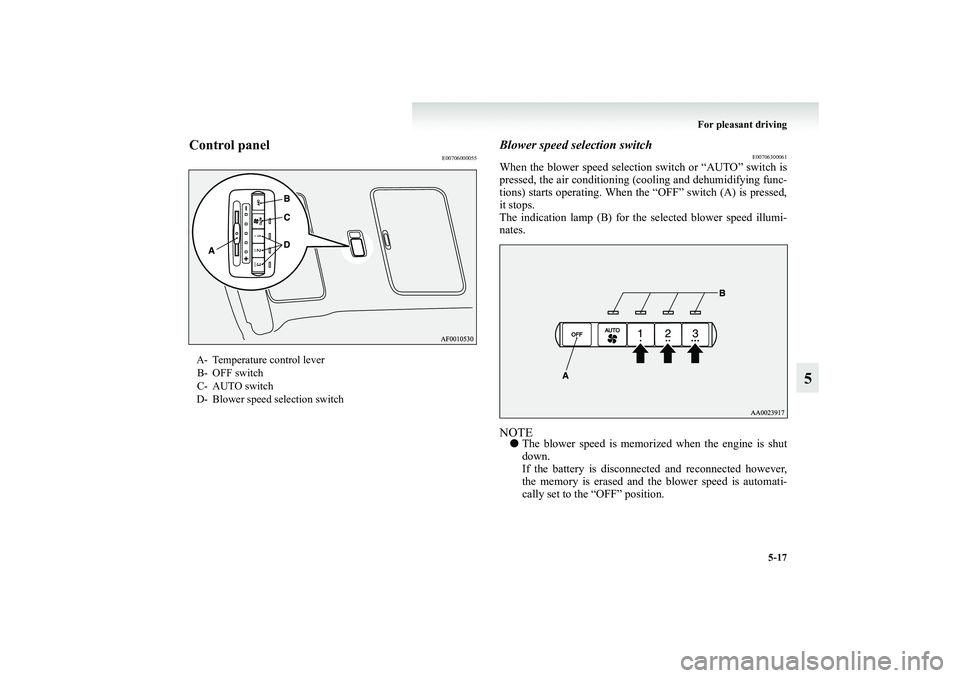
Control panel
E00706000055
Blower speed selection switch
E00706300061
When the blower speed selection switch or “AUTO” switch is
pressed, the air conditioning (cooling and dehumidifying func-
tions) starts operating. When the “OFF” switch (A) is pressed,
it stops.
The indication lamp (B) for the selected blower speed illumi-
nates.NOTE●The blower speed is memorized when the engine is shut
down.
If the battery is disconnected and reconnected however,
the memory is erased and the blower speed is automati-
cally set to the “OFF” position.
A- Temperature control lever
B- OFF switch
C- AUTO switch
D- Blower speed selection switch
BK-XP08E1ENUK.en-uk.book Page 17 Monday, August 13, 2007 2:20 PM
Page 253 of 458
For pleasant driving
5-19
5
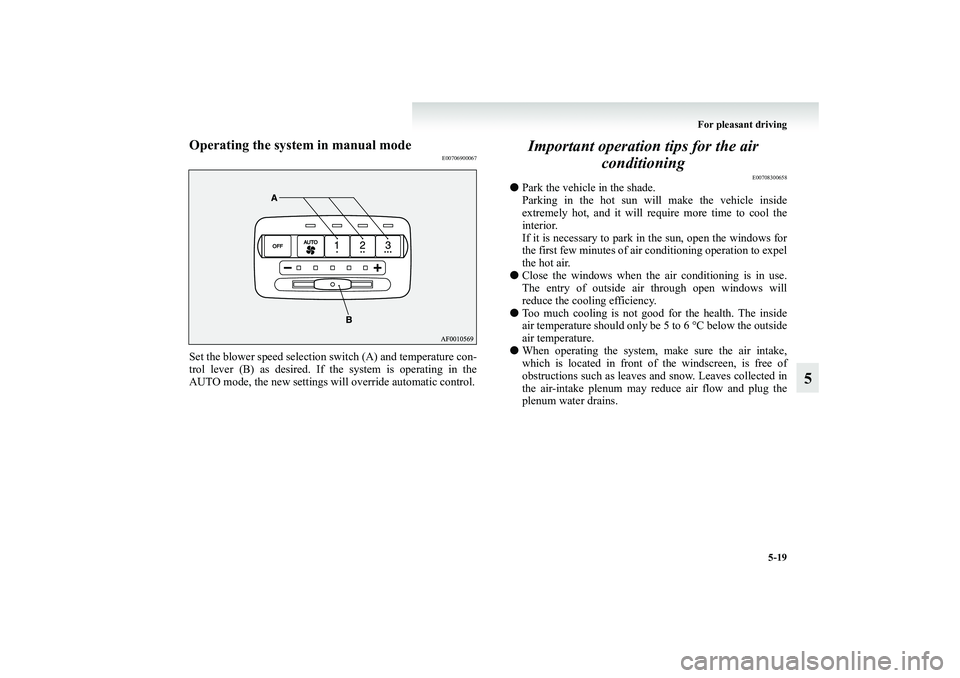
Operating the system in manual mode
E00706900067
Set the blower speed selection switch (A) and temperature con-
trol lever (B) as desired. If the system is operating in the
AUTO mode, the new settings will override automatic control.
Important operation tips for the air
conditioning
E00708300658
●Park the vehicle in the shade.
Parking in the hot sun will make the vehicle inside
extremely hot, and it will require more time to cool the
interior.
If it is necessary to park in the sun, open the windows for
the first few minutes of air conditioning operation to expel
the hot air.
●Close the windows when the air conditioning is in use.
The entry of outside air through open windows will
reduce the cooling efficiency.
●Too much cooling is not good for the health. The inside
air temperature should only be 5 to 6 °C below the outside
air temperature.
●When operating the system, make sure the air intake,
which is located in front of the windscreen, is free of
obstructions such as leaves and snow. Leaves collected in
the air-intake plenum may reduce air flow and plug the
plenum water drains.
BK-XP08E1ENUK.en-uk.book Page 19 Monday, August 13, 2007 2:20 PM
Page 254 of 458
5-20 For pleasant driving
5
Air conditioning system refrigerant and lubri-
cant recommendationsIf the air conditioning seems less effective than usual, the cause
might be a refrigerant leak. We recommend you to have the
system inspected.
The air conditioning system in your vehicle must be charged
with the refrigerant HFC-134a and the lubricant SUN-PAG56.
Use of any other refrigerant or lubricant will cause severe dam-
age which will result in the need to replace your vehicle’s
entire air conditioning system. The release of refrigerant into
the atmosphere should be prevented.
It is recommended that the refrigerant be recovered and recy-
cled for further use.During a long period of disuseThe air conditioning should be operated for at least five min-
utes each week, even in cold weather. This is to prevent poor
lubrication of the compressor internal parts and to maintain the
air conditioning in the best operating condition.
Air purifier (with deodorizing function)
E00708400301
An air filter is incorporated into the air conditioning system to
remove pollen, dust, tobacco smells, and exhaust smells from
the air.
The air filter’s ability to collect pollen and dirt is reduced as it
becomes dirty, so replace it periodically. For the maintenance
interval, refer to the “SERVICE BOOKLET”.NOTE●Operation in certain conditions such as driving on a dusty
road and frequent use of the air conditioning can lead to
reduction of service life of the filter. When the air flow
rate suddenly drops or when the windscreen or windows
start to fog up easily, the air filter requires replacement.
We recommend you to have it checked.
BK-XP08E1ENUK.en-uk.book Page 20 Monday, August 13, 2007 2:20 PM