light MITSUBISHI iMiEV 2014 1.G Manual PDF
[x] Cancel search | Manufacturer: MITSUBISHI, Model Year: 2014, Model line: iMiEV, Model: MITSUBISHI iMiEV 2014 1.GPages: 262, PDF Size: 26.84 MB
Page 163 of 262
Economical driving 6-2 Driving safety
6
N00628500029
For economical driving,
there are some tech-
nical requirements that
have to be met. In
order to achieve longer life of the vehicle andthe most economical
operation, we recom-
mend you to have the vehicle checked at reg- ular intervals according to the “WARRANTYAND MAINTENANCE MANUAL”. Avoid driving with the
accelerator pedal fully
depressed, such as for unnecessarily sudden starts, accelerati
on and deceleration.
Smoothly depress the
accelerator pedal.
Observe the speed limit and keep the speed as constant as possi
ble while driving.
Parking for a long period with the ready indi- cator illuminated will shorten the cruisingrange. At higher the vehicle speed the more main drive lithium-ion battery
is consumed. Avoid
driving at full speed. Even a slight release of the accelerator pedal wi
ll save a significant
amount of main drive lithium-ion battery charge. Check the tire inflation pressures at regular intervals Low tire inflat
ion pressure increases
road resistance. In addi
tion, low tire pressures
adversely affect tire we
ar and driving stabil-
ity. Do not drive with unnecessary articles in the luggage compartment. Too much cooling/heating can affect the cruising range, so maintain an appropriatetemperature to exte
nd the cruising range.
N00628900010
Drunk driving is one of the most frequent causes of accidents.
Your driving ability ca
n be seriously impaired
even with blood alcohol levels far below thelegal minimum. If you
have been drinking,
don’t drive. Ride with a designated non- drinking driver, call a cab or a friend, or usepublic transportation. Drinking coffee or tak- ing a cold shower will not make you sober. Similarly, prescription and nonprescriptiondrugs affect your aler
tness, perception and
reaction time. Consul
t with your doctor or
pharmacist before dr
iving while under the
influence of any of
these medications.
N00628600017
The original equipmen
t floor mat provided
with your vehicle was
specifically designed
for your vehicle. Always properly position the floor mat and assure it does not interfere with operation of the pedals. Always use theretaining clip on the driver’s floorboard to secure the floor mat. When used, this clip will help prevent the floor mat from moving for-ward and possibly interfering with the opera- tion of the pedals. To prevent the floor mat
Economical driving Starting and acceleration Idling Speed
Tire inflation pressure Cargo loads Air conditioning Driving, alcohol and drugs
WA R N I N G NEVER DRINK AND DRIVE. Your perceptions ar
e less accurate, your
reflexes are slower and your judgment is impaired.
Floor mat
BK0209800US.book 2 ページ 2014年1月14日 火曜日 午前9時26分
Page 165 of 262

Safe driving techniques 6-4 Driving safety
6
Move the driver’s seat as far backward as possible, while still
keeping good visibil-
ity, and good control of the steering wheel, brakes, accele
rator, and controls.
Check the instrument panel indicators forany possible problem. Move the front passe
nger seat as far back
as possible. Make sure that infa
nts and small children
are properly restrained in accordance with all laws and regulations.
Check these by selecti
ng the defroster mode,
and set the blower swit
ch on high. You should
be able to feel the air blowing against the windshield. (Refer to “Defrosting or defogging the wind- shield and door windows” on page 7-9.) Check all the tires for heavy tread wear or uneven wear patterns.
Look for stones, nails,
glass, or other objects
stuck in the tread. Look
for any tread cuts or sidewall cracks. Check the wheel nuts for tightness, and the tires for proper pressures. Replace your tires beforethey are heavily worn out.
As your vehicle is equi
pped with a tire pres-
sure monitoring system, there is a risk ofdamage to the tire inflation pressure sensors when the tire is replaced on the rim. Tire replacement should, th
erefore, be performed
only by a certified i-MiEV dealer. Have someone watch while you turn all the exterior lights on and off. Also check the turn signal indicators and
high-beam indicators on
the instrument panel. Check the ground under the vehicle after parking overnight, for wa
ter, oil, or other
leaks. Make sure all the fluid levels are cor- rect.
N00629200124
Even this vehicle’s safety equipment, andyour safest driving, cannot guarantee that youcan avoid an accident or injury. However, if you give extra attention to the following areas, you can better protect yourself andyour passengers:
Drive defensively. Be aware of traffic, road and weather conditions. Leave plentyof stopping distance between your vehicle and the vehicle ahead. Before changing lanes, check your mir- rors and use your turn signal light. While driving, watch the behavior of other drivers, bicyc
lists, and pedestrians.
Always obey applicable
laws and regula-
tions. Be a polite and alert driver. Always leave room for unexpected events, such as sudden braking.
Defrosters Tires
Lights Fluid leaks Safe driving techniques
BK0209800US.book 4 ページ 2014年1月14日 火曜日 午前9時26分
Page 166 of 262
Driving during cold weather
Driving safety 6-5
6
N00629400416
Check the 12V starter battery, including terminals and cables. During extremely cold weather, the 12V starter battery willnot be as strong and its power level may drop. Before driving the vehicle, check to see ifthe headlights are as bright as normal. Charge or replace th
e 12V starter battery
if necessary. During extreme cold weather, it is possible that a very low 12V starter battery
could freeze.
Check the antifreeze. If there is not enough coolant because of aleak, add high-quality ethylene glycol antifreeze and water. Use Mitsubishi Motors Genuine Super Long Life CoolantPremium or an equivalent. The recom- mended blend is about 50 % water and 50 % anti-freeze. Use a higher concentration(not over 60 %) when the outside temper- ature is -31 °F (-35 °C) or lower. When the electric motor unit is working very hard (for example,
during mountain driv-
ing and/or when the outside temperatureis high), use a 50 % concentration. This blend will provide adequate protection from corrosion and boiling.
N00629501531
All the parts of the brake system are critical to safety. Have the vehicle serviced by a certi- fied i-MiEV dealer at regular intervalsaccording to the “WARRANTY AND MAINTENANCE MANUAL”.
Check the brake system while driving at a low speed immediately
after starting, espe-
cially when the brakes are wet, to confirmthey work normally. A film of water can be formed on the brake discs and prevent normal braking after driv-ing in heavy rain or through large puddles, or after the vehicle is washed. If this occurs, dry the brakes out by drivi
ng slowly while lightly
depressing the brake pedal. On snowy roads, ice can form on the braking system, making the brakes less effective. While driving in such
conditions, pay close
attention to preceding and following vehicles and to the condition of the road surface. From time to time, lightly depress the brake pedaland check how effective the brakes are. Put the selector lever to “B” (REGENERA- TIVE BRAKE MODE) or “ECO” (ECO MODE) position according to the grade of the slope and vehicle sp
eed. This will allow
Driving during cold weather
WA R N I N GThe 12V starter batter
y gives off explosive
hydrogen gas. Any spark or flame cancause the 12V starter battery to explode, which could cause serious injury or death. Always wear protecti
ve clothes and a face
mask when working wi
th your 12V starter
battery, or let a skil
led mechanic do it.
WA R N I N GNever open the coolan
t reservoir cap while
it is hot. You could be seriously burned.
Braking
When brakes are wet When driving in cold weather When driving downhill
BK0209800US.book 5 ページ 2014年1月14日 火曜日 午前9時26分
Page 177 of 262
Air conditioning 7-4 Comfort controls
7
Air flows mainly to the windshield and the door windows.
N00730300328
The air conditioning can only be used when the ready indicator is illuminated.
N00730501314
N00736500191
When the electric motor switch is in the “ON” position, select
the blower speed by
turning the blower speed selection dial.Turning the dial clockwise will increase the blower speed; turning the dial c
ounterclockwise will
decrease it. When the dial is set to the “OFF” position, all fan-driven airflow will stop. When the dial is set to the “AUTO” position,the air flow is adjusted automatically accord-
Defroster position Air conditioning
NOTE
If the energy level gauge is at 0 bars or the power down warning light
illuminates, the
vehicle interior may
not be cooled/heated
even though the dial or switch is operated. Furthermore, the defog performance may bealso reduced. Refer to “Energy leve
l gauge” on page 5-40.
Refer to “Power down warning light” onpage 5-43.
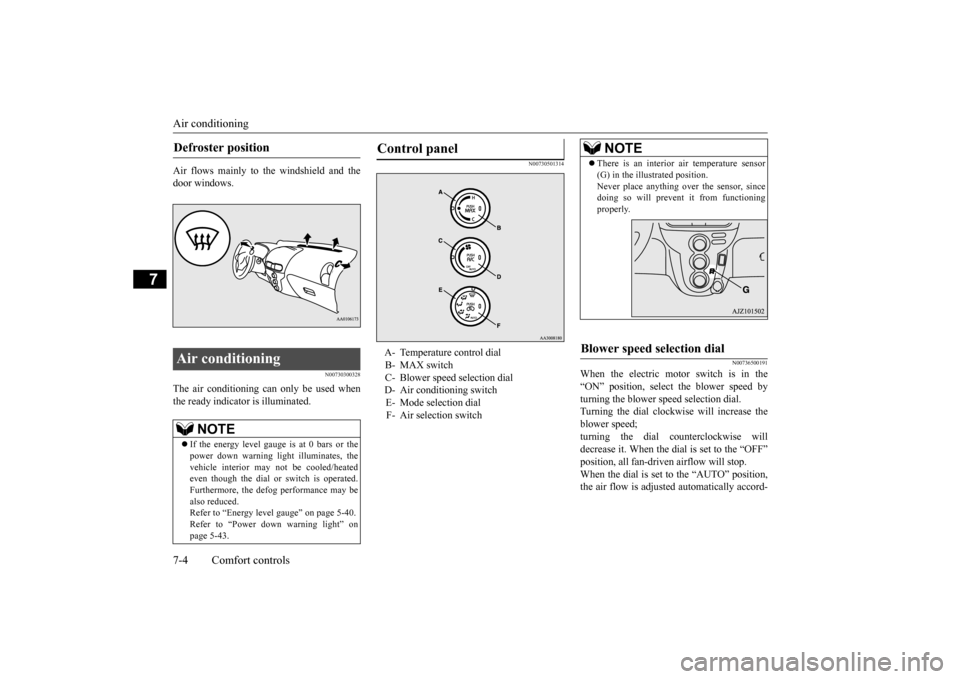
Control panel A- Temperature control dial B- MAX switch C- Blower speed selection dial D- Air conditioning switchE- Mode selection dial F- Air selection switch
NOTE
There is an interior air temperature sensor (G) in the illustrated position.Never place anything ov
er the sensor, since
doing so will prevent it from functioning properly.
Blower speed selection dial
BK0209800US.book 4 ページ 2014年1月14日 火曜日 午前9時26分
Page 179 of 262
Air conditioning 7-6 Comfort controls
7
The vents change to the following positions according to the position of the temperaturecontrol dial. Refer to “Temperature
control dial” on page
7-5.
N00736800400
Normally, use the outside
air position to keep
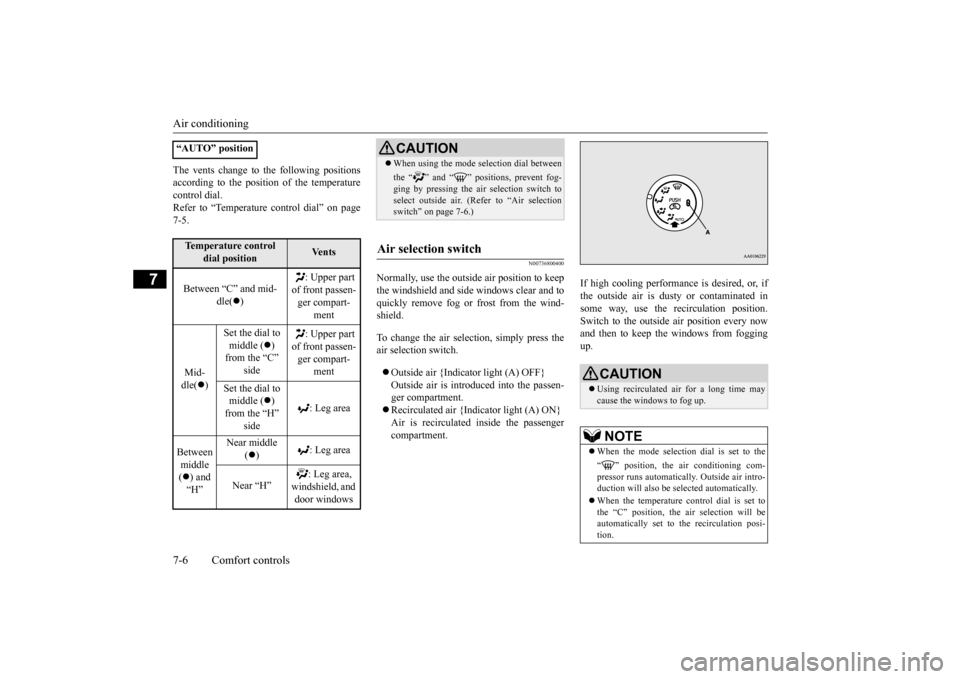
the windshield and side windows clear and to quickly remove fog or frost from the wind- shield. To change the air selection, simply press the air selection switch. Outside air {Indicator light (A) OFF} Outside air is introduced into the passen- ger compartment. Recirculated air {Indicator light (A) ON} Air is recirculated
inside the passenger
compartment.
If high cooling performance is desired, or, if the outside air is dusty
or contaminated in
some way, use the
recirculat
ion position.
Switch to the outside
air position every now
and then to keep the windows from foggingup.
“AUTO” positionTemperature control
dial position
Ve n t s
Between “C” and mid-
dle(
)
: Upper part
of front passen- ger compart-
ment
Mid- dle(
)
Set the dial to middle (
)
from the “C”
side
: Upper part
of front passen- ger compart-
ment
Set the dial to middle (
)
from the “H”
side
: Leg area
Between middle ( ) and “H”
Near middle
( )
: Leg area
Near “H”
: Leg area,
windshield, and door windows
CAUTION When using the mode se
lection dial between
the “ ” and “ ” positions, prevent fog- ging by pressing the air selection switch toselect outside air. (Refer to “Air selection switch” on page 7-6.)
Air selection switch
CAUTION Using recirculated air for a long time may cause the windows to fog up. NOTE
When the mode selection dial is set to the “ ” position, the
air conditioning com-
pressor runs automatically. Outside air intro- duction will also be selected automatically. When the temperature control dial is set to the “C” position, the ai
r selection will be
automatically set to
the recirculation posi-
tion.
BK0209800US.book 6 ページ 2014年1月14日 火曜日 午前9時26分
Page 180 of 262
Air conditioning
Comfort controls 7-7
7
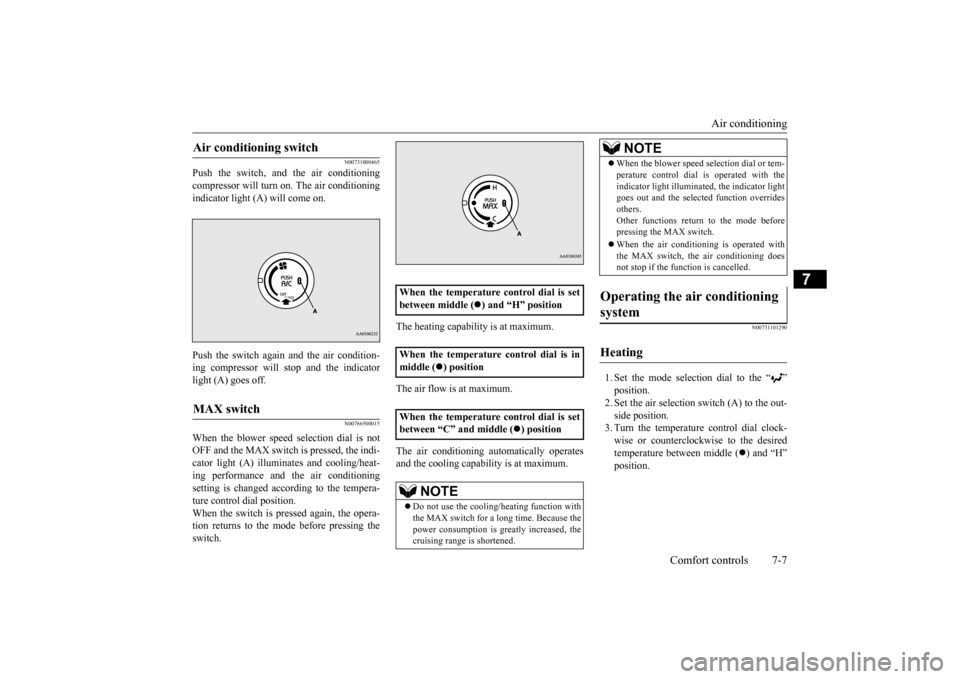
N00731000465
Push the switch, and the air conditioning compressor will turn on. The air conditioning indicator light (A) will come on. Push the switch again and the air condition- ing compressor will stop and the indicatorlight (A) goes off.
N00766500015
When the blower speed selection dial is notOFF and the MAX switch is pressed, the indi- cator light (A) illumina
tes and cooling/heat-
ing performance and
the air conditioning
setting is changed according to the tempera- ture control dial position. When the switch is pr
essed again, the opera-
tion returns to the mode before pressing the switch.
The heating capability is at maximum. The air flow is at maximum. The air conditioning au
tomatically operates
and the cooling capabi
lity is at maximum.
N00731101290
1. Set the mode selection dial to the “ ” position. 2. Set the air selection switch (A) to the out- side position.3. Turn the temperature control dial clock- wise or counterclockw
ise to the desired
temperature between middle (
) and “H”
position.
Air conditioning switch MAX switch
When the temperature control dial is set between middle (
) and “H” position
When the temperature control dial is in middle (
) position
When the temperature control dial is set between “C” and middle (
) position
NOTE
Do not use the cooling/heating function with the MAX switch for a long time. Because the power consumption is gr
eatly increased, the
cruising range is shortened.
When the blower speed
selection dial or tem-
perature control dial
is operated with the
indicator light illumina
ted, the indicator light
goes out and the selected function overrides others. Other functions return to the mode beforepressing the MAX switch. When the air conditioning is operated with the MAX switch, the air conditioning does not stop if the func
tion is cancelled.
Operating the air conditioning system Heating
NOTE
BK0209800US.book 7 ページ 2014年1月14日 火曜日 午前9時26分
Page 181 of 262
Air conditioning 7-8 Comfort controls
7
4. Select the desi
red blower speed.
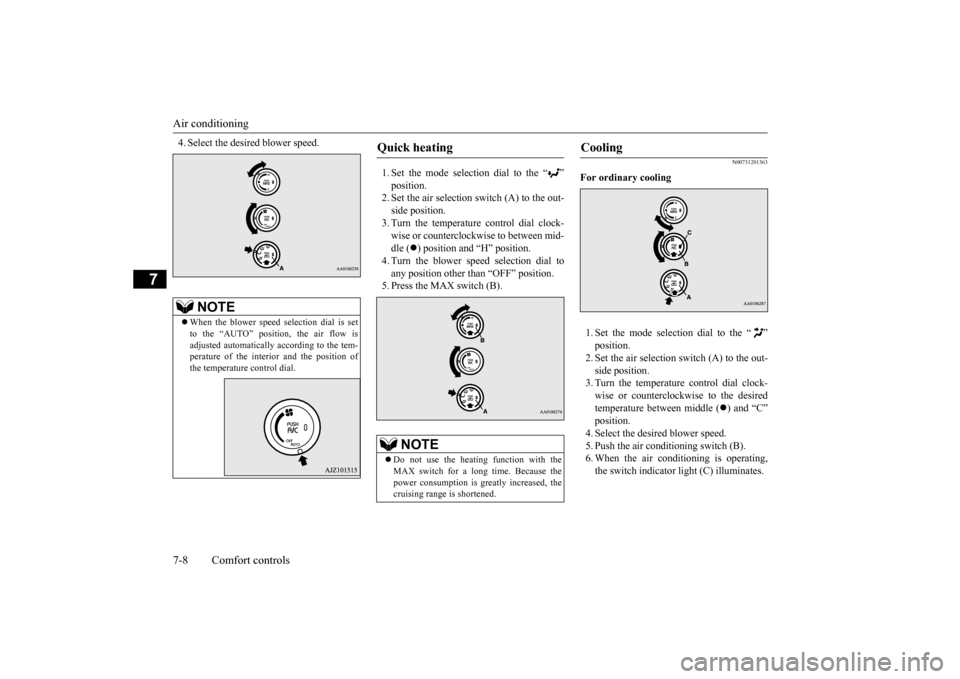
1. Set the mode selection dial to the “ ” position.2. Set the air selection switch (A) to the out- side position. 3. Turn the temperature control dial clock-wise or counterclockwise to between mid- dle (
) position and “H” position.
4. Turn the blower speed selection dial to any position other than “OFF” position. 5. Press the MAX switch (B).
N00731201363
For ordinary cooling 1. Set the mode selection dial to the “ ” position. 2. Set the air selection switch (A) to the out- side position. 3. Turn the temperature control dial clock- wise or counterclockwise to the desired temperature be
tween middle (
) and “C”
position. 4. Select the desi
red blower speed.
5. Push the air conditioning switch (B).6. When the air conditioning is operating, the switch indicator light (C) illuminates.
NOTE
When the blower speed selection dial is set to the “AUTO” positi
on, the air flow is
adjusted automatically according to the tem- perature of the interi
or and the position of
the temperature control dial.
Quick heating
NOTE
Do not use the heating function with the MAX switch for a long time. Because the power consumption is gr
eatly increased, the
cruising range is shortened.
Cooling
BK0209800US.book 8 ページ 2014年1月14日 火曜日 午前9時26分
Page 182 of 262
Air conditioning
Comfort controls 7-9
7
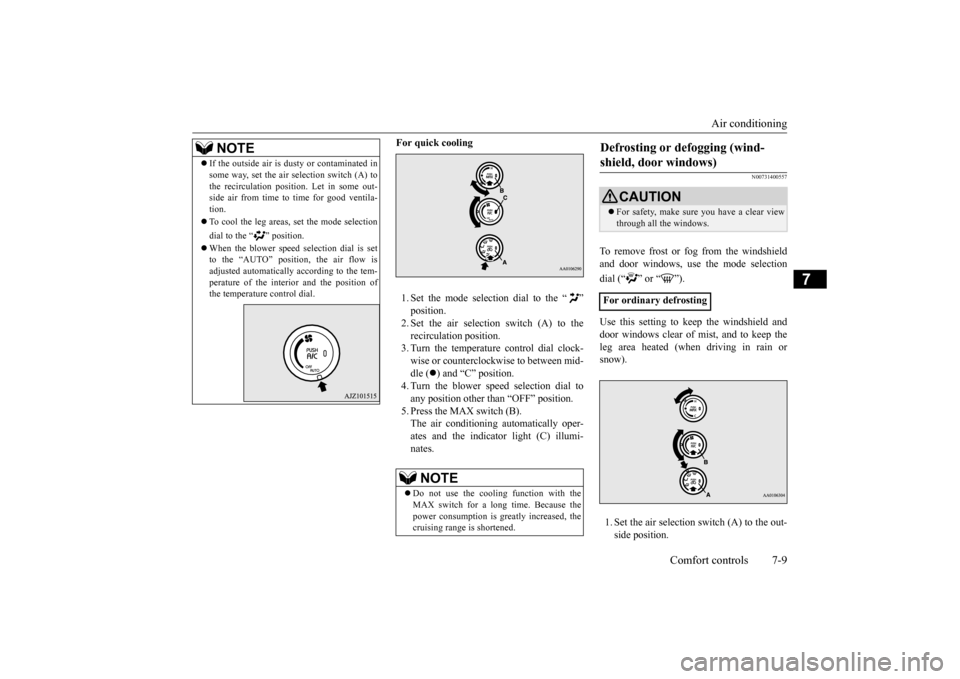
For quick cooling 1. Set the mode selection dial to the “ ” position. 2. Set the air selection switch (A) to the recirculati
on position.
3. Turn the temperature control dial clock-wise or counterclockwise to between mid- dle (
) and “C” position.
4. Turn the blower speed selection dial toany position other than “OFF” position. 5. Press the MAX switch (B). The air conditioning automatically oper-ates and the indicator light (C) illumi- nates.
N00731400557
To remove frost or fog from the windshield and door windows, use
the mode selection
dial (“ ” or “ ”). Use this setting to ke
ep the windshield and
door windows clear of mist, and to keep the leg area heated (when driving in rain orsnow). 1. Set the air selection switch (A) to the out- side position.
NOTE
If the outside air is dus
ty or contaminated in
some way, set the air selection switch (A) tothe recirculation positi
on. Let in some out-
side air from time to time for good ventila- tion. To cool the leg areas,
set the mode selection
dial to the “ ” position. When the blower speed
selection dial is set
to the “AUTO” position, the air flow is adjusted automatically according to the tem-perature of the interior and the position of the temperature control dial.
NOTE
Do not use the cooling function with the MAX switch for a l
ong time. Because the
power consumption is gr
eatly increased, the
cruising range is shortened.
Defrosting or defogging (wind- shield, door windows)
CAUTION For safety, make sure you have a clear view through all the windows.
For ordinary defrosting
BK0209800US.book 9 ページ 2014年1月14日 火曜日 午前9時26分
Page 184 of 262
Air purifier
Comfort controls 7-11
7
The air conditioning should be operated for at least five minutes each week, even in cold weather. This includes the quick defrostingmode. Operating the
air condition system
weekly maintains lubrication of the compres- sor internal parts and maintains the air condi-tioning in the best operating condition.
N00733800177
The air conditioning system is equipped with an air filter to reduc
e pollen and dust entering
the cabin.The air filter’s ability to collect pollen and dust will be reduced as
it becomes dirty, so
replace it periodically. For the maintenanceinterval, refer to the “WARRANTY AND MAINTENANCE MANUAL”.
N00766600016
You can run the air conditioning in advance of using the vehicle. For details, refer to“Remote Climate Control” on page 3-43.
N00734302128
The audio system can only be used when the electric motor switch is in the “ON” or “ACC” position.
CAUTION The air conditioning system in your vehicle must be charged with the refrigerant HFC-134a and the lubricant POE MA68EV.Use of any other refrigerant or lubricant will cause severe damage a
nd may require replac-
ing your vehicle’s en
tire air conditioning
system. The release of refrigerant into the atmo- sphere is not recommended.The new refrigerant HFC-134a in your vehi- cle is designed not to harm the earth’s ozone layer. However, it may contribute slightly toglobal warming. It is recommended that the old refrigerant be saved and recycled for future use.
During a long period of disuse
Air purifier
NOTE
Operation in certain conditions such as driv- ing on a dusty road or frequent use of the air conditioning can reduce
the service life of
the filter. When you feel that the air flow is lower than normal or when the windshield or windows start to fog up easily, replace the airfilter. Contact a certified i-MiEV dealer for assis- tance.
Remote Climate Control
(if so
equipped)
AM/FM electronically tuned radio with CD player
NOTE
To listen to the audio system while the elec- tric motor unit is not running, turn the elec- tric motor switch to the “ACC” position. If the electric motor switch is in the “ACC”position, the accessory power will automati- cally turn off after a certain period of time and you will no longer be able to use theaudio system. The accessory power comes on again if the electric motor switch is turned from the “ACC” position. Refer to “ACCpower auto-cutout f
unction” on page 5-19.
If a cellular phone is
used inside the vehicle,
it may create noise in the audio equipment. This does not mean that anything is wrong with your audio equipment. In such a case,use the cellular phone at
a place as
far away
as possible from the audio equipment. If foreign objects or wa
ter get into the audio
equipment, or if smoke or a strange odor comes from it, immediately turn off theaudio system and have
it checked at a certi-
fied i-MiEV dealer. Never try to repair it yourself. Avoid using the audio system untilit is inspected by a qualified person.
BK0209800US.book 11 ページ 2014年1月14日 火曜日 午前9時26分
Page 194 of 262
Handling of compact discs Comfort controls 7-21
7
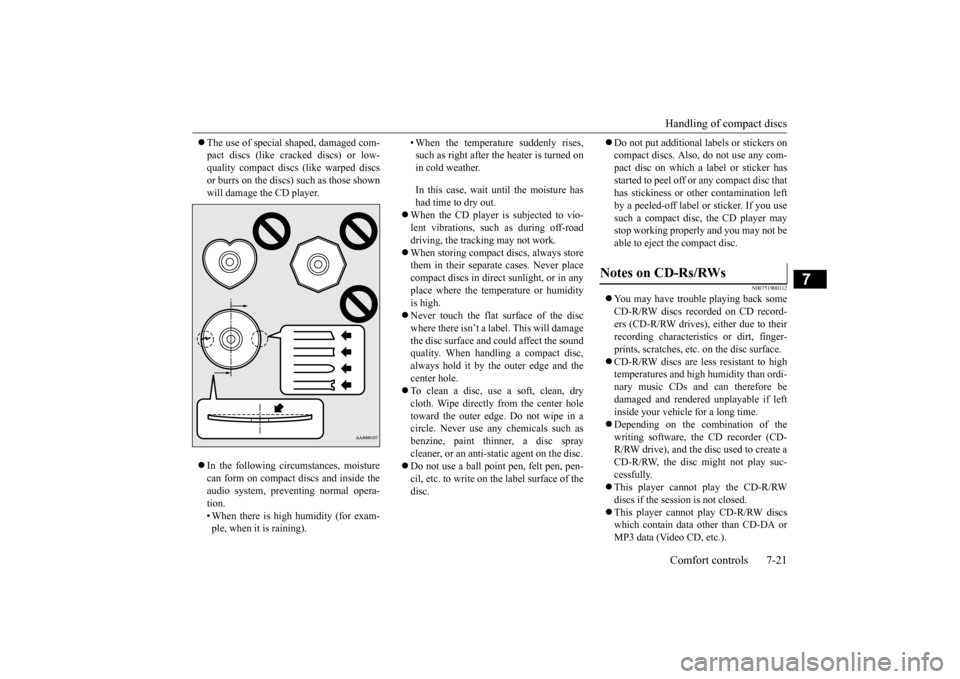
The use of special shaped, damaged com- pact discs (like cracked discs) or low-quality compact discs (like warped discs or burrs on the discs)
such as those shown
will damage the CD player. In the following circumstances, moisture can form on compact discs and inside the audio system, preventing normal opera-tion. • When there is high humidity (for exam- ple, when it is raining).
• When the temperature suddenly rises, such as right after the heater is turned onin cold weather. In this case, wait until the moisture has had time to dry out.
When the CD player is subjected to vio- lent vibrations, such as during off-road driving, the tracking may not work. When storing compact discs, always store them in their separate
cases. Never place
compact discs in direct sunlight, or in any place where the temperature or humidity is high. Never touch the flat surface of the disc where there isn’t a label. This will damage the disc surface and
could affect the sound
quality. When handli
ng a compact disc,
always hold it by the outer edge and the center hole. To clean a disc, use a soft, clean, dry cloth. Wipe directly
from the center hole
toward the outer edge. Do not wipe in a circle. Never use any chemicals such asbenzine, paint thinner, a disc spray cleaner, or an anti-static agent on the disc. Do not use a ball point pen, felt pen, pen- cil, etc. to write on the label surface of the disc.
Do not put additional la
bels or stickers on
compact discs. Also, do not use any com-pact disc on which a label or sticker has started to peel off or any compact disc that has stickiness or ot
her contamination left
by a peeled-off label or sticker. If you use such a compact disc, the CD player may stop working properly and you may not beable to eject the compact disc.
N00751900112
You may have trouble playing back some CD-R/RW discs recorded on CD record- ers (CD-R/RW drives), either due to theirrecording characterist
ics or dirt, finger-
prints, scratches, etc.
on the disc surface.
CD-R/RW discs are less resistant to high temperatures and high humidity than ordi- nary music CDs and can therefore be damaged and rendered unplayable if leftinside your vehicle for a long time. Depending on the combination of the writing software, the CD recorder (CD-R/RW drive), and the disc used to create a CD-R/RW, the disc might not play suc- cessfully. This player cannot play the CD-R/RW discs if the sessi
on is not closed.
This player cannot play CD-R/RW discs which contain data other than CD-DA or MP3 data (Video CD, etc.).
Notes on CD-Rs/RWs
BK0209800US.book 21 ページ 2014年1月14日 火曜日 午前9時26分