ECO mode MITSUBISHI iMiEV 2017 1.G User Guide
[x] Cancel search | Manufacturer: MITSUBISHI, Model Year: 2017, Model line: iMiEV, Model: MITSUBISHI iMiEV 2017 1.GPages: 296, PDF Size: 7.79 MB
Page 110 of 296
Break-in recommendations 5-2 Features and controls
5
N00508700343
Advanced automobile manufacturing tech- niques permit you to operate your new vehi- cle without requiring
a long break-in period
of low-speed driving. However, you can add to the future perfor- mance and economy of your vehicle byobserving the followi
ng precautions during
the first 300 miles (500 km). Drive your vehicle at moderate speeds during the break-in period. Do not overload the ve
hicle. Observe the
seating capacity (See “Cargo load precau-tions” on page 6-10). Do not use this vehi
cle for trailer towing.
N00508800618
Two keys are provided. The keys fit all locks. Keep one in a safe place as a spare key.
N00509101846
The electronic immobilize
r is designed to sig-
nificantly reduce the
possibility of vehicle
theft. The purpose of the system is to immo-bilize the vehicle if
an invalid start is
attempted. A valid st
art attempt can only be
achieved (subject to ce
rtain conditions), using
a key “registered” to the immobilizer system. All of the keys provided with your new vehi- cle have been program
med to the vehicle’s
electronics.
Break-in recommendations Keys
NOTE
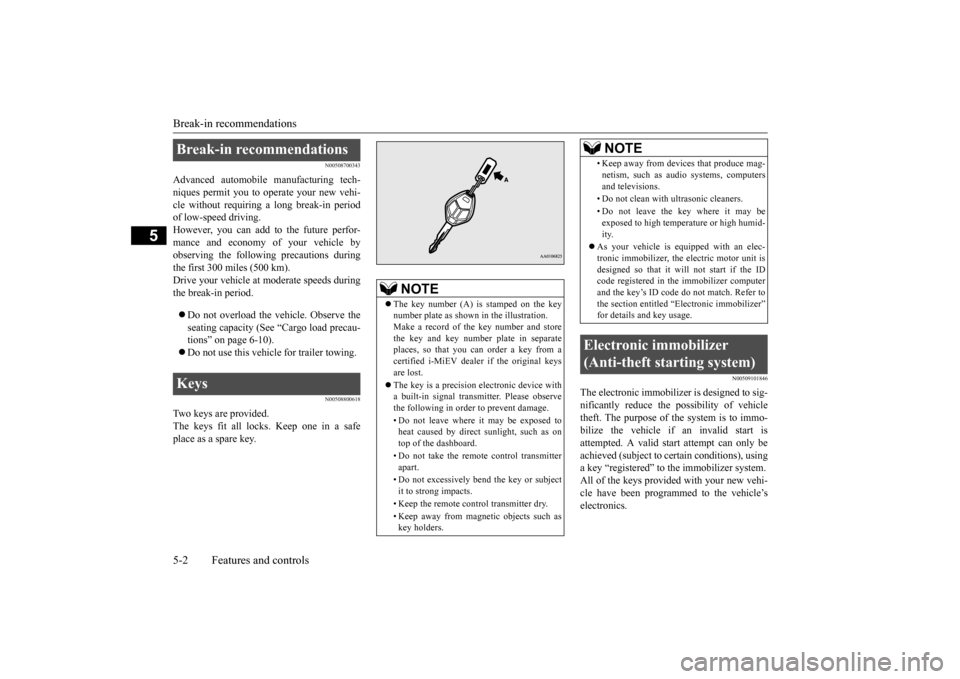
The key number (A) is stamped on the key number plate as shown
in the illustration.
Make a record of th
e key number and store
the key and key number plate in separate places, so that you can order a key from acertified i-MiEV dealer if the original keys are lost. The key is a precision
electronic device with
a built-in signal transm
itter. Please observe
the following in order to prevent damage. • Do not leave where it may be exposed to heat caused by direct sunlight, such as ontop of the dashboard. • Do not take the remote
control transmitter
apart. • Do not excessively bend the key or subject it to strong impacts. • Keep the remote control transmitter dry.• Keep away from magne
tic objects such as
key holders.
• Keep away from devi
ces that produce mag-
netism, such as audio systems, computersand televisions. • Do not clean with
ultrasonic cleaners.
• Do not leave the key where it may be exposed to high temperature or high humid- ity.
As your vehicle is equipped with an elec- tronic immobilizer, the electric motor unit isdesigned so that it wi
ll not start if the ID
code registered in the immobilizer computer and the key’s ID code
do not match. Refer to
the section entitled “E
lectronic immobilizer”
for details and key usage.
Electronic immobilizer (Anti-theft starting system)
NOTE
BK0220401US.book 2 ページ 2015年6月3日 水曜日 午前7時42分
Page 121 of 296
Theft-alarm system
Features and controls 5-13
5
The alarm will be activated if the following occurs while the vehicle is parked and the system is armed. One of the doors and the liftgate is opened without using the keyless entry system.
When the alarm is activated: 1. The headlights blink
on and off for 3 min-
utes. After 3 minutes the headlights automati- cally shut off.
2. The horn will sound intermittently for 3 minutes.
The alarm can be deactivated in the following ways. By using the keyless entry system to lock or unlock the doors and liftgate.
Turn the electric motor switch to the “ON” position.
The system will be disarmed if the following operation is performed. The electric motor switch is turned to the “ON” position. All doors and the lift
gate are unlocked by
using the keyless entry system.
The theft-alarm system can be activated when people are riding inside the vehicle orwhen the windows are open. To prevent acci-dental activati
on of the alarm, do not set the
system to the system armed mode while peo- ple are riding in the vehicle. If the answerback function (flashing of the turn signal lights by locking and unlockingthe doors and the liftgate
) is deactivated, the
turn signal lights do not flash after the lock- ing and unlocking operation.For information on the answerback function, refer to “Keyless entry system” on pages 5-5.
Alarm stage Type of alarm
NOTE
NOTE
The alarm will continue
to operate for 3 min-
utes. At the end of that
period, the alarm will
automatically shut off
to save battery power.
The system will then be rearmed until the proper disarming step is taken. The alarm will resu
me if unauthorized
actions are taken again, even if the alarm has stopped.
Alarm deactivation Horn sounds! Headlights blink on and off!
Disarmed stage
NOTE
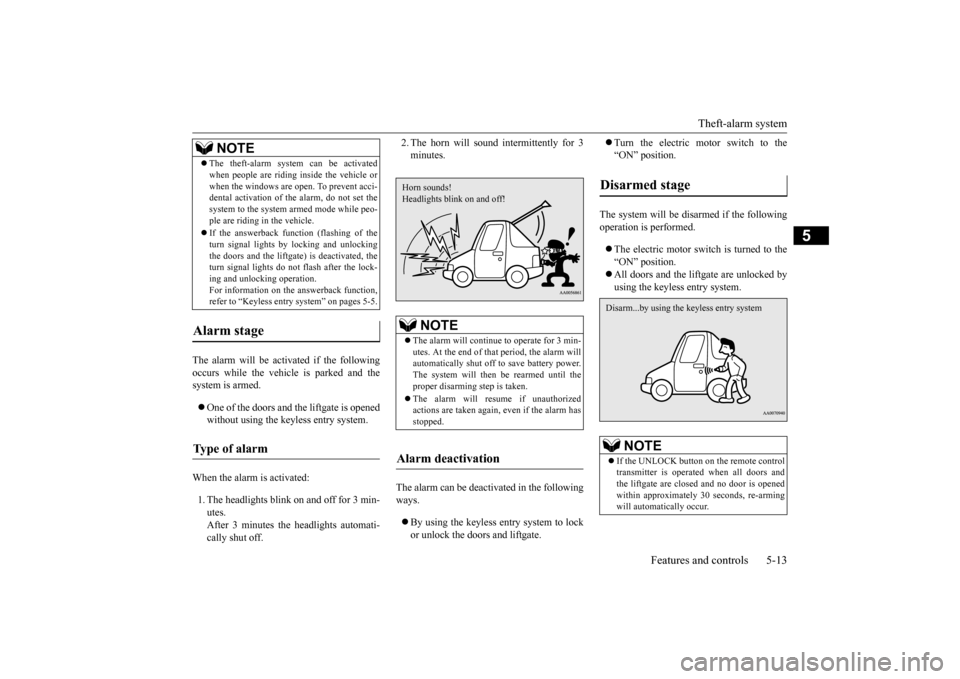
If the UNLOCK button on the remote control transmitter is operated when all doors and the liftgate are closed and no door is opened within approximately
30 seconds, re-arming
will automatically occur.Disarm...by using the keyless entry system
BK0220401US.book 13 ページ 2015年6月3日 水曜日 午前7時42分
Page 123 of 296
Power window control
Features and controls 5-15
5
N00548700127
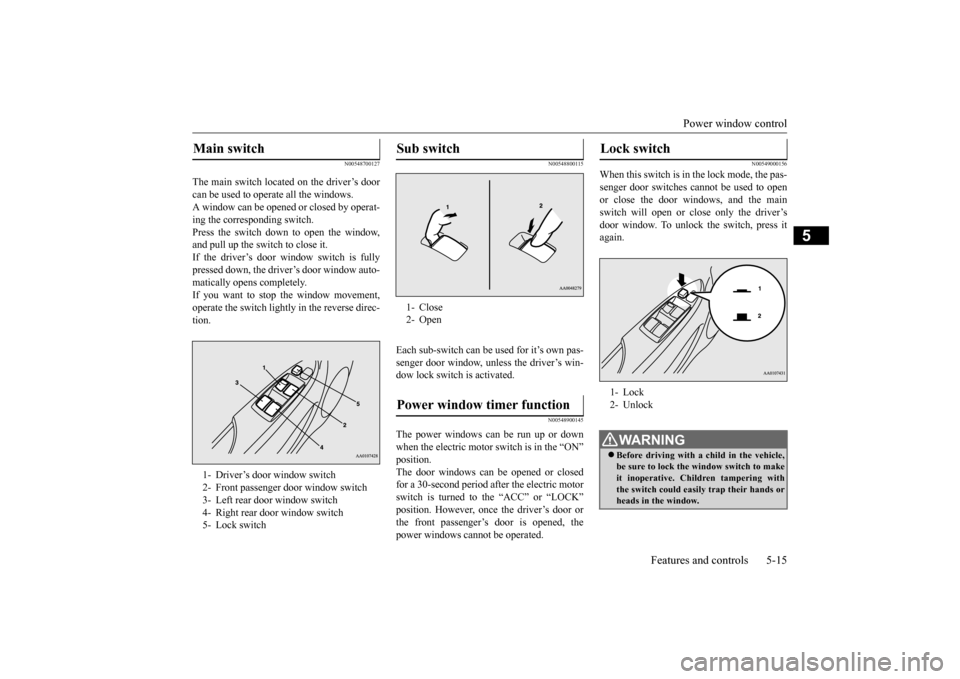
The main switch located on the driver’s door can be used to opera
te all the windows.
A window can be opened
or closed by operat-
ing the corresponding switch. Press the switch down to open the window,and pull up the switch to close it. If the driver’s door window switch is fully pressed down, the driver’s door window auto- matically opens completely. If you want to stop the window movement,operate the switch lightly in the reverse direc- tion.
N00548800115
Each sub-switch can be
used for it’s own pas-
senger door window, unless the driver’s win-dow lock switch is activated.
N00548900145
The power windows can be run up or downwhen the electric motor switch is in the “ON” The door windows can be opened or closedfor a 30-second period after the electric motor switch is turned to the “ACC” or “LOCK” position. However, once the driver’s door orthe front passenger’s door is opened, the power windows cannot be operated.
N00549000156
When this switch is in the lock mode, the pas-senger door switches cannot be used to open or close the door windows, and the mainswitch will open or close only the driver’s door window. To unlock the switch, press it again.
Main switch 1- Driver’s door window switch2- Front passenger door window switch3- Left rear door window switch 4- Right rear door window switch 5- Lock switch
Sub switch 1- Close2- OpenPower window timer function
Lock switch 1- Lock 2- UnlockWA R N I N G Before driving with a child in the vehicle, be sure to lock the window switch to make it inoperative. Children tampering withthe switch could easily trap their hands or heads in the window.
BK0220401US.book 15 ページ 2015年6月3日 水曜日 午前7時42分
Page 130 of 296
Selector lever 5-22 Features and controls
5
N00583900025
This position locks the transmission to pre- vent the vehicle from moving. The electric motor unit can be started from the “PARK” position.
This position is to back up. Use this position only wh
en the vehicle is sta-
tionary for an extended length of time while driving, such as in a traffic jam.
Use this position for normal driving. Use this position when you desire to limit power consumption and/or when moderateregenerative braking is required. Use this position when strong regenerative braking is required, such as on a steep down-hill. Refer to “Regenerative braking” on page 3-3. Refer to “When driving downhill” on page6-5.
CAUTION If the selector lever pos
ition indicator blinks
while you are driving, it
is likely that a safety
device is operating be
cause of a malfunction
in the transmission system. We recommend you to have your vehicle inspected as soon as possible. The selector lever posit
ion indicator warning
function does not operate with the selectorlever in the “R”
Selector lever positions “P” PARK
WA R N I N GDo not leave the vehicle with the electric motor switch in the “ON” position. The vehicle can move suddenly. To be sure the vehicle will not move,
even when you are
on level ground, alw
ays set the parking
brake and move the se
lector lever to the
“P” (PARK) position.
“R” REVERSE
CAUTION Never move the selector lever to the “P” (PARK) or
Page 137 of 296
Active stability control (ASC) Features and controls 5-29
5
N00559200089
On slippery surfaces, the traction control function prevents the drive wheels from spin- ning excessively, thus helping the vehicle to start moving from a stopped condition. It alsoprovides sufficient driving force and steering performance as the vehicle turns while press- ing the acceleration pedal.
N00546800049
The skid control function is designed to help the driver maintain control of the vehicle on slippery roads or during rapid steeringmaneuvers. It works by controlling the elec- tric motor unit output and the brake on each wheel.
N00559401280
The ASC is automatically activated when theelectric motor switch is turned to the “ON”
vate the system by
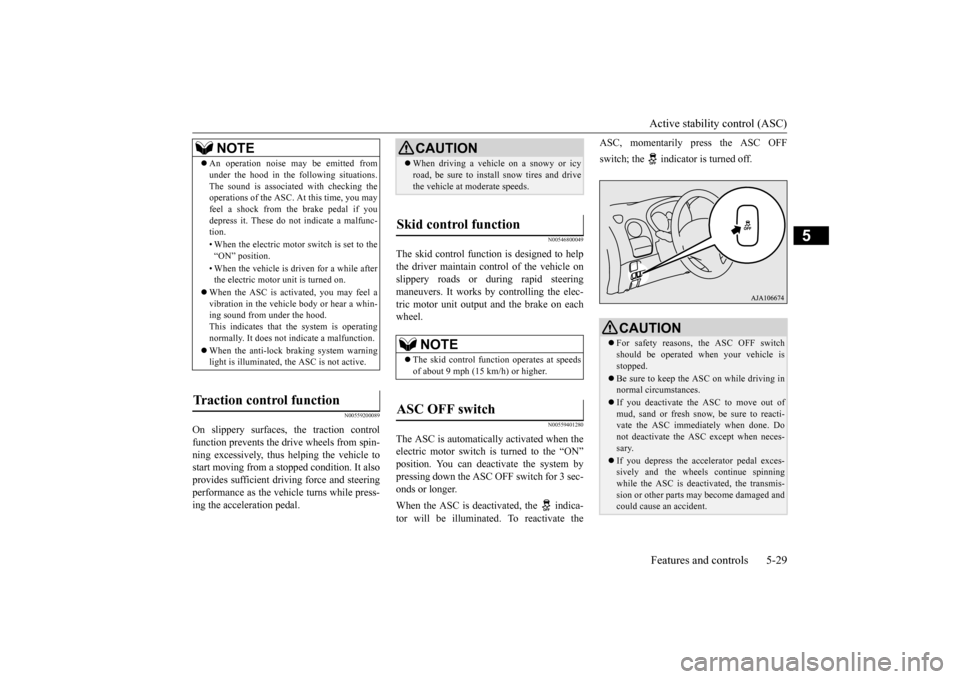
pressing down the ASC OFF switch for 3 sec-onds or longer. When the ASC is deacti
vated, the indica-
tor will be illuminated. To reactivate the
ASC, momentarily
press the ASC OFF
switch; the indicator is turned off.
NOTE
An operation noise may be emitted from under the hood in the fo
llowing situations.
The sound is associated
with checking the
operations of the ASC.
At this time, you may
feel a shock from the brake pedal if you depress it. These do not indicate a malfunc-tion. • When the electric motor switch is set to the “ON” position. • When the vehicle is driven for a while after the electric motor unit is turned on.
When the ASC is acti
vated, you may feel a
vibration in the vehicle body or hear a whin- ing sound from under the hood. This indicates that the system is operatingnormally. It does not i
ndicate a malfunction.
When the anti-lock braking system warning light is illuminated, the ASC is not active.
Traction control function
CAUTION When driving a vehicle on a snowy or icy road, be sure to install snow tires and drivethe vehicle at moderate speeds.
Skid control function
NOTE
The skid control func
tion operates at speeds
of about 9 mph (15 km/h) or higher.
ASC OFF switch
CAUTION For safety reasons, the ASC OFF switch should be operated when your vehicle isstopped. Be sure to keep the ASC on while driving in normal circumstances. If you deactivate the ASC to move out of mud, sand or fresh snow
, be sure to reacti-
vate the ASC immediately when done. Do not deactivate
the ASC except when neces-
sary. If you depress the accelerator pedal exces- sively and the wheels continue spinning while the ASC is deactivated, the transmis- sion or other parts ma
y become damaged and
could cause an
accident.
BK0220401US.book 29 ページ 2015年6月3日 水曜日 午前7時42分
Page 161 of 296
Horn switch
Features and controls 5-53
5
N00523800172
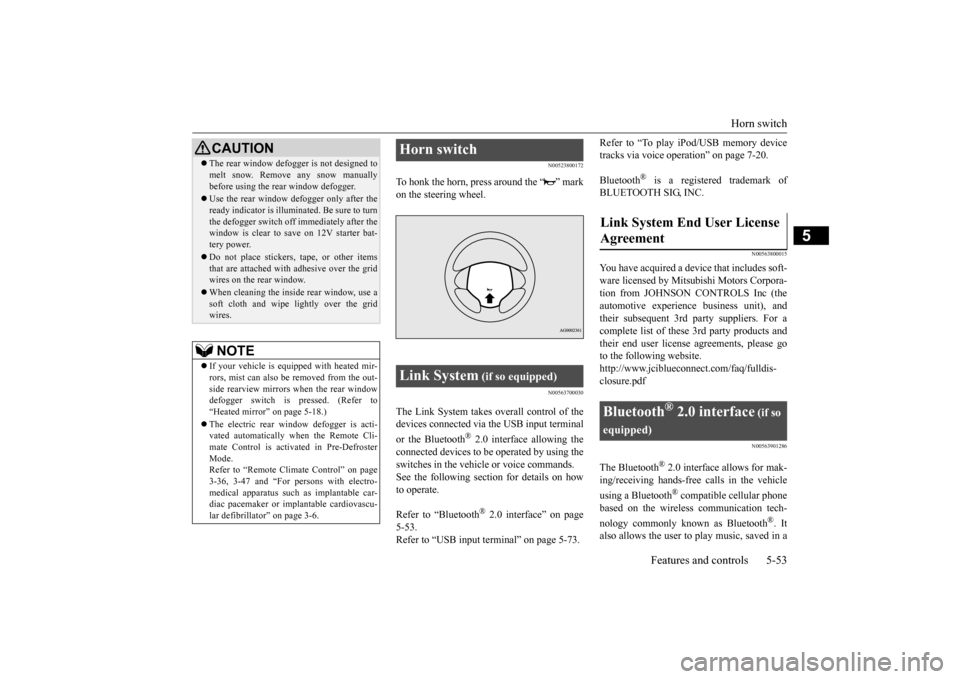
To honk the horn, press around the “ ” mark on the steering wheel.
N00563700030
The Link System takes ove
rall control of the
devices connected via the USB input terminal or the Bluetooth
® 2.0 interface allowing the
connected devices to be operated by using theswitches in the vehicl
e or voice commands.
See the following sect
ion for details on how
to operate. Refer to “Bluetooth
® 2.0 interface” on page
5-53. Refer to “USB input terminal” on page 5-73.
Refer to “To play iPod/USB memory device tracks via voice operation” on page 7-20. Bluetooth
® is a registered trademark of
BLUETOOTH SIG, INC.
N00563800015
You have acquired a devi
ce that includes soft-
ware licensed by Mitsub
ishi Motors Corpora-
tion from JOHNSON CONTROLS Inc (the automotive experience business unit), and their subsequent 3rd
party suppliers. For a
complete list of these
3rd party products and
their end user license
agreements, please go
to the following website.http://www.jciblueconne
ct.com/faq/fulldis-
closure.pdf
N00563901286
The Bluetooth
® 2.0 interface allows for mak-
ing/receiving ha
nds-free calls in the vehicle
using a Bluetooth
® compatible cellular phone
based on the wireless communication tech- nology commonly known as Bluetooth
®. It
also allows the user to play music, saved in a
CAUTION The rear window defogge
r is not designed to
melt snow. Remove
any snow manually
before using the rear window defogger. Use the rear window de
fogger only after the
ready indicator is illuminated. Be sure to turnthe defogger switch off immediately after the window is clear to sa
ve on 12V starter bat-
tery power. Do not place stickers,
tape, or other items
that are attached with adhesive over the gridwires on the rear window. When cleaning the inside
rear window, use a
soft cloth and wipe lightly over the grid wires.NOTE
If your vehicle is equi
pped with heated mir-
rors, mist can also be removed from the out-side rearview mirrors when the rear window defogger switch is pressed. (Refer to “Heated mirror”
on page 5-18.)
vated automatically when the Remote Cli-mate Control is activated in Pre-DefrosterMode. Refer to “Remote Climate Control” on page 3-36, 3-47 and “For persons with electro-medical apparatus such
as implantable car-
diac pacemaker or im
plantable cardiovascu-
lar defibrillator” on page 3-6.
Horn switch Link System
(if so equipped)
Agreement
Bluetooth
® 2.0 interface
(if so
equipped)
BK0220401US.book 53 ページ 2015年6月3日 水曜日 午前7時42分
Page 163 of 296
Bluetooth® 2.0 interface (if so equipped)
Features and controls 5-55
5
N00564001170
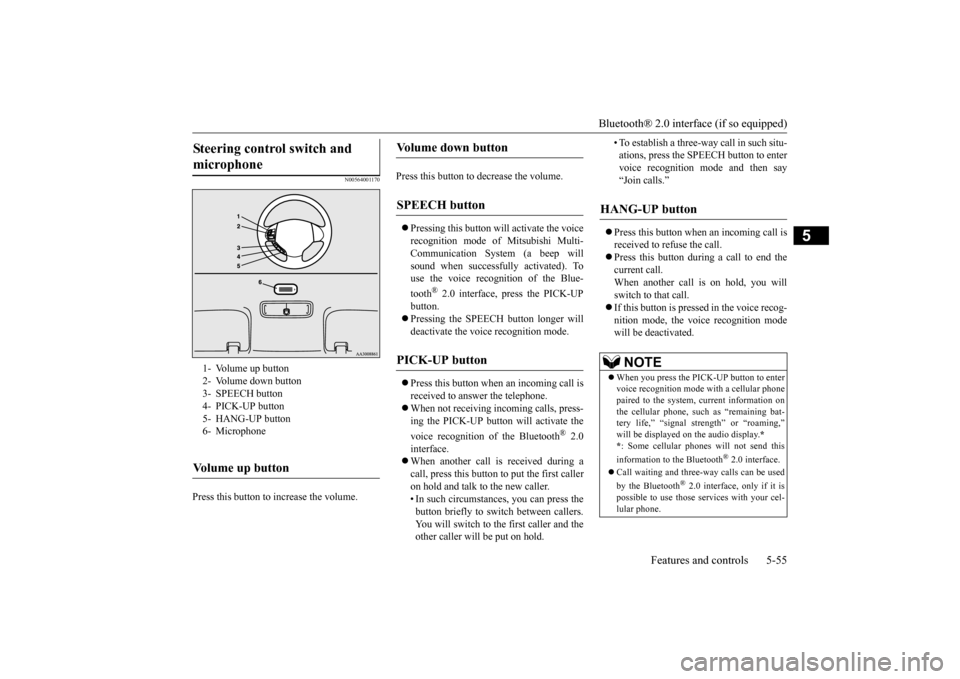
Press this button to increase the volume.
Press this button to decrease the volume. Pressing this button wi
ll activate the voice
recognition mode of Mitsubishi Multi-Communication System (a beep will sound when successful
ly activated). To
use the voice recognition of the Blue- tooth
® 2.0 interface, press the PICK-UP
button. Pressing the SPEECH button longer will deactivate th
e voice rec
ognition mode.
Press this button when an incoming call is received to answer the telephone. When not receiving incoming calls, press- ing the PICK-UP button will activate the voice recognition of
the Bluetooth
® 2.0
interface. When another call is received during a call, press this button to put the first caller on hold and talk to the new caller. • In such circumstance
s, you can press the
button briefly to sw
itch between callers.
You will switch to the first caller and the other caller will be put on hold.
• To establish a three-way call in such situ- ations, press the SPEECH button to entervoice recognition mode and then say “Join calls.”
Press this button when an incoming call is received to refuse the call. Press this button during a call to end the current call. When another call is on hold, you will switch to that call. If this button is pressed in the voice recog- nition mode, the voice recognition mode will be de
activated.
Steering control switch and microphone
1- Volume up button 2- Volume down button 3- SPEECH button4- PICK-UP button 5- HANG-UP button 6- MicrophoneVolume up button
Volume down button
SPEECH button
PICK-UP button
HANG-UP button
NOTE
When you press the PICK-UP button to enter voice recognition mode
with a cellular phone
paired to the system, current information onthe cellular phone, such as “remaining bat- tery life,” “signal st
rength” or “roaming,”
*
* : Some cellular phones
will not send this
information to the Bluetooth
® 2.0 interface.
Call waiting and three-
way calls can be used
by the Bluetooth
® 2.0 interface, only if it is
possible to use those services with your cel-lular phone.
BK0220401US.book 55 ページ 2015年6月3日 水曜日 午前7時42分
Page 165 of 296

Bluetooth® 2.0 interface (if so equipped)
Features and controls 5-57
5
N00564400018
There are 2 cancel functions. If you are at the main menu, say “Cancel” to exit from the Bluetooth
® 2.0 interface.
If you are anywhere else within the system, say “Cancel” to return to the main menu.
N00564501061
The Bluetooth
® 2.0 interface is equipped
with a confirmation function.With the confirmation function activated, you are given more opportunities than normal to confirm a command when making various settings to the Bluetooth
® 2.0 interface. This
allows you to decrease
the possibility that a
setting is accident
ally changed.
The confirmation function can be turned on or off by following the steps below. 1. Press the PICK-UP button. 2. Say “Setup.”3. Say “Confirmation prompts.” 4. The voice guide will say “Confirmation prompts are
5. The voice guide will say “Confirmation prompts are
N00564601163
It is possible to use a passcode as a securityfunction by setting a passcode of your choice for the Bluetooth
® 2.0 interface.
When the security function is turned on, it is necessary to make a vo
ice input of a 4-digit
passcode in order to use all functions of the Bluetooth
® 2.0 interface, except for recep-
tion. Use the following procedure to turn on the security function by setting a passcode. 1. Press the PICK-UP button. 2. Say “Setup.” 3. Say “Passcode.”4. The voice guide will
say “Passcode is dis-
abled. Would you like to enable it?” Answer “Yes.” passcode and return to the main menu. 5. The voice guide will say “Please say a 4-digit passcode. Remember this passcode. It will be required to use this system.”
Say a 4-digit number which you want to set as a passcode.6. For confirmation purposes, the voice guide will say “Pa
sscode <4-digit pass-
code>. Is this correct?” Answer “Yes.” input in Step 5. 7. When the registration of the passcode iscompleted, the voice
guide will say “Pass-
code is enabled” and the system will return to the main menu.
If a passcode has been
set and the security
function is enabled, the voice guide will say“Hands-free system is
locked. State the pass-
code to continue” wh
en the PICK-UP button
is pressed to enter
voice recognition mode.
Canceling
Confirmation function setting
Security function
Setting the passcode
NOTE
Passcode will be requi
red to access the sys-
tem after restarting the electric motor unit. It is required for a little time after the ready indicator has turned of
f that the entered pass-
code is actually recorded in the system. If the electric motor switch is made to “ACC” or“ON” or the electric motor is started immedi- ately after the ready indicator has turned off, there is a case when the entered passcode isnot recorded in the system. At this time, please try to enter the passcode again.
Entering the passcode
BK0220401US.book 57 ページ 2015年6月3日 水曜日 午前7時42分
Page 166 of 296

Bluetooth® 2.0 interface (if so equipped) 5-58 Features and controls
5
Say the 4-digit passcode number to enter the passcode. If the entered passcode
is wrong, the voice
guide will say “<4-digi
t passcode>, Incorrect
passcode. Please try again.” Enter the correctpasscode. Use the following procedure to turn off the security function by di
sabling the passcode.
1. Press the PICK-UP button. 2. Say “Setup.”3. Say “Passcode.” 4. The voice guide will say “Passcode is enabled. Would you like to disable it?”Answer “Yes.” the passcode and return to the main menu.
5. When the disabling of the passcode is completed, the voice
guide will say “Pass-
code is disabled” and the system will return to the main menu.
N00564700011
The Bluetooth
® 2.0 interface can use the
speaker enrollment function to create a voice model for one person per language. This makes it easier for the Bluetooth
® 2.0
interface to recognise
voice commands said
by you. You can turn a voice model registered with the speaker enrollment function on and offwhenever you want.
N00564801149
It takes about 2 to 3 mi
nutes to complete the
speaker enrollment process. To ensure the best results, run through the process while in the driver’s seat, in an envi-ronment that is as quiet as possible (when there is no rain or strong winds and the vehi- cle windows are closed).
Please turn off your
phone while in speaker enrollment to prevent interruption of the process. Use the following procedure for speakerenrollment.
1. Stop your vehicle in a safe area, put the selector lever in the
Page 173 of 296

Bluetooth® 2.0 interface (if so equipped)
Features and controls 5-65
5
5. If only 1 telephone number is registered under the name you just said, the voiceguide will proceed to Step 6. If 2 or more telephone
numbers are regis-
tered that match the name you just said,the voice guide will say “Would you like to call
6. The voice guide will say “Calling
the system will dial
the telephone number.
You can redial the last
number called, based
on the history of dialed calls in the paired cel- lular phone. Use the following procedure to redial. 1. Press the PICK-UP button. 2. Say “Redial.”
N00565700018
During a call, press the SPEECH button toenter voice recognition mode, then say “
SPEECH button and speak “1 2 3 4 pound send” and the 1234# will be sent via your cel-lular phone.
N00565800022
If an incoming phone call is received whilethe electric motor switch is in the “ACC” or “ON” position, the audio system will be auto- matically turned on and switched to the incoming call, even when the audio system was originally off.The voice guide announcement for the incoming call will be output from the front passenger’s seat speaker.If the CD player or radio was playing when the incoming call was received, the audio sys- tem will mute the sound from the CD playeror radio and output only the incoming call. To receive the call, press the PICK-UP button on the steering wheel control switch.When the call is over, the audio system will return to its previous state.
N00565900010
At any time during a
call, you can mute the
vehicle microphone. Pressing the SPEECH button and then saying“Mute” during a call will turn ON the mute function and mute the microphone.
NOTE
If the name you sele
cted has matching data
in the vehicle phonebook but no telephone number is registered unde
r the selected loca-
tion, the voice guide will say“{home/work/mobile/other} not found for
nd you can register an
additional telephone number under the selected location. If the name you sele
cted has matching data
in the mobile phonebook but no telephone number is registered unde
r the selected loca-
tion, the voice guide will say “{home/work/mobile/other} not found for
call making will be
cancelled. Start over again from Step 1.
NOTE
When the confirmation function is on, the system will check if
the name and location of
the receiver are correct. If the name is cor- rect, answer “Yes.” answer “No.” The system will return to Step 3.
RedialingSend function
Receiving calls
Mute function
BK0220401US.book 65 ページ 2015年6月3日 水曜日 午前7時42分