ECO mode MITSUBISHI iMiEV 2017 1.G Owner's Guide
[x] Cancel search | Manufacturer: MITSUBISHI, Model Year: 2017, Model line: iMiEV, Model: MITSUBISHI iMiEV 2017 1.GPages: 296, PDF Size: 7.79 MB
Page 221 of 296

AM/FM electronically tuned radio with CD player (if so equipped)
Comfort controls 7-19
7
N00771900017
Press the SCAN button.
“SCAN” will appear
on the display and the CD player will playback the first 10 second
s of each track on the
selected disc (music
CDs only) or the cur-
rently selected folder (MP3 CDs only).The track number will blink while the scan mode is selected. To stop the scan mode, press the SCAN button again.
N00752100166
This audio system can
display CD text and
MP3 titles including ID3 tag information. The audio system can di
splay disc and track
titles for discs with converted disc and track title information. Press the DISP button repeatedly to make selections in the following sequence: disc name
track name
normal
display mode. The audio system can display folder and track titles for discs wi
th converted folder and track
information. Press the DISP button repeat- edly to make selections in the followingsequence: folder name
track name
nor-
mal display mode.
The audio system can
display ID3 tag infor-
mation for files that ha
ve been recorded with
ID3 tag information. 1. Press the DISP button for 2 seconds or longer to switch to the ID3 tag informa- tion. “TAG” will appear on the display.2. Press the DISP button repeatedly to make selections in th
e following sequence:
album name
track name
artist name
normal display mode.
NOTE
With a disc that contains both CD-DA and MP3 files, the random
mode causes only
files of the same format (CD-DA only orMP3 files only) to be repeated.
To find the start of each track on a disc for playback
NOTE
Once all tracks on the
disc (music CDs only)
or the currently selected folder (MP3 CDs only) have been scanne
d, playback of the
disc will restart from
the beginning of the
track that was play
ing when scanning
started. With a disc that contains both CD-DA and MP3 files, the scan m
ode causes only files of
the same format (CD-DA only or MP3 filesonly) to be played.
CD text and MP3 title display
CD text
NOTE
The display can show up to 11 characters. If a disc name or track
name has more than 11
characters, press the PAGE button to viewthe next 11 characters. When there is no title information to be dis- played, the display shows “NO TITLE”. Characters that the a
udio system cannot dis-
play are shown as “ ”.
ID3 tag information
NOTE
To return from ID3 tag information to the folder name, press the DISP button again for2 seconds or longer. When there is no title information to be dis- played, the display
shows “NO TITLE”.
a folder name, track name
, or item of ID3 tag
information has more than 11 characters, press the PAGE button to view the next 11characters. Folder names, trac
k names and ID3 tag
information can each be displayed up to a length of 32 characters. Characters that the a
udio system cannot dis-
play are shown as “ ”.
BK0220401US.book 19 ページ 2015年6月3日 水曜日 午前7時42分
Page 223 of 296

To play iPod/USB memory device tr
acks via voice operation (vehicles with Bluetooth® 2.0 interface)
Comfort controls 7-21
7
7. The system exits
the voice recognition
mode and starts playback.
N00772300018
1. Say “Play” on the main menu. 2. After the voice guide says “Would you like to play by Artist, Album, Playlist or Genre?,” say “Album”.
3. After the voice gui
de says “What Album
would you like to play?” say the albumtitle. 4. If there is only one match, the system pro- ceeds to step 6.5. If there are two or more matches, the voice guide will say “More than one match was found, would you like to play
u say “Yes,” the sys-
tem proceeds to step 6. If you say “No,” the name of the next matching album is uttered by the system. 6. After the voice gui
de says “Playing
7. The system exits the voice recognition mode and starts playback.
N00772400019
1. Say “Play” on the main menu. 2. After the voice guide says “Would you like to play by Artist, Album, Playlist or Genre?,” say
“Playlist”.
3. After the voice guide says “What Playlist would you like to play?,” say the playlist name. 4. If there is only one match, the system pro-ceeds to step 6.
NOTE
If the confirmation f
unction is active, the
voice guide confirms if
the artist name is
correct. If the artist name is correct, say“Yes”. If not, say “No”. After the voice guide says “Artist not found, please try again,” the system returns to step 2.
To search by album title
NOTE
The Bluetooth
® 2.0 interface
starts recogniz-
ing the connected device. If the connected device
cannot be recognized
or a connection error
occurs, the Bluetooth
®
2.0 interface starts an appropriate voice guide. Follow th
e voice guide.
NOTE
If you say “Album <
title>,” you can skip
step 3.
NOTE
If you say “No” to three or all album titles uttered by the system, the voice guide will say “Album not found, please try again” and the system returns to step 2.NOTE
If the confirmation function is active, the voice guide confirms if
the album title is cor-
rect. If the album title is correct, say “Yes”.
the voice guide says
“Album not found, please try again,” the sys- tem returns to step 2.
To search by playlist
NOTE
The Bluetooth
® 2.0 interface
starts recogniz-
ing the connected device. If the connected device
cannot be recognized
or a connection error
occurs, the Bluetooth
®
2.0 interface starts an appropriate voice guide. Follow th
e voice guide.
NOTE
If you say “Playlist
step 3. If the device has no playlist, the voice guidewill say “There are no
playlists stored on
device” and the system returns to step 2.
BK0220401US.book 21 ページ 2015年6月3日 水曜日 午前7時42分
Page 224 of 296
Steering wheel audio remote cont
rol switch (if so equipped)
7-22 Comfort controls
7
5. If there are two or more matches, the voice guide will say “More than onematch was found, would you like to play
de says “Playing
N00772500010
1. Say “Play” on the main menu. 2. After the voice guide says “Would you like to play by Artist, Album, Playlist or Genre?,” say “Genre”. would you like to play?,” say the musictype. 4. If there is only one match, the system pro- ceeds to step 6.5. If there are two or more matches, the voice guide will say “More than one match was found, would you like to play
If you say “No,” the next matching genre is uttered by the system. 6. After the voice gui
de says “Playing
N00714800471
The remote control switch is located on theleft side of th
e steering wheel.
NOTE
If you say “No” to three
or all playlist names
uttered by the system, the voice guide willsay “Playlist not found,
please try again” and
the system returns to step 2.NOTE
If the confirmation function is active, the voice guide confirms if
the playlist name is
correct. If the playlist name is correct, say “Yes”. If not, say “No”. After the voice guidesays “Playlist not foun
d, please try again,”
the system returns to step 2. Refer to “Con- firmation function se
tting” on page 5-57.
To search by genre
NOTE
The Bluetooth
® 2.0 interface
starts recogniz-
ing the connected device.If the connected device
cannot be recognized
or a connection error
occurs, the Bluetooth
®
2.0 interface starts an appropriate voice guide. Follow the voice guide.NOTE
If you say “Genre
NOTE
If you say “No” to three or all genres uttered by the system, the voice guide will say “Genre not found, please try again” and thesystem returns to step 2.NOTE
If the confirmation function is active, the voice guide confirms if the genre is correct. If the genre is correct, say “Yes”. If not, say“No”. After the voice
guide says “Genre not
found, please try again,” the system returns to step 2. Refer to
“Confirmation function
setting” on page 5-57.
Steering wheel audio remote control switch
(if so equipped)
BK0220401US.book 22 ページ 2015年6月3日 水曜日 午前7時42分
Page 225 of 296
Steering wheel audio remote control switch (if so equipped)
Comfort controls 7-23
7
It can be used when the electric motor switch is in the “ON” or “ACC” position. Press the power switch to turn on the power. When the power is turned on, the last mode
used before turning off is displayed. To turn off the power, press and hold down the powerswitch for about 2 seconds until you hear a beep. While the button is pressed, the volume will continue to increase. While the button is pressed, the volume will continue to decrease. Press the mode selector button to select the desired mode.The mode changes in the following order. AM
FM1
FM2
CD
USB or iPod
*
Bluetooth
®* AM
* : If you connect these devices.
Press the mode selector button and select AM or FM mode. After pressing one of
these buttons, a receiv-
able station will be automatically selected and reception of the st
ation will begin.
Press the mode selector
button and select CD
mode. To fast forward or fast
reverse the disc, press
the fast-forward button or the fast-reverse button. You can fast forward the disc by holding down the fast-forward button. While the but-
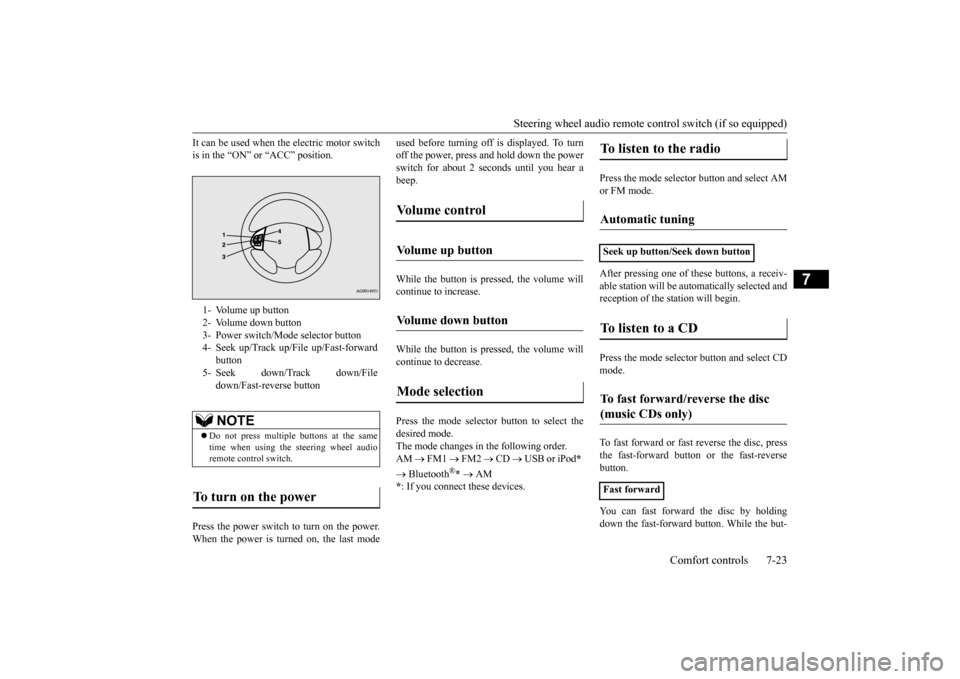
1- Volume up button 2- Volume down button 3- Power switch/Mode selector button4- Seek up/Track up/File up/Fast-forward
button
5- Seek down/Track down/File
down/Fast-reverse buttonNOTE
Do not press multiple buttons at the same time when using the steering wheel audioremote control switch.
To turn on the power
Vo l u m e c o n t r o l
Volume up button
Volume down button
Mode selection
To listen to the radio
Automatic tuning
Seek up button/Seek down buttonTo listen to a CD
To fast forward/reverse the disc (music CDs only)
Fast forward
BK0220401US.book 23 ページ 2015年6月3日 水曜日 午前7時42分
Page 257 of 296
Tires
Vehicle care and maintenance 9-11
9
Intended outboard sidewall: • The sidewall that c
ontains a whitewall,
bears white letteri
ng or bears manufac-
turer, brand, and/or model name molding that is higher or deeper than the samemolding on the other sidewall of the tire, or • The outward facing si
dewall of an asym-
metrical tire that has a particular side that must always face outward when mounted on a vehicle.
Passenger car tire: a
tire intended for use
on passenger cars, multipurpose passen-ger vehicles, and trucks, that have a gross vehicle weight rati
ng (GVWR) of 10,000
pounds or less. Light truck (LT) tire: a tire designated by its manufacturer as primarily intended for use on lightweight truc
ks or multipurpose
passenger vehicles. Tread: portion of a tire that comes into contact with the road. Tread rib: a tread se
ction running circum-
ferentially around a tire. Tread separation: pulling away of the tread from the tire carcass. Carcass: the tire structure, except tread and sidewall rubber which, when inflated,bears the load. Sidewall: portion of
a tire between the
tread and bead.
Section width: the line
ar distance between
the exteriors of the sidewalls of aninflated tire, excluding elevations due to labeling, decoration, or protective bands. Bead: the part of the tire that is made of steel wires, wrapped
or reinforced by ply
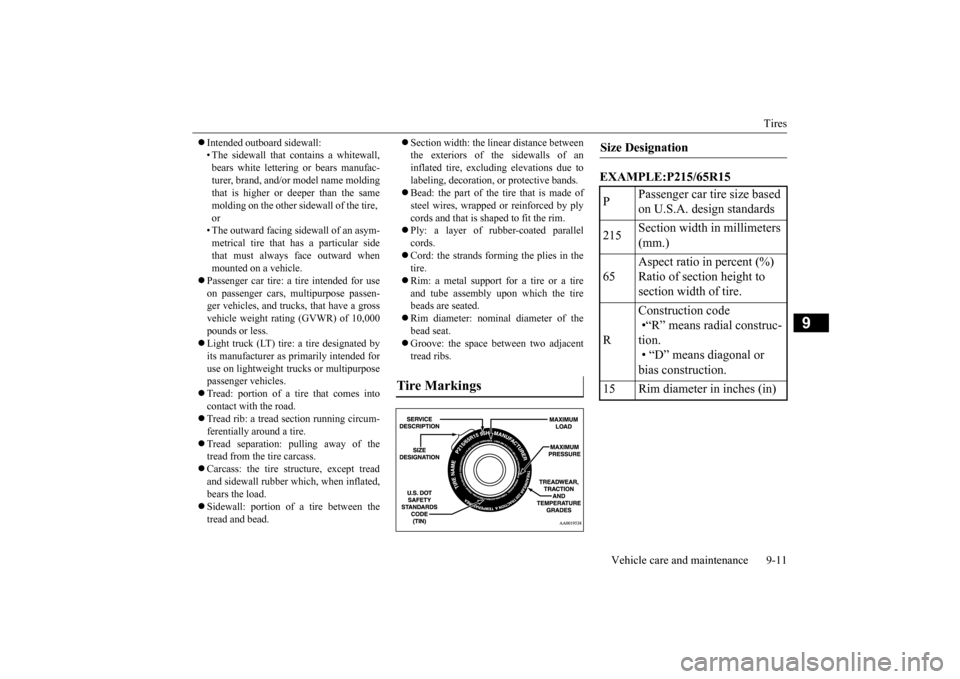
cords and that is shaped to fit the rim. Ply: a layer of rubber-coated parallel cords. Cord: the strands forming the plies in the tire. Rim: a metal support for a tire or a tire and tube assembly upon which the tirebeads are seated. Rim diameter: nominal diameter of the bead seat. Groove: the space between two adjacent tread ribs.
EXAMPLE:P215/65R15
Tire Markings
Size Designation P
Passenger car tire size based on U.S.A. design standards
215
Section width in millimeters (mm.)
65
Aspect ratio in percent (%) Ratio of section height to section width of tire.
R
Construction code •“R” means radial construc- tion.
• “D” means diagonal or bias construction.
15 Rim diameter in inches (in)
BK0220401US.book 11 ページ 2015年6月3日 水曜日 午前7時42分