engine MITSUBISHI L200 2017 (in English) Repair Manual
[x] Cancel search | Manufacturer: MITSUBISHI, Model Year: 2017, Model line: L200, Model: MITSUBISHI L200 2017Pages: 426, PDF Size: 14.12 MB
Page 148 of 426
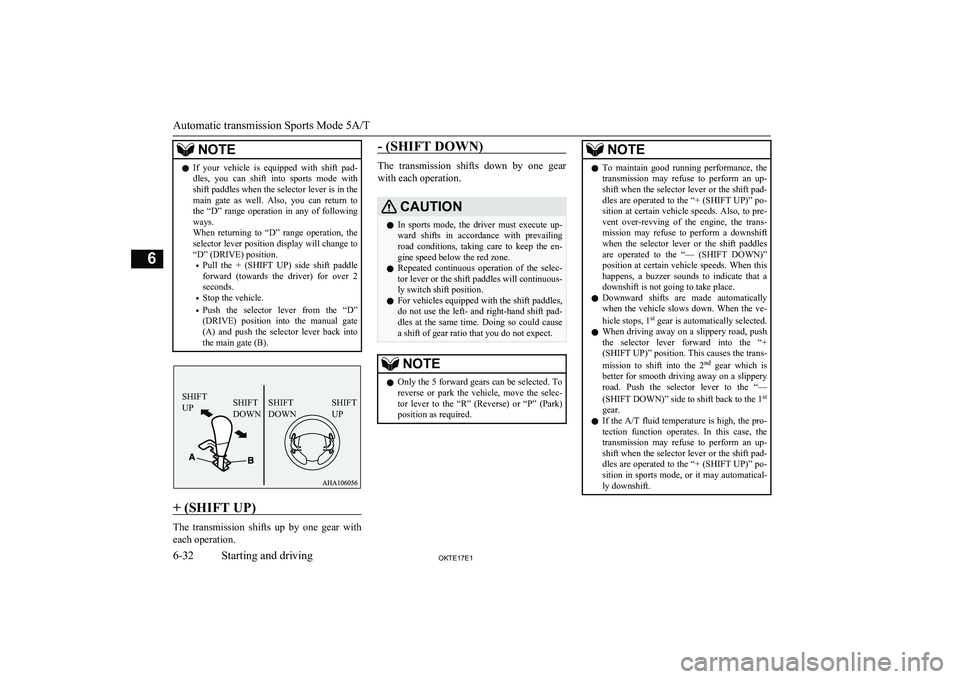
NOTElIf your vehicle is equipped with shift pad-
dles, you can shift into sports mode with
shift paddles when the selector lever is in the main gate as well. Also, you can return to
the “D” range operation in any of following ways.
When returning to “D” range operation, the selector lever position display will change to
“D” (DRIVE) position.
• Pull the + (SHIFT UP) side shift paddle
forward (towards the driver) for over 2
seconds.
• Stop the vehicle.
• Push the selector lever from the “D”
(DRIVE) position into the manual gate
(A) and push the selector lever back into the main gate (B).
+ (SHIFT UP)
The transmission shifts up by one gear with
each operation.
- (SHIFT DOWN)
The transmission shifts down by one gear
with each operation.
CAUTIONl In sports mode, the driver must execute up-
ward shifts in accordance with prevailing road conditions, taking care to keep the en-
gine speed below the red zone.
l Repeated continuous operation of the selec-
tor lever or the shift paddles will continuous-ly switch shift position.
l For vehicles equipped with the shift paddles,
do not use the left- and right-hand shift pad- dles at the same time. Doing so could cause
a shift of gear ratio that you do not expect.NOTEl Only the 5 forward gears can be selected. To
reverse or park the vehicle, move the selec-
tor lever to the “R” (Reverse) or “P” (Park)
position as required.NOTEl To maintain good running performance, the
transmission may refuse to perform an up- shift when the selector lever or the shift pad-dles are operated to the “+ (SHIFT UP)” po-
sition at certain vehicle speeds. Also, to pre- vent over-revving of the engine, the trans-
mission may refuse to perform a downshift when the selector lever or the shift paddlesare operated to the “— (SHIFT DOWN)”
position at certain vehicle speeds. When this
happens, a buzzer sounds to indicate that a downshift is not going to take place.
l Downward shifts are made automatically
when the vehicle slows down. When the ve-
hicle stops, 1 st
gear is automatically selected.
l When driving away on a slippery road, push
the selector lever forward into the “+(SHIFT UP)” position. This causes the trans-
mission to shift into the 2 nd
gear which is
better for smooth driving away on a slippery
road. Push the selector lever to the “—
(SHIFT DOWN)” side to shift back to the 1 st
gear.
l If the
A/T fluid temperature is high, the pro-
tection function operates. In this case, the
transmission may refuse to perform an up- shift when the selector lever or the shift pad-
dles are operated to the “+ (SHIFT UP)” po- sition in sports mode, or it may automatical-
ly downshift.
Automatic transmission Sports Mode 5A/T
6-32OKTE17E1Starting and driving6 SHIFT
UPSHIFT
DOWNSHIFT
DOWN SHIFT
UP
Page 150 of 426
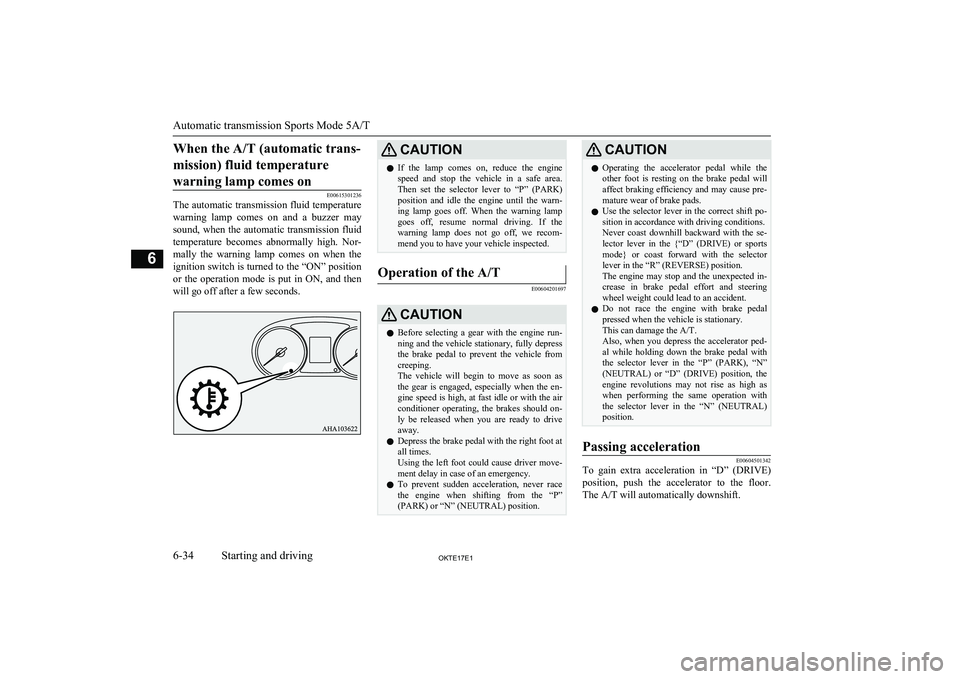
When the A/T (automatic trans-mission) fluid temperature warning lamp comes on
E00615301236
The automatic transmission fluid temperature
warning lamp comes on and a buzzer may
sound, when the automatic transmission fluid
temperature becomes abnormally high. Nor- mally the warning lamp comes on when the
ignition switch is turned to the “ON” position or the operation mode is put in ON, and then
will go off after a few seconds.
CAUTIONl If the lamp comes on, reduce the engine
speed and stop the vehicle in a safe area.Then set the selector lever to “P” (PARK)
position and idle the engine until the warn-
ing lamp goes off. When the warning lamp goes off, resume normal driving. If the
warning lamp does not go off, we recom- mend you to have your vehicle inspected.Operation of the A/T
E00604201697
CAUTIONl Before selecting a gear with the engine run-
ning and the vehicle stationary, fully depress
the brake pedal to prevent the vehicle from
creeping.
The vehicle will begin to move as soon as the gear is engaged, especially when the en- gine speed is high, at fast idle or with the airconditioner operating, the brakes should on-
ly be released when you are ready to drive
away.
l Depress the brake pedal with the right foot at
all times.
Using the left foot could cause driver move- ment delay in case of an emergency.
l To prevent sudden acceleration, never race
the engine when shifting from the “P”
(PARK) or “N” (NEUTRAL) position.CAUTIONl Operating the accelerator pedal while the
other foot is resting on the brake pedal will affect braking efficiency and may cause pre-
mature wear of brake pads.
l Use the selector lever in the correct shift po-
sition in accordance with driving conditions.Never coast downhill backward with the se-
lector lever in the {“D” (DRIVE) or sports mode} or coast forward with the selector
lever in the “R” (REVERSE) position.
The engine may stop and the unexpected in- crease in brake pedal effort and steering
wheel weight could lead to an accident.
l Do not race the engine with brake pedal
pressed when the vehicle is stationary.
This can damage the A/T.
Also, when you depress the accelerator ped- al while holding down the brake pedal withthe selector lever in the “P” (PARK), “N”
(NEUTRAL) or “D” (DRIVE) position, the
engine revolutions may not rise as high as when performing the same operation with
the selector lever in the “N” (NEUTRAL)
position.Passing acceleration
E00604501342
To gain extra acceleration in “D” (DRIVE)
position, push the accelerator to the floor.The A/T will automatically downshift.
Automatic transmission Sports Mode 5A/T
6-34OKTE17E1Starting and driving6
Page 151 of 426
NOTElIn sports mode, downshifts do not take place
when the accelerator is depressed all the way to the floor.Waiting
E00604601372
For short waiting periods, such as at traffic
signals, the vehicle can be left in gear and held stationary with the service brake.
For longer waiting periods with the engine
running, place the selector lever in the “N” (NEUTRAL) position and apply the parking
brake, while holding the vehicle stationary with the service brake.
CAUTIONl Never hold the vehicle stationary on a hill
using the accelerator pedal (without using
the brake pedal). Always apply the parking brake and/or service brakes.Parking
E00604700187
To park the vehicle, first bring it to a com-
plete stop, fully engage the parking brake,and then move the selector lever to the “P”
(PARK) position.
If you are going to leave the vehicle unatten-
ded, always switch off the engine and carry the key.
NOTEl On a slope, be sure to apply the parking
brake before moving the selector lever to the
“P” (PARK) position. If you move the selec- tor lever to the “P” (PARK) position before applying the parking brake, it may be diffi-
cult to disengage the selector lever from the
“P” (PARK) position when next you drive the vehicle, requiring application of a strong
force to the selector lever to move from the
“P” (PARK) position.When the automatic transmis-
sion makes no speed change
E00604801882
If the transmission does not change speeds
while driving, or your vehicle does not pick up enough speed when starting on an uphillslope, it may be that there is something un-
usual happening in the transmission, causing a safety device to activate. Immediately have
your vehicle checked at a MITSUBISHI
MOTORS Authorized Service Point. 1. If your vehicle has difficulty moving up-
hill, shift the selector lever into 2 nd
gear
of the sports mode. This method might
not work depending on the transmission malfunction.
2. Once the vehicle is moving on a level
road, move the selector lever back to“D” (DRIVE).
NOTEl When the selector lever position display in
the instrument panel blinks, it means that
there is an abnormal condition in the trans- mission.
Refer to “When the selector lever position
display blinks” on page 6-33.Easy select 4WD*
E00614701204
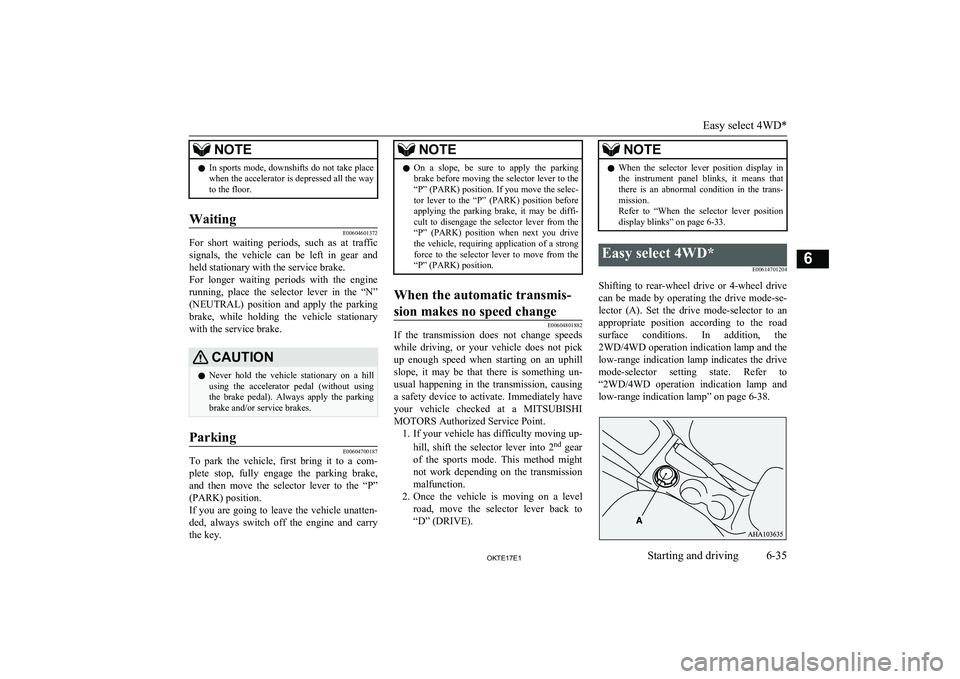
Shifting to rear-wheel drive or 4-wheel drivecan be made by operating the drive mode-se-
lector (A). Set the drive mode-selector to an appropriate position according to the roadsurface conditions. In addition, the 2WD/4WD operation indication lamp and the
low-range indication lamp indicates the drive
mode-selector setting state. Refer to “2WD/4WD operation indication lamp and low-range indication lamp” on page 6-38.
Easy select 4WD*
6-35OKTE17E1Starting and driving6
Page 153 of 426
To shift fromToProcedureVehicles with manual transmissionVehicles with automatic transmission2H4HThe drive mode-selector can be operated while the ve-
hicle is either moving or stationary.
When the vehicle is not in motion, shift the gearshift
lever to the “N” (Neutral) position before operating
the drive mode-selector.
When the vehicle is moving, and only while it can be steered straight ahead, release the accelerator pedal
before operating the drive mode-selector.The drive mode-selector can be operated while the
vehicle is either moving or stationary.
When the vehicle is not in motion, shift the selector
lever to the “N” (NEUTRAL) position before oper-
ating the drive mode-selector.
When the vehicle is moving, and only while it can
be steered straight ahead, shift the selector lever to
the “D” (DRIVE) position, and release the accelera- tor pedal before operating the drive mode-selector.
4H2H
4H4L
Stop the vehicle, depress the clutch pedal to the floor
and operate the drive mode-selector.
Keep depressing the clutch pedal while 2WD/4WD
operation indication lamp continues to blink.
Stop the vehicle, shift the selector lever to the “N”
(NEUTRAL) position, and operate the drive mode-
selector.
If operation is made with the selector lever placed
in any other position than “N” (NEUTRAL) posi-
tion, a gear noise may be generated, with a possible
failure to shift into a proper gear.
4L4H
NOTEl Shifting of setting of the drive mode-selector
between “2H” ↔ “4H” should only be doneat speeds below 100 km/h (62 mph).
l During driving, never attempt to shift from
“4H” to “4L”.
l When shifting from “2H” to “4H” in cold
weather while the vehicle is in motion, the transfer gear may make some noise. In cold
weather, try to shift the gear while the vehi-
cle is stopped.
l When shifting between “4H” and “4L”, the
transfer gear may make some noise.NOTEl When the drive mode-selector is set between
“2H” ↔ “4H” while the vehicle is stopped,
the 2WD/4WD operation indication lamp blinks while the selection is in process.
Drive slowly and normally after confirming that the lamp is illuminated. Refer to “2WD/4WD operation indication lamp and
low-range indication lamp” on page 6-38.
l When the drive mode-selector is set between
“2H” ↔ “4H” while the cruise control is ac-
tivated, the transfer gear may make some
noise.NOTEl When the drive mode-selector is set be-
tween“4H” ↔ “4L” in cold weather, its se-
lection may not complete. Return the drive mode-selector to its previous position. After
the engine is warmed up, make the range se- lection again.
Easy select 4WD*
6-37OKTE17E1Starting and driving6
Page 155 of 426
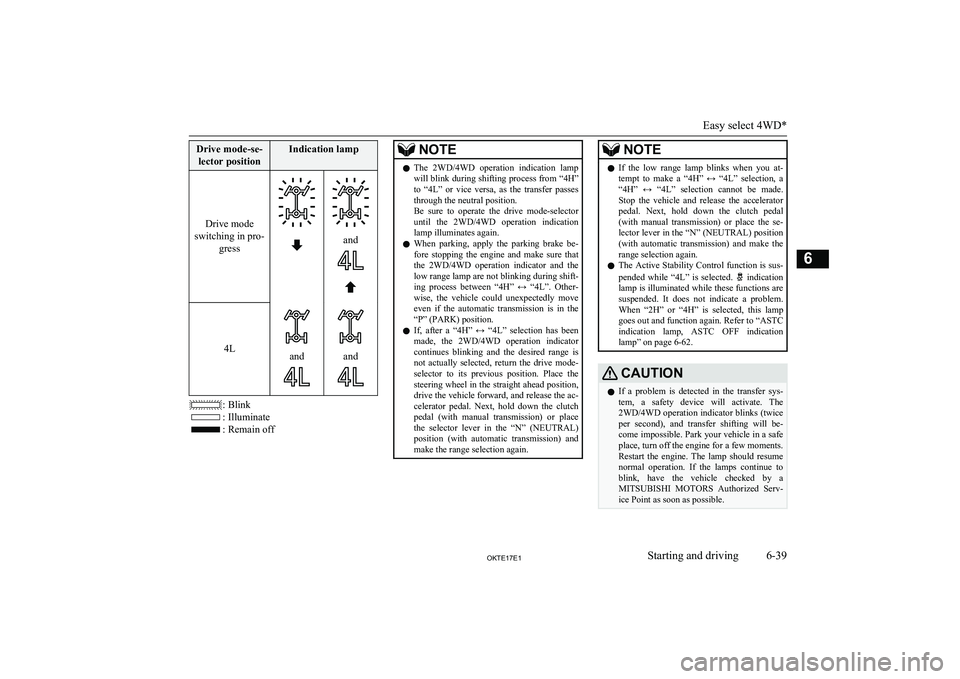
Drive mode-se-lector positionIndication lamp
Drive mode
switching in pro- gress
and
4Landand
: Blink
: Illuminate
: Remain off
NOTElThe 2WD/4WD operation indication lamp
will blink during shifting process from “4H”to “4L” or vice versa, as the transfer passes
through the neutral position.
Be sure to operate the drive mode-selector
until the 2WD/4WD operation indication lamp illuminates again.
l When parking, apply the parking brake be-
fore stopping the engine and make sure that the 2WD/4WD operation indicator and the
low range lamp are not blinking during shift- ing process between “4H” ↔ “4L”. Other- wise, the vehicle could unexpectedly move
even if the automatic transmission is in the “P” (PARK) position.
l If, after a “4H” ↔ “4L” selection has been
made, the 2WD/4WD operation indicator continues blinking and the desired range isnot actually selected, return the drive mode- selector to its previous position. Place the
steering wheel in the straight ahead position, drive the vehicle forward, and release the ac-
celerator pedal. Next, hold down the clutch pedal (with manual transmission) or place
the selector lever in the “N” (NEUTRAL)
position (with automatic transmission) and make the range selection again.NOTEl If the low range lamp blinks when you at-
tempt to make a “4H” ↔ “4L” selection, a
“4H” ↔ “4L” selection cannot be made.
Stop the vehicle and release the accelerator pedal. Next, hold down the clutch pedal(with manual transmission) or place the se-lector lever in the “N” (NEUTRAL) position(with automatic transmission) and make the
range selection again.
l The Active Stability Control function is sus-
pended while “4L” is selected.
indication
lamp is illuminated while these functions are suspended. It does not indicate a problem.
When “2H” or “4H” is selected, this lamp goes out and function again. Refer to “ASTCindication lamp, ASTC OFF indication
lamp” on page 6-62.
CAUTIONl If a problem is detected in the transfer sys-
tem, a safety device will activate. The 2WD/4WD operation indicator blinks (twiceper second), and transfer shifting will be-
come impossible. Park your vehicle in a safe place, turn off the engine for a few moments.Restart the engine. The lamp should resume normal operation. If the lamps continue to
blink, have the vehicle checked by a MITSUBISHI MOTORS Authorized Serv-
ice Point as soon as possible.
Easy select 4WD*
6-39OKTE17E1Starting and driving6
Page 158 of 426
To shift fromToProcedureVehicles with manual transmissionVehicles with automatic transmission4LLc4HLcgear noise may be generated, with a possible failure to
shift into a proper gear.NOTEl Setting of the drive mode-selector between
“2H”, “4H” and “4HLc” should only bedone at speeds below 100 km/h (62 mph).
l During driving, never attempt to shift from
“4HLc” to “4LLc”.
l When shifting between “2H”, “4H” and
“4HLc” in cold weather while the vehicle is
in motion, the transfer gear may make some noise. In cold weather, try to shift the gearwhile the vehicle is stopped.
l When shifting between “4LLc” and “4HLc”,
the transfer gear may make some noise.
l When the drive mode-selector is set between
“2H”, “4H” and “4HLc” while the vehicle is
stopped, the 2WD/4WD operation indication lamp blinks while the selection is in process. Drive slowly and normally after confirmingthat the lamp is illuminated. (Refer to “2WD/4WD operation indication lamp and
low-range indication lamp” on page 6-42.)
l When the drive mode-selector is set between
“2H”, “4H” and “4HLc” while the cruise
control is activated, the transfer gear may
make some noise.NOTEl When the drive mode-selector is set be-
tween“4HLc” ↔ “4LLc” in cold weather, its selection may not complete. Return the drivemode-selector to its previous position. After
the engine is warmed up, make the range se-
lection again.CAUTIONl Do not operate the drive mode-selector
while the rear wheels of the vehicle are slip-
ping on snow or ice.2WD/4WD operation indica-
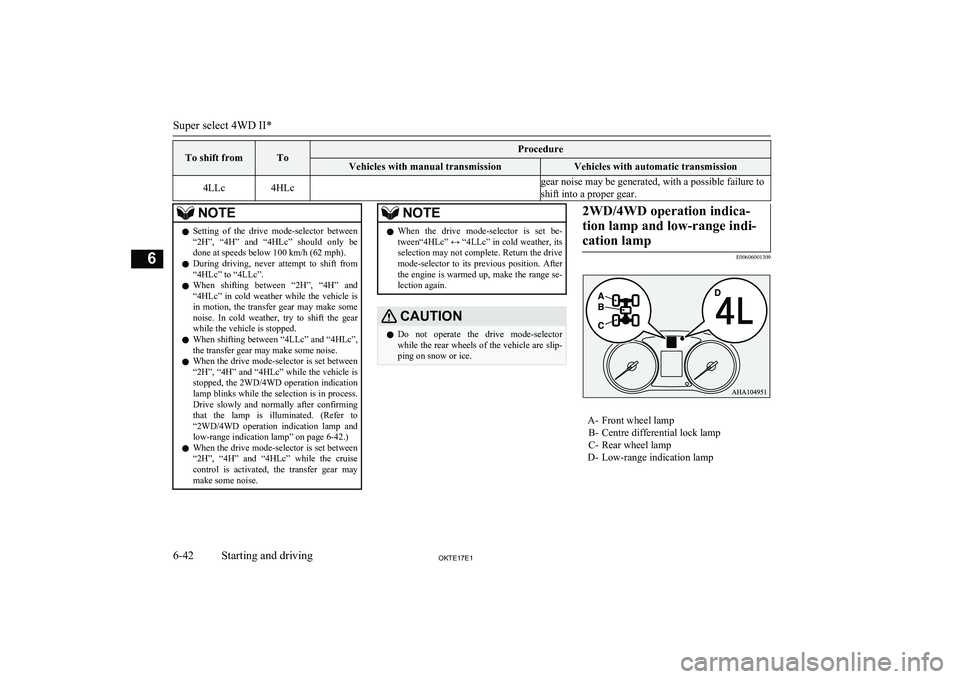
tion lamp and low-range indi- cation lamp
E00606001309
A- Front wheel lamp B- Centre differential lock lamp
C- Rear wheel lamp
D- Low-range indication lamp
Super select 4WD II*
6-42OKTE17E1Starting and driving6
Page 160 of 426
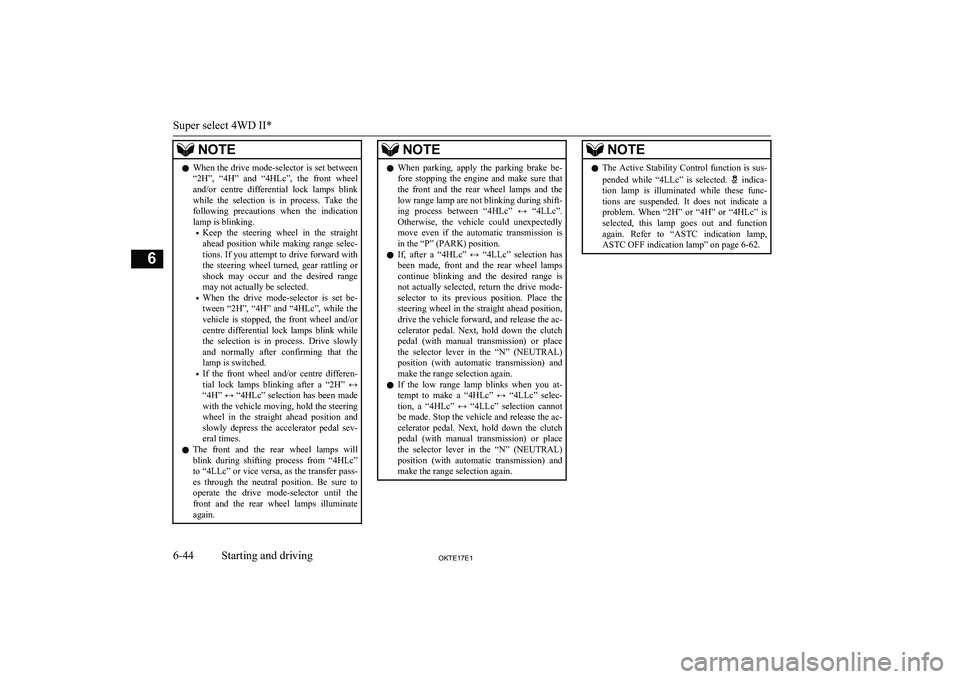
NOTElWhen the drive mode-selector is set between
“2H”, “4H” and “4HLc”, the front wheel
and/or centre differential lock lamps blink
while the selection is in process. Take the following precautions when the indicationlamp is blinking.
• Keep the steering wheel in the straight
ahead position while making range selec- tions. If you attempt to drive forward with
the steering wheel turned, gear rattling or
shock may occur and the desired range may not actually be selected.
• When the drive mode-selector is set be-
tween “2H”, “4H” and “4HLc”, while the
vehicle is stopped, the front wheel and/or centre differential lock lamps blink whilethe selection is in process. Drive slowly and normally after confirming that the
lamp is switched.
• If the front wheel and/or centre differen-
tial lock lamps blinking after a “2H” ↔
“4H” ↔ “4HLc” selection has been made with the vehicle moving, hold the steering wheel in the straight ahead position and
slowly depress the accelerator pedal sev-
eral times.
l The front and the rear wheel lamps will
blink during shifting process from “4HLc”
to “4LLc” or vice versa, as the transfer pass-
es through the neutral position. Be sure to operate the drive mode-selector until the
front and the rear wheel lamps illuminate
again.NOTEl When parking, apply the parking brake be-
fore stopping the engine and make sure that the front and the rear wheel lamps and the low range lamp are not blinking during shift-ing process between “4HLc” ↔ “4LLc”.
Otherwise, the vehicle could unexpectedly move even if the automatic transmission is
in the “P” (PARK) position.
l If, after a “4HLc” ↔ “4LLc” selection has
been made, front and the rear wheel lamps continue blinking and the desired range isnot actually selected, return the drive mode-selector to its previous position. Place the
steering wheel in the straight ahead position, drive the vehicle forward, and release the ac-
celerator pedal. Next, hold down the clutch pedal (with manual transmission) or place
the selector lever in the “N” (NEUTRAL)
position (with automatic transmission) and make the range selection again.
l If the low range lamp blinks when you at-
tempt to make a “4HLc” ↔ “4LLc” selec-
tion, a “4HLc” ↔ “4LLc” selection cannot
be made. Stop the vehicle and release the ac- celerator pedal. Next, hold down the clutch pedal (with manual transmission) or placethe selector lever in the “N” (NEUTRAL)
position (with automatic transmission) and make the range selection again.NOTEl The Active Stability Control function is sus-
pended while “4LLc” is selected. indica-
tion lamp is illuminated while these func-
tions are suspended. It does not indicate a
problem. When “2H” or “4H” or “4HLc” is selected, this lamp goes out and function
again. Refer to “ASTC indication lamp, ASTC OFF indication lamp” on page 6-62.
Super select 4WD II*
6-44OKTE17E1Starting and driving6
Page 161 of 426
CAUTIONlIf a problem is detected in the transfer sys-
tem, a safety device will activate. The front and rear wheel lamps will go out, the centre
differential lock lamp will blink rapidly (twice per second), and transfer shifting will
become impossible. Park your vehicle in a safe place, turn off the engine for a few mo-
ments. Restart the engine. The lamp should resume normal operation. If the lamps con-tinue to blink, have the vehicle checked by aMITSUBISHI MOTORS Authorized Serv-
ice Point as soon as possible.Rear differential lock*
E00606201301
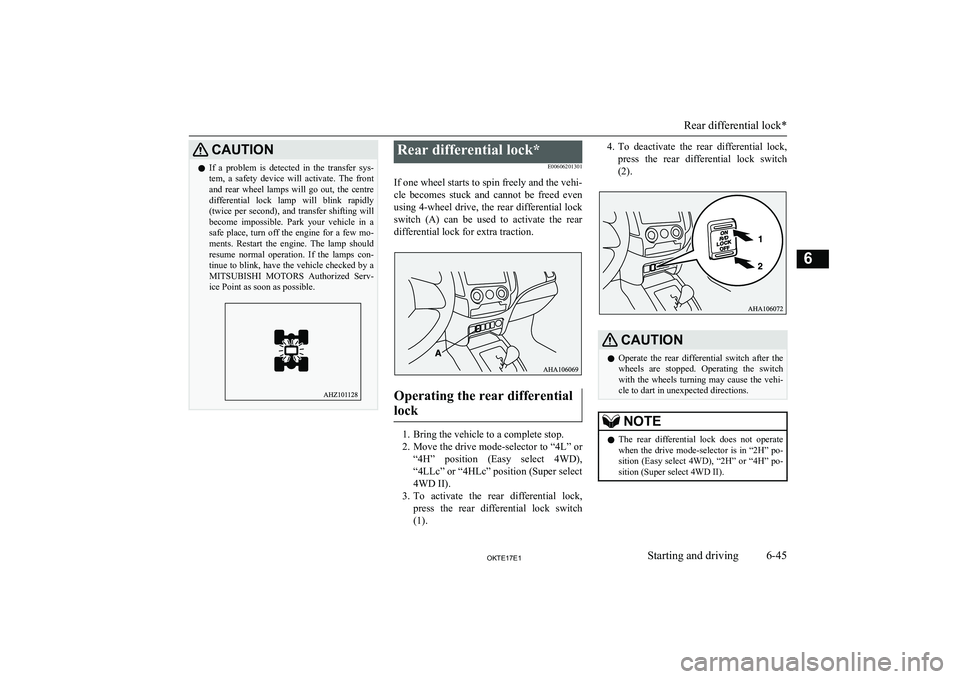
If one wheel starts to spin freely and the vehi-
cle becomes stuck and cannot be freed even using 4-wheel drive, the rear differential lock switch (A) can be used to activate the reardifferential lock for extra traction.
Operating the rear differential
lock
1. Bring the vehicle to a complete stop.
2. Move the drive mode-selector to “4L” or
“4H” position (Easy select 4WD), “4LLc” or “4HLc” position (Super select
4WD II).
3. To activate the rear differential lock,
press the rear differential lock switch
(1).
4. To deactivate the rear differential lock,
press the rear differential lock switch
(2).CAUTIONl Operate the rear differential switch after the
wheels are stopped. Operating the switch with the wheels turning may cause the vehi-
cle to dart in unexpected directions.NOTEl The rear differential lock does not operate
when the drive mode-selector is in “2H” po-
sition (Easy select 4WD), “2H” or “4H” po- sition (Super select 4WD II).
Rear differential lock*
6-45OKTE17E1Starting and driving6
Page 163 of 426
NOTElThe indication lamp blinks while the rear
differential lock is being switched between
its activated and deactivated conditions. When the switching operation is complete,
the indication lamp is either illuminated steadily or not illuminated.
l The ASTC and ABS functions are suspen-
ded while the rear differential lock is activa-
ted.
ASTC indication lamp, ASTC OFF indica- tion lamp and ABS warning lamp are illumi- nated while these functions are suspended.
It does not indicate a problem. When the
rear differential lock is disengaged, these lamps go out and function again.
Refer to “ABS warning lamp” on page
6-57, “ASTC indication lamp, ASTC OFF in-
dication lamp” on page 6-62.
l If the indication lamp continues blinking af-
ter the switch has been pressed to deactivate
the rear differential lock, hold the steering
wheel in the straight ahead position then slowly depress and release the accelerator
pedal several times.
l If the indication lamp continues blinking af-
ter the switch has been pressed to activate the rear differential lock, bear in mind thefollowing instructions:
• If the vehicle speed is 12 km/h or higher,
decelerate to a speed of 2.5 km/h or low-er. The indication lamp will illuminate
steadily and the rear differential lock will be activated.NOTE• If the vehicle speed is 12 km/h or lower,
turn the steering wheel from side to side
until the indication lamp illuminates steadily. If the vehicle is stuck in softground, make sure the area around the ve-
hicle is clear then repeatedly attempt to
drive forward and backward. The indica- tion lamp will illuminate steadily and the
rear differential lock will be activated.CAUTIONl If a problem is detected in the rear differen-
tial lock system, a safety device will acti- vate. The rear differential lock indication lamp will blink rapidly (twice per second),
and the rear differential lock will deactivate. Park your vehicle in a safe place, turn off the
engine for a few moments. Restart the en- gine. It is safe to continue driving if the lamps resume normal operation. If the rear differential lock indication lamp blinks whenthe rear differential lock is reactivated, have
the vehicle checked by a MITSUBISHI
MOTORS Authorized Service Point as soon
as possible.Examples of effective use of the
rear differential lock
E00606401127
CAUTIONl Use the rear differential lock only as an
emergency measure when the vehicle is stuck and cannot be freed with the drivemode-selector in “4L” or “4H” position (Easy select 4WD) or in “4LLc” or “4HLc” position (Super select 4WD II). Deactivate
the rear differential lock immediately after
using it.
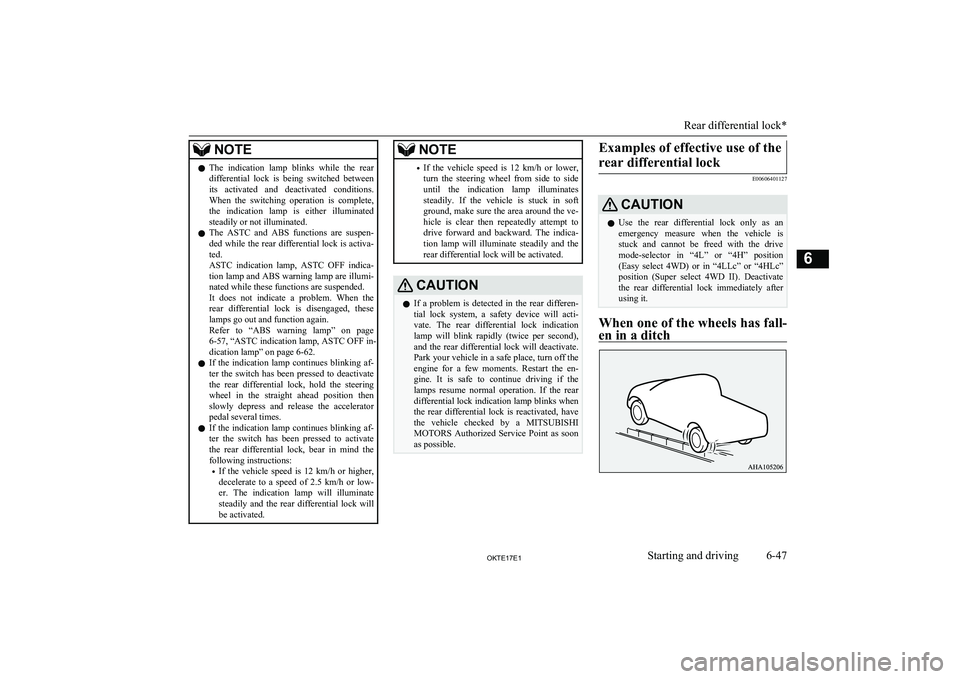
When one of the wheels has fall-
en in a ditch
Rear differential lock*
6-47OKTE17E1Starting and driving6
Page 165 of 426
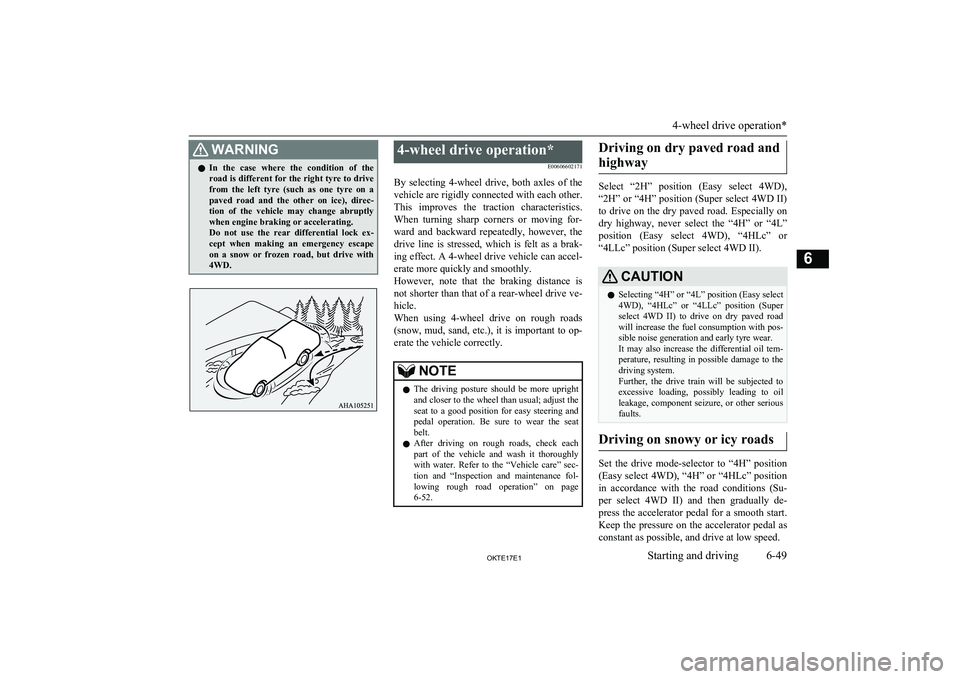
WARNINGlIn the case where the condition of the
road is different for the right tyre to drive
from the left tyre (such as one tyre on a paved road and the other on ice), direc- tion of the vehicle may change abruptly
when engine braking or accelerating.
Do not use the rear differential lock ex-
cept when making an emergency escape on a snow or frozen road, but drive with
4WD.4-wheel drive operation*
E00606602171
By selecting 4-wheel drive, both axles of the
vehicle are rigidly connected with each other. This improves the traction characteristics. When turning sharp corners or moving for-
ward and backward repeatedly, however, the drive line is stressed, which is felt as a brak-
ing effect. A 4-wheel drive vehicle can accel-
erate more quickly and smoothly.
However, note that the braking distance is not shorter than that of a rear-wheel drive ve-hicle.
When using 4-wheel drive on rough roads
(snow, mud, sand, etc.), it is important to op- erate the vehicle correctly.NOTEl The driving posture should be more upright
and closer to the wheel than usual; adjust the
seat to a good position for easy steering and pedal operation. Be sure to wear the seatbelt.
l After driving on rough roads, check each
part of the vehicle and wash it thoroughlywith water. Refer to the “Vehicle care” sec-
tion and “Inspection and maintenance fol-
lowing rough road operation” on page 6-52.Driving on dry paved road and
highway
Select “2H” position (Easy select 4WD),
“2H” or “4H” position (Super select 4WD II) to drive on the dry paved road. Especially on
dry highway, never select the “4H” or “4L”
position (Easy select 4WD), “4HLc” or “4LLc” position (Super select 4WD II).
CAUTIONl Selecting “4H” or “4L” position (Easy select
4WD), “4HLc” or “4LLc” position (Super
select 4WD II) to drive on dry paved road will increase the fuel consumption with pos-sible noise generation and early tyre wear.It may also increase the differential oil tem-
perature, resulting in possible damage to the driving system.
Further, the drive train will be subjected to
excessive loading, possibly leading to oil leakage, component seizure, or other serious faults.
Driving on snowy or icy roads
Set the drive mode-selector to “4H” position
(Easy select 4WD), “4H” or “4HLc” position in accordance with the road conditions (Su-
per select 4WD II) and then gradually de-
press the accelerator pedal for a smooth start. Keep the pressure on the accelerator pedal asconstant as possible, and drive at low speed.
4-wheel drive operation*
6-49OKTE17E1Starting and driving6