ECO mode MITSUBISHI LANCER 2014 8.G User Guide
[x] Cancel search | Manufacturer: MITSUBISHI, Model Year: 2014, Model line: LANCER, Model: MITSUBISHI LANCER 2014 8.GPages: 434, PDF Size: 57.5 MB
Page 138 of 434
Twin Clutch SST (Sportronic Shif
t Transmission) (if so equipped) Features and controls 5-71
5
N00515300194
If the CVT does not shift while driving, or your vehicle does not pick up enough speed when starting on an uphill slope, there may be something unusual happening in the transmis-sion, causing a safety device to activate. Have your vehicle checked at an authorized Mit- subishi Motors dealer or a repair facility ofyour choice as soon as possible. 1. If your vehicle has difficulty moving uphill, shift the selector lever into “L” (LOW) position (except for vehicles withsport mode) or 2nd shift range of the sports mode. This method might not work dependingon the type of transmission malfunction.
2. Once the vehicle is moving on a level road, move the selector lever back to “D” (DRIVE) position.
N00539700059
The Twin Clutch SST is a transmission that,through integrated control of the engine and transmission, is able to achieve both thesmooth shifting of an automatic transaxle and the acceleration and fuel economy close to a manual transaxle. In addition, the controlmode can be selected from two types to suit the driving conditions. Together with manual shifting, the transmis-sion is capable of responding to a variety of driving circumstances. Twin Clutch SST control mode
P.5-76
Manual shift
P.5-77
N00539800050
As an additional safe
ty precaution, models
equipped with a Twin Clutch SST have ashift-lock device that holds the gearshift lever in the “P” (PARK) position. To move the gearshift lever from the “P” (PARK) positionto another position, follow the steps below. 1. Press and hold the brake pedal down. 2. Move the gearshift lever to the desired position.
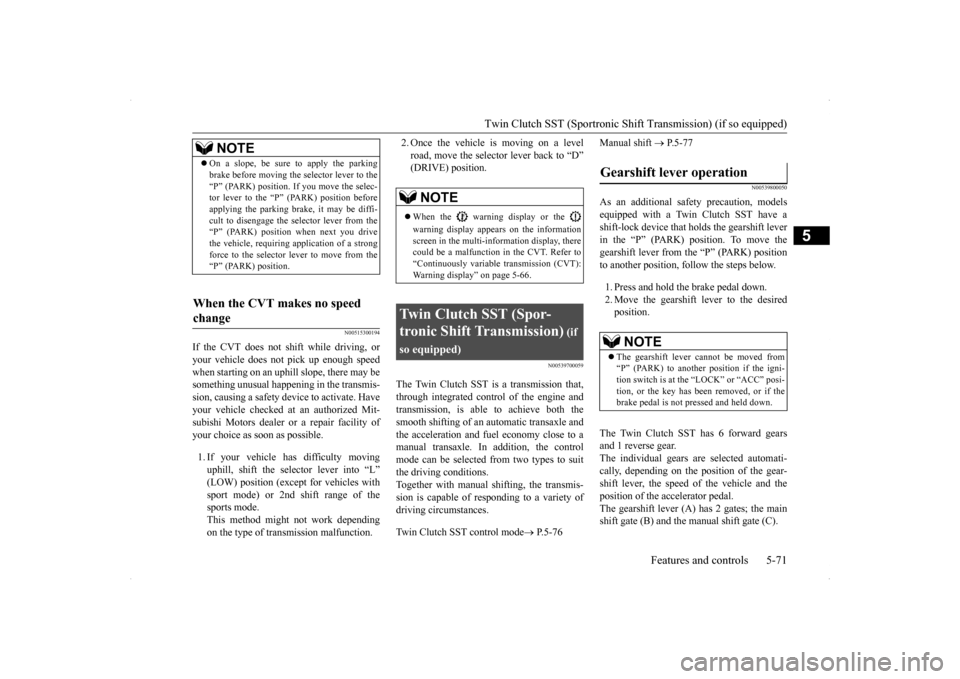
The Twin Clutch SST has 6 forward gears and 1 reverse gear. The individual gears are selected automati-cally, depending on the position of the gear- shift lever, the speed of the vehicle and the position of the accelerator pedal.The gearshift lever (A) has 2 gates; the main shift gate (B) and the manual shift gate (C).
NOTE
On a slope, be sure to apply the parking brake before moving the selector lever to the “P” (PARK) position. If you move the selec- tor lever to the “P” (PARK) position before applying the parking brake, it may be diffi-cult to disengage the selector lever from the “P” (PARK) position when next you drive the vehicle, requiring application of a strongforce to the selector le
ver to move from the
“P” (PARK) position.
When the CVT makes no speed change
NOTE
When the warning display or the warning display appears on the information screen in the multi-information display, therecould be a malfunction in the CVT. Refer to “Continuously variable transmission (CVT): Warning display” on page 5-66.
Twin Clutch SST (Spor- tronic Shift Transmission)
(if
so equipped)
Gearshift lever operation
NOTE
The gearshift lever cannot be moved from “P” (PARK) to another position if the igni-tion switch is at the “LOCK” or “ACC” posi- tion, or the key has been removed, or if the brake pedal is not pressed and held down.
Page 143 of 434
Twin Clutch SST (Sportronic Shif
t Transmission) (if so equipped)
5-76 Features and controls
5
N00540200070
Select the control mode from the following two types to suit the driving conditions.
CAUTION Never shift into the “D” (DRIVE) position from the “R” (REVERSE) position while the vehicle is in motion. If the lever is shifted into the “D” (DRIVE) from the “R” (REVERSE) position while thevehicle is in motion, the transmission may be damaged.NOTE
For information on manual shift gate opera- tion, please refer to “Manual shift” on page 5-77. When the engine is cold, upshifts occur at a higher vehicle speed than when the engine is warm.This control is performed to quickly warm up the engine. It does not indicate a malfunc- tion. After the vehicle has been driven for awhile, upshifts will occur at the regular engine speeds.
Twin Clutch SST control mode
Tw i n Clutch SST con-trol mode
Characteristic
Normal (Control mode when engine is started)
Control mode for normal driv- ing on local roads, freeways, and the like.Smooth shifting is performed at low engine speeds for eco- nomical driving with good ride quality.
Sport
Control mode for driving on mountain roads, roads with uphill and downhill slopes, and freeways with long down- hill slopes where engine brak- ing is necessary.Compared to “Normal” mode, shifting occurs at higher engine speeds and is quicker. In addition, quick downshift- ing is possible when the accel- erator pedal is depressed for quick acceleration or when the brakes are applied.
NOTE
When continuously driving on closed circuit tracks or at other locations where the engine is operated at high speeds and under a heavy load, the Twin Clutch SST fluid temperature will have a tendency to rise.In this case, if the temperature rises too high, the warning display will appear on the information screen in the multi-information display to alert the driver. If the warning display appears, be sure to refer to “Warning display” on page 5-73 and follow the appropriate measures. The Twin Clutch SST control mode can be selected both when “D” range operation is selected and when manual shifting is selected. If you select “Sport” mode while the engine is cold, the transmissi
on may shift up at dif-
ferent speeds compared to that when the engine is warm. This is simply the operation of the controlsystem to warm the engine quickly. It does not indicate a malfunction. For slippery road surfaces, such as roads with accumulated snow, “Normal” mode is recommended for smooth shifting at low engine speeds.
Page 151 of 434
ACD (Active center differential system) (if so equipped) 5-84 Features and controls
5
When the ignition switch is set to the “ON” position, operate the AWC switch to change the control mode. Each time the switch is pushed, the control mode changes in the order “TARMAC”
“GRAVEL”
“SNOW”
“TARMAC”.
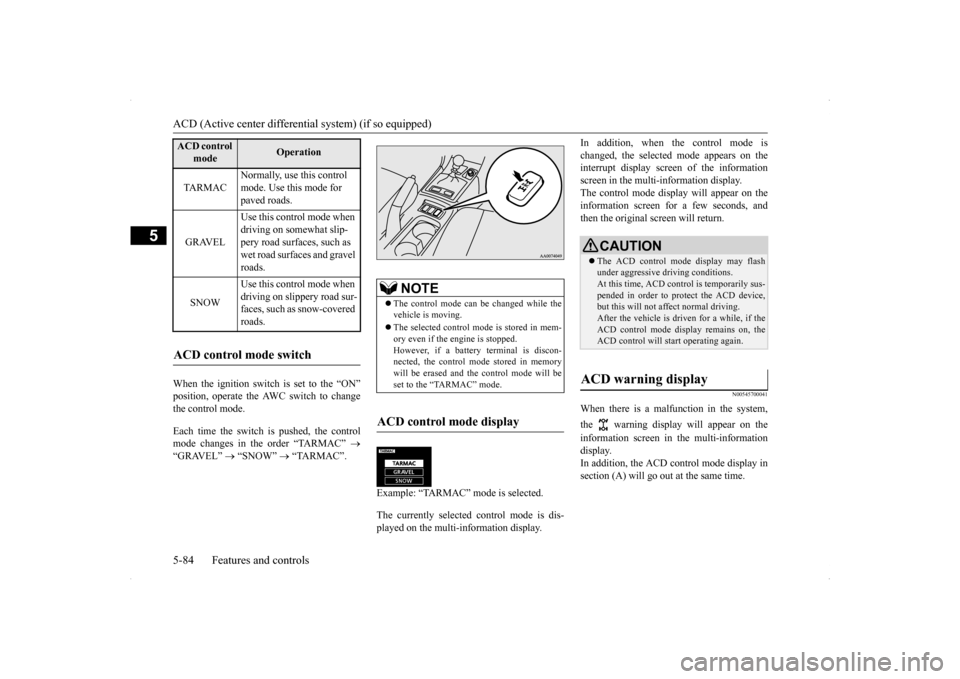
Example: “TARMAC” mode is selected. The currently selected control mode is dis- played on the multi-information display.
In addition, when the control mode is changed, the selected mode appears on the interrupt display screen of the information screen in the multi-information display.The control mode display will appear on the information screen for a few seconds, and then the original screen will return.
N00545700041
When there is a malfunction in the system, the warning display will appear on the information screen in the multi-information display. In addition, the ACD control mode display insection (A) will go out at the same time.
ACD control
mode
Operation
TA R M A C
Normally, use this control mode. Use this mode for paved roads.
GRAVEL
Use this control mode when driving on somewhat slip- pery road surfaces, such as wet road surfaces and gravel roads.
SNOW
Use this control mode when driving on slippery road sur-faces, such as snow-covered roads.
ACD control mode switch
NOTE
The control mode can be changed while the vehicle is moving. The selected control mode is stored in mem- ory even if the engine is stopped. However, if a battery terminal is discon-nected, the control mode stored in memory will be erased and the control mode will be set to the “TARMAC” mode.
ACD control mode display
ç
CAUTION The ACD control mode display may flash under aggressive driving conditions.At this time, ACD control is temporarily sus- pended in order to protect the ACD device, but this will not affect normal driving.After the vehicle is driven for a while, if the ACD control mode display remains on, the ACD control will start operating again.
ACD warning display
Page 152 of 434
Electronically controlled 4WD system (if so equipped)
Features and controls 5-85
5
N00548300019
The electronically controlled 4WD system is an all-wheel drive system that allows one of three drive modes to be selected with aswitch, in accordance with the driving condi- tions. The following drive modes are available.
4-wheel drive operation requires special driv- ing skills. Carefully read the “All-wheel driving opera- tion” section on page 5-87 and take care todrive safely.
N00548400010
The drive mode can be
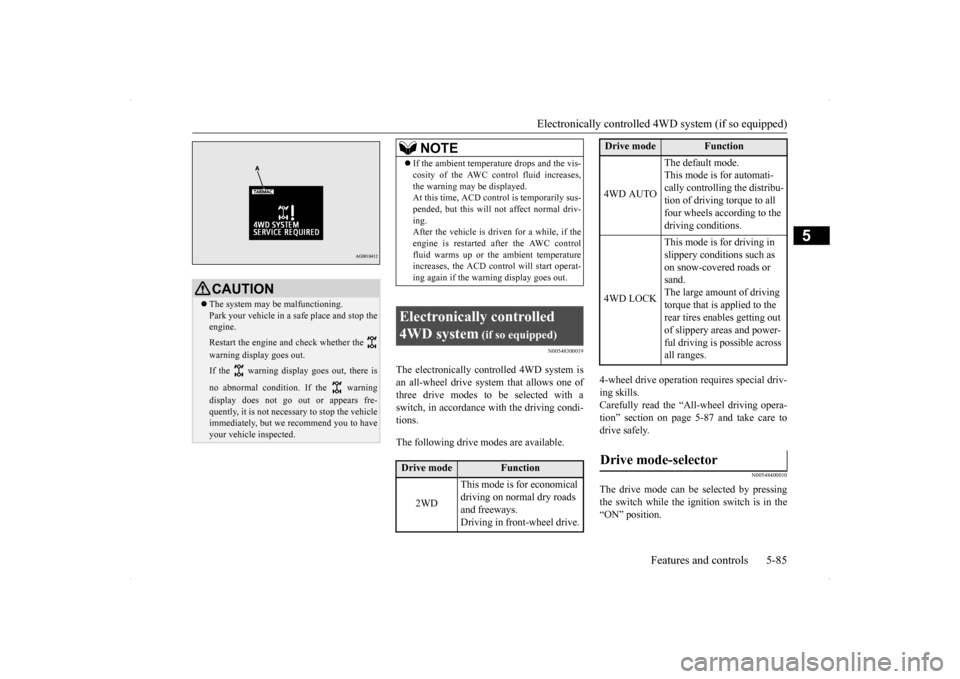
selected by pressing
the switch while the ignition switch is in the “ON” position.
CAUTION The system may be malfunctioning. Park your vehicle in a safe place and stop the engine. Restart the engine and check whether the warning display goes out. If the warning display goes out, there is no abnormal condition. If the warning display does not go out or appears fre- quently, it is not necessary to stop the vehicle immediately, but we recommend you to haveyour vehicle inspected.
NOTE
If the ambient temperature drops and the vis- cosity of the AWC control fluid increases, the warning may be displayed. At this time, ACD cont
rol is temporarily sus-
pended, but this will not affect normal driv-ing. After the vehicle is driven for a while, if the engine is restarted after the AWC controlfluid warms up or the ambient temperature increases, the ACD control will start operat- ing again if the warning display goes out.
Electronically controlled 4WD system
(if so equipped)
Drive mode
Function
2WD
This mode is for economical driving on normal dry roads and freeways. Driving in front-wheel drive.
4WD AUTO
The default mode. This mode is for automati- cally controlling the distribu-tion of driving torque to all four wheels according to the driving conditions.
4WD LOCK
This mode is for driving in slippery conditions such as on snow-covered roads or sand.The large amount of driving torque that is applied to the rear tires enables getting out of slippery areas and power- ful driving is possible across all ranges.
Drive mode-selector
Drive mode
Function
Page 153 of 434
Electronically controlled 4WD system (if so equipped) 5-86 Features and controls
5
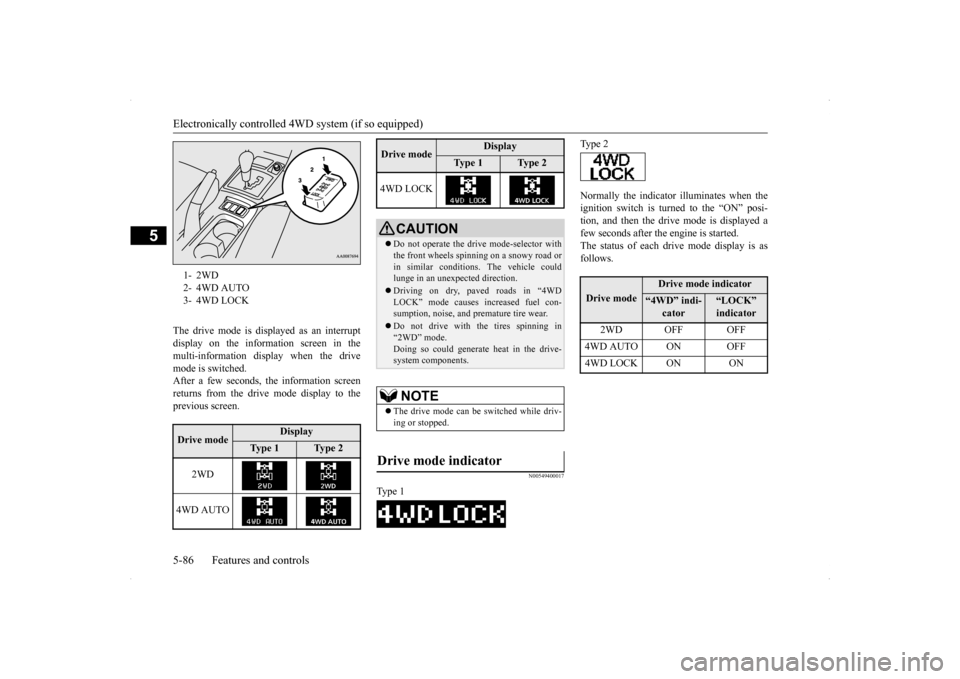
The drive mode is displayed as an interrupt display on the information screen in the multi-information display when the drive mode is switched.After a few seconds, the information screenreturns from the drive mode display to the previous screen.
N00549400017
Normally the indicator illuminates when theignition switch is turned to the “ON” posi- tion, and then the drive mode is displayed afew seconds after the engine is started. The status of each drive mode display is as follows.
1- 2WD 2- 4WD AUTO3- 4WD LOCKDrive mode
Display
Ty p e 1
Ty p e 2
2WD
4WD AUTO
4WD LOCK
CAUTION Do not operate the drive mode-selector with the front wheels spinning on a snowy road or in similar conditions. The vehicle couldlunge in an unexpected direction. Driving on dry, paved roads in “4WD LOCK” mode causes increased fuel con- sumption, noise, and premature tire wear. Do not drive with the tires spinning in “2WD” mode. Doing so could generate heat in the drive-system components.NOTE
The drive mode can be switched while driv- ing or stopped.
Drive mode indicator
Ty p e 1Drive mode
Display
Ty p e 1
Ty p e 2
Ty p e 2Drive mode
Drive mode indicator
“4WD” indi-
cator
“LOCK” indicator
2WD OFF OFF
4WD AUTO ON OFF4WD LOCK ON ON
Page 155 of 434
All-wheel driving operation 5-88 Features and controls
5
traction when driving on slippery, wet or snow-covered roads a
nd when moving out of
mud. These vehicles, however, are not designedfor off-road use, and are unsuitable for driving on bumpy ground that may cause excessive strain.
Electronically controlled
4WD system vehicles should be driven only under the same conditions as are suitable for ordinary front-wheel drive vehicles. When turning a sharp corner in “4WD LOCK” position at low speed, a slight differ- ence in steering may be experienced similarto feeling as if the brakes were applied. This is called tight corner braking and results from each of the four tires being at a different dis-tance from the corner. The phenomenon is typical of 4-wheel drive vehicles. If this occurs, either straig
hten out the steering
wheel, or change to “2WD” or “4WD AUTO” mode. Set the drive mode-selector to “4WD AUTO” or “4WD LOCK” in accordance with the road conditions, and then gradually depress theaccelerator pedal for a smooth start.
Set the drive mode-selector to “4WD LOCK” and then gradually depress the accelerator pedal for a smooth start. Keep the pressure on the accelerator pedal asconstant as possible, and drive at low speed.
Turning sharp corners On snowy or icy roads
NOTE
The use of snow tires is recommended. Maintain a safe distance between vehicles, avoid sudden braking, and use engine brak- ing (downshifting).CAUTION Avoid sudden braking, sudden acceleration, and sharp turning. Skidding occurs and con- trol of the vehicle could be lost.
Moving out of mud
CAUTION If any of the following conditions occur, fol- low these procedures:• The engine coolant temperature display appears on the information screen in the multi-information display or the engine power drops suddenly. Refer to “Engine overheating” on page 8-4.
• The “ ” warning display or the “ ” warning display appear on the information screen in the multi-information display. Refer to “Warning display” on page 5-66.WA R N I N G When attempting to rock your vehicle out of a stuck position, be sure that the area around the vehicle is clear of people and physical objects. The rocking motion may cause the vehicle to suddenly launch for- ward/backward, causing injury or dam-age to nearby people or objects.NOTE
Avoid sudden braking, sudden acceleration and sharp turning; such operations couldresult in the vehicle becoming stuck. If the vehicle becomes stuck in muddy roads, it can often be moved with a rocking motion. Move the selector lever alternately between “D” (DRIVE) and “R” (REVERSE) posi-tions, while pressing
lightly on the accelera-
tor pedal.CAUTION
Page 156 of 434

Cautions on handling of all-wheel drive vehicles
Features and controls 5-89
5
Your vehicle may not provide sufficient hill climbing ability and engine braking on steepslopes. Avoid driving on steep slopes even though the vehicle is a 4-wheel drive vehicle.
N00530800190
Since driving torque can
be applied to all four
wheels, the performance of the vehicle when operating in all-wheel drive is greatly affected by the condition of the tires. Pay close attention to the tires. Install specified tires on all wheels. Refer to “Tires and wheels” on page 11-5. Be sure to fit all four tires and wheels of the same size and type.When replacement of any of the tires or wheels is necessary, replace all of them. All tires should be rotated whenever the wear difference between the front and rear tires is recognizable.
Good vehicle performance cannot be expected if there is a difference in wear between tires. Refer to “Tire rotation” on page 9-23. Check the tire inflation pressure regularly.
Climbing/descending sharp grades Cautions on handling of all- wheel drive vehicles Tires and wheels
CAUTION Always use tires of the same size, same type, and same brand, and which have no wear dif-ferences. Using tires that differ in size, type, brands or the degree of wear, will increase the differential oil temperature, resulting inpossible damage to the driving system. Fur- ther, the drive train will be subjected to excessive loading, possibly leading to oilleakage, component seizure, or other serious problems.
To w i n g
CAUTION Do not tow all-wheel dr
ive vehicles with the
front or rear wheels on the ground (Type Aor Type B) as illustrated. This could result in damage to the drivetra
in, or unstable towing.
If you tow all-wheel drive vehicles, use Type C or Type D equipment. [For vehicle equipped with the Electronically controlled 4WD system] Even in “2WD” mode, the vehicle cannot betowed with the front or the rear wheels on the ground.
Page 163 of 434
Active Stability Control (ASC) (if so equipped) 5-96 Features and controls
5
N00559200034
On slippery surfaces, the traction control function prevents the drive wheels from spin-ning excessive, thus helping the vehicle to start moving from a stop
ped condition. It also
provides sufficient driving force and steeringperformance as the vehicle turns while press- ing the acceleration pedal.
N00559300035
The skid control function is designed to help the driver maintain control of the vehicle onslippery roads or during rapid steering
maneuvers. It works by controlling the engine output and the brake on each wheel.
N00559400179
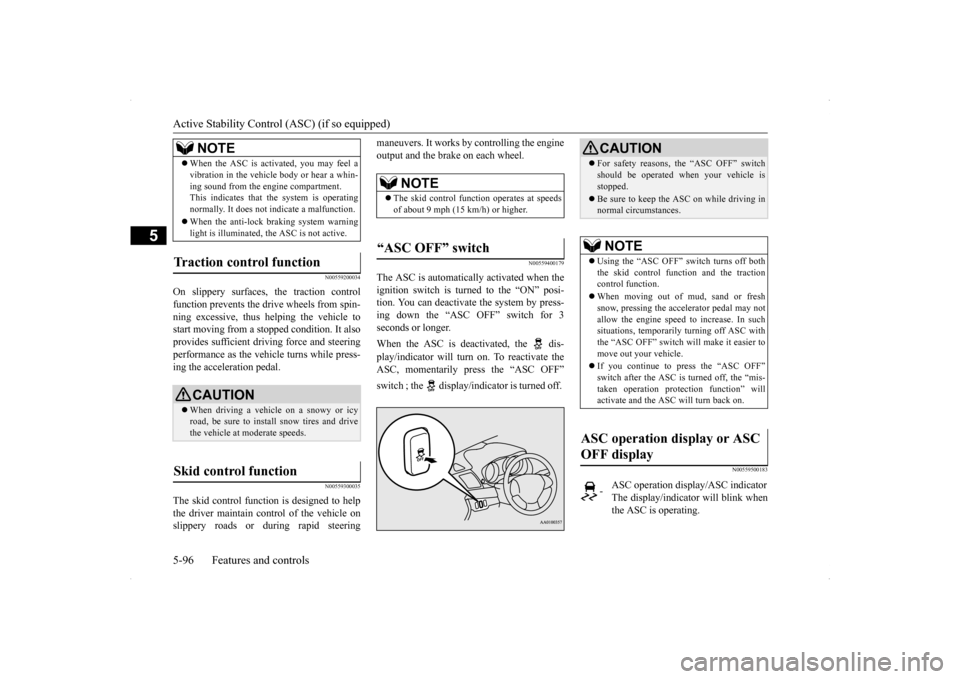
The ASC is automatically activated when the ignition switch is turned to the “ON” posi- tion. You can deactivate the system by press-ing down the “ASC OFF” switch for 3 seconds or longer. When the ASC is deactivated, the dis- play/indicator will turn on. To reactivate the ASC, momentarily press the “ASC OFF” switch ; the display/indicator is turned off.
N00559500183
When the ASC is activated, you may feel a vibration in the vehicle body or hear a whin- ing sound from the engine compartment. This indicates that the system is operating normally. It does not indicate a malfunction. When the anti-lock braking system warning light is illuminated, the ASC is not active.
Traction control function
CAUTION When driving a vehicle on a snowy or icy road, be sure to install snow tires and drivethe vehicle at moderate speeds.
Skid control function
NOTE
NOTE
The skid control function operates at speeds of about 9 mph (15 km/h) or higher.
“ASC OFF” switch
CAUTION For safety reasons, the “ASC OFF” switch should be operated when your vehicle is stopped. Be sure to keep the ASC on while driving in normal circumstances.NOTE
Using the “ASC OFF” switch turns off both the skid control function and the tractioncontrol function. When moving out of mud, sand or fresh snow, pressing the accelerator pedal may not allow the engine speed to increase. In such situations, temporarily turning off ASC withthe “ASC OFF” switch will make it easier to move out your vehicle. If you continue to press the “ASC OFF” switch after the ASC is turned off, the “mis- taken operation protection function” willactivate and the ASC will turn back on.
ASC operation display or ASC OFF display
-
ASC operation display/ASC indicator The display/indicator will blink whenthe ASC is operating.
Page 180 of 434
Multi-information display
Features and controls 5-113
5
N00555100136
The multi-information meter switch is a but- ton marked “INFO” on the left side of the dash. Each time the multi-information meter switchis operated, a sound is emitted and the multi- information display changes between infor- mation such as warnings, odometer, tripodometer, service reminder, engine coolant temperature (Type 1), average and momen- tary fuel consumption, driving range, andaverage speed and ACD control mode display (if so equipped).
It is also possible to change elements such as the language and units used on the multi- information display by operating the multi- information meter switch.
N00555200137
If you press the multi-information meterswitch and return from the warning display screen to the previous screen, the warning is displayed. Refer to “Returning to the display screen from before the warning display” on page 5-115.This mark is also displayed if there is anotherwarning other than the one displayed. When
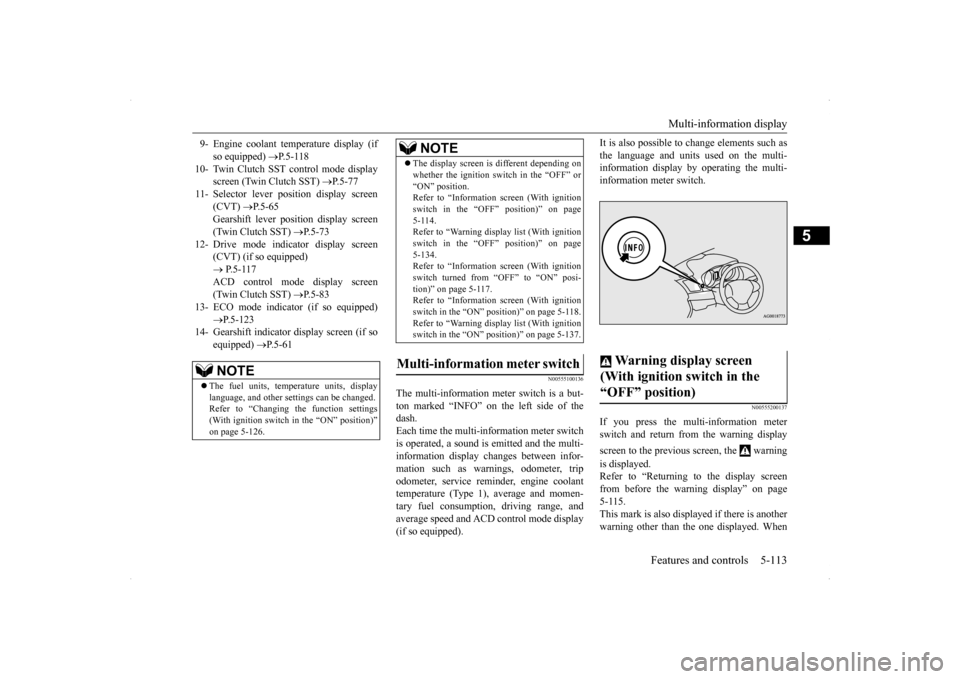
9- Engine coolant temperature display (if
so equipped)
P.5-118
10- Twin Clutch SST control mode display
screen (Twin Clutch SST)
P.5-77
11- Selector lever position display screen
(CVT)
P.5-65
Gearshift lever position display screen (Twin Clutch SST)
P.5-73
12- Drive mode indicator display screen
(CVT) (if so equipped) P.5-117 ACD control mode display screen(Twin Clutch SST)
P.5-83
13- ECO mode indicator (if so equipped)
P.5-123
14- Gearshift indicator display screen (if so
equipped)
P.5-61
NOTE
The fuel units, temperature units, display language, and other settings can be changed.Refer to “Changing the function settings (With ignition switch in the “ON” position)” on page 5-126.
The display screen is different depending on whether the ignition switch in the “OFF” or “ON” position. Refer to “Information screen (With ignition switch in the “OFF” position)” on page5-114. Refer to “Warning displa
y list (With ignition
switch in the “OFF” position)” on page5-134. Refer to “Information screen (With ignition switch turned from “OFF” to “ON” posi-tion)” on page 5-117. Refer to “Information screen (With ignition switch in the “ON” position)” on page 5-118.Refer to “Warning displa
y list (With ignition
switch in the “ON” position)” on page 5-137.
Multi-information meter switch
NOTE
Warning display screen (With ignition switch in the “OFF” position)
Page 184 of 434
Multi-information display
Features and controls 5-117
5
N00555800133
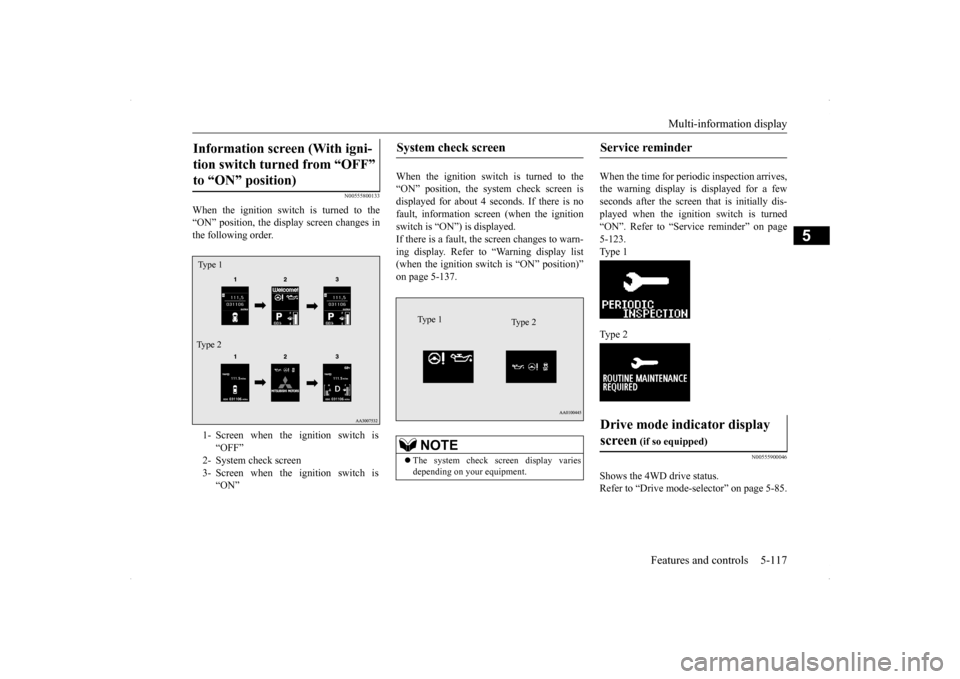
When the ignition switch is turned to the “ON” position, the display screen changes in the following order.
When the ignition switch is turned to the “ON” position, the system check screen isdisplayed for about 4 seconds. If there is no fault, information screen (when the ignition switch is “ON”) is displayed.If there is a fault, the screen changes to warn- ing display. Refer to “Warning display list (when the ignition switch is “ON” position)”on page 5-137.
When the time for periodic inspection arrives, the warning display is displayed for a fewseconds after the screen that is initially dis- played when the ignition switch is turned “ON”. Refer to “Service reminder” on page5-123. Type 1 Type 2
N00555900046
Shows the 4WD drive status. Refer to “Drive mode-s
elector” on page 5-85.
Information screen (With igni- tion switch turned from “OFF” to “ON” position) 1- Screen when the ignition switch is
“OFF”
2- System check screen 3- Screen when the ignition switch is
“ON”
Ty p e 1 Type 2
System check screen
NOTE
The system check screen display varies depending on your equipment.Type 1
Type 2
Service reminder Drive mode indicator display screen
(if so equipped)