ECO mode MITSUBISHI LANCER 2014 8.G Owner's Guide
[x] Cancel search | Manufacturer: MITSUBISHI, Model Year: 2014, Model line: LANCER, Model: MITSUBISHI LANCER 2014 8.GPages: 434, PDF Size: 57.5 MB
Page 200 of 434
Indicator light, warning light, an
d information screen display list Features and controls 5-133
5
N00557700035 N00557800238
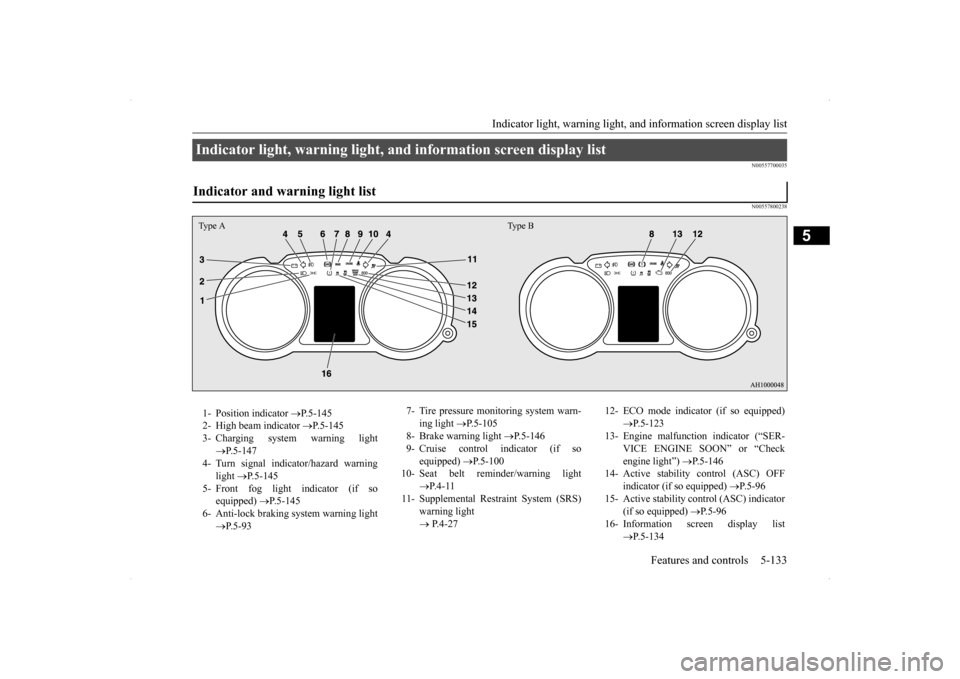
Indicator light, warning light, and information screen display list Indicator and warning light list Type A Type B1- Position indicator
P.5-145
2- High beam indicator
P.5-145
3- Charging system warning light
P.5-147
4- Turn signal indicator/hazard warning
light
P.5-145
5- Front fog light indicator (if so
equipped)
P.5-145
6- Anti-lock braking system warning light
P.5-93
7- Tire pressure monitoring system warn-
ing light
P.5-105
8- Brake warning light
P.5-146
9- Cruise control indicator (if so
equipped)
P.5-100
10- Seat belt reminder/warning light
P. 4 - 1 1
11- Supplemental Restraint System (SRS)
warning light P.4-27
12- ECO mode indicator (if so equipped)
P.5-123
13- Engine malfunction indicator (“SER-
VICE ENGINE SOON” or “Check engine light”)
P.5-146
14- Active stability
control (ASC) OFF
indicator (if so equipped)
P.5-96
15- Active stability control (ASC) indicator
(if so equipped)
P. 5 - 9 6
16- Information screen display list
P.5-134
Page 230 of 434
Bluetooth® 2.0 interface (if so equipped)
Features and controls 5-163
5
N00564001082
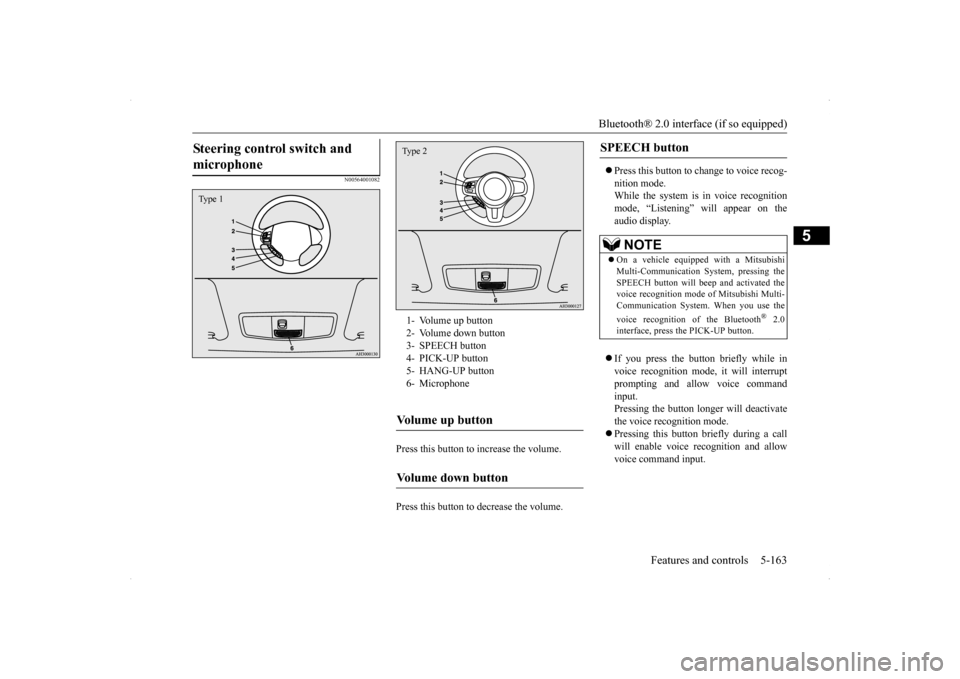
Press this button to increase the volume. Press this button to decrease the volume.
Press this button to change to voice recog- nition mode. While the system is in voice recognitionmode, “Listening” will appear on the audio display. If you press the button briefly while in voice recognition mode, it will interrupt prompting and allow voice commandinput. Pressing the button longer will deactivate the voice recognition mode. Pressing this button briefly during a call will enable voice recognition and allow voice command input.
Steering control switch and microphone
Type 1
1- Volume up button 2- Volume down button3- SPEECH button 4- PICK-UP button 5- HANG-UP button6- MicrophoneVolume up button
Volume down button
Type 2
SPEECH button
NOTE
On a vehicle equipped with a Mitsubishi Multi-Communication System, pressing the SPEECH button will beep and activated thevoice recognition mode of Mitsubishi Multi- Communication System. When you use the voice recognition of the Bluetooth
® 2.0
interface, press the PICK-UP button.
Page 231 of 434

Bluetooth® 2.0 interface (if so equipped) 5-164 Features and controls
5
Press this button when an incoming call is received to answer the telephone. When another call is received during a call, press this button to put the first calleron hold and talk to the new caller. • In such circumstances, you can press the button briefly to switch between callers.You will switch to the first caller and the other caller will be put on hold. • To establish a three-way call in such situ-ations, press the SPEECH button to enter voice recognition mode and then say “Join calls.”
Press this button when an incoming call is received to refuse the call.
Press this button during a call to end the current call. When another call is on hold, you will switch to that call. If this button is pressed in the voice recog- nition mode, the voice recognition mode will be deactivated.
N00575800025
Your voice will be recognized by a micro-phone in the overhead console, allowing you
to make hands-free calls with voice com- mands.
PICK-UP button
NOTE
On a vehicle equipped with a Mitsubishi Multi-Communication System, pressing the PICK-UP button except when an incomingcall is received to answer the telephone will activate the voice recognition of the Blue- tooth
® 2.0 interface.
HANG-UP button
NOTE
When you press the SPEECH button (except for vehicles with Mitsubishi Multi-Commu-nication System) or PICK-UP button (for vehicles with Mitsubishi Multi-Communica- tion System) to enter voice recognition modewith a cellular phone paired to the system, current information on the cellular phone, such as “remaining battery life,” “signalstrength” or “roaming,” will be displayed on the audio display.
*
* : Some cellular phones will not send this information to the Bluetooth
® 2.0 interface.
Call waiting and three-way calls can be used by the Bluetooth
® 2.0 interface, only if it is
possible to use those services with your cel-lular phone.
Microphone
NOTE
If a cellular phone is within close proximity of the microphone, it may distort the sound quality. In this case, place the cellular phoneas far as possible from the microphone.
Page 233 of 434

Bluetooth® 2.0 interface (if so equipped) 5-166 Features and controls
5
With the confirmation function activated, you are given more opportunities than normal to confirm a command when making various settings to the Bluetooth
® 2.0 interface. This
allows you to decrease the possibility that a setting is accidentally changed. The confirmation function can be turned onor off by following the steps below. 1. Press the SPEECH button (except for vehicles with Mitsubishi Multi-Commu- nication System) or PICK-UP button (forvehicles with Mitsubishi Multi-Commu-nication System). 2. Say “Setup.” 3. Say “Confirmation prompts.”4. The voice guide will say “Confirmation prompts are
N00564601118
It is possible to use a passcode as a securityfunction by setting a passcode of your choice for the Bluetooth
® 2.0 interface.
When the security function is turned on, it is necessary to make a voice input of a 4-digit
passcode in order to use all functions of the Bluetooth
® 2.0 interface, except for recep-
tion. Use the following procedure to turn on the security function by setting a passcode. 1. Press the SPEECH button (except for vehicles with Mitsubishi Multi-Commu- nication System) or PICK-UP button (forvehicles with Mitsubishi Multi-Commu-nication System). 2. Say “Setup.” 3. Say “Passcode.”4. The voice guide will say “Passcode is dis- abled. Would you like to enable it?” Answer “Yes.”Answer “No” to cancel the setting of the passcode and return to the main menu. 5. The voice guide will say “Please say a 4-digit passcode. Remember this passcode. It will be required to use this system.” Say a 4-digit number which you want toset as a passcode. 6. For confirmation purposes, the voice guide will say “Passcode <4-digit pass-code>. Is this correct?” Answer “Yes.” Answer “No” to return to the passcode input in Step 5.
7. When the registration of the passcode is completed, the voice guide will say “Pass- code is enabled” and the system will return to the main menu.
If a passcode has been set and the security function is enabled, the voice guide will say “Hands-free system is locked. State the pass- code to continue” when the SPEECH button(except for vehicles with Mitsubishi Multi- Communication System) or PICK-UP button (for vehicles with Mitsubishi Multi-Commu-nication System) is pressed to enter voice rec- ognition mode. Say the 4-digit passcode number to enter the passcode. If the entered passcode is wrong, the voice guide will say “<4-digit passcode>, Incorrect
Security function
Setting the passcode
NOTE
Passcode will be required to access the sys- tem after the next ignition cycle. It is required for a little time after engine stop that the entered passcode is actuallyrecorded in the system. If the ignition switch is made to “ACC” or “ON” or the engine is started immediately after engine stop, thereis a case when the entered passcode is not recorded in the system. At this time, please try to enter the passcode again.
Entering the passcode
Page 234 of 434

Bluetooth® 2.0 interface (if so equipped)
Features and controls 5-167
5
passcode. Please try again.” Enter the correct passcode. Use the following procedure to turn off the security function by disabling the passcode. 1. Press the SPEECH button (except for vehicles with Mitsubishi Multi-Commu-nication System) or PICK-UP button (for vehicles with Mitsubishi Multi-Commu- nication System).2. Say “Setup.” 3. Say “Passcode.” 4. The voice guide will say “Passcode isenabled. Would you like to disable it?” Answer “Yes.” Answer “No” to cancel the disabling ofthe passcode and return to the main menu.
5. When the disabling of the passcode is completed, the voice guide will say “Pass- code is disabled” and the system will return to the main menu.
N00564700011
The Bluetooth
® 2.0 interface can use the
speaker enrollment function to create a voicemodel for one person per language. This makes it easier for the Bluetooth
® 2.0
interface to recognise voice commands said by you. You can turn a voice model registered with the speaker enrollment function on and off whenever you want.
N00564801080
It takes about 2 to 3 minutes to complete thespeaker enrollment process.To ensure the best results, run through the process while in the driver’s seat, in an envi- ronment that is as quiet as possible (whenthere is no rain or strong winds and the vehi- cle windows are closed). Please turn off your phone while in speaker enrollment to preventinterruption of the process. Use the following procedure for speaker enrollment.
1. Stop your vehicle in a safe area, put the shift lever (manual transaxle) in the “N” (Neutral) position, or the selector lever {continuously variable transmission(CVT)} or gearshift lever (Twin Clutch SST) in the “P”(PARK) position, and then pull the parking brake lever. 2. Press the SPEECH button (except for vehicles with Mitsubishi Multi-Commu- nication System) or PICK-UP button (forvehicles with Mitsubishi Multi-Commu- nication System). 3. Say “Voice training.”
NOTE
You can reenter the passcode as many times as you want. If you have forgotten your passcode, say “Cancel” to quit the voice input mode and then check with an authorized MitsubishiMotors dealer.
Disabling the passcode
NOTE
System must be unlocked to disable the pass- code.
Speaker enrollment function
Speaker enrollment
NOTE
Speaker enrollment is not possible unless the vehicle is parked. Make sure you park the vehicle in a safe area before attempting speaker enrollment.
Page 235 of 434

Bluetooth® 2.0 interface (if so equipped) 5-168 Features and controls
5
4. The voice guide will say “This operation must be performed in a quiet environment while the vehicle is stopped. See the owner’s manual for the list of requiredtraining phrases. Press and release the SPEECH button when you are ready to begin. Press the HANG-UP button to can-cel at any time.” Press the SPEECH button to start the speaker enrollment process.
5. The voice guide will prompt for phrase 1. Repeat the corresponding phrase listed in table “Enrollment commands” on page 5-183.The system will register your voice and then move on to the registration of the next command. Continue the process untilall phrases have been registered. 6. When all enrollment commands have been read out, the voice guide will say “Speaker enrollment is complete.” Thesystem will then end the speaker enroll- ment process and return to the main menu.
N00564901065
You can turn a voice model registered with the speaker enrollment function on and off whenever you want.You can also retrain the system. Use the following procedure to perform these actions. 1. Press the SPEECH button (except for vehicles with Mitsubishi Multi-Commu-nication System) or PICK-UP button (for vehicles with Mitsubishi Multi-Commu- nication System).2. Say “Voice training.” 3. If you have completed a speaker enroll- ment process once already, the voiceguide will say either “Enrollment is enabled. Would you like to disable or retrain?” or “Enrollment is disabled.Would you like to enable or retrain?” 4. When enrollment is “enabled,” the voice model is on; when enrollment is “dis-abled,” the voice model is off. Say the command that fits your needs. Say “Retrain” to start the speaker enroll-ment process and recreate a new voice model. (Refer to “Speaker enrollment” on page 5-167.)
NOTE
If you do not start the speaker enrollment process within 3 minutes after pressing the SPEECH button, the speaker enrollment function will time out. The voice guide will say “Speaker enroll- ment has timed out.” The system will then beep and the voice recognition mode will bedeactivated.
NOTE
To repeat the most recent voice training com- mand, press and release the SPEECH button. If you press the HANG-UP button anytime during the process, the system will beep andstop the speaker enrollment process.NOTE
Completing the speaker enrollment process will turn on the voice model automatically. The commands “Help” and “Cancel” will not work in this mode.
Enabling and disabling the voice model and retraining
Page 242 of 434

Bluetooth® 2.0 interface (if so equipped)
Features and controls 5-175
5
4. If there is only 1 match, the system will proceed to Step 5. If there are 2 or more matches, the voice guide will say “More than one match wasfound, would you like to call
5. If only 1 telephone number is registered under the name you just said, the voice guide will proceed to Step 6. If 2 or more telephone numbers are regis-tered that match the name you just said, the voice guide will say “Would you like to call
6. The voice guide will say “Calling
You can redial the last number called, based on the history of dialed calls in the paired cel- lular phone. Use the following procedure to redial. 1. Press the SPEECH button (except for vehicles with Mitsubishi Multi-Commu- nication System) or PICK-UP button (for vehicles with Mitsubishi Multi-Commu-nication System). 2. Say “Redial.”
N00565700018
During a call, press the SPEECH button toenter voice recognition mode, then say
NOTE
If you say “No” to all names read by the sys- tem, the voice guide will say “Name not found, returning to main menu” and the sys- tem will return to the main menu.
NOTE
If the name you selected has matching data in the vehicle phonebook but no telephone number is registered under the selected loca-tion, the voice guide will say “{home/work/mobile/other} not found for
NOTE
When the confirmation function is on, the system will check if the name and location of the receiver are correct. If the name is cor-rect, answer “Yes.” To change the name or location to call, answer “No.” The system will return to Step3.
RedialingSend function
Page 243 of 434

Bluetooth® 2.0 interface (if so equipped) 5-176 Features and controls
5
“
N00565800019
If an incoming phone call is received whilethe ignition switch is in the “ACC” or “ON”position, the audio system will be automati- cally turned on and switched to the incoming call, even when the audio system was origi-nally off. The voice guide announcement for the incoming call will be output from the frontpassenger’s seat speaker. If the CD player or radio was playing when the incoming call was received, the audio sys-tem will mute the sound from the CD player or radio and output only the incoming call. To receive the call, press the PICK-UP buttonon the steering wheel control switch. When the call is over, the audio system will return to its previous state.
N00565900010
At any time during a call, you can mute thevehicle microphone. Pressing the SPEECH button and then saying “Mute” during a call will turn ON the mute function and mute the microphone.Saying “Mute off” in the same way will turn off the mute function and cancel the mute on the microphone.
N00566600014
The Bluetooth
® 2.0 interface can switch
between hands-free mode (hands-free calls) and private mode (calls using cellular phone). If you press the SPEECH button and say“Transfer call” during a hands-free call, you can stop the hands-free mode and talk in pri- vate mode. To return to hands-free mode, press the SPEECH button again and say “Transfer call.”
N00566000018
The Bluetooth
® 2.0 interface has 2 types of
unique phonebooks that are different from thephonebook stored in the cellular phone. They
are the vehicle phonebook and the mobile phonebook. These phonebooks are used to register tele- phone numbers and make calls to desirednumbers via voice recognition function.
N00566101117
This phonebook is us
ed when making calls
with the voice recognition function. Up to 32 names can be registered in the vehi- cle phonebook per language.Also, each entry has 4 locations associated with: home, work, mobile and other. You can register one telephone number for each loca-tion. You can register a desired name as a name for any phonebook entry registered in the vehicle phonebook.Names and telephone numbers can be changed later on. The vehicle phonebook can be used with all paired cellular phones.
Receiving calls
Mute function
Switching between hands-free mode and private mode
Phonebook function
NOTE
Disconnecting the battery cable will not delete information registered in the phone- book.
Vehicle phonebook
Page 252 of 434
USB input terminal (if so equipped)
Features and controls 5-185
5
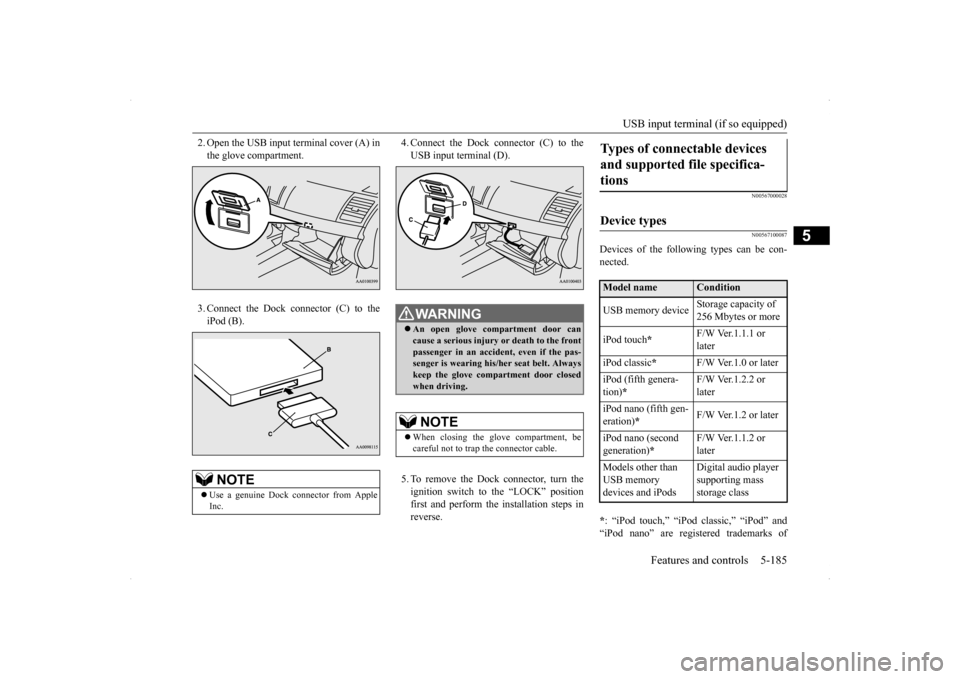
2. Open the USB input terminal cover (A) in the glove compartment. 3. Connect the Dock connector (C) to the iPod (B).
4. Connect the Dock connector (C) to the USB input terminal (D). 5. To remove the Dock connector, turn the ignition switch to the “LOCK” positionfirst and perform the installation steps in reverse.
N00567000028 N00567100087
Devices of the following types can be con- nected. * : “iPod touch,” “iPod classic,” “iPod” and “iPod nano” are registered trademarks of
NOTE
Use a genuine Dock connector from Apple Inc.
WA R N I N G An open glove compartment door can cause a serious injury or death to the front passenger in an accident, even if the pas-senger is wearing his/her seat belt. Always keep the glove compartment door closed when driving. NOTE
When closing the glove compartment, be careful not to trap the connector cable.
Types of connectable devices and supported file specifica- tions
Device types
Model name
Condition
USB memory device
Storage capacity of 256 Mbytes or more
iPod touch
*
F/W Ver.1.1.1 or later
iPod classic
*
F/W Ver.1.0 or later
iPod (fifth genera- tion)
*
F/W Ver.1.2.2 or later
iPod nano (fifth gen- eration)
*
F/W Ver.1.2 or later
iPod nano (second generation)
*
F/W Ver.1.1.2 or later
Models other than USB memory devices and iPods
Digital audio player supporting mass storage class
Page 263 of 434
Fuel economy 6-2 Driving safety
6
N00628800165
Fuel economy is dependent on many factors. Your personal driving habits can have a sig-nificant effect on your fuel use. Several rec- ommendations for achieving the greatest fuel economy are listed below. Whenever accelerating from a stop, always accelerate slowly and smoothly. When parked for even a short period, do not idle the engine. Shut it off. Plan your trips to avoid unnecessary stops. Keep your tires inflated to the recom- mended pressures. When you drive on highways or dry improved roads, set the drive mode-selec- tor “2WD” or “4WD AUTO” position (ifso equipped). For freeway driving, maintain a speed of approximately 50 mph (80 km/h) whentraffic, roadway and weather conditions safely permit. Keep your air filter clean and your vehicle lubricated according to the recommenda- tions in this manual. Always keep your vehicle well main- tained. A poorly maintained engine wastes fuel and costs money. Do not overload your vehicle.
N00628900052
Drunk driving is one of the most frequent causes of accidents.Your driving ability can be seriously impaired even with blood alcohol levels far below the legal minimum. If you have been drinking,don’t drive. Ride with a designated non- drinking driver, call a cab or a friend, or use public transportation. Drinking coffee or tak-ing a cold shower will not make you sober.Similarly, prescription and nonprescription drugs affect your alertness, perception and reaction time. Consult with your doctor orpharmacist before driving while under the influence of any of these medications.
N00628600017
The original equipment floor mat providedwith your vehicle was specifically designed for your vehicle. Always properly positionthe floor mat and assure it does not interfere with operation of the pedals. Always use the
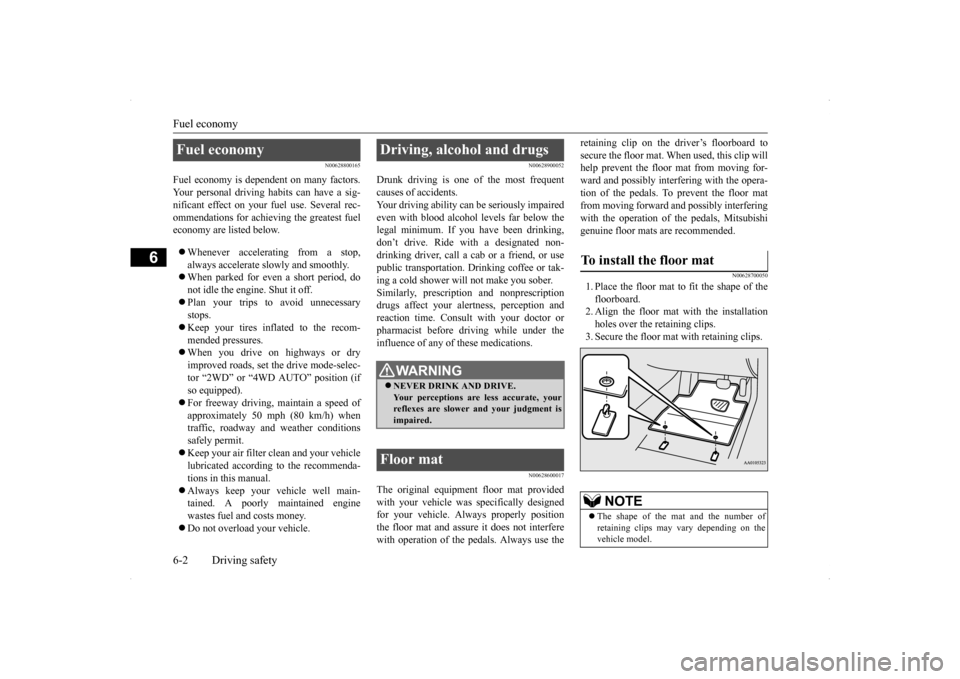
retaining clip on the driver’s floorboard to secure the floor mat. When used, this clip will help prevent the floor mat from moving for- ward and possibly interfering with the opera-tion of the pedals. To prevent the floor mat from moving forward and possibly interfering with the operation of the pedals, Mitsubishigenuine floor mats are recommended.
N00628700050
1. Place the floor mat to fit the shape of thefloorboard.2. Align the floor mat with the installation holes over the retaining clips. 3. Secure the floor mat with retaining clips.
Fuel economy
Driving, alcohol and drugs
WA R N I N G NEVER DRINK AND DRIVE. Your perceptions are less accurate, yourreflexes are slower and your judgment is impaired.
Floor mat
To install the floor mat
NOTE
The shape of the mat and the number of retaining clips may vary depending on the vehicle model.