window MITSUBISHI LANCER 2014 8.G User Guide
[x] Cancel search | Manufacturer: MITSUBISHI, Model Year: 2014, Model line: LANCER, Model: MITSUBISHI LANCER 2014 8.GPages: 434, PDF Size: 57.5 MB
Page 114 of 434
Sunroof (if so equipped)
Features and controls 5-47
5
N00549000127
When this switch is in the lock mode, the main switch for passenger door window and the sub switch cannot be used to open orclose the door window, and the main switch
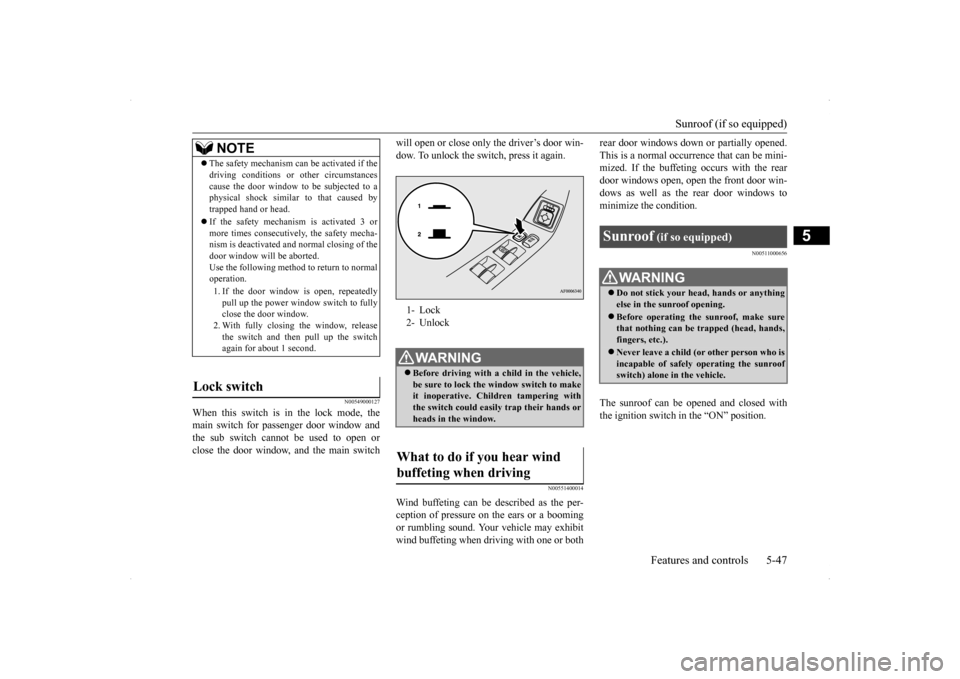
will open or close only the driver’s door win- dow. To unlock the switch, press it again.
N00551400014
Wind buffeting can be described as the per- ception of pressure on
the ears or a booming
or rumbling sound. Your vehicle may exhibitwind buffeting when driving with one or both
rear door windows down or partially opened. This is a normal occurrence that can be mini- mized. If the buffeting occurs with the rear door windows open, open the front door win-dows as well as the rear door windows to minimize the condition.
N00511000656
The sunroof can be opened and closed with the ignition switch in the “ON” position.
NOTE
The safety mechanism can be activated if the driving conditions or other circumstances cause the door window to be subjected to a physical shock similar to that caused by trapped hand or head. If the safety mechanism is activated 3 or more times consecutively, the safety mecha-nism is deactivated and normal closing of the door window will be aborted. Use the following method to return to normaloperation. 1. If the door window is open, repeatedly pull up the power window switch to fully close the door window. 2. With fully closing the window, releasethe switch and then pull up the switch again for about 1 second.
Lock switch
1- Lock 2- UnlockWA R N I N G Before driving with a child in the vehicle, be sure to lock the window switch to makeit inoperative. Children tampering with the switch could easily trap their hands or heads in the window.
What to do if you hear wind buffeting when driving
Sunroof
(if so equipped)
WA R N I N G Do not stick your head, hands or anything else in the sunroof opening. Before operating the sunroof, make sure that nothing can be trapped (head, hands, fingers, etc.). Never leave a child (or other person who is incapable of safely operating the sunroof switch) alone in the vehicle.
Page 118 of 434
Steering wheel tilt lock lever Features and controls 5-51
5
N00511500215
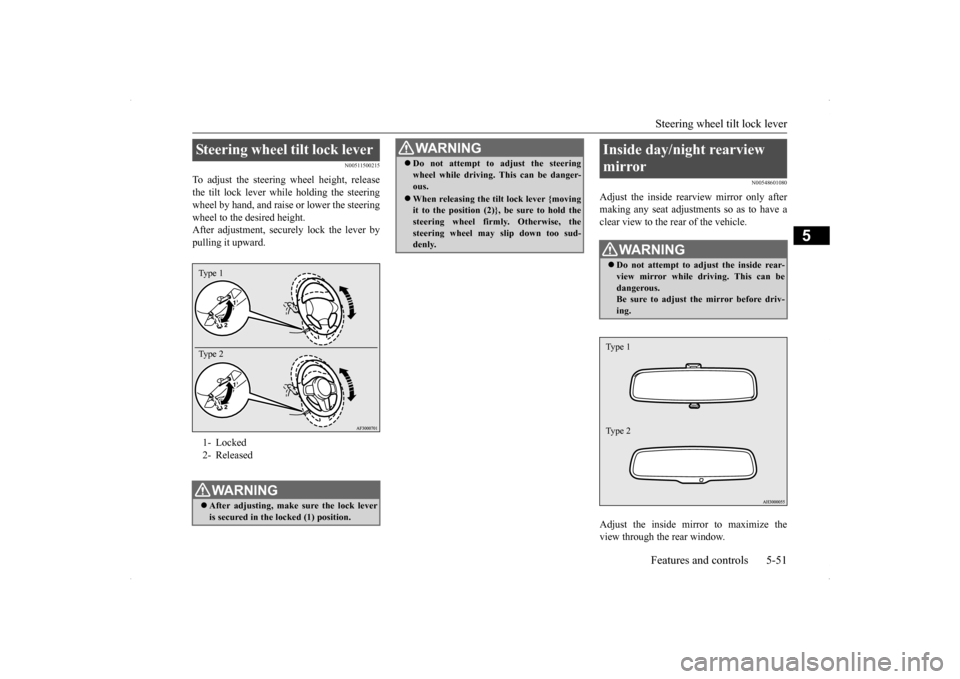
To adjust the steering wheel height, release the tilt lock lever while holding the steeringwheel by hand, and raise or lower the steering wheel to the desired height. After adjustment, securely lock the lever bypulling it upward.
N00548601080
Adjust the inside rearview mirror only aftermaking any seat adjustments so as to have aclear view to the rear of the vehicle. Adjust the inside mirror to maximize the view through the rear window.
Steering wheel tilt lock lever 1- Locked2- ReleasedWA R N I N G After adjusting, make sure the lock lever is secured in the locked (1) position. Type 1 Type 2
Do not attempt to adjust the steering wheel while driving. This can be danger- ous. When releasing the tilt lock lever {moving it to the position (2)}, be sure to hold the steering wheel firmly. Otherwise, the steering wheel may slip down too sud-denly. WA R N I N G
Inside day/night rearview mirror
WA R N I N G Do not attempt to adjust the inside rear- view mirror while driving. This can be dangerous.Be sure to adjust the mirror before driv- ing.Type 1 Type 2
Page 121 of 434
Ignition switch 5-54 Features and controls
5
The outside mirror can be folded in toward the side window to prevent damage whenparking in tight locations.
N00549300175
When the rear window defogger switch is pressed with the engine running, the outside rearview mirrors are defogged or defrosted.Current will flow through the heater element inside the mirrors, thus clearing away frost or condensation.
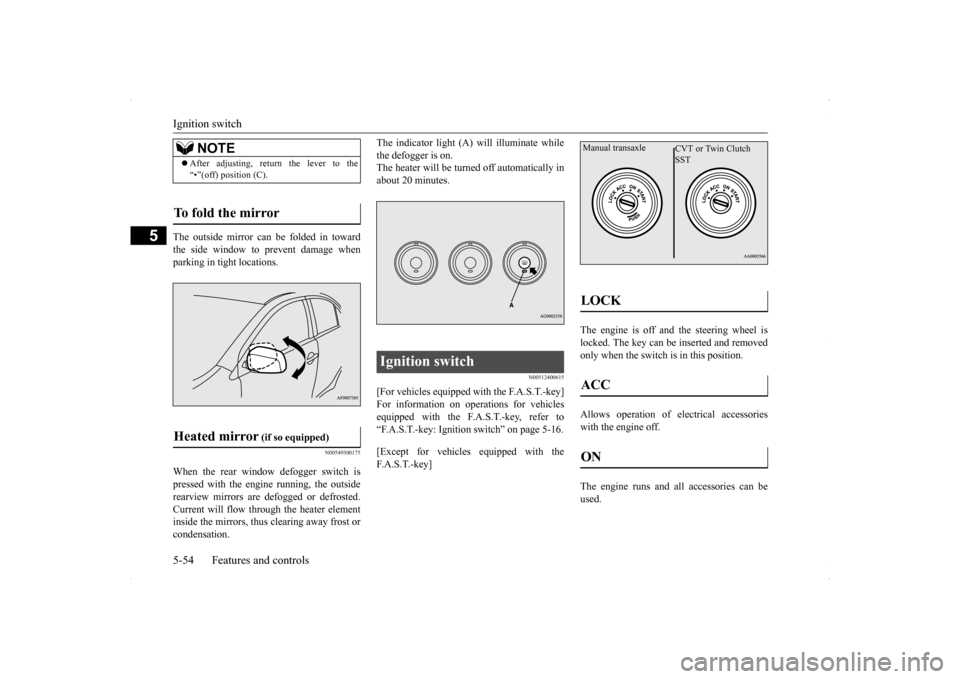
The indicator light (A) will illuminate while the defogger is on. The heater will be turned off automatically in about 20 minutes.
N00512400615
[For vehicles equipped with the F.A.S.T.-key] For information on operations for vehicles equipped with the F.A.S.T.-key, refer to“F.A.S.T.-key: Ignition switch” on page 5-16. [Except for vehicles equipped with the F. A . S . T. - k e y ]
The engine is off and the steering wheel is locked. The key can be inserted and removedonly when the switch is in this position. Allows operation of electrical accessories with the engine off. The engine runs and all accessories can be used.
NOTE
After adjusting, return the lever to the “•”(off) position (C).
To fold the mirror Heated mirror
(if so equipped)
Ignition switch
LOCK ACC ON Manual transaxle
CVT or Twin Clutch SST
Page 125 of 434

Starting and stopping the engine 5-58 Features and controls
5
6. On vehicles with manual transaxle, place the gearshift lever in the “N” (Neutral) position. On vehicles with continuously variabletransmission (CVT) or Twin Clutch SST, make sure the selector lever (CVT) or gearshift lever (Twin Clutch SST) is in the“P” (PARK) position. 7. Turn the ignition switch to the “ON” posi- tion and make certain that all warning lights are functioning properly beforestarting the engine. 8. Turn the ignition switch to the “START” position without pressing the acceleratorpedal. Release the key when the engine starts.
After several attempts, you may experience that the engine still does not start. 1. Make sure that all electric devices, such as lights, air conditioning blower and rear window defogger, are turned off. 2. While depressing the brake pedal on vehi-cles equipped with continuously variable transmission (CVT) or Twin Clutch SST or the clutch pedal on the vehiclesequipped with manual transaxle, press the accelerator pedal halfway and hold it there, then crank the engine. Release theaccelerator pedal, immediately after the engine starts.
3. If the engine still will not start, the engine could be flooded with too much gasoline. While depressing the brake pedal on vehi- cles equipped with CVT or Twin ClutchSST or the clutch pedal on the vehicles equipped with manual transaxle, push the accelerator pedal all the way down andhold it there, then crank the engine for 5 to 6 seconds. Return the ignition switch to the “LOCK” position and release theaccelerator pedal. Wait a few seconds, andthen crank the engine again for 5 to 6 sec- onds while depressing the brake pedal or the clutch pedal, but do not push theaccelerator pedal. Release the ignition key if the engine starts. If the engine fails to start, repeat these procedures. If theengine still will not start, contact your local Mitsubishi Motors dealer or a repair facility of your choice for assistance.
When the ambient temperature is -4 °F (-20 °C) or lower on vehicles with CVT, or -22 °F (-30 °C) or lower on vehicles with TwinClutch SST, it may not be possible to start
NOTE
On vehicles with CVT, the starter will not operate unless the selector lever is in the “P”(PARK) or “N” (NEUTRAL) position. On vehicles with Twin Clutch SST, the starter will not operate unless the gearshiftlever is in the “P” (PARK) position or the gearshift lever is in the “N” (NEUTRAL) position with the brake pedal depressed.For safety reasons, start the engine in the “P” (PARK) position so that the wheels are locked.
NOTE
Minor noises may be heard on engine start- up. These will disappear as the engine warms up.
When the engine is hard to start
Startability of continuously vari- able transmission (CVT) vehicles or Twin Clutch SST vehicles at extremely cold ambient tempera- ture
Page 174 of 434
Tire pressure monitoring system
Features and controls 5-107
5
2. If the tire pressure monitoring system warning light remains illuminated after you have been driving for about 20 min-utes after you adjust the tire inflation pres- sure, one or more of the tires may have a puncture. Inspect the tire and if it has apuncture, have it repaired by an autho- rized Mitsubishi Motors dealer as soon as possible.
The tire pressure monitoring system may not work normally in the following circum- stances: A wireless facility or device using the same frequency is near the vehicle. Snow or ice is stuck inside the fenders and/or on the wheels. The tire inflation pressure sensor’s battery is dead. Wheels other than Mitsubishi genuine wheels are being used. Wheels that are not fitted with tire infla- tion pressure sensors are being used. Wheels whose ID co
des are not memo-
rized by the vehicle are used. Compact spare tire is fitted on a road wheel. A window tint that affects the radio wave signals is installed.
When inspecting or adjusting the tire pres- sure, do not apply excessive force to the valve stem to avoid breakage. After inspecting or adjusting the tire pres- sure, always reinstall the valve cap on the valve stem. Without the valve cap, dirt or moisture couldget into the valve, resulting in damage to the tire inflation pressure sensor. Do not use metal valve caps, which may cause a metal reaction, resulting in corrosion and damage of the tire inflation pressure sen-sors. Once adjustments have been made, the warn- ing light will go off after a few minutes of driving.NOTE
WA R N I N G If the warning light/display illuminates while you are driving, avoid hard braking, sharp steering maneuvers and high speeds. Driving with an under-inflated tire adversely affects vehicle performance andcan result in an accident.CAUTION If a tire has a puncture, replace that tire with the spare tire. Driving on a punctured tirecould lead to an accident. The warning light/displ
ay may not illuminate
immediately in the event of a tire blowout or rapid leak.NOTE
To avoid the risk of damage to the tire infla- tion pressure sensors, have any punctured tire repaired by an authorized Mitsubishi Motors dealer. If the tire repair is not done byan authorized Mitsubishi Motors dealer, it is not covered by your warranty. Do not use an aerosol puncture-repair prod- uct on any tire. Such a spray could damagethe tire inflation pressure sensors. Have any puncture repaired by an authorized Mitsubi- shi Motors dealer.
NOTE
Tire inflation pressures vary with the ambi- ent temperature. If the vehicle is subjected to large variations in ambient temperature, the tire inflation pressures may be under-inflated (causing the warning light/display to come on) when the ambient temperature is rela-tively low. If the warning light/display comes on, adjust the tire inflation pressure.
Page 216 of 434
Combination headlights and dimmer switch
Features and controls 5-149
5
Type 2 If the engine oil pressure drops while the engine is running, the warning display is dis- played on the information screen in the multi-information display.
N00522501762
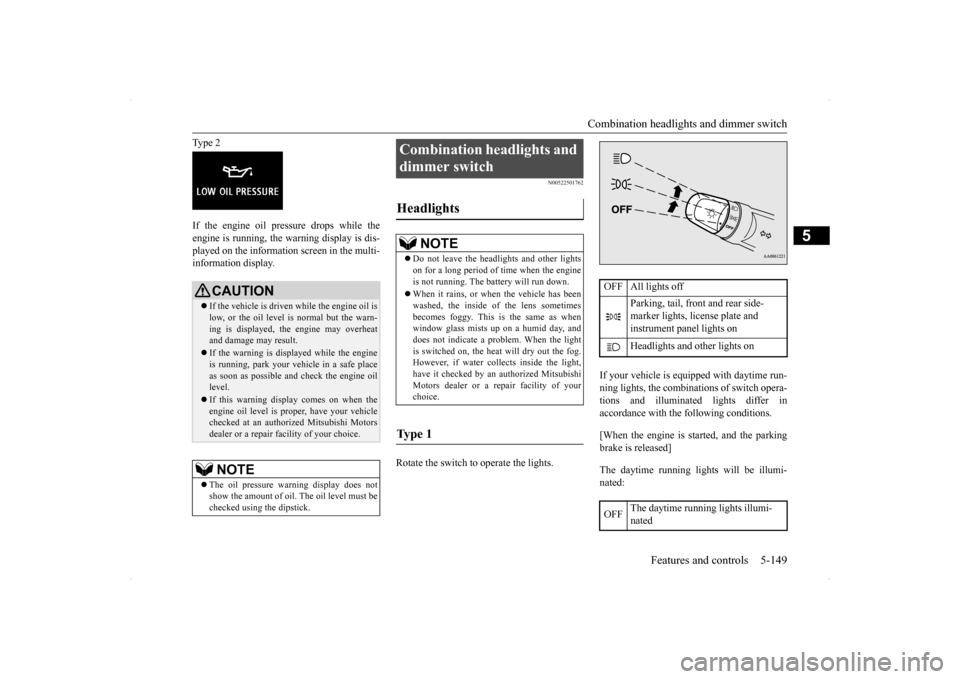
Rotate the switch to operate the lights.
If your vehicle is equipped with daytime run- ning lights, the combinations of switch opera- tions and illuminated lights differ inaccordance with the following conditions. [When the engine is started, and the parking brake is released] The daytime running lights will be illumi- nated:
CAUTION If the vehicle is driven while the engine oil is low, or the oil level is normal but the warn- ing is displayed, the engine may overheat and damage may result. If the warning is displayed while the engine is running, park your vehicle in a safe place as soon as possible and check the engine oil level. If this warning display comes on when the engine oil level is proper, have your vehiclechecked at an authorized Mitsubishi Motors dealer or a repair facility of your choice.NOTE
The oil pressure warning display does not show the amount of oil. The oil level must be checked using the dipstick.
Combination headlights and dimmer switch Headlights
NOTE
Do not leave the headlights and other lights on for a long period of time when the engine is not running. The battery will run down. When it rains, or when the vehicle has been washed, the inside of the lens sometimes becomes foggy. This is the same as whenwindow glass mists up on a humid day, and does not indicate a problem. When the light is switched on, the heat will dry out the fog.However, if water collects inside the light, have it checked by an authorized Mitsubishi Motors dealer or a repair facility of yourchoice.
Ty p e 1
OFF All lights off
Parking, tail, front and rear side- marker lights, license plate and instrument panel lights on Headlights and other lights on
OFF
The daytime running lights illumi- nated
Page 224 of 434
Wiper and washer switch
Features and controls 5-157
5
N00569300012
The misting function can be used when the ignition switch is in the “ON” or “ACC” position.
The wipers will operate once if the wiper lever is raised to the “MIST” position and released. This operation is useful when it isdrizzling, etc. The wipers will continue to operate while the lever is held in the “MIST” position.
N00569400013
The windshield wipers can be operated with the ignition switch in the “ON” or “ACC” position.If the blades are frozen to the windshield or rear window, do not operate the wipers until the ice has melted and the blades are freed,otherwise the wiper motor may be damaged.
N00569500014
Can only be used when the ignition switch is“ON” position. If the lever is put in the “AUTO” position, the rain sensor (B) will detect the extent of rain(or snow, other moisture, dust, etc.) and the wipers will operate automatically.
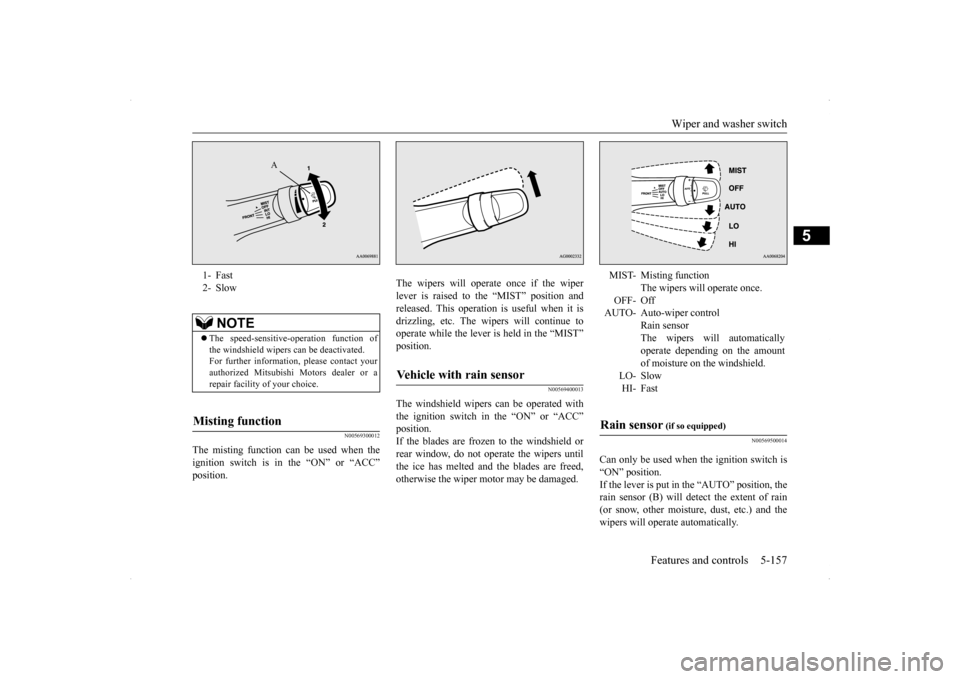
1- Fast 2- Slow
NOTE
The speed-sensitive-operation function of the windshield wipers can be deactivated. For further information, please contact yourauthorized Mitsubishi Motors dealer or a repair facility of your choice.
Misting function
A
Vehicle with rain sensor
MIST- Misting function
The wipers will operate once.
OFF- Off AUTO- Auto-wiper control
Rain sensorThe wipers will automatically operate depending on the amount of moisture on the windshield.
LO- SlowHI- Fast
Rain sensor
(if so equipped)
Page 227 of 434
Electric rear window defogger switch 5-160 Features and controls
5
N00523500209
N00523700315
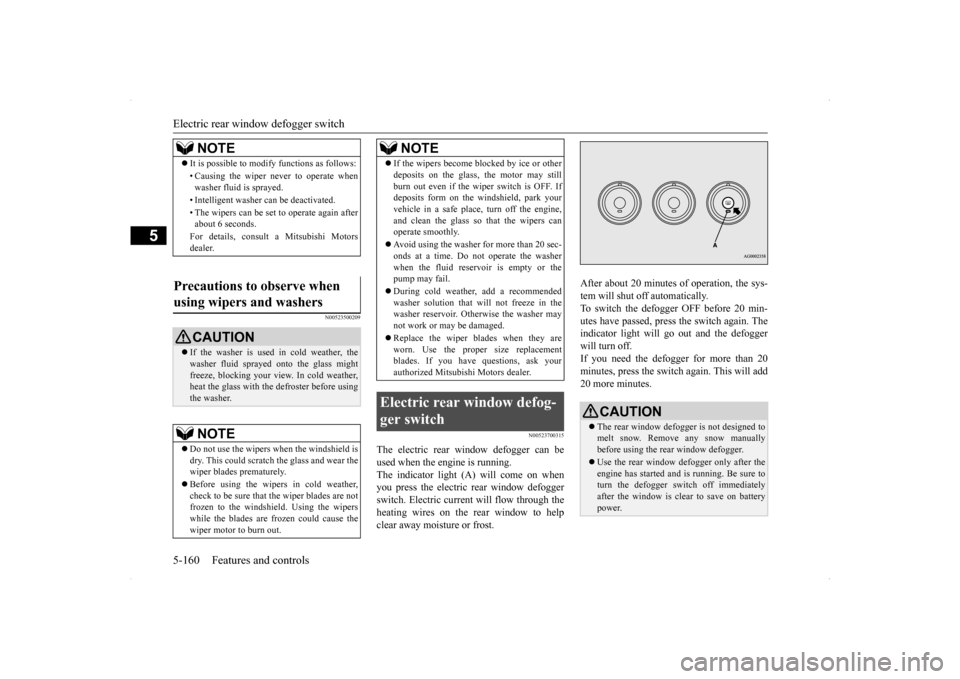
The electric rear window defogger can be used when the engine is running. The indicator light (A) will come on when you press the electric rear window defoggerswitch. Electric current will flow through the heating wires on the rear window to help clear away moisture or frost.
After about 20 minutes of operation, the sys- tem will shut off automatically. To switch the defogger OFF before 20 min-utes have passed, press the switch again. The indicator light will go out and the defogger will turn off. If you need the defogger for more than 20minutes, press the switch again. This will add 20 more minutes.
NOTE
It is possible to modify functions as follows: • Causing the wiper never to operate when washer fluid is sprayed. • Intelligent washer can be deactivated. • The wipers can be set to operate again after about 6 seconds. For details, consult a Mitsubishi Motors dealer.
Precautions to observe when using wipers and washers
CAUTION If the washer is used in cold weather, the washer fluid sprayed onto the glass might freeze, blocking your view. In cold weather,heat the glass with the defroster before using the washer.NOTE
Do not use the wipers when the windshield is dry. This could scratch the glass and wear the wiper blades prematurely. Before using the wipers in cold weather, check to be sure that the wiper blades are notfrozen to the windshield. Using the wipers while the blades are frozen could cause the wiper motor to burn out.
If the wipers become blocked by ice or other deposits on the glass, the motor may still burn out even if the wiper switch is OFF. If deposits form on the windshield, park your vehicle in a safe place, turn off the engine,and clean the glass so that the wipers can operate smoothly. Avoid using the washer for more than 20 sec- onds at a time. Do not operate the washer when the fluid reservoir is empty or thepump may fail. During cold weather, add a recommended washer solution that will not freeze in the washer reservoir. Otherwise the washer may not work or may be damaged. Replace the wiper blades when they are worn. Use the proper size replacementblades. If you have questions, ask your authorized Mitsubishi Motors dealer.
Electric rear window defog- ger switch
NOTE
CAUTION The rear window defogger is not designed to melt snow. Remove any snow manuallybefore using the rear window defogger. Use the rear window defogger only after the engine has started and is running. Be sure to turn the defogger switch off immediately after the window is clear to save on batterypower.
Page 228 of 434
Horn switch
Features and controls 5-161
5
N00523800156
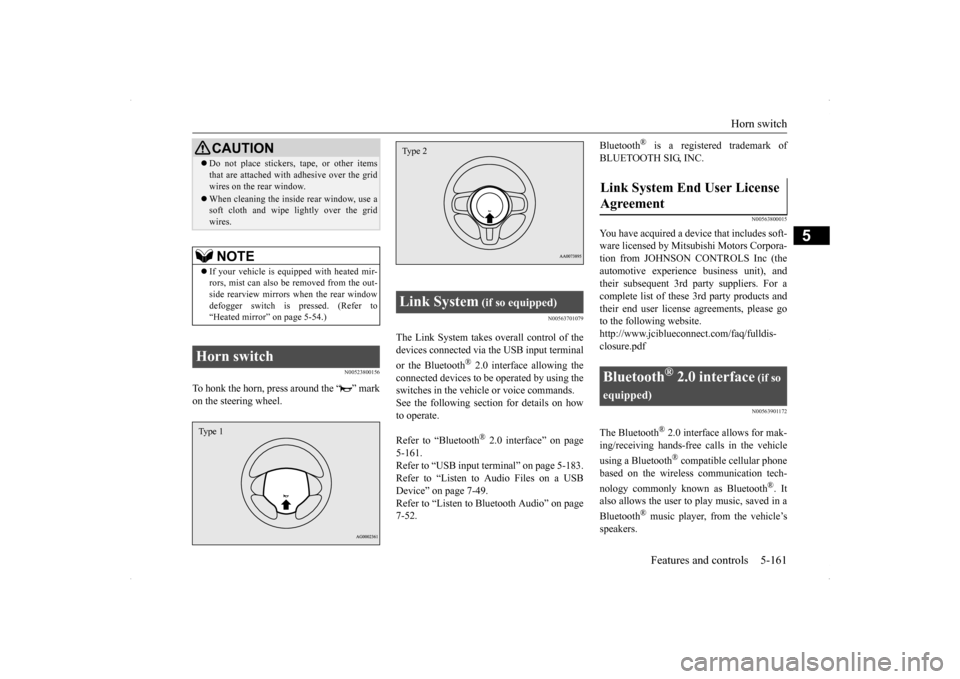
To honk the horn, press around the “ ” mark on the steering wheel.
N00563701079
The Link System takes overall control of thedevices connected via the USB input terminal or the Bluetooth
® 2.0 interface allowing the
connected devices to be operated by using theswitches in the vehicle or voice commands.See the following section for details on how to operate. Refer to “Bluetooth
® 2.0 interface” on page
5-161.Refer to “USB input terminal” on page 5-183. Refer to “Listen to Audio Files on a USB Device” on page 7-49.Refer to “Listen to Bluetooth Audio” on page 7-52.
Bluetooth
® is a registered trademark of
BLUETOOTH SIG, INC.
N00563800015
You have acquired a device that includes soft- ware licensed by Mitsubishi Motors Corpora- tion from JOHNSON CONTROLS Inc (theautomotive experien
ce business unit), and
their subsequent 3rd party suppliers. For a complete list of these 3rd party products and their end user license agreements, please goto the following website. http://www.jciblueconnect.com/faq/fulldis- closure.pdf
N00563901172
The Bluetooth
® 2.0 interface allows for mak-
ing/receiving hands-free calls in the vehicle using a Bluetooth
® compatible cellular phone
based on the wireless communication tech- nology commonly known as Bluetooth
®. It
also allows the user to
play music, saved in a
Bluetooth
® music player, from the vehicle’s
speakers.
Do not place stickers, tape, or other items that are attached with adhesive over the grid wires on the rear window. When cleaning the inside rear window, use a soft cloth and wipe lightly over the grid wires.NOTE
If your vehicle is equipped with heated mir- rors, mist can also be removed from the out-side rearview mirrors when the rear window defogger switch is pressed. (Refer to “Heated mirror” on page 5-54.)
Horn switch
CAUTION
Type 1
Link System
(if so equipped)
Type 2
Link System End User License Agreement
Bluetooth
® 2.0 interface
(if so
equipped)
Page 232 of 434

Bluetooth® 2.0 interface (if so equipped)
Features and controls 5-165
5
N00564101096
The Bluetooth
® 2.0 interface is equipped
with a voice recognition function.Simply say voice commands and you can per- form various operations and make or receive hands-free calls. With the Bluetooth
® 2.0 interface, voice rec-
ognition is possible for US English, NorthAmerican Spanish, Canadian French and Jap- anese. The factory setting is “English.”
1. Press the SPEECH button (except for vehicles with Mits
ubishi Multi-Commu-
nication System) or PICK-UP button (forvehicles with Mits
ubishi Multi-Commu-
nication System). 2. Say “Setup.”3. Say “Language.” 4. The voice guide will say “Select a lan- guage: English, Spanish, French or Japa-nese.” Say the desired language.(Example: “English”) 5. The voice guide will say “English (Span- ish, French or Japanese) selected. Is thiscorrect?” Say “Yes.” If you say “No,” the system will return to Step 4.
6. When the voice guide says “English (Spanish, French or Japanese) selected,” the language change process will be com- pleted and the system will return to themain menu.
N00564200016 N00564300017
The Bluetooth
® 2.0 interface is equipped
with a help function. If you say “Help” when the system is waiting for a voice command input, the system will tell you a list of the commands that can beused under the circumstances.
N00564400018
There are 2 cancel functions.If you are at the main menu, say “Cancel” to exit from the Bluetooth
® 2.0 interface.
If you are anywhere else within the system,say “Cancel” to return to the main menu.
N00564501029
The Bluetooth
® 2.0 interface is equipped
with a confirmation function.
Voice recognition function
NOTE
If the voice command that you say differs from the predefined command or cannot berecognized due to ambient noise or some other reason, the Bluetooth
® 2.0 interface
will ask you for the voice command again up to 3 times. For best performance and further reduction of ambient noise, the vehicle windows should be closed, lower the blower speed andrefrain from conversation with your passen- gers while engaging the voice recognition function. Depending on the selected language, some functions may not be available.
Selecting the language
NOTE
The voice guide will repeat the same mes- sage twice. The first message is in the cur-rent language, and the second message is in the selected language. If many entries are registered in the vehicle phonebook, changing the language will take a longer time. Changing the language deletes the mobile phonebook imported to the Bluetooth
® 2.0
interface. If you wish to use it, you will have to import it again.
Useful voice commands
Help function
Canceling
Confirmation function setting