lock MITSUBISHI LANCER 2014 8.G Owner's Manual
[x] Cancel search | Manufacturer: MITSUBISHI, Model Year: 2014, Model line: LANCER, Model: MITSUBISHI LANCER 2014 8.GPages: 434, PDF Size: 57.5 MB
Page 48 of 434
Child restraint systems
Seat and restraint systems 4-19
4
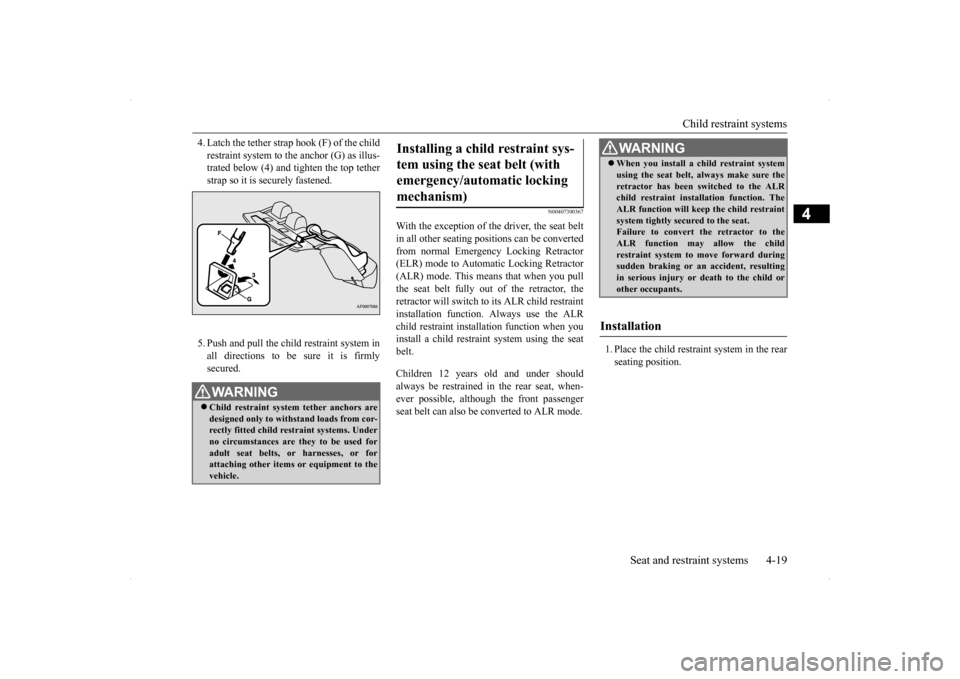
4. Latch the tether strap hook (F) of the child restraint system to the anchor (G) as illus- trated below (4) and tighten the top tether strap so it is securely fastened. 5. Push and pull the ch
ild restraint system in
all directions to be sure it is firmlysecured.
N00407300367
With the exception of the driver, the seat beltin all other seating positions can be convertedfrom normal Emergency Locking Retractor (ELR) mode to Automatic Locking Retractor (ALR) mode. This means that when you pullthe seat belt fully out of the retractor, theretractor will switch to its ALR child restraint installation function. Always use the ALR child restraint installa
tion function when you
install a child restraint system using the seat belt. Children 12 years old and under should always be restrained in the rear seat, when-ever possible, although the front passenger seat belt can also be converted to ALR mode.
1. Place the child restraint system in the rear seating position.
WA R N I N G Child restraint system tether anchors are designed only to withstand loads from cor-rectly fitted child restraint systems. Under no circumstances are they to be used for adult seat belts, or harnesses, or forattaching other items or equipment to the vehicle.
Installing a child restraint sys- tem using the seat belt (with emergency/automatic locking mechanism)
WA R N I N G When you install a child restraint system using the seat belt, always make sure the retractor has been switched to the ALR child restraint installation function. The ALR function will keep the child restraintsystem tightly secured to the seat. Failure to convert the retractor to the ALR function may allow the childrestraint system to move forward during sudden braking or an accident, resulting in serious injury or death to the child orother occupants.
Installation
Page 49 of 434
Child restraint systems 4-20 Seat and restraint systems
4
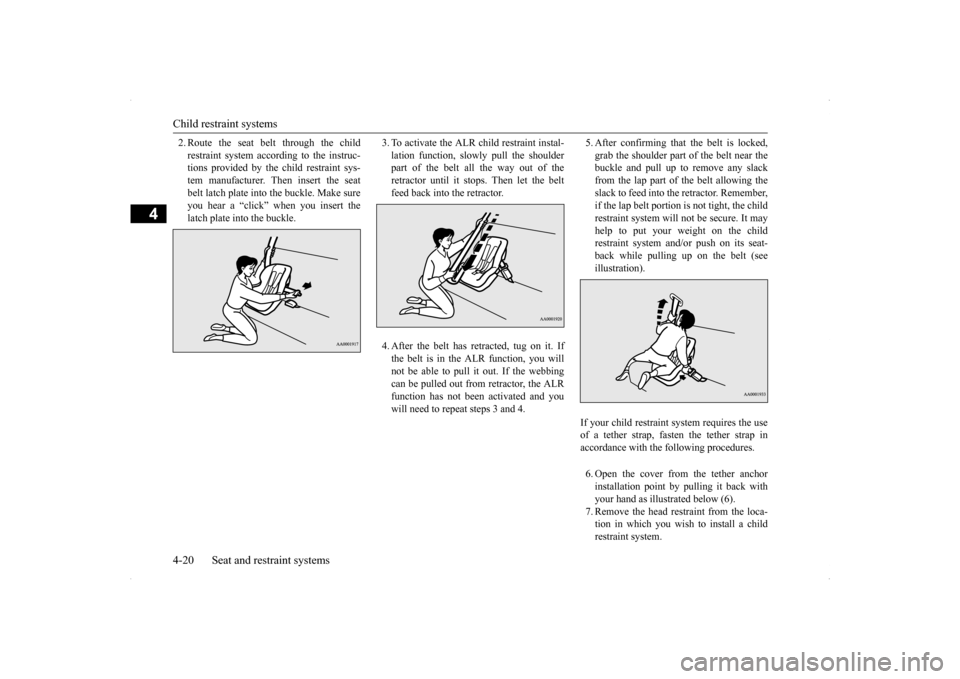
2. Route the seat belt through the child restraint system according to the instruc- tions provided by the child restraint sys- tem manufacturer. Then insert the seatbelt latch plate into the buckle. Make sure you hear a “click” when you insert the latch plate into the buckle.
3. To activate the ALR child restraint instal- lation function, slow
ly pull the shoulder
part of the belt all the way out of the retractor until it stops. Then let the beltfeed back into the retractor. 4. After the belt has retracted, tug on it. If the belt is in the ALR function, you willnot be able to pull it out. If the webbing can be pulled out from retractor, the ALR function has not been activated and youwill need to repeat steps 3 and 4.
5. After confirming that the belt is locked, grab the shoulder part of the belt near the buckle and pull up to remove any slack from the lap part of the belt allowing theslack to feed into the retractor. Remember, if the lap belt portion is not tight, the child restraint system will not be secure. It mayhelp to put your weight on the child restraint system and/or push on its seat- back while pulling up on the belt (seeillustration). 6. Open the cover from the tether anchor installation point by pulling it back with your hand as illustrated below (6).7. Remove the head restraint from the loca- tion in which you wish to install a child restraint system.
If your child restraint system requires the use of a tether strap, fasten the tether strap in accordance with the following procedures.
Page 50 of 434
Maintenance and inspection of seat belts
Seat and restraint systems 4-21
4
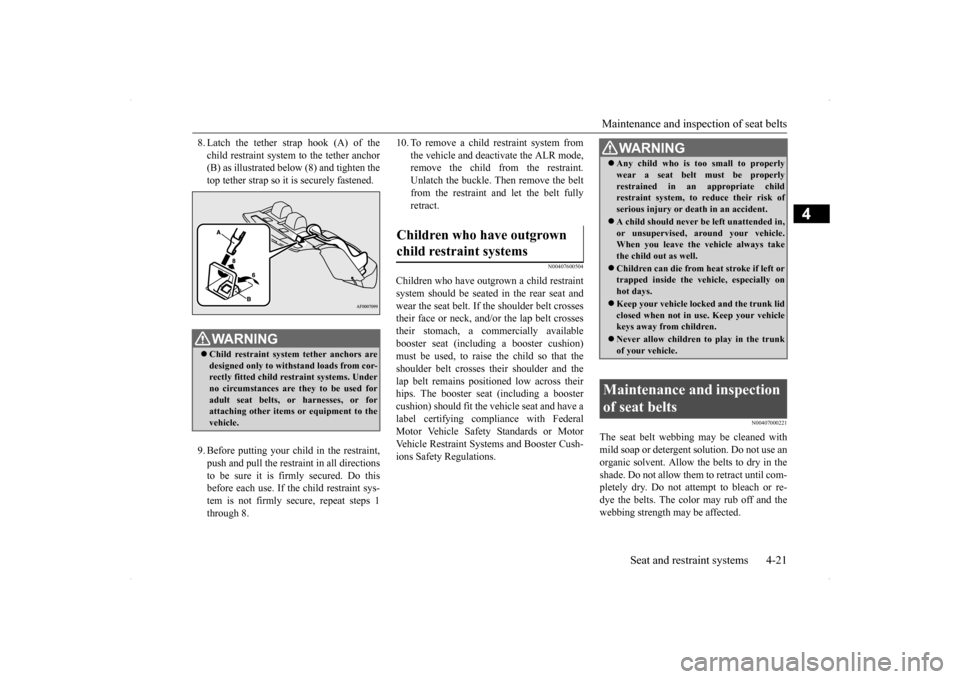
8. Latch the tether strap hook (A) of the child restraint system to the tether anchor (B) as illustrated below (8) and tighten the top tether strap so it is securely fastened. 9. Before putting your child in the restraint, push and pull the restraint in all directions to be sure it is firmly secured. Do this before each use. If the child restraint sys-tem is not firmly secure, repeat steps 1 through 8.
10. To remove a child restraint system from
the vehicle and deactivate the ALR mode, remove the child from the restraint. Unlatch the buckle. Then remove the beltfrom the restraint and let the belt fully retract.
N00407600504
Children who have outgrown a child restraintsystem should be seated in the rear seat and wear the seat belt. If the shoulder belt crossestheir face or neck, and/or the lap belt crosses their stomach, a commercially available booster seat (including a booster cushion)must be used, to raise the child so that the shoulder belt crosses their shoulder and the lap belt remains positioned low across theirhips. The booster seat (including a booster cushion) should fit the vehicle seat and have a label certifying compliance with FederalMotor Vehicle Safety Standards or Motor Vehicle Restraint Systems and Booster Cush- ions Safety Regulations.
N00407000221
The seat belt webbing may be cleaned withmild soap or detergent solution. Do not use anorganic solvent. Allow the belts to dry in the shade. Do not allow them to retract until com- pletely dry. Do not attempt to bleach or re-dye the belts. The color may rub off and the webbing strength may be affected.
WA R N I N G Child restraint system tether anchors are designed only to withstand loads from cor-rectly fitted child restraint systems. Under no circumstances are they to be used for adult seat belts, or harnesses, or forattaching other items or equipment to the vehicle.
Children who have outgrown child restraint systems
WA R N I N G Any child who is too small to properly wear a seat belt must be properly restrained in an appropriate child restraint system, to reduce their risk of serious injury or death in an accident. A child should never be left unattended in, or unsupervised, around your vehicle.When you leave the
vehicle always take
the child out as well. Children can die from he
at stroke if left or
trapped inside the vehicle, especially on hot days. Keep your vehicle locked and the trunk lid closed when not in use. Keep your vehiclekeys away from children. Never allow children to play in the trunk of your vehicle.
Maintenance and inspection of seat belts
Page 51 of 434
Supplemental Restraint System (SRS) - airbag 4-22 Seat and restraint systems
4
Regularly check your seat belt buckles and their release mechanisms for positive engage- ment and release of the latch plate. Check the retractors for automatic locking when in theAutomatic Locking Retractor function. The entire seat belt assembly should be replaced if the webbing shows any obvious cuts, tears, increase in thickness in any sec-tion of the webbing from broken fibers, or severe fading from sunlight. All of these con- ditions indicate a weakening of the belt,which may adversely affect seat belt perfor-mance in an accident.
N00407701720
This vehicle is equipped with a SupplementalRestraint System (SRS), which includes air-bags for the driver and passengers.
The SRS front airbags are designed to supple- ment the primary protection of the driver and front passenger seat belt systems by provid- ing those occupants with protection againsthead and chest injuries in certain moderate to severe frontal collisions. The SRS front airbags, together with sensorsat the front of the vehicle and sensors attached to the front seats, form an advanced airbag system. The SRS driver’s knee airbag is designed to supplement the primary protection of thedriver’s seat belt system. It can reduce the forward movement of the driver’s lower legs and provide increased overall body protectionin certain moderate to severe frontal colli- sions. The SRS side airbags (if so equipped) and the curtain airbags (if so equipped) are alsodesigned to supplement the seat belts. The SRS side airbags provide the driver and front passenger with protection against chest inju-ries by deploying the bag on the side impacted in moderate to severe side impact collisions. The SRS curtain airbags providethe driver and passengers on the front seat and rear outboard seat with protection against head injuries by deploying a bag on the sideimpacted in moderate to severe side impact collisions.
The SRS airbags are NOT
a substitute for use
of the seat belts. For maximum protection in all types of accidents, seat belts must ALWAYS be worn by everyone who drives orrides in this vehicle (with infants and small children in an appropriate child restraint sys- tem in the rear seat, and older children buck-led in the rear seat). Refer to “Child restraint systems” on page 4-14.
WA R N I N G Do not attempt to repair or replace any part of the seat belt assemblies. This work should be done by an authorized Mitsubishi Motors dealer. Failure to havean authorized Mitsubishi Motors dealer perform the work could reduce the effec- tiveness of the belts and could result in aserious injury or death in an accident.
Supplemental Restraint Sys- tem (SRS) - airbag
WA R N I N G IT IS VERY IMPORTANT TO ALWAYS WEAR YOUR SEAT BELT PROPERLY EVEN WITH AN AIRBAG.• Seat belts help keep the driver and pas-sengers properly positioned. This reduces the risk of injury in all collisions,and reduces the risk of serious injuries or death when the airbags inflate. During sudden braking just before a col-lision, an unrestrained or improperly restrained driver or passengers can move forward into direct contact with, orwithin close proximity to, the airbag when it begins to inflate. The beginning stage of airbag inflation isthe most forceful and can cause serious injuries or death if the occupant comes in contact with the airbag at this time. • Seat belts reduce the risk of injury inrollovers, rear impact collisions, and in lower-speed frontal collisions, because the airbags are not designed to inflate inthose situations.
Page 68 of 434
5
Features and controlsBreak-in recommendation
s ...............................................................5-3
Keys .....................................................
.............................................5-3
Electronic immobilizer (Anti-theft starting system) .........................5-4 Keyless entry system (if so equipped) ..............................................5-7Free-hand Advanced Security Transmitter (F.A.S.T.-key) (if so equipped)................................
.....................................................5-12
Door locks........................
...............................................................5-36
Power door locks .............
...............................................................5-38
“Child safety locks” for
rear door...................................................5-40
Trunk lid ....................................
.....................................................5-40
Inside emergency trunk lid
release .................................................5-42
Theft-alarm system ..........
...............................................................5-42
Power windows................
...............................................................5-45
Sunroof (if so equipped
) .........................................
........................5-47
Parking brake ...................
...............................................................5-49
Steering wheel tilt lock lever ..........................................................5-51Inside day/night rearview
mirror ....................................................5-51
Outside rearview mirr
ors ................................................................5-53
Ignition switch .................
...............................................................5-54
Steering wheel lock..........
...............................................................5-56
Starting and stopping the e
ngine ....................................................5-56
Turbocharger operation (if so equipped) ........................................5-60Manual transaxle (if so equipped) ..................................................5-60Continuously variable transmissi
on (CVT) (if so equipped)..........5-62
Twin Clutch SST (Sportronic Shif
t Transmission) (if so equipped)
...................................................................
..................................5-71
ACD (Active center differential system) (if so equipped)..............5-83 Electronically controlled 4WD system (if so equipped).................5-85
All-wheel driving opera
tion ........................................................... 5-87
Cautions on handling of all-wheel drive vehicles ......................... 5-89 Limited-slip differential (i
f so equipped) ....................................... 5-90
Service brake ..................
.................................................
............... 5-90
Brake assist system
................................................
......................... 5-91
Hill start assist (vehicles with
Twin Clutch SST) ........................... 5-91
Anti-lock braking syst
em ......................................
......................... 5-92
Active Stability Control (ASC
) (if so equipped) ............................ 5-95
Power steering system
...........................................
......................... 5-98
Cruise control (if so eq
uipped) ....................................................... 5-99
Tire pressure monitoring
system .................................................. 5-104
Rear-view camera (if so
equipped)..............
................................. 5-108
Instrument cluster ..........
.............................................................. 5-110
Multi-information display ............................................................ 5-112 Indicator light, warning light, and information screen display list
.................................................................
................................. 5-133
Indicators ..................................
.................................................... 5-145
Warning lights.................
.................................................
............. 5-146
Information screen disp
lay ....................................
....................... 5-147
Combination headlights and dimmer switch ................................ 5-149 Headlight leveling switch (if
so equipped)................................... 5-154
Turn signal lever ...
.................................................
....................... 5-154
Hazard warning flasher
switch ..................................................... 5-155
Front fog light switch (if so
equipped) ......................................... 5-156
Wiper and washer swit
ch ......................................
....................... 5-156
Electric rear window def
ogger switch .......................................... 5-160
Horn switch ..............................
.................................................... 5-161
Link System (if so equi
pped) ....................................................... 5-161
Page 70 of 434
Break-in recommendations
Features and controls 5-3
5
N00508700297
Advanced automobile manufacturing tech- niques permit you to operate your new vehi-cle without requiring a long break-in period of low-speed driving. However, you can add to the future perfor-mance and economy of your vehicle by observing the following precautions during the first 300 miles (500 km).Drive your vehicle at moderate speeds duringthe break-in period. Avoid revving the engine. For vehicles with turbocharger, do not exceed 5,000 rpm for the first 600 miles (1,000 km). Avoid rough driving such as fast starts, sudden acceleration, prolonged high- speed driving and sudden braking. Thesewould have a detrimental effect on the engine and also cause increased fuel and oil consumption, which could result inmalfunction of the engine components. Be particularly careful to avoid full accelera- tion while in low gear. Do not overload the vehicle. Observe the seating capacity (See “Cargo load precau- tions” on page 6-11). Do not use this vehicle for trailer towing.
N00508800559
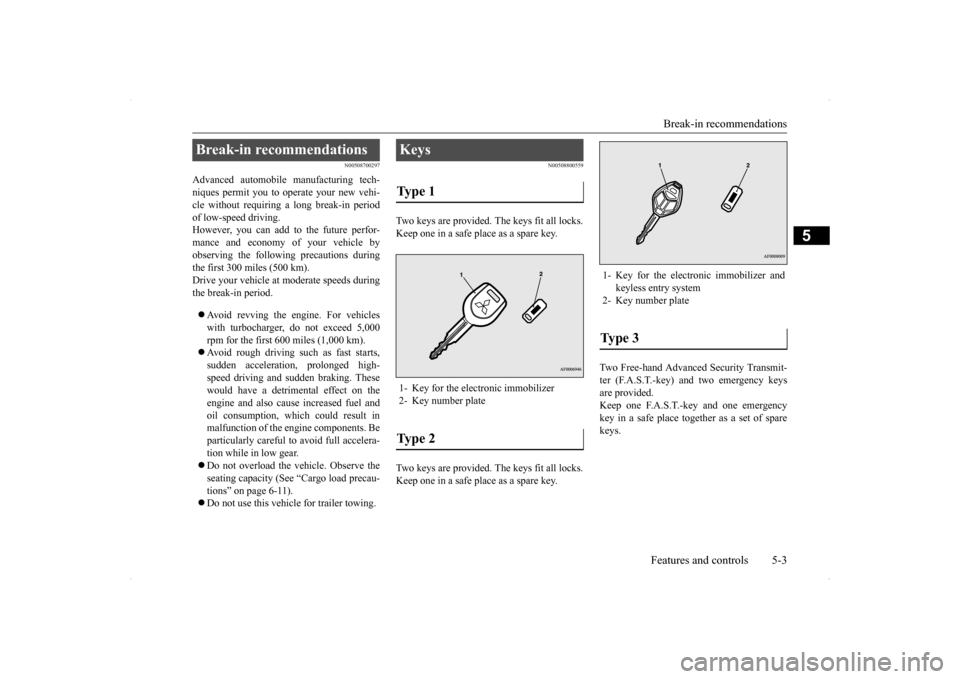
Two keys are provided. The keys fit all locks. Keep one in a safe place as a spare key. Two keys are provided. The keys fit all locks. Keep one in a safe place as a spare key.
Two Free-hand Advanced Security Transmit- ter (F.A.S.T.-key) and two emergency keysare provided. Keep one F.A.S.T.-key and one emergency key in a safe place together as a set of sparekeys.
Break-in recommendations
Keys Type 1 1- Key for the electronic immobilizer2- Key number plateType 2
1- Key for the electronic immobilizer and
keyless entry system
2- Key number plateType 3
Page 72 of 434
Electronic immobilizer (Ant
i-theft starting system)
Features and controls 5-5
5
Only keys that have been programmed to the vehicle’s electronics can be used to start the vehicle. If you lose the key, you can order a key from your authorized Mitsubishi Motors dealer by referring to the key number. To prevent vehicle theft, the ID code for thevehicle keys must be changed. Take your vehicle and all remaining keys to your authorized Mitsubishi Motors dealer tohave your ID code changed. To add a key, you need to register the ID code to the vehicle. Registering the ID code can be done by your authorized Mitsubishi Motors dealer. Or itcan be done by yourself (except for vehicles sold in Canada).
NOTE
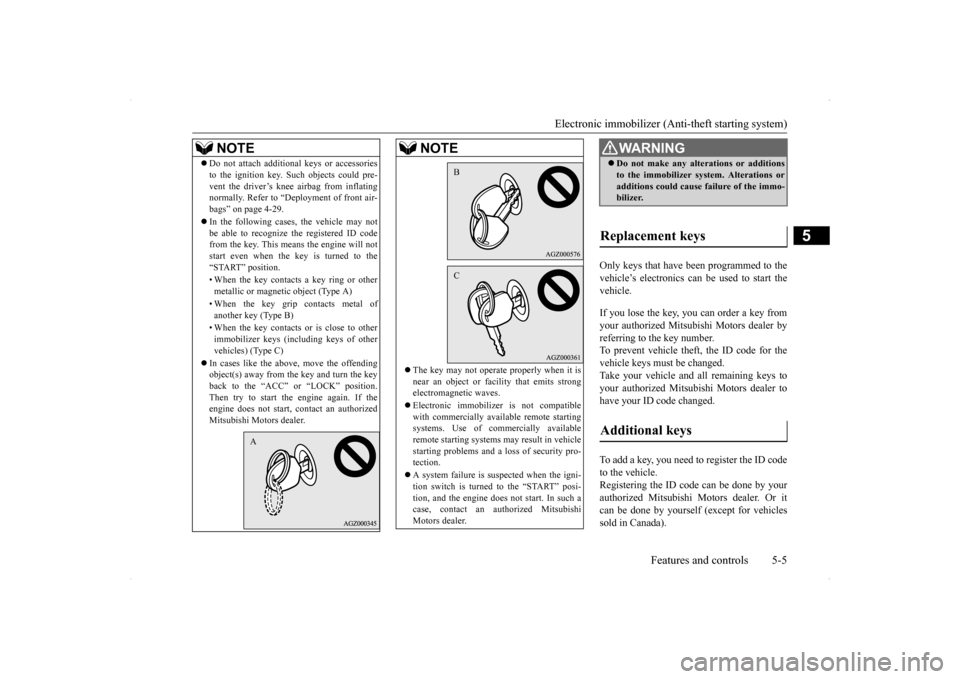
Do not attach additional keys or accessories to the ignition key. Such objects could pre- vent the driver’s knee airbag from inflating normally. Refer to “Deployment of front air- bags” on page 4-29. In the following cases, the vehicle may not be able to recognize the registered ID codefrom the key. This means the engine will not start even when the key is turned to the “START” position. • When the key contacts a key ring or other metallic or magnetic object (Type A) • When the key grip contacts metal of another key (Type B) • When the key contacts or is close to other immobilizer keys (including keys of othervehicles) (Type C)
In cases like the above, move the offending object(s) away from the key and turn the key back to the “ACC” or “LOCK” position. Then try to start the
engine again. If the
engine does not start, contact an authorized Mitsubishi Motors dealer.
A
The key may not operate properly when it is near an object or facility that emits strong electromagnetic waves. Electronic immobilizer is not compatible with commercially available remote startingsystems. Use of commercially available remote starting systems may result in vehicle starting problems and a lo
ss of security pro-
tection. A system failure is suspected when the igni- tion switch is turned to the “START” posi- tion, and the engine does not start. In such a case, contact an authorized MitsubishiMotors dealer.NOTE
BC
WA R N I N G Do not make any alterations or additions to the immobilizer system. Alterations or additions could cause failure of the immo- bilizer.
Replacement keys Additional keys
Page 73 of 434
Electronic immobilizer (Anti-theft starting system) 5-6 Features and controls
5
For you to register the ID code yourself, fol- low the “Customer key programming” proce- dure below. If you choose to have your authorized Mit-subishi Motors dealer
register the ID code,
take your vehicle and all remaining keys to your authorized Mitsubishi Motors dealer.
N00562201136
You can program new keys to the system ifyou have two valid (already registered) keysand blank (not registered) immobilizer key (specially cut for your vehicle at your Mit- subishi Motors dealer) by doing the follow-ing: 1. Insert the first valid key into the ignition switch and turn the key to the “ON” posi- tion for 5 seconds.2. Turn the key to the “LOCK” position and remove the first key.
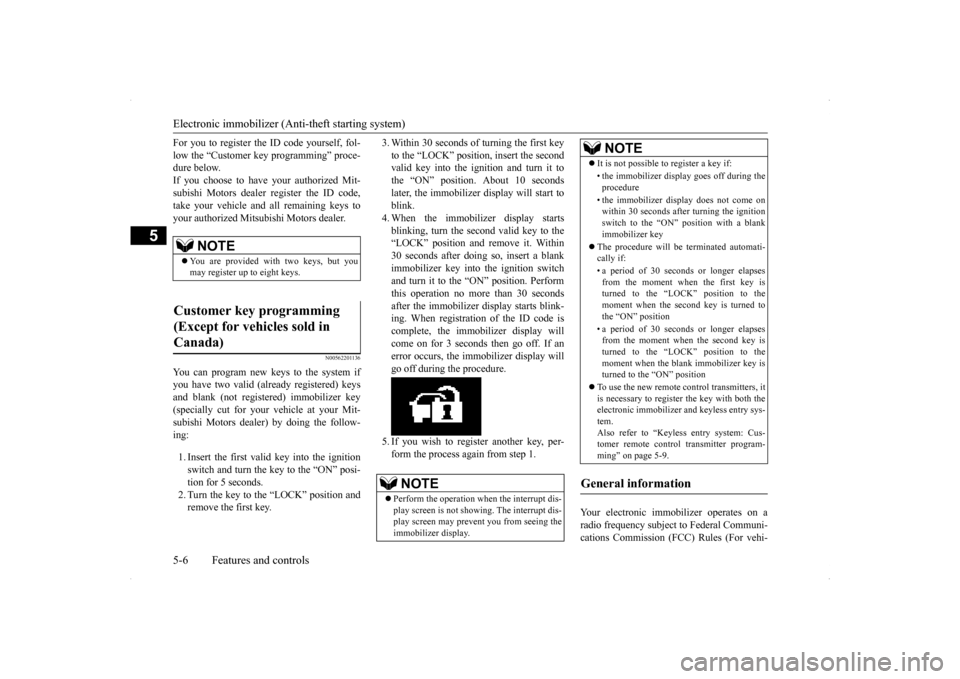
3. Within 30 seconds of turning the first key to the “LOCK” position, insert the second valid key into the ignition and turn it to the “ON” position. About 10 secondslater, the immobilizer display will start to blink. 4. When the immobilizer display startsblinking, turn the second valid key to the “LOCK” position and remove it. Within 30 seconds after doing so, insert a blankimmobilizer key into the ignition switchand turn it to the “ON” position. Perform this operation no more than 30 seconds after the immobilizer display starts blink-ing. When registration of the ID code is complete, the immobilizer display will come on for 3 seconds then go off. If anerror occurs, the immobilizer display will go off during the procedure. 5. If you wish to register another key, per- form the process again from step 1.
Your electronic immobilizer operates on a radio frequency subject to Federal Communi-cations Commission (FCC) Rules (For vehi-
NOTE
You are provided with two keys, but you may register up to eight keys.
Customer key programming (Except for vehicles sold in Canada)
NOTE
Perform the operation when the interrupt dis- play screen is not showing. The interrupt dis- play screen may prevent you from seeing the immobilizer display.
It is not possible to register a key if: • the immobilizer display goes off during the procedure • the immobilizer display does not come on within 30 seconds after turning the ignition switch to the “ON” position with a blankimmobilizer key
The procedure will be terminated automati- cally if: • a period of 30 seconds or longer elapses from the moment when the first key is turned to the “LOCK” position to the moment when the second key is turned tothe “ON” position • a period of 30 seconds or longer elapses from the moment when the second key is turned to the “LOCK” position to the moment when the blank immobilizer key isturned to the “ON” position
To use the new remote control transmitters, it is necessary to register the key with both the electronic immobilizer and keyless entry sys- tem.Also refer to “Keyless entry system: Cus- tomer remote control transmitter program- ming” on page 5-9.
General information
NOTE
Page 74 of 434
Keyless entry system (if so equipped)
Features and controls 5-7
5
cles sold in U.S.A.) and Industry Canada Rules (For vehicles sold in Canada). This device complies with Part 15 of FCC Rules and Industry Canada licence-exempt RSSstandard(s). Operation is subject to the following two con- ditions. This device may not cause harmful inter- ference. This device must accept any interference received, including interference that maycause undesired operation.
N00509000763
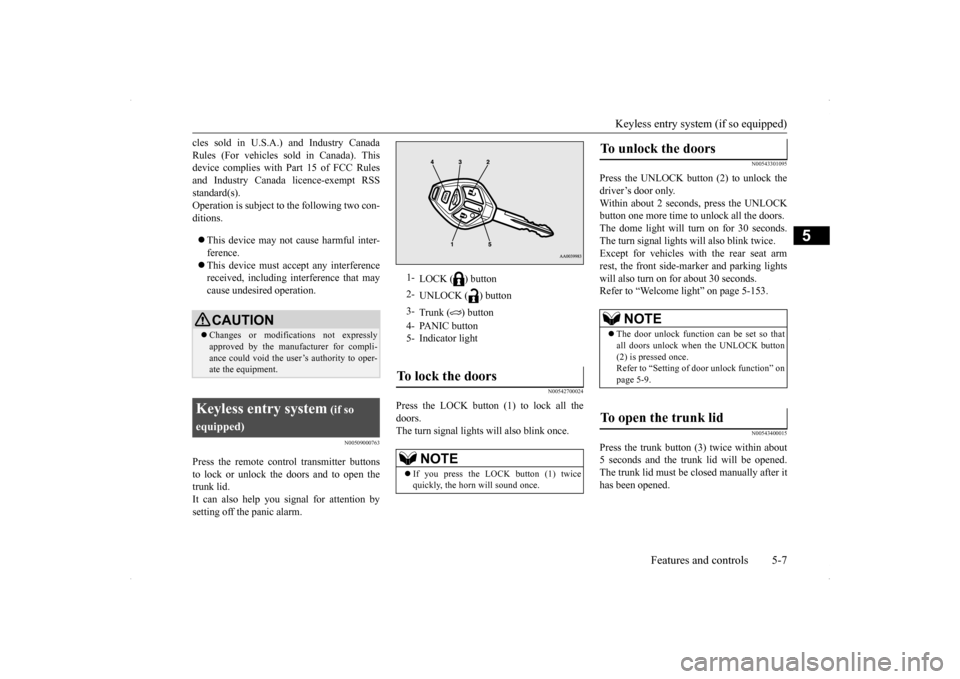
Press the remote control transmitter buttonsto lock or unlock the doors and to open the trunk lid. It can also help you signal for attention bysetting off the panic alarm.
N00542700024
Press the LOCK button (1) to lock all thedoors.The turn signal lights will also blink once.
N00543301095
Press the UNLOCK button (2) to unlock thedriver’s door only.Within about 2 seconds, press the UNLOCK button one more time to unlock all the doors. The dome light will turn on for 30 seconds.The turn signal lights will also blink twice. Except for vehicles with the rear seat arm rest, the front side-marker and parking lightswill also turn on for about 30 seconds. Refer to “Welcome light” on page 5-153.
N00543400015
Press the trunk button (3) twice within about5 seconds and the trunk lid will be opened.The trunk lid must be closed manually after it has been opened.
CAUTION Changes or modifications not expressly approved by the manufacturer for compli- ance could void the user’s authority to oper-ate the equipment.
Keyless entry system
(if so
equipped)
1-
LOCK ( ) button
2-
UNLOCK ( ) button
3-
Trunk ( ) button
4- PANIC button 5- Indicator lightTo lock the doors
NOTE
If you press the LOCK button (1) twice quickly, the horn will sound once.
To unlock the doors
NOTE
The door unlock function can be set so that all doors unlock when the UNLOCK button (2) is pressed once. Refer to “Setting of door unlock function” onpage 5-9.
To open the trunk lid
Page 75 of 434
Keyless entry system (if so equipped) 5-8 Features and controls
5
N00543501084
Setting of the horn, turn signal lights and buzzer of the keyless entry system answer-back function can be changed as required. This is done with the key removed from the ignition switch. The horn answerback function can be set to the following three conditions.Each time the horn answerback function is set, a chime will sound to tell you the condi- tion of the answerback function.
1. Remove the key from the ignition switch. 2. Open the driver’s door and turn the com- bination headlights and dimmer switch to the “OFF” position.3. Press the LOCK button (1) for 4 to 10 sec- onds and press the UNLOCK button (2) during this time.4. Release in sequence the UNLOCK andLOCK buttons within 10 seconds of pressing the UNLOCK button in step 3.
The turn signal lights answerback function can be set to the following seven conditions. Each time the turn signal lights answerback function is set, a chime will sound to tell youthe condition of the answerback function.
1. Remove the key from the ignition switch. 2. Open the driver’s door and turn the com- bination headlights and dimmer switch to the “OFF” position.3. Press the UNLOCK button (2) for 4 to 10 seconds and press the LOCK button (1) during this time.4. Release in sequence the UNLOCK and LOCK buttons within 10 seconds of pressing the LOCK button in step 3.
The buzzer answerback function can be turned ON or OFF as required.
Answerback function
NOTE
The answerback function does not operate when the key is in the ignition switch or anydoors is opened.
Horn deactivation/reactivation
Number
of chimes
Condition
One chime
The horn will not sound.
Tw o chimes
The horn will sound.
Four chimes
The horn will sound if the LOCK button is pressed twice quickly.
Changing the setting of the turn signal lights answerback function
Number of chimes
Condition
To l o c k
To u n l o c k
One chime One flash Two flashesNumber
of chimes
Condition
Two chimes One flash No flash Three chimes No flash Two flashesFour chimes Two flashes One flashFive chimes No flash One flashSix chimes Two flashes No flashSeven chimes
No flash No flash
Buzzer deactivation/reactivation
Number of chimes
Condition
To l o c k
To u n l o c k