change time MITSUBISHI LANCER 2015 8.G Owner's Guide
[x] Cancel search | Manufacturer: MITSUBISHI, Model Year: 2015, Model line: LANCER, Model: MITSUBISHI LANCER 2015 8.GPages: 434, PDF Size: 16.59 MB
Page 222 of 434
Hazard warning flasher switch Features and controls 5-153
5
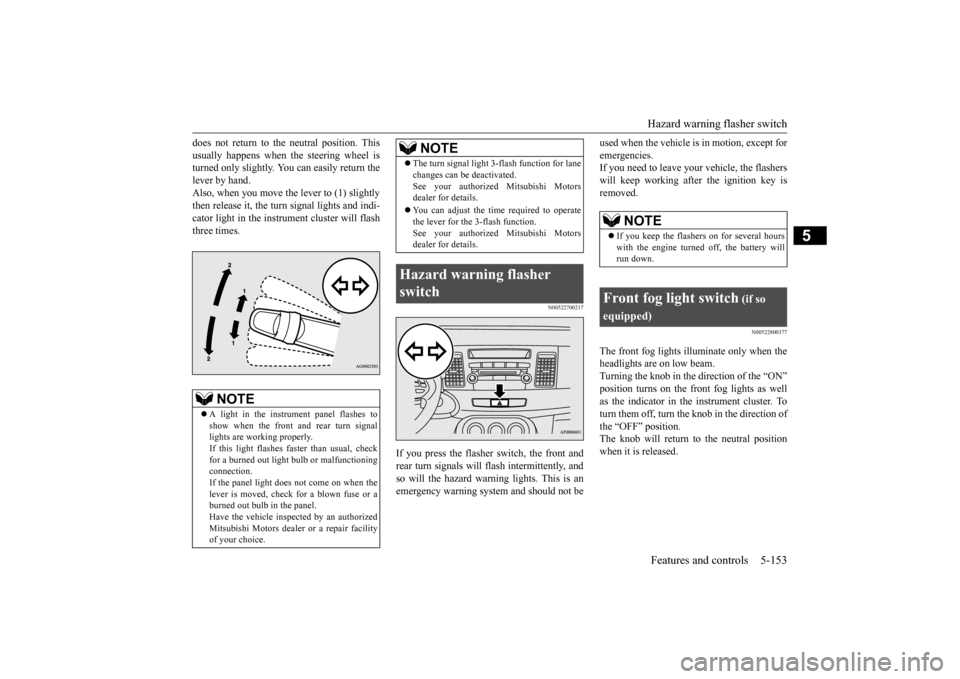
does not return to the neutral position. This usually happens when the steering wheel is turned only slightly. You can easily return the lever by hand.Also, when you move the lever to (1) slightly then release it, the turn signal lights and indi- cator light in the instrument cluster will flashthree times.
N00522700217
If you press the flasher switch, the front andrear turn signals will flash intermittently, andso will the hazard warning lights. This is an emergency warning system and should not be
used when the vehicle is in motion, except for emergencies. If you need to leave your vehicle, the flashers will keep working afte
r the ignition key is
removed.
N00522800377
The front fog lights illuminate only when the headlights are on low beam. Turning the knob in the direction of the “ON”position turns on the front fog lights as well as the indicator in the instrument cluster. To turn them off, turn the knob in the direction ofthe “OFF” position. The knob will return to the neutral position when it is released.
NOTE
A light in the instrument panel flashes to show when the front and rear turn signal lights are working properly. If this light flashes faster than usual, checkfor a burned out light bulb or malfunctioning connection. If the panel light does not come on when thelever is moved, check for a blown fuse or a burned out bulb in the panel. Have the vehicle inspected by an authorizedMitsubishi Motors dealer or a repair facility of your choice.
The turn signal light 3-flash function for lane changes can be deactivated. See your authorized Mitsubishi Motors dealer for details. You can adjust the time required to operate the lever for the 3-flash function. See your authorized Mitsubishi Motorsdealer for details.
Hazard warning flasher switch
NOTE
NOTE
If you keep the flashers on for several hours with the engine turned off, the battery will run down.
Front fog light switch
(if so
equipped)
BK0210300US.book
153 ページ 2014年4月8日 火曜日 午前10時46分
Page 226 of 434
Wiper and washer switch
Features and controls 5-157
5
N00569700016
Move the lever in the direction of the arrow and release, to operate the wipers once. Use this function when you are driving inmist or drizzle.
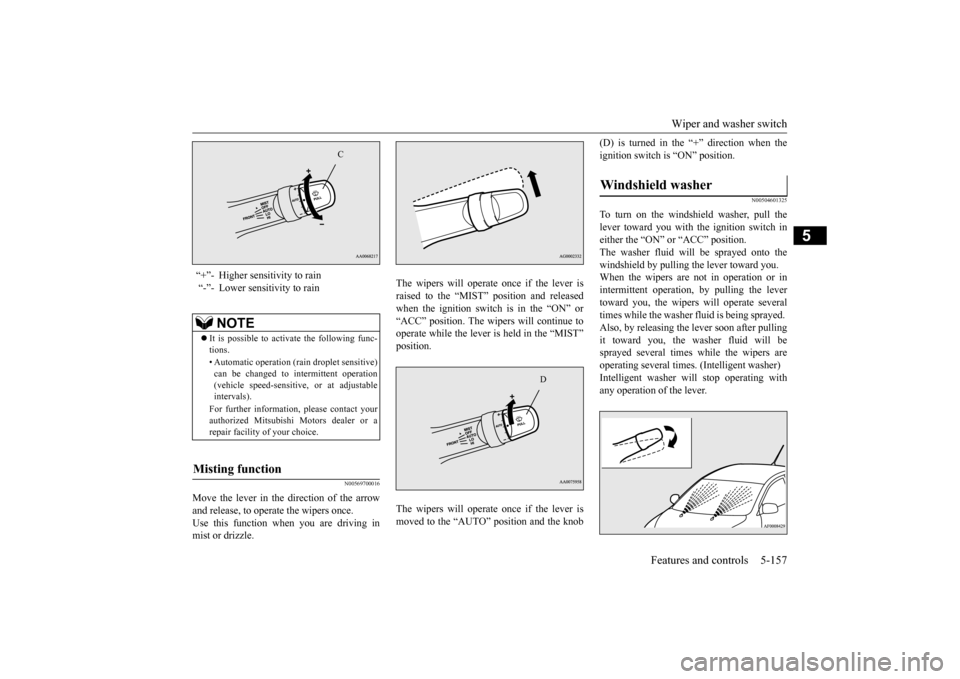
The wipers will operate once if the lever is raised to the “MIST” position and released when the ignition switch is in the “ON” or“ACC” position. The wipers will continue to operate while the lever is held in the “MIST” position. The wipers will operate once if the lever is moved to the “AUTO” position and the knob
(D) is turned in the “+” direction when the ignition switch is “ON” position.
N00504601325
To turn on the windshield washer, pull thelever toward you with the ignition switch in either the “ON” or “ACC” position. The washer fluid will be sprayed onto thewindshield by pulling the lever toward you. When the wipers are not in operation or in intermittent operation, by pulling the lever toward you, the wipers will operate severaltimes while the washer fluid is being sprayed. Also, by releasing the lever soon after pulling it toward you, the washer fluid will besprayed several times while the wipers are operating several times. (Intelligent washer) Intelligent washer will stop operating withany operation of the lever.
“+”- Higher sensitivity to rain “-”- Lower sensitivity to rain
NOTE
It is possible to activate the following func- tions. • Automatic operation (rain droplet sensitive) can be changed to intermittent operation (vehicle speed-sensitive, or at adjustableintervals). For further information, please contact your authorized Mitsubishi Motors dealer or a repair facility of your choice.
Misting function
C
D
Windshield washer
BK0210300US.book
157 ページ 2014年4月8日 火曜日 午前10時46分
Page 229 of 434
Bluetooth® 2.0 interface (if so equipped) 5-160 Features and controls
5
The system is equipped with a voice recogni- tion function, which allows you to make hands-free calls by simple switch operations and voice command operations using adefined voice tree. The Bluetooth
® 2.0 interface can be used
when the ignition switch is in the “ON” or “ACC” position. Before you can use the Bluetooth
® 2.0 inter-
face, you must pair the Bluetooth
® device
and Bluetooth
® 2.0 interface. Refer to “Con-
necting the Bluetooth
® 2.0 interface and
Bluetooth
® device” on page 5-166.
Bluetooth
® is a registered trademark of
BLUETOOTH SIG, INC.
Steering control switch and microphone
P.5-161 Voice recognition function
P.5-163
Useful voice commands
P.5-163
Speaker enrollment function
P.5-165
Connecting the Bluetooth
® 2.0 interface and
the Bluetooth
® device
P.5-166
Operating a music player connected via Blue- tooth
® P.5-170
How to make or receive hands-free calls
P.5-171 Phonebook function
P.5-173
WA R N I N GAlthough the Bluetooth
® 2.0 interface
allows you to make hands-free calls, if you choose to use the cellular phone whiledriving, you must not allow yourself to be distracted from the safe operation of your vehicle. Anything, including cellularphone usage, that di
stracts you from the
safe operation of your vehicle increases your risk of an accident. Refer to and comply with all state and local laws in your area regarding cellularphone usage while driving.
NOTE
If the ignition switch is left in the “ACC” position, the accessory power will automati- cally turn off after a
certain period of time
and you will no longer be able to use the Bluetooth
® 2.0 interface. The accessory
power comes on again if the ignition switch is turned from the “ACC” position. Refer to “ACC power auto-cutout function” on page5-54. The Bluetooth
® 2.0 interface cannot be used
if the Bluetooth
® device has a dead battery
or the device power is turned off. Hands-free calls will not be possible if your phone does not have service available. Some Bluetooth
® devices are not compatible
with the Bluetooth
® 2.0 interface.
You can confirm the Link System software version by pressing the HANG-UP button 3 times (press and hold 2 times and then press briefly) within 10 seconds.
For detail of the Bluetooth
® 2.0 interface,
refer to the following website:[For vehicles sold in U.S.A.] You can access the Mitsubishi Motors North America website.[For vehicles sold in Canada and Mexico] You can access the Mitsubishi Motors web- site.Please read and agree to the “Warning about Links to the Web Sites of Other Companies”, the websites mentioned above may connectyou to websites other
than the Mitsubishi
Motors website. http://www.mitsubishi-motors.com/en/prod-ucts/index.html Software updates by cellular phone/digital audio device manufacturers may change/alter device connectivity.NOTE
BK0210300US.book
160 ページ 2014年4月8日 火曜日 午前10時46分
Page 232 of 434

Bluetooth® 2.0 interface (if so equipped)
Features and controls 5-163
5
N00564101096
The Bluetooth
® 2.0 interface is equipped
with a voice recognition function.Simply say voice commands and you can per- form various operations and make or receive hands-free calls. With the Bluetooth
® 2.0 interface, voice rec-
ognition is possible for US English, NorthAmerican Spanish, Canadian French and Jap- anese. The factory setting is “English.”
1. Press the SPEECH button (except for vehicles with Mits
ubishi Multi-Commu-
nication System) or PICK-UP button (forvehicles with Mits
ubishi Multi-Commu-
nication System). 2. Say “Setup.”3. Say “Language.” 4. The voice guide will say “Select a lan- guage: English, Spanish, French or Japa-nese.” Say the desired language.(Example: “English”) ish, French or Japanese) selected. Is thiscorrect?” Say “Yes.” If you say “No,” the system will return to Step 4.
6. When the voice guide says “English (Spanish, French or Japanese) selected,” the language change process will be com- pleted and the system will return to themain menu.
N00564200016 N00564300017
The Bluetooth
® 2.0 interface is equipped
with a help function. If you say “Help” when the system is waiting for a voice command input, the system will tell you a list of the commands that can beused under the circumstances.
N00564400018
There are 2 cancel functions.If you are at the main menu, say “Cancel” to exit from the Bluetooth
® 2.0 interface.
If you are anywhere else within the system,say “Cancel” to return to the main menu.
N00564501029
The Bluetooth
® 2.0 interface is equipped
with a confirmation function.
Voice recognition function
NOTE
If the voice command that you say differs from the predefined command or cannot berecognized due to ambient noise or some other reason, the Bluetooth
® 2.0 interface
will ask you for the voice command again up to 3 times. For best performance and further reduction of ambient noise, the vehicle windows should be closed, lower the blower speed andrefrain from conversation with your passen- gers while engaging the voice recognition function. Depending on the selected language, some functions may not be available.
Selecting the language
NOTE
The voice guide will repeat the same mes- sage twice. The first message is in the cur-rent language, and the second message is in the selected language. If many entries are registered in the vehicle phonebook, changing the language will take a longer time. Changing the language deletes the mobile phonebook imported to the Bluetooth
® 2.0
interface. If you wish to use it, you will have to import it again.
Useful voice commands
Help function
Canceling
Confirmation function setting
BK0210300US.book
163 ページ 2014年4月8日 火曜日 午前10時46分
Page 233 of 434

Bluetooth® 2.0 interface (if so equipped) 5-164 Features and controls
5
With the confirmation function activated, you are given more opportunities than normal to confirm a command when making various settings to the Bluetooth
® 2.0 interface. This
allows you to decrease the possibility that a setting is accidentally changed. The confirmation function can be turned onor off by following the steps below. 1. Press the SPEECH button (except for vehicles with Mitsubishi Multi-Commu- nication System) or PICK-UP button (forvehicles with Mitsubishi Multi-Commu-nication System). 2. Say “Setup.” 3. Say “Confirmation prompts.”4. The voice guide will say “Confirmation prompts are
N00564601118
It is possible to use a passcode as a securityfunction by setting a passcode of your choice for the Bluetooth
® 2.0 interface.
When the security function is turned on, it is necessary to make a voice input of a 4-digit
passcode in order to use all functions of the Bluetooth
® 2.0 interface, except for recep-
tion. Use the following procedure to turn on the security function by setting a passcode. 1. Press the SPEECH button (except for vehicles with Mitsubishi Multi-Commu- nication System) or PICK-UP button (forvehicles with Mitsubishi Multi-Commu-nication System). 2. Say “Setup.” 3. Say “Passcode.”4. The voice guide will say “Passcode is dis- abled. Would you like to enable it?” Answer “Yes.”Answer “No” to cancel the setting of the passcode and return to the main menu. 5. The voice guide will say “Please say a 4-digit passcode. Remember this passcode. It will be required to use this system.” Say a 4-digit number which you want toset as a passcode. 6. For confirmation purposes, the voice guide will say “Passcode <4-digit pass-code>. Is this correct?” Answer “Yes.” Answer “No” to return to the passcode input in Step 5.
7. When the registration of the passcode is completed, the voice guide will say “Pass- code is enabled” and the system will return to the main menu.
If a passcode has been set and the security function is enabled, the voice guide will say “Hands-free system is locked. State the pass- code to continue” when the SPEECH button(except for vehicles with Mitsubishi Multi- Communication System) or PICK-UP button (for vehicles with Mitsubishi Multi-Commu-nication System) is pressed to enter voice rec- ognition mode. Say the 4-digit passcode number to enter the passcode. If the entered passcode is wrong, the voice guide will say “<4-digit passcode>, Incorrect
Security function
Setting the passcode
NOTE
Passcode will be required to access the sys- tem after the next ignition cycle. It is required for a little time after engine stop that the entered passcode is actuallyrecorded in the system. If the ignition switch is made to “ACC” or “ON” or the engine is started immediately after engine stop, thereis a case when the entered passcode is not recorded in the system. At this time, please try to enter the passcode again.
Entering the passcode
BK0210300US.book
164 ページ 2014年4月8日 火曜日 午前10時46分
Page 236 of 434

Bluetooth® 2.0 interface (if so equipped)
Features and controls 5-167
5
music player most recently connected is auto- matically connected to the Bluetooth
® 2.0
interface. You can also change a Bluetooth
® device to
be connected. To pair a Bluetooth
® device with the Blue-
tooth
® 2.0 interface, follow the steps below.
1. Stop your vehicle in a safe area, put the shift lever (manual transaxle) in the “N”(Neutral) position, or the selector lever {continuously variable transmission (CVT)} or gearshift lever (Twin ClutchSST) in the “P” (PARK) position, and then pull the parking brake lever.
2. Press the SPEECH button (except for vehicles with Mits
ubishi Multi-Commu-
nication System) or PICK-UP button (for vehicles with Mits
ubishi Multi-Commu-
nication System). 3. Say “Setup.” 4. Say “Pairing Options.”5. The voice guide will say “Select one of the following: pair, edit, delete, or list.” Say “Pair.” digit pairing code.” Say a 4-digit number. When the confirmation function is on, the system will confirm whether the numbersaid is acceptable. Answer “Yes.” Answer “No” to return to pairing code selection.
7. The voice guide will say “Start pairing procedure on the device. See the devicemanual for instructions.” Enter in the Bluetooth
® device the 4-digit number you
have registered in Step 6.
To p a i r
NOTE
You cannot pair any Bluetooth
® device with
the Bluetooth
® 2.0 interface unless the vehi-
cle is parked. Before pairing a Bluetooth
®
device with the Bluetooth
® 2.0 interface,
confirm that the vehicle is parked in a safelocation.
NOTE
If 7 devices have already been paired, the voice guide will say “Maximum devices paired” and then the system will end the pairing process. To register a new device,delete one device and then repeat the pairing process. (Refer to “Deleting a device” on page5-168.)
NOTE
Some Bluetooth
® devices require a specific
pairing code. Please refer to the device man-ual for pairing code requirements. The pairing code entered here is only used for the Bluetooth
® connection certification.
It is any 4-digit number the user would like to select.Remember the pairing code as it needs to be keyed into the Bluetooth
® device later in the
pairing process. Depending on the connection settings of the Bluetooth
® device, this code may have to be
entered each time you connect the Blue- tooth
® device to the Bluetooth
® 2.0 inter-
face. For the default connection settings, refer to the instructions for the device.NOTE
Depending on the Bluetooth
® device, it may
take a few minutes to pair it with the Blue- tooth
® 2.0 interface.
BK0210300US.book
167 ページ 2014年4月8日 火曜日 午前10時46分
Page 237 of 434

Bluetooth® 2.0 interface (if so equipped) 5-168 Features and controls
5
8. The voice guide will say “Please say the name of the device after the beep.” You can assign a desired name for the Blue- tooth
® device and register it as a device
tag. Say the name you want to register after the beep. 9. The voice guide will say “Pairing com- plete,” and the pairing process will end.
N00565101064
If multiple paired Bluetooth
® devices are
available in the vehicle, the cellular phone ormusic player most recently connected is auto- matically connected to the Bluetooth
® 2.0
interface.You can connect to the other cellular phone or music player by following setting change pro- cedures. 1. Press the SPEECH button (except for vehicles with Mitsubishi Multi-Commu-nication System) or PICK-UP button (for vehicles with Mitsubishi Multi-Commu- nication System).2. Say “Setup.” 3. Say “Select phone.” 4. After the voice guide says “Please say,” device tags of corresponding cellular phones will be read out in order, startingwith the cellular phone that has been most recently connected. Say the number of the cellular phone thatyou want to connect to.
When the confirmation function is on, the system will ask you again whether the phone that you want to connect to is cor- rect. Answer “Yes” to continue and con-nect to the cellular phone. Answer “No,” and the voice guide will say “Please say.” Say the number of thephone that you want to connect to. 5. The selected phone will be connected to the Bluetooth
® 2.0 interface. The voice
guide will say “
® 2.0 interface cannot recog-
nize the Bluetooth
® device, the voice guide
will say “Pairing has timed out” and the pair- ing process will be cancelled. Confirm that the device you are pairing sup- ports Bluetooth
®, and try pairing it again.
If you enter the wrong number, the voice guide will say “Pairing failed” and the pair- ing process will be cancelled.Confirm the number is right, and try pairing it again.NOTE
When the confirmation function is on, after repeating the device tag you have said, thevoice guide will ask “Is this correct?” Answer “Yes.” To change the device tag, answer “No” and then say the device tag again.NOTE
Selecting a device
To select a cellular phone
NOTE
You can connect to a phone at any time by pressing the SPEECH button and saying thenumber, even before all of the paired num- bers and device tags of corresponding cellu- lar phones are read out by the system.
To select a music player
BK0210300US.book
168 ページ 2014年4月8日 火曜日 午前10時46分
Page 242 of 434

Bluetooth® 2.0 interface (if so equipped)
Features and controls 5-173
5
You can redial the last number called, based on the history of dialed calls in the paired cel- lular phone. Use the following procedure to redial. 1. Press the SPEECH button (except for vehicles with Mitsubishi Multi-Commu-nication System) or PICK-UP button (for vehicles with Mitsubishi Multi-Commu- nication System).2. Say “Redial.”
N00565700018
During a call, press the SPEECH button toenter voice recognition mode, then say “
response to an automated system, press the SPEECH button and speak “1 2 3 4 pound send” and the 1234# will be sent via your cel- lular phone.
N00565800019
If an incoming phone call is received whilethe ignition switch is in the “ACC” or “ON”position, the audio system will be automati-cally turned on and switched to the incoming call, even when the audio system was origi- nally off.The voice guide announcement for the incoming call will be output from the front passenger’s seat speaker.If the CD player or radio was playing when the incoming call was received, the audio sys- tem will mute the sound from the CD playeror radio and output only the incoming call. To receive the call, press the PICK-UP button on the steering wheel control switch.When the call is over,
the audio system will
return to its previous state.
N00565900010
At any time during a call, you can mute thevehicle microphone.
Pressing the SPEECH button and then saying “Mute” during a call will turn ON the mute function and mute the microphone. Saying “Mute off” in the same way will turnoff the mute function and cancel the mute on the microphone.
N00566600014
The Bluetooth
® 2.0 interface can switch
between hands-free mode (hands-free calls)and private mode (calls using cellular phone). If you press the SPEECH button and say “Transfer call” during a hands-free call, youcan stop the hands-free mode and talk in pri- vate mode. To return to hands-free mode, press theSPEECH button again and say “Transfer call.”
N00566000018
The Bluetooth
® 2.0 interface has 2 types of
unique phonebooks that are different from the phonebook stored in the cellular phone. Theyare the vehicle phonebook and the mobile phonebook.
NOTE
When the confirmation function is on, the system will check if the name and location of the receiver are correct. If the name is cor- rect, answer “Yes.” To change the name or location to call,answer “No.” The system will return to Step 3.
RedialingSend function
Receiving calls
Mute function
Switching between hands-free mode and private mode
Phonebook function
BK0210300US.book
173 ページ 2014年4月8日 火曜日 午前10時46分
Page 245 of 434

Bluetooth® 2.0 interface (if so equipped) 5-176 Features and controls
5
6. Operate the Bluetooth
® compatible cellu-
lar phone to set it up so that the phone- book entry you want to register in the vehicle phonebook can be transferred to the Bluetooth
® 2.0 interface.
7. When the reception is complete, the voice guide will say “
8. The voice guide will say “Adding
10. The voice guide will say “Would you like
to import another contact?”Answer “Yes” if you want to continue with the registration. You can continue to register a new phonebook entry from Step5. Answer “No,” the system will return to the main menu.
N00579800023
You can change or delete a name or telephone number registered in the vehicle phonebook. You can also listen to the list of names regis-tered in the vehicle phonebook.
N00579900024
1. Press the SPEECH button (except forvehicles with Mitsubishi Multi-Commu-nication System) or PICK-UP button (for vehicles with Mitsubishi Multi-Commu- nication System).2. Say “Phonebook.” 3. The voice guide will say “Select one of the following: new entry, edit number,edit name, list names, delete, erase all, orimport contact”. Say “Edit number.” name of the entry you would like to edit,or say list names.” Say the name of the phonebook entry you want to edit. 5. The voice guide will say “Home, work, mobile or other?” Select and say the loca- tion where the telephone number youwant to change or add is registered. When the confirmation function is on, the system will check the target name andlocation again. Answer “Yes” if you want to continue with the editing.
NOTE
If the Bluetooth
® 2.0 interface cannot recog-
nise the Bluetooth
® compatible cellular
phone or the connection takes too much time, the voice guide will say “Import con- tact has timed out” and then the system will cancel the registration. In such case, start over again from Step 1. Pressing the HANG-UP button or pressing and holding the SPEECH button will cancelthe registration.NOTE
If the entered name is already used for other phonebook entry or similar to a name used for other phonebook entry, that name cannot be registered.
To change the content registered in the vehicle phonebook NOTE
The system must have at least one entry.
Editing a telephone number
NOTE
Say “List names,” and the names registered in the phonebook will be read out in order. Refer to “Listening to the list of registered names” on page 5-177.
BK0210300US.book
176 ページ 2014年4月8日 火曜日 午前10時46分
Page 249 of 434
Bluetooth® 2.0 interface (if so equipped) 5-180 Features and controls
5
5. The voice guide will say “Importing the contact list from the mobile phonebook. This may take several minutes to com- plete. Would you like to continue?”Answer “Yes,” transferring to the mobile phonebook the phonebook stored in the cellular phone will start.Answer “No,” the system will return to the main menu.
6. When the transfer is complete, the voice guide will say “Import complete” and then the system will return to the main menu.
N00566301106
MODEL: MMC FCC ID: CB2MDGMY10IC: 279B-MDGMY10 Your Bluetooth
® 2.0 interface operates on a
radio frequency subject to Federal Communi- cations Commission (FCC) Rules (For vehi- cles sold in U.S.A.) and Industry CanadaRules (For vehicles sold in Canada). This device complies with Part 15 of the FCC Rules and RSS-210 of the Industry CanadaRules. Operation is subject to the following two conditions: This device may not cause harmful inter- ference. This device must accept any interference received, including interference that may cause undesired operation.
The term “IC:” before the radio certification number only signifies that Industry Canada technical specifications were met. The antenna used for this transmitter must notbe co-located or operating in conjunction with any other antenna or transmitter. End- users and installers must be provided withinstallation instructions and transmitter oper- ating conditions for satisfying RF exposure compliance.FCC Notice: This equipment has been testedand found to comply with the limits for a Class B digital device, pursuant to part 15 of the FCC Rules. These limits are designed toprovide reasonable protection against harmful interference in a residential installation. This equipment generates, uses and can radi-ate radio frequency energy and, if not installed and used in accordance with the instructions, may cause harmful interferenceto radio communications. However, there is no guarantee that interfer- ence will not occur in a particular installation.If this equipment does cause harmful interfer- ence to radio or television reception, which can be determined by turning the equipmentoff and on, the user is encouraged to try to correct the interference by one or more of the following measures: Reorient or relocate the receiving antenna. Increase the separation between the equipment and receiver.
NOTE
The transfer may take some time to complete depending on the number of contacts. If the Bluetooth
® 2.0 interface could not be
connected to the Bluetooth
® compatible cel-
lular phone, the voice guide will say “Unable to transfer contact list from phone” and then the system will return to the main menu. If you press the HANG-UP button or press and hold the SPEECH button during the datatransfer, the transfer will be cancelled and the system will return to the main menu. If an error occurs during the data transfer, all transfer will be cancelled and the voice guide will say “Unable to complete the phonebookimport” and then the system will return to the main menu. If there are no contacts in the phonebook, the voice guide will say “There are no contacts on the connected phone.”
General information
CAUTION Changes or modifications made to this equipment not expressly approved by themanufacturer may void the FCC authoriza- tion to operate this equipment.
BK0210300US.book
180 ページ 2014年4月8日 火曜日 午前10時46分