change time MITSUBISHI LANCER 2015 8.G User Guide
[x] Cancel search | Manufacturer: MITSUBISHI, Model Year: 2015, Model line: LANCER, Model: MITSUBISHI LANCER 2015 8.GPages: 434, PDF Size: 16.59 MB
Page 130 of 434
Continuously variable transmission (CVT) (if so equipped)
Features and controls 5-61
5
N00513000096
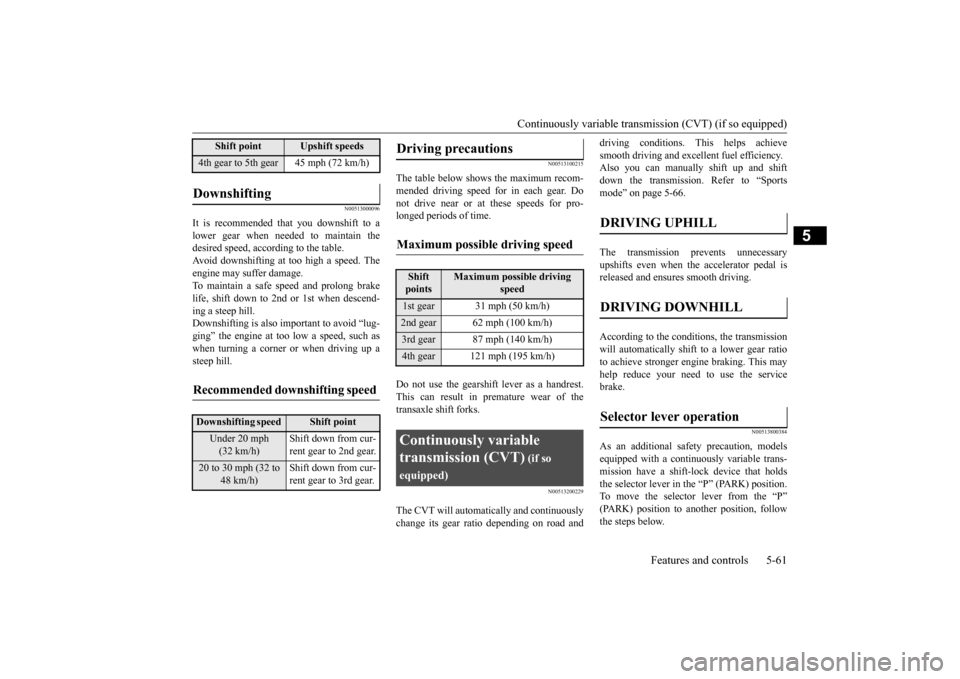
It is recommended that you downshift to a lower gear when needed to maintain the desired speed, according to the table.Avoid downshifting at too high a speed. The engine may suffer damage. To maintain a safe speed and prolong brakelife, shift down to 2nd or 1st when descend- ing a steep hill. Downshifting is also important to avoid “lug-ging” the engine at too low a speed, such aswhen turning a corner or when driving up a steep hill.
N00513100215
The table below shows the maximum recom- mended driving speed for in each gear. Donot drive near or at these speeds for pro- longed periods of time. Do not use the gearshift lever as a handrest. This can result in premature wear of the transaxle shift forks.
N00513200229
The CVT will automatically and continuously change its gear ratio depending on road and
driving conditions. This helps achieve smooth driving and excellent fuel efficiency. Also you can manually shift up and shift down the transmission. Refer to “Sportsmode” on page 5-66. The transmission prevents unnecessary upshifts even when the accelerator pedal isreleased and ensures smooth driving. According to the condi
tions, the transmission
will automatically shift to a lower gear ratio to achieve stronger engine braking. This may help reduce your need to use the servicebrake.
N00513800384
As an additional safe
ty precaution, models
equipped with a continuously variable trans- mission have a shift-lock device that holds the selector lever in the “P” (PARK) position.To move the selector lever from the “P” (PARK) position to another position, follow the steps below.
4th gear to 5th gear 45 mph (72 km/h)Downshifting
Recommended downshifting speed
Downshifting speed
Shift point
Under 20 mph (32 km/h)
Shift down from cur- rent gear to 2nd gear.
20 to 30 mph (32 to
48 km/h)
Shift down from cur- rent gear to 3rd gear.
Shift point
Upshift speeds
Driving precautions
Maximum possible driving speed
Shift points
Maximum possible driving
speed
1st gear 31 mph (50 km/h)2nd gear 62 mph (100 km/h)3rd gear 87 mph (140 km/h)4th gear 121 mph (195 km/h)Continuously variable transmission (CVT)
(if so
equipped)
DRIVING UPHILL
DRIVING DOWNHILL
Selector lever operation
BK0210300US.bo
ok 61 ページ 2014年4月8日 火曜日 午前10時46分
Page 134 of 434
Continuously variable transmission (CVT) (if so equipped)
Features and controls 5-65
5
N00514200372
This position locks th
e transmission to pre-
vent the vehicle from moving. The engine canbe started from the “PARK” position.
Move the lever to this position only after the vehicle has come to a complete stop. At this position, the transmission is disen- gaged. It is the same as the neutral position ona manual transaxle and should be used when the vehicle is not moving for an extended length of time during driving, such as in atraffic jam.
This position is used for most city and high- way driving. The transmission will automati- cally and continuously change its gear ratio depending on road and driving conditions. This position is for driv
ing up very steep hills
and for engine braking at low speeds when driving down steep hills.
• Slow down your vehicle.• Stop your vehicle in a safe place, put the selector lever in the “P” (PARK) position, and open the engine hood with the enginerunning to allow the engine to cool down.After a while, confirm that the warning display is no longer showing. It is safe to continue driving if the display is no longershowing. If the warning display remains or flashes frequently, have your vehicle inspected by an authorized MitsubishiMotors dealer or a repair facility of your choice. [When warning display is showing] It may be that there is something unusual happening in the CVT, causing a safety device to activate. Have your vehicleinspected by an authorized Mitsubishi Motors dealer or a repair facility of your choice as soon as possible.
Selector lever positions
“P” PARK
CAUTION
“R” REVERSE
CAUTION Never shift into the “P” (PARK) or “R” (REVERSE) position while the vehicle is inmotion. If the lever is shifted into the “P” (PARK) or “R” (REVERSE) position while the vehicle is in motion, the transmissionmay be damaged.
“N” NEUTRAL
WA R N I N G Never move the selector lever to the “N” (NEUTRAL) position while driving since you could accidentally slip it into the “P”(PARK) or “R”(REVERSE) position, damaging the transmission.
To prevent the vehicle from rolling when stopped on a slope, the engine should be started in the “P” (PARK) position, not in “N” (NEUTRAL) position. To prevent rolling, always keep your foot on the brake pedal when the vehicle is in “N” (NEUTRAL) position, or when shift-ing into or out of “N” (NEUTRAL) posi- tion.
“D” DRIVE
CAUTION To prevent transmission damage, never shift into the “D” (DRIVE) position from the “R” (REVERSE) position while the vehicle is inmotion.
“L” LOW (except for vehicles with manual gate)
WA R N I N G
BK0210300US.bo
ok 65 ページ 2014年4月8日 火曜日 午前10時46分
Page 135 of 434
Continuously variable transm
ission (CVT) (if so equipped)
5-66 Features and controls
5
N00514400417
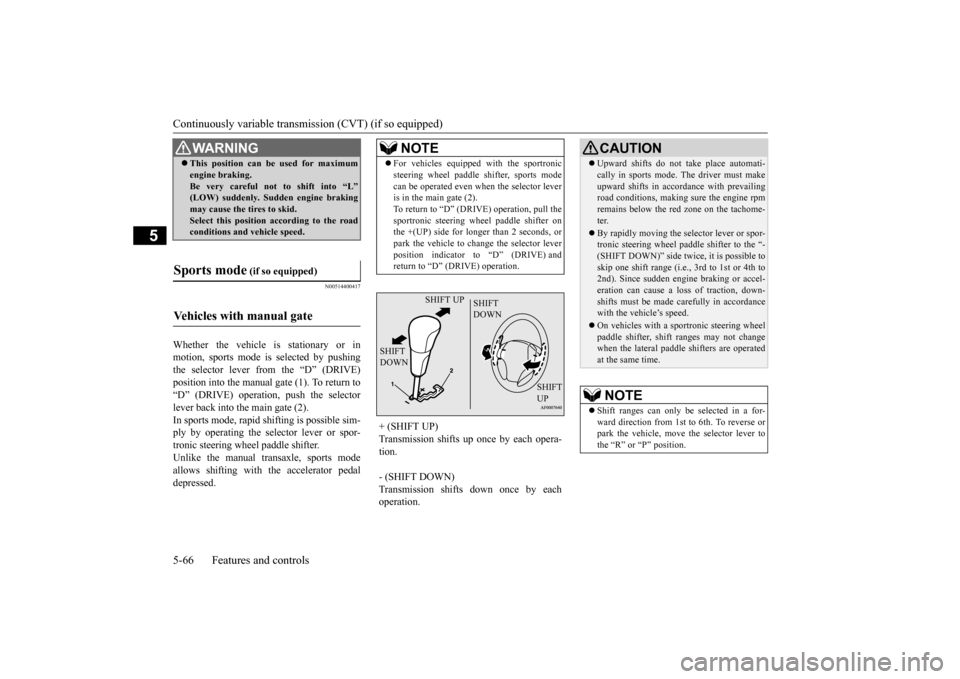
Whether the vehicle is stationary or in motion, sports mode is selected by pushingthe selector lever from the “D” (DRIVE) position into the manual gate (1). To return to “D” (DRIVE) operation, push the selectorlever back into the main gate (2). In sports mode, rapid shifting is possible sim- ply by operating the selector lever or spor-tronic steering wheel paddle shifter. Unlike the manual transaxle, sports mode allows shifting with the accelerator pedaldepressed.
WA R N I N G This position can be used for maximum engine braking. Be very careful not to shift into “L” (LOW) suddenly. Sudden engine braking may cause the tires to skid.Select this position according to the road conditions and vehicle speed.
Sports mode
(if so equipped)
Vehicles with manual gate
NOTE
For vehicles equipped with the sportronic steering wheel paddle shifter, sports mode can be operated even when the selector lever is in the main gate (2). To return to “D” (DRIVE) operation, pull thesportronic steering wheel paddle shifter on the +(UP) side for longer than 2 seconds, or park the vehicle to change the selector leverposition indicator to “D” (DRIVE) and return to “D” (DRIVE) operation.
+ (SHIFT UP) Transmission shifts up once by each opera- tion. - (SHIFT DOWN) Transmission shifts down once by each operation.
SHIFT UP
SHIFT DOWN
SHIFT DOWN
SHIFT UP
CAUTION Upward shifts do not take place automati- cally in sports mode. The driver must make upward shifts in accordance with prevailing road conditions, making sure the engine rpm remains below the red zone on the tachome-ter. By rapidly moving the selector lever or spor- tronic steering wheel padd
le shifter to the “-
(SHIFT DOWN)” side tw
ice, it is possible to
skip one shift range (i.e
., 3rd to 1st or 4th to
2nd). Since sudden engine braking or accel- eration can cause a loss of traction, down- shifts must be made carefully in accordancewith the vehicle’s speed. On vehicles with a sportronic steering wheel paddle shifter, shift ranges may not change when the lateral paddle shifters are operated at the same time.NOTE
Shift ranges can only be selected in a for- ward direction from 1st to 6th. To reverse or park the vehicle, move the selector lever tothe “R” or “P” position.
BK0210300US.bo
ok 66 ページ 2014年4月8日 火曜日 午前10時46分
Page 136 of 434
Continuously variable transmission (CVT) (if so equipped)
Features and controls 5-67
5
While driving with the selector lever in the “D” (DRIVE), sports mode can be selected by pulling one of the sportronic steering wheel shifters toward you.In sports mode, rapid
shifting is possible sim-
ply by operating the sportronic steering wheel paddle shifter.
Unlike the manual transaxle, sports mode allows shifting with the accelerator pedal depressed.
To maintain good running performance, the transmission may refuse to perform an upshift when the selector lever or sportronic steering wheel paddle shifter is moved to the “+(SHIFT UP)” positi
on at certain vehicle
speeds. Also, to prevent over-revving of the engine, the transmission may refuse to per- form a downshift when the shift lever orsportronic steering wheel paddle shifter is moved to the “- (SHIFT DOWN)” position at certain vehicle speeds. When this happens, abuzzer sounds to indicate that a downshift is not going to take place. Move the selector lever gently between the manual and main gates and between posi- tions in the manual gate. And do not operatesportronic steering wheel paddle shifter vio- lently. Excessive force could damage the selector lever or sportronic steering wheelpaddle shifter.
Except for vehicles with manual gate
NOTE
NOTE
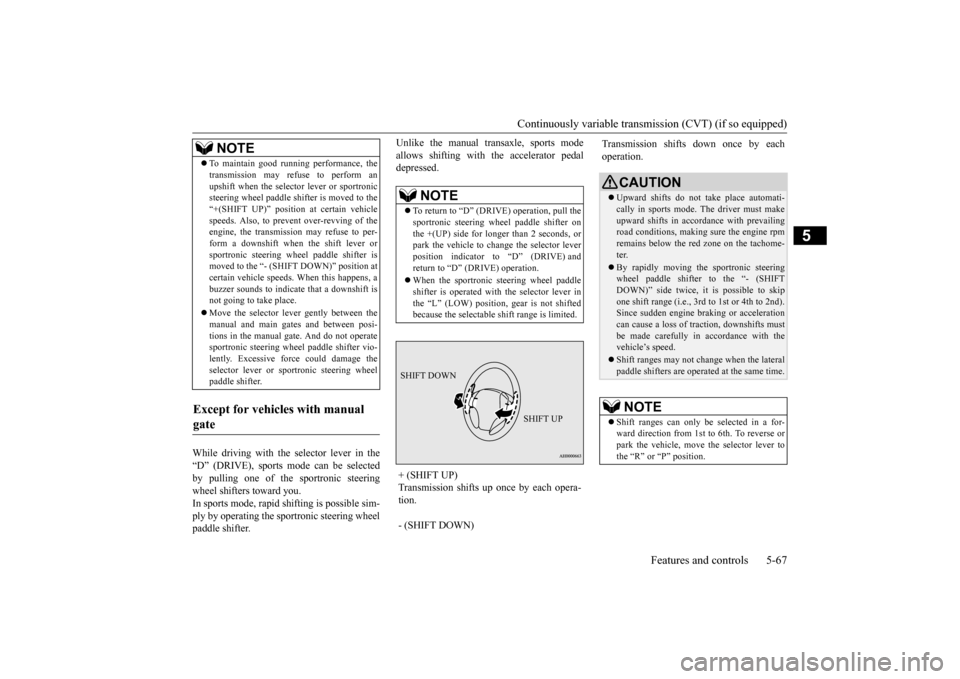
To return to “D” (DRIVE) operation, pull the sportronic steering wheel paddle shifter on the +(UP) side for longer than 2 seconds, or park the vehicle to change the selector leverposition indicator to “D” (DRIVE) and return to “D” (DRIVE) operation. When the sportronic steering wheel paddle shifter is operated with the selector lever in the “L” (LOW) position, gear is not shiftedbecause the selectable shift range is limited.
+ (SHIFT UP) Transmission shifts up once by each opera- tion. - (SHIFT DOWN) SHIFT DOWN
SHIFT UP
Transmission shifts down once by each operation.
CAUTION Upward shifts do not take place automati- cally in sports mode. The driver must makeupward shifts in accordance with prevailing road conditions, making sure the engine rpm remains below the red zone on the tachome-ter. By rapidly moving the sportronic steering wheel paddle shifter to the “- (SHIFT DOWN)” side twice, it is possible to skip one shift range (i.e., 3rd to 1st or 4th to 2nd).Since sudden engine braking or acceleration can cause a loss of traction, downshifts must be made carefully in accordance with thevehicle’s speed. Shift ranges may not change when the lateral paddle shifters are operated at the same time.NOTE
Shift ranges can only be selected in a for- ward direction from 1st to 6th. To reverse orpark the vehicle, move the selector lever to the “R” or “P” position.
BK0210300US.bo
ok 67 ページ 2014年4月8日 火曜日 午前10時46分
Page 145 of 434
Twin Clutch SST (Sportronic Shif
t Transmission) (if so equipped)
5-76 Features and controls
5
While the vehicle is stopped or being driven, push the Twin Clutch SST control mode switch rearward.
N00540400043
When the ignition switch is set to the “ON”position, the currently selected control modeis displayed on the multi-information display.
N00540500031
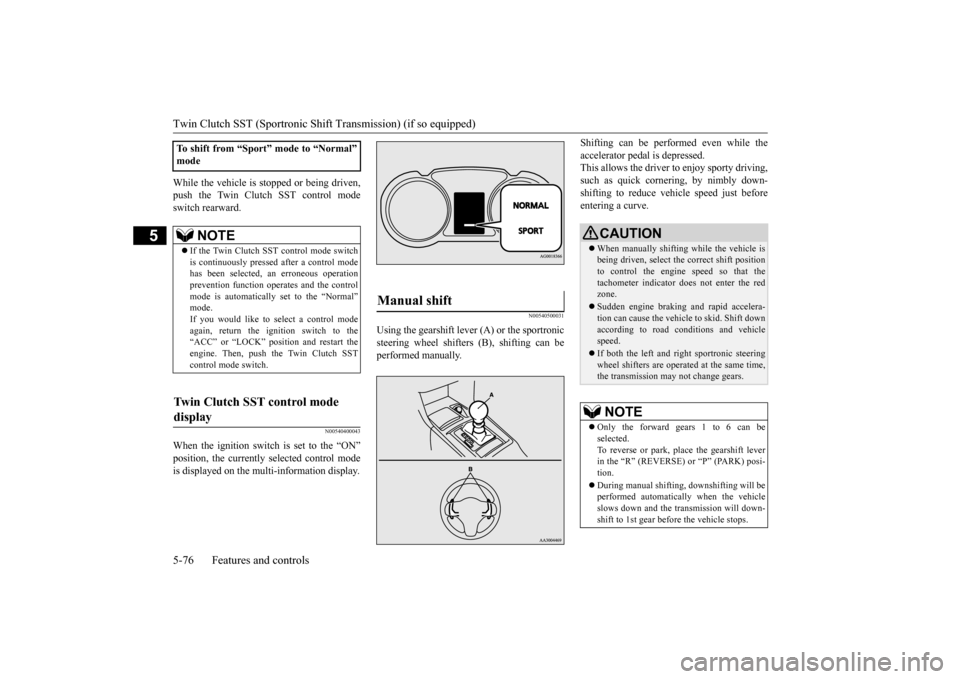
Using the gearshift lever (A) or the sportronicsteering wheel shifters (B), shifting can beperformed manually.
Shifting can be performed even while the accelerator pedal is depressed. This allows the driver to enjoy sporty driving, such as quick cornering, by nimbly down-shifting to reduce vehi
cle speed just before
entering a curve.
To shift from “Sport” mode to “Normal” mode
NOTE
If the Twin Clutch SST control mode switch is continuously pressed after a control modehas been selected, an erroneous operation prevention function operates and the control mode is automatically set to the “Normal”mode. If you would like to select a control mode again, return the ignition switch to the“ACC” or “LOCK” position and restart the engine. Then, push the Twin Clutch SST control mode switch.
Twin Clutch SST control mode display
Manual shift
CAUTION When manually shifting while the vehicle is being driven, select the correct shift position to control the engine speed so that the tachometer indicator does not enter the redzone. Sudden engine braking and rapid accelera- tion can cause the vehicle to skid. Shift down according to road conditions and vehicle speed. If both the left and right sportronic steering wheel shifters are operated at the same time,the transmission may not change gears.NOTE
Only the forward gears 1 to 6 can be selected. To reverse or park, place the gearshift lever in the “R” (REVERSE) or “P” (PARK) posi-tion. During manual shifting, downshifting will be performed automatically when the vehicle slows down and the transmission will down- shift to 1st gear before the vehicle stops.
BK0210300US.bo
ok 76 ページ 2014年4月8日 火曜日 午前10時46分
Page 151 of 434
ACD (Active center differential system) (if so equipped) 5-82 Features and controls
5
However, if the vehicle does not move or accelerate normally, or if this problem occurs repeatedly, have the vehicle checked by an authorized Mitsubishi Motors dealer or arepair facility of your choice as soon as possi- ble.
N00538500034
The ACD is a system that improves accelera- tion performance and straight-ahead stabilityby regulating the differential limiting action and power drive distribution of the center dif- ferential.
N00545400048
Select the control mode from the followingthree types to suit the driving conditions.
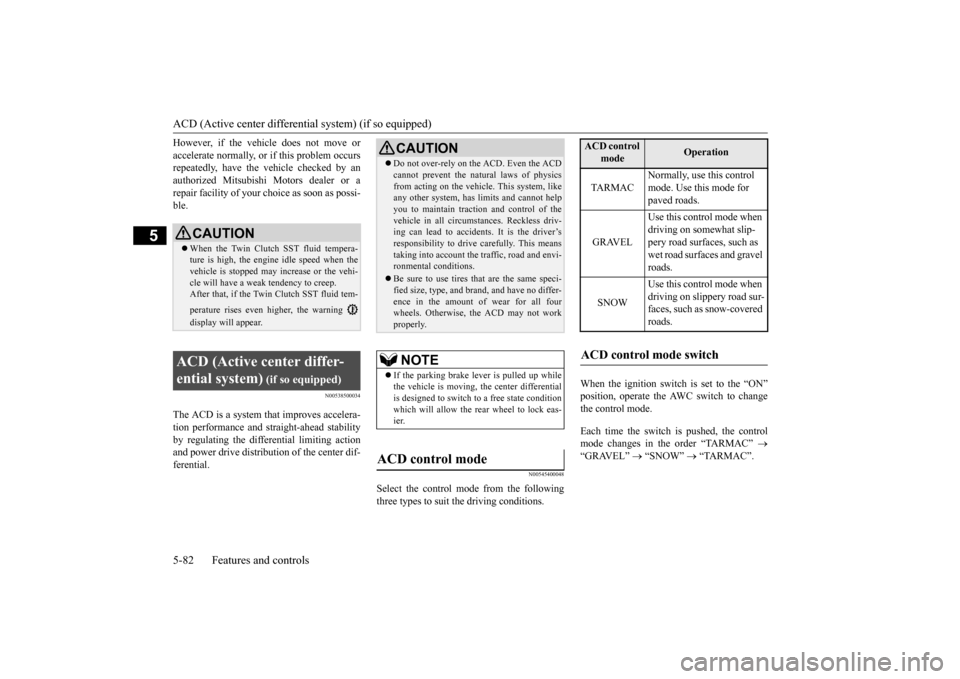
When the ignition switch is set to the “ON” position, operate the AWC switch to change the control mode. Each time the switch is pushed, the control mode changes in the order “TARMAC”
“GRAVEL”
“SNOW”
“TARMAC”.
CAUTIONWhen the Twin Clutch SST fluid tempera- ture is high, the engine idle speed when the vehicle is stopped may increase or the vehi- cle will have a weak tendency to creep. After that, if the Twin Clutch SST fluid tem- perature rises even higher, the warning display will appear.
ACD (Active center differ- ential system)
(if so equipped)
CAUTION Do not over-rely on the ACD. Even the ACD cannot prevent the natural laws of physics from acting on the vehicle. This system, like any other system, has limits and cannot help you to maintain traction and control of thevehicle in all circumstances. Reckless driv- ing can lead to accidents. It is the driver’s responsibility to drive carefully. This meanstaking into account the traffic, road and envi- ronmental conditions. Be sure to use tires that are the same speci- fied size, type, and brand, and have no differ- ence in the amount of wear for all fourwheels. Otherwise, the ACD may not work properly.NOTE
If the parking brake lever is pulled up while the vehicle is moving, the center differential is designed to switch to a free state condition which will allow the rear wheel to lock eas-ier.
ACD control mode
ACD control
mode
Operation
TA R M A C
Normally, use this control mode. Use this mode for paved roads.
GRAVEL
Use this control mode when driving on somewhat slip- pery road surfaces, such as wet road surfaces and gravel roads.
SNOW
Use this control mode when driving on slippery road sur-faces, such as snow-covered roads.
ACD control mode switch
BK0210300US.bo
ok 82 ページ 2014年4月8日 火曜日 午前10時46分
Page 152 of 434
ACD (Active center differential system) (if so equipped)
Features and controls 5-83
5
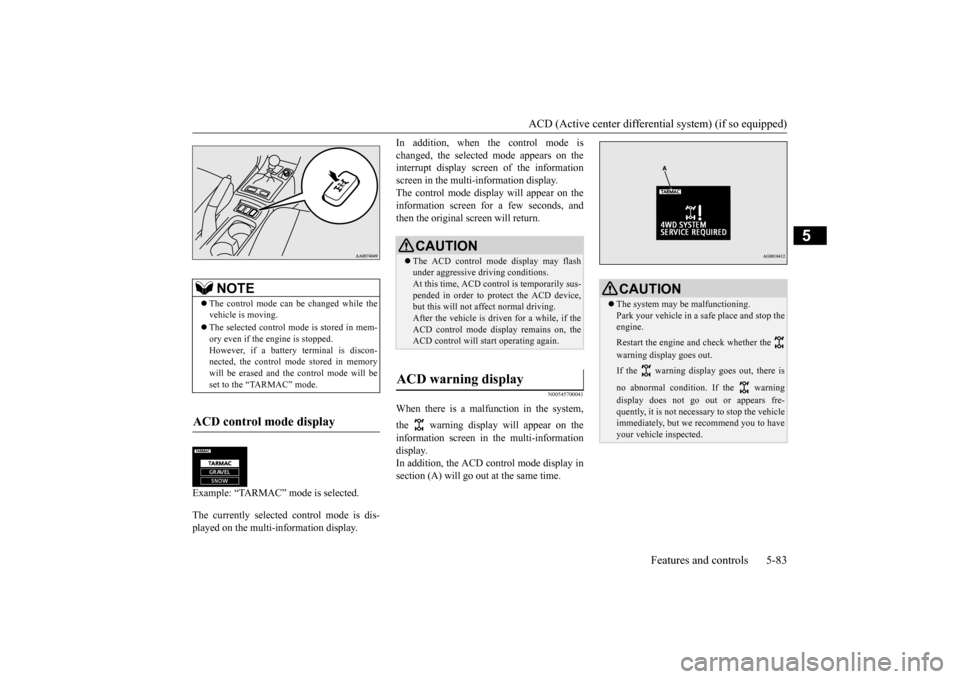
Example: “TARMAC” mode is selected. The currently selected control mode is dis- played on the multi-information display.
In addition, when the control mode is changed, the selected mode appears on the interrupt display screen of the information screen in the multi-information display.The control mode display will appear on the information screen for a few seconds, and then the original screen will return.
N00545700041
When there is a malfunction in the system, the warning display will appear on the information screen in the multi-information display. In addition, the ACD control mode display insection (A) will go out at the same time.
NOTE
The control mode can be changed while the vehicle is moving. The selected control mode is stored in mem- ory even if the engine is stopped. However, if a battery terminal is discon-nected, the control mode stored in memory will be erased and the control mode will be set to the “TARMAC” mode.
ACD control mode display
ç
CAUTION The ACD control mode display may flash under aggressive driving conditions.At this time, ACD cont
rol is temporarily sus-
pended in order to protect the ACD device, but this will not affect normal driving.After the vehicle is driven for a while, if the ACD control mode display remains on, the ACD control will start operating again.
ACD warning display
CAUTION The system may be malfunctioning. Park your vehicle in a safe place and stop the engine. Restart the engine and check whether the warning display goes out. If the warning display goes out, there is no abnormal condition. If the warning display does not go out or appears fre- quently, it is not necessary to stop the vehicle immediately, but we recommend you to haveyour vehicle inspected.
BK0210300US.bo
ok 83 ページ 2014年4月8日 火曜日 午前10時46分
Page 155 of 434
All-wheel driving operation 5-86 Features and controls
5
N00530600169
Full-time 4WD vehicles are propelled by engine power distributed constantly andappropriately to all 4 wheels. Not only does this ensure enhanced handling on dry, paved roads but also permits bettertraction when driving on slippery, wet orsnow-covered roads and when moving out of mud. These vehicles, however, are not designedfor off-road use, and are unsuitable for driving on bumpy ground that may cause excessive strain.
Full-time 4WD vehicles
should be driven only under the same condi- tions as are suitable for ordinary front-wheel drive vehicles. Electronically controlled 4WD system vehi- cles are propelled by engine power distrib- uted constantly and appropriately to all 4 wheels. Not only does this ensure enhanced handling on dry, paved roads but also permits better
traction when driving on slippery, wet or snow-covered roads and when moving out of mud. These vehicles, however, are not designedfor off-road use, and are unsuitable for driving on bumpy ground that may cause excessive strain.
Electronically controlled
4WD system vehicles should be driven only under the same conditions as are suitable for ordinary front-wheel drive vehicles. When turning a sharp corner in “4WD LOCK” position at low speed, a slight differ- ence in steering may be experienced similarto feeling as if the brakes were applied. This is called tight corner braking and results from each of the four tires being at a different dis-tance from the corner. The phenomenon is typical of 4-wheel drive vehicles. If this occurs, either straighten out the steeringwheel, or change to “2WD” or “4WD AUTO” mode. Set the drive mode-selector to “4WD AUTO” conditions, and then gradually depress theaccelerator pedal for a smooth start.
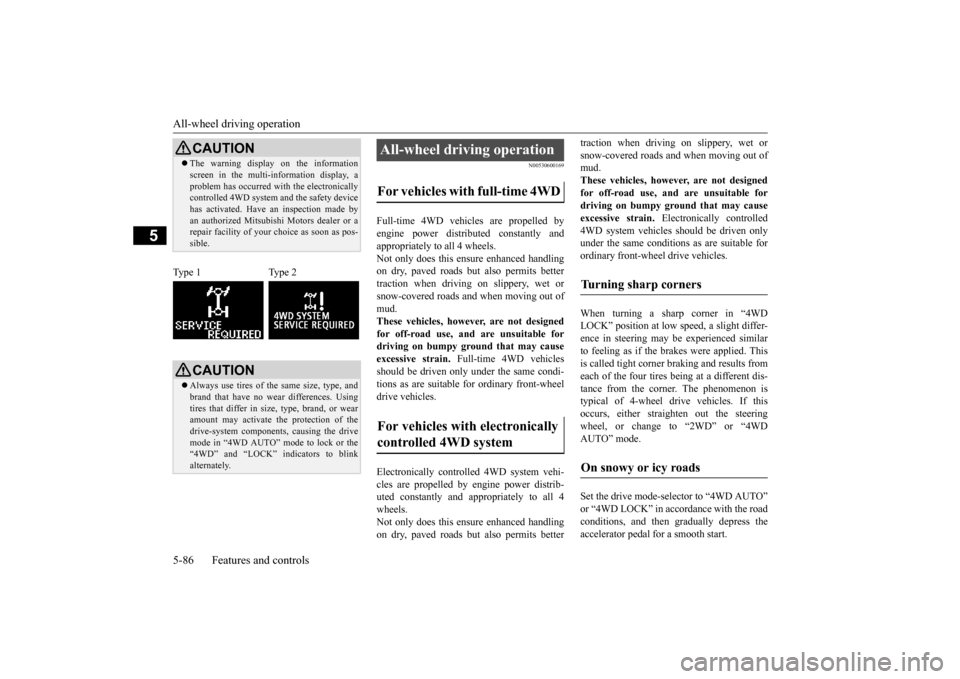
CAUTION The warning display on the information screen in the multi-information display, a problem has occurred with the electronically controlled 4WD system and the safety device has activated. Have an inspection made byan authorized Mitsubishi Motors dealer or a repair facility of your choice as soon as pos- sible.
Type 1 Type 2
CAUTION Always use tires of the same size, type, and brand that have no wear differences. Using tires that differ in size, type, brand, or wear amount may activate the protection of thedrive-system components, causing the drive mode in “4WD AUTO” mode to lock or the “4WD” and “LOCK” indicators to blinkalternately.
All-wheel driving operation For vehicles with full-time 4WD For vehicles with electronically controlled 4WD system
Turning sharp corners On snowy or icy roads
BK0210300US.bo
ok 86 ページ 2014年4月8日 火曜日 午前10時46分
Page 178 of 434
Instrument cluster
Features and controls 5-109
5
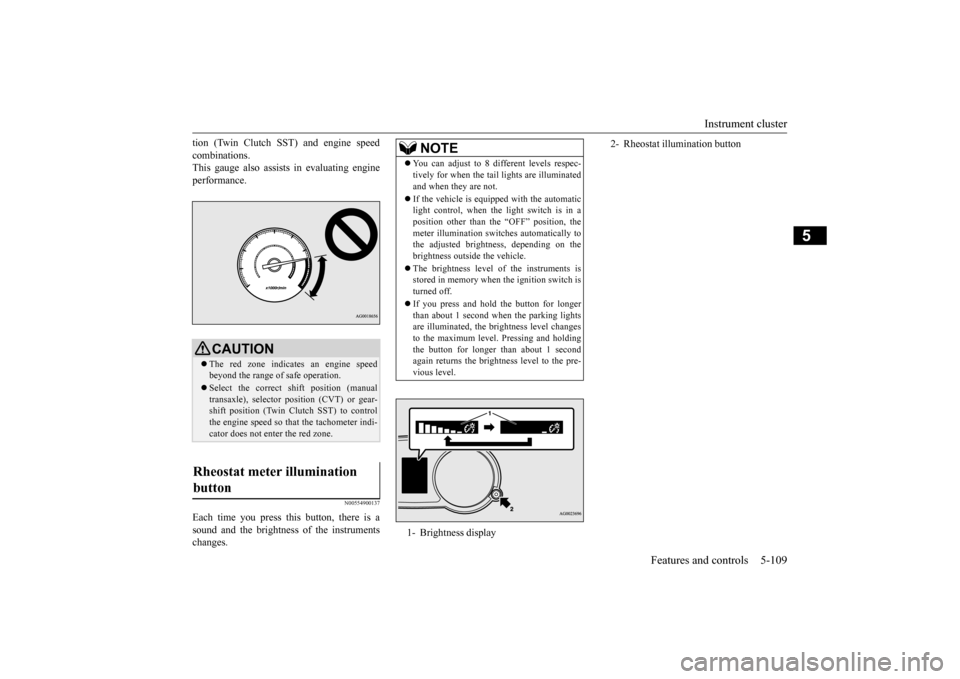
tion (Twin Clutch SST) and engine speed combinations. This gauge also assists in evaluating engine performance.
N00554900137
Each time you press this button, there is asound and the brightness of the instrumentschanges.
CAUTION The red zone indicates an engine speed beyond the range of safe operation. Select the correct shift position (manual transaxle), selector position (CVT) or gear- shift position (Twin Clutch SST) to controlthe engine speed so that the tachometer indi- cator does not enter the red zone.
Rheostat meter illumination button
NOTE
You can adjust to 8 different levels respec- tively for when the tail
lights are illuminated
and when they are not. If the vehicle is equipped with the automatic light control, when the light switch is in a position other than the “OFF” position, the meter illumination switches automatically tothe adjusted brightness, depending on the brightness outside the vehicle. The brightness level of the instruments is stored in memory when the ignition switch is turned off. If you press and hold the button for longer than about 1 second when the parking lightsare illuminated, the brightness level changes to the maximum level. Pressing and holding the button for longer than about 1 secondagain returns the brightness level to the pre- vious level.1- Brightness display
2- Rheostat illumination button
BK0210300US.book
109 ページ 2014年4月8日 火曜日 午前10時46分
Page 180 of 434
Multi-information display
Features and controls 5-111
5
N00555100136
The multi-information meter switch is a but- ton marked “INFO” on the left side of the dash. Each time the multi-information meter switchis operated, a sound is emitted and the multi- information display changes between infor- mation such as warnings, odometer, tripodometer, service reminder, engine coolant temperature (Type 1), average and momen- tary fuel consumption, driving range, andaverage speed and ACD control mode display (if so equipped).
It is also possible to change elements such as the language and units used on the multi- information display by operating the multi- information meter switch.
N00555200137
If you press the multi-information meterswitch and return from the warning display screen to the previous screen, the warning is displayed. Refer to “Returning to the display screen from before the warning display” on page 5-113.This mark is also displayed if there is anotherwarning other than the one displayed. When
9- Engine coolant temperature display (if
so equipped)
P.5-116
10- Twin Clutch SST control mode display
screen (Twin Clutch SST)
P.5-76
11- Selector lever position display screen
(CVT)
P.5-64
Gearshift lever position display screen (Twin Clutch SST)
P.5-71
12- Drive mode indicator display screen
(CVT) (if so equipped) P.5-115 ACD control mode display screen(Twin Clutch SST)
P.5-82
13- ECO mode indicator (if so equipped)
P.5-121
14- Gearshift indicator display screen (if so
equipped)
P.5-60
NOTE
The fuel units, temperature units, display language, and other settings can be changed.Refer to “Changing the function settings (With ignition switch in the “ON” position)” on page 5-123.
The display screen is different depending on whether the ignition switch in the “OFF” or “ON” position. Refer to “Information screen (With ignition switch in the “OFF” position)” on page5-112. Refer to “Warning displa
y list (With ignition
switch in the “OFF” position)” on page5-132. Refer to “Information screen (With ignition switch turned from “OFF” to “ON” posi-tion)” on page 5-115. Refer to “Information screen (With ignition switch in the “ON” position)” on page 5-116.Refer to “Warning displa
y list (With ignition
switch in the “ON” position)” on page 5-135.
Multi-information meter switch
NOTE
Warning display screen (With ignition switch in the “OFF” position)
BK0210300US.book
111 ページ 2014年4月8日 火曜日 午前10時46分