display MITSUBISHI LANCER 2016 8.G Owners Manual
[x] Cancel search | Manufacturer: MITSUBISHI, Model Year: 2016, Model line: LANCER, Model: MITSUBISHI LANCER 2016 8.GPages: 392, PDF Size: 13.12 MB
Page 297 of 392
Display Indicator
Comfort controls 7-47
7
N00717700022
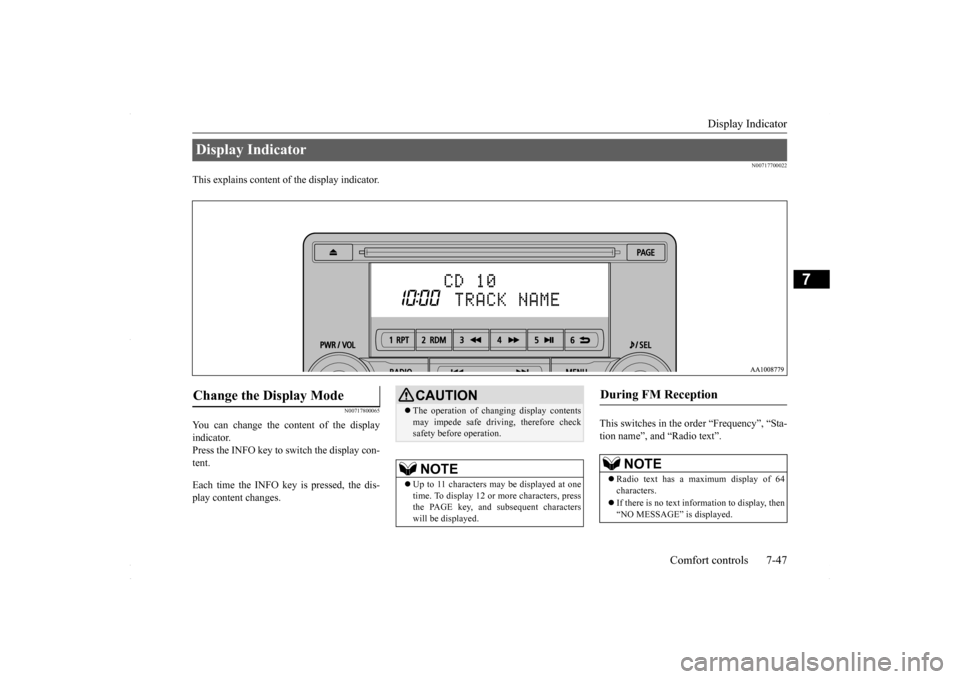
This explains content of the display indicator.
N00717800065
You can change the content of the display indicator. Press the INFO key to switch the display con- tent. Each time the INFO key is pressed, the dis- play content changes.
This switches in the order “Frequency”, “Sta- tion name”, and “Radio text”.
Display Indicator Change the Display Mode
CAUTION The operation of changing display contents may impede safe driving, therefore check safety before operation.NOTE
Up to 11 characters may be displayed at one time. To display 12 or more characters, press the PAGE key, and subsequent characterswill be displayed.
During FM Reception
NOTE
Radio text has a maximum display of 64 characters. If there is no text information to display, then “NO MESSAGE” is displayed.
BK0230300US.bo
ok 47 ページ 2015年7月30日 木曜日 午後8時38分
Page 298 of 392
Audio Quality and Volume Balance Adjustment 7-48 Comfort controls
7
This switches in the order “Channel name”, “Category name”, “Artist name”, “Trackname”, and “Composer name”. This switches in the order “Disc title”, “Track title”, and “Operating status”. This switches in the order “Folder title”, “File title”, and “Operating status”.
Hold down the INFO key. This switches the ID3tag display. Each time INFO key is pressed, this switches in the order “Album name”, “Track name”, “Artist name”, “Genre name”*, and “Operat-ing status”.
N00718200024
This switches in the order “Albums”, “Trackname”, “Artist name”, “Genre name”, and “Operating status”.
N00718300025
Operating details are the same as in “DuringiPod Playback” (P.7-48).
N00718400042
Change audio quality settings. 1. Press the /SEL key to select settings items. Each time the /SEL key is pressed, this switches in the order BASS, TREBLE, FADER, BALANCE, SCV (speed com- pensated volume), and Cancel.
During Satellite Radio Reception
(if so equipped)
NOTE
The channel and category have a maximum display of 8 characters. The other items have a maximum display of 36 characters.
During CD-DA playback
NOTE
If there is no text information to display, then “NO TITLE” is displayed.
During MP3/WMA/AAC Play- back
NOTE
If there is no text information to display, then “NO TITLE” is displayed.
Display the ID3tag
*:Displayed when playing back audio files on a USB device (vehicles with a Bluetooth
® 2.0 interface).
NOTE
During display of the ID3tag, hold down the INFO key to switch to the folder title display. The genre name display may not be possible.
During iPod Playback
NOTE
If there is no text information to display, then “NO TITLE” is displayed. Displayed genre name in equipment by type (vehicles with a Bluetooth
® 2.0 interface).
The genre name display may not be possible.
During Bluetooth
® 2.0 Audio Play-
back
(if so equipped)
Audio Quality and Volume Balance Adjustment Adjust Audio Quality and Vol- ume Balance
BK0230300US.bo
ok 48 ページ 2015年7月30日 木曜日 午後8時38分
Page 299 of 392
System Settings
Comfort controls 7-49
7
2. Turn the /SEL key to adjust.
N00718500085
Change system settings such as product time. 1. Press the MENU key.
2. Press the /SEL key to select settings items. Each time the /SEL key is pressed, this switches in the order Satellite radio set- tings*
1, Gracenote DB*
2, PHONE set-
tings, Adjust time, and Cancel. 3. Turn the /SEL key to set.4. Press the /SEL key to determine. This completes settings, and displays the next settings item.
Adjust-ment items
Turn counter- clockwise
Turn clockwise
BASS -6 to 0
(low low-pass volume)
0 to +6 (high low-pass volume)
TRE- BLE
-6 to 0 (Low high-pass volume)
0 to +6 (High high-pass volume)
FADER CENTER to
REAR 11 (emphasize REAR)
FRONT 11 to CENTER (emphasize FRONT)
BAL- ANCE
LEFT 11 to CENTER (emphasize LEFT)
CENTER to RIGHT 11 (emphasize RIGHT)
SCV OFF, LOW
(SCV effect is OFF/low)
MID, HIGH (SCV effect is middle/high)
System Settings
*1: Displayed when a satellite tuner is con- nected.
*2: Displayed when playing back audio files (vehicles with a Bluetooth
® 2.0 interface).
BK0230300US.bo
ok 49 ページ 2015年7月30日 木曜日 午後8時38分
Page 300 of 392
System Settings 7-50 Comfort controls
7
Change each satellite radio setting.Satellite Radio Settings
(if so equipped)
Settings name
Settings item
Settings value
Settings content
SIRIUS ID — — This displays the SIRIUS ID. SKIP SETTING SKIP SETTING
SELECT CH*
1
ON SKIP can be set for each channel. Channe
ls for which SKIP is set are excluded
from the search during up/down channel selecting and scanning.They can be received when selecting chan
nels using the preset keys or searching
for a station.
OFF
SKIP SETTING ALL RESET
— When “YES” is selected, the SKIP settings for all channels are turned off.
LOCK SETTING LOCK SETTING
SELECT CH*
2
ON LOCK can be set for each channel. Channels for which LOCK is set are
excluded from the search during up/do
wn channel selecting and scanning.
If a channel for which LOCK is set is sel
ected when selecting channels using the
preset keys or searching for a station, “CH LCKED” is displayed within about 2 seconds after the channel text is displayed. The sound is muted.
OFF
LOCK SETTING ALL RESET
— When “YES” is selected and the CODE
for settings is input, the LOCK settings
for all channels are turned off.
LOCK SETTING EDIT CODE
— The CODE required for the LOCK settings is changed. (The factory setting is
“1111”.)If the input code is incorrect, “LOCK SETTING WRG LC” is displayed.
*1: Each time the /SET key is pressed, this switches in the order Sett
ings channel select, Change SKIP settings, and Complete setti
ngs.
To return to “each channel SKIP setting”, press the 6 key.
BK0230300US.bo
ok 50 ページ 2015年7月30日 木曜日 午後8時38分
Page 301 of 392
System Settings
Comfort controls 7-51
7
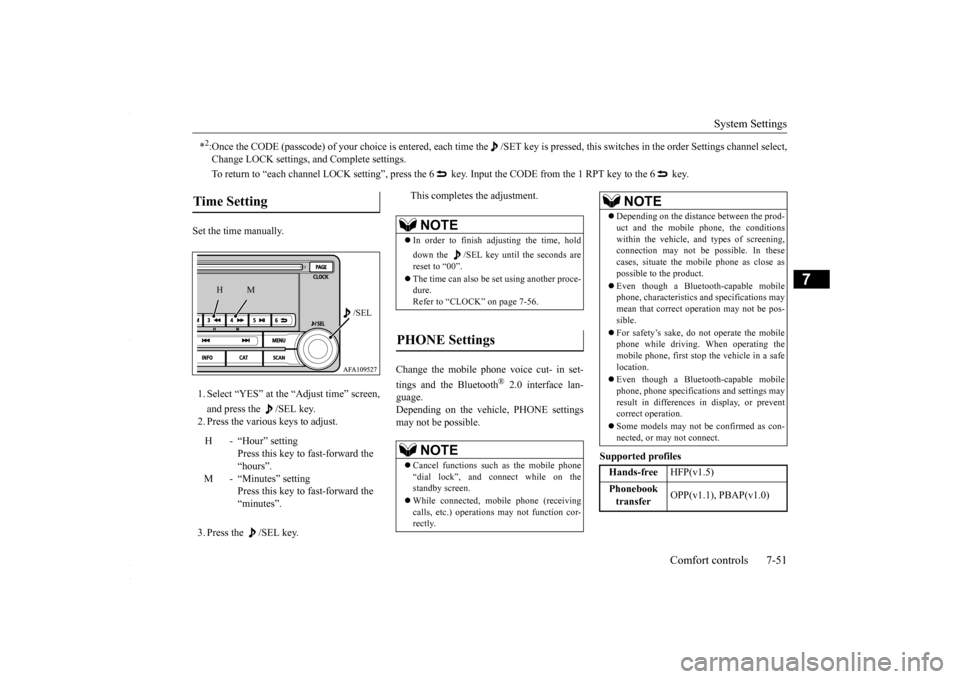
Set the time manually. 1. Select “YES” at the “Adjust time” screen, and press the /SEL key. 2. Press the various keys to adjust. 3. Press the /SEL key.
This completes the adjustment.
Change the mobile phone voice cut- in set- tings and the Bluetooth
® 2.0 interface lan-
guage. Depending on the vehicle, PHONE settingsmay not be possible.
Supported profiles
*2:Once the CODE (passcode) of your choice is entered, each time th
e /SET key is pressed, this switches in the order Settings chan
nel select,
Change LOCK settings, and Complete settings. To return to “each channel LOCK setting”, press the 6
key. Input the CODE from the 1 RPT key to the 6 key.
Time Setting
H - “Hour” setting
Press this key to fast-forward the “hours”.
M - “Minutes” setting
Press this key to fast-forward the “minutes”.
/SEL
M
H
NOTE
In order to finish adjusting the time, hold down the /SEL key until the seconds are reset to “00”. The time can also be set using another proce- dure. Refer to “CLOCK” on page 7-56.
PHONE Settings
NOTE
Cancel functions such as the mobile phone “dial lock”, and connect while on the standby screen. While connected, mobile phone (receiving calls, etc.) operations may not function cor- rectly.
Depending on the distance between the prod- uct and the mobile phone, the conditions within the vehicle, and types of screening,connection may not be possible. In these cases, situate the mobile phone as close as possible to the product. Even though a Bluetooth-capable mobile phone, characteristics and specifications may mean that correct operation may not be pos- sible. For safety’s sake, do not operate the mobile phone while driving. When operating themobile phone, first stop the vehicle in a safe location. Even though a Bluetooth-capable mobile phone, phone specifications and settings may result in differences in display, or preventcorrect operation. Some models may not be confirmed as con- nected, or may not connect.Hands-free
HFP(v1.5)
Phonebook transfer
OPP(v1.1), PBAP(v1.0)
NOTE
BK0230300US.bo
ok 51 ページ 2015年7月30日 木曜日 午後8時38分
Page 302 of 392
System Settings 7-52 Comfort controls
7
A hands-free kit (available separately) is required. (“Set value” bold typeface indicates factorydefault settings.)
(“Set value” bold typeface indicates factory default settings.) The version number can be confirmed. 1. Select “Gracenote DB” and press the
/SEL key.
2. Turn the /SEL key and select “DB Ver- sion”. 3. Press the /SEL key. The DB Version is displayed.
Vehicles without a Bluetooth
® 2.0 Inter-
faceSettings value
Settings content
PHONE OFF
Do not use mobile phone voice cut-in.
PHONE MUTE
During mobile phone voice cut- in, mute the audio.
PHONE AT T
During mobile phone voice cut- in, output audio from all speak-ers.
PHONE IN-L
During mobile phone voice cut- in, output sound from the left front speaker.
PHONE IN-R
During mobile phone voice cut- in, output sound from the right front speaker.
PHONE IN-LR
During mobile phone voice cut- in, output sound from the left and right front speakers.
Vehicles with a Bluetooth
® 2.0 Interface
Settings name
Settings value
Settings content
HFM voice lan- guage set- tings
ENG- LISH
Change the hands free module voice language.
FRENCH SPANISHJAPA- NESE
Gracenote DB (Vehicles with a Bluetooth
® 2.0 interface)
BK0230300US.bo
ok 52 ページ 2015年7月30日 木曜日 午後8時38分
Page 303 of 392
Troubleshooting
Comfort controls 7-53
7
N00718600031
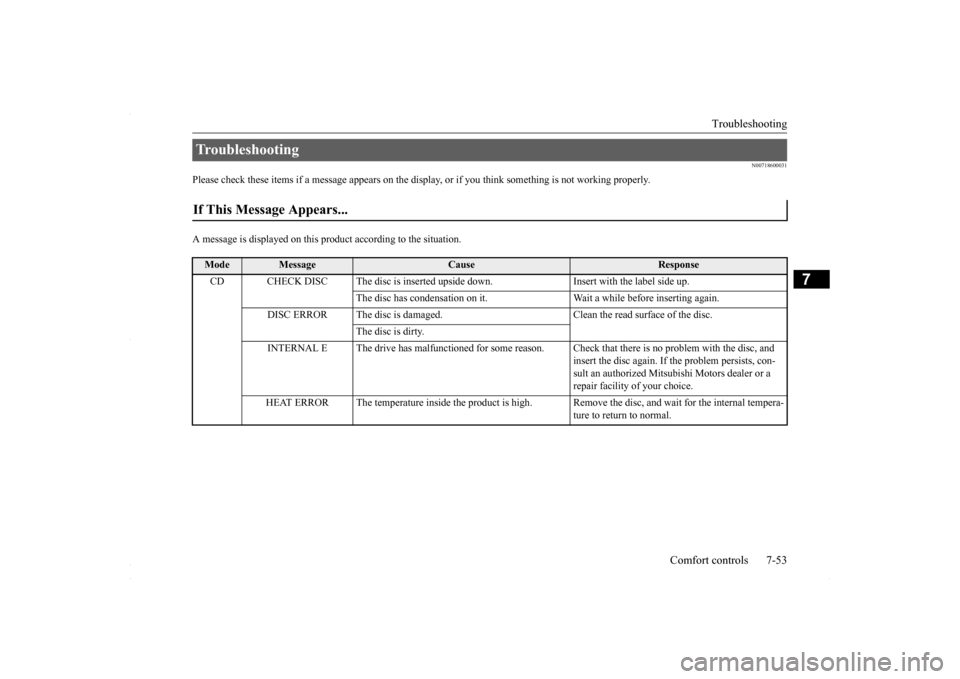
Please check these items if a message appears on the disp
lay, or if you think something is not working properly.
A message is displayed on this
product according to the situation.
Troubleshooting If This Message Appears...
Mode
Message
Cause
Response
CD CHECK DISC The disc is inserted upsi
de down. Insert with the label side up.
The disc has condensation on it. Wait a while before inserting again.
DISC ERROR The disc is damaged. Clean the read surface of the disc.
The disc is dirty.
INTERNAL E The drive has malfunctioned for some reason. Check that there is no problem with the disc, and
insert the disc again. If the problem persists, con-sult an authorized Mitsubishi Motors dealer or a repair facility of your choice.
HEAT ERROR The temperature inside the product is high.
Remove the disc, and wait for the internal tempera- ture to return to normal.
BK0230300US.bo
ok 53 ページ 2015年7月30日 木曜日 午後8時38分
Page 306 of 392
Clock (if so equipped) 7-56 Comfort controls
7
Turn the pole (A) counterclockwise. Screw the pole (A) clockwise into the base (B) until it is securely retained.
N00755001176
The time is displayed when the ignitionswitch is in ON or ACC.
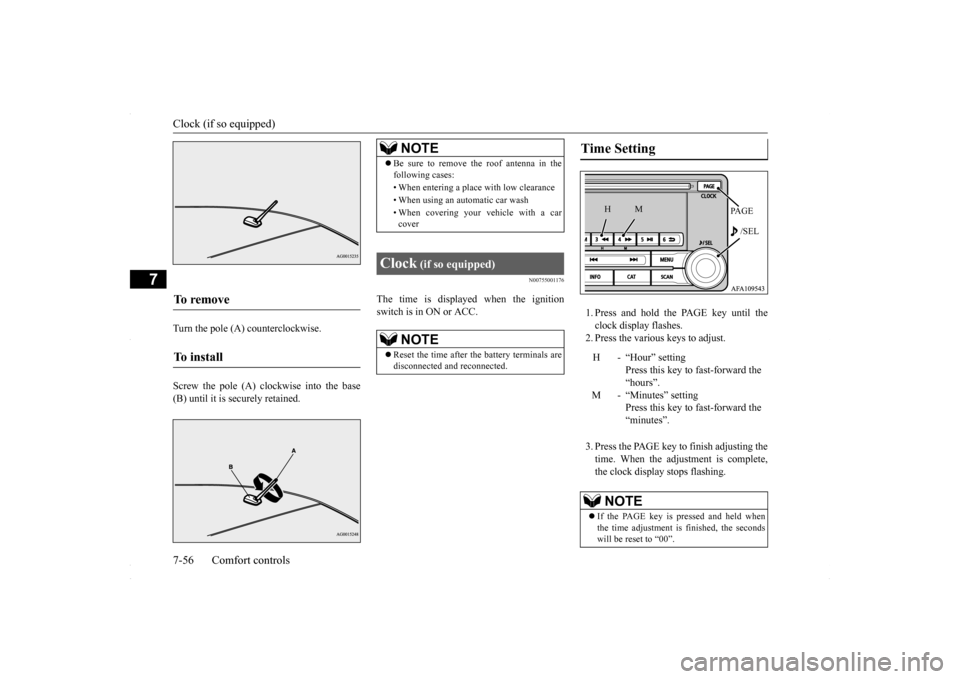
1. Press and hold the PAGE key until the clock display flashes.2. Press the various keys to adjust. 3. Press the PAGE key to finish adjusting the time. When the adjustment is complete, the clock display stops flashing.
To remove To i n s t a l l
NOTE
Be sure to remove the roof antenna in the following cases: • When entering a place with low clearance • When using an automatic car wash • When covering your vehicle with a car cover
Clock
(if so equipped)
NOTE
Reset the time after the battery terminals are disconnected and reconnected.
Time Setting
H - “Hour” setting
Press this key to fast-forward the“hours”.
M - “Minutes” setting
Press this key to fast-forward the “minutes”.
NOTE
If the PAGE key is pressed and held when the time adjustment is finished, the seconds will be reset to “00”.
PA G E /SEL
M
H
BK0230300US.bo
ok 56 ページ 2015年7月30日 木曜日 午後8時38分
Page 314 of 392
Engine overheating 8-4 For emergencies
8
If you drive your vehicle with a low battery charge, after the engine has been started by using jumper cables, the engine may misfire. This can cause the anti-lock braking systemwarning light to blink on and off. This is only due to the low battery voltage. It is not a problem with the brake system. If this hap-pens, fully charge the battery and ensure the charging system is operating properly.
N00836500323
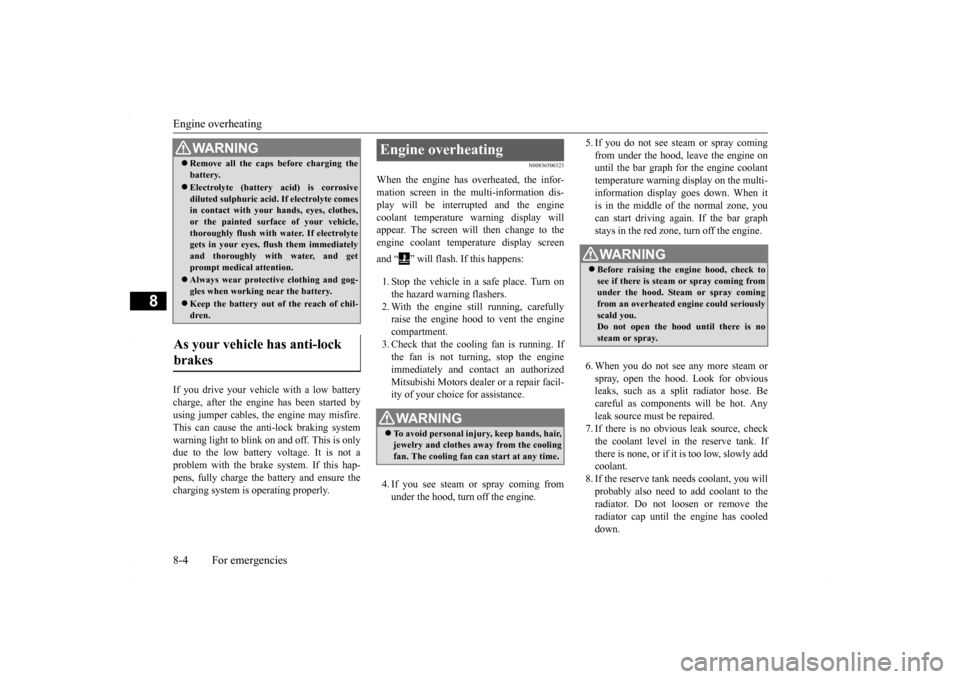
When the engine has overheated, the infor- mation screen in the multi-information dis-play will be interrupted and the engine coolant temperature warning display will appear. The screen will then change to theengine coolant temperature display screen and “ ” will flash. If this happens: 1. Stop the vehicle in a safe place. Turn on the hazard warning flashers. 2. With the engine still running, carefullyraise the engine hood to vent the engine compartment. 3. Check that the cooling fan is running. Ifthe fan is not turning, stop the engine immediately and contact an authorized Mitsubishi Motors dealer or a repair facil-ity of your choice for assistance. 4. If you see steam or spray coming from under the hood, turn off the engine.
5. If you do not see steam or spray coming from under the hood, leave the engine on until the bar graph for the engine coolant temperature warning display on the multi-information display goes down. When it is in the middle of the normal zone, you can start driving again. If the bar graphstays in the red zone, turn off the engine. 6. When you do not see any more steam or spray, open the hood. Look for obvious leaks, such as a split radiator hose. Be careful as components will be hot. Anyleak source must be repaired. 7. If there is no obvious leak source, check the coolant level in the reserve tank. Ifthere is none, or if it is too low, slowly add coolant. 8. If the reserve tank needs coolant, you willprobably also need to add coolant to the radiator. Do not loosen or remove the radiator cap until the engine has cooleddown.
Remove all the caps before charging the battery. Electrolyte (battery acid) is corrosive diluted sulphuric acid. If electrolyte comesin contact with your hands, eyes, clothes, or the painted surface of your vehicle, thoroughly flush with water. If electrolytegets in your eyes, flush them immediately and thoroughly with water, and get prompt medical attention. Always wear protective clothing and gog- gles when working near the battery. Keep the battery out of the reach of chil- dren.
As your vehicle has anti-lock brakes
WA R N I N G
Engine overheating
WA R N I N G To avoid personal injury, keep hands, hair, jewelry and clothes away from the cooling fan. The cooling fan can start at any time.
WA R N I N G Before raising the engine hood, check to see if there is steam or spray coming fromunder the hood. Steam or spray coming from an overheated engine could seriously scald you.Do not open the hood until there is no steam or spray.
BK0230300US.bo
ok 4 ページ 2015年7月30日 木曜日 午後8時38分
Page 315 of 392
Tools and jack
For emergencies 8-5
8
9. Start the engine, and slowly add coolant, up to the bottom of the filler neck. Useplain water if you have to (and replace it with the right coolant as soon as possible).
10. Replace the radiator cap and tighten it
fully. Check the engine coolant tempera- ture display on the multi-information dis- play. You can start driving again when thebar graph for the engine coolant tempera- ture display returns to the normal zone.
11. Have your vehicle checked by your autho-
rized Mitsubishi Motors dealer or a repair facility of your choice.
N00836600265
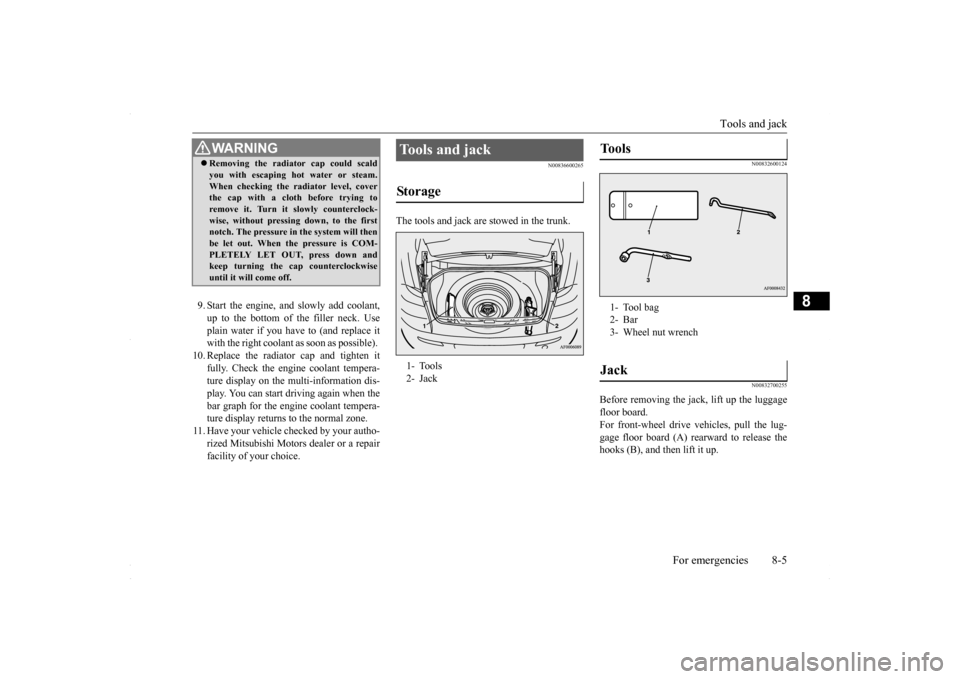
The tools and jack are stowed in the trunk.
N00832600124 N00832700255
Before removing the jack, lift up the luggage floor board. For front-wheel drive vehicles, pull the lug-gage floor board (A) rearward to release the hooks (B), and then lift it up.
WA R N I N G Removing the radiator cap could scald you with escaping hot water or steam. When checking the radiator level, cover the cap with a cloth before trying to remove it. Turn it slowly counterclock-wise, without pressing down, to the first notch. The pressure in the system will then be let out. When the pressure is COM-PLETELY LET OUT, press down and keep turning the cap counterclockwise until it will come off.
Tools and jack Storage 1- Tools 2- Jack
Tools 1- Tool bag2- Bar3- Wheel nut wrenchJack
BK0230300US.bo
ok 5 ページ 2015年7月30日 木曜日 午後8時38分