ECO mode MITSUBISHI LANCER 2016 8.G User Guide
[x] Cancel search | Manufacturer: MITSUBISHI, Model Year: 2016, Model line: LANCER, Model: MITSUBISHI LANCER 2016 8.GPages: 392, PDF Size: 13.12 MB
Page 130 of 392
Electronically controlled 4WD system (if so equipped) 5-68 Features and controls
5
2. Once the vehicle is moving on a level road, move the selector lever back to “D” (DRIVE) position.
N00548300019
The electronically controlled 4WD system isan all-wheel drive system that allows one of three drive modes to be selected with aswitch, in accordance with the driving condi- tions. The following drive modes are available.
4-wheel drive operation requires special driv- ing skills. Carefully read the “All-wheel driving opera- tion” section on page 5-70 and take care todrive safely.
N00548401033
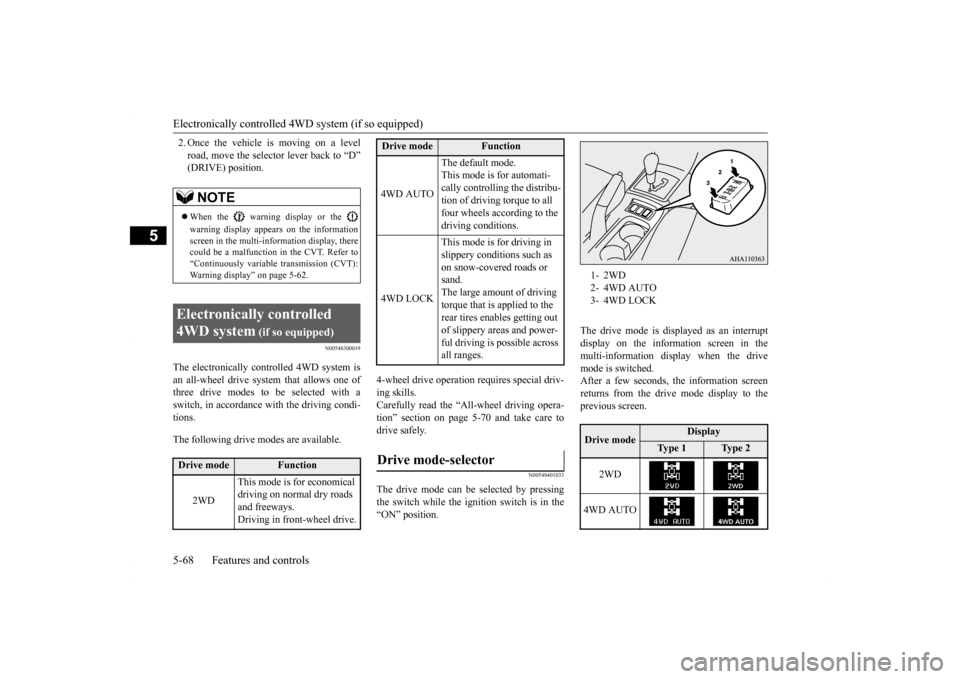
The drive mode can be selected by pressingthe switch while the ignition switch is in the “ON” position.
The drive mode is displayed as an interrupt display on the information screen in the multi-information display when the drive mode is switched.After a few seconds, the information screenreturns from the drive mode display to the previous screen.
NOTE
When the warning display or the warning display appears on the information screen in the multi-information display, therecould be a malfunction in the CVT. Refer to “Continuously variable transmission (CVT): Warning display” on page 5-62.
Electronically controlled 4WD system
(if so equipped)
Drive mode
Function
2WD
This mode is for economical driving on normal dry roads and freeways. Driving in front-wheel drive.
4WD AUTO
The default mode. This mode is for automati- cally controlling the distribu-tion of driving torque to all four wheels according to the driving conditions.
4WD LOCK
This mode is for driving in slippery conditions such as on snow-covered roads or sand.The large amount of driving torque that is applied to the rear tires enables getting out of slippery areas and power- ful driving is possible across all ranges.
Drive mode-selector
Drive mode
Function
1- 2WD2- 4WD AUTO3- 4WD LOCKDrive mode
Display
Ty p e 1
Ty p e 2
2WD
4WD AUTO
BK0230300US.bo
ok 68 ページ 2015年7月30日 木曜日 午後8時38分
Page 131 of 392
Electronically controlled 4WD system (if so equipped)
Features and controls 5-69
5
N00549400017
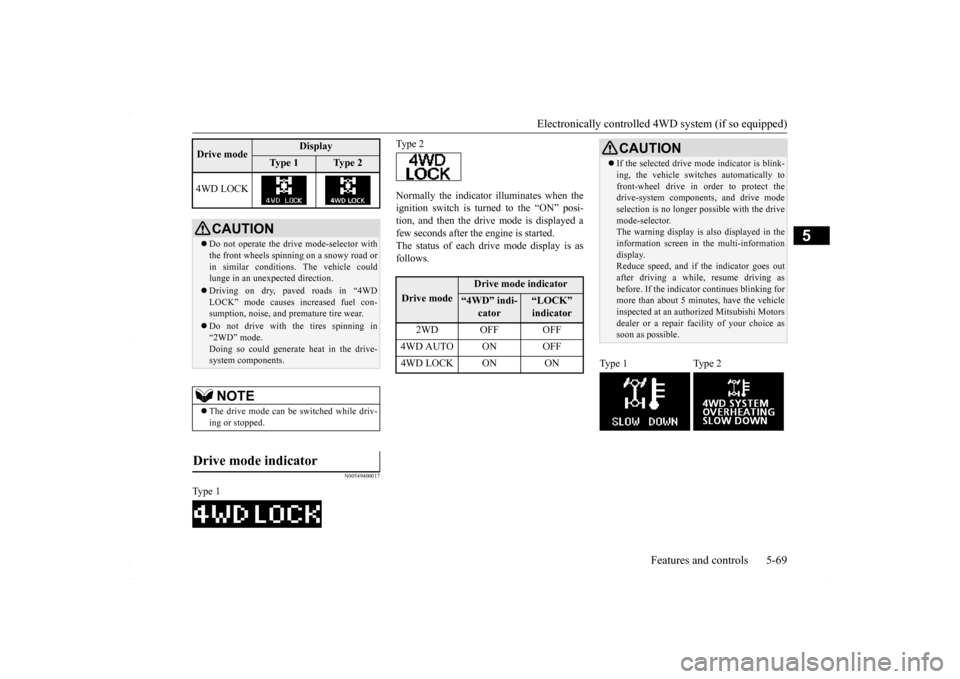
Normally the indicator illuminates when the ignition switch is turned to the “ON” posi- tion, and then the drive mode is displayed afew seconds after the engine is started. The status of each drive mode display is as follows.
4WD LOCK
CAUTION Do not operate the drive mode-selector with the front wheels spinning on a snowy road or in similar conditions. The vehicle couldlunge in an unexpected direction. Driving on dry, paved roads in “4WD LOCK” mode causes increased fuel con- sumption, noise, and premature tire wear. Do not drive with the tires spinning in “2WD” mode. Doing so could generate heat in the drive-system components.NOTE
The drive mode can be switched while driv- ing or stopped.
Drive mode indicator
Type 1Drive mode
Display
Ty p e 1
Ty p e 2
Type 2Drive mode
Drive mode indicator
“4WD” indi-
cator
“LOCK” indicator
2WD OFF OFF
4WD AUTO ON OFF4WD LOCK ON ON
CAUTION If the selected drive m
ode indicator is blink-
ing, the vehicle switches automatically to front-wheel drive in order to protect the drive-system components, and drive mode selection is no longer pos
sible with the drive
mode-selector. The warning display is also displayed in the information screen in the multi-informationdisplay. Reduce speed, and if the indicator goes out after driving a while, resume driving asbefore. If the indicator continues blinking for more than about 5 minutes, have the vehicle inspected at an authorized Mitsubishi Motorsdealer or a repair facility of your choice as soon as possible.
Type 1 Type 2
BK0230300US.bo
ok 69 ページ 2015年7月30日 木曜日 午後8時38分
Page 133 of 392
Cautions on handling of all-wheel drive vehicles
Features and controls 5-71
5
Set the drive mode-selector to “4WD LOCK” and then gradually depress the accelerator pedal for a smooth start. Keep the pressure on the accelerator pedal asconstant as possible, and drive at low speed.
Your vehicle may not provide sufficient hill climbing ability and engine braking on steepslopes. Avoid driving on steep slopes even though the vehicle is a 4-wheel drive vehicle.
N00530800190
Since driving torque can
be applied to all four
wheels, the performance of the vehicle when operating in all-wheel drive is greatly affected by the condition of the tires. Pay close attention to the tires. Install specified tires on all wheels. Refer to “Tires and wheels” on page 11-5. Be sure to fit all four tires and wheels of the same size and type.When replacement of any of the tires or wheels is necessary, replace all of them. All tires should be rotated whenever the wear difference between the front and rear tires is recognizable.
NOTE
The use of snow tires is recommended. Maintain a safe distance between vehicles, avoid sudden braking, and use engine brak- ing (downshifting).CAUTION Avoid sudden braking, sudden acceleration, and sharp turning. Skidding occurs and con- trol of the vehicle could be lost.
Moving out of mud
CAUTION If any of the following conditions occur, fol- low these procedures:• The engine coolant temperature display appears on the information screen in the multi-information display or the engine power drops suddenly. Refer to “Engine overheating” on page 8-4.
• The “ ” warning display or the “ ” warning display appear on the information screen in the multi-information display. Refer to “Warning display” on page 5-62.WA R N I N G When attempting to rock your vehicle out of a stuck position, be sure that the area around the vehicle is clear of people and physical objects. The rocking motion may cause the vehicle to suddenly launch for- ward/backward, causing injury or dam-age to nearby people or objects.NOTE
Avoid sudden braking, sudden acceleration and sharp turning; such operations couldresult in the vehicle becoming stuck. If the vehicle becomes stuck in muddy roads, it can often be moved with a rocking motion. Move the selector lever alternately between “D” (DRIVE) and “R” (REVERSE) posi-tions, while pressing lightly on the accelera- tor pedal.CAUTION
Climbing/descending sharp grades Cautions on handling of all- wheel drive vehicles Tires and wheels
BK0230300US.bo
ok 71 ページ 2015年7月30日 木曜日 午後8時38分
Page 139 of 392
Active Stability Control (ASC) (if so equipped)
Features and controls 5-77
5
N00559200034
On slippery surfaces, the traction control function prevents the dr
ive wheels from spin-
ning excessive, thus helping the vehicle tostart moving from a stopped condition. It also provides sufficient driving force and steering performance as the vehicle turns while press-ing the acceleration pedal.
N00559300035
The skid control function is designed to helpthe driver maintain control of the vehicle onslippery roads or during rapid steering maneuvers. It works by controlling the engine output and the brake on each wheel.
N00559400179
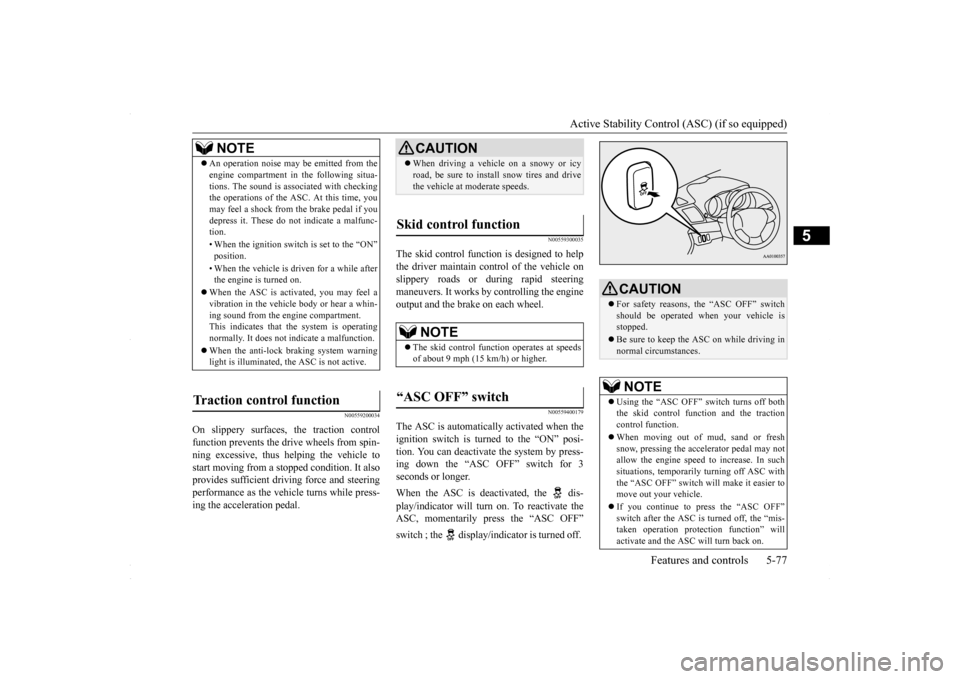
The ASC is automatically activated when the ignition switch is turned to the “ON” posi- tion. You can deactivate the system by press-ing down the “ASC OFF” switch for 3 seconds or longer. When the ASC is deactivated, the dis- play/indicator will turn on. To reactivate the ASC, momentarily press the “ASC OFF” switch ; the display/indicator is turned off.
NOTE
An operation noise may be emitted from the engine compartment in the following situa- tions. The sound is associated with checking the operations of the ASC. At this time, you may feel a shock from the brake pedal if youdepress it. These do not indicate a malfunc- tion. • When the ignition switch is set to the “ON” position. • When the vehicle is driven for a while after the engine is turned on.
When the ASC is activated, you may feel a vibration in the vehicle body or hear a whin- ing sound from the engine compartment.This indicates that the system is operating normally. It does not indicate a malfunction. When the anti-lock braking system warning light is illuminated, the ASC is not active.
Traction control function
CAUTION When driving a vehicle on a snowy or icy road, be sure to install snow tires and drive the vehicle at moderate speeds.
Skid control function
NOTE
The skid control function operates at speeds of about 9 mph (15 km/h) or higher.
“ASC OFF” switch
CAUTION For safety reasons, the “ASC OFF” switch should be operated when your vehicle is stopped. Be sure to keep the ASC on while driving in normal circumstances.NOTE
Using the “ASC OFF” switch turns off both the skid control function and the traction control function. When moving out of mud, sand or fresh snow, pressing the accelerator pedal may notallow the engine speed to increase. In such situations, temporarily turning off ASC with the “ASC OFF” switch will make it easier tomove out your vehicle. If you continue to press the “ASC OFF” switch after the ASC is turned off, the “mis- taken operation protection function” will activate and the ASC will turn back on.
BK0230300US.bo
ok 77 ページ 2015年7月30日 木曜日 午後8時38分
Page 154 of 392
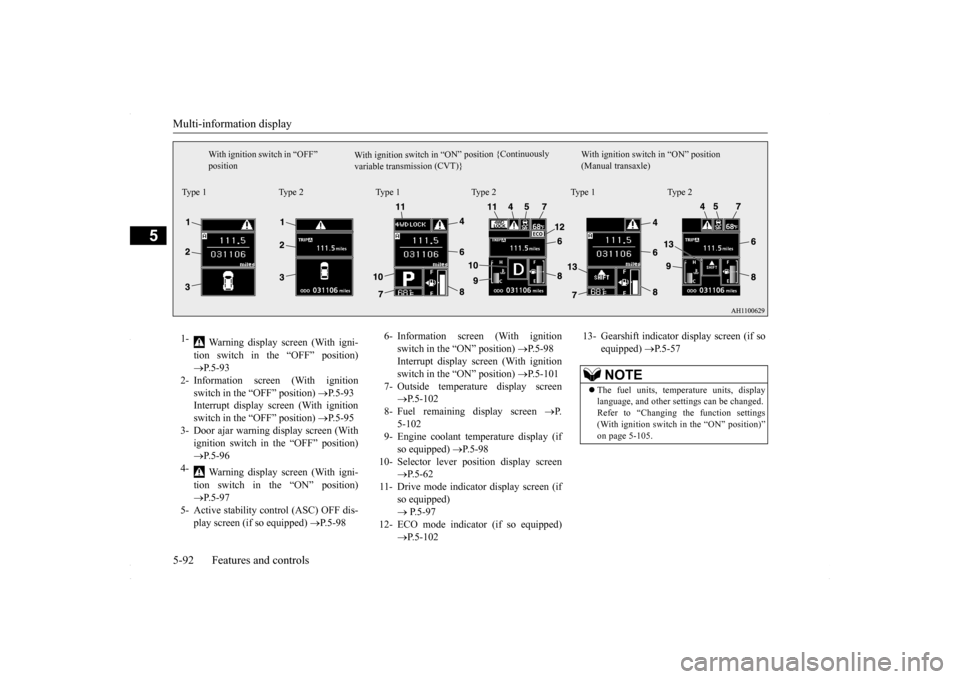
Multi-information display 5-92 Features and controls
5
W i t h i g n i t i o n s w i t c h i n “ O N ” p os i t i o n { C o n t i n u o us l y
v a r i a b l e t r a n s m i s s i o n ( C V T ) }
With ignition switch in “OFF” position
With ignition switch in “ON” position (Manual transaxle)
Type 1 Type 2 Type 1 Type 2 Type 1 Type 21-
Warning display screen (With igni- tion switch in the “OFF” position) P.5-93
2- Information screen (With ignition
switch in the “OFF” position)
P.5-93
Interrupt display screen (With ignition switch in the “OFF” position)
P.5-95
3- Door ajar warning display screen (With
ignition switch in the “OFF” position) P.5-96
4-
Warning display screen (With igni- tion switch in the “ON” position) P.5-97
5- Active stability control (ASC) OFF dis-
play screen (if so equipped)
P.5-98
6- Information screen (With ignition
switch in the “ON” position)
P.5-98
Interrupt display screen (With ignition switch in the “ON” position)
P.5-101
7- Outside temperature display screen
P.5-102
8- Fuel remaining display screen
P.
5-102
9- Engine coolant temperature display (if
so equipped)
P.5-98
10- Selector lever position display screen
P.5-62
11- Drive mode indicator display screen (if
so equipped) P.5-97
12- ECO mode indicator (if so equipped)
P.5-102
13- Gearshift indicator display screen (if so
equipped)
P.5-57
NOTE
The fuel units, temperature units, display language, and other settings can be changed. Refer to “Changing the function settings (With ignition switch in the “ON” position)” on page 5-105.
BK0230300US.bo
ok 92 ページ 2015年7月30日 木曜日 午後8時38分
Page 159 of 392
Multi-information display
Features and controls 5-97
5
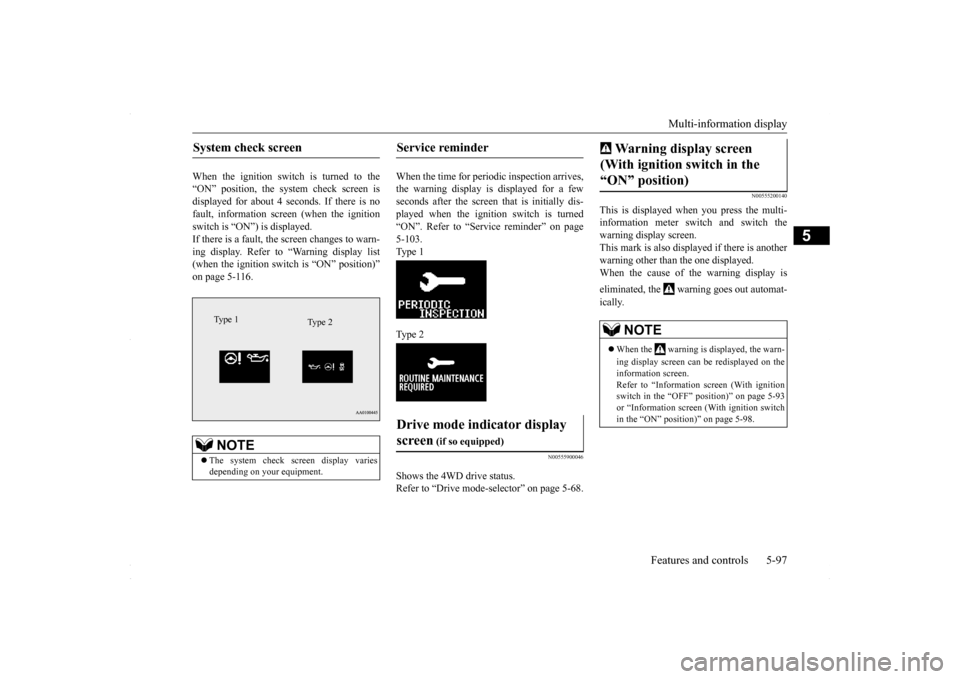
When the ignition switch is turned to the “ON” position, the system check screen isdisplayed for about 4 seconds. If there is no fault, information screen (when the ignition switch is “ON”) is displayed.If there is a fault, the screen changes to warn- ing display. Refer to “Warning display list (when the ignition switch is “ON” position)”on page 5-116.
When the time for periodic inspection arrives, the warning display is displayed for a fewseconds after the screen that is initially dis- played when the ignition switch is turned “ON”. Refer to “Service reminder” on page5-103. Type 1 Type 2
N00555900046
Shows the 4WD drive status. Refer to “Drive mode-s
elector” on page 5-68.
N00555200140
This is displayed when you press the multi- information meter switch and switch the warning display screen.This mark is also displayed if there is another warning other than the one displayed. When the cause of the warning display is eliminated, the warning goes out automat- ically.
System check screen
NOTE
The system check screen display varies depending on your equipment.Type 1
Type 2
Service reminder Drive mode indicator display screen
(if so equipped)
Warning display screen (With ignition switch in the “ON” position)
NOTE
When the warning is displayed, the warn- ing display screen can be redisplayed on the information screen. Refer to “Information screen (With ignition switch in the “OFF” position)” on page 5-93or “Information screen (With ignition switch in the “ON” position)” on page 5-98.
BK0230300US.bo
ok 97 ページ 2015年7月30日 木曜日 午後8時38分
Page 161 of 392
Multi-information display
Features and controls 5-99
5
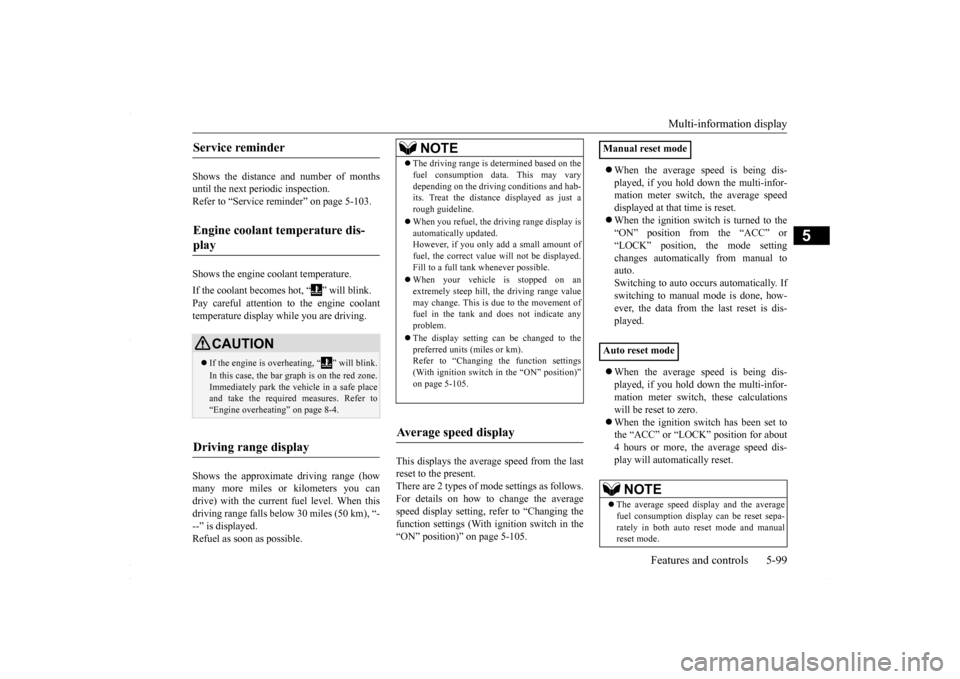
Shows the distance and number of months until the next periodic inspection.Refer to “Service reminder” on page 5-103. Shows the engine coolant temperature. If the coolant becomes hot, “ ” will blink. Pay careful attention to the engine coolant temperature display while you are driving. Shows the approximate driving range (how many more miles or kilometers you can drive) with the current fuel level. When thisdriving range falls below 30 miles (50 km), “- --” is displayed. Refuel as soon as possible.
This displays the average speed from the last reset to the present.There are 2 types of mode settings as follows. For details on how to change the average speed display setting, refer to “Changing thefunction settings (With ignition switch in the “ON” position)” on page 5-105.
When the average speed is being dis- played, if you hold down the multi-infor- mation meter switch, the average speed displayed at that time is reset. When the ignition switch is turned to the “ON” position from the “ACC” or “LOCK” position, the mode settingchanges automatically from manual to auto. Switching to auto occurs automatically. Ifswitching to manual mode is done, how-ever, the data from the last reset is dis- played. When the average speed is being dis- played, if you hold down the multi-infor-mation meter switch, these calculations will be reset to zero. When the ignition switch has been set to the “ACC” or “LOCK” position for about 4 hours or more, the average speed dis- play will automatically reset.
Service reminder Engine coolant temperature dis- play
CAUTION If the engine is overheating, “ ” will blink. In this case, the bar graph is on the red zone. Immediately park the vehicle in a safe placeand take the required measures. Refer to “Engine overheating” on page 8-4.
Driving range display
NOTE
The driving range is determined based on the fuel consumption data. This may vary depending on the driving conditions and hab- its. Treat the distance displayed as just a rough guideline. When you refuel, the driving range display is automatically updated.However, if you only add a small amount of fuel, the correct value will not be displayed. Fill to a full tank whenever possible. When your vehicle is stopped on an extremely steep hill, the driving range valuemay change. This is due to the movement of fuel in the tank and does not indicate any problem. The display setting can be changed to the preferred units (miles or km).Refer to “Changing the function settings (With ignition switch in the “ON” position)” on page 5-105.
Average speed display
Manual reset mode Auto reset mode
NOTE
The average speed display and the average fuel consumption display can be reset sepa-rately in both auto reset mode and manual reset mode.
BK0230300US.bo
ok 99 ページ 2015年7月30日 木曜日 午後8時38分
Page 164 of 392
Multi-information display 5-102 Features and controls
5
switch a few times, the warning display screen you switched from is redisplayed. The operation status of each system is dis- played on the information screen. For further details, refer to the appropriate page in the warning display list.Refer to “Other interrupt displays (With igni-tion switch in the “ON” position)” on page 5-121.
N00556400048
Shows the position of the selector lever. Refer to “Selector lever operation” on page 5-59.
N00556500094
Shows the temperature outside the vehicle.
N00568700019
This indicator will be displayed when fuel-efficient driving is achieved.
N00556600125
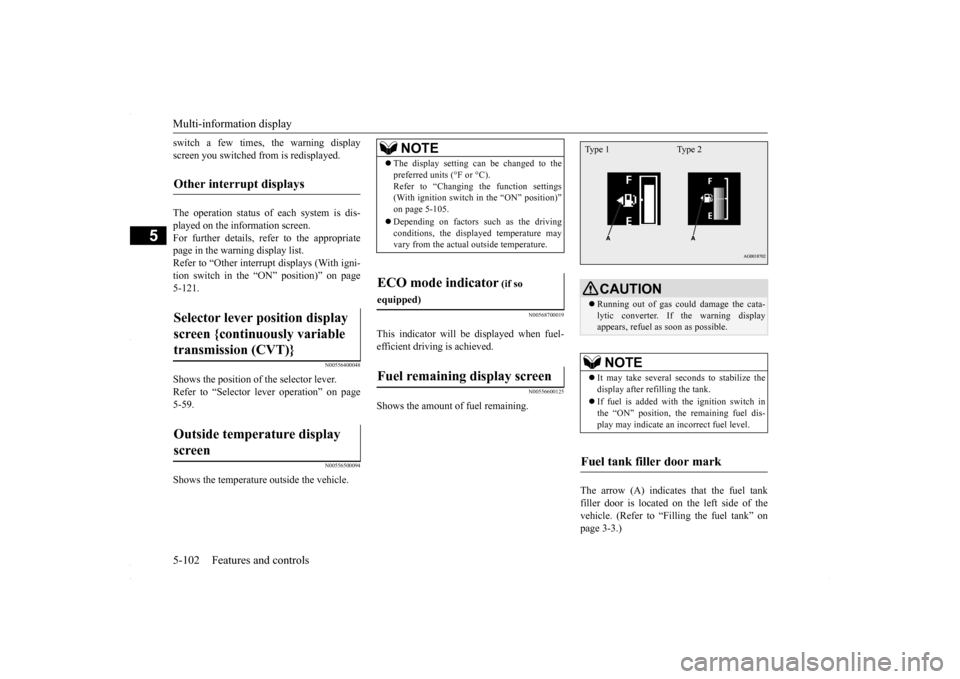
Shows the amount of fuel remaining.
The arrow (A) indicates that the fuel tank filler door is located on the left side of the vehicle. (Refer to “Filling the fuel tank” on page 3-3.)
Other interrupt displays Selector lever position display screen {continuously variable transmission (CVT)} Outside temperature display screen
NOTE
The display setting can be changed to the preferred units (°F or °C). Refer to “Changing the function settings (With ignition switch in the “ON” position)” on page 5-105. Depending on factors such as the driving conditions, the displayed temperature mayvary from the actual outside temperature.
ECO mode indicator
(if so
equipped)Fuel remaining display screen
CAUTION Running out of gas could damage the cata- lytic converter. If the warning display appears, refuel as soon as possible.NOTE
It may take several seconds to stabilize the display after refilling the tank. If fuel is added with the ignition switch in the “ON” position, the remaining fuel dis- play may indicate an incorrect fuel level.
Fuel tank filler door mark Type 1 Type 2
BK0230300US.book
102 ページ 2015年7月30日 木曜日 午後8時38分
Page 167 of 392
Multi-information display
Features and controls 5-105
5
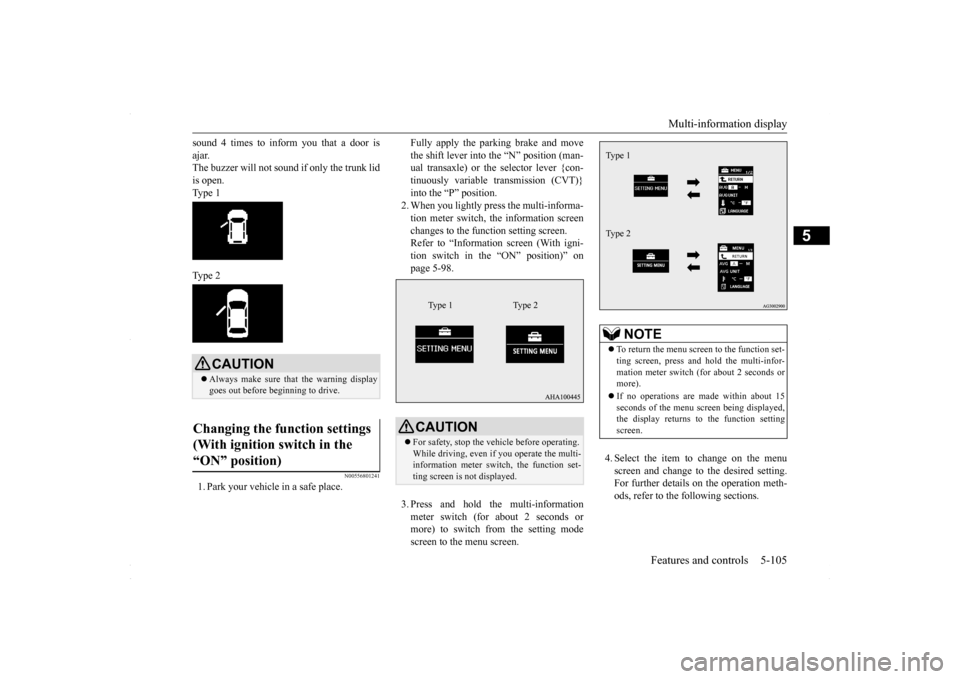
sound 4 times to inform you that a door is ajar. The buzzer will not sound if only the trunk lid is open. Type 1 Type 2
N00556801241
1. Park your vehicle in a safe place.
Fully apply the parking brake and move the shift lever into the “N” position (man- ual transaxle) or the selector lever {con- tinuously variable transmission (CVT)}into the “P” position. 2. When you lightly press the multi-informa- tion meter switch, the information screenchanges to the function setting screen. Refer to “Information screen (With igni- tion switch in the “ON” position)” onpage 5-98. 3. Press and hold the multi-information meter switch (for about 2 seconds or more) to switch from the setting mode screen to the menu screen.
4. Select the item to change on the menu screen and change to the desired setting. For further details on the operation meth- ods, refer to the following sections.
CAUTION Always make sure that the warning display goes out before beginning to drive.
Changing the function settings (With ignition switch in the “ON” position)
CAUTION For safety, stop the vehicle before operating. While driving, even if you operate the multi-information meter switch, the function set- ting screen is not displayed.
Type 1 Type 2
NOTE
To return the menu screen to the function set- ting screen, press and hold the multi-infor- mation meter switch (for about 2 seconds or more). If no operations are made within about 15 seconds of the menu screen being displayed,the display returns to the function setting screen.Type 1 Type 2
BK0230300US.book
105 ページ 2015年7月30日 木曜日 午後8時38分
Page 168 of 392
Multi-information display 5-106 Features and controls
5
Refer to “Changing the reset mode for average fuel consum
ption and average
speed” on page 5-106. Refer to “Changing the fuel consumptiondisplay unit” on page 5-107. Refer to “Changing the temperature unit” on page 5-108.Refer to “Changing the display language” on page 5-108. Refer to “Operation sound setting” onpage 5-109.Refer to “Changing the amount of time until “REST REMINDER” is displayed” on page 5-109.Refer to “Changing the turn signal sound” on page 5-110. Refer to “Changing the momentary fuelconsumption display (Type 2)” on page 5-110. Refer to “Returning to the factory set-tings” on page 5-111.
N00557000184
You can change the mode condition for the average fuel consumption and average speed display to “Auto reset” or “Manual reset”.
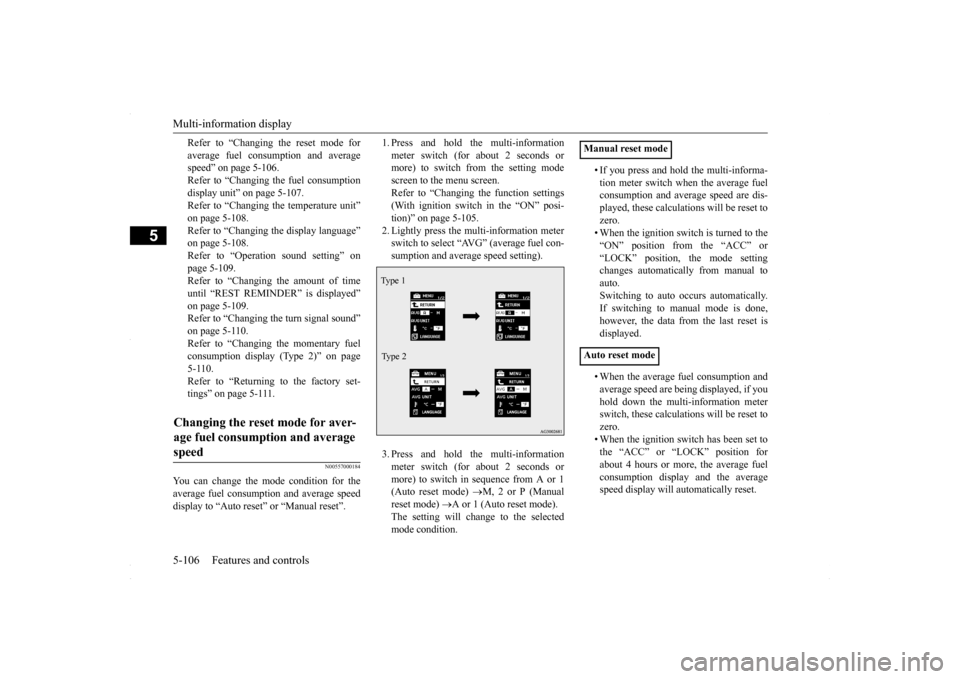
1. Press and hold the multi-information meter switch (for about 2 seconds or more) to switch from the setting mode screen to the menu screen.Refer to “Changing the function settings (With ignition switch in the “ON” posi- tion)” on page 5-105.2. Lightly press the multi-information meter switch to select “AVG” (average fuel con- sumption and average speed setting). 3. Press and hold the multi-information meter switch (for about 2 seconds ormore) to switch in sequence from A or 1 (Auto reset mode)
M, 2 or P (Manual
reset mode)
A or 1 (Auto reset mode).
The setting will change to the selectedmode condition.
• If you press and hold the multi-informa- tion meter switch when the average fuel consumption and average speed are dis- played, these calculations will be reset tozero. • When the ignition switch is turned to the “ON” position from the “ACC” or“LOCK” position, the mode setting changes automatically from manual to auto.Switching to auto occurs automatically.If switching to manual mode is done, however, the data from the last reset is displayed. • When the average fuel consumption and average speed are being displayed, if you hold down the multi-information meterswitch, these calculations will be reset to zero. • When the ignition switch has been set tothe “ACC” or “LOCK” position for about 4 hours or more, the average fuel consumption display and the averagespeed display will automatically reset.
Changing the reset mode for aver- age fuel consumption and average speed
Type 1 Type 2
Manual reset mode Auto reset mode
BK0230300US.book
106 ページ 2015年7月30日 木曜日 午後8時38分