buttons MITSUBISHI LANCER 2017 8.G User Guide
[x] Cancel search | Manufacturer: MITSUBISHI, Model Year: 2017, Model line: LANCER, Model: MITSUBISHI LANCER 2017 8.GPages: 385, PDF Size: 14.34 MB
Page 95 of 385
Free-hand Advanced Security Transmitter (F.A.S.T.-key) (if so equipped) 5-30 Features and controls
5
N00515500141
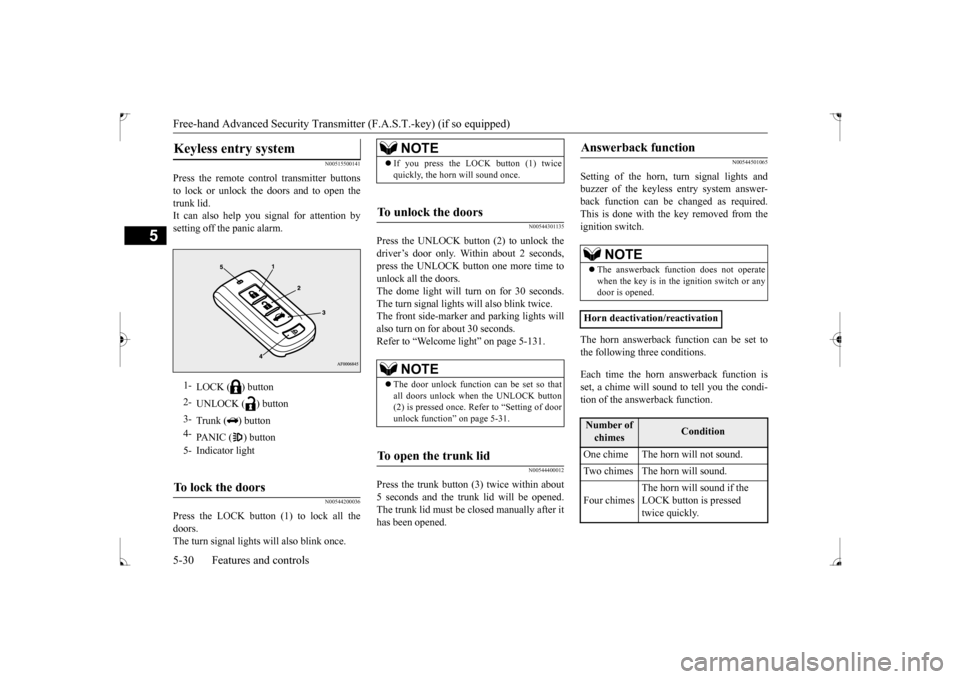
Press the remote control transmitter buttons to lock or unlock the doors and to open thetrunk lid. It can also help you signal for attention by setting off the panic alarm.
N00544200036
Press the LOCK button (1) to lock all thedoors.The turn signal lights will also blink once.
N00544301135
Press the UNLOCK button (2) to unlock the driver’s door only. Within about 2 seconds, press the UNLOCK button one more time tounlock all the doors.The dome light will turn on for 30 seconds. The turn signal lights will also blink twice. The front side-marker and parking lights willalso turn on for about 30 seconds. Refer to “Welcome light” on page 5-131.
N00544400012
Press the trunk button (3) twice within about5 seconds and the trunk lid will be opened. The trunk lid must be closed manually after ithas been opened.
N00544501065
Setting of the horn, turn signal lights andbuzzer of the keyless entry system answer-back function can be changed as required. This is done with the key removed from the ignition switch. The horn answerback function can be set to the following three conditions. Each time the horn answerback function is set, a chime will sound to tell you the condi- tion of the answerback function.
Keyless entry system
1-
LOCK ( ) button
2-
UNLOCK ( ) button
3-
Trunk ( ) button
4-
PANIC ( ) button
5- Indicator lightTo lock the doors
NOTE
If you press the LOCK button (1) twice quickly, the horn will sound once.
To unlock the doors
NOTE
The door unlock function can be set so that all doors unlock when the UNLOCK button(2) is pressed once. Refer to “Setting of door unlock function” on page 5-31.
To open the trunk lid
Answerback function
NOTE
The answerback function does not operate when the key is in the ignition switch or anydoor is opened.
Horn deactivation/reactivationNumber of chimes
Condition
One chime The horn will not sound. Two chimes The horn will sound. Four chimes
The horn will sound if the LOCK button is pressed twice quickly.
BK0237700US.bo
ok 30 ページ 2016年4月15日 金曜日 午前11時28分
Page 96 of 385
Free-hand Advanced Security Transmit
ter (F.A.S.T.-key) (if so equipped)
Features and controls 5-31
5
1. Turn the ignition switch to the “LOCK” position. If you started the engine with the key, remove the key from the ignition switch.2. Open the driver’s door and turn the com- bination headlights and dimmer switch to the “OFF” position.3. Press the LOCK button (1) for 4 to 10 sec- onds and press the UNLOCK button (2) during this time.4. Release in sequence the UNLOCK andLOCK buttons within 10 seconds of pressing the UNLOCK button in step 3.
The turn signal lights answerback function can be set to the following seven conditions. Each time the turn signal lights answerback function is set, a chime will sound to tell you the condition of the answerback function.
1. Turn the ignition switch to the “LOCK” position. If you started the engine with the key, remove the key from the ignition switch.2. Open the driver’s door and turn the com- bination headlights and dimmer switch to the “OFF” position.3. Press the UNLOCK button (2) for 4 to 10 seconds and press the LOCK button (1) during this time.4. Release in sequence the UNLOCK andLOCK buttons within 10 seconds of pressing the LOCK button in step 3.
The buzzer answerback function can be turned ON or OFF as required.
N00544601112
The door unlock function
can be set to the
following two conditions.
Each time the door unlock function is set, a chime will sound to te
ll you the condition of
the door unlock function. 1. Turn the ignition switch to the “LOCK” position. If you started the engine with thekey, remove the key from the ignition switch. 2. Open the driver’s door and turn the com-bination headlights and dimmer switch tothe “OFF” position. 3. Press the LOCK button (1) for 4 to 10 sec- onds and press the UNLOCK button (2)during this time. 4. Release in sequence the LOCK and UNLOCK buttons within 10 seconds ofpressing the LOCK button in step 3.
N00544700015
If you are near your vehicle and feel threat-ened, you can activate the alarm to call atten- tion as follows: 1. Press the PANIC button (4) for more than 1 second.
Changing the setting of the turn signal lights answerback functionNumber of chimes
Condition
To l o c k
To u n l o c k
One chime One flash Two flashesTwo chimes One flash No flashThree chimes No flash Two flashesFour chimes Two flashes One flash
Five chimes No flash One flashSix chimes Two flashes No flashSeven chimes
No flash No flash
Buzzer deactivation/reactivationSetting of door unlock function
Number of chimes
Condition
To l o c k
To u n l o c k
Number of chimes
Condition
One chime All doors unlock Two chimes Driver’s door unlock onlyUsing the panic alarm
BK0237700US.bo
ok 31 ページ 2016年4月15日 金曜日 午前11時28分
Page 97 of 385
Free-hand Advanced Security Transmitter (F.A.S.T.-key) (if so equipped) 5-32 Features and controls
5
2. The headlights will blink on and off and the horn will sound intermittently for about 3 minutes. 3. To turn off the alarm, press any button onthe remote control transmitter.
N00561300029
Only a F.A.S.T.-key, which has been pro-grammed into the vehicle’s electronics, canlock and unlock all the doors, and start the engine. If you lose the F.A.S.T.-key, you can order aF.A.S.T.-key from your authorized Mitsubishi Motors dealer by referring to the key number. To prevent vehicle theft, the ID codes for allthe F.A.S.T.-keys except the one for the lost F.A.S.T.-key must be programmed again. Take your vehicle and all the remainingF.A.S.T.-keys to your authorized Mitsubishi Motors dealer to have your ID codes pro- grammed again.
N00561400020
To add a F.A.S.T.-key, you must already havetwo registered F.A.S.T.-keys.Registering the ID code can be done by your authorized Mitsubishi Motors dealer. Or it can be done by yourself (except for vehiclessold in Canada). For you to register the ID
code yourself, follow the “Customer F.A.S.T.-key programming” procedure below. If you choose to have your authorized Mit- subishi Motors dealer
register the ID code,
take your vehicle and all remaining F.A.S.T.- keys to your authorized Mitsubishi Motors dealer.
N00561501116
You can program new F.A.S.T.-keys to the system if you have two valid (already regis- tered) F.A.S.T.-keys, blank (not registered)F.A.S.T.-key and emergency key (specially cut for your vehicle at your Mitsubishi Motors dealer).To use the new F.A.S.T.-key, it is necessary to register the key with both the electronic immobilizer and keyless entry system.Also refer to “Electronic immobilizer: Cus- tomer F.A.S.T.-key programming” on page 5-28. For F.A.S.T.-key programming, follow the procedures below.
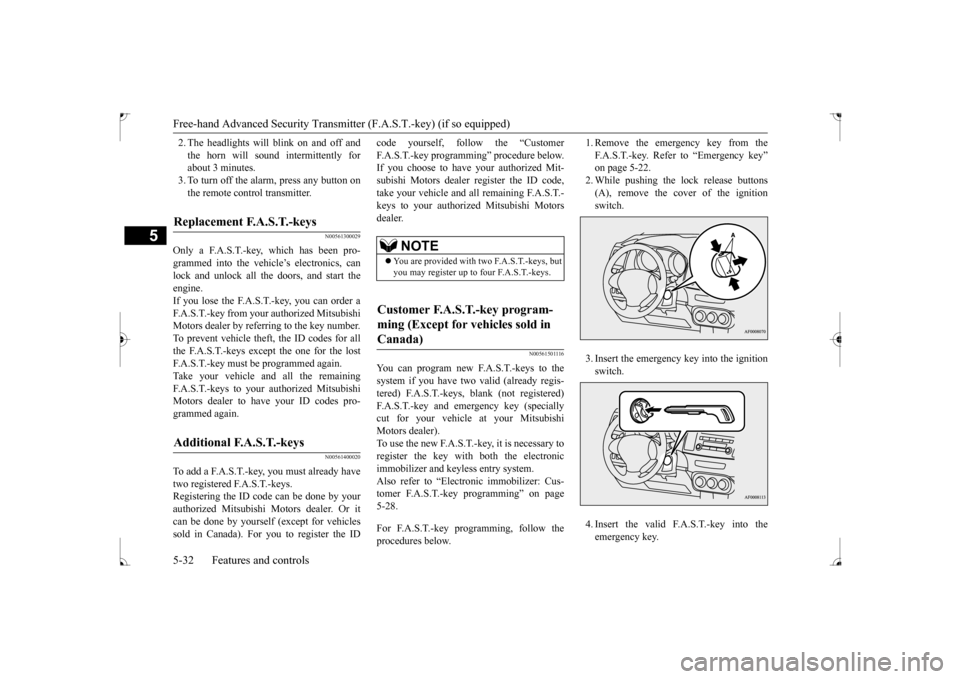
1. Remove the emergency key from the F.A.S.T.-key. Refer to “Emergency key” on page 5-22. 2. While pushing the lock release buttons(A), remove the cover of the ignition switch. 3. Insert the emergency key into the ignition switch. 4. Insert the valid F.A.S.T.-key into the emergency key.
Replacement F.A.S.T.-keys
Additional F.A.S.T.-keys
NOTE
You are provided with two F.A.S.T.-keys, but you may register up to four F.A.S.T.-keys.
Customer F.A.S.T.-key program- ming (Except for vehicles sold in Canada)
BK0237700US.bo
ok 32 ページ 2016年4月15日 金曜日 午前11時28分
Page 98 of 385
Free-hand Advanced Security Transmit
ter (F.A.S.T.-key) (if so equipped)
Features and controls 5-33
5
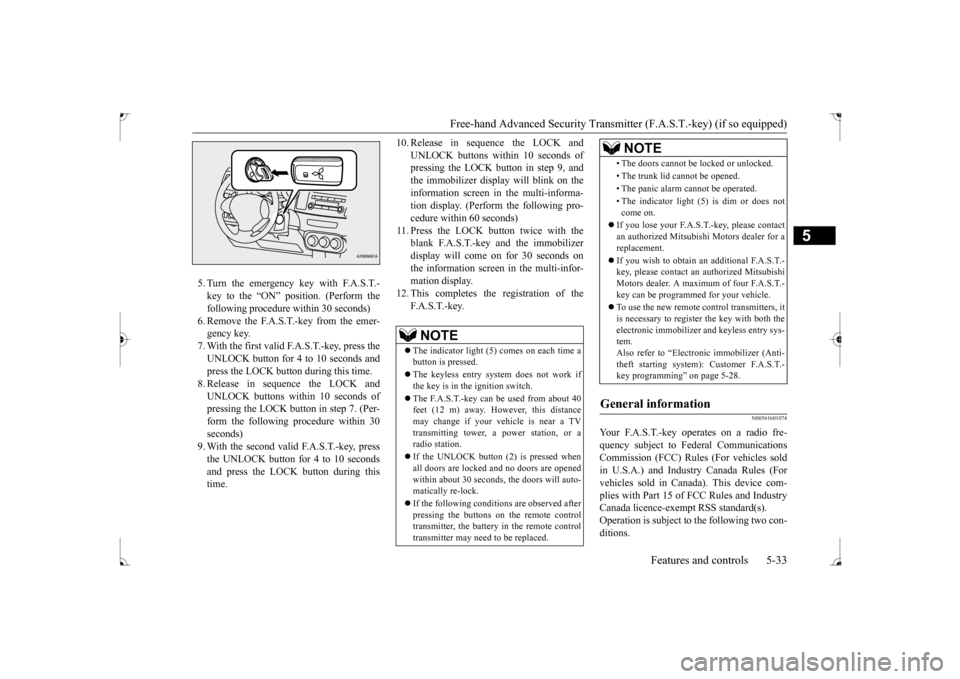
5. Turn the emergency key with F.A.S.T.- key to the “ON” position. (Perform thefollowing procedure within 30 seconds) 6. Remove the F.A.S.T.-key from the emer- gency key.7. With the first valid F.A.S.T.-key, press the UNLOCK button for 4 to 10 seconds and press the LOCK button during this time.8. Release in sequence the LOCK andUNLOCK buttons within 10 seconds of pressing the LOCK button in step 7. (Per- form the following procedure within 30seconds) 9. With the second valid F.A.S.T.-key, press the UNLOCK button for 4 to 10 secondsand press the LOCK button during this time.
10. Release in sequence the LOCK and
UNLOCK buttons within 10 seconds of pressing the LOCK butt
on in step 9, and
the immobilizer display will blink on theinformation screen in the multi-informa- tion display. (Perform the following pro- cedure within 60 seconds)
11. Press the LOCK button twice with the
blank F.A.S.T.-key and the immobilizer display will come on for 30 seconds onthe information screen in the multi-infor-mation display.
12. This completes the registration of the
F. A . S . T. - k e y.
N00561601074
Your F.A.S.T.-key operates on a radio fre-quency subject to Federal Communications Commission (FCC) Rules (For vehicles sold in U.S.A.) and Industry Canada Rules (Forvehicles sold in Canada). This device com- plies with Part 15 of FCC Rules and Industry Canada licence-exempt RSS standard(s).Operation is subject to
the following two con-
ditions.
NOTE
The indicator light (5) comes on each time a button is pressed. The keyless entry system does not work if the key is in the ignition switch. The F.A.S.T.-key can be used from about 40 feet (12 m) away. However, this distance may change if your vehicle is near a TVtransmitting tower, a power station, or a radio station. If the UNLOCK button (2) is pressed when all doors are locked and no doors are openedwithin about 30 seconds, the doors will auto- matically re-lock. If the following conditions are observed after pressing the buttons on the remote control transmitter, the battery in the remote controltransmitter may need to be replaced.
• The doors cannot be locked or unlocked. • The trunk lid cannot be opened.• The panic alarm cannot be operated.• The indicator light (5) is dim or does not come on.
If you lose your F.A.S.T.-key, please contact an authorized Mitsubishi Motors dealer for areplacement. If you wish to obtain
an additional F.A.S.T.-
key, please contact an authorized Mitsubishi Motors dealer. A maximum of four F.A.S.T.- key can be programmed for your vehicle. To use the new remote control transmitters, it is necessary to register the key with both theelectronic immobilizer and keyless entry sys- tem. Also refer to “Electronic immobilizer (Anti-theft starting system): Customer F.A.S.T.- key programming” on page 5-28.
General information
NOTE
BK0237700US.bo
ok 33 ページ 2016年4月15日 金曜日 午前11時28分
Page 273 of 385
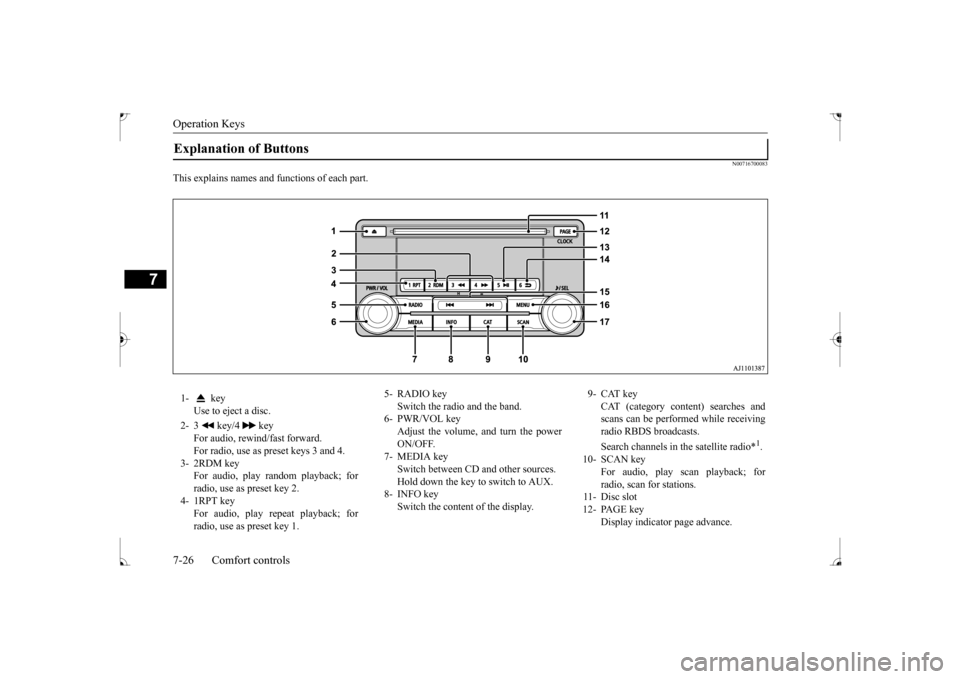
Operation Keys 7-26 Comfort controls
7
N00716700083
This explains names and functions of each part.Explanation of Buttons 1- key
Use to eject a disc.
2- 3 key/4 key
For audio, rewind/fast forward. For radio, use as preset keys 3 and 4.
3- 2RDM key
For audio, play random playback; for radio, use as preset key 2.
4- 1RPT key
For audio, play repeat playback; forradio, use as preset key 1.
5- RADIO key
Switch the radio and the band.
6- PWR/VOL key
Adjust the volume, and turn the power ON/OFF.
7- MEDIA key
Switch between CD and other sources. Hold down the key to switch to AUX.
8- INFO key
Switch the content of the display.
9- CAT key
CAT (category content) searches andscans can be performed while receiving radio RBDS broadcasts. Search channels in the satellite radio*
1.
10- SCAN key
For audio, play scan playback; for radio, scan for stations.
11- Disc slot 12- PAGE key
Display indicator page advance.
BK0237700US.bo
ok 26 ページ 2016年4月15日 金曜日 午前11時28分
Page 281 of 385
Listen to an iPod 7-34 Comfort controls
7
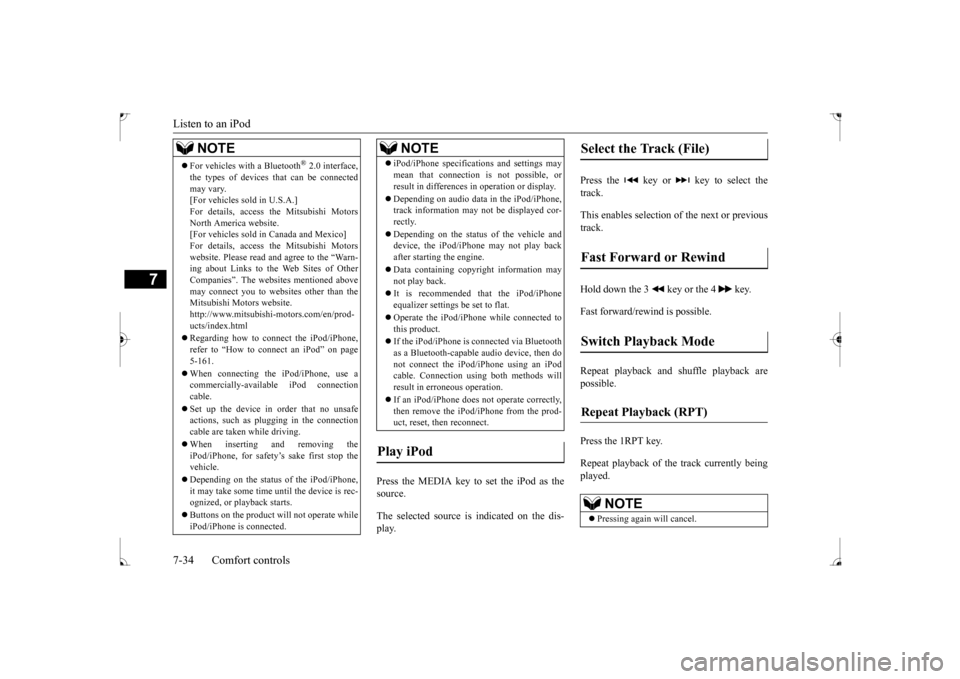
Press the MEDIA key to set the iPod as the source. The selected source is indicated on the dis- play.
Press the key or key to select the track. This enables selection of the next or previous track. Hold down the 3 key or the 4 key. Fast forward/rewind is possible. Repeat playback and shuffle playback are possible. Press the 1RPT key. Repeat playback of th
e track currently being
played.
For vehicles with a Bluetooth
® 2.0 interface,
the types of devices that can be connectedmay vary. [For vehicles sold in U.S.A.] For details, access the Mitsubishi MotorsNorth America website. [For vehicles sold in Canada and Mexico] For details, access the Mitsubishi Motorswebsite. Please read and agree to the “Warn- ing about Links to the Web Sites of Other Companies”. The websites mentioned abovemay connect you to websites other than the Mitsubishi Motors website. http://www.mitsubishi-motors.com/en/prod-ucts/index.html Regarding how to connect the iPod/iPhone, refer to “How to connect an iPod” on page 5-161. When connecting the iPod/iPhone, use a commercially-available iPod connectioncable. Set up the device in order that no unsafe actions, such as plugging in the connection cable are taken while driving. When inserting and removing the iPod/iPhone, for safety’s sake first stop the vehicle. Depending on the status of the iPod/iPhone, it may take some time until the device is rec-ognized, or playback starts. Buttons on the product will not operate while iPod/iPhone is connected.NOTE
iPod/iPhone specifications and settings may mean that connection is not possible, or result in differences in operation or display. Depending on audio data in the iPod/iPhone, track information may not be displayed cor- rectly. Depending on the status of the vehicle and device, the iPod/iPhone may not play back after starting the engine. Data containing copyright information may not play back. It is recommended that the iPod/iPhone equalizer settings be set to flat. Operate the iPod/iPhone while connected to this product. If the iPod/iPhone is connected via Bluetooth as a Bluetooth-capable audio device, then donot connect the iPod/iPhone using an iPod cable. Connection using both methods will result in erroneous operation. If an iPod/iPhone does not operate correctly, then remove the iPod/iPhone from the prod-uct, reset, then reconnect.
Play iPod
NOTE
Select the Track (File) Fast Forward or Rewind Switch Playback Mode Repeat Playback (RPT)
NOTE
Pressing again will cancel.
BK0237700US.bo
ok 34 ページ 2016年4月15日 金曜日 午前11時28分
Page 283 of 385
Listen to Audio Files on a USB Device 7-36 Comfort controls
7
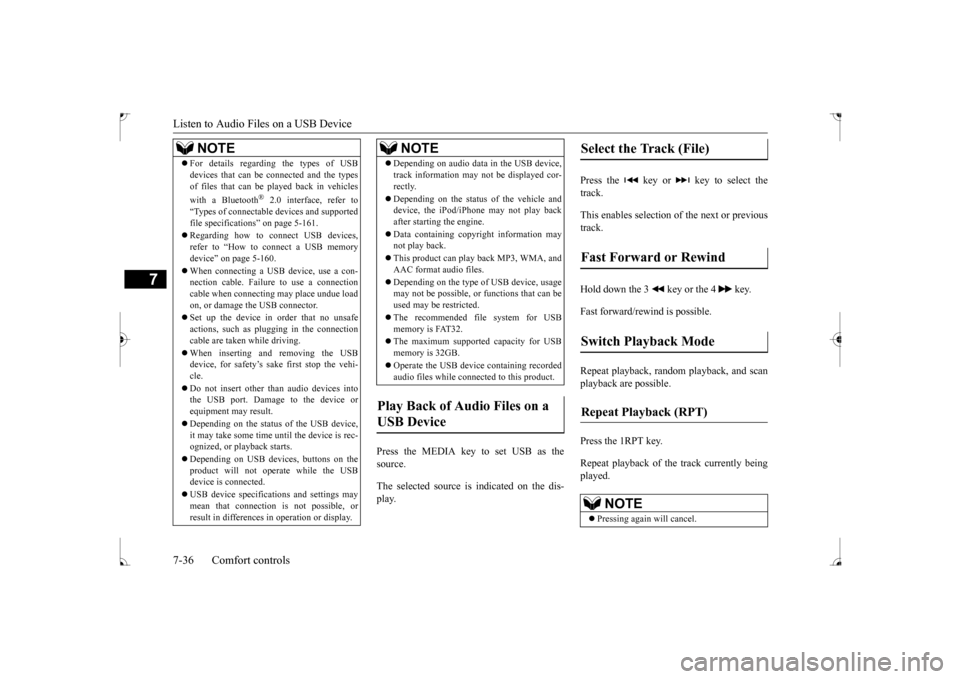
Press the MEDIA key to set USB as the source. The selected source is indicated on the dis- play.
Press the key or key to select the track. This enables selection of the next or previous track. Hold down the 3 key or the 4 key. Fast forward/rewind is possible. Repeat playback, random playback, and scan playback are possible. Press the 1RPT key. Repeat playback of th
e track currently being
played.
For details regarding the types of USB devices that can be connected and the types of files that can be played back in vehicles with a Bluetooth
® 2.0 interface, refer to
“Types of connectable devices and supportedfile specifications” on page 5-161. Regarding how to connect USB devices, refer to “How to connect a USB memory device” on page 5-160. When connecting a USB device, use a con- nection cable. Failure to use a connection cable when connecting may place undue loadon, or damage the USB connector. Set up the device in order that no unsafe actions, such as plugging in the connection cable are taken while driving. When inserting and removing the USB device, for safety’s sake first stop the vehi- cle. Do not insert other than audio devices into the USB port. Damage to the device or equipment may result. Depending on the status of the USB device, it may take some time until the device is rec- ognized, or playback starts. Depending on USB devices, buttons on the product will not operate while the USBdevice is connected. USB device specifications and settings may mean that connection is not possible, or result in differences in operation or display.NOTE
Depending on audio data in the USB device, track information may not be displayed cor- rectly. Depending on the status of the vehicle and device, the iPod/iPhone may not play back after starting the engine. Data containing copyright information may not play back. This product can play back MP3, WMA, and AAC format audio files. Depending on the type of USB device, usage may not be possible, or functions that can be used may be restricted. The recommended file system for USB memory is FAT32. The maximum supported capacity for USB memory is 32GB. Operate the USB device containing recorded audio files while connected to this product.
Play Back of Audio Files on a USB Device
NOTE
Select the Track (File) Fast Forward or Rewind Switch Playback Mode Repeat Playback (RPT)
NOTE
Pressing again will cancel.
BK0237700US.bo
ok 36 ページ 2016年4月15日 金曜日 午前11時28分