audio MITSUBISHI LANCER 2017 8.G Owner's Guide
[x] Cancel search | Manufacturer: MITSUBISHI, Model Year: 2017, Model line: LANCER, Model: MITSUBISHI LANCER 2017 8.GPages: 385, PDF Size: 14.34 MB
Page 283 of 385
Listen to Audio Files on a USB Device 7-36 Comfort controls
7
Press the MEDIA key to set USB as the source. The selected source is indicated on the dis- play.
Press the key or key to select the track. This enables selection of the next or previous track. Hold down the 3 key or the 4 key. Fast forward/rewind is possible. Repeat playback, random playback, and scan playback are possible. Press the 1RPT key. Repeat playback of th
e track currently being
played.
For details regarding the types of USB devices that can be connected and the types of files that can be played back in vehicles with a Bluetooth
® 2.0 interface, refer to
“Types of connectable devices and supportedfile specifications” on page 5-161. Regarding how to connect USB devices, refer to “How to connect a USB memory device” on page 5-160. When connecting a USB device, use a con- nection cable. Failure to use a connection cable when connecting may place undue loadon, or damage the USB connector. Set up the device in order that no unsafe actions, such as plugging in the connection cable are taken while driving. When inserting and removing the USB device, for safety’s sake first stop the vehi- cle. Do not insert other than audio devices into the USB port. Damage to the device or equipment may result. Depending on the status of the USB device, it may take some time until the device is rec- ognized, or playback starts. Depending on USB devices, buttons on the product will not operate while the USBdevice is connected. USB device specifications and settings may mean that connection is not possible, or result in differences in operation or display.NOTE
Depending on audio data in the USB device, track information may not be displayed cor- rectly. Depending on the status of the vehicle and device, the iPod/iPhone may not play back after starting the engine. Data containing copyright information may not play back. This product can play back MP3, WMA, and AAC format audio files. Depending on the type of USB device, usage may not be possible, or functions that can be used may be restricted. The recommended file system for USB memory is FAT32. The maximum supported capacity for USB memory is 32GB. Operate the USB device containing recorded audio files while connected to this product.
Play Back of Audio Files on a USB Device
NOTE
Select the Track (File) Fast Forward or Rewind Switch Playback Mode Repeat Playback (RPT)
NOTE
Pressing again will cancel.
BK0237700US.bo
ok 36 ページ 2016年4月15日 金曜日 午前11時28分
Page 284 of 385
Listen to Audio Files on a USB Device
Comfort controls 7-37
7
Hold down the 1RPT key. Repeat playback of the tracks within the folder currently being played. Press the 2RDM key. Play tracks in the folder currently being played in a random order.
Hold down the 2RDM key. Play the tracks in all folders in a random order. Press the SCAN key. Play the first 10 seconds of each of the tracks on the whole USB device in order.
Hold down the SCAN key. Play the first 10 seconds of the first track in each folder on the USB device in order. Search folders and files, and select a track. 1. Turn the /SEL key to select the folder. 2. Press the /SEL key. Files within the selected folder are dis- played. 3. Turn the /SEL key to select the file.4. Press the /SEL key.
Selecting a file will cancel this. However, it will not be cancelled in vehicles with a Bluetooth
® 2.0 interface.
Folder Repeat Playback
NOTE
Pressing again will cancel. Selecting a folder will cancel this. Cycling up/down through files will cancel this. Even if the file is selected, folder repeat playback will not be cancelled.
Folder Random Playback (RDM)
NOTE
Pressing again will cancel. Selecting a folder will cancel this.NOTE
Cycling up/down through files will cancel this. Even if the file is selected, folder random playback will not be cancelled.
All Folder Random Playback
NOTE
Pressing again will cancel. Selecting a folder will cancel this. Cycling up/down through files will cancel this. Even if the file is selected, all folder random playback will not be cancelled.
Scan Playback (SCAN)
NOTE
NOTE
Press this button again during playback if you wish to hear that track, and that track will play normally.
Folder Scan Playback
NOTE
Press this button again during playback if you wish to hear that track, and that track will play normally.
Search Tracks
BK0237700US.bo
ok 37 ページ 2016年4月15日 金曜日 午前11時28分
Page 288 of 385
Listen to Bluetooth Audio (if so equipped)
Comfort controls 7-41
7
6. After the voice guide says “Playing
N00717500020
This product can play back tracks on com- mercially-available Bluetooth-capable audiodevices.
Regarding how to connect your Bluetooth device, refer to “Connecting the Bluetooth
®
2.0 interface and Bluetooth device” on page 5-146. Operation methods below describe situationsonce connection has been completed. 1. Press the MEDIA key to set Bluetooth Audio as the source. The selected source is indicated on the display.
NOTE
If you say “No” to three or all genres uttered by the system, the voice guide will say “Genre not found, please try again” and the system returns to step 2.NOTE
If the confirmation function is active, the voice guide confirms if the genre is correct. If the genre is correct, say “Yes”. If not, say “No”. After the voice guide says “Genre notfound, please try again,” the system returns to step 2. Refer to “Confirmation function setting” on page 5-143.
Listen to Bluetooth Audio
(if
so equipped)
CAUTION Never hold these devices in your hand to operate while driving, as this is dangerous. Do not leave the Bluetooth audio device unattended in the vehicle. Depending on how the devices are handled, audio files being damaged or lost, thereforeit is recommended that data be backed up.NOTE
Depending on the type of Bluetooth-capable audio devices, usage may not be possible, orfunctions that can be used may be restricted. Confirm together with the user manuals for the commercially-available Bluetooth-capa- ble audio devices. Depending on the type of Bluetooth-capable audio devices, volume levels may differ. There is the danger of loud volumes, so priorto use, it is recommended that you turn the volume down. “Adjust Volume” (P.7-25)
Depending on the status of the Bluetooth audio device, it may take some time until thedevice is recognized, or playback starts. Bluetooth audio device specifications and settings may mean that connection is not possible, or result in differences in operationor display. Depending on audio data in the Bluetooth audio device, track information may not be displayed correctly.
Depending on the status of the vehicle and device, the iPod/iPhone may not play back after starting the engine.
Connect a Bluetooth-capable Audio Device
NOTE
If the iPod/iPhone is connected via Bluetooth as a Bluetooth-capable audio device, then do not connect the iPod/iPhone using an iPod cable. Connection using both methods willresult in erroneous operation.
Play Bluetooth Audio
NOTE
BK0237700US.bo
ok 41 ページ 2016年4月15日 金曜日 午前11時28分
Page 289 of 385
Listen to Bluetooth Audio (if so equipped) 7-42 Comfort controls
7
2. Press the 5 key. Bluetooth Audio play- back starts.
Press the key or key to select the track. This enables selection of the next or previous track. Hold down the 3 key or the 4 key. Fast forward/rewind is possible. Repeat playback, random playback, and scan playback are possible.
Press the 1RPT key. Repeat playback of th
e track currently being
played. Press the 2RDM key. Play the tracks in the Bluetooth Audio device in a random order. Press the SCAN key. Play the first 10 seconds of each of the tracks on the whole Bluetooth Audio device inorder.
NOTE
Hold down the 5 key to pause. Press the 6 key to stop.
Select the Track (File)
Fast Forward or Rewind
Switch Playback Mode
Repeat Playback (RPT)
NOTE
Each time the 1RPT key is pressed, this switches in the order Repeat OFF, 1 trackrepeat, All track repeat, and Repeat OFF.
Random Playback (RDM)
NOTE
Pressing again will cancel.
Scan Playback (SCAN)
NOTE
Press this button again during playback if you wish to hear that track, and that track will play normally.
BK0237700US.bo
ok 42 ページ 2016年4月15日 金曜日 午前11時28分
Page 291 of 385
Audio Quality and Volume Balance Adjustment 7-44 Comfort controls
7
This switches in the order “Channel name”, “Category name”, “Artist name”, “Trackname”, and “Composer name”. This switches in the order “Disc title”, “Track title”, and “Operating status”. This switches in the order “Folder title”, “File title”, and “Operating status”.
Hold down the INFO key. This switches the ID3tag display. Each time INFO key is pressed, this switches in the order “Album name”, “Track name”, “Artist name”, “Genre name”*, and “Operat-ing status”.
N00718200024
This switches in the order “Albums”, “Trackname”, “Artist name”, “Genre name”, and “Operating status”.
N00718300025
Operating details are the same as in “DuringiPod Playback” (P.7-44).
N00718400042
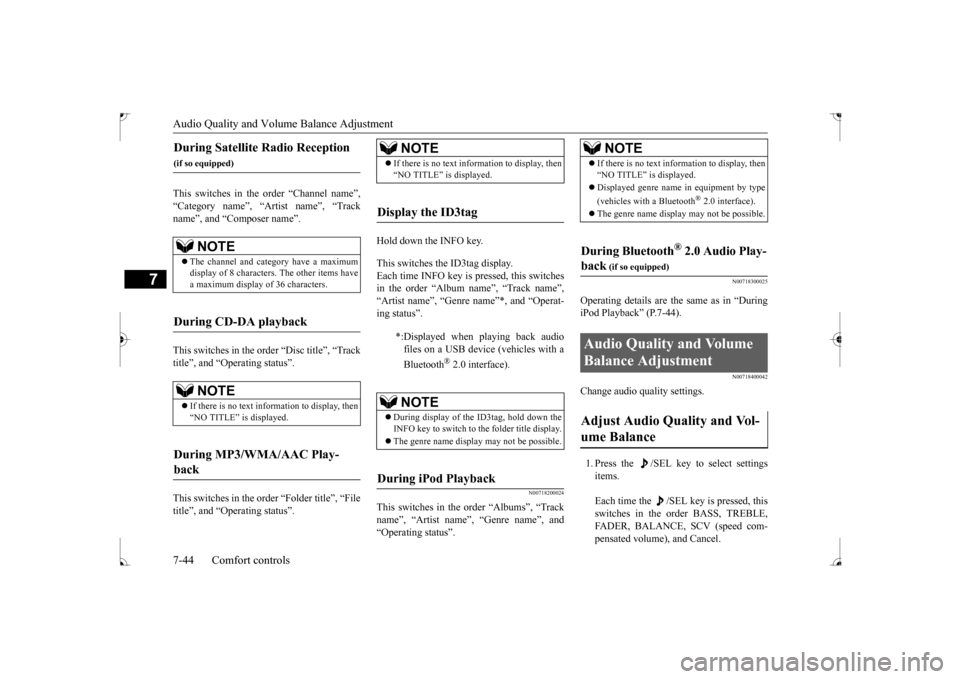
Change audio quality settings. 1. Press the /SEL key to select settings items. Each time the /SEL key is pressed, this switches in the order BASS, TREBLE, FADER, BALANCE, SCV (speed com- pensated volume), and Cancel.
During Satellite Radio Reception
(if so equipped)
NOTE
The channel and category have a maximum display of 8 characters. The other items have a maximum display of 36 characters.
During CD-DA playback
NOTE
If there is no text information to display, then “NO TITLE” is displayed.
During MP3/WMA/AAC Play- back
NOTE
If there is no text information to display, then “NO TITLE” is displayed.
Display the ID3tag
*:Displayed when playing back audio files on a USB device (vehicles with a Bluetooth
® 2.0 interface).
NOTE
During display of the ID3tag, hold down the INFO key to switch to the folder title display. The genre name display may not be possible.
During iPod Playback
NOTE
If there is no text information to display, then “NO TITLE” is displayed. Displayed genre name in equipment by type (vehicles with a Bluetooth
® 2.0 interface).
The genre name display may not be possible.
During Bluetooth
® 2.0 Audio Play-
back
(if so equipped)
Audio Quality and Volume Balance Adjustment Adjust Audio Quality and Vol- ume Balance
BK0237700US.bo
ok 44 ページ 2016年4月15日 金曜日 午前11時28分
Page 292 of 385
System Settings
Comfort controls 7-45
7
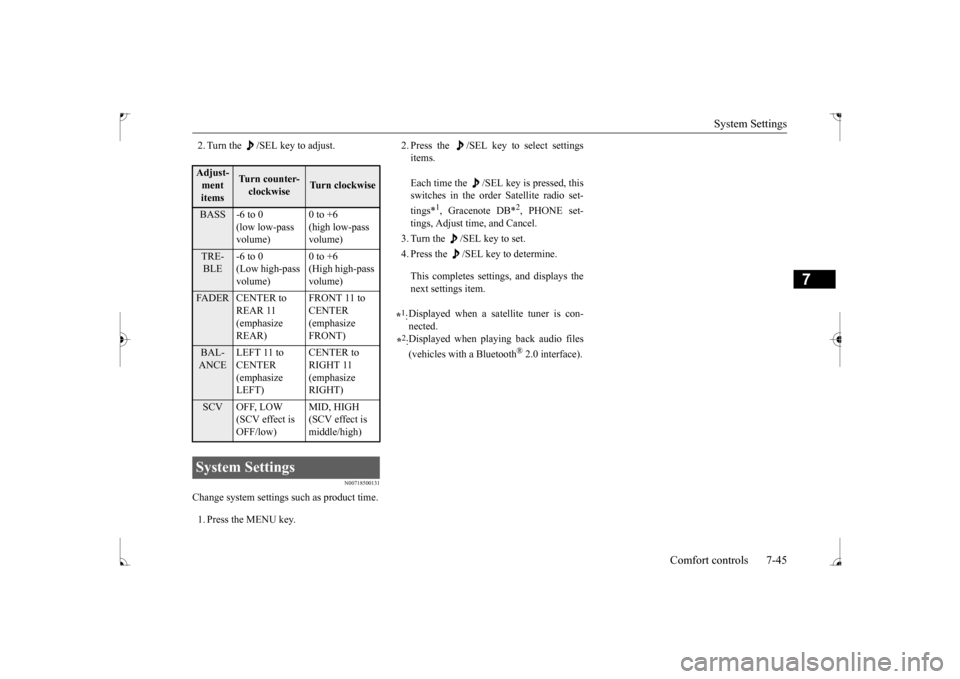
2. Turn the /SEL key to adjust.
N00718500131
Change system settings such as product time. 1. Press the MENU key.
2. Press the /SEL key to select settings items. Each time the /SEL key is pressed, this switches in the order Satellite radio set- tings*
1, Gracenote DB*
2, PHONE set-
tings, Adjust time, and Cancel. 3. Turn the /SEL key to set.4. Press the /SEL key to determine. This completes settings, and displays the next settings item.
Adjust-ment items
Turn counter- clockwise
Turn clockwise
BASS -6 to 0
(low low-pass volume)
0 to +6 (high low-pass volume)
TRE- BLE
-6 to 0 (Low high-pass volume)
0 to +6 (High high-pass volume)
FADER CENTER to
REAR 11 (emphasize REAR)
FRONT 11 to CENTER (emphasize FRONT)
BAL- ANCE
LEFT 11 to CENTER (emphasize LEFT)
CENTER to RIGHT 11 (emphasize RIGHT)
SCV OFF, LOW
(SCV effect is OFF/low)
MID, HIGH (SCV effect is middle/high)
System Settings
*1: Displayed when a satellite tuner is con- nected.
*2: Displayed when playing back audio files (vehicles with a Bluetooth
® 2.0 interface).
BK0237700US.bo
ok 45 ページ 2016年4月15日 金曜日 午前11時28分
Page 295 of 385
System Settings 7-48 Comfort controls
7
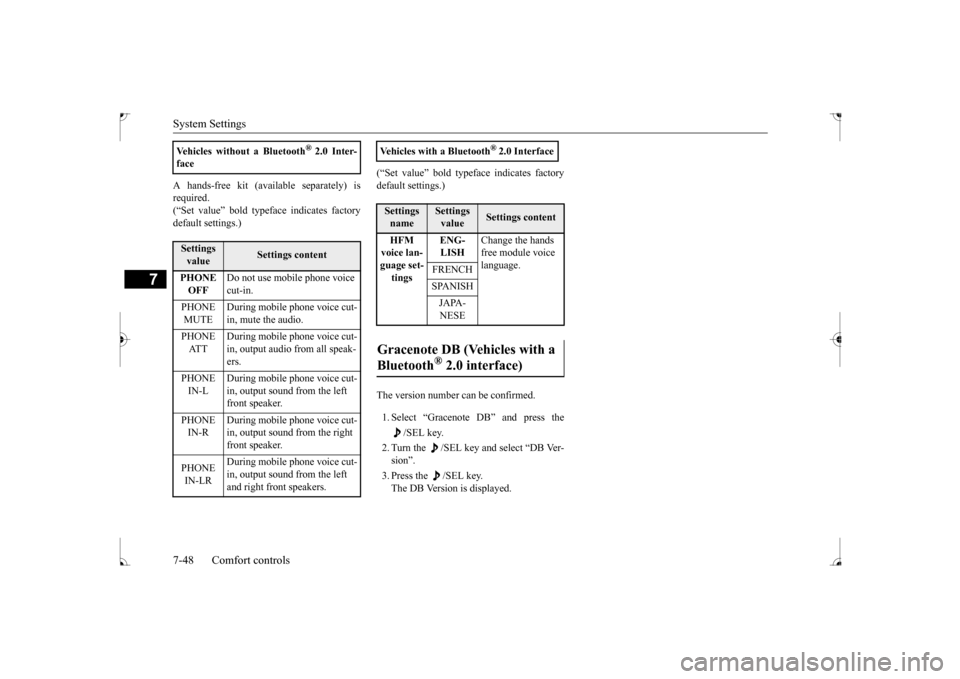
A hands-free kit (available separately) is required. (“Set value” bold typeface indicates factorydefault settings.)
(“Set value” bold typeface indicates factory default settings.) The version number can be confirmed. 1. Select “Gracenote DB” and press the
/SEL key.
2. Turn the /SEL key and select “DB Ver- sion”. 3. Press the /SEL key. The DB Version is displayed.
Vehicles without a Bluetooth
® 2.0 Inter-
faceSettings value
Settings content
PHONE OFF
Do not use mobile phone voice cut-in.
PHONE MUTE
During mobile phone voice cut- in, mute the audio.
PHONE AT T
During mobile phone voice cut- in, output audio from all speak-ers.
PHONE IN-L
During mobile phone voice cut- in, output sound from the left front speaker.
PHONE IN-R
During mobile phone voice cut- in, output sound from the right front speaker.
PHONE IN-LR
During mobile phone voice cut- in, output sound from the left and right front speakers.
Vehicles with a Bluetooth
® 2.0 Interface
Settings name
Settings value
Settings content
HFM voice lan- guage set- tings
ENG- LISH
Change the hands free module voice language.
FRENCH SPANISHJAPA- NESE
Gracenote DB (Vehicles with a Bluetooth
® 2.0 interface)
BK0237700US.bo
ok 48 ページ 2016年4月15日 金曜日 午前11時28分
Page 297 of 385
Troubleshooting 7-50 Comfort controls
7
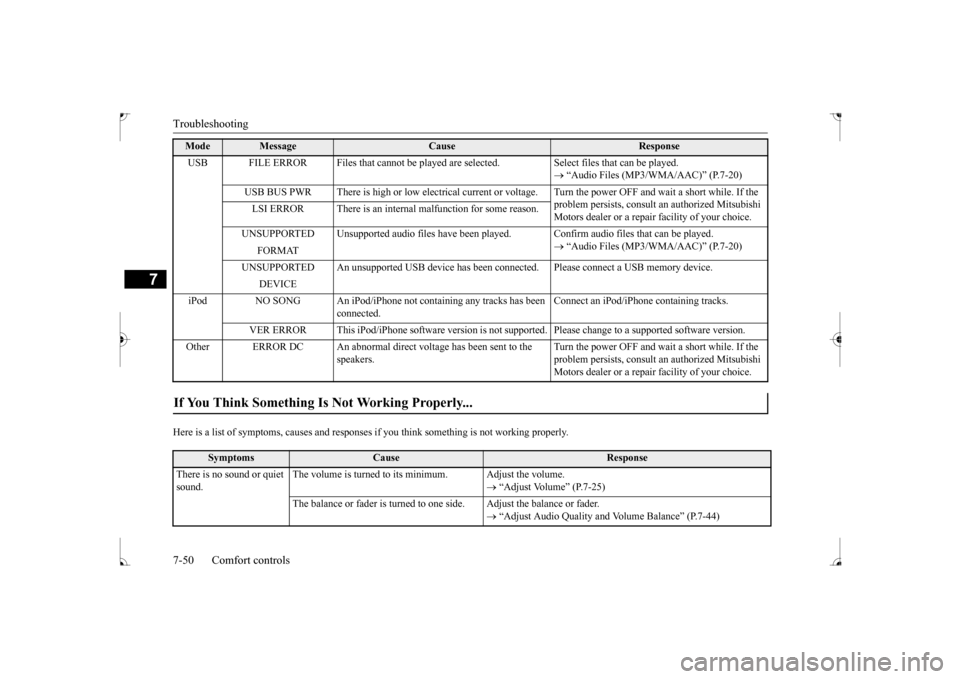
Here is a list of symptoms, causes and responses
if you think something is not working properly.
USB FILE ERROR Files that cannot be played are
selected. Select files that can be played.
“Audio Files (MP3/WMA/AAC)” (P.7-20)
USB BUS PWR There is high or low electrical current or
voltage. Turn the power OFF and wait a short while. If the
problem persists, consult an authorized Mitsubishi Motors dealer or a repair facility of your choice.
LSI ERROR There is an internal malfunction for some reason. UNSUPPORTED Unsupported audio files have been pl
ayed. Confirm audio files that can be played.
“Audio Files (MP3/WMA/AAC)” (P.7-20)
FORMAT
UNSUPPORTED An unsupported USB device has been co
nnected. Please connect a USB memory device.
DEVICE
iPod NO SONG An iPod/iPhone not containing any tracks has been
connected.
Connect an iPod/iPhone containing tracks.
VER ERROR This iPod/iPhone software version is not su
pported. Please change to a supported software version.
Other ERROR DC An abnormal direct voltage has been sent to the
speakers.
Turn the power OFF and wait a short while. If the problem persists, consult an authorized Mitsubishi Motors dealer or a repair facility of your choice.
If You Think Something Is Not Working Properly...
Symptoms
Cause
Response
There is no sound or quiet sound.
The volume is turned to its minimum. Adjust the volume.
“Adjust Volume” (P.7-25)
The balance or fader is turned to one side. Adjust the balance or fader.
“Adjust Audio Quality and Volume Balance” (P.7-44)
Mode
Message
Cause
Response
BK0237700US.bo
ok 50 ページ 2016年4月15日 金曜日 午前11時28分
Page 347 of 385
Fuses 9-28 Vehicle care and maintenance
9
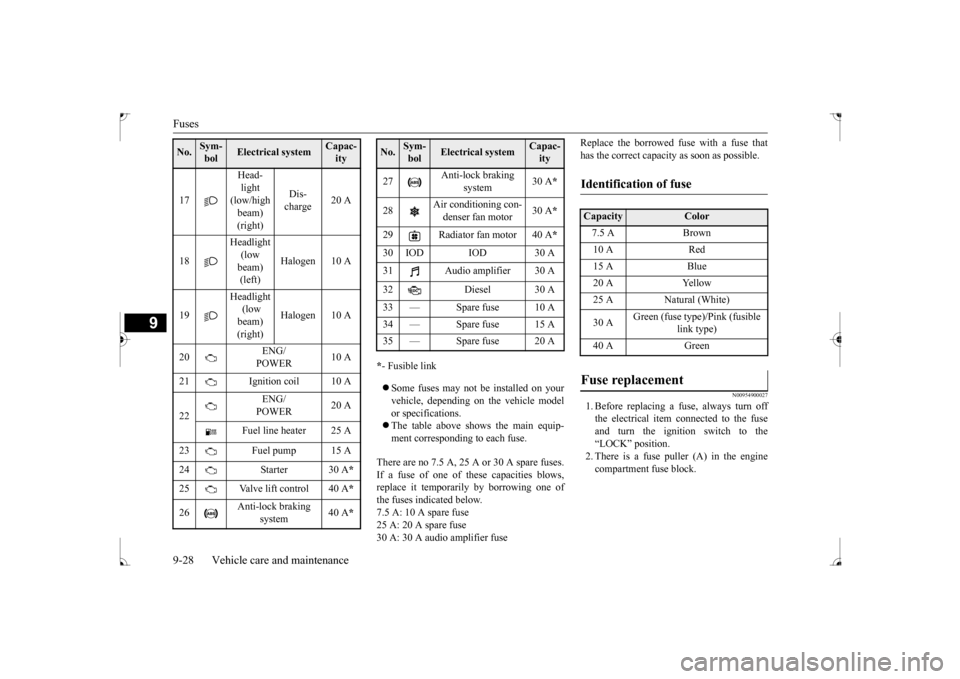
* - Fusible link Some fuses may not be installed on your vehicle, depending on the vehicle modelor specifications. The table above shows the main equip- ment corresponding to each fuse.
There are no 7.5 A, 25 A or 30 A spare fuses. If a fuse of one of these capacities blows,replace it temporarily by borrowing one of the fuses indicated below. 7.5 A: 10 A spare fuse25 A: 20 A spare fuse 30 A: 30 A audio amplifier fuse
Replace the borrowed fuse with a fuse that has the correct capacity as soon as possible.
N00954900027
1. Before replacing a fuse, always turn offthe electrical item connected to the fuseand turn the ignition switch to the“LOCK” position. 2. There is a fuse puller (A) in the engine compartment fuse block.
17
Head- light (low/high beam) (right)
Dis- charge
20 A
18
Headlight (low beam) (left)
Halogen 10 A
19
Headlight (low beam) (right)
Halogen 10 A
20
ENG/ POWER
10 A
21 Ignition coil 10 A 22
ENG/ POWER
20 A
Fuel line heater 25 A
23 Fuel pump 15 A 24 Starter 30 A
*
25 Valve lift control 40 A
*
26
Anti-lock braking
system
40 A
*
No.
Sym- bol
Electrical system
Capac-ity
27
Anti-lock braking
system
30 A
*
28
Air conditioning con- denser fan motor
30 A
*
29 Radiator fan motor 40 A
*
30 IOD IOD 30 A31 Audio amplifier 30 A 32 Diesel 30 A 33 — Spare fuse 10 A 34 — Spare fuse 15 A35 — Spare fuse 20 ANo.
Sym- bol
Electrical system
Capac-ity
Identification of fuse Capacity
Color
7.5 A Brown10 A Red15 A Blue20 A Yellow25 A Natural (White) 30 A
Green (fuse type)/Pink (fusible
link type)
40 A Green
Fuse replacement
BK0237700US.bo
ok 28 ページ 2016年4月15日 金曜日 午前11時28分
Page 380 of 385
Alphabetical index
12-1
12
A
Accessory (installation)
.........................
3-5
Active stability control (ASC)
..............
5-76
ASC OFF display or ASC indicator
..5-78
ASC operation display
....................
5-78
Air cleaner filter
...................
................
9-8
Air conditioning
Automatic air conditioning
.........
7-4
, 7-9
Important air conditioning operating tips
..
7-14
Air purifier
....................
.....................
7-15
All-wheel driving operation
.................
5-70
Aluminum wheels
...............................
9-45
AM/FM radio
....................
.................
7-15
Antenna
Roof antenna
.................
.................
7-51
Anti-lock braking system
.....................
5-74
Warning light / display
...........
5-74
, 5-75
Arm rest
........................
.......................
4-6
Assist grip
.....................
...................
5-168
Audio
AM/FM radio
................
.................
7-15
CD player
.....................
.................
7-15
Troubleshooting
.............................
7-49
Automatic air conditioning
.............
7-4
, 7-9
B
Back-up lights
Bulb capacity
..................
...............
9-30
Replacement
...................
...............
9-38
Ball joint, steering linkage seals and drive shaft boots
.....................
..................
9-23
Battery
........................
......................
9-12
Charging system warning light
.......
5-125
Checking battery electrolyte level
....
9-12
Disconnection and connection
.........
9-13
During cold weather
.......................
9-12
Specification
...................
...............
11-5
Bluetooth 2.0 interface
.......................
5-139
Bottle holder
....................
.................
5-168
Brake
Anti-lock braking system
................
5-74
Braking
.......................
....................
6-5
Fluid
....................
.................
9-11
, 11-6
Hose
.......................
......................
9-23
Parking brake
..................
...............
5-48
Parking brake lever stroke
...............
9-21
Pedal
.......................
......................
5-72
Pedal free play
................
...............
9-21
Power brakes
..................
...............
5-73
Service brake
..................
...............
5-72
Brake assist
......................
..................
5-73
Break-in recommendations
....................
5-3
Bulb capacity
...................
..................
9-30
C
California Perchlorate Materials Requirements
.....................
................
3-6
Capacities
.....................
.....................
11-6
Card holder
............................
5-163
, 5-167
Cargo loads
...................
.....................
6-10
Catalytic converter
................
................
9-2
CD player
......................
.....................
7-15
Center console box
............................
5-167
Certification label
...............................
11-3
Charging system warning light
...........
5-125
Chassis number
..................
.................
11-2
Checking battery electrolyte level
.........
9-12
Child restraint
....................
.................
4-13
Child safety locks for rear door
............
5-38
Cleaning
Inside of your vehicle
......................
9-42
Outside of your vehicle
...................
9-43
Clock
.........................
........................
7-52
Clutch
Fluid
..................
...................
9-11
, 11-6
Pedal free play
...............
.................
9-20
Coat hooks
....................
...................
5-169
Combination headlights and dimmer switch
.
5-127 Coming home light
...........................
5-131
BK0237700US.bo
ok 1 ページ 2016年4月15日 金曜日 午前11時28分