display MITSUBISHI LANCER EVOLUTION 2007 Service Owner's Guide
[x] Cancel search | Manufacturer: MITSUBISHI, Model Year: 2007, Model line: LANCER EVOLUTION, Model: MITSUBISHI LANCER EVOLUTION 2007Pages: 1449, PDF Size: 56.82 MB
Page 1091 of 1449
ABS <4WD> -Troubleshooting35B-21
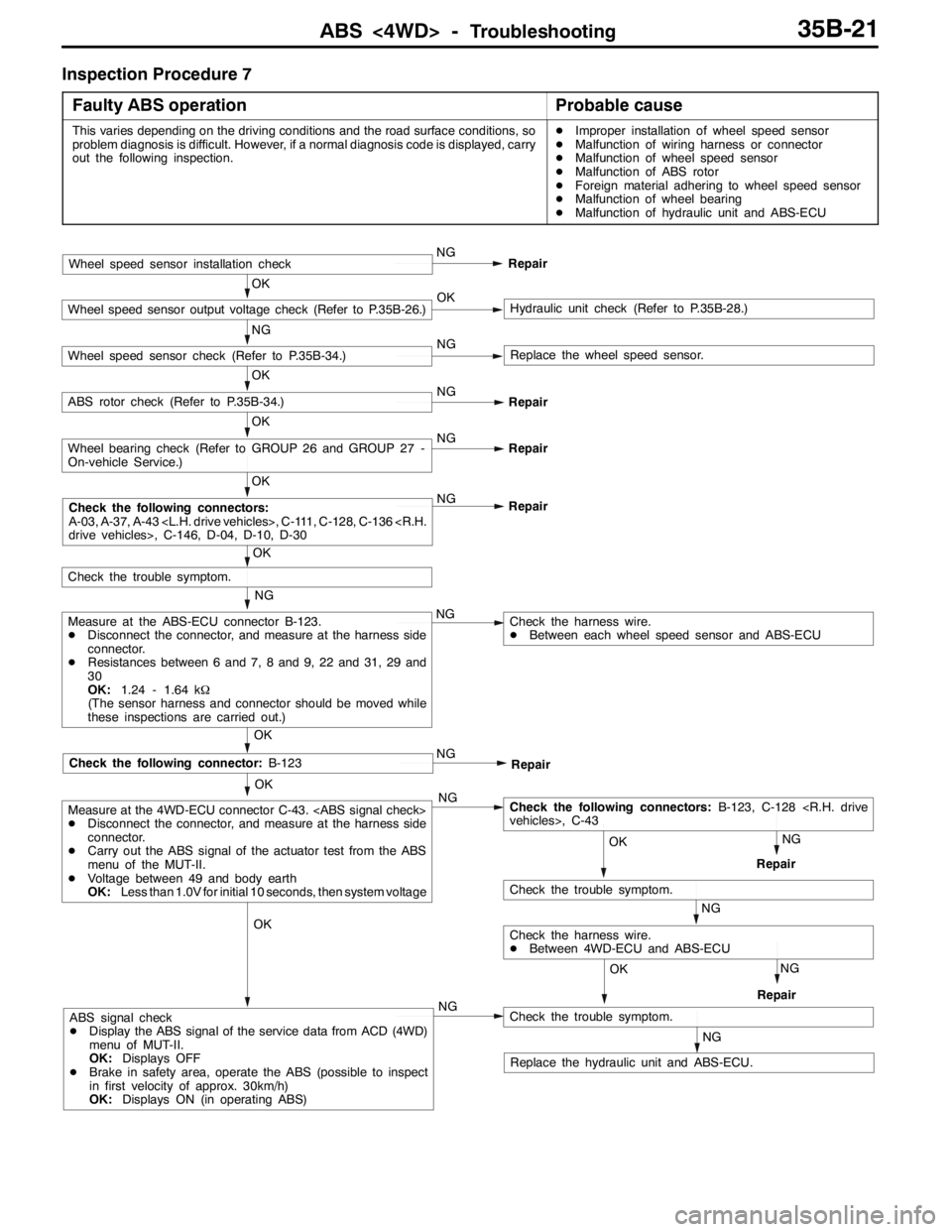
Inspection Procedure 7
Faulty ABS operation
Probable cause
This varies depending on the driving conditions and the road surface conditions, so
problem diagnosis is difficult. However, if a normal diagnosis code is displayed, carry
out the following inspection.DImproper installation of wheel speed sensor
DMalfunction of wiring harness or connector
DMalfunction of wheel speed sensor
DMalfunction of ABS rotor
DForeign material adhering to wheel speed sensor
DMalfunction of wheel bearing
DMalfunction of hydraulic unit and ABS-ECU
OK
OK
Check the following connector:B-123
NG
Measure at the ABS-ECU connector B-123.
DDisconnect the connector, and measure at the harness side
connector.
DResistances between 6 and 7, 8 and 9, 22 and 31, 29 and
30
OK:1.24 - 1.64 kΩ
(The sensor harness and connector should be moved while
these inspections are carried out.)NG
OK
Check the trouble symptom.
OK
NG
Repair
OK
Wheel bearing check (Refer to GROUP 26 and GROUP 27 -
On-vehicle Service.)NG
Repair
OK
ABS rotor check (Refer to P.35B-34.)NG
Repair
NG
Wheel speed sensor check (Refer to P.35B-34.)NGReplace the wheel speed sensor.
OK
Wheel speed sensor output voltage check (Refer to P.35B-26.)OKHydraulic unit check (Refer to P.35B-28.)
Wheel speed sensor installation checkNG
Repair
Check the harness wire.
DBetween each wheel speed sensor and ABS-ECU
NG
Repair
NG
NG
RepairOK
Check the following connectors:B-123, C-128
NG
Check the trouble symptom.
RepairNG
OK
Check the harness wire.
DBetween 4WD-ECU and ABS-ECU OK
Measure at the 4WD-ECU connector C-43.
DDisconnect the connector, and measure at the harness side
connector.
DCarry out the ABS signal of the actuator test from the ABS
menu of the MUT-II.
DVoltage between 49 and body earth
OK:Less than 1.0V for initial 10 seconds, then system voltage
NGABS signal check
DDisplay the ABS signal of the service data from ACD (4WD)
menu of MUT-II.
OK:Displays OFF
DBrake in safety area, operate the ABS (possible to inspect
in first velocity of approx. 30km/h)
OK:Displays ON (in operating ABS)
NG
Check the trouble symptom.
Replace the hydraulic unit and ABS-ECU.
Check the following connectors:
A-03, A-37, A-43
Page 1092 of 1449

ABS <4WD> -Troubleshooting35B-22
DATA LIST REFERENCE TABLE
The following items can be read by the MUT-IIfrom the ABS-ECU input data.
1. When the system is normal
Item No.Check itemChecking requirementsNormal value
11Front-right wheel speed sensorPerform a test runVehicle speeds
displayedonthe
12Front-left wheel speed sensor
displayedonthe
speedometer and
MUTIIareidentical13Rear-right wheel speed sensorMUT-IIareidentical.
14Rear-left wheel speed sensor
21Power supply voltageIgnition switch: ON10 - 16 V
29Parking brake switchPull the parking brake lever.ON
Release the parking brake lever.OFF
36Stop lamp switchDepress the brake pedal.ON
Release the brake pedal.OFF
37Steering wheel sensor neutral
position learningAfter driving straightly with vehicle speed more
than 10km/hON
Before driving with ignition switch ONOFF
71Lateral G sensorWhen vehicle stops2.4 - 2.6 V
When vehicle drives1.0 - 4.0 V
74Steering wheel sensor (ST-N)Ignition switch: ONSteering:
Neutral position and
position near by±
360_ON
Steering:
Except for aboveOFF
75Steering wheel sensor (ST-1)Ignition switch: ONSteering:
Turnlaterallyslowly
Display ON and OFF
alternately
76Steering wheel sensor (ST-2)
Turnlaterallyslowlyalternately
86Steering degreeIgnition switch: ON
Steering wheel sensor
tlitili
Steering: Steer by
90_to the right+90_
g
neutral position learning
is finished (service data
N37di lON)
Steering: NeutralOFF(
No. 37 displays ON)Steering: Steer by
90_to the left-90_
2. When the ABS-ECU shut off ABS operation
When the diagnosis system stops the ABS-ECU, the MUT-IIdisplay data will be unreliable.
Page 1099 of 1449

ABS <4WD> -On-vehicle Service35B-29
The result should be as shown in the following diagram.
Approx. 0.05 seconds
Pedal operationDepressed
Released
Solenoid valve
positionIncrease in pressure
Steady pressure
Reduction in pressure
Checking the
brake forceLock
Drag force when the pedal is freeMUT-IIactuator test
(Item No. 01, 02, 03, 04) start
2 seconds
1 seconds
6. If the result of inspection is abnormal, correct according to the following “Diagnosis Table.”
Diagnosis Table
No.MUT-II
display
OperationJudgementProbable
cause
Remedy
display
NormalAbnormal
cause
01FR VALVE(1) Depress the brake
pedal to lock wheel.
(2) Using the MUT-II,
select the wheel to be
checkedandforcethe
Brake force
released for 3
seconds after
locking.Wheel does
not lock when
brake pedal
is depressed.Clogged
brake line
other than
hydraulic unitCheck and
clean brake
line.
02FL VALVEchecked and force the
actuator to operate.
(3) Check the brake force
for the selected wheel
using a brake force
ttbttith
Clogged
hydraulic
circuit in
hydraulic unitReplace
hydraulic unit
assembly.
03RR VALVE
g
tester or by rotating the
wheel by hand.Brake force is
not released.Incorrect
hydraulic unit
brake tube
connectionConnect
correctly.
04RL VALVEHydraulic unit
solenoid
valve not
functioning
correctlyReplace
hydraulic unit
assembly.
7. After checking, turn the ignition switch to the “LOCK” (OFF) position and then disconnect the MUT-II.
REMEDY FOR A FLAT BATTERY
When booster cables are used to start the engine when the
battery is completely flat and then the vehicle is immediately
driven without waiting for the battery to recharge itself to
some extent, the engine may misfire, and driving might not
be possible. This happens because ABS consumes a great
amount of current for its self-check function. If this happens,
recharge the battery fully.
Caution
The vehicle posture will be unstable during braking, so
do not drive the vehicle with the ABS-ECU connector
disconnected or with the ABS not operating for any other
reason.
Page 1254 of 1449

SRS -Troubleshooting52B-10
Code no.Page Diagnostic item
34*2Connector lock system52B-29
35SRS-ECU (deployed air bag) system52B-29
41*2Power supply circuit system (fuse No.2 circuit)52B-30
42*2Power supply circuit system (fuse No.3 circuit)52B-32
43*2SRS warning lamp drive circuit systemLamp does not illumi-
nate.52B-33
SRS warning lamp drive circuit systemLamp does not go out.52B-33
44*2SRS warning lamp drive circuit system52B-33
45SRS-EUC internal circuit system including non - volatile memory (EEPROM)52B-11
51Driver’s air bag module (squib) ignition drive circuit systemShort in the ignition
drive circuit52B-11
52Driver’s air bag module (squib) ignition drive circuit systemOpen in the ignition
drive circuit
54Front passenger’s air bag (squib) ignition drive circuit
systemShort in the ignition
drive circuit52B-11
55Front passenger’s air bag (squib) ignition drive circuit
systemOpen in the ignition
drive circuit
56Driver’s seat belt pre-tensioner (squib) ignition drive circuit
systemShort in the ignition
drive circuit52B-11
57Driver’s seat belt pre-tensioner (squib) ignition drive circuit
systemOpen in the ignition
drive circuit
58Front passenger’s seat belt pre-tensioner (squib) ignition
drive circuit systemShort in the ignition
drive circuit52B-11
59Front passenger’s seat belt pre-tensioner (squib) ignition
drive circuit systemOpen in the ignition
drive circuit
61Driver’s air bag module (squib) systemShort-circuited to
power supply52B-34
62Driver’s air bag module (squib) systemShort-circuited to earth
64Front passenger’s air bag module (squib) systemShort-circuited to
power supply52B-38
65Front passenger’s air bag module (squib) systemShort-circuited to earth
66Driver’s seat belt pre-tensioner (squib) systemShort-circuited to
power supply52B-39
67Driver’s seat belt pre-tensioner (squib) systemShort-circuited to earth
68Front passenger’s seat belt pre-tensioner (squib) systemShort-circuited to
power supply52B-40
69Front passenger’s seat belt pre-tensioner (squib) systemShort-circuited to earth
NOTE
(1) *1: If the trouble(s) are removed, the SRS warning lamp go out with diagnosis code history stored.
(2) *2: If the trouble(s) are removed, the SRS warning lamp will go out with diagnosis code history automatically erased.
(3) When the battery has been discharged, diagnosis code No.41 or 42 is stored. Check the battery when either of
these is displayed.
Page 1273 of 1449
SRS -Troubleshooting52B-29
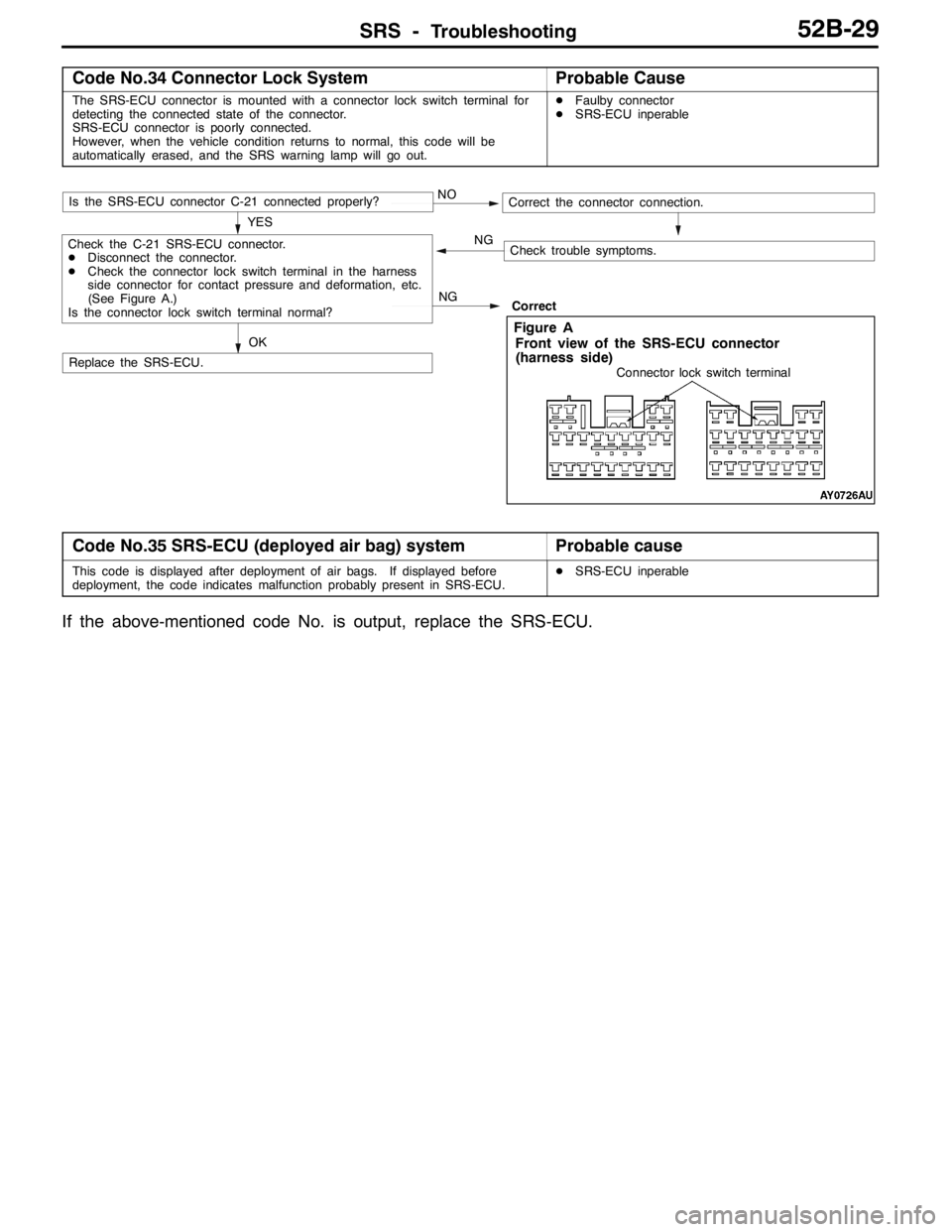
Code No.34 Connector Lock SystemProbable Cause
The SRS-ECU connector is mounted with a connector lock switch terminal for
detecting the connected state of the connector.
SRS-ECU connector is poorly connected.
However, when the vehicle condition returns to normal, this code will be
automatically erased, and the SRS warning lamp will go out.DFaulby connector
DSRS-ECU inperable
NOIs the SRS-ECU connector C-21 connected properly?
Replace the SRS-ECU.Correct YES
OK
Correct the connector connection.
Check trouble symptoms. NG
NGCheck the C-21 SRS-ECU connector.
DDisconnect the connector.
DCheck the connector lock switch terminal in the harness
side connector for contact pressure and deformation, etc.
(See Figure A.)
Is the connector lock switch terminal normal?
Connector lock switch terminal
Front view of the SRS-ECU connector
(harness side)
Figure A
Code No.35 SRS-ECU (deployed air bag) systemProbable cause
This code is displayed after deployment of air bags. If displayed before
deployment, the code indicates malfunction probably present in SRS-ECU.DSRS-ECU inperable
If the above-mentioned code No. is output, replace the SRS-ECU.
Page 1289 of 1449

SRS - Post-collision Diagnosis52B-45
POST-COLLISION DIAGNOSIS
Whether or not the air bags have deployed, check and service
the vehicle after collision as follows:
SRS-ECU MEMORY CHECK
1. Connect the MUT-IIto the diagnosis connector. (Refer
to GROUP 00 – How to Use Troubleshooting/Inspection
Service Points.)
Caution
Refer to that the ignition switch is LOCK(OFF) when
connecting or disconnecting MUT-II.
2. Read (and write down) all displayed diagnosis codes.
(Refer to P.52B-9.)
NOTE
If battery power supply has been shut down by the
collision, the MUT-IIcannot communicate with the
SRS-ECU. Check and, repair if necessary, the instrument
panel wiring harness before the next job.
3. Use the the MUT-IIto read the data list (how long trouble(s)
have continued and how often memory have been
erased).
Data list
NoService Data ItemApplicability
92Number indication how often the memory is cleared.Maximum time to be stored: 250
93How long problem have lasted (How long it takes
from the occurrence of the problem till the first air bag
squib igniting signal)Maximum time to be stored: 9999 minutes
(approximately 7 days)
94How long problem(s) have lasted (How long it takes
from the first air bag squib igniting signal till now.)
4. Erase the diagnosis codes and after waiting 5 seconds
or more read (and write down) all displayed diagnosis
codes. (Refer to P.52B-9.)
Page 1366 of 1449

SWS -Special Tools/Troubleshooting54B-2
SPECIAL TOOLS
ToolNumberNameUse
MB991502MUT-II subassem-
blyFor SWS inspections (diagnosis code display
and input signal check by MUT-II)
MB991529Diagnosis code
check harnessFor checking input signals by voltmeter
A
B
C
D
MB991223
A: MB991219
B: MB991220
C: MB991221
D: MB991222Harness set
A: Test harness
B: LED harness
C: LED harness
adapter
D: ProbeFor checking voltage (continuity and value) at
harnesses and connectors
A: For checking connector pin contact voltage
B: For checking power supply circuits
C: For checking power supply circuits
D: For connection to commercially available
testers
TROUBLESHOOTING
BEFORE COMMENCING TROUBLESHOOTING
Before starting troubleshooting, check the following two points to ensure there are no defects.
DCheck the state of the connector couplings to the ETACS-ECU and junction box.
DCheck that the fuses and fusible links relating to all systems are not fused.
STANDARD FLOW OF DIAGNOSTIC TROUBLESHOOTING
Refer to GROUP 00 - How to Use Troubleshooting/Inspection Service Points.
DIAGNOSTIC FUNCTIONS
READING DIAGNOSIS CODES
Read the diagnosis codes using MUT-II. (Refer to GROUP 00 - How to Use Troubleshooting/Inspection
Service Points.)
NOTE
1. Connect MUT-II to the 16-pin diagnosis connector (black).
2. The diagnosis code cannot be read when there is an ETACS-ECU fault or when the power is first
turned ON (voltage rising). In this case, refer to “No Communication with MUT-II” (P. 54B-10) on
Fault Symptom Inspection Procedure, and perform troubleshooting.