instrument panel MITSUBISHI LANCER EVOLUTION 2007 Service Workshop Manual
[x] Cancel search | Manufacturer: MITSUBISHI, Model Year: 2007, Model line: LANCER EVOLUTION, Model: MITSUBISHI LANCER EVOLUTION 2007Pages: 1449, PDF Size: 56.82 MB
Page 1288 of 1449

SRS - SRS Maintenance52B-44
REPLACE ANY VISUALLY INSPECTED PART IF IT
FAILS THAT INSPECTION. (Refer to P.52B-52.)
Caution
The SRS may not activate if any of the above
components is not installed properly, which could
result in serious injury or death to the vehicle’s driver
or front passenger.
INSTRUMENT PANEL WIRING HARNESS
Instrument panel wiring harness
1. Check connector for poor connection.
2. Check harnesses for binds, connectors for damage, and
terminals for deformation.
REPLACE ANY CONNECTORS OR HARNESS THAT
FAIL THE VISUAL INSPECTION. (Refer to P.52B-3.)
Caution
The SRS may not activate if SRS harnesses or
connectors are damaged or improperly connected,
which could result in serious injury or death to the
vehicle’s driver or front passenger.
POST-INSTALLATION INSPECTION
Reconnect the negative battery terminal. Turn the ignition
switch to the ON position. Does the SRS warning lamp
illuminate for about 7 seconds, and then go out? If yes, SRS
system is functioning properly. If no, consult page 52B-6.
SRS warning lamp
Page 1289 of 1449

SRS - Post-collision Diagnosis52B-45
POST-COLLISION DIAGNOSIS
Whether or not the air bags have deployed, check and service
the vehicle after collision as follows:
SRS-ECU MEMORY CHECK
1. Connect the MUT-IIto the diagnosis connector. (Refer
to GROUP 00 – How to Use Troubleshooting/Inspection
Service Points.)
Caution
Refer to that the ignition switch is LOCK(OFF) when
connecting or disconnecting MUT-II.
2. Read (and write down) all displayed diagnosis codes.
(Refer to P.52B-9.)
NOTE
If battery power supply has been shut down by the
collision, the MUT-IIcannot communicate with the
SRS-ECU. Check and, repair if necessary, the instrument
panel wiring harness before the next job.
3. Use the the MUT-IIto read the data list (how long trouble(s)
have continued and how often memory have been
erased).
Data list
NoService Data ItemApplicability
92Number indication how often the memory is cleared.Maximum time to be stored: 250
93How long problem have lasted (How long it takes
from the occurrence of the problem till the first air bag
squib igniting signal)Maximum time to be stored: 9999 minutes
(approximately 7 days)
94How long problem(s) have lasted (How long it takes
from the first air bag squib igniting signal till now.)
4. Erase the diagnosis codes and after waiting 5 seconds
or more read (and write down) all displayed diagnosis
codes. (Refer to P.52B-9.)
Page 1292 of 1449

SRS - Post-collision Diagnosis52B-48
Steering wheel, steering column and intermediate joint
1. Check the driver’s air bag module for proper installation
to the steering wheel.
2. Check the steering wheel for noise, binds or difficult
operation and excessive free play.
Harness connector (Instrument panel wiring harness,
Floor wiring harness)
Check the harness for binds, the connector for damage and
the terminals for deformation. (Refer to P.52B-44.)
Seat belt with pre-tensioner
1. Check the seat belt for damage or deformation.
2. Check the pre-tensioner for cracks or deformation.
3. Check the harness or the connector for damage, and
the terminal for deformation.
4. Check that the unit is installed correctly to the vehicle
body.
Page 1299 of 1449

SRS - Air Bag Modules and Clock Spring52B-55
1
Removal steps
DInstrument panel assembly
(Refer to GROUP 52A - Instrument
panel.)
A
F"1. Passenger’s air bag moduleInstallation steps
"AADPre-installation inspection
1. Passenger’s air bag module
DInstrument panel assembly
(Refer to GROUP 52A - Instrument
panel.)
DNegative ( - ) battery cable connection
"DADPost-installation inspection
REMOVAL SERVICE POINTS
AA"DRIVER’S AIR BAG MODULE REMOVAL
1. Remove the air bag module mounting screw (torque
screw) from the steering wheel side.
2. Spread the lock outward to remove the connector by
prying with a flat-tipped screw driver as shown in the
illustration at left.
Caution
(1) Be careful not to remove the connector forcibly.
(2) Keep the removed driver’s air bag module facing
the pad surface upward in a clean and dry place.
locked
Connector
Flat-tipped screw
driver
locked
Page 1309 of 1449
SRS -AirBagModuleandSeatBeltPre-tensioner
Disposal Procedures52B-65
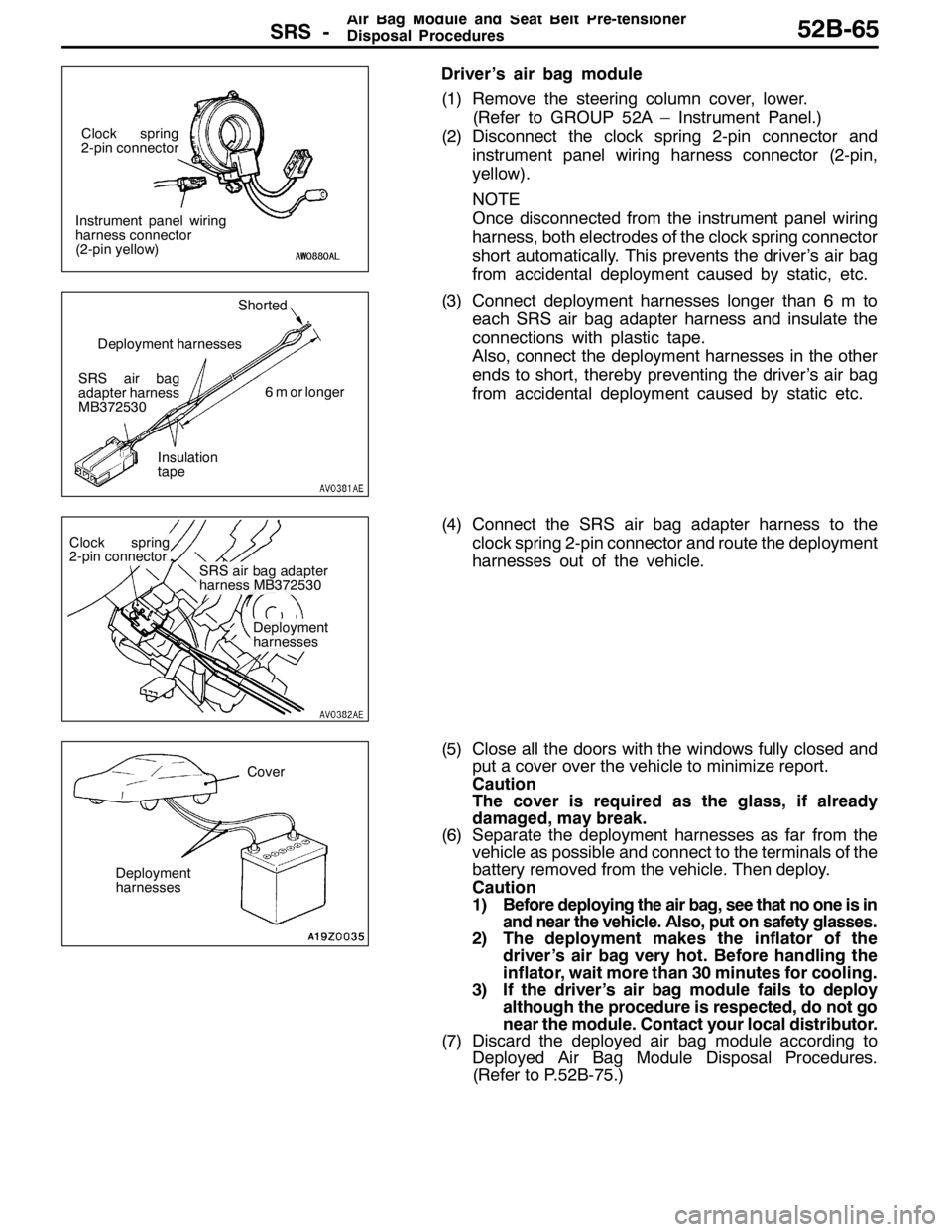
Driver’s air bag module
(1) Remove the steering column cover, lower.
(Refer to GROUP 52A – Instrument Panel.)
(2) Disconnect the clock spring 2-pin connector and
instrument panel wiring harness connector (2-pin,
yellow).
NOTE
Once disconnected from the instrument panel wiring
harness, both electrodes of the clock spring connector
short automatically. This prevents the driver’s air bag
from accidental deployment caused by static, etc.
(3) Connect deployment harnesses longer than 6 m to
each SRS air bag adapter harness and insulate the
connections with plastic tape.
Also, connect the deployment harnesses in the other
ends to short, thereby preventing the driver’s air bag
from accidental deployment caused by static etc.
(4) Connect the SRS air bag adapter harness to the
clock spring 2-pin connector and route the deployment
harnesses out of the vehicle.
(5) Close all the doors with the windows fully closed and
put a cover over the vehicle to minimize report.
Caution
The cover is required as the glass, if already
damaged, may break.
(6) Separate the deployment harnesses as far from the
vehicle as possible and connect to the terminals of the
battery removed from the vehicle. Then deploy.
Caution
1) Before deploying the air bag, see that no one is in
and near the vehicle. Also, put on safety glasses.
2) The deployment makes the inflator of the
driver’s air bag very hot. Before handling the
inflator, wait more than 30 minutes for cooling.
3) If the driver’s air bag module fails to deploy
although the procedure is respected, do not go
near the module. Contact your local distributor.
(7) Discard the deployed air bag module according to
Deployed Air Bag Module Disposal Procedures.
(Refer to P.52B-75.)
Instrument panel wiring
harness connector
(2-pin yellow)Clock spring
2-pin connector
SRS air bag
adapter harness
MB372530Shorted
6 m or longer
Insulation
tape Deployment harnesses
Clock spring
2-pin connector
SRS air bag adapter
harness MB372530
Deployment
harnesses
Cover
Deployment
harnesses
Page 1310 of 1449

SRS -AirBagModuleandSeatBeltPre-tensioner
Disposal Procedures52B-66
Front passenger’s air bag module
(1) Remove the glove box.
(Refer to GROUP 52A – Instrument Panel.)
(2) Disconnect the front passenger’s air bag module 2-pin
connector (red) and instrument panel wiring harness
connector (2-pin, red).
NOTE
Once disconnected from the instrument panel wiring
harness, both electrodes of the front passenger’s air
bag module short automatically. This prevents the
front passenger air bag from accidental deployment
caused by static, etc.
(3) Connect deployment harnesses longer than 6 m to
each SRS air bag adapter harness and insulate the
connections with plastic tape.
Also, connect the deployment harnesses in the other
ends to short, thereby preventing the front
passenger’s air bag from accidental deployment
caused by static etc.
(4) Connect the SRS air bag adapter harness to the
front passenger’s air bag module 2-pin connector
(red) and route the deployment harnesses out of the
vehicle.
(5) Close all the doors with the windows fully closed and
put a cover over the vehicle to minimize report.
Caution
The cover is required as the glass, if already
damaged, may break.
Instrument panel wiring
harness connector
(2-pin, red)
Front passen-
ger’s air bag
module 2-pin
connector (red)
SRS air bag
adapter harness
MB686560Shorted
6 m or longer
Insulation
tape Deployment harnesses
Deployment
harnesses SRS air bag
adapter harness
MB686560
Front passenger’s
air bag module 2-pin
connector (red)
Cover
Deployment
harnesses
Page 1311 of 1449
SRS -AirBagModuleandSeatBeltPre-tensioner
Disposal Procedures52B-67
(6) Separate the deployment harnesses as far from the
vehicle as possible and connect to the terminals of the
battery removed from the vehicle. Then deploy.
Caution
1) Before deploying the air bag, see that no one is
in and near the vehicle. Also, put on safety
glasses.
2) The deployment makes the inflator of the front
passenger’s air bag very hot. Before handling
the inflator, wait more than 30 minutes for
cooling.
3) If the front passenger’s air bag module fails to
deploy although the procedure is respected,
do not go near the module. Contact your local
distributor.
(7) Discard the deployed air bag module according to
Deployed Air Bag Module Disposal Procedures.
(Refer to P.52B-75.)
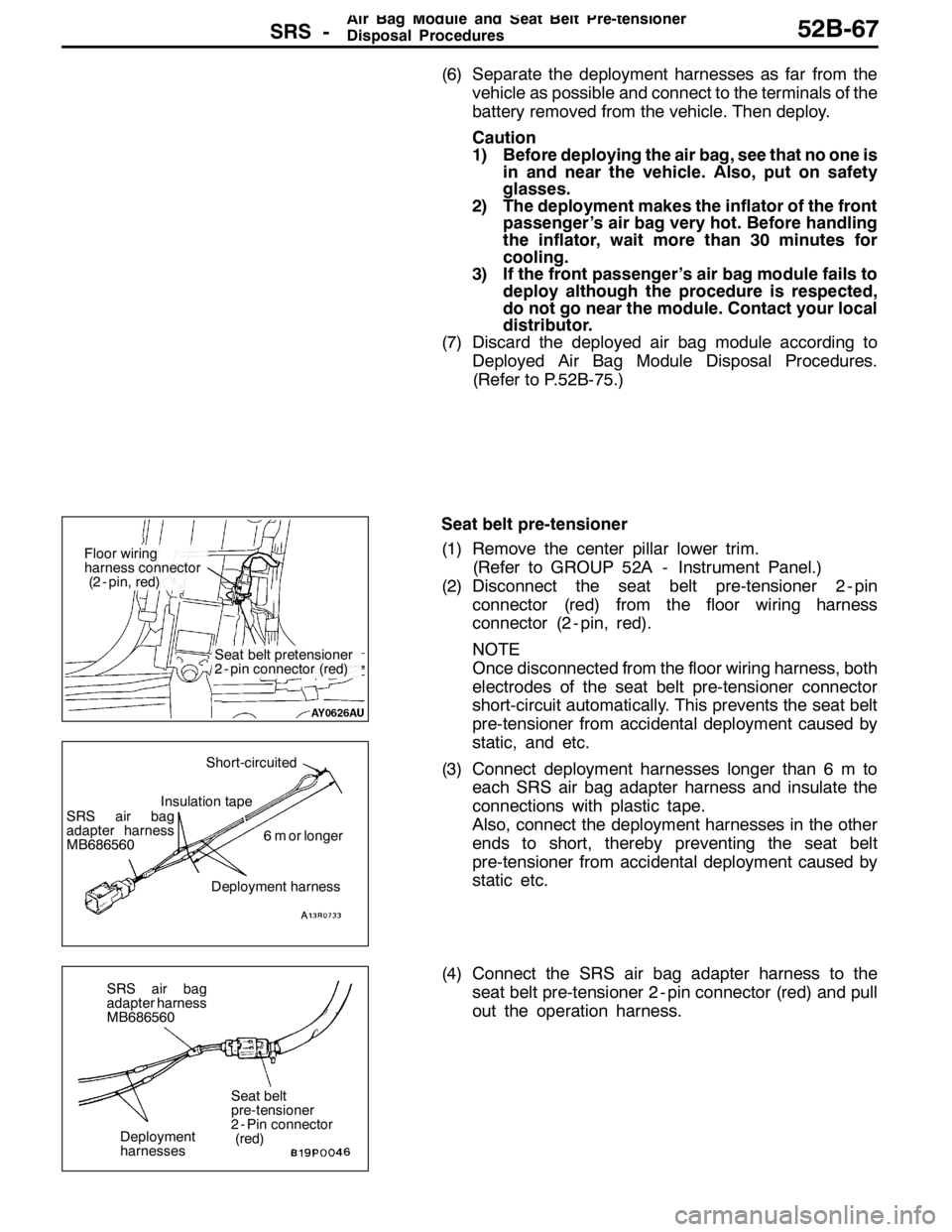
Seat belt pre-tensioner
(1) Remove the center pillar lower trim.
(Refer to GROUP 52A - Instrument Panel.)
(2) Disconnect the seat belt pre-tensioner 2 - pin
connector (red) from the floor wiring harness
connector (2 - pin, red).
NOTE
Once disconnected from the floor wiring harness, both
electrodes of the seat belt pre-tensioner connector
short-circuit automatically. This prevents the seat belt
pre-tensioner from accidental deployment caused by
static, and etc.
(3) Connect deployment harnesses longer than 6 m to
each SRS air bag adapter harness and insulate the
connections with plastic tape.
Also, connect the deployment harnesses in the other
ends to short, thereby preventing the seat belt
pre-tensioner from accidental deployment caused by
static etc.
(4) Connect the SRS air bag adapter harness to the
seat belt pre-tensioner 2 - pin connector (red) and pull
out the operation harness.
Seat belt pretensioner
2 - pin connector (red)
Floor wiring
harness connector
(2 - pin, red)
SRS air bag
adapter harness
MB686560
Insulation tapeShort-circuited
6 m or longer
Deployment harness
Deployment
harnesses SRS air bag
adapter harness
MB686560
Seat belt
pre-tensioner
2 - Pin connector
(red)
Page 1326 of 1449

CHASSIS ELECTRICAL -Ignition Switch and Immobilizer System54A-6
IGNITION SWITCH AND IMMOBILIZER SYSTEM
SPECIAL TOOLS
ToolNumberNameUse
MB991502MUT-IISub as-
semblyChecking the immobilizer system
MB990784Ornament removerInstrument panel under cover and column
cover removal
TROUBLESHOOTING
IGNITION SWITCH
The ignition switch is controlled by the Smart Wiring System (SWS). For troubleshooting procedures,
refer to GROUP 54B.
IMMOBILIZER
STANDARD FLOW OF DIAGNOSIS TROUBLESHOOTING
Refer to GROUP 00 - How to Use Troubleshooting/Inspection Service Points.
DIAGNOSIS FUNCTION
READING DIAGNOSIS CODES
The diagnosis codes can be read using the MUT-IIor by using the Simple Check Diagnosis mode. (Refer
to GROUP 00 - How to Use Troubleshooting/Inspection Service Points.)
NOTE
Connect the MUT-IIto the 16-pin diagnosis connector (black).
DIAGNOSIS CODE MEMORY ERASING PROCEDURE
Refer to GROUP 00 - How to Use Troubleshooting/Inspection Service Points.
INSPECTION USING SIMPLE CHECK DIAGNOSIS MODE
1. Change to Simple Check Diagnosis mode and activate switch diagnosis mode. (Refer to GROUP
00 - How to Use Troubleshooting/Inspection Service Points.)
2. In this condition, the input signals for the following switches can be checked.
CHART CLASSIFIED BY DIAGNOSIS CODES
Code No.Diagnosis contentsReference page
11Problem related to communication with the ignition key54A-7
12Ignition key is not registered, or encrypted code from ignition key does not match.54A-7
Page 1331 of 1449

CHASSIS ELECTRICAL -Ignition Switch and Immobilizer System54A-11
IGNITION SWITCH
REMOVAL AND INSTALLATION
7
6
15 32
4
8
Removal steps
1. Lower column cover (Refer to GROUP
52A - Instrument Panel.)
2. Upper column cover (Refer to GROUP
52A - Instrument Panel.)
3. Steering Wheel (Refer to GROUP
37A.)
4. Clock spring column switch assembly
(Refer to GROUP 37A - Steering
Shaft.)AA"5. Steering lock cylinder
6. Ignition switch
7. Key reminder switch
8. Immobilizer-ECU
REMOVAL SERVICE POINT
AA"STEERING LOCK CYLINDER REMOVAL
1. Insert key into steering lock cylinder to turn ignition key
to “ACC” position.
2. Insert locking pin with small plus screwdriver, etc., and
remove steering lock cylinder.
Locking pin
Page 1342 of 1449

CHASSIS ELECTRICAL -Combination Meter54A-22
COMBINATION METER
REMOVAL AND INSTALLATION
3
1 2
Removal steps
1. Meter bezel
2. Instrument panel ornament
3. Combination meter
INSPECTION
COMBINATION METER INTERNAL RESISTANCE
CHECK
Use circuit tester to measure combination meter internal
resistance.
Standard Value:
Measuring
terminal No.Terminal nameStandard
valueΩ
1-50Water temperature gauge to earth233±3
1-51Fuel gauge to earth181±2