display MITSUBISHI LANCER EVOLUTION 2007 Service Repair Manual
[x] Cancel search | Manufacturer: MITSUBISHI, Model Year: 2007, Model line: LANCER EVOLUTION, Model: MITSUBISHI LANCER EVOLUTION 2007Pages: 1449, PDF Size: 56.82 MB
Page 90 of 1449
HOW TO READ THE WIRING DIAGRAMS -How to Read Circuit DiagramsA-4
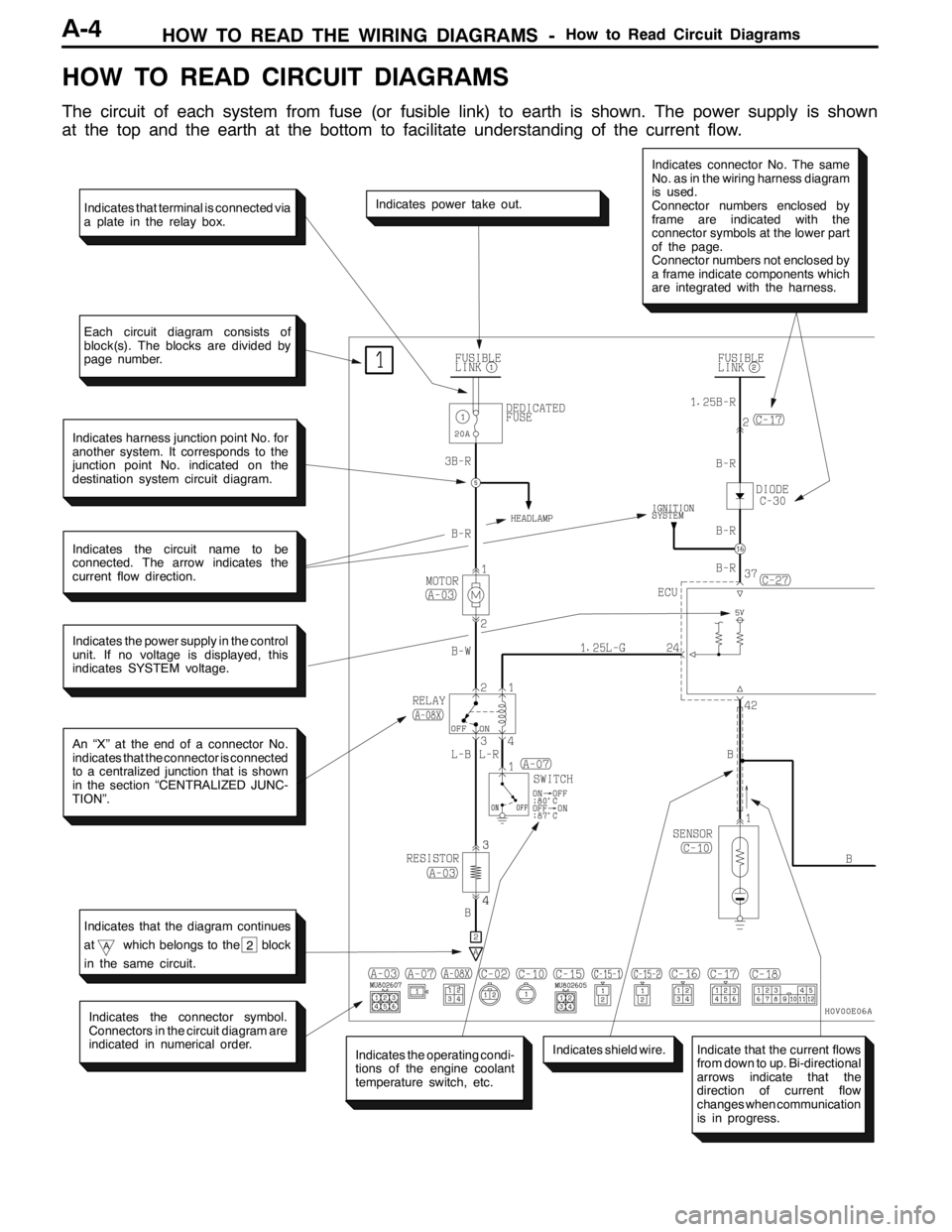
HOW TO READ CIRCUIT DIAGRAMS
The circuit of each system from fuse (or fusible link) to earth is shown. The power supply is shown
at the top and the earth at the bottom to facilitate understanding of the current flow.
Indicates the power supply in the control
unit. If no voltage is displayed, this
indicates SYSTEM voltage.
Indicates power take out.
Indicates connector No. The same
No. as in the wiring harness diagram
is used.
Connector numbers enclosed by
frame are indicated with the
connector symbols at the lower part
of the page.
Connector numbers not enclosed by
a frame indicate components which
are integrated with the harness.
Indicates harness junction point No. for
another system. It corresponds to the
junction point No. indicated on the
destination system circuit diagram.
Indicates the circuit name to be
connected. The arrow indicates the
current flow direction.
An “X” at the end of a connector No.
indicates that the connector is connected
to a centralized junction that is shown
in the section “CENTRALIZED JUNC-
TION”.
Indicates the operating condi-
tions of the engine coolant
temperature switch, etc.
Indicates the connector symbol.
Connectors in the circuit diagram are
indicated in numerical order.
Indicates shield wire.
Indicates that terminal is connected via
a plate in the relay box.
Each circuit diagram consists of
block(s). The blocks are divided by
page number.
Indicates that the diagram continues
at
Awhich belongs to the block
in the same circuit.2
Indicate that the current flows
from down to up. Bi-directional
arrows indicate that the
direction of current flow
changes when communication
is in progress.
Page 98 of 1449

HOW TO READ THE WIRING DIAGRAMS -Abbreviation SymbolsA-12
Name of switches and
relaysOperation Abbreviation
symbols
Windshield wiper
switch
MISTWiper operates once
switch
INTWiper operates intermittently
LOWiper operates at low speed
HIWiper operates at high speed
4. Other abbreviation symbols
Abbreviation
symbolsMeaningAbbreviation
symbolsMeaning
ECUElectronic control unitLCDLiquid crystal display
GNDEarthLHLeft hand
ILLIllumination lampLHDL.H. drive vehicles
INDIndicator lampRHRight hand
J/BJunction blockRHDR.H. drive vehicles
J/CJoint connector
Page 384 of 1449
GENERAL -How to Use Troubleshooting/Inspection Service Points00-6
HOW TO USE TROUBLESHOOTING/INSPECTION SERVICE
POINTS
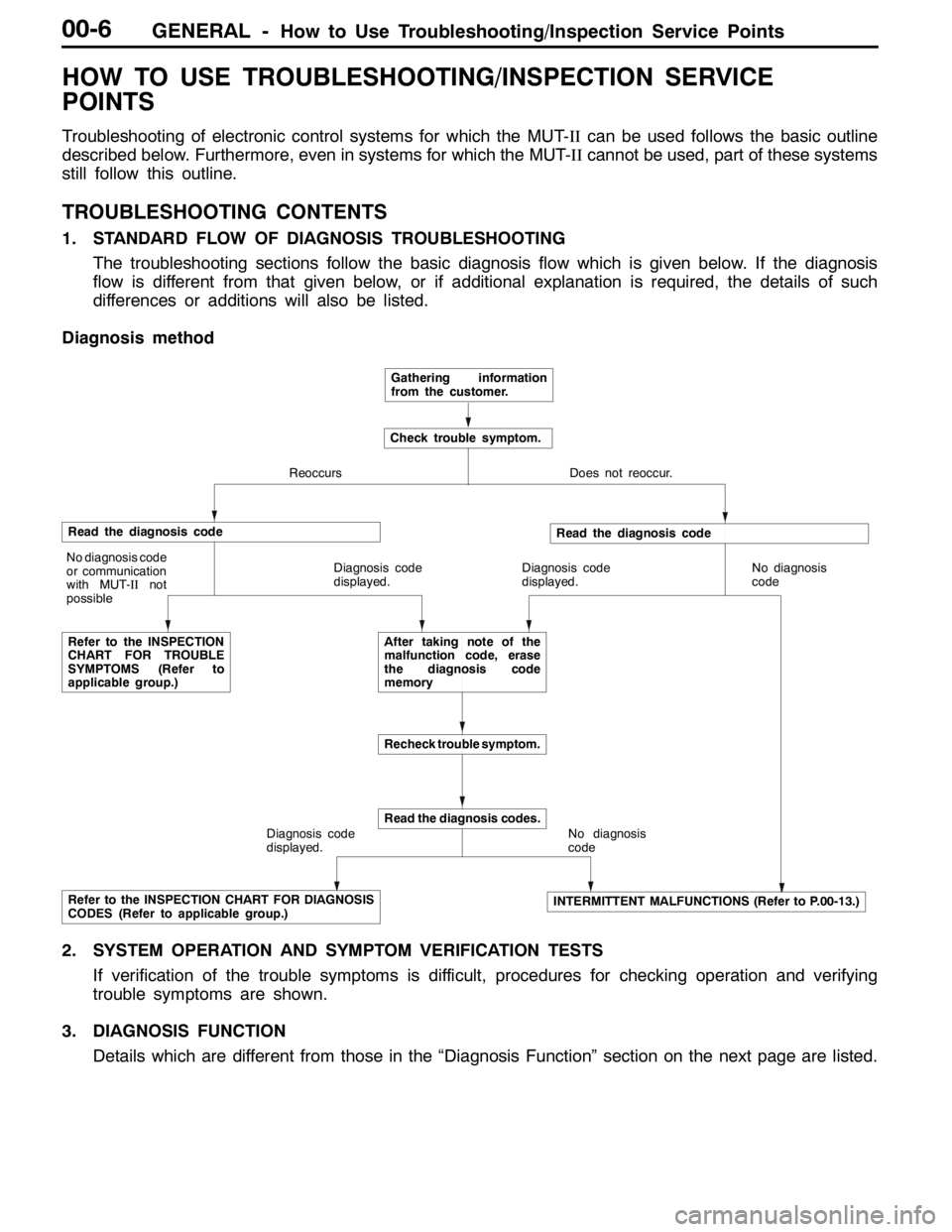
Troubleshooting of electronic control systems for which the MUT-IIcan be used follows the basic outline
described below. Furthermore, even in systems for which the MUT-IIcannot be used, part of these systems
still follow this outline.
TROUBLESHOOTING CONTENTS
1. STANDARD FLOW OF DIAGNOSIS TROUBLESHOOTING
The troubleshooting sections follow the basic diagnosis flow which is given below. If the diagnosis
flow is different from that given below, or if additional explanation is required, the details of such
differences or additions will also be listed.
Diagnosis method
Gathering information
from the customer.
Check trouble symptom.
Reoccurs Does not reoccur.
Read the diagnosis code
No diagnosis code
or communication
with MUT-IInot
possible
Refer to the INSPECTION
CHART FOR TROUBLE
SYMPTOMS (Refer to
applicable group.)Diagnosis code
displayed.
Read the diagnosis code
Diagnosis code
displayed.No diagnosis
code
After taking note of the
malfunction code, erase
the diagnosis code
memory
Recheck trouble symptom.
Diagnosis code
displayed.
Read the diagnosis codes.
No diagnosis
code
Refer to the INSPECTION CHART FOR DIAGNOSIS
CODES (Refer to applicable group.)INTERMITTENT MALFUNCTIONS (Refer to P.00-13.)
2. SYSTEM OPERATION AND SYMPTOM VERIFICATION TESTS
If verification of the trouble symptoms is difficult, procedures for checking operation and verifying
trouble symptoms are shown.
3. DIAGNOSIS FUNCTION
Details which are different from those in the “Diagnosis Function” section on the next page are listed.
Page 583 of 1449
MPI -Troubleshooting13A-51
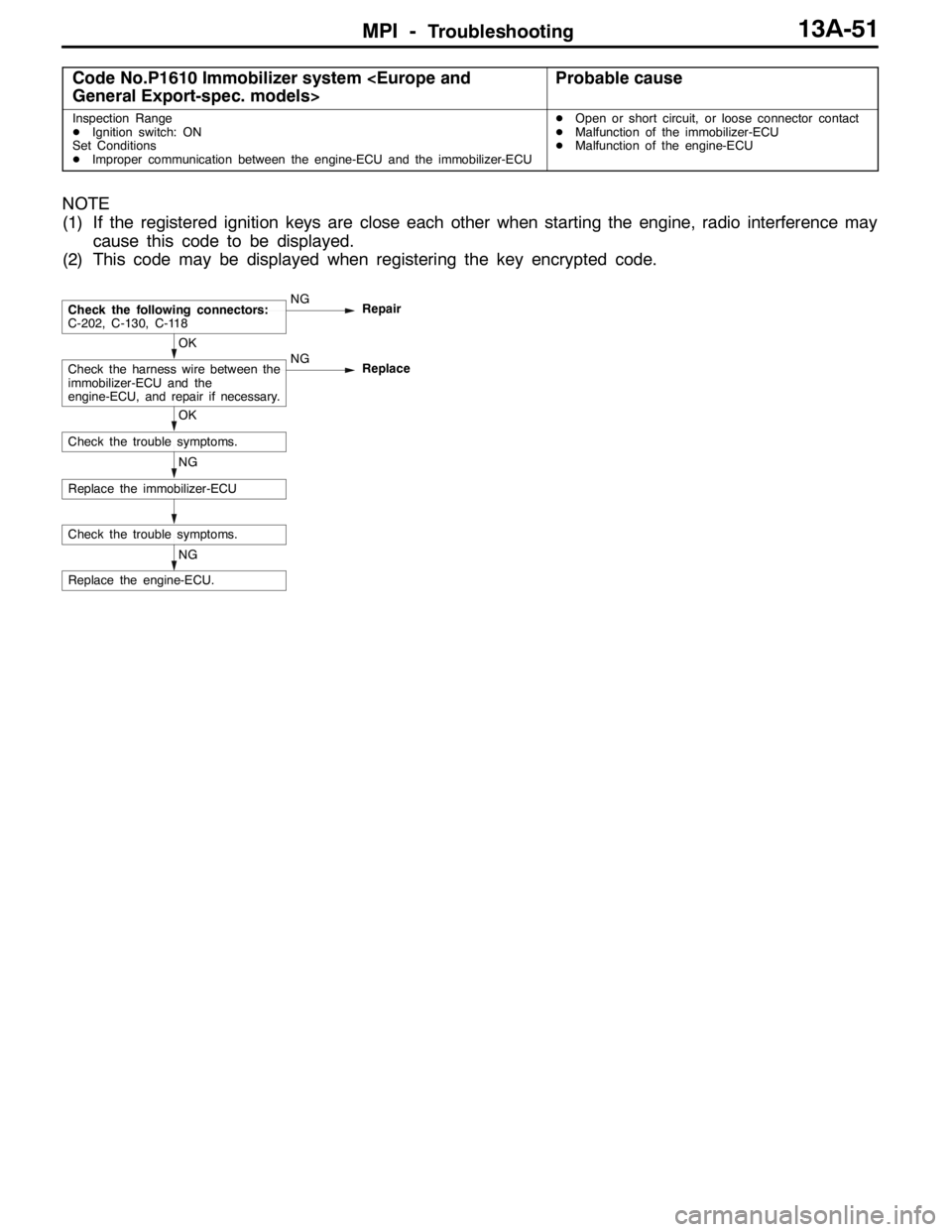
Code No.P1610 Immobilizer system
Inspection Range
DIgnition switch: ON
Set Conditions
DImproper communication between the engine-ECU and the immobilizer-ECUDOpen or short circuit, or loose connector contact
DMalfunction of the immobilizer-ECU
DMalfunction of the engine-ECU
NOTE
(1) If the registered ignition keys are close each other when starting the engine, radio interference may
cause this code to be displayed.
(2) This code may be displayed when registering the key encrypted code.
NG
Replace the engine-ECU.
Check the trouble symptoms.
NG
Replace the immobilizer-ECU
OK
Check the trouble symptoms.
OK
Check the harness wire between the
immobilizer-ECU and the
engine-ECU, and repair if necessary.NG
Replace
Check the following connectors:
C-202, C-130, C-118NG
Repair
Page 587 of 1449
MPI -Troubleshooting13A-55
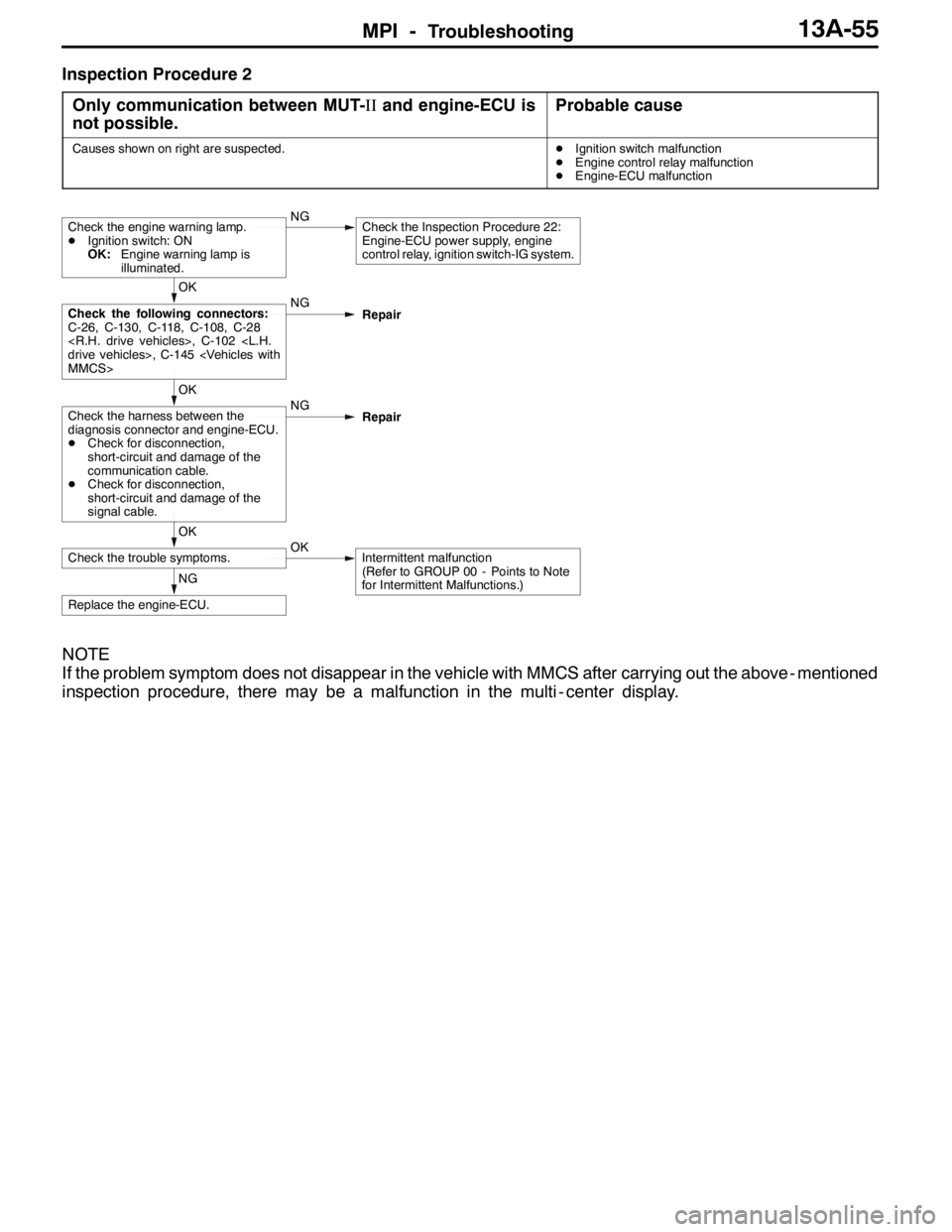
Inspection Procedure 2
Only communication between MUT-IIand engine-ECU is
not possible.
Probable cause
Causes shown on right are suspected.DIgnition switch malfunction
DEngine control relay malfunction
DEngine-ECU malfunction
NG
Replace the engine-ECU.
OK
Check the trouble symptoms.OKIntermittent malfunction
(Refer to GROUP 00 - Points to Note
for Intermittent Malfunctions.)
OK
Check the harness between the
diagnosis connector and engine-ECU.
DCheck for disconnection,
short-circuit and damage of the
communication cable.
DCheck for disconnection,
short-circuit and damage of the
signal cable.NG
Repair
OK
Check the following connectors:
C-26, C-130, C-118, C-108, C-28
Repair
Check the engine warning lamp.
DIgnition switch: ON
OK:Engine warning lamp is
illuminated.NGCheck the Inspection Procedure 22:
Engine-ECU power supply, engine
control relay, ignition switch-IG system.
NOTE
If the problem symptom does not disappear in the vehicle with MMCS after carrying out the above - mentioned
inspection procedure, there may be a malfunction in the multi - center display.
Page 638 of 1449

MPI -Troubleshooting13A-106
Item
No.Reference
page Inspection
procedure
No. Normal condition Inspection contents Inspection
item
A1LOxygen
sensor
(front)Engine: After having
warmed up
(Air/fuel mixture is
made leaner whenWhen at 4,000 r/min,
engine is suddenly de-
celerated200 mV or lessCode No.
P013013A-24
madeleanerwhen
decelerating, and is
made richer when
racing.)When engine is sud-
denly raced600 - 1,000 mV
Engine: After having
warmed up
(By using oxygen
sensorcheckair/fuel
Idle operation400 mV or less↔
600 - 1,000 mV
(altered)
sensor, checkair/fuel
mixture as well as
control status by
engine-ECU)2,500 r/min
A2LOxygen
sensor
(rear)Engine: After having
warmed upWhen engine is sud-
denly raced0 and 600 - 1,000
mV alternate.Code No.
P013613A-27
8ALThrottle
position
sensor
DEngine: After
having warmed
up
Release the accelera-
tor pedal.8 - 16%Code No.
P012013A-21
sensor
(Throttle
position
opening
angle)up
DIgnition switch:
“ON” (Engine
stopped)Depress the accelera-
tor pedal gradually.Increase in re-
sponse to the
pedal depression
stroke.
Depress the accelera-
tor pedal fully.80 - 100%
NOTE
Items marked byLwill not displayed if service data is selected on the check mode.
Page 648 of 1449

MPI -Troubleshooting13A-116
INSPECTION PROCEDURE USING AN
ANALYZER
AIR FLOW SENSOR
Measurement Method
1. Disconnect the air flow sensor connector, and connect
the special tool (test harness: MB991709) in between.
(All terminals should be connected.)
2. Connect the analyzer special patterns pickup to air flow
sensor connector terminal No. 3.
Alternate Method (Test harness not available)
1. Connect the analyzer special patterns pickup to
engine-ECU terminal No. 65.
Standard Wave Pattern
Observation conditions
FunctionSpecial patterns
Pattern heightLow
Pattern selectorDisplay
Engine r/minIdle speed
Standard wave pattern
(V)
10
0The time (cycle time) T is reduced when
the amount of intake air increases.
Times T1 and T2 are equal.
Time T
T1 T2
Observation conditions (from conditions above engine speed is increased by racing.)
Time (V)
10
0T
Wave Pattern Observation Points
Check that cycle time T becomes shorter and the frequency increases when the engine speed is increased.
Analyzer
Special
patterns
pickup
Page 650 of 1449

MPI -Troubleshooting13A-118
Standard Wave Pattern
Observation condition
FunctionSpecial patterns
Pattern heightLow
Pattern selectorDisplay
Engine r/minIdle speed
Standard Wave Pattern
Crank angle
sensor output
wave pattern(V)
75_BTDC2 engine revolutions
(1 camshaft revolution)
5_BTDCThe time (cycle time) T is
reduced when the engine
speed increases
0
Camshaft position
sensor output
wave pattern
TDC: Top dead centre131_49_
No. 1 TDC No. 3 TDC No. 4 TDC No. 2 TDCTime
056_34_
Wave Pattern Observation Points
Check that cycle time T becomes shorter when the engine speed increases.
Examples of Abnormal Wave Patterns
DExample 1
Cause of problem
Sensor interface malfunction
Wave pattern characteristics
Rectangular wave pattern is output even when the engine
is not started.
Page 651 of 1449

MPI -Troubleshooting13A-119
DExample 2
Cause of problem
Loose timing belt
Abnormality in sensor disk
Wave pattern characteristics
Wave pattern is displaced to the left or right.
INJECTOR
Measurement Method
1. Disconnect the injector connector, and then connect the
special tool (test harness: MB991348) in between.
(All terminals should be connected.)
2. Connect the analyzer special patterns pickup to terminal
No. 2 of the injector connector.
Alternate Method (Test harness not available)
1. Connect the analyzer special patterns pickup to
engine-ECU terminal No. 1. (When checking the No. 1
cylinder.)
2. Connect the analyzer special patterns pickup to
engine-ECU terminal No. 14. (When checking the No.
2 cylinder.)
3. Connect the analyzer special patterns pickup to
engine-ECU terminal No. 2. (When checking the No. 3
cylinder.)
4. Connect the analyzer special patterns pickup to
engine-ECU terminal No. 15. (When checking the No.
4 cylinder.)
Standard Wave Pattern
Observation conditions
FunctionSpecial patterns
Pattern heightVariable
Variable knobAdjust while viewing the wave pattern
Pattern selectorDisplay
Engine r/minIdle speed
Special
patterns
pickupAnalyzer
Page 652 of 1449

MPI -Troubleshooting13A-120
Standard wave pattern
(V)
Point A
Point BSolenoid back electromotive force
(Approx. 7×10 V)
Injector drive time
Power voltage
Drive signal: ON Drive signal: OFF
Time 50
0
Wave Pattern Observation Points
Point A: Height of solenoid back electromotive force
Contrast with standard wave patternProbable cause
Solenoid coil back electromotive force is low or doesn’t
appear at all.Short in the injector solenoid
Point B: Injector drive time
DThe injector drive time will be synchronized with the MUT-II
tester display.
DWhen the engine is suddenly raced, the drive time will
be greatly extended at first, but the drive time will soon
match the engine speed.
When idling
When racing ---
--