steering wheel MITSUBISHI LANCER EVOLUTION 2014 10.G Owner's Guide
[x] Cancel search | Manufacturer: MITSUBISHI, Model Year: 2014, Model line: LANCER EVOLUTION, Model: MITSUBISHI LANCER EVOLUTION 2014 10.GPages: 338, PDF Size: 40.99 MB
Page 142 of 338
Cruise control
Features and controls 5-81
5
lost. If the power assist is lost for some rea- son, you will still be able to steer your vehi- cle, but you will notice it takes much more effort to steer. If this happens, have your vehi-cle inspected at an authorized Mitsubishi Motors dealer or a repair facility of your choice.
N00518300472
Cruise control is an automatic speed control system that keeps a set speed. It can be acti- vated at speeds from about 25 mph(40 km/h). Cruise control does not work at speeds below about 25 mph (40 km/h).
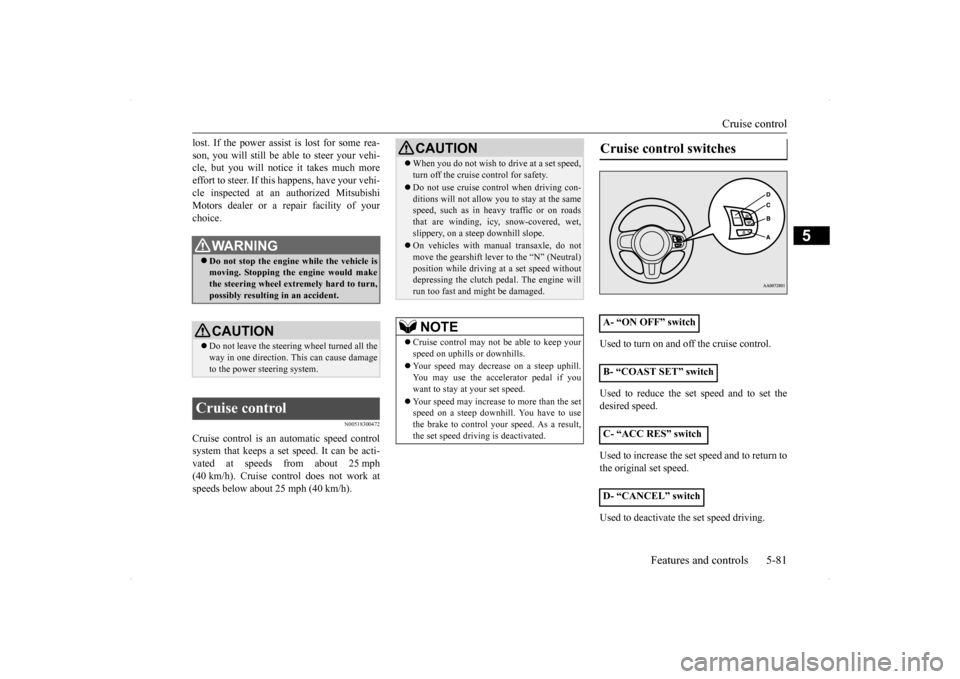
Used to turn on and off the cruise control. Used to reduce the set speed and to set the desired speed. Used to increase the set speed and to return to the original set speed. Used to deactivate the set speed driving.
WA R N I N G Do not stop the engine while the vehicle is moving. Stopping the engine would makethe steering wheel extremely hard to turn, possibly resulting in an accident.CAUTION Do not leave the steering wheel turned all the way in one direction. This can cause damage to the power steering system.
Cruise control
CAUTION When you do not wish to drive at a set speed, turn off the cruise control for safety. Do not use cruise control when driving con- ditions will not allow you to stay at the samespeed, such as in heavy traffic or on roads that are winding, icy, snow-covered, wet, slippery, on a steep downhill slope. On vehicles with manual transaxle, do not move the gearshift lever to the “N” (Neutral)position while driving at a set speed without depressing the clutch pedal. The engine will run too fast and might be damaged.NOTE
Cruise control may not be able to keep your speed on uphills or downhills. Your speed may decrease on a steep uphill. You may use the accelerator pedal if you want to stay at your set speed. Your speed may increase to more than the set speed on a steep downhill. You have to usethe brake to control your speed. As a result, the set speed driving is deactivated.
Cruise control switches A- “ON OFF” switch B- “COAST SET” switch C- “ACC RES” switch D- “CANCEL” switch
BK0200800US.bo
ok 81 ページ 2013年2月14日 木曜日 午後2時28分
Page 148 of 338

Tire pressure monitoring system
Features and controls 5-87
5
Each tire, including the spare (if provided), should be checked monthly when cold and inflated to the inflation pressure recom-mended by the vehicle manufacturer on the vehicle placard or tire inflation pressure label. (If your vehicle has tires of a different sizethan the size indicated on the vehicle placard or tire inflation pressure label, you should determine the proper tire inflation pressurefor those tires.) As an added safety feature, your vehicle has been equipped with a tire pressure monitoringsystem (TPMS) that illuminates a low tire pressure telltale when one or more of your tires is significantly under-inflated.Accordingly, when the low tire pressure tell-tale illuminates, you should stop and check your tires as soon as possible, and inflate them to the proper pres
sure. Driving on a sig-
nificantly under-inflated tire causes the tire to overheat and can lead to tire failure.
Under-inflation also reduces fuel efficiency and tire tread life, and may affect the vehi- cle’s handling and stopping ability. Please note that the TPMS is not a substitute forproper tire maintenance, and it is the driver’s responsibility to maintain correct tire pres- sure, even if under-inflation has not reachedthe level to trigger illumination of the TPMS low tire pressure telltale. Your vehicle has also been equipped with aTPMS malfunction indicator to indicate whenthe system is not operating properly. The TPMS malfunction indicator is combined with the low tire pressure telltale.When the system detects a malfunction, the telltale will flash for approximately one min- ute and then remain continuously illuminated.This sequence will continue upon subsequent vehicle start-ups as long as the malfunction exists.When the malfunction indicator is illumi- nated, the system may not be able to detect or signal low tire pressure as intended.TPMS malfunctions may occur for a variety of reasons, including the installation of replacement or alternat
e tires or wheels on the
vehicle that prevent the TPMS from function- ing properly. Always check the TPMS mal- function telltale after replacing one or moretires or wheels on your vehicle to ensure that the replacement or alternate tires and wheels
allow the TPMS to continue to function prop- erly.
N00532800439
1. If the tire pressure monitoring system warning light illuminates, avoid hard braking, sharp steering maneuvers andhigh speeds. You should stop and adjustthe tires to the proper inflation pressure as soon as possible. Adjust the spare tire at the same time. Refer to “Tires” on page9-12.
NOTE
In addition, the warning display is displayed on the information screen in the multi-infor- mation display.
If the warning light/display illu- minates while driving
NOTE
In addition, the warning display is displayed on the information screen in the multi-infor- mation display. When inspecting or adjusting the tire pres- sure, do not apply excessive force to thevalve stem to avoid breakage. After inspecting or adjusting the tire pres- sure, always reinstall the valve cap on the valve stem. Without the valve cap, dirt or moisture could get into the valve, resulting in damage to the tire inflation pressure sensor. Do not use metal valve caps, which may cause a metal reaction, resulting in corrosionand damage of the tire inflation pressure sen- sors.
BK0200800US.bo
ok 87 ページ 2013年2月14日 木曜日 午後2時28分
Page 149 of 338
Tire pressure monitoring system 5-88 Features and controls
5
2. If the tire pressure monitoring system warning light remains illuminated after you have been driving for about 20 min- utes after you adjust the tire inflation pres-sure, one or more of the tires may have apuncture. Inspect the tire and if it has a puncture, have it repaired by an autho- rized Mitsubishi Motors dealer as soon aspossible.
The tire pressure monitoring system may not work normally in the following circum- stances: A wireless facility or device using the same frequency is near the vehicle. Snow or ice is stuck inside the fenders and/or on the wheels. The tire inflation pressure sensor’s battery is dead. Wheels other than Mitsubishi genuine wheels are being used. Wheels that are not fi
tted with tire infla-
tion pressure sensors are being used. Wheels whose ID codes are not memo- rized by the vehicle are used. Compact spare tire is fitted on a road wheel.
A window tint that affects the radio wave signals is installed.
N00532900179
If new wheels with new tire inflation pressuresensors are installed, their ID codes must beprogrammed into the tire pressure monitoring system. Have tire and wheel replacement per- formed by an authorized Mitsubishi Motorsdealer to avoid the risk of damaging the tire inflation pressure sensors. If the wheel replacement is not done by an authorizedMitsubishi Motors dealer, it is not covered by your warranty.
Once adjustments have been made, the warn- ing light will go off after a few minutes of driving.WA R N I N G If the warning light/display illuminates while you are driving, avoid hard braking, sharp steering maneuvers and high speeds. Driving with an under-inflated tireadversely affects vehicle performance and can result in an accident.CAUTION If a tire has a puncture, replace that tire with the spare tire. Driving on a punctured tire could lead to an accident. The warning light/display may not illuminate immediately in the event of a tire blowout orrapid leak.NOTE
NOTE
To avoid the risk of damage to the tire infla- tion pressure sensors, have any punctured tire repaired by an authorized Mitsubishi Motors dealer. If the tire repair is not done by an authorized Mitsubishi Motors dealer, it isnot covered by your warranty. Do not use an aerosol puncture-repair prod- uct on any tire. Such a spray could damage the tire inflation pressure sensors. Have any puncture repaired by an authorized Mitsubi-shi Motors dealer.
NOTE
Tire inflation pressures vary with the ambi- ent temperature. If the
vehicle is subjected to
large variations in ambient temperature, thetire inflation pressures may be under-inflated (causing the warning light/display to come on) when the ambient temperature is rela-tively low. If the warning light/display comes on, adjust the tire inflation pressure.
Whenever the tires and wheels are replaced with new ones
BK0200800US.bo
ok 88 ページ 2013年2月14日 木曜日 午後2時28分
Page 192 of 338
Turn signal lever
Features and controls 5-131
5
N00522601558
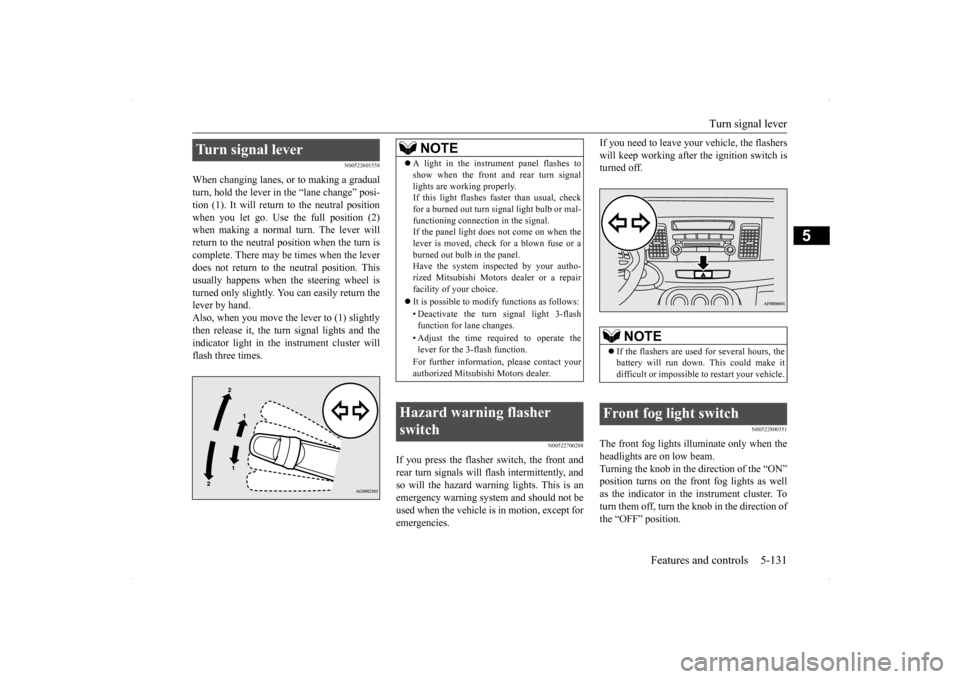
When changing lanes, or to making a gradual turn, hold the lever in
the “lane change” posi-
tion (1). It will return to the neutral position when you let go. Use the full position (2) when making a normal turn. The lever willreturn to the neutral position when the turn is complete. There may be times when the lever does not return to the neutral position. Thisusually happens when the steering wheel isturned only slightly. You can easily return the lever by hand. Also, when you move the lever to (1) slightlythen release it, the turn signal lights and the indicator light in the instrument cluster will flash three times.
N00522700288
If you press the flasher switch, the front andrear turn signals will flash intermittently, and so will the hazard warning lights. This is an emergency warning system and should not beused when the vehicle is in motion, except for emergencies.
If you need to leave your vehicle, the flashers will keep working after the ignition switch is turned off.
N00522800351
The front fog lights illuminate only when the headlights are on low beam. Turning the knob in the direction of the “ON” position turns on the front fog lights as wellas the indicator in the instrument cluster. To turn them off, turn the knob in the direction of the “OFF” position.
Turn signal lever
NOTE
A light in the instrument panel flashes to show when the front and rear turn signal lights are working properly. If this light flashes faster than usual, check for a burned out turn signal light bulb or mal-functioning connection in the signal. If the panel light does not come on when the lever is moved, check for a blown fuse or aburned out bulb in the panel. Have the system inspected by your autho- rized Mitsubishi Motors dealer or a repairfacility of your choice. It is possible to modify functions as follows: • Deactivate the turn signal light 3-flash function for lane changes. • Adjust the time required to operate the lever for the 3-flash function. For further information, please contact your authorized Mitsubishi Motors dealer.
Hazard warning flasher switch
NOTE
If the flashers are used for several hours, the battery will run down. This could make it difficult or impossible to restart your vehicle.
Front fog light switch
BK0200800US.book
131 ページ 2013年2月14日 木曜日 午後2時28分
Page 198 of 338
Horn switch
Features and controls 5-137
5
N00523800130
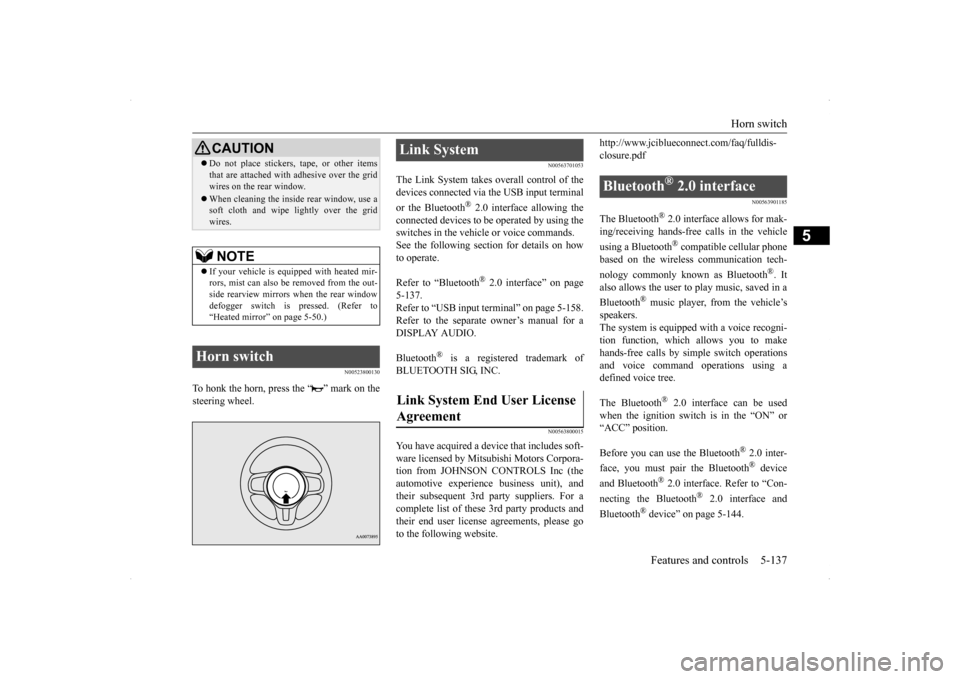
To honk the horn, press the “ ” mark on the steering wheel.
N00563701053
The Link System takes overall control of thedevices connected via the USB input terminal or the Bluetooth
® 2.0 interface allowing the
connected devices to be operated by using the switches in the vehicle or voice commands.See the following section for details on how to operate. Refer to “Bluetooth
® 2.0 interface” on page
5-137. Refer to “USB input terminal” on page 5-158.Refer to the separate owner’s manual for a DISPLAY AUDIO. Bluetooth
® is a registered trademark of
BLUETOOTH SIG, INC.
N00563800015
You have acquired a device that includes soft-ware licensed by Mitsubishi Motors Corpora- tion from JOHNSON CONTROLS Inc (the automotive experience business unit), andtheir subsequent 3rd party suppliers. For a complete list of these 3rd party products and their end user license agreements, please goto the following website.
http://www.jciblueconnect.com/faq/fulldis- closure.pdf
N00563901185
The Bluetooth
® 2.0 interface allows for mak-
ing/receiving hands-free calls in the vehicle using a Bluetooth
® compatible cellular phone
based on the wireless communication tech- nology commonly known as Bluetooth
®. It
also allows the user to
play music, saved in a
Bluetooth
® music player, from the vehicle’s
speakers.The system is equipped with a voice recogni- tion function, which allows you to make hands-free calls by simple switch operationsand voice command operations using a defined voice tree. The Bluetooth
® 2.0 interface can be used
when the ignition switch is in the “ON” or“ACC” position. Before you can use the Bluetooth
® 2.0 inter-
face, you must pair the Bluetooth
® device
and Bluetooth
® 2.0 interface. Refer to “Con-
necting the Bluetooth
® 2.0 interface and
Bluetooth
® device” on page 5-144.
Do not place stickers, tape, or other items that are attached with adhesive over the grid wires on the rear window. When cleaning the inside rear window, use a soft cloth and wipe lightly over the grid wires.NOTE
If your vehicle is equipped with heated mir- rors, mist can also be removed from the out-side rearview mirrors when the rear window defogger switch is pressed. (Refer to “Heated mirror” on page 5-50.)
Horn switch
CAUTION
Link System Link System End User License Agreement
Bluetooth
® 2.0 interface
BK0200800US.book
137 ページ 2013年2月14日 木曜日 午後2時28分
Page 212 of 338

Bluetooth® 2.0 interface
Features and controls 5-151
5
“
N00565800019
If an incoming phone call is received whilethe ignition switch is in the “ACC” or “ON”position, the audio system will be automati- cally turned on and switched to the incoming call, even when the audio system was origi-nally off. The voice guide announcement for the incoming call will be output from the frontpassenger’s seat speaker. If the CD player or radio was playing when the incoming call was received, the audio sys-tem will mute the sound from the CD player or radio and output only the incoming call. To receive the call, press the PICK-UP buttonon the steering wheel control switch. When the call is over,
the audio system will
return to its previous state.
N00565900010
At any time during a call, you can mute thevehicle microphone. Pressing the SPEECH button and then saying “Mute” during a call will turn ON the mute function and mute the microphone.Saying “Mute off” in the same way will turn off the mute function and cancel the mute on the microphone.
N00566600014
The Bluetooth
® 2.0 interface can switch
between hands-free mode (hands-free calls) and private mode (calls using cellular phone). If you press the SPEECH button and say“Transfer call” during a hands-free call, you can stop the hands-free mode and talk in pri- vate mode. To return to hands-free mode, press the SPEECH button again and say “Transfer call.”
N00566000018
The Bluetooth
® 2.0 interface has 2 types of
unique phonebooks that are different from thephonebook stored in the cellular phone. They
are the vehicle phonebook and the mobile phonebook. These phonebooks are used to register tele- phone numbers and make calls to desirednumbers via voice recognition function.
N00566101117
This phonebook is us
ed when making calls
with the voice recognition function. Up to 32 names can be registered in the vehi- cle phonebook per language.Also, each entry has 4 locations associated with: home, work, mobile and other. You can register one telephone number for each loca-tion. You can register a desired name as a name for any phonebook entry registered in the vehicle phonebook.Names and telephone numbers can be changed later on. The vehicle phonebook can be used with all paired cellular phones.
Receiving calls
Mute function Switching between hands-free mode and private mode Phonebook function
NOTE
Disconnecting the battery cable will not delete information registered in the phone- book.
Vehicle phonebook
BK0200800US.book
151 ページ 2013年2月14日 木曜日 午後2時28分
Page 232 of 338
Vehicle preparation before driving
Driving safety 6-3
6
N00629001712
For a safer and more enjoyable trip, always observe the following: Before starting the vehicle, make certain that you and all passengers are seated and wearing their seat belts properly (with children in the rear seat, in appropriaterestraints), and that all the doors are locked.
Move the driver’s seat as far backward as possible, while still keeping good visibil- ity, and good control of the steering wheel, brakes, accelerator, and controls.Check the instrument panel indicators and multi-information display for any possible problem. Move the front passenger seat as far back as possible. Make sure that infants and small children are properly restrained in accordance withall laws and regulations.
Check these by selecting the defroster mode, and set the blower switch on high. You should be able to feel the air blowing against the windshield.{Refer to “Defrosting or defogging (wind- shield, door window)” on page 7-8, 7-13.} Check all the tires for heavy tread wear or uneven wear patterns. Look for stones, nails, glass, or other objects stuck in the tread. Lookfor any tread cuts or sidewall cracks. Check the wheel nuts for tightness, and the tires (including spare tire) for proper pressures.
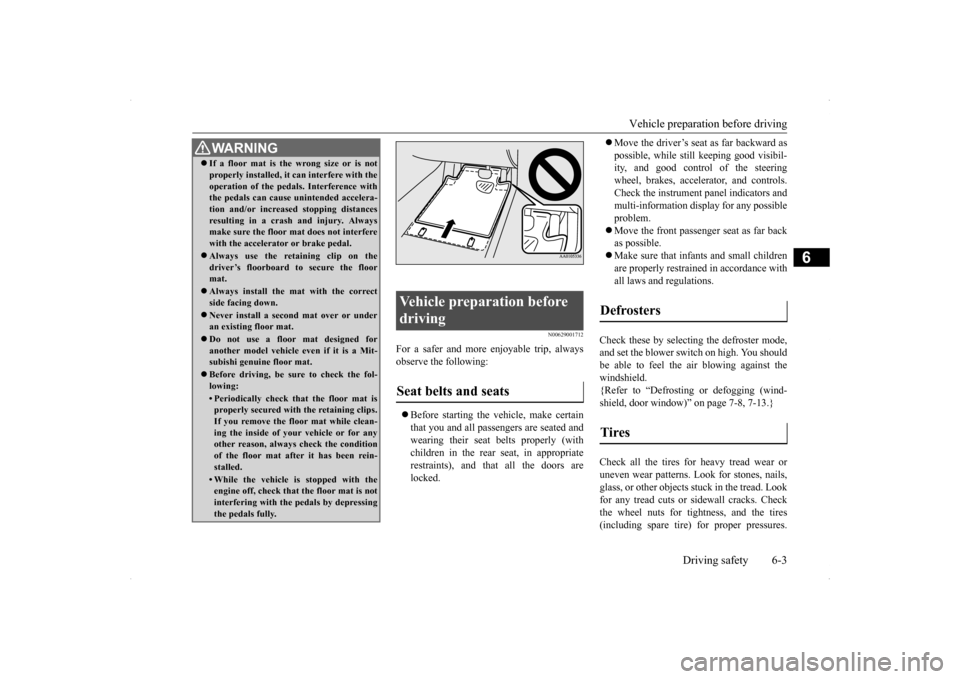
WA R N I N G If a floor mat is the wrong size or is not properly installed, it can interfere with the operation of the pedals. Interference with the pedals can cause unintended accelera- tion and/or increased stopping distancesresulting in a crash and injury. Always make sure the floor mat does not interfere with the accelerator or brake pedal. Always use the retaining clip on the driver’s floorboard to secure the floormat. Always install the mat with the correct side facing down. Never install a second mat over or under an existing floor mat. Do not use a floor mat designed for another model vehicle ev
en if it is a Mit-
subishi genuine floor mat. Before driving, be sure to check the fol- lowing:• Periodically check that the floor mat isproperly secured with the retaining clips. If you remove the floor mat while clean-ing the inside of your vehicle or for any other reason, always check the condition of the floor mat after it has been rein-stalled.• While the vehicle is stopped with the engine off, check that the floor mat is not interfering with the pedals by depressingthe pedals fully.
Vehicle preparation before driving Seat belts and seats
Defrosters Tires
BK0200800US.bo
ok 3 ページ 2013年2月14日 木曜日 午後2時28分
Page 233 of 338
Safe driving techniques 6-4 Driving safety
6
Replace your tires before they are heavily worn out. As your vehicle is equipped with a tire pres- sure monitoring system, there is a risk ofdamage to the tire inflation pressure sensors when the tire is replaced on the rim. Tire replacement should, therefore, be performedonly by an authorized Mitsubishi Motors dealer. Have someone watch while you turn all the exterior lights on and off. Also check the turn signal indicators and high-beam indicators on the instrument panel. Check the ground under the vehicle after parking overnight, for fuel, water, oil, orother leaks. Make sure all the fluid levels are correct. Also, if you can smell fuel, you need to find out why immediately and have itfixed.
N00629200108
Even this vehicle’s safety equipment, andyour safest driving, cannot guarantee that you
can avoid an accident or injury. However, if you give extra attention to the following areas, you can better protect yourself and your passengers: Drive defensively. Be aware of traffic, road and weather conditions. Leave plenty of stopping distance between your vehicle and the vehicle ahead. Before changing lanes, check your mir- rors and use your turn signal light. While driving, keep a tight grip on the steering wheel. While driving, watch the behavior of other drivers, bicyclists, and pedestrians. Always obey applicable laws and regula- tions. Be a polite and alert driver. Always leave room for unexpected events, such as sudden braking. If you plan to drive in another country, obey their vehicle registration laws and make sure you will be able to get the rightfuel.
N00629400432
Check the battery, including terminals and cables. During extremely cold weather,the battery will not be as strong. Also, the battery power level may drop because more power is used for cold starting anddriving. Before driving the vehicle, check to see if the engine runs at the proper speed and ifthe headlights are as bright as normally.Charge or replace the battery if necessary. During extreme cold weather, it is possi- ble that a very low battery could freeze. Warm the engine sufficiently. After start- ing the engine, allow a short warm-up time to distribute oil
to all cylinders and
turbocharger. Then drive your vehicleslowly.
Lights Fluid leaks Safe driving techniques
Driving during cold weather
WA R N I N G The battery gives off explosive hydrogen gas. Any spark or flame can cause the bat-tery to explode, which could cause serious injury or death. Always wear protective clothes and a facemask when working with your battery, or let a skilled mechanic do it.
BK0200800US.bo
ok 4 ページ 2013年2月14日 木曜日 午後2時28分
Page 259 of 338
If the vehicle breaks down 8-2 For emergencies
8
N00836300190
If your vehicle breaks down on the road, move to the shoulder and turn on the hazardwarning flashers. If there is no shoulder, or the shoulder is not safe, drive in the right lane slowly, with the hazard lights flashing, untilyou come to a safe stopping place. Keep the flashers flashing. If the engine stops, there will be no power assist to the steering and brakes, making these difficult to use. The brake booster will not work, so the brakes will not grip well. The brake pedalwill be harder to press than usual. Since there is no power steering assist, the steering wheel will be hard to turn.
Get help from your passengers, bystanders, etc. to push the vehicl
e and move it to a safe
zone.
N00836400670
If the engine cannot be started because the battery is weak or dead, you can start it withthe battery from another vehicle using jumper cables.
1. Take off any metal jewelry such as watch bands or bracelets that might make an accidental electrical contact. 2. Position the vehicles close enoughtogether so that the jumper cables can reach, but be sure the vehicles aren’t touching each other. 3. You could be injured if the vehicles move. Set the parking brake firmly on each vehi- cle. Put an automatic transaxle, Twin Clutch SST or CVT in “P” (PARK) or amanual transaxle in “N” (Neutral). Turn the ignition switch to the “LOCK” posi- tion.
If the vehicle breaks down If the engine stops/fails When the engine fails at the intersection
Jump-starting the engine
WA R N I N G Follow the procedure described in this sec- tion when using the jump cable to start the engine. Failure to follow these instructions can cause serious injury or death.CAUTION Do not try to start your vehicle by pushing or towing. Vehicles with Twin Clutch SST can- not be started this way. Pushing or towing avehicle that has a manual transaxle may overheat and damage the catalytic converter. Also, there is more ri
sk of an accident when
a vehicle is being pushed or towed.NOTE
Although the battery in your vehicle is located in the trunk (refer to page 9-11), use the joint terminal in the engine compartment to jump start the engine.
CAUTION Check the other vehicle. It must have a 12- volt battery. If the other system isn’t 12-volt, both systems can be damaged.WA R N I N G Turn the ignition switch to the “LOCK” position on both vehicles. Make sure that the cables or your clothes cannot be caught by the fan or drive belt. Personalinjury could result. NOTE
Turn off all lights, heater, and other electrical loads. This will avoid sparks and help saveboth batteries.
BK0200800US.bo
ok 2 ページ 2013年2月14日 木曜日 午後2時28分
Page 264 of 338
How to change a tire
For emergencies 8-7
8
N00849701326
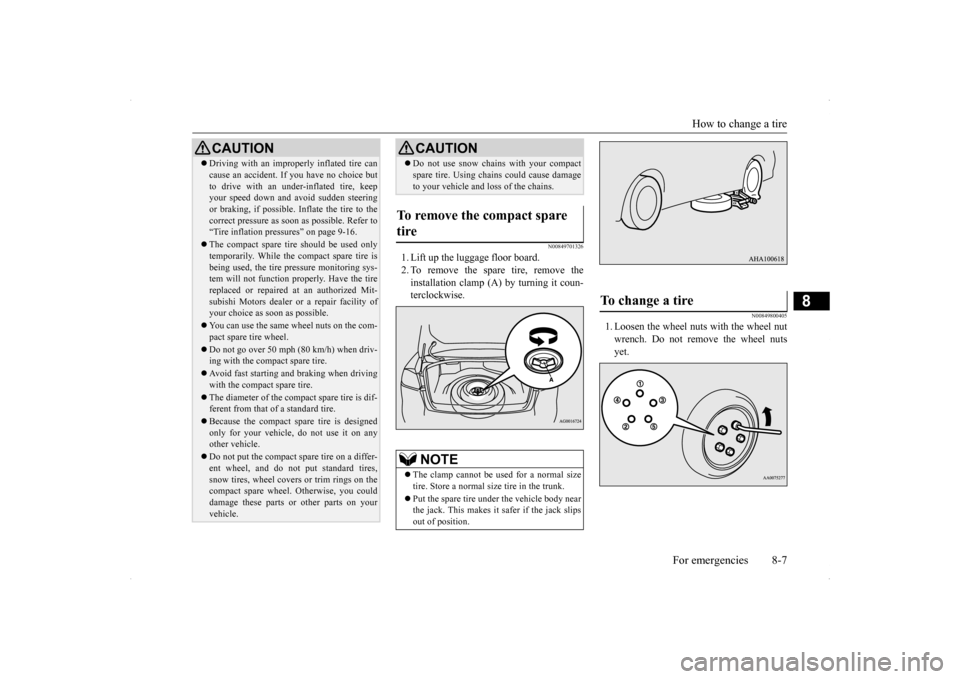
1. Lift up the luggage floor board. 2. To remove the spare tire, remove theinstallation clamp (A) by turning it coun- terclockwise.
N00849800405
1. Loosen the wheel nuts with the wheel nut wrench. Do not remove the wheel nutsyet.
Driving with an improperly inflated tire can cause an accident. If you have no choice but to drive with an under-inflated tire, keep your speed down and avoid sudden steering or braking, if possible
. Inflate the tire to the
correct pressure as soon as possible. Refer to “Tire inflation pressures” on page 9-16. The compact spare tire should be used only temporarily. While the compact spare tire is being used, the tire pressure monitoring sys-tem will not function properly. Have the tire replaced or repaired at an authorized Mit- subishi Motors dealer
or a repair facility of
your choice as soon as possible. You can use the same wheel nuts on the com- pact spare tire wheel. Do not go over 50 mph (80 km/h) when driv- ing with the compact spare tire. Avoid fast starting and braking when driving with the compact spare tire. The diameter of the compact spare tire is dif- ferent from that of a standard tire. Because the compact spare tire is designed only for your vehicle, do not use it on any other vehicle. Do not put the compact spare tire on a differ- ent wheel, and do not put standard tires, snow tires, wheel covers or trim rings on the compact spare wheel. Otherwise, you could damage these parts or other parts on yourvehicle.CAUTION
Do not use snow chains with your compact spare tire. Using chains could cause damage to your vehicle and loss of the chains.
To remove the compact spare tire
NOTE
The clamp cannot be us
ed for a normal size
tire. Store a normal size tire in the trunk. Put the spare tire under the vehicle body near the jack. This makes it safer if the jack slipsout of position.CAUTION
To change a tire
BK0200800US.bo
ok 7 ページ 2013年2月14日 木曜日 午後2時28分