Sst MITSUBISHI LANCER EVOLUTION 2014 10.G Service Manual
[x] Cancel search | Manufacturer: MITSUBISHI, Model Year: 2014, Model line: LANCER EVOLUTION, Model: MITSUBISHI LANCER EVOLUTION 2014 10.GPages: 338, PDF Size: 40.99 MB
Page 162 of 338
Multi-information display
Features and controls 5-101
5
N00556500081
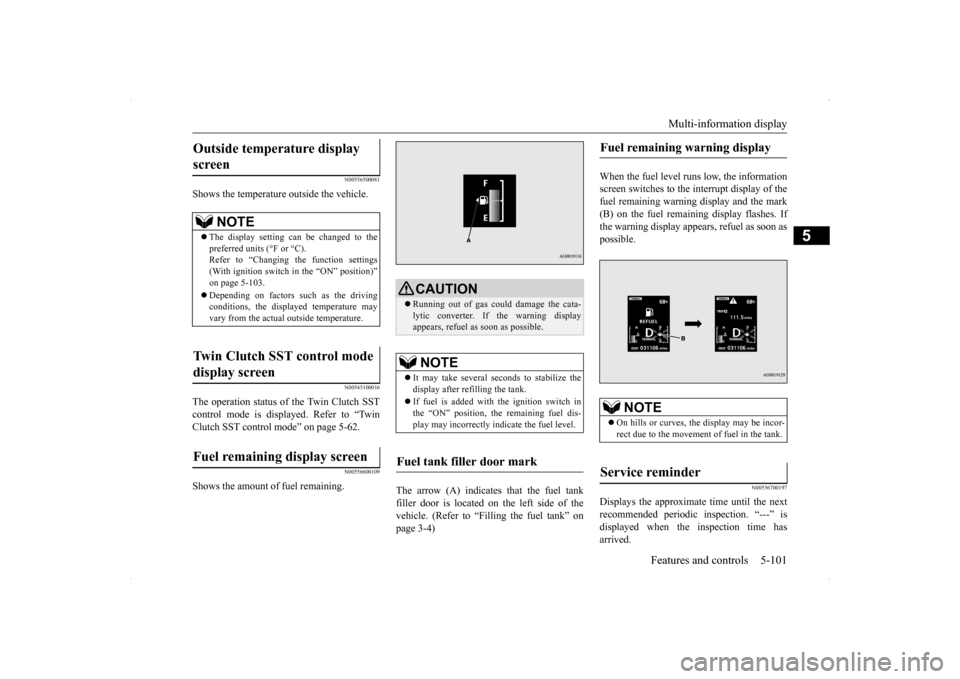
Shows the temperature outside the vehicle.
N00545100016
The operation status of the Twin Clutch SST control mode is displayed. Refer to “Twin Clutch SST control mode” on page 5-62.
N00556600109
Shows the amount of fuel remaining.
The arrow (A) indicates that the fuel tank filler door is located on the left side of the vehicle. (Refer to “Filling the fuel tank” on page 3-4)
When the fuel level runs low, the information screen switches to the interrupt display of thefuel remaining warning display and the mark (B) on the fuel remaining display flashes. If the warning display appears, refuel as soon aspossible.
N00556700197
Displays the approximate time until the nextrecommended periodic inspection. “---” isdisplayed when the inspection time has arrived.
Outside temperature display screen
NOTE
The display setting can be changed to the preferred units (°F or °C).Refer to “Changing the function settings (With ignition switch in the “ON” position)” on page 5-103. Depending on factors such as the driving conditions, the displayed temperature mayvary from the actual outside temperature.
Twin Clutch SST control mode display screen Fuel remaining display screen
CAUTION Running out of gas could damage the cata- lytic converter. If the warning display appears, refuel as soon as possible.NOTE
It may take several seconds to stabilize the display after refilling the tank. If fuel is added with the ignition switch in the “ON” position, the remaining fuel dis- play may incorrectly indicate the fuel level.
Fuel tank filler door mark
Fuel remaining warning display
NOTE
On hills or curves, the display may be incor- rect due to the movement of fuel in the tank.
Service reminder
BK0200800US.book
101 ページ 2013年2月14日 木曜日 午後2時28分
Page 164 of 338
Multi-information display
Features and controls 5-103
5
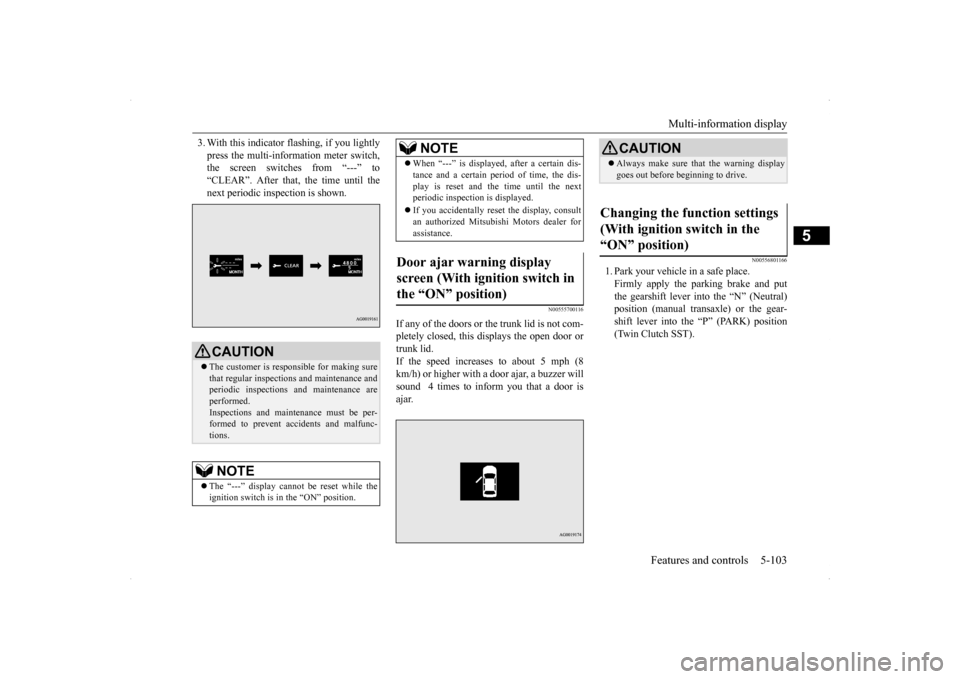
3. With this indicator flashing, if you lightly press the multi-information meter switch, the screen switches from “---” to “CLEAR”. After that, the time until thenext periodic inspection is shown.
N00555700116
If any of the doors or the trunk lid is not com- pletely closed, this displays the open door or trunk lid.If the speed increases to about 5 mph (8 km/h) or higher with a door ajar, a buzzer will sound 4 times to inform you that a door isajar.
N00556801166
1. Park your vehicle in a safe place.Firmly apply the parking brake and putthe gearshift lever into the “N” (Neutral) position (manual transaxle) or the gear- shift lever into the “P” (PARK) position(Twin Clutch SST).
CAUTION The customer is responsible for making sure that regular inspections and maintenance andperiodic inspections and maintenance are performed. Inspections and maintenance must be per-formed to prevent accidents and malfunc- tions.NOTE
The “---” display cannot be reset while the ignition switch is in the “ON” position.
When “---” is displayed, after a certain dis- tance and a certain period of time, the dis- play is reset and the time until the next periodic inspection is displayed. If you accidentally reset the display, consult an authorized Mitsubishi Motors dealer for assistance.
Door ajar warning display screen (With ignition switch in the “ON” position)
NOTE
CAUTION Always make sure that the warning display goes out before beginning to drive.
Changing the function settings (With ignition switch in the “ON” position)
BK0200800US.book
103 ページ 2013年2月14日 木曜日 午後2時28分
Page 178 of 338
Indicator light, warning light, an
d information screen display list Features and controls 5-117
5
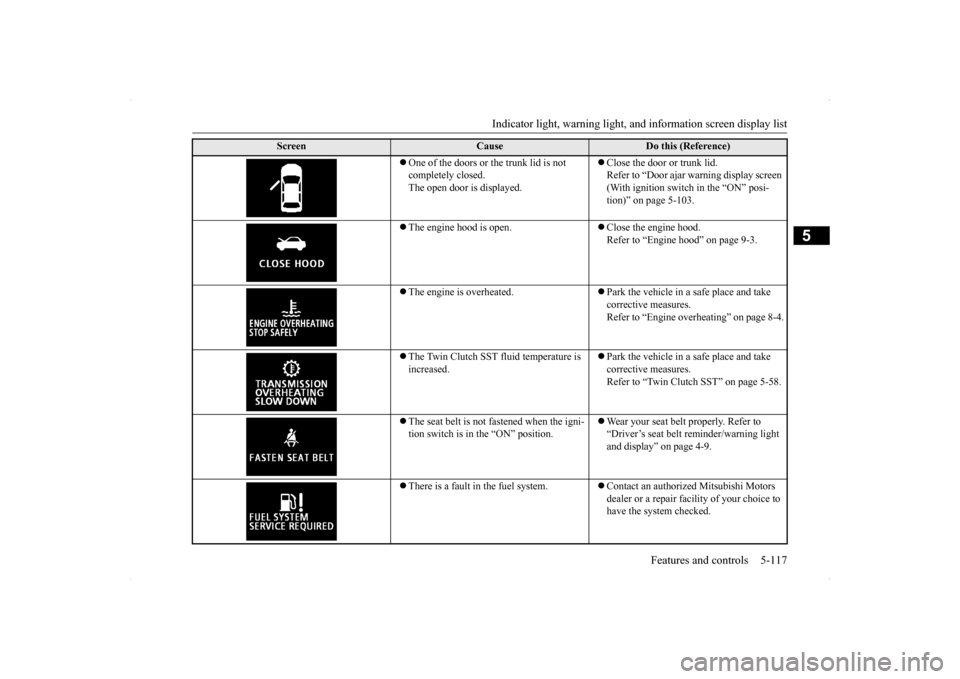
One of the doors or the trunk lid is not completely closed. The open door is displayed.
Close the door or trunk lid. Refer to “Door ajar warning display screen (With ignition switch in the “ON” posi-tion)” on page 5-103.
The engine hood is open.
Close the engine hood. Refer to “Engine hood” on page 9-3.
The engine is overheated.
Park the vehicle in a safe place and take corrective measures.Refer to “Engine overheating” on page 8-4.
The Twin Clutch SST fluid temperature is increased.
Park the vehicle in a safe place and take corrective measures. Refer to “Twin Clutch SST” on page 5-58.
The seat belt is not fastened when the igni- tion switch is in the “ON” position.
Wear your seat belt properly. Refer to “Driver’s seat belt reminder/warning light and display” on page 4-9.
There is a fault in the fuel system.
Contact an authorized Mitsubishi Motors dealer or a repair facility of your choice to have the system checked.
Screen
Cause
Do this (Reference)
BK0200800US.book
117 ページ 2013年2月14日 木曜日 午後2時28分
Page 180 of 338
Indicator light, warning light, an
d information screen display list Features and controls 5-119
5
N00558200183
The operation status of each system is displayed on the information screen. For further details, refer to the appropriate page
for each system.
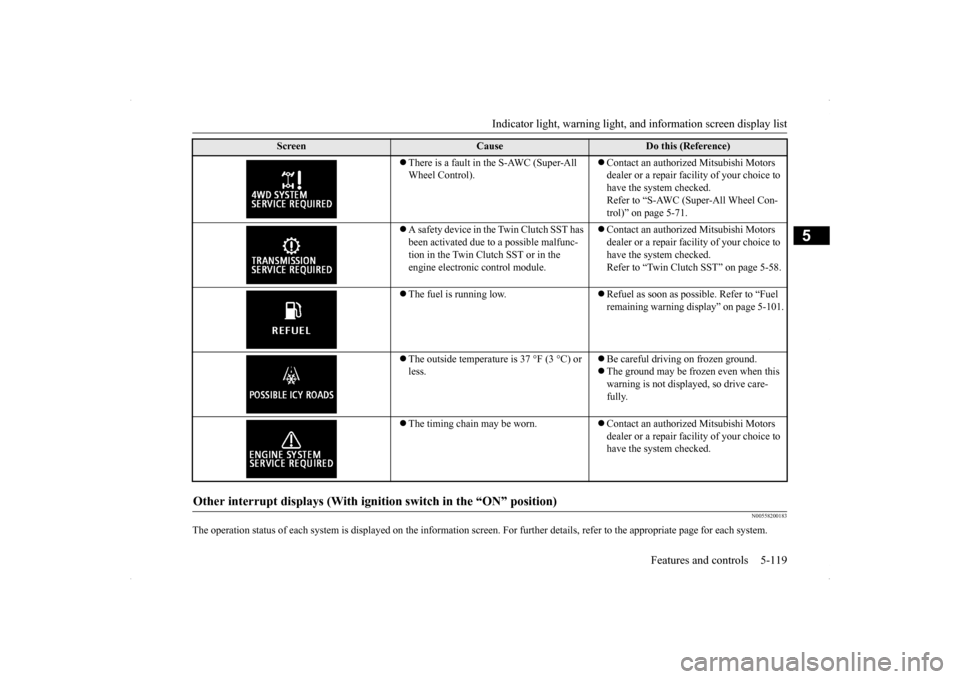
There is a fault in the S-AWC (Super-All Wheel Control).
Contact an authorized Mitsubishi Motors dealer or a repair facility of your choice to have the system checked.Refer to “S-AWC (Super-All Wheel Con- trol)” on page 5-71.
A safety device in the Twin Clutch SST has been activated due to a possible malfunc-tion in the Twin Clutch SST or in the engine electronic control module.
Contact an authorized Mitsubishi Motors dealer or a repair facility of your choice to have the system checked. Refer to “Twin Clutch SST” on page 5-58.
The fuel is running low.
Refuel as soon as possible. Refer to “Fuel remaining warning display” on page 5-101.
The outside temperature is 37 °F (3 °C) or less.
Be careful driving on frozen ground. The ground may be frozen even when this warning is not displayed, so drive care- fully.
The timing chain may be worn.
Contact an authorized Mitsubishi Motors dealer or a repair facility of your choice to have the system checked.
Other interrupt displays (With igniti
on switch in the “ON” position)
Screen
Cause
Do this (Reference)
BK0200800US.book
119 ページ 2013年2月14日 木曜日 午後2時28分
Page 183 of 338
Warning lights 5-122 Features and controls
5
N00520300147 N00520400483
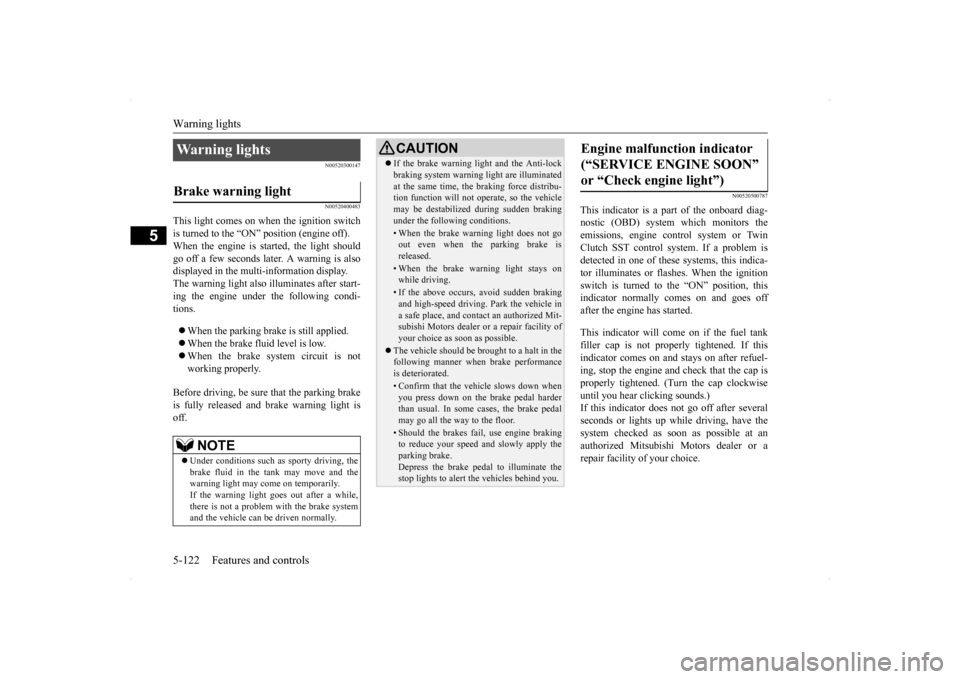
This light comes on when the ignition switch is turned to the “ON” position (engine off).When the engine is started, the light should go off a few seconds later. A warning is also displayed in the multi-information display.The warning light also illuminates after start-ing the engine under the following condi- tions. When the parking brake is still applied. When the brake fluid level is low. When the brake system circuit is not working properly.
Before driving, be sure that the parking brake is fully released and brake warning light isoff.
N00520500787
This indicator is a part of the onboard diag- nostic (OBD) system which monitors the emissions, engine control system or TwinClutch SST control sy
stem. If a problem is
detected in one of these systems, this indica- tor illuminates or flashes. When the ignitionswitch is turned to the “ON” position, thisindicator normally comes on and goes off after the engine has started. This indicator will come on if the fuel tank filler cap is not properly tightened. If thisindicator comes on and stays on after refuel- ing, stop the engine and check that the cap is properly tightened. (Turn the cap clockwiseuntil you hear clicking sounds.) If this indicator does not go off after several seconds or lights up while driving, have thesystem checked as soon as possible at an authorized Mitsubishi Motors dealer or a repair facility of your choice.
Warning lights Brake warning light
NOTE
Under conditions such as sporty driving, the brake fluid in the tank may move and the warning light may come on temporarily.If the warning light goes out after a while, there is not a problem with the brake system and the vehicle can be driven normally.
CAUTION If the brake warning light and the Anti-lock braking system warning light are illuminated at the same time, the braking force distribu- tion function will not operate, so the vehicle may be destabilized during sudden brakingunder the following conditions.• When the brake warning light does not goout even when the parking brake is released.• When the brake warning light stays onwhile driving.• If the above occurs, avoid sudden brakingand high-speed driving. Park the vehicle in a safe place, and contact an authorized Mit-subishi Motors dealer or a repair facility of your choice as soon as possible.
The vehicle should be brought to a halt in the following manner when brake performance is deteriorated.• Confirm that the vehicle slows down whenyou press down on the brake pedal harderthan usual. In some cases, the brake pedal may go all the way to the floor.• Should the brakes fail, use engine brakingto reduce your speed and slowly apply the parking brake.Depress the brake pedal to illuminate the stop lights to alert the vehicles behind you.
Engine malfunction indicator (“SERVICE ENGINE SOON” or “Check engine light”)
BK0200800US.book
122 ページ 2013年2月14日 木曜日 午後2時28分
Page 184 of 338
Information screen display
Features and controls 5-123
5
N00520600296
This light comes on in the event of a malfunc- tion in the charging system or when the igni- tion switch is turned to the “ON” position (engine off). A warning is also displayed inthe multi-information display. When the engine is started,
the light should go out.
Check to make sure that the light has goneout before driving.
N00558300012 N00558400114
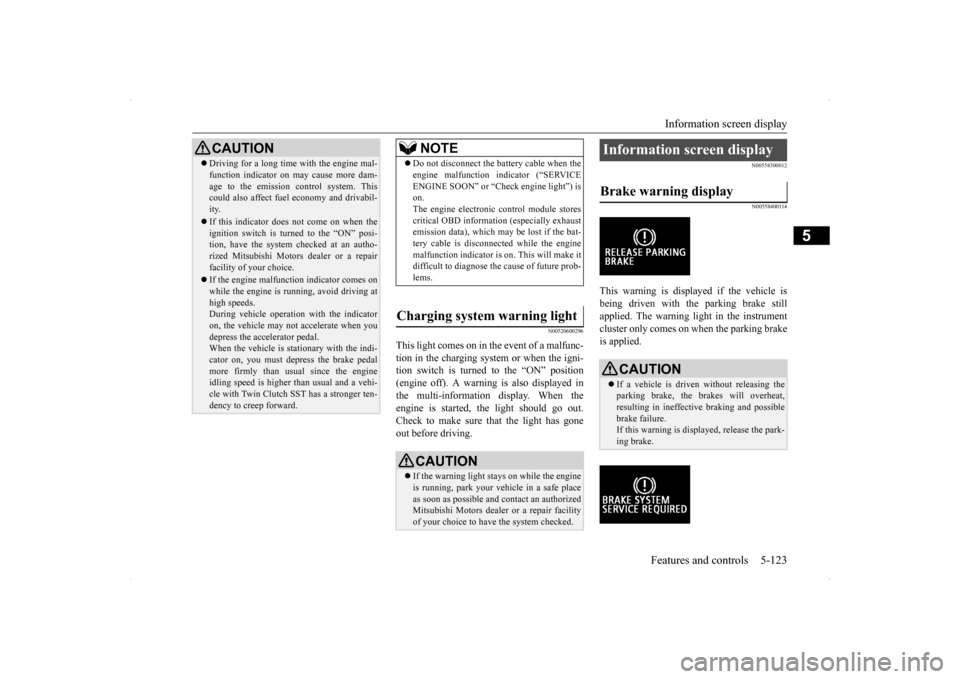
This warning is displayed if the vehicle is being driven with the parking brake stillapplied. The warning light in the instrument cluster only comes on when the parking brake is applied.
CAUTION Driving for a long time with the engine mal- function indicator on may cause more dam- age to the emission control system. This could also affect fuel economy and drivabil- ity. If this indicator does not come on when the ignition switch is turned to the “ON” posi-tion, have the system checked at an autho- rized Mitsubishi Motors dealer or a repair facility of your choice. If the engine malfunction indicator comes on while the engine is running, avoid driving athigh speeds. During vehicle operation with the indicator on, the vehicle may not accelerate when youdepress the accelerator pedal. When the vehicle is stationary with the indi- cator on, you must depress the brake pedalmore firmly than usual since the engine idling speed is higher than usual and a vehi- cle with Twin Clutch SST has a stronger ten-dency to creep forward.
NOTE
Do not disconnect the battery cable when the engine malfunction indicator (“SERVICE ENGINE SOON” or “Check engine light”) is on. The engine electronic control module storescritical OBD information (especially exhaust emission data), which may be lost if the bat- tery cable is disconnected while the enginemalfunction indicator is on. This will make it difficult to diagnose the cause of future prob- lems.
Charging system warning light
CAUTION If the warning light stays on while the engine is running, park your vehicle in a safe place as soon as possible and contact an authorizedMitsubishi Motors dealer or a repair facility of your choice to have the system checked.
Information screen display Brake warning display
CAUTION If a vehicle is driven without releasing the parking brake, the brakes will overheat,resulting in ineffective braking and possible brake failure. If this warning is displayed, release the park-ing brake.
BK0200800US.book
123 ページ 2013年2月14日 木曜日 午後2時28分
Page 204 of 338

Bluetooth® 2.0 interface
Features and controls 5-143
5
1. Stop your vehicle in a safe area, put the gearshift lever in the “N” (Neutral) posi- tion (manual transaxle), or the gearshift lever in the “P” (PARK) position (TwinClutch SST) and pull
the parking brake
lever. 2. Press the SPEECH button (except for vehicles with Mitsubishi Multi-Commu- nication System) or PICK-UP button (for vehicles with Mitsubishi Multi-Commu-nication System). 3. Say “Voice training.”
4. The voice guide will say “This operation must be performed in a quiet environment while the vehicle is stopped. See the owner’s manual for the list of requiredtraining phrases. Press and release the SPEECH button when you are ready to begin. Press the HANG-UP button to can-cel at any time.” Press the SPEECH button to start the speaker enrollment process.
5. The voice guide will prompt for phrase 1. Repeat the corresponding phrase listed in table “Enrollment commands” on page 5-158.The system will register your voice and then move on to the registration of the next command. Continue the process untilall phrases have been registered. 6. When all enrollment commands have been read out, the voice guide will say “Speaker enrollment is complete.” Thesystem will then end the speaker enroll- ment process and return to the main menu.
NOTE
Speaker enrollment is not possible unless the vehicle is parked. Make sure you park the vehicle in a safe area before attemptingspeaker enrollment.
NOTE
If you do not start the speaker enrollment process within 3 minutes after pressing the SPEECH button, the speaker enrollment function will time out. The voice guide will say “Speaker enroll- ment has timed out.” The system will then beep and the voice recognition mode will bedeactivated.
NOTE
To repeat the most recent voice training com- mand, press and release the SPEECH button. If you press the HANG-UP button anytime during the process, the system will beep andstop the speaker enrollment process.NOTE
Completing the speaker enrollment process will turn on the voice model automatically. The commands “Help” and “Cancel” will not work in this mode.
BK0200800US.book
143 ページ 2013年2月14日 木曜日 午後2時28分
Page 205 of 338

Bluetooth® 2.0 interface 5-144 Features and controls
5
N00564901065
You can turn a voice model registered with the speaker enrollment function on and off whenever you want.You can also retrain the system. Use the following procedure to perform these actions. 1. Press the SPEECH button (except for vehicles with Mitsubishi Multi-Commu-nication System) or PICK-UP button (for vehicles with Mitsubishi Multi-Commu- nication System).2. Say “Voice training.” 3. If you have completed a speaker enroll- ment process once already, the voiceguide will say either “Enrollment is enabled. Would you like to disable or retrain?” or “Enrollment is disabled.Would you like to enable or retrain?” 4. When enrollment is “enabled,” the voice model is on; when enrollment is “dis-abled,” the voice model is off. Say the command that fits your needs. Say “Retrain” to start the speaker enroll-ment process and recreate a new voice model. (Refer to “Speaker enrollment” on page 5-142.)
N00565001210
Before you can make or receive hands-free calls or play music using the Bluetooth
® 2.0
interface function, you must pair the Blue- tooth
® device and Bluetooth
® 2.0 interface.
Up to 7 Bluetooth
® devices can be paired
with the Bluetooth
® 2.0 interface.
If multiple paired Bluetooth
® devices are
available in the vehicle, the cellular phone or music player most recently connected is auto- matically connected to the Bluetooth
® 2.0
interface. You can also change a Bluetooth
® device to
be connected.
To pair a Bluetooth
® device with the Blue-
tooth
® 2.0 interface, follow the steps below.
1. Stop your vehicle in a safe area, put the gearshift lever in the “N” (Neutral) posi- tion (manual transaxle), or the gearshift lever in the “P” (PAR
K) position (Twin
Clutch SST) and pull the parking brake lever. 2. Press the SPEECH button (except for vehicles with Mitsubishi Multi-Commu- nication System) or PICK-UP button (for vehicles with Mitsubishi Multi-Commu-nication System).3. Say “Setup.” 4. Say “Pairing Options.”
Enabling and disabling the voice model and retraining
Connecting the Bluetooth
® 2.0
interface and Bluetooth
® device
NOTE
Pairing is required only when the device is used for the first time. Once the device has been paired with the Bluetooth
® 2.0 inter-
face, all you need is
to bring the device into
the vehicle next time and the device will connect to the Bluetooth
® 2.0 interface auto-
matically (if supported by the device). The device must have Bluetooth
® turned ON to
connect.
To p a i r
NOTE
You cannot pair any Bluetooth
® device with
the Bluetooth
® 2.0 interface unless the vehi-
cle is parked. Before pairing a Bluetooth
®
device with the Bluetooth
® 2.0 interface,
confirm that the vehicle is parked in a safe location.
BK0200800US.book
144 ページ 2013年2月14日 木曜日 午後2時28分
Page 222 of 338
Sun visors
Features and controls 5-161
5
Apple Inc. in the United States and other countries.
N00567200017
You can play music files of the following specifications that are saved in a USB mem- ory device or other device supporting massstorage class.
N00524600281
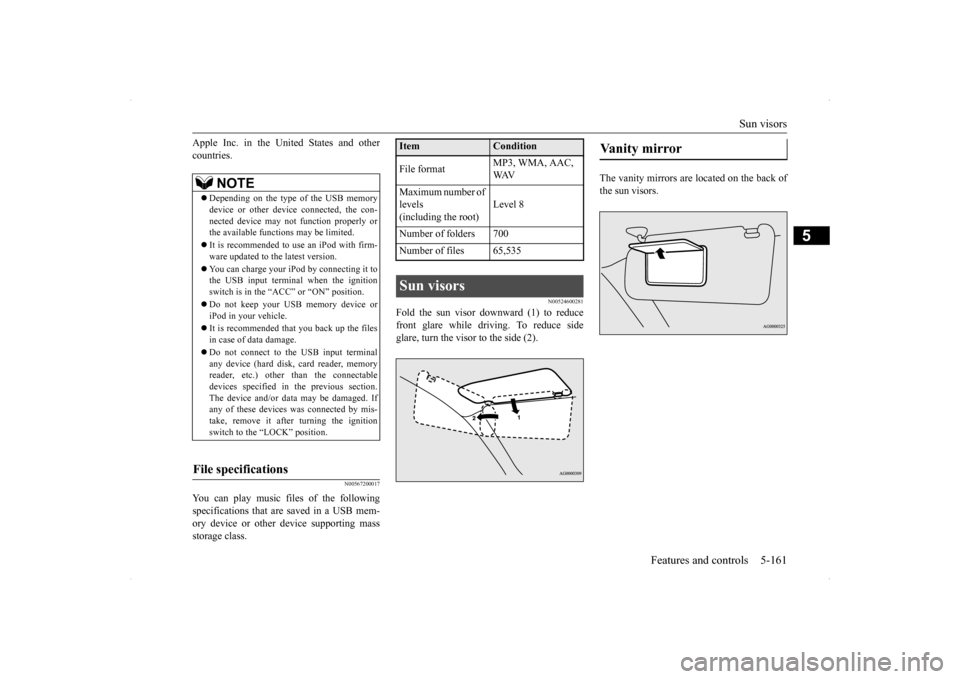
Fold the sun visor downward (1) to reduce front glare while driving. To reduce side glare, turn the visor to the side (2).
The vanity mirrors are located on the back of the sun visors.
NOTE
Depending on the type of the USB memory device or other device connected, the con- nected device may not function properly orthe available functions may be limited. It is recommended to use an iPod with firm- ware updated to the latest version. You can charge your iPod by connecting it to the USB input terminal when the ignition switch is in the “ACC” or “ON” position. Do not keep your USB memory device or iPod in your vehicle. It is recommended that you back up the files in case of data damage. Do not connect to the USB input terminal any device (hard disk, card reader, memory reader, etc.) other than the connectabledevices specified in the previous section. The device and/or data may be damaged. If any of these devices
was connected by mis-
take, remove it after turning the ignition switch to the “LOCK” position.
File specifications
Item
Condition
File format
MP3, WMA, AAC, WAV
Maximum number of levels(including the root)
Level 8
Number of folders 700 Number of files 65,535Sun visors
Vanity mirror
BK0200800US.book
161 ページ 2013年2月14日 木曜日 午後2時28分
Page 235 of 338
Parking 6-6 Driving safety
6
N00629600320
When parking on a hill, set the parking brake, and turn the front wheels toward the curb on adownhill, or away from the curb on an uphill. If necessary, apply chocks to wheels. Place the gearshift lever into the “R” (Reverse) position when parking on a down-hill slope, into the 1s
t position when parking
on an uphill slope. Be sure that the parking brake is firmly set when parked and that the gearshift lever is in the “P” (PARK) position.When parking on a hill, it is important to set the parking brake before moving the gearshift lever to the “P” (PARK) position. This pre-vents loading the parking brake against the transmission gear. When this happens, it is difficult to move the gearshift lever out of the“P” (PARK) position.
Never leave the engi
ne running while you
take a short sleep/rest. Also, never leave the engine running in a closed or poorly venti- lated place. Your front bumper can be damaged if you scrape it over curbs or parking stop blocks.Be careful when traveling up or down steep slopes where your bumper can scrape the road.
When leaving the vehicle unattended, always carry the key and lock all doors.Always try to park your vehicle in a well lit area.
N00629900365
It is very important to know how much weight your vehicle can carry. This weight is called the vehicle capacity weight and includes the weight of all occupants, cargo(including the roof load) and non-factory- installed options. The tire and loading infor- mation placard located on the driver’s doorsill of your vehicle will show how much weight it may properly carry. It is important to familiarize yourself with the following terms before loading your vehicle:
Parking Parking on a hill For vehicles with manual trans- axle For vehicles with Twin Clutch SST
Parking with the engine run- ning
WA R N I N G Leaving the engine running risks injury or death from accidentally moving the gear-shift lever (manual transaxle) or the gear- shift lever (Twin Clutch SST) or from the accumulation of toxic exhaust fumes in thepassenger compartment.
Where you park
WA R N I N G Do not park your vehicle in areas where combustible materials such as dry grass orleaves can come in contact with a hot exhaust, since a fire could occur.
When leaving the vehicle Loading information
WA R N I N G Never overload your vehicle. Overloading can damage your vehicle, adversely affectvehicle performance, including handling and braking, cause tire failure, and result in an accident.
BK0200800US.bo
ok 6 ページ 2013年2月14日 木曜日 午後2時28分