battery MITSUBISHI LANCER EVOLUTION 2015 10.G User Guide
[x] Cancel search | Manufacturer: MITSUBISHI, Model Year: 2015, Model line: LANCER EVOLUTION, Model: MITSUBISHI LANCER EVOLUTION 2015 10.GPages: 338, PDF Size: 43.12 MB
Page 85 of 338
Free-hand Advanced Security Transmitter (F.A.S.T.-key) (if so equipped) 5-24 Features and controls
5
Turn the emergency key to the “LOCK” posi- tion. Turn the steering wheel until it is locked. Turn the emergency key to the “ACC” posi- tion while moving the steering wheel slightly. Tips for starting
Do not operate the starter motor continu- ously for longer than 15 seconds as this could run the battery down or damage the starter motor. If the engine does not start,turn the emergency key back to the “LOCK” position, wait a few seconds, and then try again. Trying repeatedly withthe engine or starter motor still turning will damage the starter mechanism. If the engine will not start because the bat- tery is weak or discharged, refer to“Jump-starting the engine” on page 8-2 for instructions. A longer warm up period will only con- sume extra fuel. The
engine is warmed up
enough for driving when the bar graph of the engine coolant temperature displaystarts to move. Refer to “Interrupt display screen (With ignition switch in the “ON” position)” on page 5-99. On vehicles equipped with the Twin Clutch SST, the following may occur after the engine is started, but they do not indi-cate an abnormality. • You may hear operational sounds of the Twin Clutch SST and you may feelvibration in the vehicle body. • If you shift the gearshift lever into the “N” (NEUTRAL) position and depressthe accelerator pedal, increases in the engine speed will be limited.
The vehicle is equipped with an electronically controlled fuel injection system. This is a sys-tem that automatically controls the fuel injec- tion. There is no need to depress the accelerator pedal when starting the engine.The starter motor should not be run for more than 15 seconds at a time. To prevent battery drain, wait a few secondsbetween attempts to restart the engine. 1. Make sure all occupants are properly seated with seat belts fastened.
To l o c k To u n l o c k
CAUTION Remove the emergency key when leaving the vehicle. If your vehicle needs to be towed, turn the emergency key to the “ACC” position tounlock the steering wheel.NOTE
If the front wheels are turned, the anti-theft lock may sometimes make it difficult to turnthe emergency key from “LOCK” to “ACC”. Firmly turn the steering wheel to the left or to the right as you turn the emergency key.
Starting
WA R N I N G Never run the engine in a closed or poorly ventilated area any longer than is needed to move your vehicle out of the area. Car- bon monoxide gas, which is odorless and extremely poisonous, could build up andcause serious injury or death.CAUTION Do not push-start the vehicle.Do not run the engine
at high rpms or drive
at high speeds until the engine has had a chance to warm up. Release the emergency key as soon as the engine starts. It will damage the startermotor.
Starting the engine
BK0210800US.bo
ok 24 ページ 2014年4月8日 火曜日 午前11時28分
Page 93 of 338
Free-hand Advanced Security Transmitter (F.A.S.T.-key) (if so equipped) 5-32 Features and controls
5
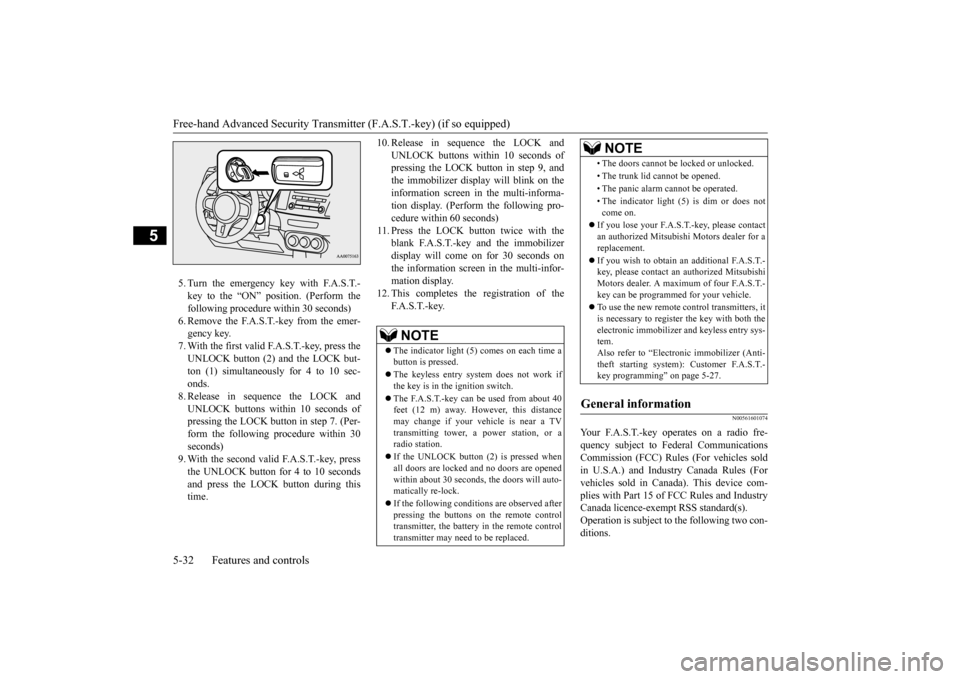
5. Turn the emergency key with F.A.S.T.- key to the “ON” position. (Perform the following procedure within 30 seconds)6. Remove the F.A.S.T.-key from the emer- gency key. 7. With the first valid F.A.S.T.-key, press theUNLOCK button (2) and the LOCK but- ton (1) simultaneously for 4 to 10 sec- onds.8. Release in sequence the LOCK andUNLOCK buttons within 10 seconds of pressing the LOCK button in step 7. (Per- form the following procedure within 30seconds) 9. With the second valid F.A.S.T.-key, press the UNLOCK button for 4 to 10 secondsand press the LOCK button during this time.
10. Release in sequence the LOCK and
UNLOCK buttons within 10 seconds of pressing the LOCK button in step 9, and the immobilizer display will blink on theinformation screen in the multi-informa- tion display. (Perform the following pro- cedure within 60 seconds)
11. Press the LOCK button twice with the
blank F.A.S.T.-key and the immobilizer display will come on for 30 seconds onthe information screen in the multi-infor-mation display.
12. This completes the registration of the
F. A . S . T. - k e y.
N00561601074
Your F.A.S.T.-key operates on a radio fre-quency subject to Federal Communications Commission (FCC) Rules (For vehicles sold in U.S.A.) and Industry Canada Rules (Forvehicles sold in Canada). This device com- plies with Part 15 of FCC Rules and Industry Canada licence-exempt RSS standard(s).Operation is subject to the following two con- ditions.
NOTE
The indicator light (5) comes on each time a button is pressed. The keyless entry system does not work if the key is in the ignition switch. The F.A.S.T.-key can be used from about 40 feet (12 m) away. However, this distance may change if your vehicle is near a TVtransmitting tower, a power station, or a radio station. If the UNLOCK button (2) is pressed when all doors are locked and no doors are openedwithin about 30 seconds, the doors will auto- matically re-lock. If the following conditions are observed after pressing the buttons on the remote control transmitter, the battery in the remote controltransmitter may need to be replaced.
• The doors cannot be locked or unlocked. • The trunk lid cannot be opened.• The panic alarm cannot be operated.• The indicator light (5) is dim or does not come on.
If you lose your F.A.S.T.-key, please contact an authorized Mitsubishi Motors dealer for areplacement. If you wish to obtain an
additional F.A.S.T.-
key, please contact an authorized Mitsubishi Motors dealer. A maximum of four F.A.S.T.- key can be programmed for your vehicle. To use the new remote control transmitters, it is necessary to register the key with both theelectronic immobilizer and keyless entry sys- tem. Also refer to “Electr
onic immobilizer (Anti-
theft starting system): Customer F.A.S.T.- key programming” on page 5-27.
General information
NOTE
BK0210800US.bo
ok 32 ページ 2014年4月8日 火曜日 午前11時28分
Page 94 of 338
Door locks
Features and controls 5-33
5
This device may not cause harmful inter- ference. This device must accept any interference received, including interference that maycause undesired operation.
N00561700094
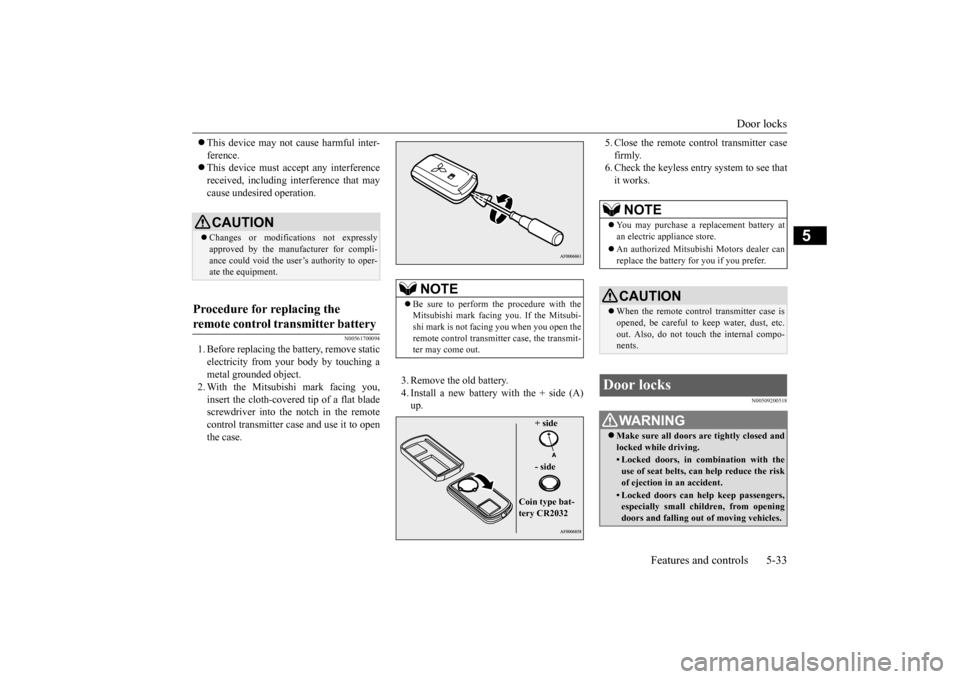
1. Before replacing the battery, remove static electricity from your body by touching a metal grounded object.2. With the Mitsubishi mark facing you, insert the cloth-covered tip of a flat blade screwdriver into the notch in the remotecontrol transmitter case and use it to open the case.
3. Remove the old battery. 4. Install a new battery with the + side (A) up.
5. Close the remote control transmitter case firmly. 6. Check the keyless entry system to see that it works.
N00509200518
CAUTION Changes or modifications not expressly approved by the manufacturer for compli- ance could void the user’s authority to oper-ate the equipment.
Procedure for replacing the remote control transmitter battery
NOTE
Be sure to perform the procedure with the Mitsubishi mark facing you. If the Mitsubi- shi mark is not facing you when you open the remote control transmitter case, the transmit-ter may come out.
+ side - side
Coin type bat- tery CR2032
NOTE
You may purchase a replacement battery at an electric appliance store. An authorized Mitsubishi Motors dealer can replace the battery for you if you prefer.CAUTION When the remote control transmitter case is opened, be careful to keep water, dust, etc. out. Also, do not touch the internal compo-nents.
Door locks
WA R N I N G Make sure all doors are tightly closed and locked while driving.• Locked doors, in combination with theuse of seat belts, can help reduce the risk of ejection in an accident.• Locked doors can help keep passengers,especially small children, from opening doors and falling out of moving vehicles.
BK0210800US.bo
ok 33 ページ 2014年4月8日 火曜日 午前11時28分
Page 102 of 338
Theft-alarm system
Features and controls 5-41
5
The alarm can be deactivated in the following ways. By using the keyless entry system or the F.A.S.T.-key operation to lock or unlock the door. Turn the ignition switch to the “ON” posi- tion.
The system will be disarmed if the following operation is performed. The ignition switch is turned to the “ON” position. All doors are unlocked by the keyless entry system or the F.A.S.T.-key opera-tion.
Use the following procedure to test the sys- tem: 1. Lower the driver’s window. 2. Arm the system as explained in “Armedstage”. 3. Make sure that the theft-alarm indicator comes on and flashes for approximately20 seconds. 4. Wait a few seconds and then unlock the driver’s side door by using the inside doorlock knob and open the door. 5. Check to be sure that the horn sounds intermittently and the headlights blink onand off when the door is opened. 6. Disarm the system by unlocking all doors by the keyless entry system or theF.A.S.T.-key operation.
NOTE
The alarm will continue to operate for 3 min- utes. At the end of that period, the alarm will automatically shut off to save battery power. The system will then
be rearmed until the
proper disarming step is taken. The alarm will resume if unauthorized actions are taken again, even if the alarm hasstopped. While the alarm is operating, a warning is displayed on the information screen in the multi-information display.
Alarm deactivation
Disarmed stage
NOTE
If the UNLOCK button is pressed when all doors are closed and no door is opened within approximately 30 seconds, re-arming will automatically occur. The amount of time after unlocking until the vehicle relocks automatically can beadjusted. See an authorized Mitsubishi Motors dealer for details.Disarm...by the keyless entry system or F.A.S.T.-key operation
Once the system has been disarmed, it can- not be rearmed except by repeating the arm- ing procedure.
Testing the theft-alarm system
NOTE
BK0210800US.bo
ok 41 ページ 2014年4月8日 火曜日 午前11時28分
Page 103 of 338
Power windows 5-42 Features and controls
5
N00510800266
N00548700114
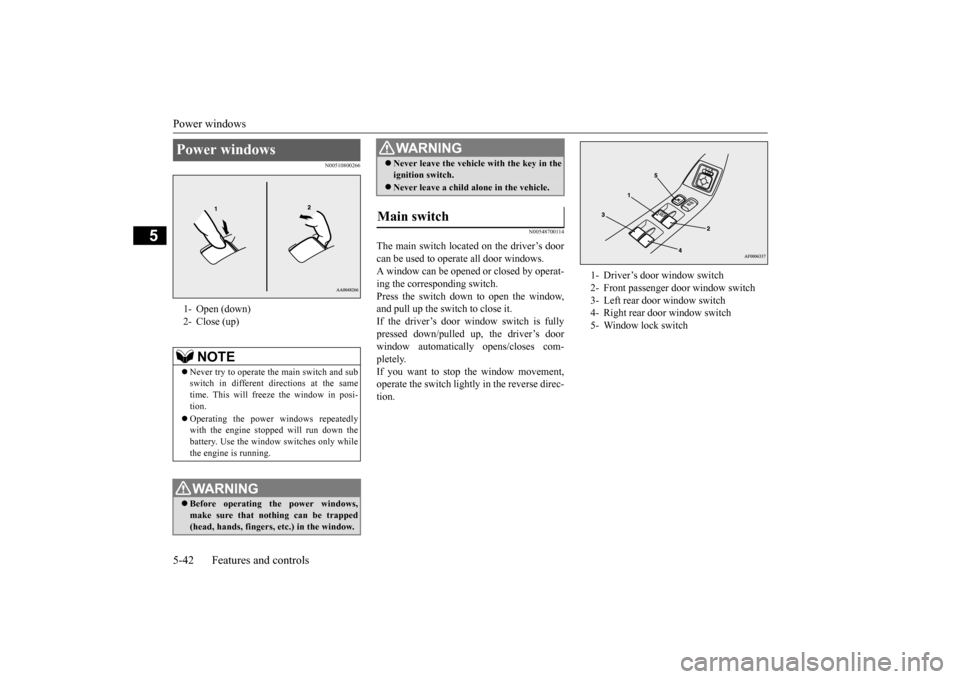
The main switch located on the driver’s door can be used to operate all door windows. A window can be opened or closed by operat-ing the corresponding switch.Press the switch down to open the window, and pull up the switch to close it. If the driver’s door window switch is fullypressed down/pulled up, the driver’s door window automatically opens/closes com- pletely.If you want to stop the window movement, operate the switch lightly in the reverse direc- tion.
Power windows 1- Open (down) 2- Close (up)
NOTE
Never try to operate the main switch and sub switch in different directions at the sametime. This will freeze the window in posi- tion. Operating the power windows repeatedly with the engine stopped will run down the battery. Use the window switches only whilethe engine is running. WA R N I N G Before operating the power windows, make sure that nothing can be trapped(head, hands, fingers, etc.) in the window.
Never leave the vehicle with the key in the ignition switch. Never leave a child alone in the vehicle.
Main switch
WA R N I N G
1- Driver’s door window switch 2- Front passenger door window switch 3- Left rear door window switch 4- Right rear door window switch 5- Window lock switch
BK0210800US.bo
ok 42 ページ 2014年4月8日 火曜日 午前11時28分
Page 107 of 338
Parking brake 5-46 Features and controls
5
N00545000028
The sunshade can be opened or closed manu- ally while the sunroof is closed.When the sunroof is opened, the sunshade will also open automatically.
N00511400360
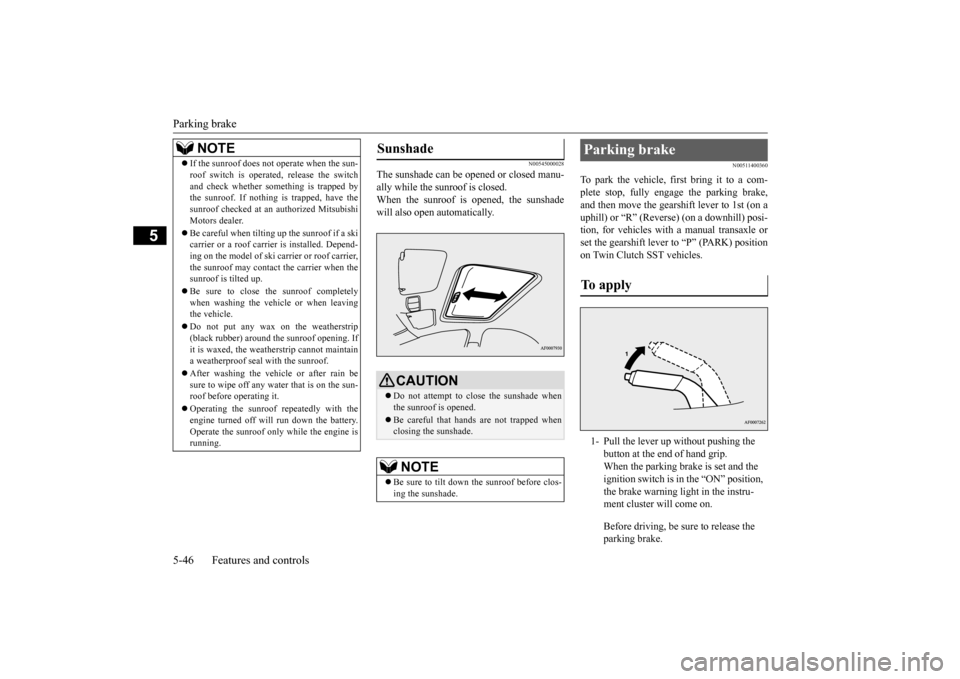
To park the vehicle, first bring it to a com- plete stop, fully engage the parking brake,and then move the gearshift lever to 1st (on a uphill) or “R” (Reverse) (on a downhill) posi- tion, for vehicles with a manual transaxle orset the gearshift lever to “P” (PARK) position on Twin Clutch SST vehicles.
If the sunroof does not operate when the sun- roof switch is operated, release the switch and check whether something is trapped by the sunroof. If nothing is trapped, have the sunroof checked at an authorized MitsubishiMotors dealer. Be careful when tilting
up the sunroof if a ski
carrier or a roof carrier is installed. Depend- ing on the model of ski car
rier or roof carrier,
the sunroof may contact the carrier when thesunroof is tilted up. Be sure to close the sunroof completely when washing the vehicle or when leaving the vehicle. Do not put any wax on the weatherstrip (black rubber) around the sunroof opening. If it is waxed, the weatherstrip cannot maintaina weatherproof seal with the sunroof. After washing the vehicle or after rain be sure to wipe off any water that is on the sun- roof before operating it. Operating the sunroof repeatedly with the engine turned off will run down the battery. Operate the sunroof only while the engine isrunning.NOTE
Sunshade
CAUTION Do not attempt to close the sunshade when the sunroof is opened. Be careful that hands are not trapped when closing the sunshade.NOTE
Be sure to tilt down the sunroof before clos- ing the sunshade.
Parking brake To apply 1- Pull the lever up without pushing the
button at the end of hand grip. When the parking brake is set and the ignition switch is in the “ON” position, the brake warning light in the instru-ment cluster will come on. Before driving, be sure to release the parking brake.
BK0210800US.bo
ok 46 ページ 2014年4月8日 火曜日 午前11時28分
Page 112 of 338
Ignition switch
Features and controls 5-51
5
Engages the starter. After the engine starts, release the key and it will return automati-cally to the “ON” position.
N00539601101
After about 30 minutes has elapsed with theignition switch in the “ACC” position, the function automatically cuts out the power for the audio system and other electric devicesthat can be operated with that position. When the ignition switch is turned from “ACC” to the “ON” position, the power issupplied again to those devices.
N00550900139
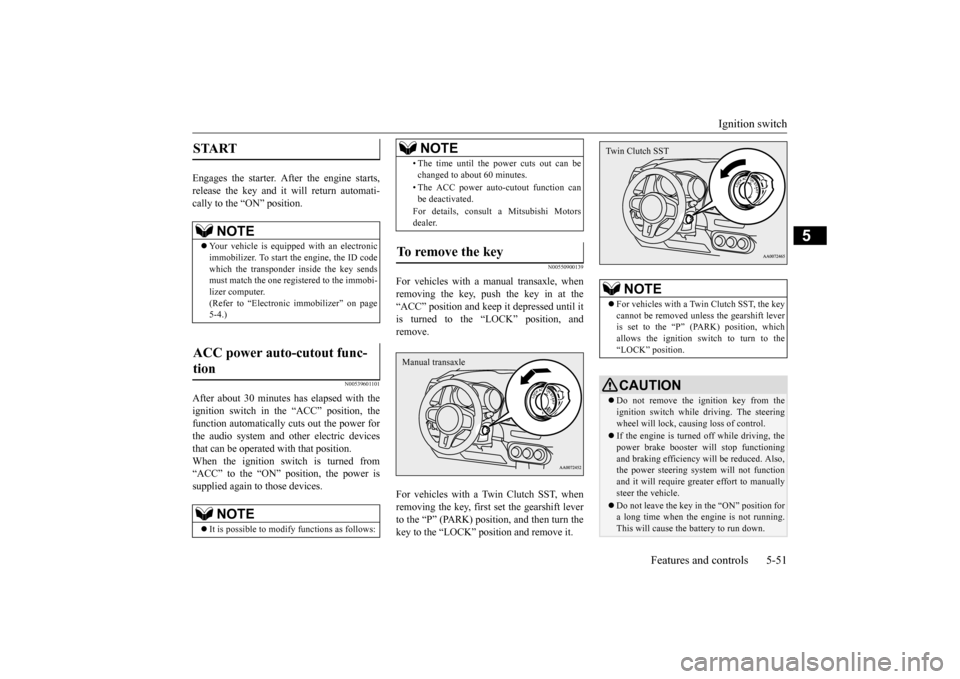
For vehicles with a manual transaxle, whenremoving the key, push the key in at the“ACC” position and keep it depressed until it is turned to the “LOCK” position, and remove. For vehicles with a Twin Clutch SST, when removing the key, first set the gearshift leverto the “P” (PARK) position, and then turn the key to the “LOCK” position and remove it.
START
NOTE
Your vehicle is equipped with an electronic immobilizer. To start the engine, the ID code which the transponder inside the key sendsmust match the one registered to the immobi- lizer computer. (Refer to “Electronic immobilizer” on page5-4.)
ACC power auto-cutout func- tion
NOTE
It is possible to modify functions as follows:
• The time until the power cuts out can be changed to about 60 minutes. • The ACC power auto-cutout function can be deactivated. For details, consult a Mitsubishi Motors dealer.
To remove the key
NOTE
Manual transaxle
NOTE
For vehicles with a Twin Clutch SST, the key cannot be removed unless the gearshift lever is set to the “P” (PARK) position, whichallows the ignition switch to turn to the “LOCK” position.CAUTION Do not remove the ignition key from the ignition switch while driving. The steering wheel will lock, causing loss of control. If the engine is turned off while driving, the power brake booster will stop functioning and braking efficiency will be reduced. Also,the power steering system will not function and it will require greater effort to manually steer the vehicle. Do not leave the key in the “ON” position for a long time when the engine is not running.This will cause the battery to run down.Twin Clutch SST
BK0210800US.bo
ok 51 ページ 2014年4月8日 火曜日 午前11時28分
Page 113 of 338
![MITSUBISHI LANCER EVOLUTION 2015 10.G User Guide Steering wheel lock 5-52 Features and controls
5
N00512500010
[For vehicles equipped with the F.A.S.T.- key]For information on operations for vehiclesequipped with the F.A.S.T.-key, refer to “F.A.S.](/img/19/7477/w960_7477-112.png "MITSUBISHI LANCER EVOLUTION 2015 10.G User Guide Steering wheel lock 5-52 Features and controls
5
N00512500010
[For vehicles equipped with the F.A.S.T.- key]For information on operations for vehiclesequipped with the F.A.S.T.-key, refer to “F.A.S.")
Steering wheel lock 5-52 Features and controls
5
N00512500010
[For vehicles equipped with the F.A.S.T.- key]For information on operations for vehiclesequipped with the F.A.S.T.-key, refer to “F.A.S.T.-key: Steering wheel lock” on page 5-19. [Except for vehicles equipped with the F. A . S . T. - k e y ]
Remove the key at the “LOCK” position. Turn the steering wheel until it is locked. Turn the key to the “ACC” position while moving the steering wheel slightly.
N00542100073
Do not operate the starter motor continu- ously for longer than 15 seconds as this could run the battery down or damage thestarter motor. If the engine does not start,turn the ignition switch back to the “LOCK” position, wait a few seconds, and then try again. Trying repeatedly withthe engine or starter motor still turning will damage the starter mechanism. If the engine will not start because the bat- tery is weak or discharged, refer to “Jump-starting the engine” (on page 8-2) for instructions. The engine is warmed up enough for driv- ing when the bar graph of engine coolant temperature display starts to move. Driv-ing before the bar graph moves may cause deterioration of turbocharger performance and driveability. A longer warm up periodwill only consume extra fuel. On vehicles equipped with the Twin Clutch SST, the following may occur afterthe engine is started, but they do not indi- cate an abnormality.
Do not turn the key to the “START” position when the engine is running. It will damage the starter motor.
Steering wheel lock
CAUTION
To l o c k To u n l o c k
CAUTION Remove the key when leaving the vehicle.NOTE
If the front wheels are turned, the anti-theft lock may sometimes make it difficult to turn the key from “LOCK” position to “ACC” position. Firmly turn the steering wheel tothe left or to the right as you turn the key.
Starting and stopping the engine Tips for starting
BK0210800US.bo
ok 52 ページ 2014年4月8日 火曜日 午前11時28分
Page 114 of 338
Starting and stopping the engine Features and controls 5-53
5
• You may hear operational sounds of the Twin Clutch SST and you may feel vibration in the vehicle body. • If you shift the gearshift lever into the“N” (NEUTRAL) position and depress the accelerator pedal, increases in the engine speed will be limited.
N00542201172
[For vehicles equipped with the F.A.S.T.-key]
For information on operation for vehicles equipped with the F.A.S.T.-key, refer to “F.A.S.T.-key: Starting the engine” on page 5-19. [Except for vehicles equipped with the F. A . S . T. - k e y ] Your vehicle is equipped with an electroni- cally controlled fuel injection system, whichautomatically controls the release of fuel. There is usually no need to depress the accel- erator pedal when starting the engine.The starter should not be run for more than15 seconds at a time. To prevent battery drain, wait a few seconds between attempts to restart the engine. 1. Make sure all occupants are properly seated with seat belts fastened. 2. Insert the ignition key. 3. Make sure the parking brake is applied.4. Press and hold the brake pedal down with your right foot. 5. Press and hold the clutch pedal all the waydown (manual transaxle).
6. On vehicles with manual transaxle, place the gearshift lever in the “N” (Neutral) position. On vehicles with Twin Clutch SST, makesure the gearshift lever is in the “P” (PARK) position. 7. Turn the ignition switch to the “ON” posi- tion and make certain that all warninglights are functioning properly before starting the engine. 8. Turn the ignition switch to the “START”position without pressing the accelerator pedal. Release the key when the engine starts.
After several attempts, you may experience that the engine still does not start.
WA R N I N G Never run the engine in a closed or poorly ventilated area any longer than is neededto move your vehicle out of the area. Car- bon monoxide gas, which is odorless and extremely poisonous, could build up andcause serious injury or death.CAUTION Do not push-start the vehicle.Do not run the engine at high rpms or drive at high speeds until the engine has had a chance to warm up. Release the ignition switch as soon as the engine starts. Otherwise, the starter motorwill be damaged.
Starting the engine
NOTE
For models equipped with a manual trans- axle, the starter will not operate unless the clutch pedal is fully depressed (Clutch inter-lock). This is a safety feature.
NOTE
On vehicles with Twin Clutch SST, the starter will not operate unless the gearshift lever is in the “P” (P
ARK) position or the
gearshift lever is in the “N” (NEUTRAL) position with the brake pedal depressed. For safety reasons, start the engine in the “P”(PARK) position so that the wheels are locked.
When the engine is hard to start
BK0210800US.bo
ok 53 ページ 2014年4月8日 火曜日 午前11時28分
Page 133 of 338
S-AWC (Super-All Wheel Control) 5-72 Features and controls
5
The left-right differential limiting function is a function that enhances driving performance and vehicle stability by preventing idle spin-ning of a wheel when driving on slippery road surfaces or when the road surfaces of the left and right wheels are different. The yaw control function is a function that enhances vehicle cornering performance by controlling the drive power difference of theleft and right wheels
and the braking force
when the vehicle does not turn in response to steering input, such as when the steeringwheel is turned quickly or when driving on slippery road surfaces.
N00542401057
Select the control mode from the followingthree types to suit the driving conditions.
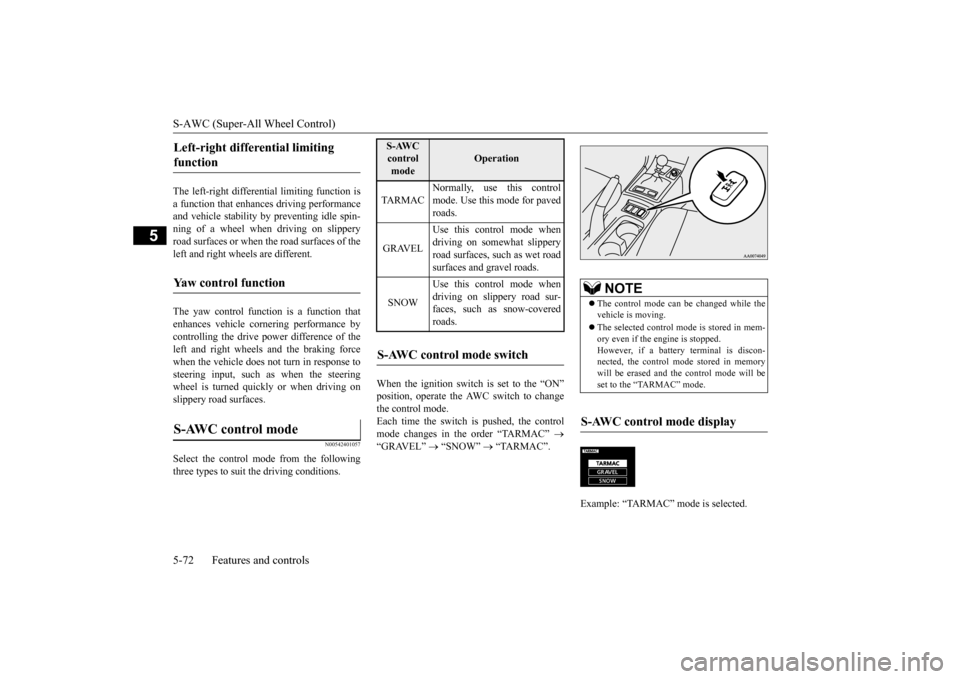
When the ignition switch is set to the “ON” position, operate the AWC switch to change the control mode.Each time the switch is pushed, the control mode changes in the order “TARMAC”
“GRAVEL”
“SNOW”
“TARMAC”.
Left-right differential limiting function Yaw control function S-AWC control mode
S-AWC control mode
Operation
TA R M A C
Normally, use this control mode. Use this mode for paved roads.
GRAVEL
Use this control mode when driving on somewhat slipperyroad surfaces, such as wet road surfaces and gravel roads.
SNOW
Use this control mode when driving on slippery road sur-faces, such as snow-covered roads.
S-AWC control mode switch
NOTE
The control mode can be changed while the vehicle is moving. The selected control mode is stored in mem- ory even if the engine is stopped. However, if a battery terminal is discon-nected, the control mode stored in memory will be erased and the control mode will be set to the “TARMAC” mode.
S-AWC control mode display Example: “TARMAC” mode is selected.ç
BK0210800US.bo
ok 72 ページ 2014年4月8日 火曜日 午前11時28分