brake MITSUBISHI LANCER EVOLUTION 2015 10.G Service Manual
[x] Cancel search | Manufacturer: MITSUBISHI, Model Year: 2015, Model line: LANCER EVOLUTION, Model: MITSUBISHI LANCER EVOLUTION 2015 10.GPages: 338, PDF Size: 43.12 MB
Page 176 of 338
Indicator light, warning light, an
d information screen display list Features and controls 5-115
5
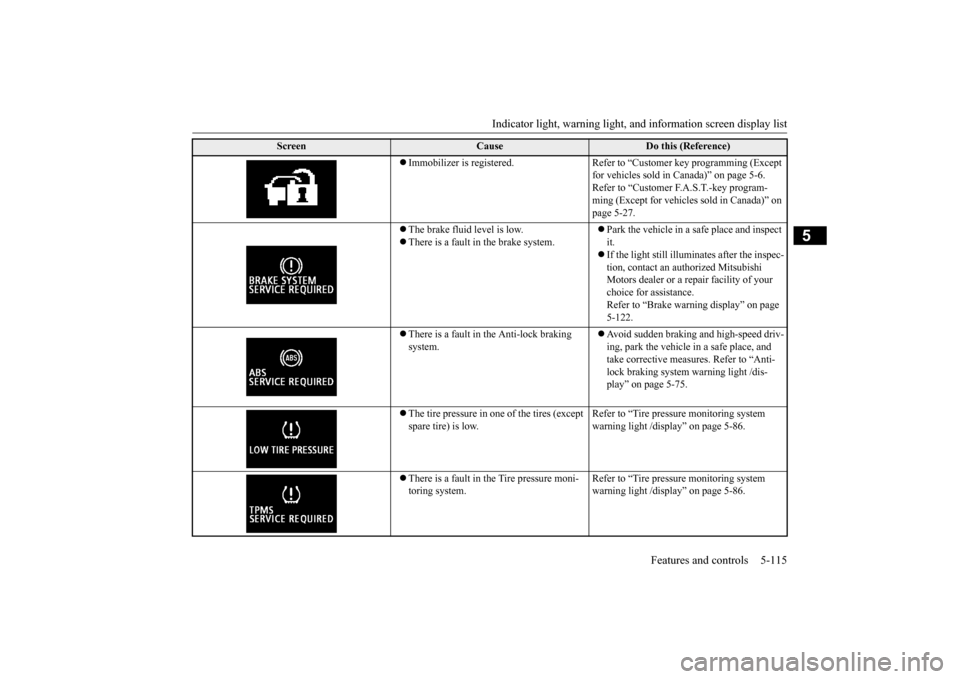
Immobilizer is registered. Refer to “Customer key programming (Except
for vehicles sold in Canada)” on page 5-6. Refer to “Customer F.A.S.T.-key program-ming (Except for vehicles sold in Canada)” on page 5-27.
The brake fluid level is low. There is a fault in the brake system.
Park the vehicle in a safe place and inspect it. If the light still illuminates after the inspec- tion, contact an authorized Mitsubishi Motors dealer or a repair facility of your choice for assistance. Refer to “Brake warning display” on page 5-122.
There is a fault in the Anti-lock braking system.
Avoid sudden braking and high-speed driv- ing, park the vehicle in a safe place, and take corrective measures. Refer to “Anti- lock braking system warning light /dis-play” on page 5-75.
The tire pressure in one of the tires (except spare tire) is low.
Refer to “Tire pressure monitoring system warning light /display” on page 5-86.
There is a fault in the Tire pressure moni- toring system.
Refer to “Tire pressure monitoring system warning light /display” on page 5-86.
Screen
Cause
Do this (Reference)
BK0210800US.book
115 ページ 2014年4月8日 火曜日 午前11時28分
Page 178 of 338
Indicator light, warning light, an
d information screen display list Features and controls 5-117
5
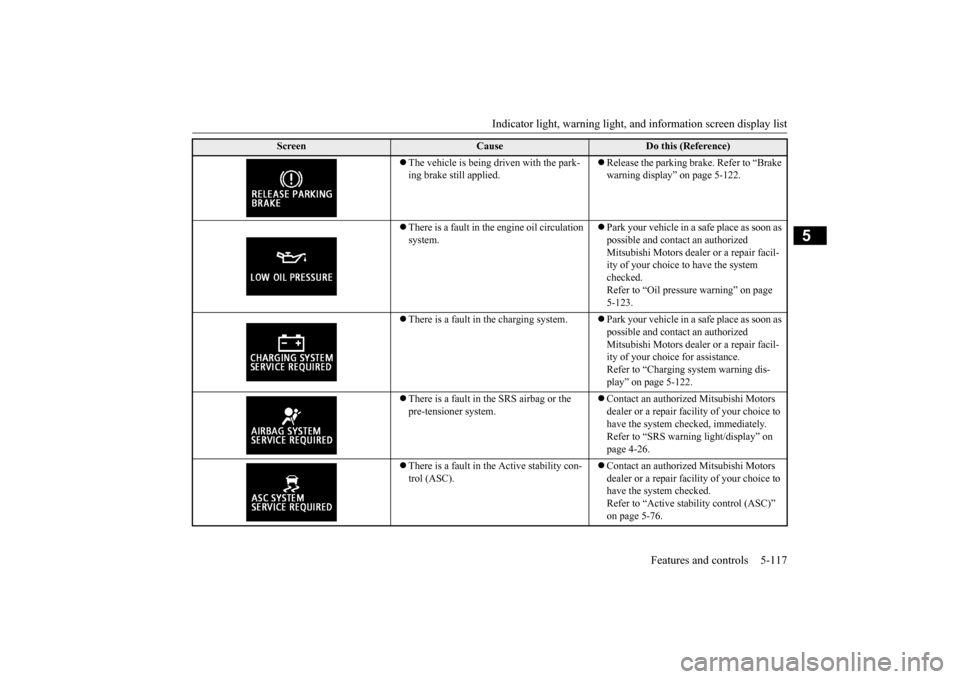
The vehicle is being driven with the park- ing brake still applied.
Release the parking brake. Refer to “Brake warning display” on page 5-122.
There is a fault in the
engine oil circulation
system.
Park your vehicle in a safe place as soon as possible and contact an authorized Mitsubishi Motors dealer or a repair facil- ity of your choice to have the system checked.Refer to “Oil pressure warning” on page 5-123.
There is a fault in the charging system.
Park your vehicle in a safe place as soon as possible and contact an authorized Mitsubishi Motors dealer or a repair facil- ity of your choice for assistance. Refer to “Charging system warning dis-play” on page 5-122.
There is a fault in the SRS airbag or the pre-tensioner system.
Contact an authorized Mitsubishi Motors dealer or a repair facility of your choice to have the system checked, immediately. Refer to “SRS warning light/display” on page 4-26.
There is a fault in the Active stability con- trol (ASC).
Contact an authorized Mitsubishi Motors dealer or a repair facility of your choice to have the system checked.Refer to “Active stability control (ASC)” on page 5-76.
Screen
Cause
Do this (Reference)
BK0210800US.book
117 ページ 2014年4月8日 火曜日 午前11時28分
Page 182 of 338
Warning lights
Features and controls 5-121
5
N00520300147 N00520400483
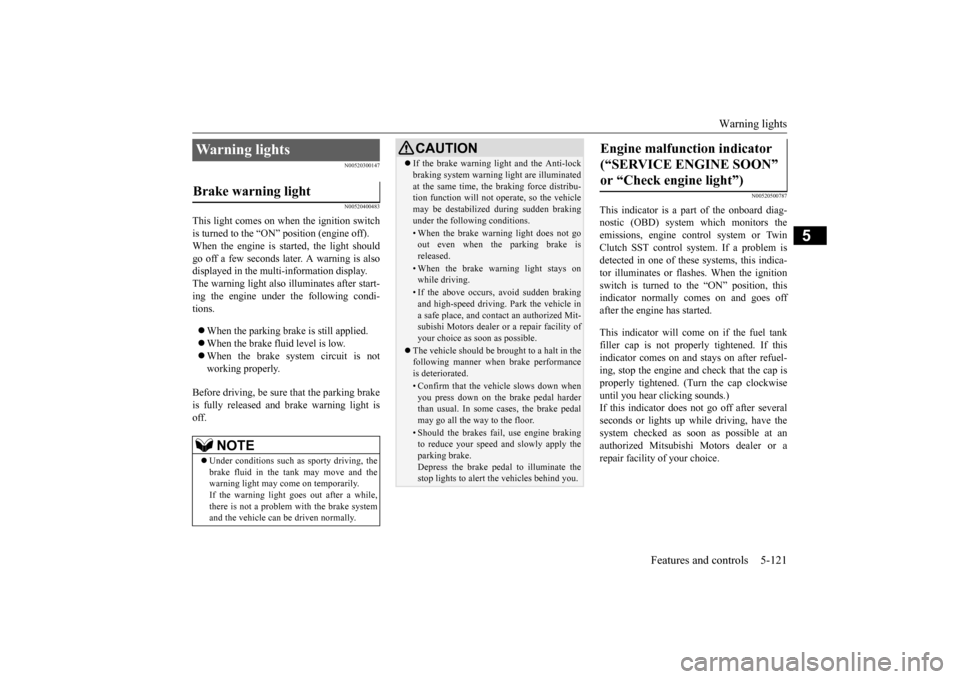
This light comes on when the ignition switch is turned to the “ON” position (engine off).When the engine is started, the light should go off a few seconds later. A warning is also displayed in the multi-information display.The warning light also illuminates after start-ing the engine under the following condi- tions. When the parking brake is still applied. When the brake fluid level is low. When the brake system circuit is not working properly.
Before driving, be sure that the parking brake is fully released and brake warning light isoff.
N00520500787
This indicator is a part of the onboard diag- nostic (OBD) system which monitors the emissions, engine control system or TwinClutch SST control system. If a problem is detected in one of these systems, this indica- tor illuminates or flashes. When the ignitionswitch is turned to the “ON” position, thisindicator normally comes on and goes off after the engine has started. This indicator will come on if the fuel tank filler cap is not properly tightened. If thisindicator comes on and stays on after refuel- ing, stop the engine and check that the cap is properly tightened. (Turn the cap clockwiseuntil you hear clicking sounds.) If this indicator does not go off after several seconds or lights up while driving, have thesystem checked as soon as possible at an authorized Mitsubishi Motors dealer or a repair facility of your choice.
Warning lights Brake warning light
NOTE
Under conditions such as sporty driving, the brake fluid in the tank may move and the warning light may come on temporarily.If the warning light goes out after a while, there is not a problem with the brake system and the vehicle can be driven normally.
CAUTION If the brake warning light and the Anti-lock braking system warning light are illuminated at the same time, the braking force distribu- tion function will not operate, so the vehicle may be destabilized during sudden brakingunder the following conditions.• When the brake warning light does not goout even when the parking brake is released.• When the brake warning light stays onwhile driving.• If the above occurs, avoid sudden brakingand high-speed driving. Park the vehicle in a safe place, and contact an authorized Mit-subishi Motors dealer or a repair facility of your choice as soon as possible.
The vehicle should be brought to a halt in the following manner when brake performance is deteriorated.• Confirm that the vehicle slows down whenyou press down on the brake pedal harderthan usual. In some cases, the brake pedal may go all the way to the floor.• Should the brakes fail, use engine brakingto reduce your speed and slowly apply the parking brake.Depress the brake pedal to illuminate the stop lights to alert the vehicles behind you.
Engine malfunction indicator (“SERVICE ENGINE SOON” or “Check engine light”)
BK0210800US.book
121 ページ 2014年4月8日 火曜日 午前11時28分
Page 183 of 338
Information screen display 5-122 Features and controls
5
N00520600296
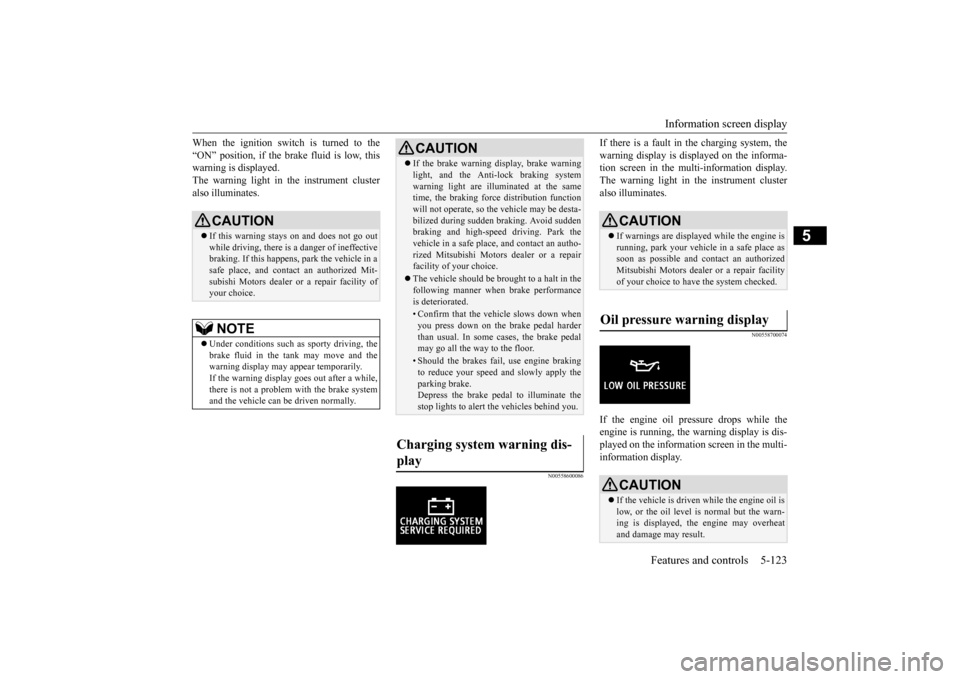
This light comes on in the event of a malfunc- tion in the charging system or when the igni- tion switch is turned to the “ON” position (engine off). A warning is also displayed inthe multi-information display. When the engine is started, the light should go out. Check to make sure that the light has goneout before driving.
N00558300012 N00558400114
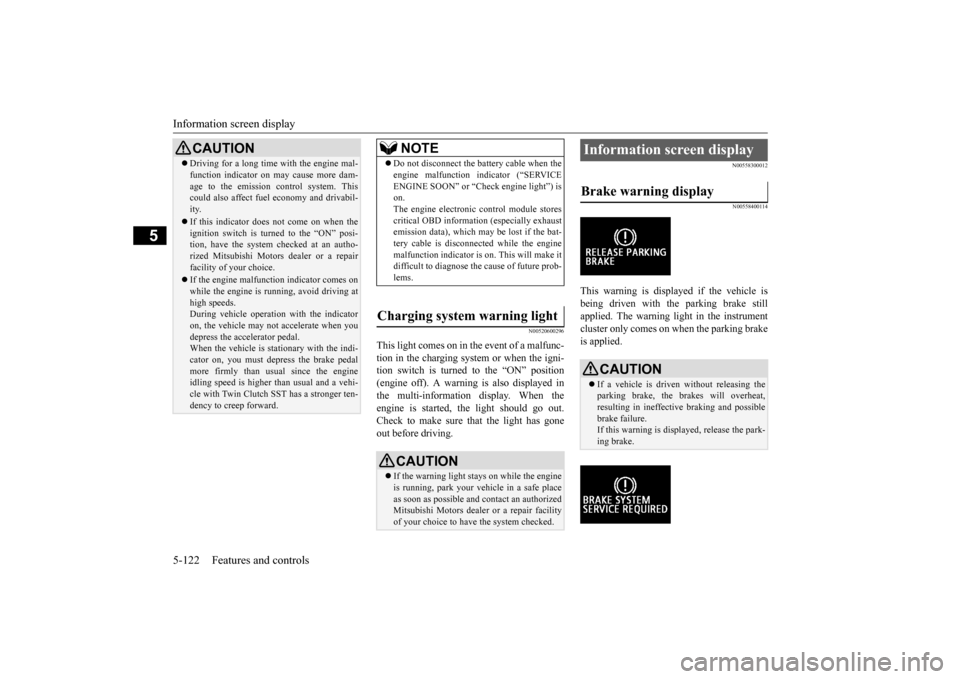
This warning is displayed if the vehicle is being driven with the parking brake stillapplied. The warning light in the instrument cluster only comes on when the parking brake is applied.
CAUTION Driving for a long time with the engine mal- function indicator on may cause more dam- age to the emission control system. This could also affect fuel economy and drivabil- ity. If this indicator does not come on when the ignition switch is turned to the “ON” posi-tion, have the system checked at an autho- rized Mitsubishi Motors dealer or a repair facility of your choice. If the engine malfunction indicator comes on while the engine is running, avoid driving athigh speeds. During vehicle operation with the indicator on, the vehicle may not accelerate when youdepress the accelerator pedal. When the vehicle is stationary with the indi- cator on, you must depress the brake pedalmore firmly than usual since the engine idling speed is higher than usual and a vehi- cle with Twin Clutch SST has a stronger ten-dency to creep forward.
NOTE
Do not disconnect the battery cable when the engine malfunction indicator (“SERVICE ENGINE SOON” or “Check engine light”) is on. The engine electronic control module storescritical OBD information (especially exhaust emission data), which may be lost if the bat- tery cable is disconnected while the enginemalfunction indicator is on. This will make it difficult to diagnose the cause of future prob- lems.
Charging system warning light
CAUTION If the warning light stays on while the engine is running, park your vehicle in a safe place as soon as possible and contact an authorizedMitsubishi Motors dealer or a repair facility of your choice to have the system checked.
Information screen display Brake warning display
CAUTION If a vehicle is driven without releasing the parking brake, the brakes will overheat,resulting in ineffective braking and possible brake failure. If this warning is displayed, release the park-ing brake.
BK0210800US.book
122 ページ 2014年4月8日 火曜日 午前11時28分
Page 184 of 338
Information screen display
Features and controls 5-123
5
When the ignition switch is turned to the “ON” position, if the brake fluid is low, this warning is displayed. The warning light in the instrument clusteralso illuminates.
N00558600086
If there is a fault in
the charging system, the
warning display is displayed on the informa- tion screen in the multi-information display. The warning light in the instrument clusteralso illuminates.
N00558700074
If the engine oil pressure drops while theengine is running, the warning display is dis-played on the information screen in the multi-information display.
CAUTION If this warning stays on and does not go out while driving, there is a danger of ineffective braking. If this happens, park the vehicle in asafe place, and contact an authorized Mit- subishi Motors dealer
or a repair facility of
your choice.NOTE
Under conditions such as sporty driving, the brake fluid in the tank may move and the warning display may appear temporarily.If the warning display goes out after a while, there is not a problem with the brake system and the vehicle can be driven normally.
CAUTION If the brake warning display, brake warning light, and the Anti-lock braking system warning light are illuminated at the same time, the braking force distribution function will not operate, so the vehicle may be desta-bilized during sudden braking. Avoid sudden braking and high-speed driving. Park the vehicle in a safe place, and contact an autho-rized Mitsubishi Motors dealer or a repair facility of your choice. The vehicle should be brought to a halt in the following manner when brake performance is deteriorated.• Confirm that the vehicle slows down whenyou press down on the brake pedal harderthan usual. In some cases, the brake pedal may go all the way to the floor.• Should the brakes fail, use engine brakingto reduce your speed and slowly apply the parking brake.Depress the brake pedal to illuminate the stop lights to alert the vehicles behind you.
Charging system warning dis- play
CAUTION If warnings are displayed while the engine is running, park your vehicle in a safe place as soon as possible and contact an authorizedMitsubishi Motors dealer or a repair facility of your choice to have the system checked.
Oil pressure warning display
CAUTION If the vehicle is driven while the engine oil is low, or the oil level is normal but the warn- ing is displayed, the engine may overheat and damage may result.
BK0210800US.book
123 ページ 2014年4月8日 火曜日 午前11時28分
Page 186 of 338
![MITSUBISHI LANCER EVOLUTION 2015 10.G Service Manual Combination headlights and dimmer switch
Features and controls 5-125
5
[When the engine is started, and the parking brake is released] The daytime running lights will be illumi- nated: [When the engi](/img/19/7477/w960_7477-185.png "MITSUBISHI LANCER EVOLUTION 2015 10.G Service Manual Combination headlights and dimmer switch
Features and controls 5-125
5
[When the engine is started, and the parking brake is released] The daytime running lights will be illumi- nated: [When the engi")
Combination headlights and dimmer switch
Features and controls 5-125
5
[When the engine is started, and the parking brake is released] The daytime running lights will be illumi- nated: [When the engine is not running, or when the engine is running but the parking brake is not released] The engine starts when the lights are off.
Rotate the switch to operate the lights. The combinations of switch operations and illuminated lights differ in accordance withthe following conditions. Except for vehicles equipped with daytime running lights
[When the engine is started, and the parking brake is released] The daytime running lights will be illumi- nated:
Vehicles equipped with daytime running lights OFF
The daytime running lights illumi- nated The daytime running lights illumi- natedParking, tail, front and rear side- marker lights, license plate and instrument panel lights on Headlights and other lights onNOTE
Once the daytime running light come on, they do not go out until the ignition switch isturned to the “LOCK” or “ACC” position.
OFF All lights off
Parking, tail, front and rear side- marker lights, license plate and instrument panel lights on Headlights and other lights on
Ty p e 2 OFF All lights off AUTO
Headlights and other lights turn on and off automatically in accor-dance with outside light level.
Parking, tail, front and rear side- marker lights, license plate and instrument panel lights on Headlights and other lights on
Vehicles equipped with daytime running lights OFF
The daytime running lights illumi- nated
AUTO
The daytime running lights illumi- natedHeadlights and other lights turn on and off automatically in accor- dance with outside light level. The daytime running lights illumi- nated Parking, tail, front and rear side- marker lights, license plate and instrument panel lights on Headlights and other lights on
BK0210800US.book
125 ページ 2014年4月8日 火曜日 午前11時28分
Page 187 of 338
![MITSUBISHI LANCER EVOLUTION 2015 10.G Service Manual Combination headlights and dimmer switch 5-126 Features and controls
5
[When the engine is not running, or when the engine is running but the parking brake is not released] The engine starts when the](/img/19/7477/w960_7477-186.png "MITSUBISHI LANCER EVOLUTION 2015 10.G Service Manual Combination headlights and dimmer switch 5-126 Features and controls
5
[When the engine is not running, or when the engine is running but the parking brake is not released] The engine starts when the")
Combination headlights and dimmer switch 5-126 Features and controls
5
[When the engine is not running, or when the engine is running but the parking brake is not released] The engine starts when the lights are off.
N00532601610
With the combination headlights and dim- mer switch in the “ ” or “ ” position, if the key is turned to the “LOCK” or“ACC” position or removed from the ignition switch and the driver’s door is opened, the lights automatically turn off. [When using a key to start the engine]
• If the driver’s door is opened after the key is removed from the ignition switch, a high-pitched constant tone will sound to remind you to turn off the lights.• If the driver’s door is opened with the key in the ignition switch, a low-pitched beep will sound to remind you to removethe key. [When using the F.A.S.T.-key to start the engine] • If the ignition switch is turned to the “LOCK” position and the driver’s door is opened, a high-pitched constantbuzzer will sound to remind you to turn off the lights. • If the ignition switch
is turned to any
position other than “LOCK” and the driver’s door is opened, a low-pitched constant buzzer will sound to remindyou to return the ignition switch.
With the combination headlights and dim- mer switch in the “ ” or “ ” position, if the key is turned to the “LOCK” or “ACC” position or removed from theignition switch and the driver’s door is not opened, the lights automatically turn off after about 3 minutes.
NOTE
Once the daytime running light come on, they do not go out until the ignition switch is turned to the “LOCK” or “ACC” position.OFF All lights off AUTO
Headlights and other lights turn on and off automatically in accor- dance with outside light level. Parking, tail, front and rear side- marker lights, license plate and instrument panel lights on Headlights and other lights on
NOTE
The sensitivity of the automatic on/off con- trol can be adjusted. For further information, please contact your authorized Mitsubishi Motors dealer or arepair facility of your choice.
Do not cover the sensor (A) for the automatic on/off control by affixing a sticker or label to the windshield. If the lights do not turn on or off with the switch in the “AUTO” position, manually operate the switch. Have the system checked by an authorized Mitsubishi Motors dealer ora repair facility of your choice.
Light auto-cutout function (headlights and other lights)
NOTE
BK0210800US.book
126 ページ 2014年4月8日 火曜日 午前11時28分
Page 202 of 338
Bluetooth® 2.0 interface
Features and controls 5-141
5
If a passcode has been set and the security function is enabled, the voice guide will say “Hands-free system is locked. State the pass- code to continue” when the SPEECH button(except for vehicles with Mitsubishi Multi- Communication System) or PICK-UP button (for vehicles with Mi
tsubishi Multi-Commu-
nication System) is pressed to enter voice rec- ognition mode. Say the 4-digit passcode number to enter the passcode. If the entered passcode is wrong, the voice guide will say “<4-digit passcode>, Incorrectpasscode. Please try again.” Enter the correct passcode. Use the following procedure to turn off the security function by disabling the passcode.
1. Press the SPEECH button (except for vehicles with Mits
ubishi Multi-Commu-
nication System) or PICK-UP button (for vehicles with Mits
ubishi Multi-Commu-
nication System).2. Say “Setup.”3. Say “Passcode.” 4. The voice guide will say “Passcode is enabled. Would you like to disable it?”Answer “Yes.” Answer “No” to cancel the disabling of the passcode and return to the main menu. 5. When the disabling of the passcode is completed, the voice guide will say “Pass- code is disabled” and the system willreturn to the main menu.
N00564700011
The Bluetooth
® 2.0 interface can use the
speaker enrollment function to create a voice model for one person per language. This makes it easier for the Bluetooth
® 2.0
interface to recognise voice commands said by you.
You can turn a voice model registered with the speaker enrollment function on and off whenever you want.
N00564801107
It takes about 2 to 3 minutes to complete thespeaker enrollment process. To ensure the best results, run through theprocess while in the driver’s seat, in an envi-ronment that is as quiet as possible (when there is no rain or strong winds and the vehi- cle windows are closed). Please turn off yourphone while in speaker enrollment to prevent interruption of the process. Use the following procedure for speakerenrollment. 1. Stop your vehicle in a safe area, put the gearshift lever in the “N” (Neutral) posi- tion (manual transaxle), or the gearshiftlever in the “P” (PARK) position (Twin Clutch SST) and pull the parking brake lever.
Entering the passcode
NOTE
You can reenter the passcode as many times as you want. If you have forgotten your passcode, say “Cancel” to quit the voice input mode andthen check with an authorized Mitsubishi Motors dealer.
Disabling the passcode
NOTE
System must be unlocked to disable the pass- code.
Speaker enrollment function
Speaker enrollment
NOTE
Speaker enrollment is not possible unless the vehicle is parked. Make sure you park the vehicle in a safe area before attempting speaker enrollment.
BK0210800US.book
141 ページ 2014年4月8日 火曜日 午前11時28分
Page 204 of 338
Bluetooth® 2.0 interface
Features and controls 5-143
5
interface function, you must pair the Blue- tooth
® device and Bluetooth
® 2.0 interface.
Up to 7 Bluetooth
® devices can be paired
with the Bluetooth
® 2.0 interface.
If multiple paired Bluetooth
® devices are
available in the vehicle, the cellular phone ormusic player most recently connected is auto- matically connected to the Bluetooth
® 2.0
interface. You can also change a Bluetooth
® device to
be connected. To pair a Bluetooth
® device with the Blue-
tooth
® 2.0 interface, follow the steps below.
1. Stop your vehicle in a safe area, put the gearshift lever in the “N” (Neutral) posi- tion (manual transaxle), or the gearshift lever in the “P” (PARK) position (TwinClutch SST) and pull the parking brake lever. 2. Press the SPEECH button (except for vehicles with Mits
ubishi Multi-Commu-
nication System) or PICK-UP button (for vehicles with Mits
ubishi Multi-Commu-
nication System). 3. Say “Setup.” 4. Say “Pairing Options.”5. The voice guide will say “Select one of the following: pair, edit, delete, or list.” Say “Pair.”
6. The voice guide will say “Please say a 4- digit pairing code.” Say a 4-digit number. When the confirmation function is on, thesystem will confirm whether the number said is acceptable. Answer “Yes.” Answer “No” to return to pairing codeselection.
NOTE
Pairing is required only when the device is used for the first time. Once the device has been paired with the Bluetooth
® 2.0 inter-
face, all you need is
to bring the device into
the vehicle next time and the device will connect to the Bluetooth
® 2.0 interface auto-
matically (if supported by the device). The device must have Bluetooth
® turned ON to
connect.
To p a i r
NOTE
You cannot pair any Bluetooth
® device with
the Bluetooth
® 2.0 interface unless the vehi-
cle is parked. Before pairing a Bluetooth
®
device with the Bluetooth
® 2.0 interface,
confirm that the vehicle is parked in a safelocation.
NOTE
If 7 devices have already been paired, the voice guide will say “Maximum devices paired” and then the system will end the pairing process. To register a new device, delete one device and then repeat the pairingprocess. (Refer to “Selecting a device: Deleting a device” on page 5-145.)NOTE
Some Bluetooth
® devices require a specific
pairing code. Please refer to the device man-ual for pairing code requirements.
BK0210800US.book
143 ページ 2014年4月8日 火曜日 午前11時28分
Page 232 of 338
Vehicle preparation before driving
Driving safety 6-3
6
N00629001712
For a safer and more enjoyable trip, always observe the following: Before starting the vehicle, make certain that you and all passengers are seated and wearing their seat belts properly (with children in the rear seat, in appropriaterestraints), and that all the doors are locked.
Move the driver’s seat as far backward as possible, while still keeping good visibil- ity, and good control of the steering wheel, brakes, accelerator, and controls.Check the instrument panel indicators and multi-information display for any possible problem. Move the front passenger seat as far back as possible. Make sure that infants and small children are properly restrained in accordance withall laws and regulations.
Check these by selecting the defroster mode, and set the blower switch on high. You should be able to feel the air blowing against the windshield.{Refer to “Defrosting or defogging (wind- shield, door window)” on page 7-8, 7-13.} Check all the tires for heavy tread wear or uneven wear patterns. Look for stones, nails, glass, or other objects stuck in the tread. Lookfor any tread cuts or sidewall cracks. Check the wheel nuts for tightness, and the tires (including spare tire) for proper pressures.
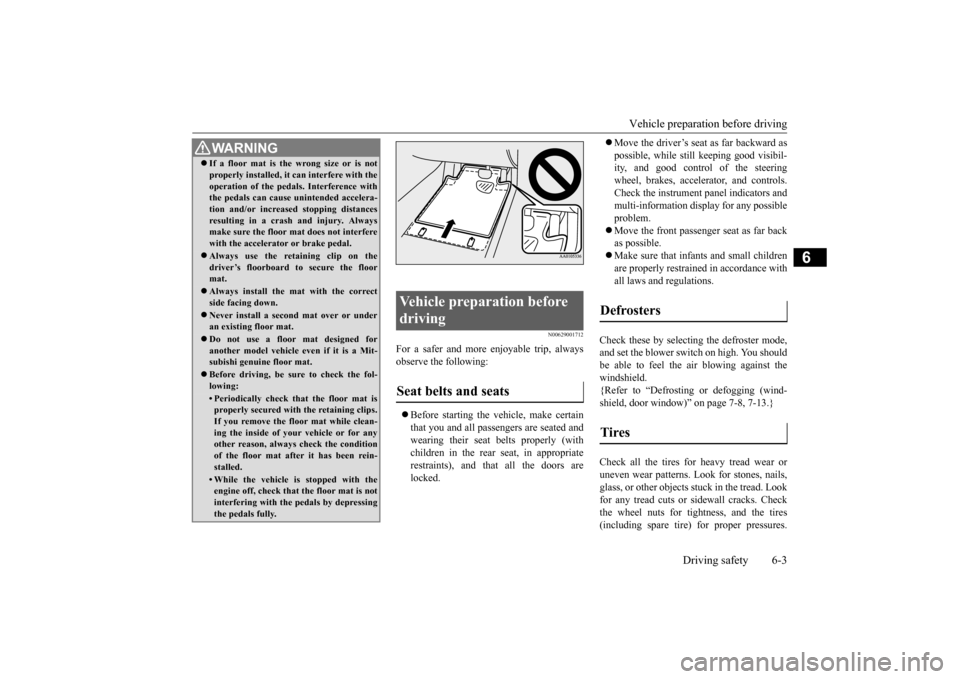
WA R N I N G If a floor mat is the wrong size or is not properly installed, it can interfere with the operation of the pedals. Interference with the pedals can cause unintended accelera- tion and/or increased stopping distancesresulting in a crash and injury. Always make sure the floor mat does not interfere with the accelerator or brake pedal. Always use the retaining clip on the driver’s floorboard to secure the floormat. Always install the mat with the correct side facing down. Never install a second mat over or under an existing floor mat. Do not use a floor mat designed for another model vehicle ev
en if it is a Mit-
subishi genuine floor mat. Before driving, be sure to check the fol- lowing:• Periodically check that the floor mat isproperly secured with the retaining clips. If you remove the floor mat while clean-ing the inside of your vehicle or for any other reason, always check the condition of the floor mat after it has been rein-stalled.• While the vehicle is stopped with the engine off, check that the floor mat is not interfering with the pedals by depressingthe pedals fully.
Vehicle preparation before driving Seat belts and seats
Defrosters Tires
BK0210800US.bo
ok 3 ページ 2014年4月8日 火曜日 午前11時28分