motor MITSUBISHI LANCER IX 2006 User Guide
[x] Cancel search | Manufacturer: MITSUBISHI, Model Year: 2006, Model line: LANCER IX, Model: MITSUBISHI LANCER IX 2006Pages: 800, PDF Size: 45.03 MB
Page 32 of 800
TROUBLESHOOTING
ENGINE COOLING14-18
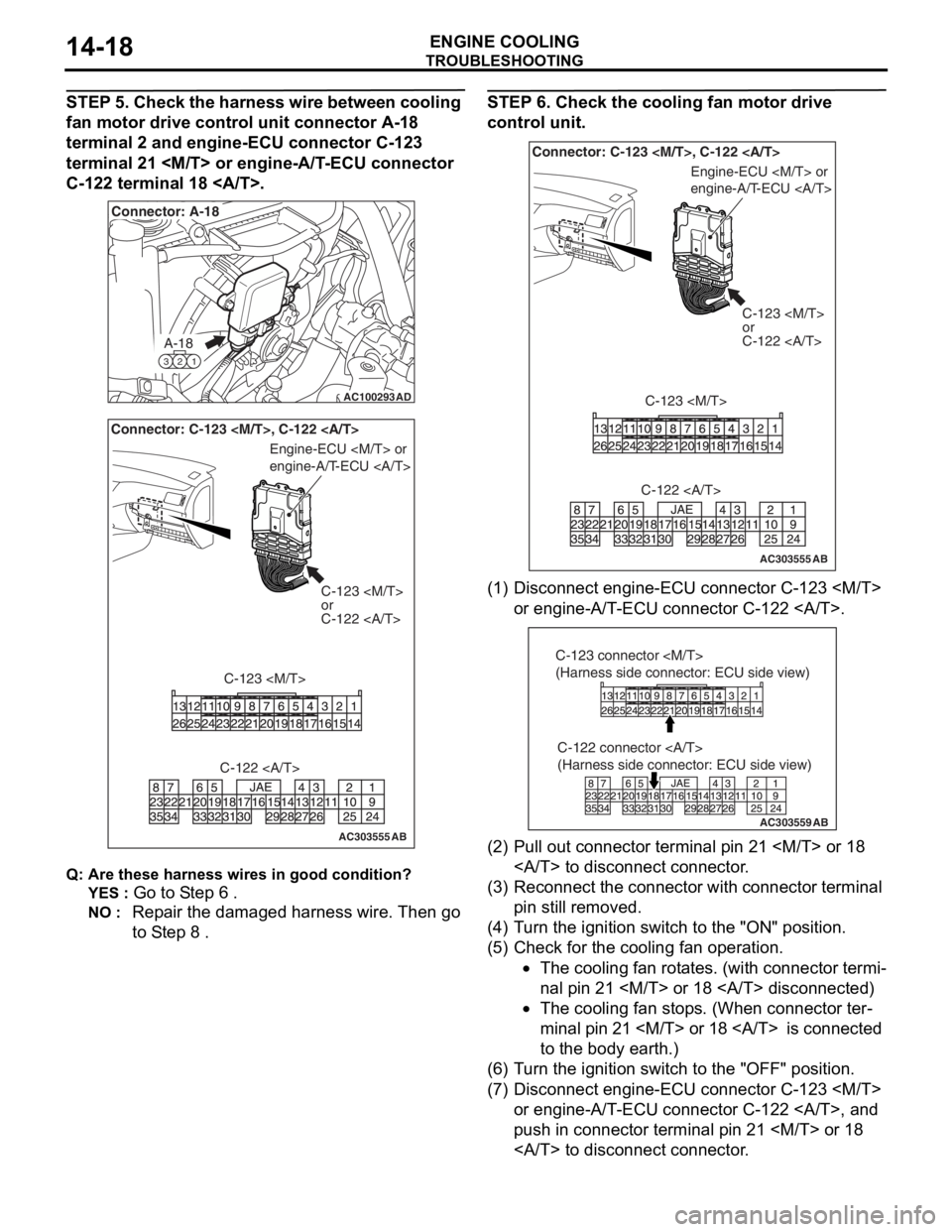
STEP 5. Check the harness wire between cooling
fan motor drive control unit connector A-18
terminal 2 and engine-ECU connector C-123
terminal 21
C-122 terminal 18 .
AC100293
A-18
321
Connector: A-18
AD
AC303555AB
Connector: C-123
or
C-122
C-123
Engine-ECU
engine-A/T-ECU
C-122
Q: Are t h es e har n es s wires in goo d cond it ion?
YES : Go to S t ep 6 .
NO : Repa ir the dama ged harness wire. Then go
to S
t ep 8
.
STEP 6 . Check the cooling fan moto r d r iv e
control unit.
AC303555AB
Connector: C-123
C-123
or
C-122
C-123
Engine-ECU
engine-A/T-ECU
C-122
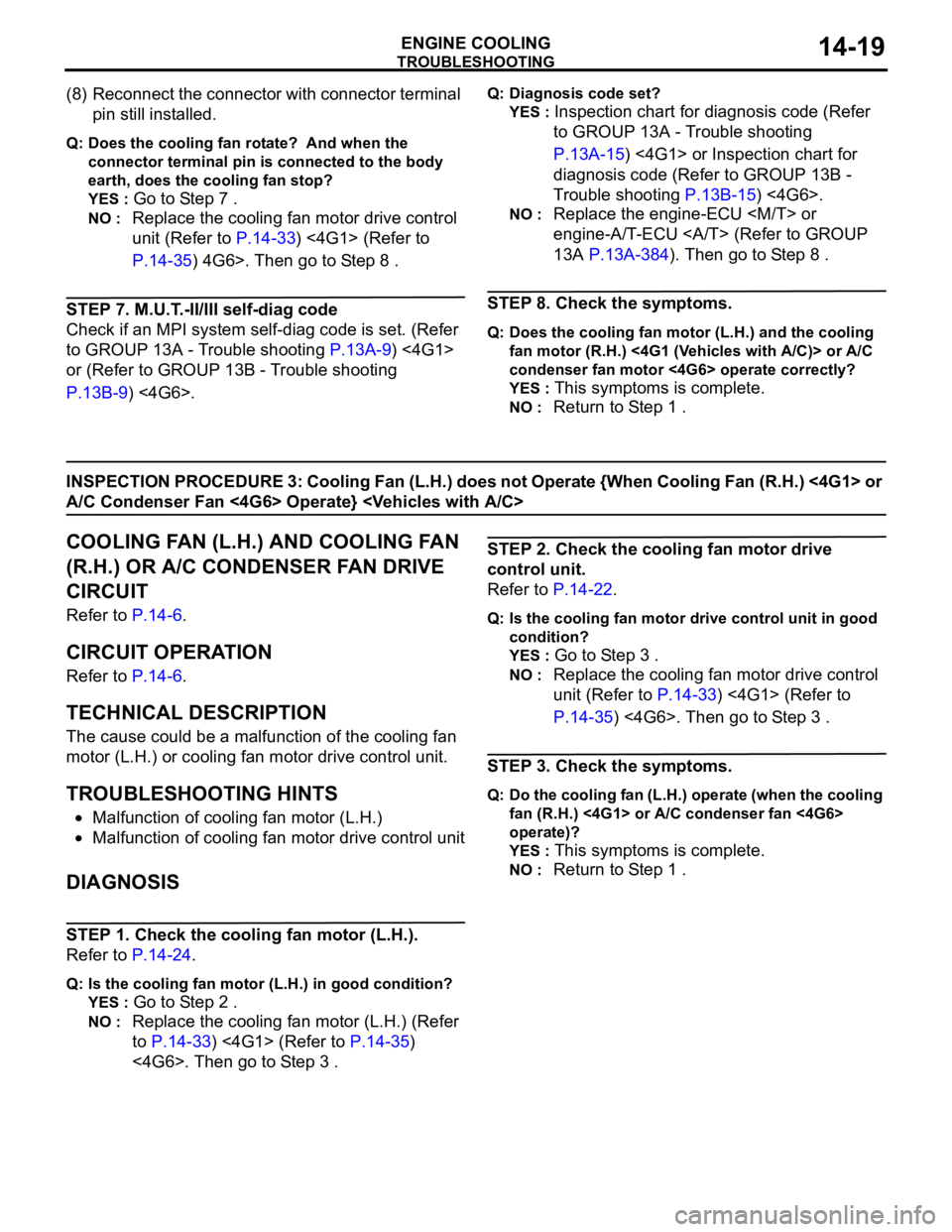
(1) D isconn ect e ngin e -ECU conne ctor C-12 3
or e ngine -A/T -ECU conne ctor C-12 2 .
AC303559
C-122 connector
(Harness side connector: ECU side view)
AB
C-123 connector
(Harness side connector: ECU side view)
(2)P ull out conne ctor terminal p i n 21
to discon nect conn ector .
(3)R econnect the con necto r with conn ector te rmin al
pin still removed.
(4)T urn t he ig nition switch t o the "ON" positio n.
(5)C heck fo r the cooling fan opera t ion.
•The cooling fan ro t a t e s. (with conne ctor termi-
nal pi n 21
•The cooling fan stop s. (When con necto r ter-
minal pi n 21
to the
body earth.)
(6)T urn t he ig nition switch t o the "OFF" po sit i on.
(7)D isconn ect e ngin e -ECU conne ctor C-12 3
or e ngine -A/T -ECU conne ctor C-12 2 , a nd
push in con nect o r terminal pin 21
to discon nect conn ector .
Page 33 of 800
TROUBLESHOOTING
ENGINE COOLING14-19
(8) Reconnect the connector with connector terminal
pin still installed.
Q: Does the cooling fan rotate? And when the
connector terminal pin is connected to the body
earth, does the cooling fan stop?
YES : Go to Step 7 .
NO : Replace the cooling fan motor drive control
unit (Refer to
P.14-33) <4G1> (Refer to
P.14-35) 4G6>. Then go to Step 8 .
STEP 7. M.U.T.-II/III self-diag code
Check if an MPI system self-diag code is set. (Refer
to GROUP 13A - Trouble shooting
P.13A-9) <4G1>
or (Refer to GROUP 13B - Trouble shooting
P.13B-9) <4G6>.
Q: Diagnosis code set?
YES : Inspection chart for diagnosis code (Refer
to GROUP 13A - Trouble shooting
P.13A-15) <4G1> or Inspection chart for
diagnosis code (Refer to GROUP 13B -
Trouble shooting
P.13B-15) <4G6>.
NO : Replace the engine-ECU
engine-A/T-ECU (Refer to GROUP
13A
P.13A-384). Then go to Step 8 .
STEP 8. Check the symptoms.
Q: Does the cooling fan motor (L.H.) and the cooling
fan motor (R.H.) <4G1 (Vehicles with A/C)> or A/C
condenser fan motor <4G6> operate correctly?
YES : This symptoms is complete.
NO : Return to Step 1 .
INSPECTION PROCEDURE 3: Cooling Fan (L.H.) does not Operate {When Cooling Fan (R.H.) <4G1> or
A/C Condenser Fan <4G6> Operate}
COOLING FAN (L.H.) AND COOLING FAN
(R.H.) OR A/C CONDENSER FAN DRIVE
CIRCUIT
Refer to P.14-6.
CIRCUIT OPERATION
Refer to P.14-6.
TECHNICAL DESCRIPTION
The cause could be a malfunction of the cooling fan
motor (L.H.) or cooling fan motor drive control unit.
TROUBLESHOOTING HINTS
•Malfunction of cooling fan motor (L.H.)
•Malfunction of cooling fan motor drive control unit
DIAGNOSIS
STEP 1. Check the cooling fan motor (L.H.).
Refer to P.14-24.
Q: Is the cooling fan motor (L.H.) in good condition?
YES : Go to Step 2 .
NO : Replace the cooling fan motor (L.H.) (Refer
to
P.14-33) <4G1> (Refer to P.14-35)
<4G6>. Then go to Step 3 .
STEP 2. Check the cooling fan motor drive
control unit.
Refer to P.14-22.
Q: Is the cooling fan motor drive control unit in good
condition?
YES : Go to Step 3 .
NO : Replace the cooling fan motor drive control
unit (Refer to
P.14-33) <4G1> (Refer to
P.14-35) <4G6>. Then go to Step 3 .
STEP 3. Check the symptoms.
Q: Do the cooling fan (L.H.) operate (when the cooling
fan (R.H.) <4G1> or A/C condenser fan <4G6>
operate)?
YES : This symptoms is complete.
NO : Return to Step 1 .
Page 34 of 800
TROUBLESHOOTING
ENGINE COOLING14-20
INSPECTION PROCEDURE 4: Cooling Fan (R.H.) <4G1> or A/C Condenser Fan <4G6> does not
Operate {When Cooling Fan (L.H.) Operate}
COOLING FAN (L.H.) AND COOLING FAN
(R.H.) OR A/C CONDENSER FAN DRIVE
CIRCUIT
Refer to P.14-6.
CIRCUIT OPERATION
Refer to P.14-6.
TECHNICAL DESCRIPTION
The cause could be a malfunction of the cooling fan
motor (R.H.) <4G1> or A/C condenser fan motor
<4G6> or cooling fan motor drive control unit.
TROUBLESHOOTING HINTS
•Malfunction of cooling fan motor (R.H.) <4G1> or
A/C condenser fan motor <4G6>
•Malfunction of cooling fan motor drive control unit
DIAGNOSIS
STEP 1. Check the cooling fan motor (R.H.)
<4G1> or A/C condenser fan motor <4G6>.
Cooling fan motor (R.H.) check. (Refer to P.14-24)
<4G1>.
A/C condenser fan motor check. (Refer to GROUP
55
P.55A-91) <4G6>.
Q: Is the cooling fan motor (R.H.) <4G1> or A/C
condenser fan motor <4G6> in good condition?
YES : Go to Step 2 .
NO : Replace the cooling fan motor (R.H.) (Refer
to
P.14-33) <4G1> or A/C condenser fan
motor (Refer to GROUP 55 P.55A-90)
<4G6>. Then go to Step 3 .
STEP 2. Check the cooling fan motor drive
control unit.
Refer to P.14-22.
Q: Is the cooling fan motor drive control unit in good
condition?
YES : Go to Step 3 .
NO : Replace the cooling fan motor drive control
unit (Refer to
P.14-33) <4G1> (Refer to
P.14-35) <4G6>. Then go to Step 3 .
STEP 3. Check the symptoms.
Q: Do the cooling fan (R.H.) <4G1> or A/C condenser
fan <4G6> operate (when the cooling fan (L.H.)
operate)?
YES : This symptoms is complete.
NO : Return to Step 1 .
Page 36 of 800
AC200625
Cylinder block
drain plug
AC
ON-VEHICLE SER VICE
ENGINE COOLING14-22
5.App l y the designa ted sealant to t he scre w area of
th e cylin der block drain plu g , and then tighten to
th e st and ard torq ue.
Sp e c ified s ealant: 3 M Nut Loc king Part
No. 4171 o r e quivale n t
Ti ghtenin g torque:
40 ± 5 N⋅m <4G1>
44 ± 5 N⋅m <4G6>
6.Securely tighten t he drain plug of t he radiator .
7.Reinst all the ra diato r con denser t ank.
CAUTION
Do not use alcohol or methanol anti-freeze or any
engine coolants mixed with alcohol or methanol
anti-freeze. The use of an improper anti-freeze
can cause corrosion of the aluminium compo
-
nents.
AC303612AB
MB991871
AIR HOSE
8. By referring to the section on coolant, select an
appropriate concentration for safe operating
temperature within the range of 30 to 60%. Use
special tool LLC changer (MB991871) to refill the
coolant. A convenient mixture is a 50% water and
50% antifreeze solution (freezing point:
−31°C).
Recommended antifreeze: DIAQUEEN SUPER LONG LIFE COOLANT or equivalent
Quantity:
5.0 L <4G1>
7.0 L <4G6>
NOTE: For how to use special tool MB991871,
refer to its manufacturer’s instructions.
9. Reinstall the radiator cap.
10.Start the engine and let it warm up until the thermostat opens.
11.After repeatedly revving the engine up to 3,000 r/min several times, then stop the engine.
12.Remove the radiator cap after the engine has become cold, and pour in coolant up to the brim.
Reinstall the cap.
CAUTION
Do not overfill the radiator condenser tank.
13.Add coolant to the radiator condenser tank between the "F" and "L" mark if necessary.
CONCENTRATION MEASUREMENT
M1141001100352
Measure the temperature and specific gravity of the
engine coolant to check the antifreeze concentration.
Standard value: 30 − 60% (allowable concentra-
tion range)
Recommended antifreeze: DIAQUEEN SUPER
LONG LIFE COOLANT or equivalent
CAUTION
If the concentration of the anti-freeze is below
30%, the anti-corrosion property will be
adversely affected. In addition, if the concentra
-
tion is above 60%, both the anti-freezing and
engine cooling properties will decrease, affecting
the engine adversely. For these reasons, be sure
to maintain the concentration level within the
specified range.
COOLING FAN MOTOR DRIVE CONTROL
UNIT CHECK
M1141006100250
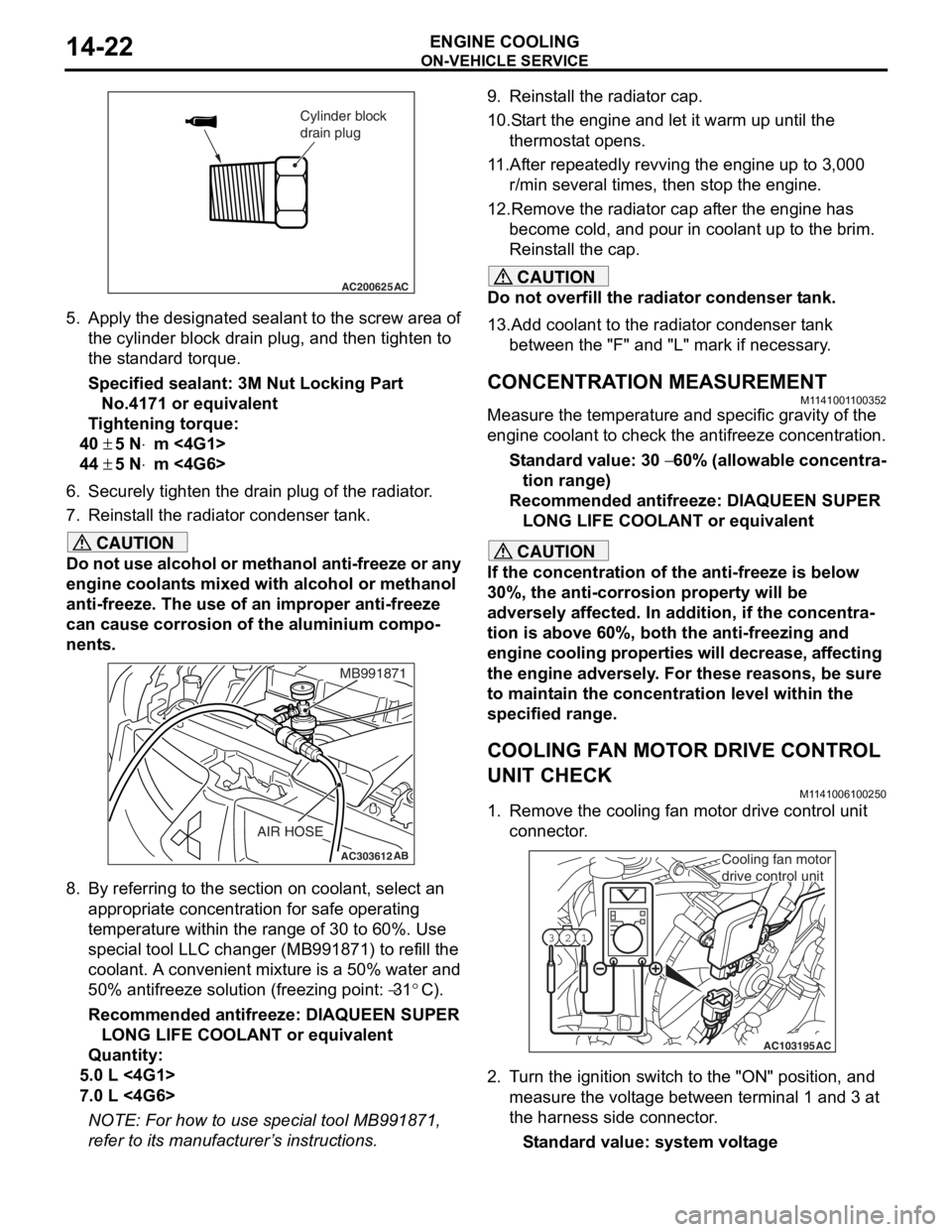
1. Remove the cooling fan motor drive control unit connector.
AC103195
Y1716AU
1
23
AC
Cooling fan motor
drive control unit
2. Turn the ignition switch to the "ON" position, and
measure the voltage between terminal 1 and 3 at
the harness side connector.
Standard value: system voltage
Page 37 of 800
ON-VEHICLE SERVICE
ENGINE COOLING14-23
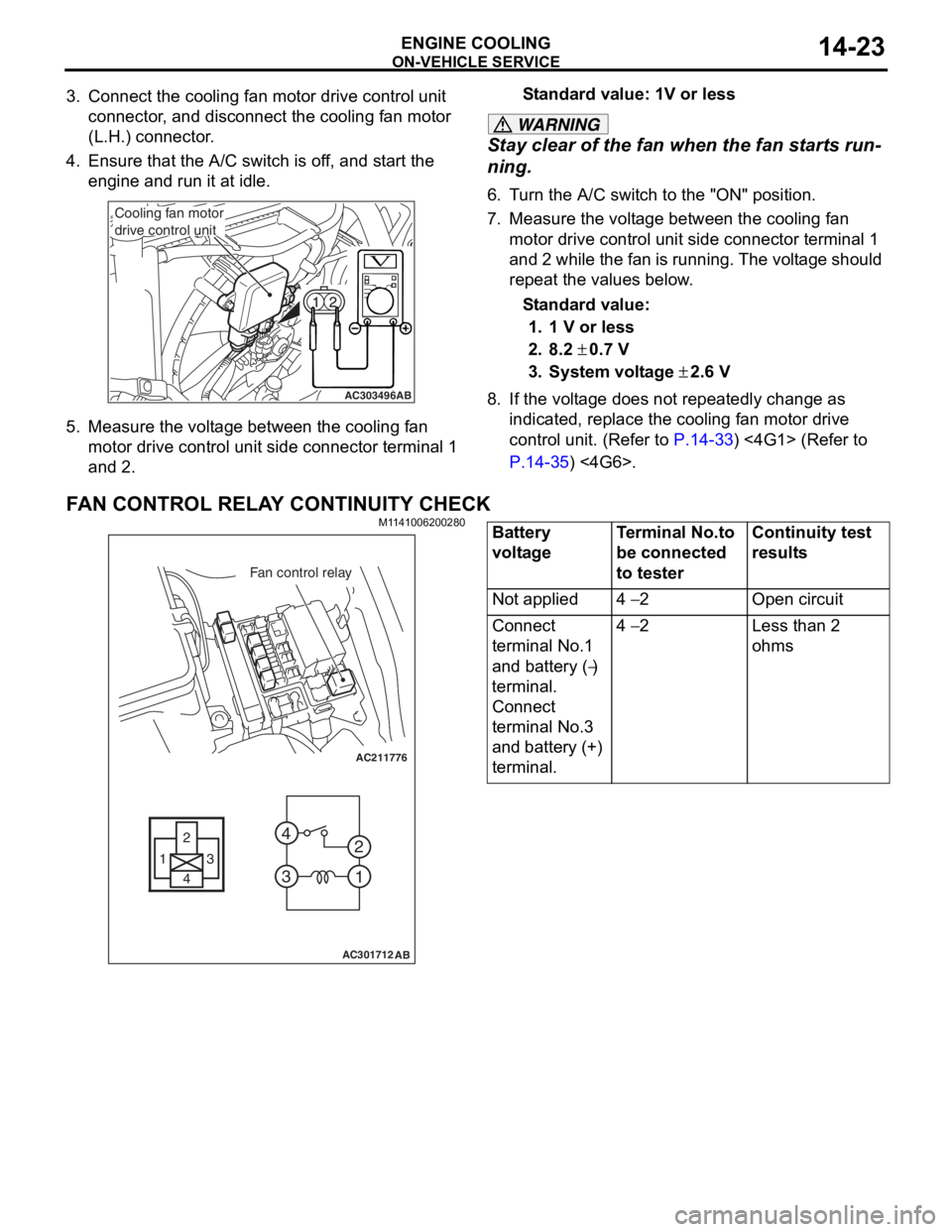
3. Connect the cooling fan motor drive control unit connector, and disconnect the cooling fan motor
(L.H.) connector.
4. Ensure that the A/C switch is off, and start the engine and run it at idle.
AC303496AB
Cooling fan motor
drive control unit
5.Measure the volt ag e betwee n the cooling f an
motor d r ive cont rol un it side conne ctor t e rminal 1
an d 2.
St andard va lue: 1V or le ss
WARNING
Stay clear of the fan when the fan starts run-
ning.
6. Turn the A/C switch to the "ON" position.
7. Measure the voltage between the cooling fan
motor drive control unit side connector terminal 1
and 2 while the fan is running. The voltage should
repeat the values below.
Standard value:
1. 1 V or less
2. 8.2 ± 0.7 V
3. System voltage ± 2.6 V
8. If the voltage does not repeatedly change as indicated, replace the cooling fan motor drive
control unit. (Refer to
P.14-33) <4G1> (Refer to
P.14-35) <4G6>.
FAN CONTROL RELAY CONTINUITY CHECK
M1141006200280
AC211776
13
4 2
3 4
1
2
AC301712
Fan control relay
AB
Battery
voltageTerminal No.to
be connected
to testerContinuity test
results
Not applied4 − 2Open circuit
Connect
terminal No.1
and battery (
−)
terminal.
Connect
terminal No.3
and battery (+)
terminal.
4 − 2Less than 2
ohms
Page 38 of 800
THERMOSTAT
ENGINE COOLING14-24
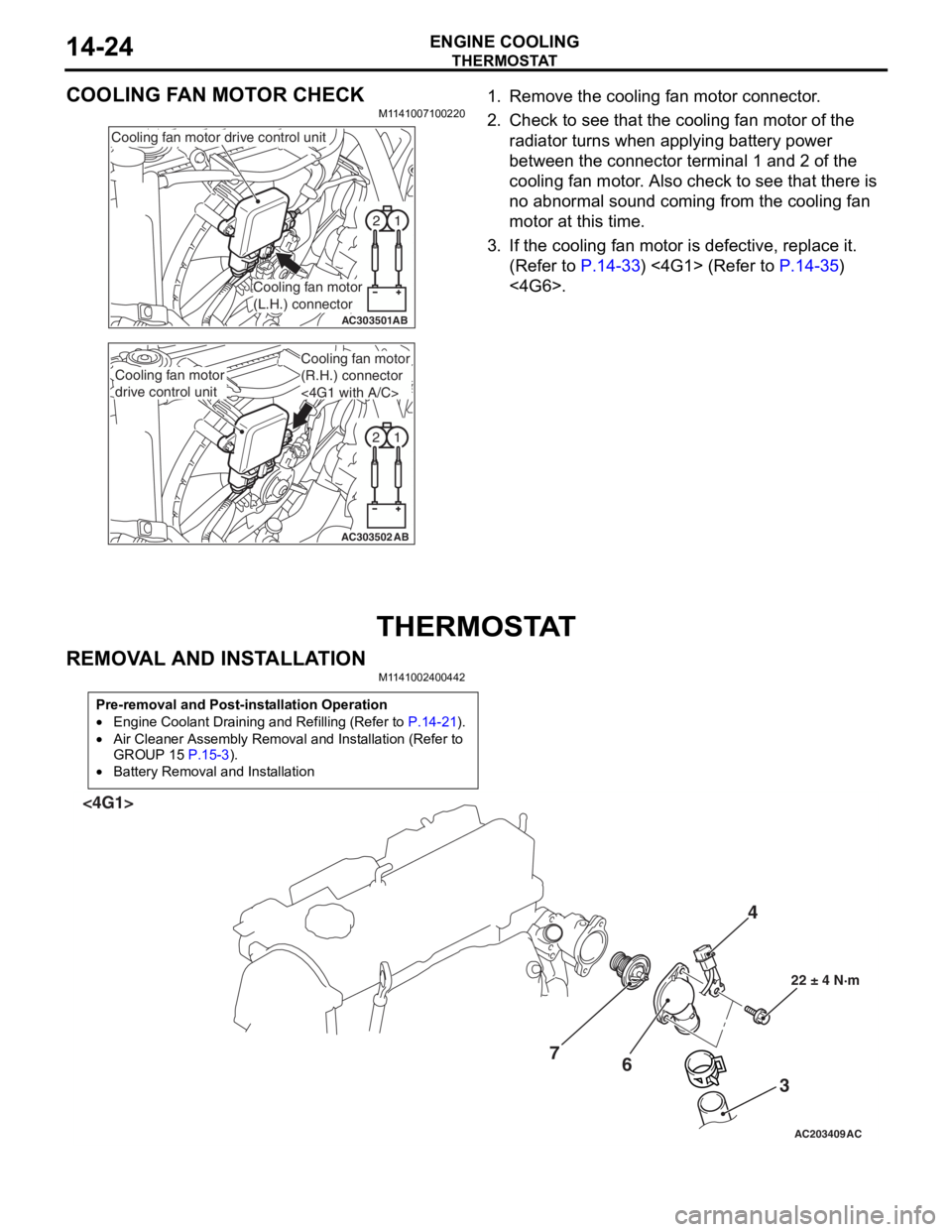
COOLING FAN MOTOR CHECK
M1141007100220
1
2
AC303501AB
Cooling fan motor drive control unit
Cooling fan motor
(L.H.) connector
1
2
AC303502AB
Cooling fan motor
drive control unit
Cooling fan motor
(R.H.) connector
<4G1 with A/C>
1. Remove the cooling fa n mot o r co nnector .
2.Check t o see that t he co oling fan motor of the
ra diato r turns wh en ap plying b a ttery power
b e tween th e con nect o r terminal 1 and 2 of t he
cooling fa n mo tor . Also ch eck to see tha t there is
n o abno rmal soun d co min g from the cooling fa n
motor a t this time.
3.If the cooling fan moto r is defective, replace it.
(Refe r to
P.14-33) <4G1> (Refer to P.14-35)
<4G6>.
THERMOSTA T
REMOVA L AND INST ALLA TION
M1141 0024 0044 2
Pre-removal and Post-installation Operation
•Engine Coolant Draining and Refilling (Refer to P.14-21).
•Air Cleaner Assembly Removal and Installation (Refer to
GROUP 15
P.15-3).
•Battery Removal and Installation
AC203409AC
4
3
6
7
22 ± 4 N·m
<4G1>
Page 48 of 800
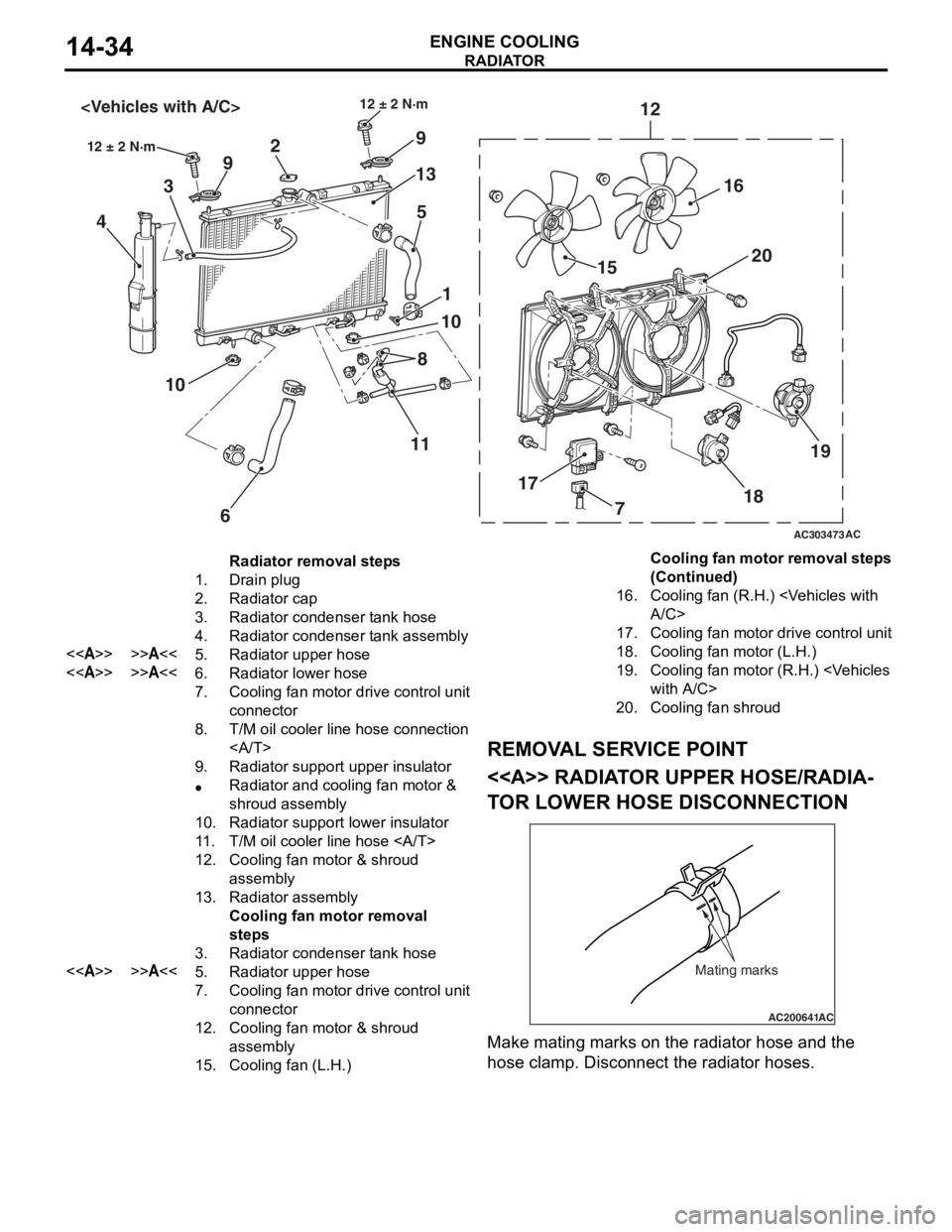
AC303473
18
17 15
20
12
9
13
5
2
9
3
4
1
10
6
10
12 ± 2 N·m
AC
12 ± 2 N·m
16
19
8
11
7
Radiator removal steps
1.Drain plug
2.Radiator cap
3.Radiator condenser tank hose
4.Radiator condenser tank assembly
<>>>A<<5.Radiator upper hose
<>>>A<<6.Radiator lower hose
7.Cooling fan motor drive control unit
connector
8.T/M oil cooler line hose connection
9.Radiator support upper insulator
•Radiator and cooling fan motor &
shroud assembly
10.Radiator support lower insulator
11 .T/M oil cooler line hose
12.Cooling fan motor & shroud
assembly
13.Radiator assembly
Cooling fan motor removal
steps
3.Radiator condenser tank hose
<>>>A<<5.Radiator upper hose
7.Cooling fan motor drive control unit
connector
12.Cooling fan motor & shroud
assembly
15.Cooling fan (L.H.)
16.Cooling fan (R.H.)
17.Cooling fan motor drive control unit
18.Cooling fan motor (L.H.)
19.Cooling fan motor (R.H.)
20.Cooling fan shroud
RADIA T OR
ENGINE COOLING14-34
REMOV A L SER VICE POINT
<> RADIAT OR UPPER HOSE/RADIA-
TO R LOW E R HOSE DISCONNECTION
AC200641AC
Mating marks
Make mating marks on the rad i ator hose and th e
hose
cla m p. Disconnect the ra diat or hoses.
Cooling fan motor removal steps
(Continued)
Page 49 of 800
RADIATOR
ENGINE COOLING14-35
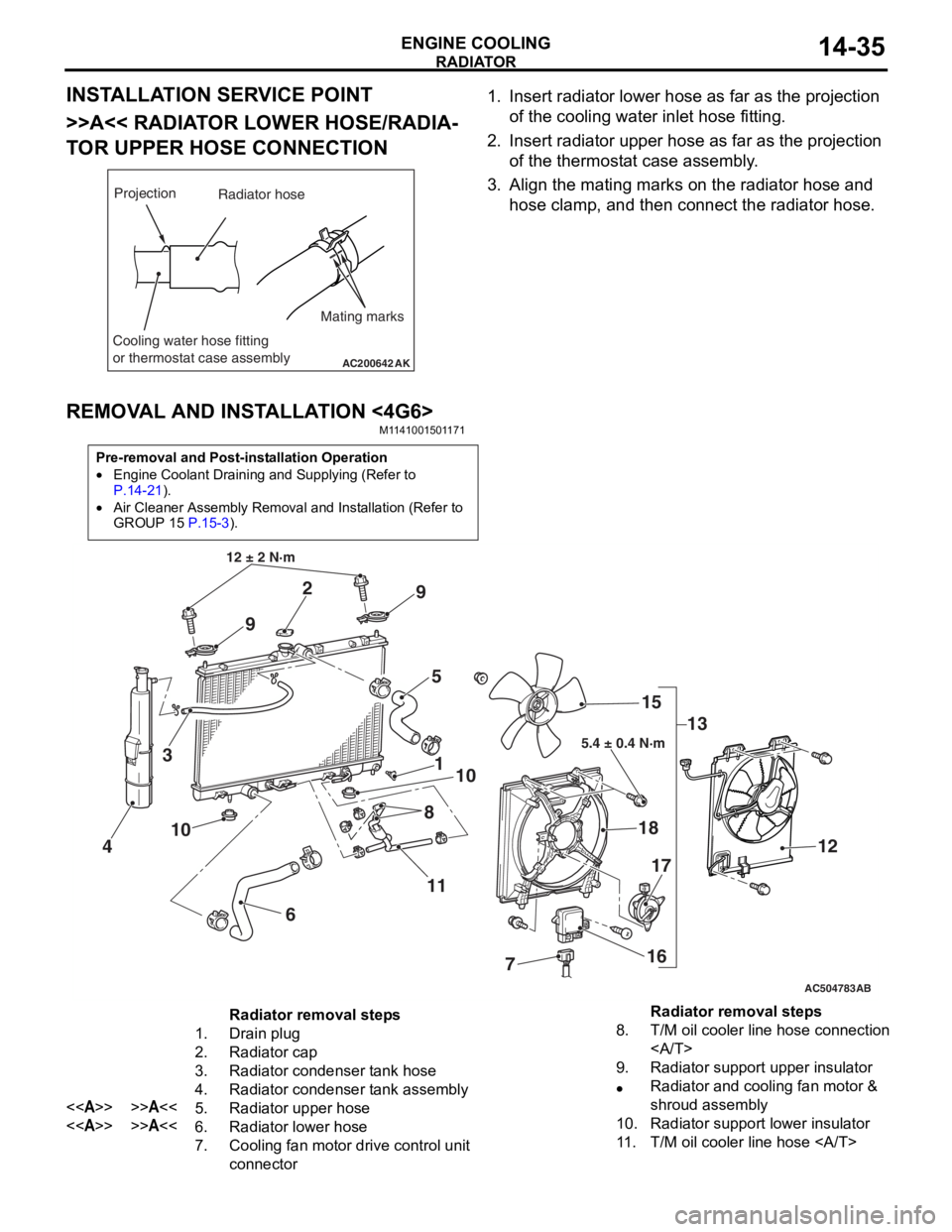
INSTALLATION SERVICE POINT
>>A<< RADIATOR LOWER HOSE/RADIA-
TOR UPPER HOSE CONNECTION
AC200642
Mating marks
Projection
Cooling water hose fitting
or thermostat case assembly
AK
Radiator hose
1.In sert ra diato r lower h o se as fa r as th e projection
o f the cooling wate r inlet hose fit t ing.
2.In sert radia t or up per h o se as far a s t he pro j ection
o f the th ermost at ca se asse mbly .
3.Align th e ma ting marks on the rad i ator hose and
h o se clamp, an d then conn ect the radiator h o se.
REMOVA L AND INST ALLA TION <4G6>
M11 4100 1501 17 1
Pre-removal and Post-installation Operation
•Engine Coolant Draining and Supplying (Refer to
P.14-21).
•Air Cleaner Assembly Removal and Installation (Refer to
GROUP 15
P.15-3).
AC504783
1
12 ± 2 N·m
10
2
3
4
5
6
7
8
9
9
10
11 13
15
18
16
17
12
AB
5.4 ± 0.4 N·m
Radiator removal steps
1.Drain plug
2.Radiator cap
3.Radiator condenser tank hose
4.Radiator condenser tank assembly
<>>>A<<5.Radiator upper hose
<>>>A<<6.Radiator lower hose
7.Cooling fan motor drive control unit
connector
8.T/M oil cooler line hose connection
9.Radiator support upper insulator
•Radiator and cooling fan motor &
shroud assembly
10.Radiator support lower insulator
11 .T/M oil cooler line hose
Radiator removal steps
Page 63 of 800
16-1
GROUP 16
ENGINE
ELECTRICAL
CONTENTS
CHARGING SYSTEM . . . . . . . .16-2
GENERAL INFORMATION . . . . . .16-2
SERVICE SPECIFICATIONS. . . . .16-3
SPECIAL TOOL . . . . . . . . . . . . . . .16-3
ON-VEHICLE SERVICE. . . . . . . . .16-3
ALTERNATOR OUTPUT LINE VOLTAGE
DROP TEST . . . . . . . . . . . . . . . . . . . . . 16-3
OUTPUT CURRENT TEST . . . . . . . . . . 16-5
REGULATED VOLTAGE TEST . . . . . . . 16-7
WAVEFORM CHECK USING AN
OSCILLOSCOPE . . . . . . . . . . . . . . . . . . 16-9
ALTERNATOR ASSEMB LY . . . . .16-12
REMOVAL AND INSTALLATION
<4G1> . . . . . . . . . . . . . . . . . . . . . . . . . . 16-12
REMOVAL AND INSTALLATION
<4G6> . . . . . . . . . . . . . . . . . . . . . . . . . . 16-13
DISASSEMBLY AND REASSEMBLY . . 16-15
INSPECTION . . . . . . . . . . . . . . . . . . . . . 16-17
STARTING SYSTEM . . . . . . . . .16-19
GENERAL INFORMATION . . . . . .16-19
SERVICE SPECIFICATIONS. . . . .16-20
STARTER MOTOR ASSEMBLY . .16-21
REMOVAL AND INSTALLATION
<4G1> . . . . . . . . . . . . . . . . . . . . . . . . . . 16-21
REMOVAL AND INSTALLATION
<4G6> . . . . . . . . . . . . . . . . . . . . . . . . . . 16-22
STARTER MOTOR ASSEMBLY
INSPECTION . . . . . . . . . . . . . . . . . . . . . 16-23
DISASSEMBLY AND REASSEMBLY . . 16-26
INSPECTION . . . . . . . . . . . . . . . . . . . . . 16-27
IGNITION SYSTEM . . . . . . . . . 16-30
GENERAL INFORMATION . . . . . .16-30
SERVICE SPECIFICATIONS . . . . .16-31
SPECIAL TOOL . . . . . . . . . . . . . . .16-31
ON-VEHICLE SERVICE . . . . . . . . .16-32
IGNITION COIL (WITH BUILT-IN
POWER TRANSISTOR) CHECK . . . . . . 16-32
RESISTIVE CORD CHECK . . . . . . . . . . 16-32
SPARK PLUG CHECK AND CLEANING
<4G1>. . . . . . . . . . . . . . . . . . . . . . . . . . . 16-32
SPARK PLUG CHECK AND CLEANING
<4G6>. . . . . . . . . . . . . . . . . . . . . . . . . . . 16-33
CAMSHAFT POSITION SENSOR
CHECK . . . . . . . . . . . . . . . . . . . . . . . . . . 16-33
CRANK ANGLE SENSOR CHECK . . . . 16-33
DETONATION SENSOR CHECK . . . . . 16-33
IGNITION SECONDARY VOLTAGE
WAVEFORM CHECK USING AN
OSCILLOSCOPE . . . . . . . . . . . . . . . . . . 16-33
IGNITION COIL RELAY CHECK . . . . . . 16-37
IGNITION COIL . . . . . . . . . . . . . . . .16-38
REMOVAL AND INSTALLATION
<4G1>. . . . . . . . . . . . . . . . . . . . . . . . . . . 16-38
REMOVAL AND INSTALLATION
<4G6>. . . . . . . . . . . . . . . . . . . . . . . . . . . 16-39
CAMSHAFT POSITION SENSOR .16-40
REMOVAL AND INSTALLATION . . . . . . 16-40
CRANKSHAFT POSITION SENSOR16-41
REMOVAL AND INSTALLATION
<4G1>. . . . . . . . . . . . . . . . . . . . . . . . . . . 16-41
REMOVAL AND INSTALLATION
<4G6>. . . . . . . . . . . . . . . . . . . . . . . . . . . 16-42
DETONATION SENSOR . . . . . . . .16-43
REMOVAL AND INSTALLATION . . . . . . 16-43
Page 81 of 800
STARTING SYSTEM
ENGINE ELECTRICAL16-19
STARTING SYSTEM
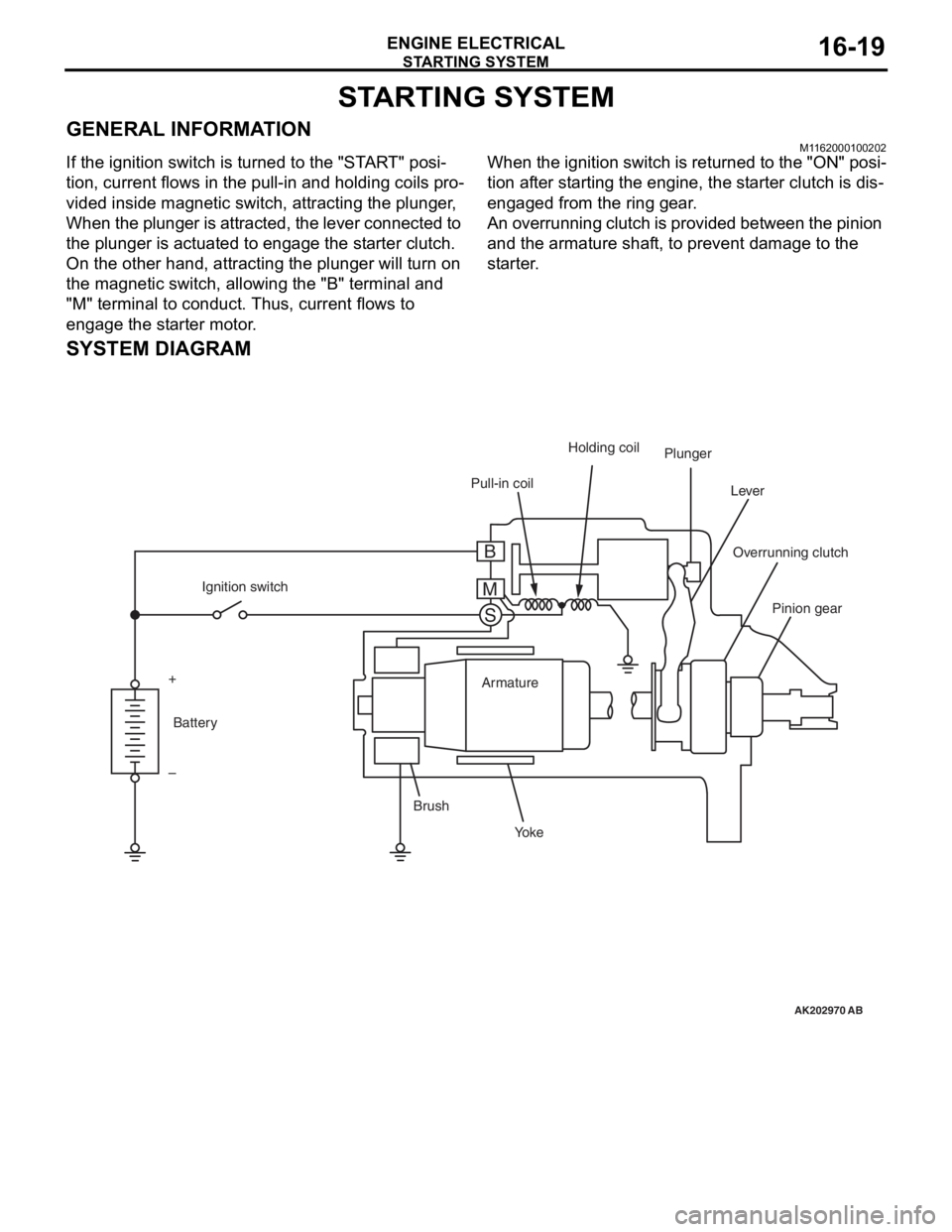
GENERAL INFORMATIONM1162000100202
If the ignition switch is turned to the "START" posi-
tion, current flows in the pull-in and holding coils pro-
vided inside magnetic switch, attracting the plunger,
When the plunger is attracted, the lever connected to
the plunger is actuated to engage the starter clutch.
On the other hand, attracting the plunger will turn on
the magnetic switch, allowing the "B" terminal and
"M" terminal to conduct. Thus, current flows to
engage the starter motor.
When the ignition switch is returned to the "ON" posi-
tion after starting the engine, the starter clutch is dis-
engaged from the ring gear.
An overrunning clutch is provided between the pinion
and the armature shaft, to prevent damage to the
starter.
SYSTEM DIAGRAM
AK202970
Pull-in coilHolding coil
Plunger
Lever
Pinion gear
Overrunning clutch
Yo k e
Brush Armature
Ignition switch
Battery
+
–
AB
B
M S