Check MITSUBISHI LANCER RALLIART 2014 8.G Repair Manual
[x] Cancel search | Manufacturer: MITSUBISHI, Model Year: 2014, Model line: LANCER RALLIART, Model: MITSUBISHI LANCER RALLIART 2014 8.GPages: 434, PDF Size: 57.5 MB
Page 239 of 434

Bluetooth® 2.0 interface (if so equipped) 5-172 Features and controls
5
Use the following procedure to delete a paired Bluetooth
® device from the Blue-
tooth
® 2.0 interface.
1. Press the SPEECH button (except for vehicles with Mitsubishi Multi-Commu-nication System) or PICK-UP button (for vehicles with Mitsubishi Multi-Commu- nication System).2. Say “Setup.”3. Say “Pairing Options.” 4. The voice guide will say “Select one of the following: pair, edit, delete, or list.”Say “Delete.” 5. After the voice guide says “Please say,” the numbers of the devices and devicetags of corresponding devices will be read out in order, starting with the device that has been most recently connected. After itcompletes reading all pairs, the voice guide will say “or all.” Say the number of the device that youwant to delete from the system. If you want to delete all paired phones from the system, say “All.”
6. For confirmation purposes, the voice guide will say “Deleting
N00565201023
You can check a paired Bluetooth
® device by
following the steps below. 1. Press the SPEECH button (except for vehicles with Mitsubishi Multi-Commu- nication System) or PICK-UP button (for vehicles with Mitsubishi Multi-Commu-nication System). 2. Say “Setup.” 3. Say “Pairing Options.”
4. The voice guide will say “Select one of the following: pair, edit, delete, or list.” Say “List.” 5. The voice guide will read out device tagsof corresponding devices in order, starting with the Bluetooth
® device that has been
most recently connected.6. After the device tags of all paired Blue- tooth
® devices have been read, the system
will say “End of list, would you like tostart from the beginning?”To hear the list again from the beginning, answer “Yes.” When you are done, answer “No” toreturn to the main menu.
Deleting a device
NOTE
If the device deletion process fails for some reason, the voice guide will say “Delete failed” and then the system will cancel delet- ing the device.
To check a paired Bluetooth
®
device
NOTE
If you press and release the SPEECH button and say “Continue” or “Previous” while the list is being read, the system will advance or rewind the list.Say “Continue” to proceed to the device with the next highest number or “Previous” to return to the phone with the previous num-ber. You can change the device tag by pressing and releasing the SPEECH button and then saying “Edit” while the list is being read. You can change the phone to be connected by pressing and releasing the SPEECH but-ton and then saying “S
elect phone” while the
list is being read.
Page 242 of 434

Bluetooth® 2.0 interface (if so equipped)
Features and controls 5-175
5
4. If there is only 1 match, the system will proceed to Step 5. If there are 2 or more matches, the voice guide will say “More than one match wasfound, would you like to call
5. If only 1 telephone number is registered under the name you just said, the voice guide will proceed to Step 6. If 2 or more telephone numbers are regis-tered that match the name you just said, the voice guide will say “Would you like to call
6. The voice guide will say “Calling
You can redial the last number called, based on the history of dialed calls in the paired cel- lular phone. Use the following procedure to redial. 1. Press the SPEECH button (except for vehicles with Mitsubishi Multi-Commu- nication System) or PICK-UP button (for vehicles with Mitsubishi Multi-Commu-nication System). 2. Say “Redial.”
N00565700018
During a call, press the SPEECH button toenter voice recognition mode, then say
NOTE
If you say “No” to all names read by the sys- tem, the voice guide will say “Name not found, returning to main menu” and the sys- tem will return to the main menu.
NOTE
If the name you selected has matching data in the vehicle phonebook but no telephone number is registered under the selected loca-tion, the voice guide will say “{home/work/mobile/other} not found for
NOTE
When the confirmation function is on, the system will check if the name and location of the receiver are correct. If the name is cor-rect, answer “Yes.” To change the name or location to call, answer “No.” The system will return to Step3.
RedialingSend function
Page 246 of 434

Bluetooth® 2.0 interface (if so equipped)
Features and controls 5-179
5
8. The voice guide will say “Adding
10. The voice guide will say “Would you like
to import another contact?”Answer “Yes” if you want to continue with the registration. You can continue to register a new phonebook entry from Step5. Answer “No,” the system will return to the main menu.
N00579800023
You can change or delete a name or telephone number registered in the vehicle phonebook. You can also listen to the list of names regis-tered in the vehicle phonebook.
N00579900024
1. Press the SPEECH button (except forvehicles with Mits
ubishi Multi-Commu-
nication System) or PICK-UP button (for vehicles with Mits
ubishi Multi-Commu-
nication System).2. Say “Phonebook.” 3. The voice guide will say “Select one of the following: new entry, edit number,edit name, list names, delete, erase all, orimport contact”. Say “Edit number.” 4. The voice guide will say “Please say the name of the entry you would like to edit,or say list names.” Say the name of the phonebook entry you want to edit.
5. The voice guide will say “Home, work, mobile or other?” Select and say the loca- tion where the telephone number you want to change or add is registered.When the confirmation function is on, the system will check the target name and location again. Answer “Yes” if you wantto continue with the editing. Answer “No,” the system will return to Step 3.6. The voice guide will say “Number,please.” Say the telephone number you want to register. 7. The voice guide will repeat the telephone number. When the confirmation function is on, the system will ask if the number is correct.Answer “Yes.” Answer “No,” the system will return to the Step 3.
To change the content registered in the vehicle phonebook NOTE
The system must have at least one entry.
Editing a telephone number
NOTE
Say “List names,” and the names registered in the phonebook will be read out in order. Refer to “Listening to the list of registered names” on page 5-180.
NOTE
If the telephone number is already registered in the selected location, the voice guide will say “The current number is
Page 247 of 434

Bluetooth® 2.0 interface (if so equipped) 5-180 Features and controls
5
8. Once the telephone number is registered, the voice guide will say “Number saved” and then the system will return to the main menu.
N00580100026
1. Press the SPEECH button (except forvehicles with Mitsubishi Multi-Commu-nication System) or PICK-UP button (for vehicles with Mitsubishi Multi-Commu- nication System).2. Say “Phonebook.” 3. The voice guide will say “Select one of the following: new entry, edit number,edit name, list names, delete, erase all, or import contact.” Say “Edit name.”
4. The voice guide will say “Please say the name of the entry you would like to edit, or say list names.” Say the name you want to edit. 5. The voice guide will say “Changing
N00580200027
1. Press the SPEECH button (except forvehicles with Mitsubishi Multi-Commu- nication System) or PICK-UP button (for vehicles with Mitsubishi Multi-Commu-nication System).
2. Say “Phonebook.” 3. The voice guide will say “Select one of the following: new entry, edit number, edit name, list names, delete, erase all, orimport contact.” Say “List names.” 4. Bluetooth
® 2.0 interface will read out the
entries in the phonebook in order.5. When the voice guide is done reading the list, it will say “End of list, would you like to start from the beginning?” When youwant to check the list again from thebeginning, answer “Yes.” When you are done, answer “No” to return to the previous or main menu.
NOTE
If the location where a telephone number was already registered has been overwritten with a new number, the voice guide will say “Number changed” and then the system willreturn to the main menu.
Editing a name
NOTE
Say “List names,” and the names registered in the phonebook are read out in order. Refer to “Listening to the list of registered names” on page 5-180.
Listening to the list of registered names
NOTE
You can call, edit or delete a name that is being read out.Press the SPEECH button and say “Call” to call the name, “Edit name” to edit it, or “Delete” to delete it.The system will beep and then execute your command. If you press the SPEECH button and say “Continue” or “Previous” while the list is being read, the system will advance or rewind the list. Say “Continue” to proceed to the next entry or “Previ
ous” to return to the
previous entry.
Page 264 of 434
Vehicle preparation before driving
Driving safety 6-3
6
N00629000337
For a safer and more enjoyable trip, always observe the following: Before starting the vehicle, make certain that you and all passengers are seated and wearing their seat belts properly (with children in the rear seat, in appropriaterestraints), and that all the doors are locked.
Move the driver’s seat as far backward as possible, while still keeping good visibil- ity, and good control of the steering wheel, brakes, accelerator, and controls.Check the instrument panel indicators and multi-information display for any possible problem. Move the front passenger seat as far back as possible. Make sure that infants and small children are properly restrained in accordance withall laws and regulations.
Check these by selecting the defroster mode, and set the blower switch on high. You should be able to feel the air blowing against the windshield. (Refer to “Defrosting or defogging the wind- shield and door windows” on page 7-6, 7-12, 7-17, 7-22, 7-27.) Check all the tires for heavy tread wear or uneven wear patterns. Look for stones, nails,glass, or other objects stuck in the tread. Look for any tread cuts or sidewall cracks. Check the wheel nuts for tightness, and the tires(including spare tire) for proper pressures.
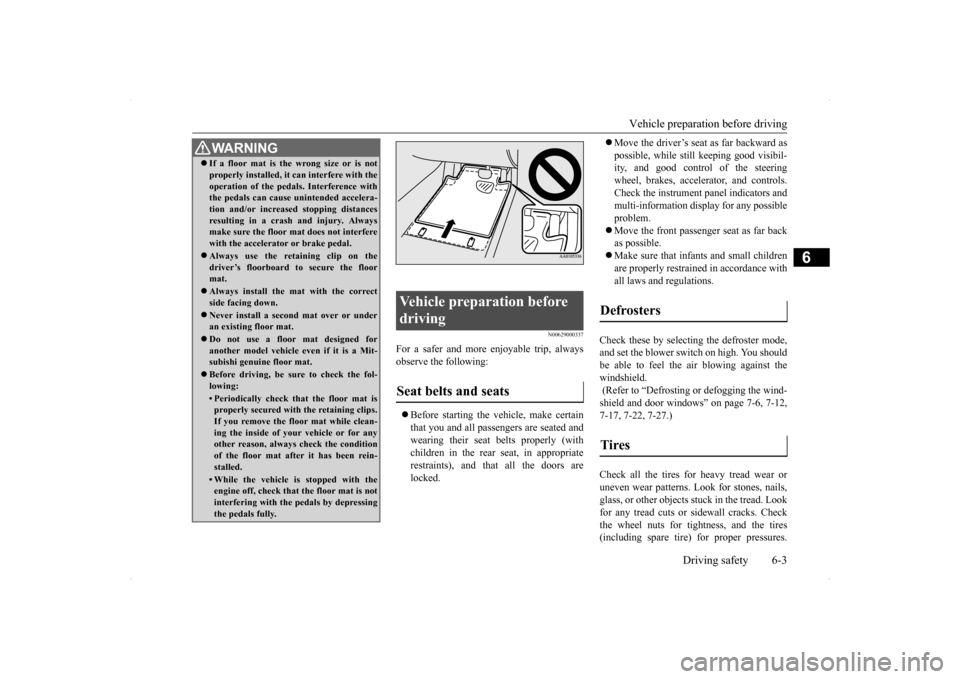
WA R N I N G If a floor mat is the wrong size or is not properly installed, it can interfere with the operation of the pedals. Interference with the pedals can cause unintended accelera- tion and/or increased stopping distancesresulting in a crash and injury. Always make sure the floor mat does not interfere with the accelerator or brake pedal. Always use the retaining clip on the driver’s floorboard to secure the floormat. Always install the mat with the correct side facing down. Never install a second mat over or under an existing floor mat. Do not use a floor mat designed for another model vehicle ev
en if it is a Mit-
subishi genuine floor mat. Before driving, be sure to check the fol- lowing:• Periodically check that the floor mat isproperly secured with the retaining clips. If you remove the floor mat while clean-ing the inside of your vehicle or for any other reason, always check the condition of the floor mat after it has been rein-stalled.• While the vehicle is stopped with the engine off, check that the floor mat is not interfering with the pedals by depressingthe pedals fully.
Vehicle preparation before driving Seat belts and seats
Defrosters Tires
Page 265 of 434
Safe driving techniques 6-4 Driving safety
6
Replace your tires before they are heavily worn out. As your vehicle is equipped with a tire pres- sure monitoring system, there is a risk ofdamage to the tire inflation pressure sensors when the tire is replaced on the rim. Tire replacement should, therefore, be performedonly by an authorized Mitsubishi Motors dealer. Have someone watch while you turn all the exterior lights on and off. Also check the turn signal indicators and high-beam indicators on the instrument panel. Check the ground under the vehicle after parking overnight, for fuel, water, oil, orother leaks. Make sure all the fluid levels are correct. Also, if you can smell fuel, you need to find out why immediately and have itfixed.
N00629200111
Even this vehicle’s safety equipment, andyour safest driving, cannot guarantee that you
can avoid an accident or injury. However, if you give extra attention to the following areas, you can better protect yourself and your passengers: Drive defensively. Be aware of traffic, road and weather conditions. Leave plenty of stopping distance between your vehicle and the vehicle ahead. Before changing lanes, check your mir- rors and use your turn signal light. While driving, watch the behavior of other drivers, bicyclists, and pedestrians. Always obey applicable laws and regula- tions. Be a polite and alert driver. Always leave room for unexpected events, such assudden braking. If you plan to drive in another country, obey their vehicle registration laws andmake sure you will be able to get the right fuel.
N00629400429
Check the battery, including terminals and cables. During extremely cold weather,the battery will not be as strong. Also, the battery power level may drop because more power is used for cold starting anddriving. Before driving the vehicle, check to see if the engine runs at the proper speed and ifthe headlights are as bright as normally.Charge or replace the battery if necessary. During extreme cold weather, it is possi- ble that a very low battery could freeze. Warm the engine sufficiently. After start- ing the engine, allow a short warm-up time to distribute oil
to all cylinders and
turbocharger. Then drive your vehicleslowly.
Lights Fluid leaks Safe driving techniques
Driving during cold weather
WA R N I N G The battery gives off explosive hydrogen gas. Any spark or flame can cause the bat-tery to explode, which could cause serious injury or death. Always wear protective clothes and a facemask when working with your battery, or let a skilled mechanic do it.
Page 266 of 434
Braking
Driving safety 6-5
6
Stay at low speeds at first so that the transaxle, transfer case and rear axle oil have time to spread to all the lubrication points. Manual transaxle can be harder to shift in cold weather conditions. This is normal and shifting will get easier as the transaxlewarms up. Check the engine antifreeze. If there is not enough coolant because of aleak or from engine overheating, add Mit-subishi Motors Genuine Super Long Life Coolant Premium or equivalent. Please read this section in conjunctionwith the “Engine coolant” on page 9-8.
[For RALLIART vehicles sold in U.S.A.] Mitsubishi Motors recommends that the standard equipment tires be replaced with winter tires when the vehicle is going to be used in winter.The standard equipment tires provided with this vehicle are summer tires and use a high-grip compound that provides supe-rior grip. The road grip, however, is reduced in win- ter.When replacing the standard equipmenttires with winter tires, all four tires must be replaced using radial identicalsize win- ter tires.
N00629500446
All the parts of the brake system are criticalto safety. Have the vehicle serviced by anauthorized Mitsubishi Motors dealer or a repair facility of your choice at regular inter- vals according to the “WARRANTY ANDMAINTENANCE MANUAL”. Check the brake system while driving at a low speed immediately after starting, espe-cially when the brakes are wet, to confirm they work normally. A film of water can be formed on the brakediscs or brake drums and prevent normal braking after driving in heavy rain or through large puddles, or after the vehicle is washed.If this occurs, dry the brakes out by driving slowly while lightly depressing the brake pedal. On snowy roads, ice can form on the braking system, making the brakes less effective.While driving in such conditions, pay close attention to preceding and following vehicles and to the condition of
the road surface. From
WA R N I N GNever open the radiator cap when the radiator is hot. You could be seriously burned.
NOTE
As your vehicle is equipped with a tire pres- sure monitoring system, there is a risk of damage to the tire inflation pressure sensorswhen the tire is replaced on the rim. Tire replacement should, therefore, be performed only by an authorized Mitsubishi Motorsdealer. If you use new wheels w
ith new tire inflation
pressure sensors, their ID codes must be pro- grammed into the tire pressure monitoringsystem. Refer to “Whenever the tires and wheels are replaced with new ones” on page 5-108.
Braking When brakes are wet When driving in cold weather
Page 267 of 434
Parking 6-6 Driving safety
6
time to time, lightly depress the brake pedal and check how effective the brakes are. It is important to take advantage of the engine braking by shifting to a lower gear while driving on steep downhill roads in order to prevent the brakes from overheating.
N00629600287
When parking on a hill, set the parking brake, and turn the front wheels toward the curb on a downhill, or away from the curb on an uphill.If necessary, apply chocks to wheels. Place the gearshift lever into the “R” (Reverse) position when parking on a down-hill slope, into the 1s
t position when parking
on an uphill slope.
Be sure that the parking brake is firmly set when parked and that the selector lever (CVT) or gearshift lever (Twin Clutch SST) is in the “P” (PARK) position.When parking on a hill, it is important to set the parking brake before moving the selector lever (CVT) or gearshift lever (Twin ClutchSST) to the “P” (PARK) position. This pre-vents loading the parking brake against the transaxle gear. When this happens, it is diffi- cult to move the selector lever (CVT) or gear-shift lever (Twin Clutch SST) out of the “P” (PARK) position. Never leave the engi
ne running while you
take a short sleep/rest. Also, never leave theengine running in a closed or poorly venti- lated place.
Your front bumper can be damaged if you scrape it over curbs or parking stop blocks.Be careful when traveling up or down steep slopes where your bumper can scrape the road. When leaving the vehicle unattended, always carry the key and lock all doors.Always try to park your vehicle in a well lit area.
When driving downhill Parking Parking on a hill For vehicles with manual trans- axle
For vehicles with continuously variable transmission (CVT) or Twin Clutch SST Parking with the engine run- ning
WA R N I N G Leaving the engine running risks injury or death from accidentally moving the gear- shift lever (manual transaxle or Twin Clutch SST) or the selector lever (CVT) or from the accumulation of toxic exhaustfumes in the passenger compartment.
Where you park
WA R N I N G Do not park your vehicle in areas where combustible materials such as dry grass or leaves can come in contact with a hotexhaust, since a fire could occur.
When leaving the vehicle
Page 273 of 434
Trailer towing 6-12 Driving safety
6
N00630600102
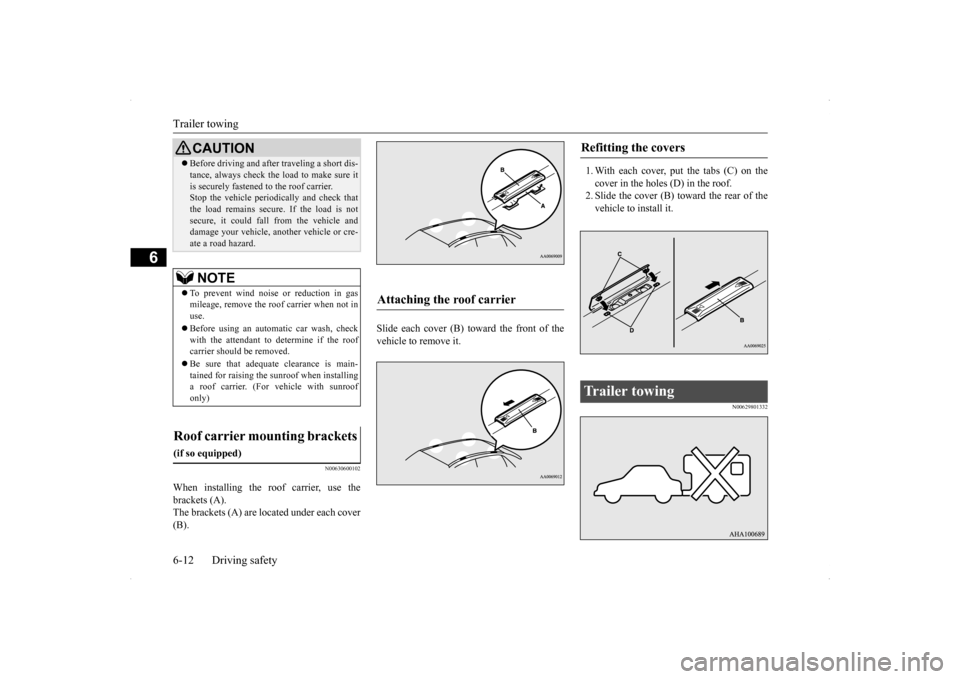
When installing the roof carrier, use the brackets (A). The brackets (A) are located under each cover (B).
Slide each cover (B) toward the front of the vehicle to remove it.
1. With each cover, put the tabs (C) on the cover in the holes (D) in the roof. 2. Slide the cover (B) toward the rear of thevehicle to install it.
N00629801332
Before driving and after traveling a short dis- tance, always check the load to make sure it is securely fastened to the roof carrier. Stop the vehicle periodically and check that the load remains secure. If the load is notsecure, it could fall from the vehicle and damage your vehicle, another vehicle or cre- ate a road hazard.NOTE
To prevent wind noise or reduction in gas mileage, remove the roof carrier when not in use. Before using an automatic car wash, check with the attendant to determine if the roof carrier should be removed. Be sure that adequate clearance is main- tained for raising the sunroof when installinga roof carrier. (For vehicle with sunroof only)
Roof carrier mounting brackets
(if so equipped)
CAUTION
Attaching the roof carrier
Refitting the covers
Trailer towing
Page 285 of 434
Manual air conditioning with
MAX A/C mode (if so equipped)
7-10 Comfort controls
7
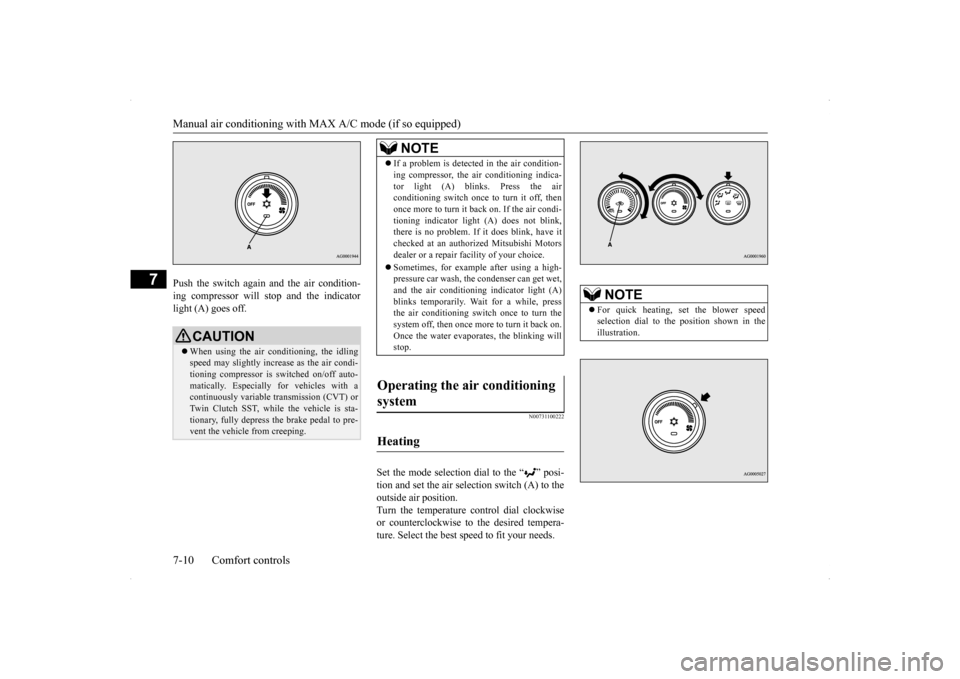
Push the switch again and the air condition- ing compressor will stop and the indicator light (A) goes off.
N00731100222
Set the mode selection dial to the “ ” posi-tion and set the air selection switch (A) to theoutside air position. Turn the temperature control dial clockwise or counterclockwise to the desired tempera-ture. Select the best speed to fit your needs.
CAUTION When using the air conditioning, the idling speed may slightly increase as the air condi-tioning compressor is switched on/off auto- matically. Especially for vehicles with a continuously variable transmission (CVT) orTwin Clutch SST, while the vehicle is sta- tionary, fully depress the brake pedal to pre- vent the vehicle from creeping.
NOTE
If a problem is detected in the air condition- ing compressor, the air conditioning indica- tor light (A) blinks. Press the air conditioning switch once to turn it off, then once more to turn it back on. If the air condi-tioning indicator light (A) does not blink, there is no problem. If it does blink, have it checked at an authorized Mitsubishi Motorsdealer or a repair facility of your choice. Sometimes, for example after using a high- pressure car wash, the condenser can get wet, and the air conditioning indicator light (A) blinks temporarily. Wait for a while, pressthe air conditioning switch once to turn the system off, then once more to turn it back on. Once the water evaporates, the blinking willstop.
Operating the air conditioning system
Heating
NOTE
For quick heating, set the blower speed selection dial to the position shown in the illustration.